Reboot Loop after Win7 Updates

VWC318

New member
Local time
4:01 PM
Messages
5
Over the past couple of weeks my PC would go through a reboot loop after a Windows Update. I thought it was a virus of some kind so ran various utilities to get rid of and make sure the system was clean. Yesterday I decided to let Windows update again. As it shut down 23 updates were applied and I restarted the system with no issues. Then I noticed there were more updates so I shut it down and allowed another 53 updates. This time whenI restarted the PC I'd see the Gateway logo then I'd get the screen that says the system wasn't shutdown properly do I want to start in safe mode, etc etc. No matter what I do it just keeps rebooting with the same screen. I tried Win7 repair disk with no luck. What I did find was startup repair found the following root cause; "The partition table does not have a valid System Partition". I tried running Macrium Reflect rescue disk to repair the MBR with no luck.

Does anyone know why the updates are causing this to happen and how to fix it?

Thanks
 

My Computer

Computer type
PC/Desktop
Computer Manufacturer/Model Number
Gateway FX 6710
OS
Windows 7 Professional 64
CPU
Intel Q9400
Motherboard
Gateway
Memory
6GB
Hard Drives
Seagate 1 TB, WD 1 TB
Antivirus
Zonealarm, Malwarebytes, Spyhunter, Spybot
Browser
IE 11, Chrome
Hi and welcome to SevenForums,
I have read some asus mother boards I assume that have a 100mb efi system reserved partition instead of a 100mb ntfs partition are seeing secure boot errors

I only have C drive or partition on a x99 sabertooth and no problems.
But most needed to disable secure boot to rectify the issue.
Or switch the os type to Other os instead of windows uefi compatibility mode.

Also disable fast start I believe might help

Ultimately there was a Recommended up "which these should be avoided" for bitlocker that might of caused the issue.
https://support.microsoft.com/en-us/kb/3133977

https://rog.asus.com/forum/showthre...Secure-Boot-Violation-Asus-Maximus-VII-Ranger
 

My Computer

Computer type
PC/Desktop
Computer Manufacturer/Model Number
Custom assembled by me :}
OS
Win-7-Pro64bit 7-H-Prem-64bit
CPU
i7-5930K 2nd i9-9940x both water blocked VRM's too
Motherboard
ASUS SABERTOOTH X99 2nd ASUS x299 Apex
Memory
Trident-z 3200C14 2nd Trident-z 3600C16
Graphics Card(s)
EVGA 1080ti ftw3 2nd Titan Xp both water blocked
Sound Card
Built-in Realtek
Monitor(s) Displays
1-AOC G2460PG 24"G-Sync 144Hz/ 2nd 1-ASUS VG248QE 24" 144Hz
Screen Resolution
1920 x 1080 144Hz
Hard Drives
2-Samsung M.2 Evo & Evo Plus
2-Samsung 850 EVO 500GB SSD's/ 3-2.5 W.D. Black 1tb-&3-1tb/3-3.5 WD Black 1tb hdd's
PSU
EVGA SuperNOVA 1000-P2 2nd 1200-P2
Case
2-Corsair Obsidian Series 450D Black ATX Mid Tower
Cooling
Custom water loops
Keyboard
Logitech G710+/ 2nd Logitech G910
Mouse
2-RedDragon M901 Perdition 16400 dpi Gaming mouse = wired
Internet Speed
Comcast Ping 19ms 89.31mbps download speed 6.12mbps upload
Antivirus
Malwarebytes Pro/ Superantispyware Pro
Browser
FireFox & Pale moon
Other Info
2nd ASUS X299 Apex/Intel i9-9940x with Custom water loop/7H-Prem-x64/Corsair 450D case/Ram Trident-z 3600C16 4x8gb / Samsung970Evo plus 500gb SSD/Dual ssd EZ swap evo/PSU EVGA SuperNova 1200w-P2 80+Platinum/GPU Titan Xp /8-ML-140 on push-pull on 2-280GTX rads
Thank you. The only way I've been able to get the system back is to do a full restore before the updates.

I don't believe I have a reserved partition on this system. When I create a restore date, I do see a C:\ reserved "not found". Is that someting I need to fix? Also, one of the updates is the KB 3133977. Should that be avoided?
 

My Computer

Computer type
PC/Desktop
Computer Manufacturer/Model Number
Gateway FX 6710
OS
Windows 7 Professional 64
CPU
Intel Q9400
Motherboard
Gateway
Memory
6GB
Hard Drives
Seagate 1 TB, WD 1 TB
Antivirus
Zonealarm, Malwarebytes, Spyhunter, Spybot
Browser
IE 11, Chrome
Hi,
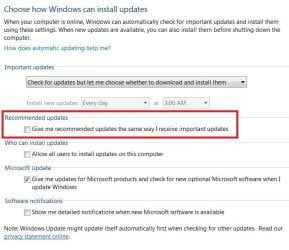
Most if not all Recommended updates should be avoided unless it supposed to address a issue you're facing
If you adjust your windows update settings Recommended updates will not be mixed up with real Important updates
update settings.JPG

But yes system images can come in real handy if you ever have issues with updates and it is very advised to create one before downloading and installing Any windows updates
http://www.sevenforums.com/tutorials/73828-imaging-free-macrium.html

Ultimately you need to change your Bios boot and secure boot settings to Other os instead of uefi compatibility mode.
 

My Computer

Computer type
PC/Desktop
Computer Manufacturer/Model Number
Custom assembled by me :}
OS
Win-7-Pro64bit 7-H-Prem-64bit
CPU
i7-5930K 2nd i9-9940x both water blocked VRM's too
Motherboard
ASUS SABERTOOTH X99 2nd ASUS x299 Apex
Memory
Trident-z 3200C14 2nd Trident-z 3600C16
Graphics Card(s)
EVGA 1080ti ftw3 2nd Titan Xp both water blocked
Sound Card
Built-in Realtek
Monitor(s) Displays
1-AOC G2460PG 24"G-Sync 144Hz/ 2nd 1-ASUS VG248QE 24" 144Hz
Screen Resolution
1920 x 1080 144Hz
Hard Drives
2-Samsung M.2 Evo & Evo Plus
2-Samsung 850 EVO 500GB SSD's/ 3-2.5 W.D. Black 1tb-&3-1tb/3-3.5 WD Black 1tb hdd's
PSU
EVGA SuperNOVA 1000-P2 2nd 1200-P2
Case
2-Corsair Obsidian Series 450D Black ATX Mid Tower
Cooling
Custom water loops
Keyboard
Logitech G710+/ 2nd Logitech G910
Mouse
2-RedDragon M901 Perdition 16400 dpi Gaming mouse = wired
Internet Speed
Comcast Ping 19ms 89.31mbps download speed 6.12mbps upload
Antivirus
Malwarebytes Pro/ Superantispyware Pro
Browser
FireFox & Pale moon
Other Info
2nd ASUS X299 Apex/Intel i9-9940x with Custom water loop/7H-Prem-x64/Corsair 450D case/Ram Trident-z 3600C16 4x8gb / Samsung970Evo plus 500gb SSD/Dual ssd EZ swap evo/PSU EVGA SuperNova 1200w-P2 80+Platinum/GPU Titan Xp /8-ML-140 on push-pull on 2-280GTX rads
Thanks again. I'll try to address the boot situation soon. Just a comment about Windows update options on my PC. I have "check for updates but let me choose whether to download and install them". If I chose the option that says " download updates but let me choose whether to install them" causes the PC to automatically download and install on shutdown. It doesn't give me the opportunity to choose. Don't have that issue on my Vista machine.
 

My Computer

Computer type
PC/Desktop
Computer Manufacturer/Model Number
Gateway FX 6710
OS
Windows 7 Professional 64
CPU
Intel Q9400
Motherboard
Gateway
Memory
6GB
Hard Drives
Seagate 1 TB, WD 1 TB
Antivirus
Zonealarm, Malwarebytes, Spyhunter, Spybot
Browser
IE 11, Chrome
Hi,
Yea once updates download it's a lot harder to undo things especially when Recommended updates are downloading too

Installing is just insult to injury at that point :)
I would obviously suggest using the settings I posted :)
 

My Computer

Computer type
PC/Desktop
Computer Manufacturer/Model Number
Custom assembled by me :}
OS
Win-7-Pro64bit 7-H-Prem-64bit
CPU
i7-5930K 2nd i9-9940x both water blocked VRM's too
Motherboard
ASUS SABERTOOTH X99 2nd ASUS x299 Apex
Memory
Trident-z 3200C14 2nd Trident-z 3600C16
Graphics Card(s)
EVGA 1080ti ftw3 2nd Titan Xp both water blocked
Sound Card
Built-in Realtek
Monitor(s) Displays
1-AOC G2460PG 24"G-Sync 144Hz/ 2nd 1-ASUS VG248QE 24" 144Hz
Screen Resolution
1920 x 1080 144Hz
Hard Drives
2-Samsung M.2 Evo & Evo Plus
2-Samsung 850 EVO 500GB SSD's/ 3-2.5 W.D. Black 1tb-&3-1tb/3-3.5 WD Black 1tb hdd's
PSU
EVGA SuperNOVA 1000-P2 2nd 1200-P2
Case
2-Corsair Obsidian Series 450D Black ATX Mid Tower
Cooling
Custom water loops
Keyboard
Logitech G710+/ 2nd Logitech G910
Mouse
2-RedDragon M901 Perdition 16400 dpi Gaming mouse = wired
Internet Speed
Comcast Ping 19ms 89.31mbps download speed 6.12mbps upload
Antivirus
Malwarebytes Pro/ Superantispyware Pro
Browser
FireFox & Pale moon
Other Info
2nd ASUS X299 Apex/Intel i9-9940x with Custom water loop/7H-Prem-x64/Corsair 450D case/Ram Trident-z 3600C16 4x8gb / Samsung970Evo plus 500gb SSD/Dual ssd EZ swap evo/PSU EVGA SuperNova 1200w-P2 80+Platinum/GPU Titan Xp /8-ML-140 on push-pull on 2-280GTX rads
Will do and thanks for your knowledge and help!
 

My Computer

Computer type
PC/Desktop
Computer Manufacturer/Model Number
Gateway FX 6710
OS
Windows 7 Professional 64
CPU
Intel Q9400
Motherboard
Gateway
Memory
6GB
Hard Drives
Seagate 1 TB, WD 1 TB
Antivirus
Zonealarm, Malwarebytes, Spyhunter, Spybot
Browser
IE 11, Chrome
Hi,
No problem lets us know if you have anymore issues :)
There was also a mention posted that in bios and CMS there is a option to use uefi only worked but that was a full uefi install that was being used.
Not many people do that for win-7 but some people get a little weird about secure boot and actually use bitlocker for business machines.
 

My Computer

Computer type
PC/Desktop
Computer Manufacturer/Model Number
Custom assembled by me :}
OS
Win-7-Pro64bit 7-H-Prem-64bit
CPU
i7-5930K 2nd i9-9940x both water blocked VRM's too
Motherboard
ASUS SABERTOOTH X99 2nd ASUS x299 Apex
Memory
Trident-z 3200C14 2nd Trident-z 3600C16
Graphics Card(s)
EVGA 1080ti ftw3 2nd Titan Xp both water blocked
Sound Card
Built-in Realtek
Monitor(s) Displays
1-AOC G2460PG 24"G-Sync 144Hz/ 2nd 1-ASUS VG248QE 24" 144Hz
Screen Resolution
1920 x 1080 144Hz
Hard Drives
2-Samsung M.2 Evo & Evo Plus
2-Samsung 850 EVO 500GB SSD's/ 3-2.5 W.D. Black 1tb-&3-1tb/3-3.5 WD Black 1tb hdd's
PSU
EVGA SuperNOVA 1000-P2 2nd 1200-P2
Case
2-Corsair Obsidian Series 450D Black ATX Mid Tower
Cooling
Custom water loops
Keyboard
Logitech G710+/ 2nd Logitech G910
Mouse
2-RedDragon M901 Perdition 16400 dpi Gaming mouse = wired
Internet Speed
Comcast Ping 19ms 89.31mbps download speed 6.12mbps upload
Antivirus
Malwarebytes Pro/ Superantispyware Pro
Browser
FireFox & Pale moon
Other Info
2nd ASUS X299 Apex/Intel i9-9940x with Custom water loop/7H-Prem-x64/Corsair 450D case/Ram Trident-z 3600C16 4x8gb / Samsung970Evo plus 500gb SSD/Dual ssd EZ swap evo/PSU EVGA SuperNova 1200w-P2 80+Platinum/GPU Titan Xp /8-ML-140 on push-pull on 2-280GTX rads
Well I went into the Bios this morning and see nothing about a secure boot settings. I looked under Boot and Security as well as every other heading. The Bios on my GatewayFX6710 is from 2008. Did I miss something? If not, how is KB3133977 affecting my system?
 

My Computer

Computer type
PC/Desktop
Computer Manufacturer/Model Number
Gateway FX 6710
OS
Windows 7 Professional 64
CPU
Intel Q9400
Motherboard
Gateway
Memory
6GB
Hard Drives
Seagate 1 TB, WD 1 TB
Antivirus
Zonealarm, Malwarebytes, Spyhunter, Spybot
Browser
IE 11, Chrome
Back
Top