ReBoot Time

Status
Not open for further replies.
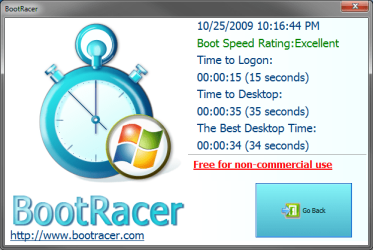
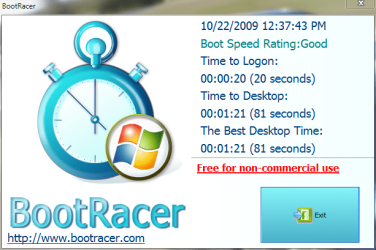
Just wanted to see bootracer in action.
 

Attachments

  • Capture50.JPG
    Capture50.JPG
    50 KB · Views: 61
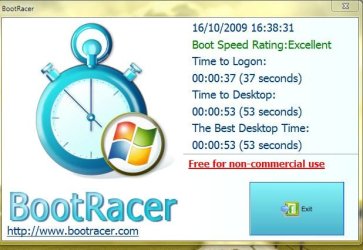
  • Capture51.JPG
    Capture51.JPG
    13.5 KB · Views: 256

My Computer

Computer Manufacturer/Model Number
Acer Aspire 5750
OS
Windows 7 Home Premium 64bit
CPU
Intel Core i3-2310M
Motherboard
Acer OEM
Memory
8GB
Graphics Card(s)
Intel HD3000
Screen Resolution
1366x768
Hard Drives
320GB Toshiba
Man, I'm not even going to post mine.

Windows itself starts up extremely fast. Unfortunately my Bios hangs on the HP screen for at least 20 seconds sometimes. I wonder if I can change that.

If it weren't for the bios taking forever mine would probably be in the 80 second range.
 

My Computer

Computer Manufacturer/Model Number
HP Workstation Xw4100
OS
Windows 7 Ultimate/XP SP3
CPU
Pentium 4 HT 3.0 Ghz
Memory
2048MB DDR ECC RAM @ 200Mhz (4x512mb)
Graphics Card(s)
Nvidia Quadro FX 1100
Sound Card
Max Blaster
Monitor(s) Displays
17" MAG
Screen Resolution
1280*1024
Hard Drives
160GB IDE (WinXP Installation)
13GB IDE
250GB SATA (Win 7 installation & Storage)
PSU
280w
Man, I'm not even going to post mine.

Windows itself starts up extremely fast. Unfortunately my Bios hangs on the HP screen for at least 20 seconds sometimes. I wonder if I can change that.

If it weren't for the bios taking forever mine would probably be in the 80 second range.

Was the time in BIOS quicker at some point in the past? If if was, sometimes clearing the NVRAM will bring it back to normal
Tom.
 

My Computer

Computer type
PC/Desktop
Computer Manufacturer/Model Number
Dell: XPS 420 (2), XPS M1330 (several), XPS 14z, Mini 9, Mini 10v
OS
W8 Pro, W7 Ultimate, XP Pro x64, Vista x64, Ubuntu
CPU
Q6600, Q6700, T7500, T7500, N270, N270
Motherboard
Dell
Memory
8GB, 8GB, 4GB, 4GB, 2GB, 2GB
Graphics Card(s)
ATI, nVidia, nVidia, nVidia, Intel, Intel
Monitor(s) Displays
Dell 2408WFP
Hard Drives
A drawer full. OCZ Vertex's in RAID 0. Vertex 3's, Vertex 4, Samsung 830's, Samsung 840's, Intel 330. Don't use dino drives any more except for servers.
Keyboard
Logitech Wave
Internet Speed
29 Mbps DL / .95 Mbps UL
Other Info
New project(2013)...Another low power server. Zotac H67ITX, i3-2100T, Windows Server 2012 Essentials on Samsung SSD.
Previous project...Low power (38-40 watts using Kill-a-Watt) Windows Home Server. Zotac ION (Atom 330, GeForce9400), 4GB RAM, 2x2TB WD Green, IN WIM miniITX Case. Fits on a shelf in laundry closet, practically silent.
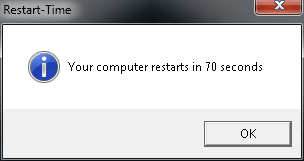
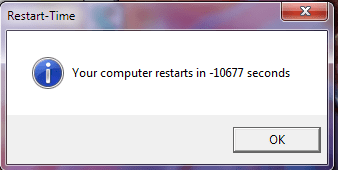
I have seen much better times but here is mine;

restart.jpg
 

My Computer

OS
Windows 7 Ultimate X64 NL
CPU
AMD PhenomII X4 940 Processor, 3000 MHz, 4 core('s)
Motherboard
BIOSTAR TA790GX3 A2+
Memory
Kingston HyperX DDR2 4 GB
Graphics Card(s)
ATI Radeon HD 4870 X2 1GB
Sound Card
None, onboard
Monitor(s) Displays
IIYama ProLite E1900WS
Screen Resolution
1440 x 900
Hard Drives
WD sata 320 GB, WD sata 250 GB and WD sata 150 GB
Internet Speed
20 Mb
Heres mine
 

Attachments

  • Capture.PNG
    Capture.PNG
    3.2 KB · Views: 205

My Computer

OS
windows 7 ultimate
CPU
Core i7 920
Motherboard
Rampage 2 extreme
Memory
3 gig of ballistix tracer
Graphics Card(s)
9800 GTX+
Hard Drives
Spinpoint f1 1 tb
dekstar 250 gb
samsung hd 500 gb
maxtor 250 gb
Case
Antec 900 two
Cooling
Corsair h50
Keyboard
Razor Lacosa
Mouse
Roccat Kone
Man, I'm not even going to post mine.

Windows itself starts up extremely fast. Unfortunately my Bios hangs on the HP screen for at least 20 seconds sometimes. I wonder if I can change that.

If it weren't for the bios taking forever mine would probably be in the 80 second range.

Was the time in BIOS quicker at some point in the past? If if was, sometimes clearing the NVRAM will bring it back to normal
Tom.


Actually I got my computer from my school and they had some weird setup that took you to this black screen looking for a network. Before I reset the BIOS by taking out the battery it used to take 1-2 MINUTES just to get past the BIOS.
 

My Computer

Computer Manufacturer/Model Number
HP Workstation Xw4100
OS
Windows 7 Ultimate/XP SP3
CPU
Pentium 4 HT 3.0 Ghz
Memory
2048MB DDR ECC RAM @ 200Mhz (4x512mb)
Graphics Card(s)
Nvidia Quadro FX 1100
Sound Card
Max Blaster
Monitor(s) Displays
17" MAG
Screen Resolution
1280*1024
Hard Drives
160GB IDE (WinXP Installation)
13GB IDE
250GB SATA (Win 7 installation & Storage)
PSU
280w
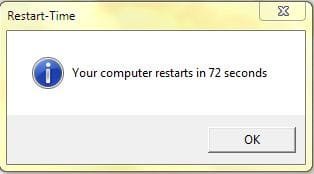
I'm not sure if mines fast, but it's a good 20 seconds quicker then my old laptop, cept this one hangs on the BIOS screen as well, mainly because the IDE drive takes a good 5 seconds to spool up. but heres my time:
 

My Computer

Computer Manufacturer/Model Number
Custom Build
OS
W7 RTM Ultimate x64
CPU
Intel Q8400 @ 2.66GHZ
Motherboard
Gigabyte GA-EG45M-UD2H
Memory
4GB DDR2-800
Graphics Card(s)
Gainward GTS 450 GLH 1GB Edition
Sound Card
Integrated 8 Channel
Monitor(s) Displays
AOC 23.6 Inch Widescreen LCD
Screen Resolution
1920x1080
Hard Drives
Seagate 500GB Internal
Western Digital 1TB Internal

Hitachi 1TB External
PSU
Apevia Java Power 500W
Case
Cooler Master HAF 922 Black
Cooling
Stock Intel CPU Fan
Keyboard
HP SK-2960 Multimedia Keyboard
Mouse
Logitech M350 Wireless Gaming Mouse
Internet Speed
1.5MB
Man, I'm not even going to post mine.

Windows itself starts up extremely fast. Unfortunately my Bios hangs on the HP screen for at least 20 seconds sometimes. I wonder if I can change that.

If it weren't for the bios taking forever mine would probably be in the 80 second range.

Was the time in BIOS quicker at some point in the past? If if was, sometimes clearing the NVRAM will bring it back to normal
Tom.


Actually I got my computer from my school and they had some weird setup that took you to this black screen looking for a network. Before I reset the BIOS by taking out the battery it used to take 1-2 MINUTES just to get past the BIOS.

If you have USB devices, try disconnecting them one by one and try rebooting each time. i have found on a few computers, when they have certain USB devices plugged in they sit at the post screen for ages, and that is what yours is doing. the HP logo just covers the post screen.

Also you will probably find the bios was set to boot via the network hub b4 you reset it.

anywho im gonna give this test a try.
 

My Computer

Computer Manufacturer/Model Number
Mad Customs #4
OS
Windows 7 7600 x64 (16385) Ultimate,Windows Vista x64 Ultimate
CPU
Intel Quad core Q9550 [email protected](AS5 lapped)(1845FSB)
Motherboard
EVGA 790i FTW DIGITAL PWM (AS5 re-pasted)
Memory
2gbx4 GSkill1600MHz9/9/9/24/2T-1.8v@1677MHz9/9/9/18/1T-1.8v
Graphics Card(s)
x2 Leadtek 9800GX2 Quad SLI(re-pasted/no cases)755/1120/1820
Sound Card
Crapative XF-i Plat
Monitor(s) Displays
Chimei22"ws(DVI)/LG32"LCD(HDMI)/Samsung 40"LCD(HDMI)
Screen Resolution
1680x1050/1360x768/1920x1080 (1080P)
Hard Drives
Seagate 1TB "40NS" 32mb sata2, Hitachi 500gb 16mb sata2 (backup storage), Sandisk 16gb micro SD (mobile storage)
PSU
Zalman 850-HP 850watt x6 12v@18A
Case
Tiled floor (nice and cold-usually 18c idle)
Cooling
fan forced 120 Xtreme (lapped)with push/pull setup
Keyboard
Logitech Di Novo Edge
Mouse
MX 1100
Internet Speed
Bigpond 17mbit/s cable=Max witnessed 2.5Mbyte/s down 30kb up
Other Info
Enzotech SLF-1+Enzotech CNB-EVGAi chipset coolers/Sunbeamtech Rheobus Extreme 30 Watt x 6 channel fan controller/Zalman ZM-MFC2 fan controller-Watt meter/Logitech G25 Racing Wheel/Logitech cordless number pad/OCZ NIA//HTPC:7600 x64/[email protected]/2x2Gb ST Proj.X DDR3 1800 9-9-9-24/Nvidia 8400GS 512Mb/Asus HDAV1.3 Delux(changed OPAmps to OPA627)/250Gb 16Mb 7200/480W PSU/Custom made cardboard box!!
I think it has alot to do with what and or how many apps you have running at startup. obviously a fresh install would run quicker...:huh:
boot time.PNG
 

My Computer

Computer Manufacturer/Model Number
Mad Customs #4
OS
Windows 7 7600 x64 (16385) Ultimate,Windows Vista x64 Ultimate
CPU
Intel Quad core Q9550 [email protected](AS5 lapped)(1845FSB)
Motherboard
EVGA 790i FTW DIGITAL PWM (AS5 re-pasted)
Memory
2gbx4 GSkill1600MHz9/9/9/24/2T-1.8v@1677MHz9/9/9/18/1T-1.8v
Graphics Card(s)
x2 Leadtek 9800GX2 Quad SLI(re-pasted/no cases)755/1120/1820
Sound Card
Crapative XF-i Plat
Monitor(s) Displays
Chimei22"ws(DVI)/LG32"LCD(HDMI)/Samsung 40"LCD(HDMI)
Screen Resolution
1680x1050/1360x768/1920x1080 (1080P)
Hard Drives
Seagate 1TB "40NS" 32mb sata2, Hitachi 500gb 16mb sata2 (backup storage), Sandisk 16gb micro SD (mobile storage)
PSU
Zalman 850-HP 850watt x6 12v@18A
Case
Tiled floor (nice and cold-usually 18c idle)
Cooling
fan forced 120 Xtreme (lapped)with push/pull setup
Keyboard
Logitech Di Novo Edge
Mouse
MX 1100
Internet Speed
Bigpond 17mbit/s cable=Max witnessed 2.5Mbyte/s down 30kb up
Other Info
Enzotech SLF-1+Enzotech CNB-EVGAi chipset coolers/Sunbeamtech Rheobus Extreme 30 Watt x 6 channel fan controller/Zalman ZM-MFC2 fan controller-Watt meter/Logitech G25 Racing Wheel/Logitech cordless number pad/OCZ NIA//HTPC:7600 x64/[email protected]/2x2Gb ST Proj.X DDR3 1800 9-9-9-24/Nvidia 8400GS 512Mb/Asus HDAV1.3 Delux(changed OPAmps to OPA627)/250Gb 16Mb 7200/480W PSU/Custom made cardboard box!!
any boot test should really be tested on a fresh install with only drivers installed and without modifying the boot apps and service programs, then you could see what overclocking performs best ect.

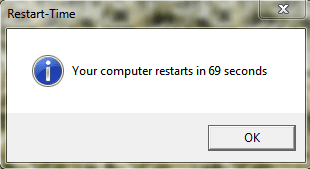
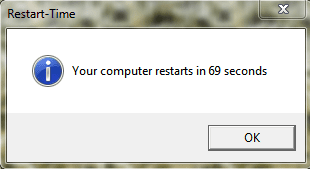
anywho...69 yeh baby!

i tried that BootRacer but after rebooting, the BootRacer does not show up on reboot, but it has the services running in task manager. i tried run as admin but no help.
 

Attachments

  • boot time.PNG
    boot time.PNG
    8.9 KB · Views: 267

My Computer

Computer Manufacturer/Model Number
Mad Customs #4
OS
Windows 7 7600 x64 (16385) Ultimate,Windows Vista x64 Ultimate
CPU
Intel Quad core Q9550 [email protected](AS5 lapped)(1845FSB)
Motherboard
EVGA 790i FTW DIGITAL PWM (AS5 re-pasted)
Memory
2gbx4 GSkill1600MHz9/9/9/24/2T-1.8v@1677MHz9/9/9/18/1T-1.8v
Graphics Card(s)
x2 Leadtek 9800GX2 Quad SLI(re-pasted/no cases)755/1120/1820
Sound Card
Crapative XF-i Plat
Monitor(s) Displays
Chimei22"ws(DVI)/LG32"LCD(HDMI)/Samsung 40"LCD(HDMI)
Screen Resolution
1680x1050/1360x768/1920x1080 (1080P)
Hard Drives
Seagate 1TB "40NS" 32mb sata2, Hitachi 500gb 16mb sata2 (backup storage), Sandisk 16gb micro SD (mobile storage)
PSU
Zalman 850-HP 850watt x6 12v@18A
Case
Tiled floor (nice and cold-usually 18c idle)
Cooling
fan forced 120 Xtreme (lapped)with push/pull setup
Keyboard
Logitech Di Novo Edge
Mouse
MX 1100
Internet Speed
Bigpond 17mbit/s cable=Max witnessed 2.5Mbyte/s down 30kb up
Other Info
Enzotech SLF-1+Enzotech CNB-EVGAi chipset coolers/Sunbeamtech Rheobus Extreme 30 Watt x 6 channel fan controller/Zalman ZM-MFC2 fan controller-Watt meter/Logitech G25 Racing Wheel/Logitech cordless number pad/OCZ NIA//HTPC:7600 x64/[email protected]/2x2Gb ST Proj.X DDR3 1800 9-9-9-24/Nvidia 8400GS 512Mb/Asus HDAV1.3 Delux(changed OPAmps to OPA627)/250Gb 16Mb 7200/480W PSU/Custom made cardboard box!!
Was the time in BIOS quicker at some point in the past? If if was, sometimes clearing the NVRAM will bring it back to normal
Tom.


Actually I got my computer from my school and they had some weird setup that took you to this black screen looking for a network. Before I reset the BIOS by taking out the battery it used to take 1-2 MINUTES just to get past the BIOS.

If you have USB devices, try disconnecting them one by one and try rebooting each time. i have found on a few computers, when they have certain USB devices plugged in they sit at the post screen for ages, and that is what yours is doing. the HP logo just covers the post screen.

Also you will probably find the bios was set to boot via the network hub b4 you reset it.

anywho im gonna give this test a try.

Hmm you could be right, I have a lot of USB things plugged in.

I used to have this issue where my computer wouldn't actually start up if I had an iPod plugged in (Maybe it would have but I stopped waiting after 10 minutes).
 

My Computer

Computer Manufacturer/Model Number
HP Workstation Xw4100
OS
Windows 7 Ultimate/XP SP3
CPU
Pentium 4 HT 3.0 Ghz
Memory
2048MB DDR ECC RAM @ 200Mhz (4x512mb)
Graphics Card(s)
Nvidia Quadro FX 1100
Sound Card
Max Blaster
Monitor(s) Displays
17" MAG
Screen Resolution
1280*1024
Hard Drives
160GB IDE (WinXP Installation)
13GB IDE
250GB SATA (Win 7 installation & Storage)
PSU
280w
Here's my latest reboot and bootracer scores.:huh:
 

Attachments

  • reboot time.PNG
    reboot time.PNG
    5.7 KB · Views: 235
  • bootracer.PNG
    bootracer.PNG
    40.1 KB · Views: 8

My Computer

Computer type
PC/Desktop
Computer Manufacturer/Model Number
Self Built
OS
Win 10 Pro x64
CPU
Intel I5-2500K @3.3GHz
Motherboard
Asrock P67 Extreme4
Memory
16GB G.Skill Ripjaws X (4x4GB)
Graphics Card(s)
EVGA GeForce 750 Ti SC 2GB
Sound Card
ASUS Xonar DG 5.1 Channels 24-bit 96KHz PCI Interface Sound
Monitor(s) Displays
auria eq2367
Screen Resolution
1920 x 1080
Hard Drives
250GB Samsung 850 EVO SSD
1TB WD Blue
1TB Hitachi
PSU
SeaSonic X 650W 80 Plus Gold
Case
Corsair Obsidian 750D
Cooling
Corsair H60, Three 140mm case fans
Keyboard
Logitech Wireless Keyboard K520
Mouse
Logitech Wireless Mouse M310
Internet Speed
Wave Broadband ~ 100 dn 5 up
Antivirus
Windows Defender, Malwarebytes Premium
Browser
Edge, IE11, Chrome
Other Info
Laptop specs: HP g7-1365dx /
CPU: AMD A6-3420M APU with Radeon(tm) HD Graphics /
RAM: Crucial 8Gb (2x4Gb) /
SSD: Crucial M4-CT128M4SSD2 ATA Device/ FW 000F /
GFX: AMD Radeon HD 6520G /
OS: Windows 10 Pro x64
Post Your Start Up Times Here

My pc starts up in 21 seconds which is good for a pc with apps and a antivirus on it.
 

My Computer

Computer Manufacturer/Model Number
Intel
OS
Windows 7 32 & 64 bit
CPU
Intel E5400
Motherboard
Foxconn
Memory
4GB
Graphics Card(s)
Nvidia
Sound Card
Realteck
Monitor(s) Displays
20" lcd
Hard Drives
Samsung 750 SATA II
PSU
450 watts
Case
Custom
Cooling
Intel standerd
21 seconds? Now, does it it ake 21 seconds to SEE your desktop or is your pc actually FULLY FUNCTIONAL in 21 seconds?

Because I can physically see my desktop in under a minute but I still have to wait a few seconds for the antivirus to start up and some other stuff before it's really functional. (In Windows XP)

Windows 7 starts up a little better though.
 

My Computer

Computer Manufacturer/Model Number
HP Workstation Xw4100
OS
Windows 7 Ultimate/XP SP3
CPU
Pentium 4 HT 3.0 Ghz
Memory
2048MB DDR ECC RAM @ 200Mhz (4x512mb)
Graphics Card(s)
Nvidia Quadro FX 1100
Sound Card
Max Blaster
Monitor(s) Displays
17" MAG
Screen Resolution
1280*1024
Hard Drives
160GB IDE (WinXP Installation)
13GB IDE
250GB SATA (Win 7 installation & Storage)
PSU
280w
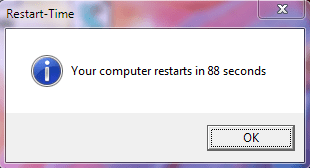
Tried a boot with Bootracer, and heres my results.<br><br>

W7-Restart-time2.png
 

My Computer

Computer Manufacturer/Model Number
Custom Build
OS
W7 RTM Ultimate x64
CPU
Intel Q8400 @ 2.66GHZ
Motherboard
Gigabyte GA-EG45M-UD2H
Memory
4GB DDR2-800
Graphics Card(s)
Gainward GTS 450 GLH 1GB Edition
Sound Card
Integrated 8 Channel
Monitor(s) Displays
AOC 23.6 Inch Widescreen LCD
Screen Resolution
1920x1080
Hard Drives
Seagate 500GB Internal
Western Digital 1TB Internal

Hitachi 1TB External
PSU
Apevia Java Power 500W
Case
Cooler Master HAF 922 Black
Cooling
Stock Intel CPU Fan
Keyboard
HP SK-2960 Multimedia Keyboard
Mouse
Logitech M350 Wireless Gaming Mouse
Internet Speed
1.5MB
hi i got 51 seconds on just normal setup/startup as usual.

is this pretty good?
 

My Computer

Computer Manufacturer/Model Number
The Perpetrator
OS
Windows 7 Ultimate x64
CPU
AMD Phenom II X4 B50 (3.62Ghz)
Motherboard
Gigabyte GA-MA790XT-UD4P
Memory
8GB(4x2GB) Mushkin XP DDR3-1600-CL7 (996657)
Graphics Card(s)
Galaxy Geforce 9600GT Factory OCed
Hard Drives
Western Digital Caviar Black 640GB
PSU
OCZ ModXstream-Pro 600W
Case
XION II Series Gaming PC Case
restart2.jpg
 

My Computer

Computer Manufacturer/Model Number
Custom Built
OS
Windows 7 Home Premium
CPU
Quad Q9550 @ 2.83GHz
Motherboard
Asus P5N-T Deluxe nForce 780i SLI
Memory
4GB (2x2GB) PC6400 DDR2/800 (2.75 useable)
Graphics Card(s)
GeForce 9800 GTX+ 1GB
Sound Card
on-board
Monitor(s) Displays
hp w2408h
Screen Resolution
1920x1200
Hard Drives
-150GB Western Digital VelociRaptor 10,000RPM SATA-II 3.0Gb/s 16MB Cache
-1TB SATA-II 3.0Gb/s 32MB Cache 7200RPM
PSU
Thermaltake ToughPower 1,000 Watts
Case
Thermaltake M9 VI1000BWS Mid-Tower
Cooling
Asetek Liquid CPU Cooling System / 1 intake & 3 exhaust fans
Keyboard
Logitech Wave
Mouse
Logitech LX8
<---Win

I win ^.^


Edit: added real boot time
 

Attachments

  • j;lkal;f.png
    j;lkal;f.png
    8 KB · Views: 4
  • abced.png
    abced.png
    7.6 KB · Views: 221

My Computer

OS
Windows Seven 64-bit
CPU
Intel Core i5 3.20Ghz
Motherboard
Asus
Memory
8gb
Graphics Card(s)
Nvidia GTS 250
Monitor(s) Displays
Asus Display
Screen Resolution
1980x1080
Hard Drives
1tb
Cooling
Fans?
Keyboard
Razer Lachosiasfaad something
Mouse
Razer deathadder
Internet Speed
Cable
Untitled.png
 
Last edited:

My Computer

OS
Windows 7 x64 Ultimate
CPU
AMD Phenom(tm) II X4 940 Processor OC 3.4Ghz
Motherboard
GA-MA790X-UD4P
Memory
6.00 GB
Graphics Card(s)
EVGA 896-P3-1257-AR GeForce GTX 260 Core 216 Superclocked
Sound Card
Onboard
Monitor(s) Displays
Primary ASUS VK246H 24" | Secondary Samsung LN46A950 46"
Screen Resolution
Primary 1920x1080p | Secondary 1920x1080p
Hard Drives
Areca 1231ML Raid Controller |
Intel X25-M G2 "74.5GB" (SSDSA2MH080G2) |
Raid 6 (9x1TB) "6.36TB" (WD1001FALS) |
WD VelociRaptor "279GB" (WD3000GLFS)
PSU
PC Power & Cooling Silencer PPCS910 910W
Case
Lian Li PC-A70B
Cooling
Freezone Elite
Keyboard
Logitech S 510 Silver/Black RF Wireless Slim Cordless
Mouse
Logitech S 510 Silver/Black RF Wireless Slim Cordless
Internet Speed
Intel EXPI9300PT 10/100/1000Mbps PCI-Express|Optimum Online
Other Info
ZALMAN VF700-CU 2 Ball VGA COOLER used for Areca 1231ML
Microsoft JR9-00001 Xbox 360 Wireless Controller for Windows
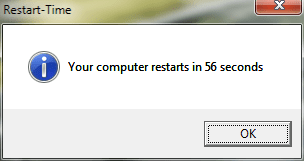
My restart time after a bit of tweaking 41 seconds
 

Attachments

  • reboottimethumb.jpg
    reboottimethumb.jpg
    55.9 KB · Views: 26

My Computer

Computer Manufacturer/Model Number
Custom
OS
Windows 7
CPU
Intel Q9650
Motherboard
Asus Striker II Extreme
Memory
Corsair DDR3 Dual Channel PC3-16000 @ 2000Mhz
Graphics Card(s)
2xNvidia Geforce GTX 280 in SLI
Sound Card
Creative Fatal1ty Champion Series
Monitor(s) Displays
Samsung Syncmaster 245B
Hard Drives
Intel X-25M SSD
Western Digital Raptor SATA 36Gb
Western Digital Raptor SATA 72Gb
Western Digital Raptor SATA II 300Gb
PSU
ThermalTake Toughpower 1200Watt
Case
Coolermaster RC-Cosmos S
Cooling
Thermalright Ultra-120 Extreme Rev.C
Status
Not open for further replies.
Back
Top