Recent Items - Turn On or Off

How to Turn Recent Items On or Off in Windows 7


   Information
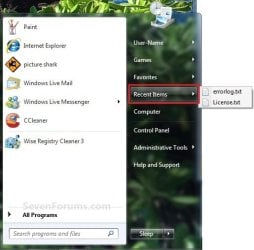
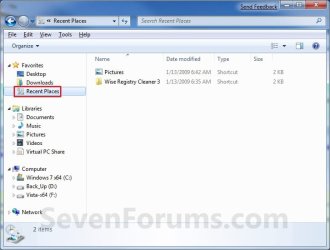
Recent Items is a list of your recently used files on the right side of the Start Menu, Taskbar Windows Explorer icon link, in the Navigaton Pane Recent Places, and in Jump Lists. This will show you how to turn Recent Items on or off in Windows 7.
   Note
The hidden system folder Recent Items is located at:

C:\Users\(User Name)\AppData\Roaming\Microsoft\Windows\Recent Items

OR

%AppData%\Microsoft\Windows\Recent Items

If you go to the Recent Items folder location above and you have a yellow folder named Recent instead of one named Recent Items with an icon, then right click on the Recent folder and click Delete. Type shell:recent in the white line (Start Search) area of the Start Menu, and press Enter. Logoff and logon, or restart the computer, to rebuild the folder back to the default Recent Items. Recent Items will not function correctly if is not set as the default Recent Items folder.

If this did not fix the Recent Items folder, then see the post at this link to make sure that the registry locations at the link have the correct locations entered for them.


EXAMPLE: Recent Items
NOTE: If Recent Items is turned on, the these are the locations (Taskbar, Start Menu, Navigation Pane) that you will see your recent items listed.
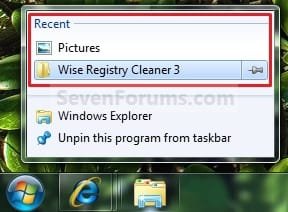
Taskbar.jpg

Start_Menu.jpg

Recent_Places.jpg


OPTION ONE

To Turn Recent Items On or Off in Start Menu Properties

1. Right click on the Start button, and click on Properties.

2. To Turn Recent Items On A) Check the Store and display recently opened items in the Start menu and the taskbar box. (see screenshot below step 4)
NOTE: If you just turned on Recent Items, then it may take a bit after opening the recents items a few times before they actually show up.

B) Go to step 4.
3. To Turn Recent Items Off A) Uncheck the Store and display recently opened items in the Start menu and the taskbar box. (see screenshot below step 4)
4. Click on OK. (see screenshot below) Properties.jpg
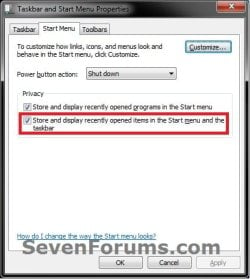
5. If you turned on recent items, then be sure to also set how many recent items you want displayed.

   Tip
If you turned on recent items, and would like to have Frequent (recent items) display in the Internet Explorer taskbar jump list, then you will need to be sure to add (check) "Internet Explorer History" to the Indexed Location.
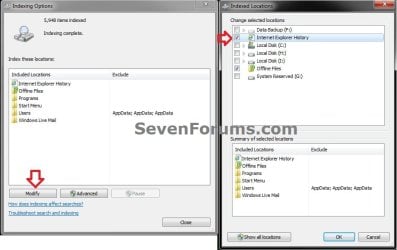
IE.jpg


OPTION TWO

To Turn Recent Items On or Off using a REG File Download

1. To Turn Recent Items On
NOTE: This is the default setting. A) Click on the Download button below to download the file below. Turn_On_Recent_Items_in_Start_Menu.reg

Download


B) Go to step 3.
2. To Turn Recent Items Off A) Click on the Download button below to download the file below. Turn_Off_Recent_Items_in_Start_Menu.reg

Download


3. Save the .reg file to the desktop.

4. Right click on the downloaded .reg file, and click on Merge.

5. Click on Run, Yes (UAC), Yes, and OK when prompted.

6. When done, you can delete the downloaded .reg file if you like.


OPTION THREE

To Add or Remove "Recent Items" Button from the Start Menu


NOTE: This will allow you to add or remove the Recent Items button from the right dark side of the Start Menu. If you add it, then you will need to turn on Recent Items on OPTION ONE above to have them listed. 1. Open the Start Menu Customize window.

2. Scroll down a bit, and check the Recent Items box, and click on OK. (See screenshot below) Start_Menu_Customize.jpg
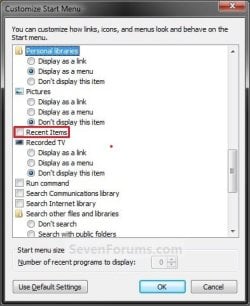
3. Click on OK. (See link in step 1)
That's it,
Shawn


Attachments

Last edited:
Hello NeoRitz, and welcome to Seven Forums.

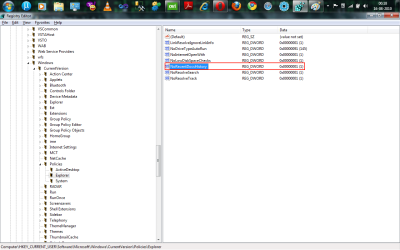
Could you post back with a screenshot showing all of the right pane at each these two registry locations below? There may be some entry at either one of these locations that may be responsible for this.

HKEY_CURRENT_USER\Software\Microsoft\Windows\CurrentVersion\Policies\Explorer

HKEY_LOCAL_MACHINE\SOFTWARE\Microsoft\Windows\CurrentVersion\Policies\Explorer
 

My Computer

Computer type
PC/Desktop
Computer Manufacturer/Model Number
Self built custom
OS
64-bit Windows 11 Pro for Workstations
CPU
Intel i7-8700K OC'd to 5 GHz
Motherboard
ASUS ROG Maximus XI Formula Z390
Memory
64 GB (4x16GB) G.SKILL TridentZ RGB DDR4 3600 MHz
Graphics Card(s)
ASUS ROG-STRIX-GTX1080TI-O11G-GAMING
Sound Card
Integrated
Monitor(s) Displays
2 x Samsung Odyssey G7 27"
Screen Resolution
2560x1440
Hard Drives
1TB Samsung 990 PRO M.2,
4TB Samsung 990 PRO PRO M.2,
TerraMaster F8 SSD Plus NAS
PSU
Seasonic Prime Titanium 850W
Case
Thermaltake Core P3
Cooling
Corsair Hydro H115i
Keyboard
Logitech wireless K800
Mouse
Logitech MX Master 4
Internet Speed
2 Gb/s Download and 100 Mb/s Upload
Antivirus
Malwarebyte Anti-Malware Premium
Browser
Google Chrome
Other Info
Logitech Z625 speaker system,
Logitech BRIO 4K Pro webcam,
HP Color LaserJet Pro MFP M477fdn,
APC SMART-UPS RT 1000 XL - SURT1000XLI,
Galaxy S23 Plus phone
Thanks, matter resolved

Thanks a lot Brink,
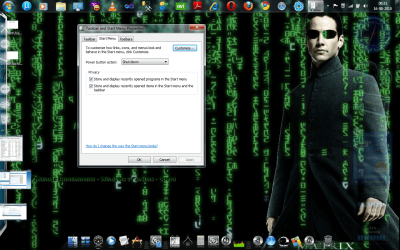
I'm posting both the screen shots here.
Deleted the key for NoRecentDocsHistory in CurrentUser Policies.
And then restarted the system.
Now the option's enabled.
Thanks and regards,
NeoRitz
 

Attachments

  • Resolved.png
    Resolved.png
    392.4 KB · Views: 633
  • CurrentUserPolicies.png
    CurrentUserPolicies.png
    53.4 KB · Views: 849
  • LocalMachinePolicies.png
    LocalMachinePolicies.png
    49.5 KB · Views: 709

My Computer

Computer Manufacturer/Model Number
HCLK21
OS
Windows 7
CPU
Intel Penium Dual Core Inside
Memory
2GB
Graphics Card(s)
ATI RADEON Xpress 1100
Sound Card
Realtek Onboard
Hard Drives
120 GB
Last edited:

My Computer

Computer type
PC/Desktop
Computer Manufacturer/Model Number
Self built custom
OS
64-bit Windows 11 Pro for Workstations
CPU
Intel i7-8700K OC'd to 5 GHz
Motherboard
ASUS ROG Maximus XI Formula Z390
Memory
64 GB (4x16GB) G.SKILL TridentZ RGB DDR4 3600 MHz
Graphics Card(s)
ASUS ROG-STRIX-GTX1080TI-O11G-GAMING
Sound Card
Integrated
Monitor(s) Displays
2 x Samsung Odyssey G7 27"
Screen Resolution
2560x1440
Hard Drives
1TB Samsung 990 PRO M.2,
4TB Samsung 990 PRO PRO M.2,
TerraMaster F8 SSD Plus NAS
PSU
Seasonic Prime Titanium 850W
Case
Thermaltake Core P3
Cooling
Corsair Hydro H115i
Keyboard
Logitech wireless K800
Mouse
Logitech MX Master 4
Internet Speed
2 Gb/s Download and 100 Mb/s Upload
Antivirus
Malwarebyte Anti-Malware Premium
Browser
Google Chrome
Other Info
Logitech Z625 speaker system,
Logitech BRIO 4K Pro webcam,
HP Color LaserJet Pro MFP M477fdn,
APC SMART-UPS RT 1000 XL - SURT1000XLI,
Galaxy S23 Plus phone
Option 1 restored my jump lists, Thanks. It may be a coincidence. But my jump lists disappeared when I installed google chrome
 

My Computer

OS
7 ultimate
Hello Nsbjsn,

When recent items and programs is turned off and back on, it will clear their history leaving a nearly empty jump list. You'll have to reopen these items again (possibly a few times) before they eventually show back up again.

Is the jump list completely missing, or just empty?

Installing chrome may have reset them again if just empty. If completely missing, then see if uninstalling chrome restores them.
 

My Computer

Computer type
PC/Desktop
Computer Manufacturer/Model Number
Self built custom
OS
64-bit Windows 11 Pro for Workstations
CPU
Intel i7-8700K OC'd to 5 GHz
Motherboard
ASUS ROG Maximus XI Formula Z390
Memory
64 GB (4x16GB) G.SKILL TridentZ RGB DDR4 3600 MHz
Graphics Card(s)
ASUS ROG-STRIX-GTX1080TI-O11G-GAMING
Sound Card
Integrated
Monitor(s) Displays
2 x Samsung Odyssey G7 27"
Screen Resolution
2560x1440
Hard Drives
1TB Samsung 990 PRO M.2,
4TB Samsung 990 PRO PRO M.2,
TerraMaster F8 SSD Plus NAS
PSU
Seasonic Prime Titanium 850W
Case
Thermaltake Core P3
Cooling
Corsair Hydro H115i
Keyboard
Logitech wireless K800
Mouse
Logitech MX Master 4
Internet Speed
2 Gb/s Download and 100 Mb/s Upload
Antivirus
Malwarebyte Anti-Malware Premium
Browser
Google Chrome
Other Info
Logitech Z625 speaker system,
Logitech BRIO 4K Pro webcam,
HP Color LaserJet Pro MFP M477fdn,
APC SMART-UPS RT 1000 XL - SURT1000XLI,
Galaxy S23 Plus phone
All is fixed, didn't have to uninstall chrome. I just used your option one above, Thanks
 

My Computer

OS
7 ultimate
That's great news Nsbjsn. I'm happy to hear that you got it fixed. :)
 

My Computer

Computer type
PC/Desktop
Computer Manufacturer/Model Number
Self built custom
OS
64-bit Windows 11 Pro for Workstations
CPU
Intel i7-8700K OC'd to 5 GHz
Motherboard
ASUS ROG Maximus XI Formula Z390
Memory
64 GB (4x16GB) G.SKILL TridentZ RGB DDR4 3600 MHz
Graphics Card(s)
ASUS ROG-STRIX-GTX1080TI-O11G-GAMING
Sound Card
Integrated
Monitor(s) Displays
2 x Samsung Odyssey G7 27"
Screen Resolution
2560x1440
Hard Drives
1TB Samsung 990 PRO M.2,
4TB Samsung 990 PRO PRO M.2,
TerraMaster F8 SSD Plus NAS
PSU
Seasonic Prime Titanium 850W
Case
Thermaltake Core P3
Cooling
Corsair Hydro H115i
Keyboard
Logitech wireless K800
Mouse
Logitech MX Master 4
Internet Speed
2 Gb/s Download and 100 Mb/s Upload
Antivirus
Malwarebyte Anti-Malware Premium
Browser
Google Chrome
Other Info
Logitech Z625 speaker system,
Logitech BRIO 4K Pro webcam,
HP Color LaserJet Pro MFP M477fdn,
APC SMART-UPS RT 1000 XL - SURT1000XLI,
Galaxy S23 Plus phone
The hidden system folder Recent Items is located at:

C:\Users\(User Name)\AppData\Roaming\Microsoft\Windows\Recent Items

If you go to the Recent Items folder location above and you have a yellow folder named Recent instead of one named Recent Items with a icon, then right click on the Recent folder and click Delete. Type shell:recent in the white line (Start Search) area of the Start Menu and press Enter. Logoff and logon, or restart the computer, to rebuild the folder back to the default Recent Items. Recent Items will not function correctly if is not set as the default Recent Items folder

I had a 'recent' folder instead of 'recent items' folder initially in appdata/roaming folder and I accidentally dragged it out to desktop instead of right clicking and deleting it. Once it was in the desktop, the delete option when the icon is right clicked disappeared, and the only way to remove it was to drag into the recycle bin and empty it. After that I thought typing shell:recent would create a new and proper 'Recent Items' in the appdata\roaming\Microsoft\Windows folder. A working Recent Items folder seems to have been created but instead it is now always created on the desktop instead of the original position (the appdata\roaming). Even after restarting, it does not solve the issue. Any ideas or solutions?

Any help would be appreciated. Thanks.
 

My Computer

OS
Windows 7 Home Premium 32bit
Hello Xiaolufer, and welcome to Seven Forums.

See if dragging or moving the Recent Items on your desktop back into the C:\Users\(User Name)\AppData\Roaming\Microsoft\Windows may help.

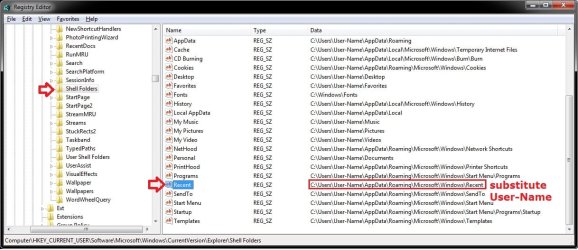
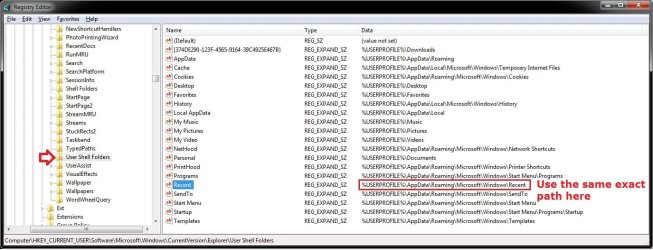
If not, then make sure that the registry (regedit.exe) locations below have the correct path for the Recent expandable string value in the right pane. If not, then right click on Recent, click on Modify, enter the correct path, and click on OK. Afterwards, restart the computer and do what you have in the quote box again to fix the Recent folder. :)


HKEY_CURRENT_USER\Software\Microsoft\Windows\CurrentVersion\Explorer\Shell Folders
(Use the same path, but substitute User-Name in the path with your user account's name instead.)
Shell_Folders.jpg
HKEY_CURRENT_USER\Software\Microsoft\Windows\CurrentVersion\Explorer\User Shell Folders
(Use the exact same path as below for Recent.)
User-Shell-Folders.jpg

Hope this helps,
Shawn
 

My Computer

Computer type
PC/Desktop
Computer Manufacturer/Model Number
Self built custom
OS
64-bit Windows 11 Pro for Workstations
CPU
Intel i7-8700K OC'd to 5 GHz
Motherboard
ASUS ROG Maximus XI Formula Z390
Memory
64 GB (4x16GB) G.SKILL TridentZ RGB DDR4 3600 MHz
Graphics Card(s)
ASUS ROG-STRIX-GTX1080TI-O11G-GAMING
Sound Card
Integrated
Monitor(s) Displays
2 x Samsung Odyssey G7 27"
Screen Resolution
2560x1440
Hard Drives
1TB Samsung 990 PRO M.2,
4TB Samsung 990 PRO PRO M.2,
TerraMaster F8 SSD Plus NAS
PSU
Seasonic Prime Titanium 850W
Case
Thermaltake Core P3
Cooling
Corsair Hydro H115i
Keyboard
Logitech wireless K800
Mouse
Logitech MX Master 4
Internet Speed
2 Gb/s Download and 100 Mb/s Upload
Antivirus
Malwarebyte Anti-Malware Premium
Browser
Google Chrome
Other Info
Logitech Z625 speaker system,
Logitech BRIO 4K Pro webcam,
HP Color LaserJet Pro MFP M477fdn,
APC SMART-UPS RT 1000 XL - SURT1000XLI,
Galaxy S23 Plus phone
thanks! dragging didnt work but changing the registry as u mentioned did :)
 

My Computer

OS
Windows 7 Home Premium 32bit
thanks! dragging didnt work but changing the registry as u mentioned did :)

You're most welcome Xiaolufer. I'm happy to hear that you got it sorted. :)
 

My Computer

Computer type
PC/Desktop
Computer Manufacturer/Model Number
Self built custom
OS
64-bit Windows 11 Pro for Workstations
CPU
Intel i7-8700K OC'd to 5 GHz
Motherboard
ASUS ROG Maximus XI Formula Z390
Memory
64 GB (4x16GB) G.SKILL TridentZ RGB DDR4 3600 MHz
Graphics Card(s)
ASUS ROG-STRIX-GTX1080TI-O11G-GAMING
Sound Card
Integrated
Monitor(s) Displays
2 x Samsung Odyssey G7 27"
Screen Resolution
2560x1440
Hard Drives
1TB Samsung 990 PRO M.2,
4TB Samsung 990 PRO PRO M.2,
TerraMaster F8 SSD Plus NAS
PSU
Seasonic Prime Titanium 850W
Case
Thermaltake Core P3
Cooling
Corsair Hydro H115i
Keyboard
Logitech wireless K800
Mouse
Logitech MX Master 4
Internet Speed
2 Gb/s Download and 100 Mb/s Upload
Antivirus
Malwarebyte Anti-Malware Premium
Browser
Google Chrome
Other Info
Logitech Z625 speaker system,
Logitech BRIO 4K Pro webcam,
HP Color LaserJet Pro MFP M477fdn,
APC SMART-UPS RT 1000 XL - SURT1000XLI,
Galaxy S23 Plus phone
Thanks Brink

Excellent tutorial that solved this issue for me. Clearest I have found anywhere.:thumbsup:
 

My Computer

OS
Windows 7 x64
You're most welcome Ian. Thank you. :)
 

My Computer

Computer type
PC/Desktop
Computer Manufacturer/Model Number
Self built custom
OS
64-bit Windows 11 Pro for Workstations
CPU
Intel i7-8700K OC'd to 5 GHz
Motherboard
ASUS ROG Maximus XI Formula Z390
Memory
64 GB (4x16GB) G.SKILL TridentZ RGB DDR4 3600 MHz
Graphics Card(s)
ASUS ROG-STRIX-GTX1080TI-O11G-GAMING
Sound Card
Integrated
Monitor(s) Displays
2 x Samsung Odyssey G7 27"
Screen Resolution
2560x1440
Hard Drives
1TB Samsung 990 PRO M.2,
4TB Samsung 990 PRO PRO M.2,
TerraMaster F8 SSD Plus NAS
PSU
Seasonic Prime Titanium 850W
Case
Thermaltake Core P3
Cooling
Corsair Hydro H115i
Keyboard
Logitech wireless K800
Mouse
Logitech MX Master 4
Internet Speed
2 Gb/s Download and 100 Mb/s Upload
Antivirus
Malwarebyte Anti-Malware Premium
Browser
Google Chrome
Other Info
Logitech Z625 speaker system,
Logitech BRIO 4K Pro webcam,
HP Color LaserJet Pro MFP M477fdn,
APC SMART-UPS RT 1000 XL - SURT1000XLI,
Galaxy S23 Plus phone
Code:
 Windows Registry Editor Version 5.00

[HKEY_CURRENT_USER\Software\Microsoft\Windows\CurrentVersion\Explorer\Advanced]
"Start_TrackProgs"=dword:00000001
; Store and display recently opened programs in the Start menu
"Start_TrackDocs"=dword:00000001
; Store and display recently opened items in the Start menu and the taskbar
or
Code:
@echo off
reg add "HKCU\Software\Microsoft\Windows\CurrentVersion\Explorer\Advanced" /v "Start_TrackProgs" /t REG_DWORD /d 0x1 /f
reg add "HKCU\Software\Microsoft\Windows\CurrentVersion\Explorer\Advanced" /v "Start_TrackDocs"  /t REG_DWORD /d 0x1 /f
pause & exit
 
Last edited:

My Computer

OS
windows7 ultimate x32
CPU
DualCore Intel Core 2 Duo E8400, 3000 MHz (9 x 333)
Motherboard
ASRock 4Core1333-GLAN (3 PCI,1 PCI-E x16,4 DDR2 DIMM...)
Memory
4Gb (1x4 DDR2-800 DDR2 SDRAM)
Graphics Card(s)
NVIDIA GeForce 9600 GT (512 mb)
Sound Card
onboard
Monitor(s) Displays
lg flatron w2242t
Screen Resolution
1680 x 1050
Hard Drives
WDC WD5000AAJS-00YFA0 ATA Device
PSU
-
Case
-
Cooling
-
Other Info
d-link dir100
wow been searching for this fix thank you so much worked perfect for me
 

My Computer

OS
windows 7 home premium
Thanks

Thanks for this. :D It fixed my issue which resulted by remoting into a Vista environment and apparently changing the profile's default setting for storing the recent items in the taskbar.
 

My Computer

OS
Win 7 Pro 64-bit
When I right-click on taskbar > Properties > Start Menu, I cannot check "Store and Display Recently Opened Items in the Start Menu and on the Taskbar" because it is grayed out.

I located the C:\Users\...\AppData\Roaming\Microsoft\Windows\Recent
and it appeared empty for some time, even though Properties indicates 2 folder and 30 files (none hidden).
Suddenly a subfolder appeared called CustomDestinations (modified just now) with 24 files with names ending in .customDestinations-ms
Listing them from a command window shows the other folder is called AutomaticDestinations with files ending in .automaticDestinations-ms Not too useful.

I even tried the registry fix but still cannot get "Recent Places" or "recent items" to work anywhere.
 

My Computer

Computer Manufacturer/Model Number
HP Pavilion DV7-2157ca
OS
Windows 7 Home Premium 64bit
CPU
P7350
Memory
4 GB
Graphics Card(s)
ATI Mobility Radeon HD 4530
Sound Card
Altec Lansing
Monitor(s) Displays
1600x900 LED
Hard Drives
500 GB
Hello Pat, and welcome to Seven Forums.

It sounds like you may have Recent Items disabled since the Store and Display Recently Opened Items in the Start Menu and on the Taskbar option is grayed out. See if doing step 2 in OPTION ONE of the tutorial below may be able to enable Recent Items and allow you to check/uncheck the option afterwards.

http://www.sevenforums.com/tutorials/104503-recent-items-enable-disable.html

Hope this helps,
Shawn
 
Last edited:

My Computer

Computer type
PC/Desktop
Computer Manufacturer/Model Number
Self built custom
OS
64-bit Windows 11 Pro for Workstations
CPU
Intel i7-8700K OC'd to 5 GHz
Motherboard
ASUS ROG Maximus XI Formula Z390
Memory
64 GB (4x16GB) G.SKILL TridentZ RGB DDR4 3600 MHz
Graphics Card(s)
ASUS ROG-STRIX-GTX1080TI-O11G-GAMING
Sound Card
Integrated
Monitor(s) Displays
2 x Samsung Odyssey G7 27"
Screen Resolution
2560x1440
Hard Drives
1TB Samsung 990 PRO M.2,
4TB Samsung 990 PRO PRO M.2,
TerraMaster F8 SSD Plus NAS
PSU
Seasonic Prime Titanium 850W
Case
Thermaltake Core P3
Cooling
Corsair Hydro H115i
Keyboard
Logitech wireless K800
Mouse
Logitech MX Master 4
Internet Speed
2 Gb/s Download and 100 Mb/s Upload
Antivirus
Malwarebyte Anti-Malware Premium
Browser
Google Chrome
Other Info
Logitech Z625 speaker system,
Logitech BRIO 4K Pro webcam,
HP Color LaserJet Pro MFP M477fdn,
APC SMART-UPS RT 1000 XL - SURT1000XLI,
Galaxy S23 Plus phone
Did that already but no change. "Start_TrackProgs" and "Start_TrackDocs" are both set to 1.

I noticed %USERPROFILE%\AppData\Roaming\Microsoft\Windows\Recent goes to
my profile but displays as: Recent Items.
 

My Computer

Computer Manufacturer/Model Number
HP Pavilion DV7-2157ca
OS
Windows 7 Home Premium 64bit
CPU
P7350
Memory
4 GB
Graphics Card(s)
ATI Mobility Radeon HD 4530
Sound Card
Altec Lansing
Monitor(s) Displays
1600x900 LED
Hard Drives
500 GB
"Start_TrackProgs" and "Start_TrackDocs" is not what the tutorial to enable Recent Items sets. This is different setting instead. Please give step 2 in OPTION ONE a try to see if it may help afterwards. :)

http://www.sevenforums.com/tutorials/104503-recent-items-enable-disable.html

[HKEY_CURRENT_USER\Software\Microsoft\Windows\CurrentVersion\Policies\Explorer]
"NoRecentDocsHistory"=-

[HKEY_LOCAL_MACHINE\SOFTWARE\Microsoft\Windows\CurrentVersion\Policies\Explorer]
"NoRecentDocsHistory"=-

Yep, it should be "Recent Items".
 

My Computer

Computer type
PC/Desktop
Computer Manufacturer/Model Number
Self built custom
OS
64-bit Windows 11 Pro for Workstations
CPU
Intel i7-8700K OC'd to 5 GHz
Motherboard
ASUS ROG Maximus XI Formula Z390
Memory
64 GB (4x16GB) G.SKILL TridentZ RGB DDR4 3600 MHz
Graphics Card(s)
ASUS ROG-STRIX-GTX1080TI-O11G-GAMING
Sound Card
Integrated
Monitor(s) Displays
2 x Samsung Odyssey G7 27"
Screen Resolution
2560x1440
Hard Drives
1TB Samsung 990 PRO M.2,
4TB Samsung 990 PRO PRO M.2,
TerraMaster F8 SSD Plus NAS
PSU
Seasonic Prime Titanium 850W
Case
Thermaltake Core P3
Cooling
Corsair Hydro H115i
Keyboard
Logitech wireless K800
Mouse
Logitech MX Master 4
Internet Speed
2 Gb/s Download and 100 Mb/s Upload
Antivirus
Malwarebyte Anti-Malware Premium
Browser
Google Chrome
Other Info
Logitech Z625 speaker system,
Logitech BRIO 4K Pro webcam,
HP Color LaserJet Pro MFP M477fdn,
APC SMART-UPS RT 1000 XL - SURT1000XLI,
Galaxy S23 Plus phone
Back
Top