
Solved Recent Windows Update KB3064209 causes Windows 7 to not boot

[SOLVED] Windows 10 will not install on a system with a G3258 CPU

Hi all,

I've found a 'solution' (until Intel and Microsoft get off their a** and fix it) and it's amazingly simple, no registry editing, waiting for a BIOS update, changing Windows settings to try to disable the core for a second then re-enable it, or anything.

It's simply changing the name of a single file. Hard to believe but true.

I not only re-enabled the 2nd CPU core (now I have both, as it should be) but I re-applied my overclock and have experienced no problems whatsoever.

It appeared that the only way most G3258 CPU owners were getting Windows 10 to install were either disabling 1 core in the BIOS or removing all overclocking settings (using 3.20GHz with Adaptive voltage (all stock, in other words)) or both.

Here's how to fix the problem for now:

1) Either disable one core of the CPU in the BIOS or remove all OC and return to stock settings or both. Whatever it takes to install Windows 10 successfully.

2) Once booted into Windows 10, navigate to C:\Windows\System32 and find the file named 'mcupdate_GenuineIntel.dll'.

3) All you have to do is rename it. Most posts I've read say it's safe to just delete it but I prefer renaming it. Just add .old or .bak to the end of the filename.
So it would look like 'mcupdate_GenuineIntel.dll.OLD' or 'mcupdate_GenuineIntel.dll.BAK' (or 'mcupdate_GenuineIntel.dll.MyStupidCat' will also work
001.png
)

4) You will have to temporarily change permissions on the file to change the name since it's a system file and will say 'File Access Denied' when you try to rename it (or do anything with it, really)

Change the permissions:
(Credit: © 2015 Sergey Tkachenko at WinAero.com)

There are pictures on that site if you prefer to go there and do it that way, but I'll just describe it with steps.

This may seem like a lot of steps but it's necessary for someone who has no previous experience working with file permissions. For those who are, just set permissions as usual to allow renaming of the specified file.

1) Right-click on the file whose permissions you wish to change ('mcupdate_GenuineIntel.dll', in this case)

2) Select Properties then click on the Security tab.

3) Click on the Advanced button. A window named 'Advanced Security Settings for Data' will open.

4) Here you need to change the Owner of the file. Initially it should say the Owner is 'TrustedInstaller'.

5) Click the blue letters just to the right of that that says 'Change'.

6) A small window named 'Select User or Group' will open.

7) You will need to select a User or Group. There are a couple of ways to do this and this step may cause some confusion but here's how I do it:

a) Type your name or whatever the name is of the current user (click the Start button at the very lower left of the Desktop and the name is at the very top of the left column) into the box that is named 'Enter the object name to select'. The spelling must be exact.

b) Click on the Check Names button. It should then show the name of your computer plus the name you just entered.

c) Click OK.

8) Now you will provide yourself full access to the file. (which will allow the renaming of the file without the Access Denied message)

9) Close all the remaining open dialog boxes by clicking OK on each of them.

10) Right-click the file (mcupdate_GenuineIntel.dll) once more. Select Properties then click on the Security tab.

11) Click the Add button and the box from before named 'Permission Entry for Data' will open.

12) Click on the blue letters that say 'Select a Principal'. Once again the small Select User or Group box will open.

13) Again type in your name or the name of the current user (same as before) and click Check Names then OK.

14) This will take you back to the box named 'Permission Entry for Data'.

15) Make sure there is a check mark in Full Control then click OK and OK again to close all open dialog boxes.

You can now rename the file.

After renaming it, reboot the computer and enter the BIOS to re-enable the CPU core that was disabled which allowed the installation of Windows 10.

You can now also re-apply any overclocking settings that you wish if you do so inside the BIOS. I prefer this method but it's not necessary at this time if you use a utility such as Intel XTU (Intel Extreme Overclocking Utility) to set overclock settings from within Windows.

That's it.

Windows 10 will now boot normally with both cores of the G3258 CPU enabled and any overclocking you wish to add.


.
 

Attachments
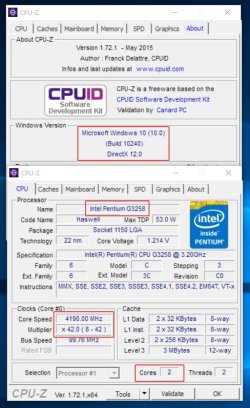
  • CPU-Z_screenshot.jpg
    CPU-Z_screenshot.jpg
    89 KB · Views: 0
Last edited:

My Computer My Computer

At a glance

Windows 10 Pro x64Intel Pentium G3258 3.20GHz Haswell, OC to 4....8GB G.SKILL Ripjaws X Series DDR3 1600 9-9-9-...NVIDIA GeForce GTX 650
Computer type
PC/Desktop
Computer Manufacturer/Model Number
Custom Build
OS
Windows 10 Pro x64
CPU
Intel Pentium G3258 3.20GHz Haswell, OC to 4.2GHz
Motherboard
EVGA Z87 FTW
Memory
8GB G.SKILL Ripjaws X Series DDR3 1600 9-9-9-24-2T
Graphics Card(s)
NVIDIA GeForce GTX 650
Sound Card
Onboard Realtek Hi-Def
Monitor(s) Displays
ViewSonic 20"
Screen Resolution
1680x1050
Hard Drives
1 OCZ ARC 100 120GB SSD (OS) &
2 WD Raptors 500GB in RAID 0
PSU
EVGA 80+ 500W
Case
Antec Nine Hundred ATX
Cooling
Case: 4x 120mm, 1x 200mm top fan - CPU: CM Hyper D92
Keyboard
Microsoft Comfort Curve 2000
Mouse
Logitech Laser
Internet Speed
12Mbps
Antivirus
Avira
Browser
Firefox 39
Other Info
Just a note on my CPU cooler. I currently have the new Cooler Master Hyper D92 (quite similar to the ever-popular Hyper 212 EVO except it has 2 fans and they are offset).
Believe it or not, my temps with a moderate OC (stock 3.2GHz to 4.2Ghz @1.215V (31% increase)) are 3C-5C LESS than the Corsair Hydro Series H90 water cooler I replaced, idle and 100% load.
Windows 7 installed this update on my AMD notebook (no Intel CPU). I am having the "install failed in the safe os phase" while attempting Windows 10 updates on Win7. Could this update be the culprit. Will uninstalling the update cause problems with my upgrade. I tried it 3 times manually getting this boot error each time. I have the upgrade reserved now.

No, this win7 update has nothing to do with the success or failure of installing win10. Win10 seems to have the same library that causes the crash, regardless. You could try setting your number of cores to 1 instead of 2 in the bios.
 

My Computer My Computer

At a glance

windows 7 home premium 64bit
Computer type
PC/Desktop
OS
windows 7 home premium 64bit
Windows 7 installed this update on my AMD notebook (no Intel CPU). I am having the "install failed in the safe os phase" while attempting Windows 10 updates on Win7. Could this update be the culprit. Will uninstalling the update cause problems with my upgrade. I tried it 3 times manually getting this boot error each time. I have the upgrade reserved now.

No, this win7 update has nothing to do with the success or failure of installing win10. Win10 seems to have the same library that causes the crash, regardless. You could try setting your number of cores to 1 instead of 2 in the bios.

Hi jdorje,

I would like to make a short post to clarify.

I TL;DR'ed the quote above your response and I thought you were disputing what I said in my post above regarding Windows 10 and G3258. I see now that you were talking to someone else. Sorry.

May I paraphrase what you said to make it clearer to the person?

The Windows 7 update itself has nothing to do with a successful or unsuccessful Windows 10 installation attempt.

However, the final Windows 10 release includes, internally, the same coding (libraries, dll's, etc.) that was previously the culprit Windows 7 update.

Therefore, when before you could just elect to not install the update, in order to continue to have no problems with Windows 7, you cannot now install Windows 10 because there is no option to exclude the code.

Simply do as jdorje suggested and disable one CPU core in the BIOS, install Windows 10, then re-enable the core (plus overclocking if you wish). Also as jdorje said, you disable a core by changing the number of active cores from 2 to 1 in the BIOS.

See the steps listed in my post above for instructions on how to do that. (i.e. changing the name of mcupdate_GenuineIntel.dll)

.
 

My Computer My Computer

At a glance

Windows 10 Pro x64Intel Pentium G3258 3.20GHz Haswell, OC to 4....8GB G.SKILL Ripjaws X Series DDR3 1600 9-9-9-...NVIDIA GeForce GTX 650
Computer type
PC/Desktop
Computer Manufacturer/Model Number
Custom Build
OS
Windows 10 Pro x64
CPU
Intel Pentium G3258 3.20GHz Haswell, OC to 4.2GHz
Motherboard
EVGA Z87 FTW
Memory
8GB G.SKILL Ripjaws X Series DDR3 1600 9-9-9-24-2T
Graphics Card(s)
NVIDIA GeForce GTX 650
Sound Card
Onboard Realtek Hi-Def
Monitor(s) Displays
ViewSonic 20"
Screen Resolution
1680x1050
Hard Drives
1 OCZ ARC 100 120GB SSD (OS) &
2 WD Raptors 500GB in RAID 0
PSU
EVGA 80+ 500W
Case
Antec Nine Hundred ATX
Cooling
Case: 4x 120mm, 1x 200mm top fan - CPU: CM Hyper D92
Keyboard
Microsoft Comfort Curve 2000
Mouse
Logitech Laser
Internet Speed
12Mbps
Antivirus
Avira
Browser
Firefox 39
Other Info
Just a note on my CPU cooler. I currently have the new Cooler Master Hyper D92 (quite similar to the ever-popular Hyper 212 EVO except it has 2 fans and they are offset).
Believe it or not, my temps with a moderate OC (stock 3.2GHz to 4.2Ghz @1.215V (31% increase)) are 3C-5C LESS than the Corsair Hydro Series H90 water cooler I replaced, idle and 100% load.
My gb motherboard now has a beta bios that purports to fix it (I'll wait), and gigabyte responded to my ticket saying they'd have a fixed bios within a "few weeks".

Removing the mcupdate_GenuineIntel.dll is a windows 10 fix. I don't know if it works on win7, but there's little reason to try it when you can just hide the optional update.

Edit: so I did try the f3a beta bios for my motherboard. It allows the system to boot when at stock, but it still can't boot when overclocked. Removing the offending dll or dropping down to 1 core still allows it to work. This is really worrisome, as it makes me thing the behavior is intentional and is intended to prevent overclocking this chip.
 
Last edited:

My Computer My Computer

At a glance

windows 7 home premium 64bit
Computer type
PC/Desktop
OS
windows 7 home premium 64bit
I have uninstalled and hidden this update on my two Win7 computers even though this update wasn't causing any apparent problems. For those who have had problems and in BIOS set the number of CPU cores from 2 to 1, I am curious if anybody has tried setting their PCI bus frequency to exactly 100MHz. The reason I ask is that I have found that the nVidia graphics card in one of my computers makes the system somewhat unstable (occasional BSOD which is always caused by NV4_disp.dll) unless I manually set the PCI bus to 100MHz in my BIOS. And I ask since posters mention that their computer's reboot right after a garbled screen is shown.
 

My Computer My Computer

At a glance

Windows 7 Professional x64Intel I532GBnVidia
Computer type
PC/Desktop
Computer Manufacturer/Model Number
custom build
OS
Windows 7 Professional x64
CPU
Intel I5
Motherboard
MSI Z87-G41 PC Mate
Memory
32GB
Graphics Card(s)
nVidia
Hard Drives
3TB
Antivirus
Panda Cloud AV Pro
Browser
Firefox
I have uninstalled and hidden this update on my two Win7 computers even though this update wasn't causing any apparent problems. For those who have had problems and in BIOS set the number of CPU cores from 2 to 1, I am curious if anybody has tried setting their PCI bus frequency to exactly 100MHz. The reason I ask is that I have found that the nVidia graphics card in one of my computers makes the system somewhat unstable (occasional BSOD which is always caused by NV4_disp.dll) unless I manually set the PCI bus to 100MHz in my BIOS. And I ask since posters mention that their computer's reboot right after a garbled screen is shown.

Manually tweaking the PCI bus is a very foolish idea unless you know exactly what you're doing. I've had garbled screen issues before as well, but thankfully my card was from XFX which naturally accepted an RMA 5 years after I bought it because they're the only ones in the business who offer lifetime warranties. I've since moved on to an R9-280, which is a very nice compromise when comparing cost to performance, even at 1200p for games that aren't cutting-edge.
 

My Computer My Computer

At a glance

Win7 x64
Computer type
PC/Desktop
OS
Win7 x64
Another update?

We just had another batch of updates install over night (not including 3064209) and guess what? 32 BRIX that wont boot in the same fashion as before.

Anyone know where to these beta bios versions from so I might be able to avoid it again in the future?
 

My Computer My Computer

At a glance

Windows 10
Computer type
PC/Desktop
OS
Windows 10
I just wanted to add some further info on this issue related to my setup.

After some troubleshooting, i narrowed down an extreme performance drop to KB3064209.

System and Enviro:

Windows 7 Pro x64
CPU: i7-5930k (No OC)
Memory: 16gb Corsair 2400mhz
Mobo: Rampage IV-E
SSD: Crucial 512GB MX100
GPU: GTX 980 (Zotac reference card)

My symptoms were basically that the computer performed perfectly fine. No issues on bootup, no notable performance issues. However, as soon as the computer entered 'sleep' mode or powered off the monitors, after waking, i would get an EXTREME drop in performance. Games would go from 80fps consistent to 10-15 FPS. Dropping the resolution of games to a postage stamp and disabling all effects would not increase FPS by a single frame.

I remembered i had recently done a windows update and mindlessly ticked all optional upgrades. (Hey, they cant hurt right?) So i started systematically uninstalling them one by one and reproducing the problem with a sleep timer of 1min. Sure enough, when i uninstalled KB3064209, my systems performance returned to normal even after a wake.

I would assume that this update is doing something funny with the CPU and not allowing Windows to wake it from a low-power state or some such? Odd. Running the most demanding games and even crunching some video encoding wouldnt pick up performance at all.

Hopefully this post helps some desperate googling troubleshooter to find the culprit of their massive performance drop after sleep on Windows 7 x64.
 

My Computer My Computer

At a glance

Windows 7 Pro x64i7 5930k16gb Corsair 2400mhzNvidia GTX 980
Computer type
PC/Desktop
Computer Manufacturer/Model Number
Custom Build
OS
Windows 7 Pro x64
CPU
i7 5930k
Motherboard
Rampage IV-E
Memory
16gb Corsair 2400mhz
Graphics Card(s)
Nvidia GTX 980
Hard Drives
Crucial CT512 MX100
Browser
Chrome
Made an account just for this, confirming this is not just a G3258 problem

Here is my system:

ASUS R4BE BIOS 0801
CORSAIR 64GB
EVGA 980 Ti *3

My win7 was running good for two month until I got KB3064209 as an optional update (400k), once that update is installed, my computer gets a BSOD and needed to recover.

I have not been able to run win10 successfully and this update maybe the problem as well, I had to went into my bios, disable cpu c states and csm booting to have win10 install but after installation, no matter what I do, windows 10 only runs on 1 of my 6 core, did benchmark and confirm its on single core.

Last night, my computer went BSOD again after auto-update, nothing optional, just the important one, that is when I realize that KB3064209 is now listed under important update instead optional, I had to hide it and installed all other update and my OS runs fine.

At this point, I don't know what to do, when will I be able to run win 10? until sp1? where is the asus bios update?
 

My Computer My Computer

At a glance

Windows 7 Ultimate x64
Computer type
PC/Desktop
OS
Windows 7 Ultimate x64
I have no idea why one would let a Windows 7 Update mess with their CPU and or Bios.

When one has a computer with problems, one of the last things to do is update the bios. Bios version is seldom the problem.

Intel cpu information should be got from Intel.
Bios information should be got from your motherboard manufacture.
Keep Microsoft the hell out of both.
 

My Computer My Computer

At a glance

Windows 10 Pro. 64/ version 1709 Windows 7 Pr...Intel i7-6800K @ 4.3Corsair Platinum 16 gig @2400EVGA GTX 1070 OC
Computer type
PC/Desktop
Computer Manufacturer/Model Number
Home made Desktop
OS
Windows 10 Pro. 64/ version 1709 Windows 7 Pro/64
CPU
Intel i7-6800K @ 4.3
Motherboard
ASUS X-99 Deluxe II
Memory
Corsair Platinum 16 gig @2400
Graphics Card(s)
EVGA GTX 1070 OC
Monitor(s) Displays
Asus 27" LED LCD/VE278Q
Screen Resolution
1920-1080 or 1280-720 HDMI
Hard Drives
INTEL SSD 730-240 Gb Sata 3.0/
PSU
EVGA Platium 1200W
Case
Phanteks Luxe Tempered Glass 8 fans/ one radiator
Cooling
XSPC/ Water Cooled CPU
Keyboard
Das 4 Professional
Mouse
Logitech M705/MX Anywhere 2-S
Internet Speed
100 mbits
Antivirus
Microsoft Security Essentials/ Malwarebytes Premium 3.0/ SAS
Browser
I.E. 11 default/Firefox/ ISP Time Warner Cable/Spectrum
Other Info
LG BluRay Burner/
Sound system-KLipsch-THX/
Icy Dock ssd Hot Swap bays.
For those running Win10 and/or otherwise have no other choice, see the workaround posted by Cetus35 top of Page 5.
 

My Computer My Computer

At a glance

Windown 7 Ultimate x64
Computer type
PC/Desktop
OS
Windown 7 Ultimate x64
I haven't used or tried win-10 on this system but the update loaded on 6/26 on a new build and installed 7 os :/
I'm still flipping coins on win-10 anyway as to how or if I use 10 at all
This issue will go in the negatives section lol :)

Wouldn't win-10 load that update anyway it is an os that picking and choosing updates is not all that possible.
 

My Computer My Computer

At a glance

Win-7-Pro64bit 7-H-Prem-64biti7-5930K 2nd i9-9940x both water blocked VRM'...Trident-z 3200C14 2nd Trident-z 3600C16EVGA 1080ti ftw3 2nd Titan Xp both water blocked
Computer type
PC/Desktop
Computer Manufacturer/Model Number
Custom assembled by me :}
OS
Win-7-Pro64bit 7-H-Prem-64bit
CPU
i7-5930K 2nd i9-9940x both water blocked VRM's too
Motherboard
ASUS SABERTOOTH X99 2nd ASUS x299 Apex
Memory
Trident-z 3200C14 2nd Trident-z 3600C16
Graphics Card(s)
EVGA 1080ti ftw3 2nd Titan Xp both water blocked
Sound Card
Built-in Realtek
Monitor(s) Displays
1-AOC G2460PG 24"G-Sync 144Hz/ 2nd 1-ASUS VG248QE 24" 144Hz
Screen Resolution
1920 x 1080 144Hz
Hard Drives
2-Samsung M.2 Evo & Evo Plus
2-Samsung 850 EVO 500GB SSD's/ 3-2.5 W.D. Black 1tb-&3-1tb/3-3.5 WD Black 1tb hdd's
PSU
EVGA SuperNOVA 1000-P2 2nd 1200-P2
Case
2-Corsair Obsidian Series 450D Black ATX Mid Tower
Cooling
Custom water loops
Keyboard
Logitech G710+/ 2nd Logitech G910
Mouse
2-RedDragon M901 Perdition 16400 dpi Gaming mouse = wired
Internet Speed
Comcast Ping 19ms 89.31mbps download speed 6.12mbps upload
Antivirus
Malwarebytes Pro/ Superantispyware Pro
Browser
FireFox & Pale moon
Other Info
2nd ASUS X299 Apex/Intel i9-9940x with Custom water loop/7H-Prem-x64/Corsair 450D case/Ram Trident-z 3600C16 4x8gb / Samsung970Evo plus 500gb SSD/Dual ssd EZ swap evo/PSU EVGA SuperNova 1200w-P2 80+Platinum/GPU Titan Xp /8-ML-140 on push-pull on 2-280GTX rads
For those running Win10 and/or otherwise have no other choice, see the workaround posted by Cetus35 top of Page 5.

I have already read the work around and I would not do such a work around if it was my computer.

Who knows what problems one will encounter down the road.
Of course one can do with their computer as one sees fit.

I just give my opinion. Some will like it and some will not.
 

My Computer My Computer

At a glance

Windows 10 Pro. 64/ version 1709 Windows 7 Pr...Intel i7-6800K @ 4.3Corsair Platinum 16 gig @2400EVGA GTX 1070 OC
Computer type
PC/Desktop
Computer Manufacturer/Model Number
Home made Desktop
OS
Windows 10 Pro. 64/ version 1709 Windows 7 Pro/64
CPU
Intel i7-6800K @ 4.3
Motherboard
ASUS X-99 Deluxe II
Memory
Corsair Platinum 16 gig @2400
Graphics Card(s)
EVGA GTX 1070 OC
Monitor(s) Displays
Asus 27" LED LCD/VE278Q
Screen Resolution
1920-1080 or 1280-720 HDMI
Hard Drives
INTEL SSD 730-240 Gb Sata 3.0/
PSU
EVGA Platium 1200W
Case
Phanteks Luxe Tempered Glass 8 fans/ one radiator
Cooling
XSPC/ Water Cooled CPU
Keyboard
Das 4 Professional
Mouse
Logitech M705/MX Anywhere 2-S
Internet Speed
100 mbits
Antivirus
Microsoft Security Essentials/ Malwarebytes Premium 3.0/ SAS
Browser
I.E. 11 default/Firefox/ ISP Time Warner Cable/Spectrum
Other Info
LG BluRay Burner/
Sound system-KLipsch-THX/
Icy Dock ssd Hot Swap bays.
I'm still trying to figure out why someone would install a new os= any os while still overclocking in the bios :confused:
 

My Computer My Computer

At a glance

Win-7-Pro64bit 7-H-Prem-64biti7-5930K 2nd i9-9940x both water blocked VRM'...Trident-z 3200C14 2nd Trident-z 3600C16EVGA 1080ti ftw3 2nd Titan Xp both water blocked
Computer type
PC/Desktop
Computer Manufacturer/Model Number
Custom assembled by me :}
OS
Win-7-Pro64bit 7-H-Prem-64bit
CPU
i7-5930K 2nd i9-9940x both water blocked VRM's too
Motherboard
ASUS SABERTOOTH X99 2nd ASUS x299 Apex
Memory
Trident-z 3200C14 2nd Trident-z 3600C16
Graphics Card(s)
EVGA 1080ti ftw3 2nd Titan Xp both water blocked
Sound Card
Built-in Realtek
Monitor(s) Displays
1-AOC G2460PG 24"G-Sync 144Hz/ 2nd 1-ASUS VG248QE 24" 144Hz
Screen Resolution
1920 x 1080 144Hz
Hard Drives
2-Samsung M.2 Evo & Evo Plus
2-Samsung 850 EVO 500GB SSD's/ 3-2.5 W.D. Black 1tb-&3-1tb/3-3.5 WD Black 1tb hdd's
PSU
EVGA SuperNOVA 1000-P2 2nd 1200-P2
Case
2-Corsair Obsidian Series 450D Black ATX Mid Tower
Cooling
Custom water loops
Keyboard
Logitech G710+/ 2nd Logitech G910
Mouse
2-RedDragon M901 Perdition 16400 dpi Gaming mouse = wired
Internet Speed
Comcast Ping 19ms 89.31mbps download speed 6.12mbps upload
Antivirus
Malwarebytes Pro/ Superantispyware Pro
Browser
FireFox & Pale moon
Other Info
2nd ASUS X299 Apex/Intel i9-9940x with Custom water loop/7H-Prem-x64/Corsair 450D case/Ram Trident-z 3600C16 4x8gb / Samsung970Evo plus 500gb SSD/Dual ssd EZ swap evo/PSU EVGA SuperNova 1200w-P2 80+Platinum/GPU Titan Xp /8-ML-140 on push-pull on 2-280GTX rads
I have no idea why one would let a Windows 7 Update mess with their CPU and or Bios.

When one has a computer with problems, one of the last things to do is update the bios. Bios version is seldom the problem.

Intel cpu information should be got from Intel.
Bios information should be got from your motherboard manufacture.
Keep Microsoft the hell out of both.

The update is provided by microsoft and in win10, carried with the os. I have no problem with my cpu or my motherboard without such update, my bios sees my cpu just fine, my device manager in windows even see my 6 core/12 thread just fine, it is however windows, only uses one core, two thread (that is with all the work I have to do get win 10 install), I am still not saying this is the 100% reason for my issue, but as you were saying, why is this windows update crashed my bios and cpu? seems to be a windows problem to me, not 100% microsoft, but microsoft is surely responsible to fix this. I really think MS and intel had a communication error cause all this, MS is saying that the cpu detected a hardware error so that MS can't install/operate, that's as far as I understand the problem
 

My Computer My Computer

At a glance

Windows 7 Ultimate x64
Computer type
PC/Desktop
OS
Windows 7 Ultimate x64
I haven't used or tried win-10 on this system but the update loaded on 6/26 on a new build and installed 7 os :/
I'm still flipping coins on win-10 anyway as to how or if I use 10 at all
This issue will go in the negatives section lol :)

Wouldn't win-10 load that update anyway it is an os that picking and choosing updates is not all that possible.

I have given up on win10 as of right now after almost two weeks of trying, win10 carries this update from day1, so there is no way around it.
 

My Computer My Computer

At a glance

Windows 7 Ultimate x64
Computer type
PC/Desktop
OS
Windows 7 Ultimate x64
Made an account just for this, confirming this is not just a G3258 problem

I have not been able to run win10 successfully... I realize that KB3064209 is now listed under important update instead optional, I had to hide it and installed all other update and my OS runs fine.
At this point, I don't know what to do, when will I be able to run win 10? until sp1? where is the asus bios update?

Hi kanzy,
I made a post above on how to successfully install Windows 10. Disable so there is only 1 core running, install Windows 10, rename or delete C:\Windows\System32\mcupdate_GenuineIntel.dll, go back into the BIOS and re-enable the core (or cores). Everything will work fine from there.


.


.
 

My Computer My Computer

At a glance

Windows 10 Pro x64Intel Pentium G3258 3.20GHz Haswell, OC to 4....8GB G.SKILL Ripjaws X Series DDR3 1600 9-9-9-...NVIDIA GeForce GTX 650
Computer type
PC/Desktop
Computer Manufacturer/Model Number
Custom Build
OS
Windows 10 Pro x64
CPU
Intel Pentium G3258 3.20GHz Haswell, OC to 4.2GHz
Motherboard
EVGA Z87 FTW
Memory
8GB G.SKILL Ripjaws X Series DDR3 1600 9-9-9-24-2T
Graphics Card(s)
NVIDIA GeForce GTX 650
Sound Card
Onboard Realtek Hi-Def
Monitor(s) Displays
ViewSonic 20"
Screen Resolution
1680x1050
Hard Drives
1 OCZ ARC 100 120GB SSD (OS) &
2 WD Raptors 500GB in RAID 0
PSU
EVGA 80+ 500W
Case
Antec Nine Hundred ATX
Cooling
Case: 4x 120mm, 1x 200mm top fan - CPU: CM Hyper D92
Keyboard
Microsoft Comfort Curve 2000
Mouse
Logitech Laser
Internet Speed
12Mbps
Antivirus
Avira
Browser
Firefox 39
Other Info
Just a note on my CPU cooler. I currently have the new Cooler Master Hyper D92 (quite similar to the ever-popular Hyper 212 EVO except it has 2 fans and they are offset).
Believe it or not, my temps with a moderate OC (stock 3.2GHz to 4.2Ghz @1.215V (31% increase)) are 3C-5C LESS than the Corsair Hydro Series H90 water cooler I replaced, idle and 100% load.
I am curious if anybody has tried setting their PCI bus frequency to exactly 100MHz. The reason I ask is that I have found that the nVidia graphics card in one of my computers makes the system somewhat unstable (occasional BSOD which is always caused by NV4_disp.dll) unless I manually set the PCI bus to 100MHz in my BIOS. And I ask since posters mention that their computer's reboot right after a garbled screen is shown.

Hi GoneToPlaid,

I also have an NVIDIA card (GTX 650) and my BIOS defaults to 100MHz and I have never changed it but this doesn't seem to be the cause of any of the problems mentioned in this thread.

I do know that this NVIDIA card (I've been loyal for at least 10 years now) is my last. I have had to deal with way, way too many "The NVIDIA driver blank-blank has quit working and Windows has restarted it". I'm sick of it. It's not a particular card. I've dealt with this for years with NVIDIA.

AMD Radeon, here I come.


.
 

My Computer My Computer

At a glance

Windows 10 Pro x64Intel Pentium G3258 3.20GHz Haswell, OC to 4....8GB G.SKILL Ripjaws X Series DDR3 1600 9-9-9-...NVIDIA GeForce GTX 650
Computer type
PC/Desktop
Computer Manufacturer/Model Number
Custom Build
OS
Windows 10 Pro x64
CPU
Intel Pentium G3258 3.20GHz Haswell, OC to 4.2GHz
Motherboard
EVGA Z87 FTW
Memory
8GB G.SKILL Ripjaws X Series DDR3 1600 9-9-9-24-2T
Graphics Card(s)
NVIDIA GeForce GTX 650
Sound Card
Onboard Realtek Hi-Def
Monitor(s) Displays
ViewSonic 20"
Screen Resolution
1680x1050
Hard Drives
1 OCZ ARC 100 120GB SSD (OS) &
2 WD Raptors 500GB in RAID 0
PSU
EVGA 80+ 500W
Case
Antec Nine Hundred ATX
Cooling
Case: 4x 120mm, 1x 200mm top fan - CPU: CM Hyper D92
Keyboard
Microsoft Comfort Curve 2000
Mouse
Logitech Laser
Internet Speed
12Mbps
Antivirus
Avira
Browser
Firefox 39
Other Info
Just a note on my CPU cooler. I currently have the new Cooler Master Hyper D92 (quite similar to the ever-popular Hyper 212 EVO except it has 2 fans and they are offset).
Believe it or not, my temps with a moderate OC (stock 3.2GHz to 4.2Ghz @1.215V (31% increase)) are 3C-5C LESS than the Corsair Hydro Series H90 water cooler I replaced, idle and 100% load.
For those running Win10 and/or otherwise have no other choice, see the workaround posted by Cetus35 top of Page 5.

I have already read the work around and I would not do such a work around if it was my computer.

Who knows what problems one will encounter down the road.
Of course one can do with their computer as one sees fit.

I just give my opinion. Some will like it and some will not.

Hi Layback Bear,

Say you knew of a workaround that would fix a problem that was causing you much desperation and hair pulling trying to upgrade to Windows 10 and you wouldn't use it?

I don't get it.

You did say that it was just your opinion and some would like it and some would not. It's not that I like or dislike it, I just don't understand it.

Then again, I never was the sharpest tool in the shed.

.
 

My Computer My Computer

At a glance

Windows 10 Pro x64Intel Pentium G3258 3.20GHz Haswell, OC to 4....8GB G.SKILL Ripjaws X Series DDR3 1600 9-9-9-...NVIDIA GeForce GTX 650
Computer type
PC/Desktop
Computer Manufacturer/Model Number
Custom Build
OS
Windows 10 Pro x64
CPU
Intel Pentium G3258 3.20GHz Haswell, OC to 4.2GHz
Motherboard
EVGA Z87 FTW
Memory
8GB G.SKILL Ripjaws X Series DDR3 1600 9-9-9-24-2T
Graphics Card(s)
NVIDIA GeForce GTX 650
Sound Card
Onboard Realtek Hi-Def
Monitor(s) Displays
ViewSonic 20"
Screen Resolution
1680x1050
Hard Drives
1 OCZ ARC 100 120GB SSD (OS) &
2 WD Raptors 500GB in RAID 0
PSU
EVGA 80+ 500W
Case
Antec Nine Hundred ATX
Cooling
Case: 4x 120mm, 1x 200mm top fan - CPU: CM Hyper D92
Keyboard
Microsoft Comfort Curve 2000
Mouse
Logitech Laser
Internet Speed
12Mbps
Antivirus
Avira
Browser
Firefox 39
Other Info
Just a note on my CPU cooler. I currently have the new Cooler Master Hyper D92 (quite similar to the ever-popular Hyper 212 EVO except it has 2 fans and they are offset).
Believe it or not, my temps with a moderate OC (stock 3.2GHz to 4.2Ghz @1.215V (31% increase)) are 3C-5C LESS than the Corsair Hydro Series H90 water cooler I replaced, idle and 100% load.
I'm still trying to figure out why someone would install a new os= any os while still overclocking in the bios :confused:

Because 90% of the time it works? I'm just saying..

I never have had to remove an overclock (before now) to install an OS and I've installed a few in my day.

If you are really, really pushing it and your system is half-ass unstable to start with, then yes, it's probably a good idea to get rid of the OC first.

I'm of the "If it's not stable, I'm not done tweaking yet" school. If an OC won't run stable for 2 or 3 days of IBT set to Maximum, I lower my OC settings and try again.

And yes I've read the many posts by goofball wannabe overclockers saying things like "I have a Pentium G3258 3.20GHz OC to 4.8 on air!!! I must have a problem somewhere, though, because when I try to open my game I get a BSOD every time"

That particular goofball should definitely follow your advice and get rid of that OC. (And stay away from it until he reads, reads, then reads some more about how to OC the right way.)


.
 

My Computer My Computer

At a glance

Windows 10 Pro x64Intel Pentium G3258 3.20GHz Haswell, OC to 4....8GB G.SKILL Ripjaws X Series DDR3 1600 9-9-9-...NVIDIA GeForce GTX 650
Computer type
PC/Desktop
Computer Manufacturer/Model Number
Custom Build
OS
Windows 10 Pro x64
CPU
Intel Pentium G3258 3.20GHz Haswell, OC to 4.2GHz
Motherboard
EVGA Z87 FTW
Memory
8GB G.SKILL Ripjaws X Series DDR3 1600 9-9-9-24-2T
Graphics Card(s)
NVIDIA GeForce GTX 650
Sound Card
Onboard Realtek Hi-Def
Monitor(s) Displays
ViewSonic 20"
Screen Resolution
1680x1050
Hard Drives
1 OCZ ARC 100 120GB SSD (OS) &
2 WD Raptors 500GB in RAID 0
PSU
EVGA 80+ 500W
Case
Antec Nine Hundred ATX
Cooling
Case: 4x 120mm, 1x 200mm top fan - CPU: CM Hyper D92
Keyboard
Microsoft Comfort Curve 2000
Mouse
Logitech Laser
Internet Speed
12Mbps
Antivirus
Avira
Browser
Firefox 39
Other Info
Just a note on my CPU cooler. I currently have the new Cooler Master Hyper D92 (quite similar to the ever-popular Hyper 212 EVO except it has 2 fans and they are offset).
Believe it or not, my temps with a moderate OC (stock 3.2GHz to 4.2Ghz @1.215V (31% increase)) are 3C-5C LESS than the Corsair Hydro Series H90 water cooler I replaced, idle and 100% load.
Back
Top