Recently fixed one BSOD, getting new code 0x1e

olivert

New member
Local time
8:42 AM
Messages
25
I only just closed another thread recently, but I started getting a new BSOD/error code x1e. I ran it through an online crash analyzer and it was initially pointing to MSIafterburner, at which point I ran a complete uninstall and installed NVIDIA inspector, as I prefer to run my graphics card fans even though by default sometimes they don't turn on until 70C (yikes). Anyways, I just had a crash after a few days and the analyzer is now pointing to the NVIDIA inspector.

Looking for help or recommendations that might ease this issue.
 

My Computer

Computer type
PC/Desktop
Computer Manufacturer/Model Number
Custom
OS
Windows 7 Home Premium 64 bit
CPU
Intel i7-2600k CPU
Motherboard
ASUS P8Z68-V PRO/GEN 3
Memory
24 GB
Graphics Card(s)
NVIDIA GeForce GTX 970
Hard Drives
Seagate ST1000DM003-9YN162
Antivirus
N/A
Browser
Chrome
Hello!

Code:
MaxSpeed: 3400 

CurrentSpeed: [COLOR="red"]3502 [/COLOR]


[COLOR="Red"]Processor may be overclocked! [/COLOR]
Expected Frequency: 3400 
Actual Frequency: 3502 
Overclock Ratio: 1.03

Please revert back to normal speed.
 

My Computer

Computer type
PC/Desktop
Computer Manufacturer/Model Number
Custom
OS
Windows 8.1 Pro x64
CPU
Intel Core i5-4570 CPU @ 3.20GHz
Motherboard
Gigabyte Z87-D3HP-CF
Memory
8GB DDR3-1596 - Dual Channel
Graphics Card(s)
NVIDIA GeForce GTX 750 Ti SC
Sound Card
Onboard
Monitor(s) Displays
Samsung
Screen Resolution
1920x1080
Hard Drives
SSD - 120GB
Second - 1TB
Antivirus
MSE
Browser
Chrome
Oh man! This is gonna sound kinda dumb but I don't know how to change that (safely).
 

My Computer

Computer type
PC/Desktop
Computer Manufacturer/Model Number
Custom
OS
Windows 7 Home Premium 64 bit
CPU
Intel i7-2600k CPU
Motherboard
ASUS P8Z68-V PRO/GEN 3
Memory
24 GB
Graphics Card(s)
NVIDIA GeForce GTX 970
Hard Drives
Seagate ST1000DM003-9YN162
Antivirus
N/A
Browser
Chrome
You should be able to go into the motherboard's BIOS (usually pressing F2 as the PC boots up) and simply reset the BIOS back to factory settings.
 

My Computer

Computer type
PC/Desktop
Computer Manufacturer/Model Number
Custom
OS
Windows 8.1 Pro x64
CPU
Intel Core i5-4570 CPU @ 3.20GHz
Motherboard
Gigabyte Z87-D3HP-CF
Memory
8GB DDR3-1596 - Dual Channel
Graphics Card(s)
NVIDIA GeForce GTX 750 Ti SC
Sound Card
Onboard
Monitor(s) Displays
Samsung
Screen Resolution
1920x1080
Hard Drives
SSD - 120GB
Second - 1TB
Antivirus
MSE
Browser
Chrome
Have been busy this week, tried to do this, reset to recommended defaults. For some reason the clock speed won't go under 3500mhz. Also left computer running to see what was going on. Left for a while and when I came back computer was black screen but still on and having since tried to restart, it loads thru BIOS but won't load windows, no logo, no login. Any idea what to do?
 

My Computer

Computer type
PC/Desktop
Computer Manufacturer/Model Number
Custom
OS
Windows 7 Home Premium 64 bit
CPU
Intel i7-2600k CPU
Motherboard
ASUS P8Z68-V PRO/GEN 3
Memory
24 GB
Graphics Card(s)
NVIDIA GeForce GTX 970
Hard Drives
Seagate ST1000DM003-9YN162
Antivirus
N/A
Browser
Chrome
I'll make a quick addition - after unplugging the PSU for a couple of minutes, I attempted another restart and it looked like it was going properly until login screen never showed up. The mouse did get a little win7 wheel for a moment though.
 

My Computer

Computer type
PC/Desktop
Computer Manufacturer/Model Number
Custom
OS
Windows 7 Home Premium 64 bit
CPU
Intel i7-2600k CPU
Motherboard
ASUS P8Z68-V PRO/GEN 3
Memory
24 GB
Graphics Card(s)
NVIDIA GeForce GTX 970
Hard Drives
Seagate ST1000DM003-9YN162
Antivirus
N/A
Browser
Chrome
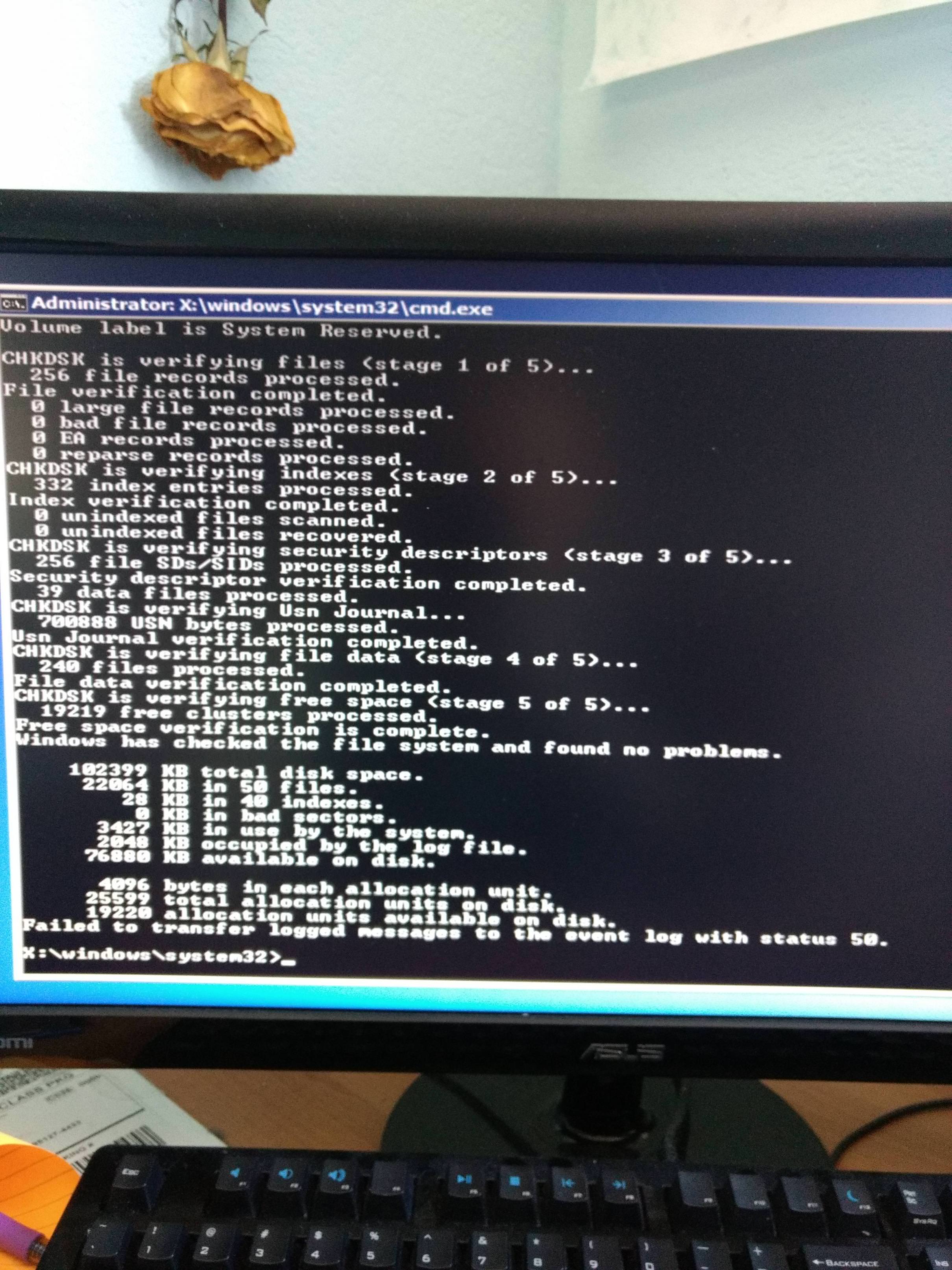
I've been trying to repair start up, etc, and just now decided to run chkdsk /r and the attached is a photo of the results. My HDD is supposed to be 1TB... Did I fry it?
VhCmWnz.jpg
 
Last edited:

My Computer

Computer type
PC/Desktop
Computer Manufacturer/Model Number
Custom
OS
Windows 7 Home Premium 64 bit
CPU
Intel i7-2600k CPU
Motherboard
ASUS P8Z68-V PRO/GEN 3
Memory
24 GB
Graphics Card(s)
NVIDIA GeForce GTX 970
Hard Drives
Seagate ST1000DM003-9YN162
Antivirus
N/A
Browser
Chrome

My Computer

Computer type
PC/Desktop
Computer Manufacturer/Model Number
Custom
OS
Windows 8.1 Pro x64
CPU
Intel Core i5-4570 CPU @ 3.20GHz
Motherboard
Gigabyte Z87-D3HP-CF
Memory
8GB DDR3-1596 - Dual Channel
Graphics Card(s)
NVIDIA GeForce GTX 750 Ti SC
Sound Card
Onboard
Monitor(s) Displays
Samsung
Screen Resolution
1920x1080
Hard Drives
SSD - 120GB
Second - 1TB
Antivirus
MSE
Browser
Chrome
The System Reserved partition appears to have been checked which is a small partition. Depending on the way your hard drive is partitioned, there are by default 1/2 or more small partitions for the recovery and booting.
Run diskpart in the command prompt to find out on which partition letter you need/want to run chkdsk on.
Code:
diskpart
list volume
 

My Computer

Computer type
PC/Desktop
Computer Manufacturer/Model Number
Custom build
OS
Windows 10 Pro
CPU
i5-6500
Motherboard
Gigabyte B150-HD3P-CF
Memory
16GB DDR4 2133 Crucial Ballistix Sport LT
Graphics Card(s)
MSI GeForce GTX 1060 GAMING X 6G
Sound Card
Intel Display Audio
Monitor(s) Displays
Liyama ProLite XB2483HSU-B2
Screen Resolution
1920 x 1080
Hard Drives
Crucial MX200 500GB & Toshiba DT01ACA300 3TB
PSU
Corsair RM550x
Case
Fractal Design Define S
Cooling
Cooler Master TX3 i
Keyboard
Func KB-460 (MX Red)
Mouse
Corsair Gaming M65 RGB
Antivirus
Bitdefender Total Security 2016 + MBAM Pro + MBAE Pro
Browser
Google Chrome
Other Info
Creative Sound Blaster Tactic3D Rage V2 headset
Back
Top