Recording sterio analog sound on a computer

jim davis

New member
Member
VIP
Local time
11:56 AM
Messages
191
Location
Walking, Taking In The Sweet Air
I have many music recordings on Cr2 tape and metal tape that never deteriorates (I am told) made on a nakamichi tape deck, these recordings are from "Half Speed Master Vinyl" records, which unless you've heard one, is just too breath taking to explain the value of. In a info advertisement page, I read but can't believe, I just need to run 2 RCA's from the tape deck that combine on the end to a stereo 3.5 mini plug and put it in my dell mic input, and then did not go on to explain what you do next in any sort of traction-able detail.
I know many company's that transfer these type of tape super recordings to a CD, and hearing "Dark Side of the Moon" a-b switched between a half speed analog AAD CD and a DDD CD was a historic emotional moment, but they want real money for doing this as such i wanna try making my own-if its possible.


Nakamichi DR-1 - YouTube

 
Last edited:

My Computer My Computer

At a glance

7 Home Prem. 32 bit, c drive 74.4 space CPU 3...?64 ?
Computer type
PC/Desktop
Computer Manufacturer/Model Number
dell optiplex 745
OS
7 Home Prem. 32 bit, c drive 74.4 space CPU 3.00 GHZ
CPU
?
Motherboard
?
Memory
64 ?
Hard Drives
1 TARA BITE WESTERN
Cooling
FAN IN FRONT AND a fan in back
Internet Speed
100 mbps
Antivirus
Avast and many others
Browser
firefox
Other Info
Patience Please, I know nothing, Zip, Zero about computers
I don't understand what your question is. I can tell you that the MIC in on a computer is only mono. You want to use line in which would be stereo. Also, you'll want a high quality sound card and record in a lossless audio format like FLAC. I use Wavepad myself for audio stuff, but I'm sure there's better software. Wavepad does have a wealth of audio recording formats and features to chose from.

Edit-

Looks like FLAC is fast seeking. FLAC - Wikipedia

Can you post a link to this advertisement page?
 

My Computer My Computer

At a glance

Windows 7 Ultimate x64
Computer type
PC/Desktop
OS
Windows 7 Ultimate x64
... I read but can't believe, I just need to run 2 RCA's [/SIZE]from the tape deck that combine on the end to a stereo 3.5 mini plug and put it in my dell mic input, ...


Yes, you can get converters or adaptors that connect a Stereo RCA Phono output to a 3.5mm TRSS jack. As usual with audio equipment, the better quality the better the result. Here is an example converter 2x RCA Phono to 3.5mm TRSS Jack Microphone recording lead . The Mic input on the computer doubles as a Line In connector for your audio equipment. Here is an explanation on how to connect the lead to your equipment How to connect your Equipment | Audacity Manual .

Whether you want to feed the recording signal into a graphic equaliser, is up to you.

Once the hardware is connected, then leave the rest of the recording process up to the software. Audacity again have a nice tutorial on recording from tape Sample Workflow for Tape Digitisation | Audacity Manual
 

My Computer My Computer

At a glance

Windows 7 x64, Vista x64, 8.1 smartphoneIntel E8400 65W 64-bitDDR2 2 x 2GB, 1GB x 2XFX Radeon HD5750
Computer type
PC/Desktop
OS
Windows 7 x64, Vista x64, 8.1 smartphone
CPU
Intel E8400 65W 64-bit
Motherboard
Gigabyte EP45-UD3LR
Memory
DDR2 2 x 2GB, 1GB x 2
Graphics Card(s)
XFX Radeon HD5750
Sound Card
AMD High Definition Audio; Realtek High Definition Audio
Monitor(s) Displays
iiyama prolite X2377HDS
Screen Resolution
1920 x 1080
Hard Drives
500GB 7200 rpm Seagate ST3500413AS 16MB, 500GB 5400 rpm Toshiba MQ02ABF050H 32MB, 200GB 7200 rpm Seagate ST3200820AS 8MB, 2TB 7200 rpm Western Digital WD20EZRX 64MB
PSU
Enermax Liberty Modular
Case
Antec P193 Midi Tower
Keyboard
Mionix ZIBAL 60
Mouse
Razer USB 2.0 Diamondback Mouse or Huion Graphics Tablet
Browser
Internet Explorer, Lunascape, Firefox, Opera, Avast Safezone
[SIZE=4 said:
iko22[/SIZE];3474741]Yes, you can get converters or adaptors that connect a Stereo RCA Phono output to a 3.5mm TRSS jack. As usual with audio equipment, the better quality the better the result. Here is an example converter 2x RCA Phono to 3.5mm TRSS Jack Microphone recording lead . The Mic input on the computer doubles as a Line In connector for your audio equipment. Here is an explanation on how to connect the lead to your equipment How to connect your Equipment | Audacity Manual .

Whether you want to feed the recording signal into a graphic equaliser, is up to you.

Once the hardware is connected, then leave the rest of the recording process up to the software. Audacity again have a nice tutorial on recording from tape Sample Workflow for Tape Digitisation | Audacity Manual


Thank you every body, simpilot TOO.
this looks like it will take me every where I need to get, some where down the road i will let you all know how it went and mark this solved.
WOW Mobile Fidelity Vinyl half speed masters transfer to lossless CD's, these are famous for sounding even better then the CD's Mobile Fidelity puts out
any one can read about them here who's interested --VINYL
Stay safe and loving
JD
 

My Computer My Computer

At a glance

7 Home Prem. 32 bit, c drive 74.4 space CPU 3...?64 ?
Computer type
PC/Desktop
Computer Manufacturer/Model Number
dell optiplex 745
OS
7 Home Prem. 32 bit, c drive 74.4 space CPU 3.00 GHZ
CPU
?
Motherboard
?
Memory
64 ?
Hard Drives
1 TARA BITE WESTERN
Cooling
FAN IN FRONT AND a fan in back
Internet Speed
100 mbps
Antivirus
Avast and many others
Browser
firefox
Other Info
Patience Please, I know nothing, Zip, Zero about computers
My experience has mirrored that of F22 Simpilot (computer mic inputs are mono), so Iko's response was news to me. So I followed his links.

His first link says, in the first paragraph, "Connect 2x RCA phono AUX output (left/right channel) from mixer to smartphone headset input."

A smartphone jack is totally different from mic jacks on computers. Smartphone jacks combine stereo out plus mono in, and are intended to be used with headsets. Computer jacks are not combined like that, except on a few laptops.

The link also continues by clarifying, "(please note: headset inputs are mono and not possible to record in true stereo)."

The first paragraph of the second link affirms, "Do not connect to the mic-in port of the computer," and further down the page (in the yellow box below the pictures), "A microphone port is typically mono."

Jim, the key distinction to note in your quest is that there is a difference between a Mic input (pink, mono) and a Line-In input (blue, stereo). While a Line-In input should work, the Mic input will not. Dedicated sound cards will typically have both pink and blue, but the motherboard sound on most computers typically only supports stereo out and mono in.
 

My Computer My Computer

At a glance

Windows 7/8.1/10 multibootIntel Core i7-770048GB (2x16GB Crucial DDR4-3200 + 2x8GB Hynix ...Intel HD630 + AMD Radeon R7 450 PCIe
Computer type
PC/Desktop
Computer Manufacturer/Model Number
Dell Optiplex 7050
OS
Windows 7/8.1/10 multiboot
CPU
Intel Core i7-7700
Motherboard
Dell, Intel Q270 chipset
Memory
48GB (2x16GB Crucial DDR4-3200 + 2x8GB Hynix DDR4-2400)
Graphics Card(s)
Intel HD630 + AMD Radeon R7 450 PCIe
Monitor(s) Displays
Asus VC279 (27")
Screen Resolution
1920x1080
Hard Drives
Toshiba M.2 NVMe (256GB),
Samsung 960 Evo (500GB),
WD Red Plus 80EFBX (8TB)
My experience has mirrored that of F22 Simpilot (computer mic inputs are mono), so Iko's response was news to me. So I followed his links.

His first link says, in the first paragraph, "Connect 2x RCA phono AUX output (left/right channel) from mixer to smartphone headset input."

A smartphone jack is totally different from mic jacks on computers. Smartphone jacks combine stereo out plus mono in, and are intended to be used with headsets. Computer jacks are not combined like that, except on a few laptops.

The link also continues by clarifying, "(please note: headset inputs are mono and not possible to record in true stereo)."

The first paragraph of the second link affirms, "Do not connect to the mic-in port of the computer," and further down the page (in the yellow box below the pictures), "A microphone port is typically mono."

Jim, the key distinction to note in your quest is that there is a difference between a Mic input (pink, mono) and a Line-In input (blue, stereo). While a Line-In input should work, the Mic input will not. Dedicated sound cards will typically have both pink and blue, but the motherboard sound on most computers typically only supports stereo out and mono in.

Thanks for chiming in dg1261, for I appear to have let in two mistakes.

One, the example cable TRSS connection is indeed a Smartphone connection.
Two, the mic input is not the same as a line in input, as I claimed. As dg1261 explained, a (stereo) Line In input is only on specialised sound cards.

Sorry :shock:

The Audacity articles are still good.
 

My Computer My Computer

At a glance

Windows 7 x64, Vista x64, 8.1 smartphoneIntel E8400 65W 64-bitDDR2 2 x 2GB, 1GB x 2XFX Radeon HD5750
Computer type
PC/Desktop
OS
Windows 7 x64, Vista x64, 8.1 smartphone
CPU
Intel E8400 65W 64-bit
Motherboard
Gigabyte EP45-UD3LR
Memory
DDR2 2 x 2GB, 1GB x 2
Graphics Card(s)
XFX Radeon HD5750
Sound Card
AMD High Definition Audio; Realtek High Definition Audio
Monitor(s) Displays
iiyama prolite X2377HDS
Screen Resolution
1920 x 1080
Hard Drives
500GB 7200 rpm Seagate ST3500413AS 16MB, 500GB 5400 rpm Toshiba MQ02ABF050H 32MB, 200GB 7200 rpm Seagate ST3200820AS 8MB, 2TB 7200 rpm Western Digital WD20EZRX 64MB
PSU
Enermax Liberty Modular
Case
Antec P193 Midi Tower
Keyboard
Mionix ZIBAL 60
Mouse
Razer USB 2.0 Diamondback Mouse or Huion Graphics Tablet
Browser
Internet Explorer, Lunascape, Firefox, Opera, Avast Safezone
What did we learn-
Sometimes if you hear hooves stampeding--
pay attention, it may turn out to be Zebras

Above is what i found my self writing toRoWin7 in my "can't rip Cd's thread"
after he tried his caustic skill at a psychiatric evaluation of guess who :o ?, that would surly have got him kicked out of any good Medical school. because folks were speaking before thinking or reading correctly what i said. which says all that's needs to be said.


Look I wanna tell you guys something, that your the best forum in the world is a indisputable fact,
but you all try too dam hard tho , I am coming in here with "Other Technology" questions :cry::banghead:
and getting worse off for it. I love the earnest-nist I get here, you all are great, but know when to let the world fix it self if your too tired and get some sleep :sleepy::sleepy::sleepy:.
Thanks really, truly and dam deeply :dinesh:


j
 

My Computer My Computer

At a glance

7 Home Prem. 32 bit, c drive 74.4 space CPU 3...?64 ?
Computer type
PC/Desktop
Computer Manufacturer/Model Number
dell optiplex 745
OS
7 Home Prem. 32 bit, c drive 74.4 space CPU 3.00 GHZ
CPU
?
Motherboard
?
Memory
64 ?
Hard Drives
1 TARA BITE WESTERN
Cooling
FAN IN FRONT AND a fan in back
Internet Speed
100 mbps
Antivirus
Avast and many others
Browser
firefox
Other Info
Patience Please, I know nothing, Zip, Zero about computers
What he did was, was dump a UN-intergrated, unfinished device on the public and then scam them into thinking it was a "great thing" to have to fix it your self.
Steve Jobs


OK

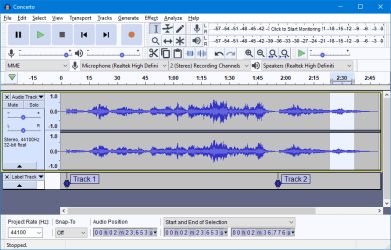
I saw the audacity program Dash board and yes, it took some audacity to complicate a simple process like converting a analog song off a tape deck into a digital lossless file they way they have suggested. I am not a submarine capt, and deeply resent being asked to be.


MOVING FORWARD


I have connected two RCA "Ends" into my tape player output, this cord coming off tape deck terminates to a single stereo 3.5 jack hat I should be able to input into my computer stereo Blueish input in back of computer, then open a program that captures that analog signal, changes it to "Lossless digital file" by way of a analog to digital converter, lets me name the file and store for movement to a CD-r or flash drive.


Audacity "Joke" dash board below, if you look at it longer then 10 seconds I predict hair will grow on your palms
 

Attachments

  • Theme_Light.png
    Theme_Light.png
    20.6 KB · Views: 0
Last edited:

My Computer My Computer

At a glance

7 Home Prem. 32 bit, c drive 74.4 space CPU 3...?64 ?
Computer type
PC/Desktop
Computer Manufacturer/Model Number
dell optiplex 745
OS
7 Home Prem. 32 bit, c drive 74.4 space CPU 3.00 GHZ
CPU
?
Motherboard
?
Memory
64 ?
Hard Drives
1 TARA BITE WESTERN
Cooling
FAN IN FRONT AND a fan in back
Internet Speed
100 mbps
Antivirus
Avast and many others
Browser
firefox
Other Info
Patience Please, I know nothing, Zip, Zero about computers
this may help some folks, this is a home audio CD recorder, It will take a signal from a Record Player thru your pre Amp, or accept a signal from a tape deck, and of course another CD player. I ASSUME you can make a CD R then copy the files from the CD R to a Flash drive, plug flash drive in to a high Fidelity CD player with a flash Drive USB input and play those files.
This is just one of many on the market and legal where i live to copy "One Copy" of a copy righted CD-Just one tho :rolleyes:


https://www.amazon.com/gp/product/B00Z7GAL24/ref=ask_ql_qh_dp_hza
 

My Computer My Computer

At a glance

7 Home Prem. 32 bit, c drive 74.4 space CPU 3...?64 ?
Computer type
PC/Desktop
Computer Manufacturer/Model Number
dell optiplex 745
OS
7 Home Prem. 32 bit, c drive 74.4 space CPU 3.00 GHZ
CPU
?
Motherboard
?
Memory
64 ?
Hard Drives
1 TARA BITE WESTERN
Cooling
FAN IN FRONT AND a fan in back
Internet Speed
100 mbps
Antivirus
Avast and many others
Browser
firefox
Other Info
Patience Please, I know nothing, Zip, Zero about computers
Back
Top