Solved Recover data from an accidental diskpart / clean command

drfalk

New member
Local time
12:31 AM
Messages
20
Hey folks,

What I did: Within CMD>diskpart>Select disk, i ran the clean (not clean all) command on a different drive than intended, (the goal was to recover a partition of a USB thumb drive), and ended up cleaning an external data drive (3TB), and would love to find out that my data is not lost. (over 2 TB of Data).

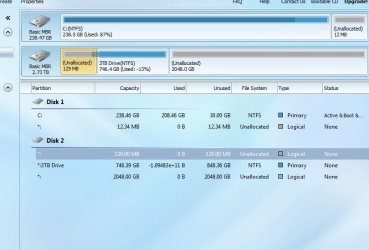
What I've done since: I immediately cursed, and then exited the CMD before i caused any more problems. After some reading up on these forums and other forums, i ended up downloading MiniTool Partitioning Wizard, and TestDisk. Within MiniTool, I've run a quick scan, as per: How to Make Partition Recovery | MiniTool Partition Wizard Tutorial . The tool found 3 partitions, and i took a screenshot. (should be attached).

Why I'm asking for help: I'm not sure what to do now. I had approximately the unallocated amount on the right (2048.0 GB) of data.(from my screenshot). The drive is not showing up in My Computer.
Is all that is left a simple merge of the partitions?

Please point me in the right direction.

Thanks in advance,
-drfalk
 

Attachments
  • hdddd.JPG
    hdddd.JPG
    52.1 KB · Views: 5

My Computer

Computer type
PC/Desktop
Computer Manufacturer/Model Number
Custom
OS
Windows 7 64 bit
CPU
i5 - 3550k
Motherboard
ASRock z77 Extreme6
Memory
ddr3 2x4gb
Graphics Card(s)
gtx 770
Hard Drives
Seagate external (now internal) 3tb hdd
OS drive - OCZ vertex 4 - 256 gb
Antivirus
NOD32
Browser
Chrome
Use testdisk to hunt for your lost partition. Pick the right disk it should be intel when asked what type, then pick analyse for lost partitions and see what it finds this may take a very long time. TestDisk Step By Step - CGSecurity -- Data Recovery Examples - CGSecurity If your confused about which disk to pick then post a pic of its output here.
 

My Computer

Computer type
PC/Desktop
Computer Manufacturer/Model Number
Custom
OS
10 Pro x64
CPU
Ryzen 9 3900X
Motherboard
Asrock x370 Tachi
Memory
64GB(4x16GB) DDR4
Graphics Card(s)
EVGA 1080ti FTW3
Sound Card
ASUS Xonar Essence STX (V4 Bursons), ODAC rev B, NFB-11, O2
Monitor(s) Displays
3xASUS PB278Q/R, Optoma HD142X
Screen Resolution
3x1440p, 1080p
Hard Drives
512GB 850 EVO(OS, Programs)
4TB (Movies)
3TB (Downloads)
3TB (Programs)
1TB HDD (Games)
2x6TB R1 (videos)
PSU
AX760
Case
Fractal Define R5
Cooling
NH-D15S
Keyboard
Massdrop Ctrl with Box Navy's
Mouse
G903, Alioth XXL Mat
Internet Speed
280/40
Antivirus
MBAM, ESET
Browser
Canary 64 Bit
Other Info
I also own a Thinkpad P50 Xeon 4K, X220T, X1C5
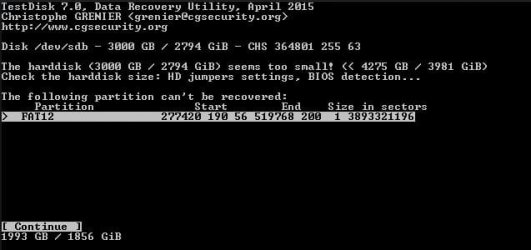
I ran the quick scan as instructed.

The results are as shown.
What should I do now? The website you linked instructs me to highlight each 'partition' but those 2 are not identifying themselves as partitions.
 

Attachments

  • hd1.JPG
    hd1.JPG
    34.8 KB · Views: 42

My Computer

Computer type
PC/Desktop
Computer Manufacturer/Model Number
Custom
OS
Windows 7 64 bit
CPU
i5 - 3550k
Motherboard
ASRock z77 Extreme6
Memory
ddr3 2x4gb
Graphics Card(s)
gtx 770
Hard Drives
Seagate external (now internal) 3tb hdd
OS drive - OCZ vertex 4 - 256 gb
Antivirus
NOD32
Browser
Chrome
I ran the quick scan as instructed.

The results are as shown.
What should I do now? The website you linked instructs me to highlight each 'partition' but those 2 are not identifying themselves as partitions.

Select the bottom one and hit p and see if it shows the correct files inside.
 

My Computer

Computer type
PC/Desktop
Computer Manufacturer/Model Number
Custom
OS
10 Pro x64
CPU
Ryzen 9 3900X
Motherboard
Asrock x370 Tachi
Memory
64GB(4x16GB) DDR4
Graphics Card(s)
EVGA 1080ti FTW3
Sound Card
ASUS Xonar Essence STX (V4 Bursons), ODAC rev B, NFB-11, O2
Monitor(s) Displays
3xASUS PB278Q/R, Optoma HD142X
Screen Resolution
3x1440p, 1080p
Hard Drives
512GB 850 EVO(OS, Programs)
4TB (Movies)
3TB (Downloads)
3TB (Programs)
1TB HDD (Games)
2x6TB R1 (videos)
PSU
AX760
Case
Fractal Define R5
Cooling
NH-D15S
Keyboard
Massdrop Ctrl with Box Navy's
Mouse
G903, Alioth XXL Mat
Internet Speed
280/40
Antivirus
MBAM, ESET
Browser
Canary 64 Bit
Other Info
I also own a Thinkpad P50 Xeon 4K, X220T, X1C5
I attached what it shows after hitting P on the bottom one.

Doesn't look like any comprehensible file names
 

Attachments

  • hd3.JPG
    hd3.JPG
    57.6 KB · Views: 39

My Computer

Computer type
PC/Desktop
Computer Manufacturer/Model Number
Custom
OS
Windows 7 64 bit
CPU
i5 - 3550k
Motherboard
ASRock z77 Extreme6
Memory
ddr3 2x4gb
Graphics Card(s)
gtx 770
Hard Drives
Seagate external (now internal) 3tb hdd
OS drive - OCZ vertex 4 - 256 gb
Antivirus
NOD32
Browser
Chrome
I attached what it shows after hitting P on the bottom one.

Doesn't look like any comprehensible file names

yeah, what does it find with the first option and p?
 

My Computer

Computer type
PC/Desktop
Computer Manufacturer/Model Number
Custom
OS
10 Pro x64
CPU
Ryzen 9 3900X
Motherboard
Asrock x370 Tachi
Memory
64GB(4x16GB) DDR4
Graphics Card(s)
EVGA 1080ti FTW3
Sound Card
ASUS Xonar Essence STX (V4 Bursons), ODAC rev B, NFB-11, O2
Monitor(s) Displays
3xASUS PB278Q/R, Optoma HD142X
Screen Resolution
3x1440p, 1080p
Hard Drives
512GB 850 EVO(OS, Programs)
4TB (Movies)
3TB (Downloads)
3TB (Programs)
1TB HDD (Games)
2x6TB R1 (videos)
PSU
AX760
Case
Fractal Define R5
Cooling
NH-D15S
Keyboard
Massdrop Ctrl with Box Navy's
Mouse
G903, Alioth XXL Mat
Internet Speed
280/40
Antivirus
MBAM, ESET
Browser
Canary 64 Bit
Other Info
I also own a Thinkpad P50 Xeon 4K, X220T, X1C5
First one shows this :confused:
 

Attachments

  • hd2.JPG
    hd2.JPG
    22.4 KB · Views: 39

My Computer

Computer type
PC/Desktop
Computer Manufacturer/Model Number
Custom
OS
Windows 7 64 bit
CPU
i5 - 3550k
Motherboard
ASRock z77 Extreme6
Memory
ddr3 2x4gb
Graphics Card(s)
gtx 770
Hard Drives
Seagate external (now internal) 3tb hdd
OS drive - OCZ vertex 4 - 256 gb
Antivirus
NOD32
Browser
Chrome
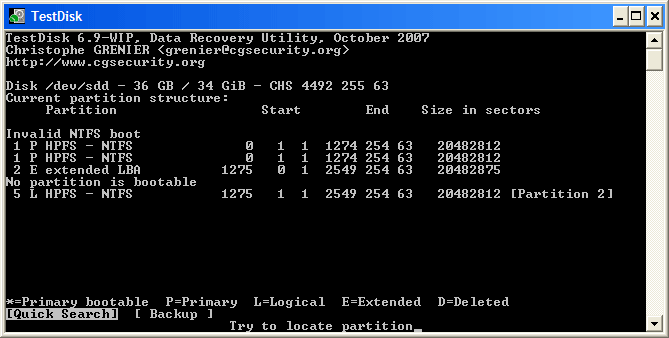
Pick the lower one again but instead of hitting p hit enter to continue then post the what it shows please. EDIT: actually what does it show at this step before you quick search?
Analyse.gif
 

My Computer

Computer type
PC/Desktop
Computer Manufacturer/Model Number
Custom
OS
10 Pro x64
CPU
Ryzen 9 3900X
Motherboard
Asrock x370 Tachi
Memory
64GB(4x16GB) DDR4
Graphics Card(s)
EVGA 1080ti FTW3
Sound Card
ASUS Xonar Essence STX (V4 Bursons), ODAC rev B, NFB-11, O2
Monitor(s) Displays
3xASUS PB278Q/R, Optoma HD142X
Screen Resolution
3x1440p, 1080p
Hard Drives
512GB 850 EVO(OS, Programs)
4TB (Movies)
3TB (Downloads)
3TB (Programs)
1TB HDD (Games)
2x6TB R1 (videos)
PSU
AX760
Case
Fractal Define R5
Cooling
NH-D15S
Keyboard
Massdrop Ctrl with Box Navy's
Mouse
G903, Alioth XXL Mat
Internet Speed
280/40
Antivirus
MBAM, ESET
Browser
Canary 64 Bit
Other Info
I also own a Thinkpad P50 Xeon 4K, X220T, X1C5
This software is also free and seems to work well for your type of problem but you will at this point need another disk to transfer your files to then you will have to reformat your messed up disk and copy your files back to it. Do you have another disk you can use to save your recovered stuff too at this time? Partition Find and Mount — free partition recovery software
 

My Computer

Computer type
PC/Desktop
Computer Manufacturer/Model Number
Custom
OS
10 Pro x64
CPU
Ryzen 9 3900X
Motherboard
Asrock x370 Tachi
Memory
64GB(4x16GB) DDR4
Graphics Card(s)
EVGA 1080ti FTW3
Sound Card
ASUS Xonar Essence STX (V4 Bursons), ODAC rev B, NFB-11, O2
Monitor(s) Displays
3xASUS PB278Q/R, Optoma HD142X
Screen Resolution
3x1440p, 1080p
Hard Drives
512GB 850 EVO(OS, Programs)
4TB (Movies)
3TB (Downloads)
3TB (Programs)
1TB HDD (Games)
2x6TB R1 (videos)
PSU
AX760
Case
Fractal Define R5
Cooling
NH-D15S
Keyboard
Massdrop Ctrl with Box Navy's
Mouse
G903, Alioth XXL Mat
Internet Speed
280/40
Antivirus
MBAM, ESET
Browser
Canary 64 Bit
Other Info
I also own a Thinkpad P50 Xeon 4K, X220T, X1C5
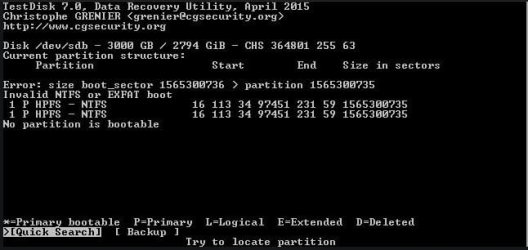
Shows this.

And yes i have an extra external hdd

Partition Find & Mount is downloaded
 

Attachments

  • hd4.JPG
    hd4.JPG
    34.4 KB · Views: 36
Last edited:

My Computer

Computer type
PC/Desktop
Computer Manufacturer/Model Number
Custom
OS
Windows 7 64 bit
CPU
i5 - 3550k
Motherboard
ASRock z77 Extreme6
Memory
ddr3 2x4gb
Graphics Card(s)
gtx 770
Hard Drives
Seagate external (now internal) 3tb hdd
OS drive - OCZ vertex 4 - 256 gb
Antivirus
NOD32
Browser
Chrome
what happens if you pick deep search, you might have to find more info to pick the right one to attempt to write. Don't write anything till were sure.
 

My Computer

Computer type
PC/Desktop
Computer Manufacturer/Model Number
Custom
OS
10 Pro x64
CPU
Ryzen 9 3900X
Motherboard
Asrock x370 Tachi
Memory
64GB(4x16GB) DDR4
Graphics Card(s)
EVGA 1080ti FTW3
Sound Card
ASUS Xonar Essence STX (V4 Bursons), ODAC rev B, NFB-11, O2
Monitor(s) Displays
3xASUS PB278Q/R, Optoma HD142X
Screen Resolution
3x1440p, 1080p
Hard Drives
512GB 850 EVO(OS, Programs)
4TB (Movies)
3TB (Downloads)
3TB (Programs)
1TB HDD (Games)
2x6TB R1 (videos)
PSU
AX760
Case
Fractal Define R5
Cooling
NH-D15S
Keyboard
Massdrop Ctrl with Box Navy's
Mouse
G903, Alioth XXL Mat
Internet Speed
280/40
Antivirus
MBAM, ESET
Browser
Canary 64 Bit
Other Info
I also own a Thinkpad P50 Xeon 4K, X220T, X1C5
Running Deeper Scan on TestDisk overnight, will post results tomorrow
 

My Computer

Computer type
PC/Desktop
Computer Manufacturer/Model Number
Custom
OS
Windows 7 64 bit
CPU
i5 - 3550k
Motherboard
ASRock z77 Extreme6
Memory
ddr3 2x4gb
Graphics Card(s)
gtx 770
Hard Drives
Seagate external (now internal) 3tb hdd
OS drive - OCZ vertex 4 - 256 gb
Antivirus
NOD32
Browser
Chrome

My Computer

Computer type
PC/Desktop
Computer Manufacturer/Model Number
Custom
OS
10 Pro x64
CPU
Ryzen 9 3900X
Motherboard
Asrock x370 Tachi
Memory
64GB(4x16GB) DDR4
Graphics Card(s)
EVGA 1080ti FTW3
Sound Card
ASUS Xonar Essence STX (V4 Bursons), ODAC rev B, NFB-11, O2
Monitor(s) Displays
3xASUS PB278Q/R, Optoma HD142X
Screen Resolution
3x1440p, 1080p
Hard Drives
512GB 850 EVO(OS, Programs)
4TB (Movies)
3TB (Downloads)
3TB (Programs)
1TB HDD (Games)
2x6TB R1 (videos)
PSU
AX760
Case
Fractal Define R5
Cooling
NH-D15S
Keyboard
Massdrop Ctrl with Box Navy's
Mouse
G903, Alioth XXL Mat
Internet Speed
280/40
Antivirus
MBAM, ESET
Browser
Canary 64 Bit
Other Info
I also own a Thinkpad P50 Xeon 4K, X220T, X1C5
This is all it says
 

Attachments

  • hd5.JPG
    hd5.JPG
    27.9 KB · Views: 24

My Computer

Computer type
PC/Desktop
Computer Manufacturer/Model Number
Custom
OS
Windows 7 64 bit
CPU
i5 - 3550k
Motherboard
ASRock z77 Extreme6
Memory
ddr3 2x4gb
Graphics Card(s)
gtx 770
Hard Drives
Seagate external (now internal) 3tb hdd
OS drive - OCZ vertex 4 - 256 gb
Antivirus
NOD32
Browser
Chrome
If you now continue and hit p again its still all messed up? You might need to in the end use photorec to just get your files off it to your external but that would suck as it will named random things I think and I imagine you have a lot of files if it's 2TB.
 

My Computer

Computer type
PC/Desktop
Computer Manufacturer/Model Number
Custom
OS
10 Pro x64
CPU
Ryzen 9 3900X
Motherboard
Asrock x370 Tachi
Memory
64GB(4x16GB) DDR4
Graphics Card(s)
EVGA 1080ti FTW3
Sound Card
ASUS Xonar Essence STX (V4 Bursons), ODAC rev B, NFB-11, O2
Monitor(s) Displays
3xASUS PB278Q/R, Optoma HD142X
Screen Resolution
3x1440p, 1080p
Hard Drives
512GB 850 EVO(OS, Programs)
4TB (Movies)
3TB (Downloads)
3TB (Programs)
1TB HDD (Games)
2x6TB R1 (videos)
PSU
AX760
Case
Fractal Define R5
Cooling
NH-D15S
Keyboard
Massdrop Ctrl with Box Navy's
Mouse
G903, Alioth XXL Mat
Internet Speed
280/40
Antivirus
MBAM, ESET
Browser
Canary 64 Bit
Other Info
I also own a Thinkpad P50 Xeon 4K, X220T, X1C5
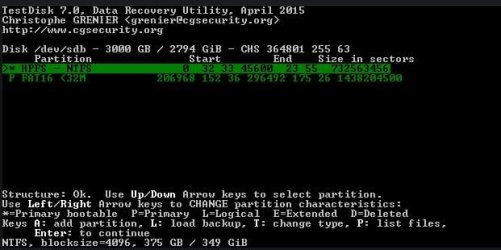
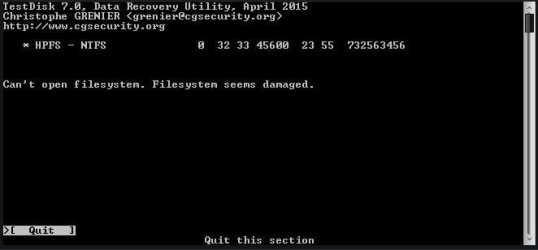
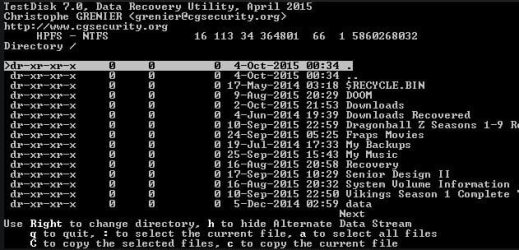
All but the 3rd Partition, the one highlighted, has either incomprehensible file names or "Can't open file system. Filesystem seems damaged." The 3rd, highlighted, partition looks like everything is there, I attached a screenshot, 2nd screenshot, of what it shows within that partition, all file names seem to be correct
 

Attachments

  • hd6.JPG
    hd6.JPG
    38 KB · Views: 24
  • hd7.JPG
    hd7.JPG
    55.2 KB · Views: 24

My Computer

Computer type
PC/Desktop
Computer Manufacturer/Model Number
Custom
OS
Windows 7 64 bit
CPU
i5 - 3550k
Motherboard
ASRock z77 Extreme6
Memory
ddr3 2x4gb
Graphics Card(s)
gtx 770
Hard Drives
Seagate external (now internal) 3tb hdd
OS drive - OCZ vertex 4 - 256 gb
Antivirus
NOD32
Browser
Chrome
Ok that's good I need to reread the steps now so ill post again once I get what you should do next, the one in pic 1 that's highlighted is the one you can see your files in correct?
 

My Computer

Computer type
PC/Desktop
Computer Manufacturer/Model Number
Custom
OS
10 Pro x64
CPU
Ryzen 9 3900X
Motherboard
Asrock x370 Tachi
Memory
64GB(4x16GB) DDR4
Graphics Card(s)
EVGA 1080ti FTW3
Sound Card
ASUS Xonar Essence STX (V4 Bursons), ODAC rev B, NFB-11, O2
Monitor(s) Displays
3xASUS PB278Q/R, Optoma HD142X
Screen Resolution
3x1440p, 1080p
Hard Drives
512GB 850 EVO(OS, Programs)
4TB (Movies)
3TB (Downloads)
3TB (Programs)
1TB HDD (Games)
2x6TB R1 (videos)
PSU
AX760
Case
Fractal Define R5
Cooling
NH-D15S
Keyboard
Massdrop Ctrl with Box Navy's
Mouse
G903, Alioth XXL Mat
Internet Speed
280/40
Antivirus
MBAM, ESET
Browser
Canary 64 Bit
Other Info
I also own a Thinkpad P50 Xeon 4K, X220T, X1C5
Ok that's good I need to reread the steps now so ill post again once I get what you should do next, the one in pic 1 that's highlighted is the one you can see your files in correct?

Yes, the 3rd NTFS one.
 

My Computer

Computer type
PC/Desktop
Computer Manufacturer/Model Number
Custom
OS
Windows 7 64 bit
CPU
i5 - 3550k
Motherboard
ASRock z77 Extreme6
Memory
ddr3 2x4gb
Graphics Card(s)
gtx 770
Hard Drives
Seagate external (now internal) 3tb hdd
OS drive - OCZ vertex 4 - 256 gb
Antivirus
NOD32
Browser
Chrome
Okay you need to highlight the good one and then use this to make only the one you need to L (not D)

Using the left/right arrow keys, change the status of the selected partition from D(eleted) to L(ogical). This way you will be able to recover this partition

Then once it is correct (as L) hit enter to continue then it will say write at the bottom and you want to do it, but before you do it post a pic of what it says it will write.
 

My Computer

Computer type
PC/Desktop
Computer Manufacturer/Model Number
Custom
OS
10 Pro x64
CPU
Ryzen 9 3900X
Motherboard
Asrock x370 Tachi
Memory
64GB(4x16GB) DDR4
Graphics Card(s)
EVGA 1080ti FTW3
Sound Card
ASUS Xonar Essence STX (V4 Bursons), ODAC rev B, NFB-11, O2
Monitor(s) Displays
3xASUS PB278Q/R, Optoma HD142X
Screen Resolution
3x1440p, 1080p
Hard Drives
512GB 850 EVO(OS, Programs)
4TB (Movies)
3TB (Downloads)
3TB (Programs)
1TB HDD (Games)
2x6TB R1 (videos)
PSU
AX760
Case
Fractal Define R5
Cooling
NH-D15S
Keyboard
Massdrop Ctrl with Box Navy's
Mouse
G903, Alioth XXL Mat
Internet Speed
280/40
Antivirus
MBAM, ESET
Browser
Canary 64 Bit
Other Info
I also own a Thinkpad P50 Xeon 4K, X220T, X1C5
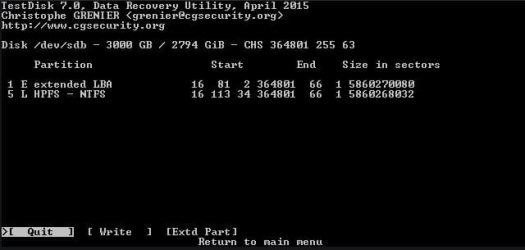
Ok, only the 3rd was switched to L, i hit enter and it shows this:
 

Attachments

  • hd8.JPG
    hd8.JPG
    23.7 KB · Views: 24

My Computer

Computer type
PC/Desktop
Computer Manufacturer/Model Number
Custom
OS
Windows 7 64 bit
CPU
i5 - 3550k
Motherboard
ASRock z77 Extreme6
Memory
ddr3 2x4gb
Graphics Card(s)
gtx 770
Hard Drives
Seagate external (now internal) 3tb hdd
OS drive - OCZ vertex 4 - 256 gb
Antivirus
NOD32
Browser
Chrome
Back
Top