Solved Recover data from an accidental diskpart / clean command

Looks good i'm pretty sure that extended should be there like that. Choose to write it then post pic.
 

My Computer My Computer

Computer type
PC/Desktop
Computer Manufacturer/Model Number
Custom
OS
10 Pro x64
CPU
Ryzen 9 3900X
Motherboard
Asrock x370 Tachi
Memory
64GB(4x16GB) DDR4
Graphics Card(s)
EVGA 1080ti FTW3
Sound Card
ASUS Xonar Essence STX (V4 Bursons), ODAC rev B, NFB-11, O2
Monitor(s) Displays
3xASUS PB278Q/R, Optoma HD142X
Screen Resolution
3x1440p, 1080p
Hard Drives
512GB 850 EVO(OS, Programs)
4TB (Movies)
3TB (Downloads)
3TB (Programs)
1TB HDD (Games)
2x6TB R1 (videos)
PSU
AX760
Case
Fractal Define R5
Cooling
NH-D15S
Keyboard
Massdrop Ctrl with Box Navy's
Mouse
G903, Alioth XXL Mat
Internet Speed
280/40
Antivirus
MBAM, ESET
Browser
Canary 64 Bit
Other Info
I also own a Thinkpad P50 Xeon 4K, X220T, X1C5
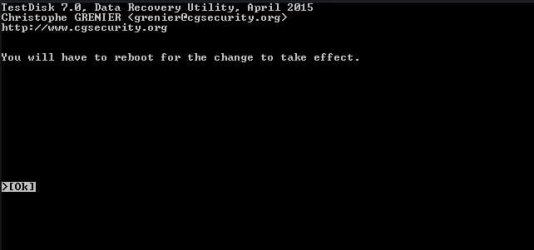
Ok rebooting, as instructed in program
 

Attachments

  • hd9.JPG
    hd9.JPG
    16.6 KB · Views: 25

My Computer My Computer

Computer type
PC/Desktop
Computer Manufacturer/Model Number
Custom
OS
Windows 7 64 bit
CPU
i5 - 3550k
Motherboard
ASRock z77 Extreme6
Memory
ddr3 2x4gb
Graphics Card(s)
gtx 770
Hard Drives
Seagate external (now internal) 3tb hdd
OS drive - OCZ vertex 4 - 256 gb
Antivirus
NOD32
Browser
Chrome
What's next?
 

My Computer My Computer

Computer type
PC/Desktop
Computer Manufacturer/Model Number
Custom
OS
Windows 7 64 bit
CPU
i5 - 3550k
Motherboard
ASRock z77 Extreme6
Memory
ddr3 2x4gb
Graphics Card(s)
gtx 770
Hard Drives
Seagate external (now internal) 3tb hdd
OS drive - OCZ vertex 4 - 256 gb
Antivirus
NOD32
Browser
Chrome
hmmmm............... This thread came to my atttention just a few minutes ago. I tried to cry "HALT" but before I can do that it seems to have moved faster to a point of no return.

If you have not given a Write Command yet, don't. If you haven't rebooted, Don't. Just quit TestDisk so that the write does not take effect.
 

My Computer My Computer

OS
Windows 7 Home Premium 32 bit
And if i have?
 

My Computer My Computer

Computer type
PC/Desktop
Computer Manufacturer/Model Number
Custom
OS
Windows 7 64 bit
CPU
i5 - 3550k
Motherboard
ASRock z77 Extreme6
Memory
ddr3 2x4gb
Graphics Card(s)
gtx 770
Hard Drives
Seagate external (now internal) 3tb hdd
OS drive - OCZ vertex 4 - 256 gb
Antivirus
NOD32
Browser
Chrome
hmmmm............... This thread came to my atttention just a few minutes ago. I tried to cry "HALT" but before I can do that it seems to have moved faster to a point of no return.

If you have not given a Write Command yet, don't. If you haven't rebooted, Don't. Just quit TestDisk

Oh, He has rebooted I believe.
 

My Computer My Computer

Computer type
PC/Desktop
Computer Manufacturer/Model Number
Custom
OS
10 Pro x64
CPU
Ryzen 9 3900X
Motherboard
Asrock x370 Tachi
Memory
64GB(4x16GB) DDR4
Graphics Card(s)
EVGA 1080ti FTW3
Sound Card
ASUS Xonar Essence STX (V4 Bursons), ODAC rev B, NFB-11, O2
Monitor(s) Displays
3xASUS PB278Q/R, Optoma HD142X
Screen Resolution
3x1440p, 1080p
Hard Drives
512GB 850 EVO(OS, Programs)
4TB (Movies)
3TB (Downloads)
3TB (Programs)
1TB HDD (Games)
2x6TB R1 (videos)
PSU
AX760
Case
Fractal Define R5
Cooling
NH-D15S
Keyboard
Massdrop Ctrl with Box Navy's
Mouse
G903, Alioth XXL Mat
Internet Speed
280/40
Antivirus
MBAM, ESET
Browser
Canary 64 Bit
Other Info
I also own a Thinkpad P50 Xeon 4K, X220T, X1C5
@rvcjew, now you can proceed with what you wanted to do. and see whether the data can be recovered.

When I started reading this thread I realised a mistake has been done. The mistake is as I saw it:

His 3TB drive seems to be a GPT drive. The 129MB partition shown by Partition Wizard is the Microsoft System Reserved Partition.

When the OP ran TestDisk he should have chosen [EFI GPT] and not [Intel]

Then perhaps everything would have gone right.

Now I don't know. Carry on with your processing and let us see where we land. If data is recovered I may have to give you ten reps.:)
 

My Computer My Computer

OS
Windows 7 Home Premium 32 bit
@rvcjew, now you can proceed with what you wanted to do. and see whether the data can be recovered.

When I started reading this thread I realised a mistake has been done. The mistake is as I saw it:

His 3TB drive seems to be a GPT drive. The 129MB partition shown by Partition Wizard is the Microsoft System Reserved Partition.

When the OP ran TestDisk he should have chosen [EFI GPT] and not [Intel]

Then perhaps everything would have gone right.

Now I don't know. Carry on with your processing and let us see where we land. If data is recovered I may have to give you ten reps.:)

Oh god, your right I thought the intel incorporated the GPT (I saw mac, and linux and I guess had a brain fart, I still think we have a chance though). Well cross your fingers. We'll have to just wait for there reply.
 

My Computer My Computer

Computer type
PC/Desktop
Computer Manufacturer/Model Number
Custom
OS
10 Pro x64
CPU
Ryzen 9 3900X
Motherboard
Asrock x370 Tachi
Memory
64GB(4x16GB) DDR4
Graphics Card(s)
EVGA 1080ti FTW3
Sound Card
ASUS Xonar Essence STX (V4 Bursons), ODAC rev B, NFB-11, O2
Monitor(s) Displays
3xASUS PB278Q/R, Optoma HD142X
Screen Resolution
3x1440p, 1080p
Hard Drives
512GB 850 EVO(OS, Programs)
4TB (Movies)
3TB (Downloads)
3TB (Programs)
1TB HDD (Games)
2x6TB R1 (videos)
PSU
AX760
Case
Fractal Define R5
Cooling
NH-D15S
Keyboard
Massdrop Ctrl with Box Navy's
Mouse
G903, Alioth XXL Mat
Internet Speed
280/40
Antivirus
MBAM, ESET
Browser
Canary 64 Bit
Other Info
I also own a Thinkpad P50 Xeon 4K, X220T, X1C5
Oh god, your right I thought the intel incorporated the GPT (I saw mac, and linux and I guess had a brain fart, I still think we have a chance though). Well cross your fingers. We'll have to just wait for there reply.

Yep, I do think the situation can be retrieved with a little bit of additional exercise. But for the present continue with your processing - but no more write command on any count. Only Copy command.. We have lots of unknowns when trying Data Recovery, and I won't be surprised if data can be recovered even with this fault. That is why I said if it is recovered, I have to give you ten reps :)

But I can assure the OP that nothing is really lost and he need not lose hope - not yet.If at all, what could have been written is a wrong partition table in sector 0.If my assumption is correct, We can easily write zeros to the whole sector 0, or delete only the wrong partition table written into sector 0 and bring the Disk back to the pre-TestDisk run state and then start TestDisk all over again.
 

My Computer My Computer

OS
Windows 7 Home Premium 32 bit
Oh god, your right I thought the intel incorporated the GPT (I saw mac, and linux and I guess had a brain fart, I still think we have a chance though). Well cross your fingers. We'll have to just wait for there reply.

Yep, I do think the situation can be retrieved with a little bit of additional exercise. But for the present continue with your processing - but no more write command on any count. Only Copy command.. We have lots of unknowns when trying Data Recovery, and I won't be surprised if data can be recovered even with this fault. That is why I said if it is recovered, I have to give you ten reps :)

But I can assure the OP that nothing is really lost and he need not lose hope - not yet.If at all what could have been written is a wrong partition table in sector 0. We can easily write zeros to the whole sector 0, or delete only the wrong partition table written into sector 0 and bring the Disk back to the pre TestDisk run state and then start TestDisk all over again.

That certainty, makes me feel better and i'm sure the OP as well, thank you for the excellent advice and information to help this process in the future. I figured there was a way to revert the table but did not know what it would be.
 

My Computer My Computer

Computer type
PC/Desktop
Computer Manufacturer/Model Number
Custom
OS
10 Pro x64
CPU
Ryzen 9 3900X
Motherboard
Asrock x370 Tachi
Memory
64GB(4x16GB) DDR4
Graphics Card(s)
EVGA 1080ti FTW3
Sound Card
ASUS Xonar Essence STX (V4 Bursons), ODAC rev B, NFB-11, O2
Monitor(s) Displays
3xASUS PB278Q/R, Optoma HD142X
Screen Resolution
3x1440p, 1080p
Hard Drives
512GB 850 EVO(OS, Programs)
4TB (Movies)
3TB (Downloads)
3TB (Programs)
1TB HDD (Games)
2x6TB R1 (videos)
PSU
AX760
Case
Fractal Define R5
Cooling
NH-D15S
Keyboard
Massdrop Ctrl with Box Navy's
Mouse
G903, Alioth XXL Mat
Internet Speed
280/40
Antivirus
MBAM, ESET
Browser
Canary 64 Bit
Other Info
I also own a Thinkpad P50 Xeon 4K, X220T, X1C5
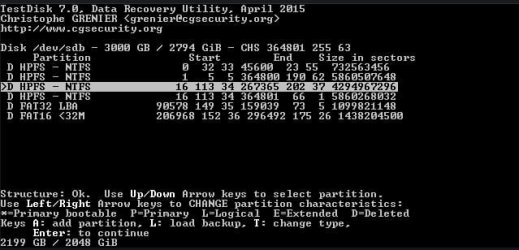
Ah, well, hopefully not too late. What should i do to revert back to pre-TestDisk state?
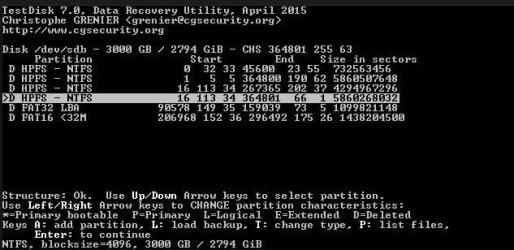
I ran another Deeper Scan, and it still finds my files, but this time with 2 options showing the files. I attached the 2 that show my files, (they're the highlighted ones).
 

Attachments

  • hdd.JPG
    hdd.JPG
    37.9 KB · Views: 44
  • hdd1.JPG
    hdd1.JPG
    42.3 KB · Views: 44
Last edited:

My Computer My Computer

Computer type
PC/Desktop
Computer Manufacturer/Model Number
Custom
OS
Windows 7 64 bit
CPU
i5 - 3550k
Motherboard
ASRock z77 Extreme6
Memory
ddr3 2x4gb
Graphics Card(s)
gtx 770
Hard Drives
Seagate external (now internal) 3tb hdd
OS drive - OCZ vertex 4 - 256 gb
Antivirus
NOD32
Browser
Chrome
Did you select [GPT EFI] this time? Yes/No

Only your last screen in your last post shows " P: list files"

So select only that partition which shows as "D 16 113 34 364801 66 1 5860268032"
and then press "Shift + P" (capital P) to list the files. Does it show your files?

Copying the files: To copy the files to another external drive, you must have the other external drive plugged in before you started TestDisk, so that TestDisk sees the drive.( You cannot plug it in after you had started TestDisk)

Please create a folder named TD Recovery on that external drive. When TestDisk list the files and asks for the Destination to copy you should point it to the TD Recovery folder on the external drive.

Read this on how to copy: http://www.sevenforums.com/hardware...suddenly-became-unllocated-3.html#post2395385 ( Don't follow screenshots 1 to 3. That only shows how I made my drive RAW so that I can recover the data and copy it with TestDisk.You already have the RAW drive.:))

Please post the screen that comes when you press shift+P listing the files and the next screen when you issue the copy command.
 

My Computer My Computer

OS
Windows 7 Home Premium 32 bit
Ok so here it is:
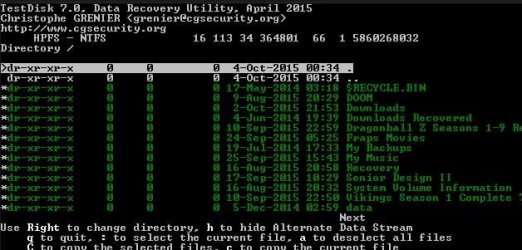
1st shows List all files with Shift+P and Copy command,
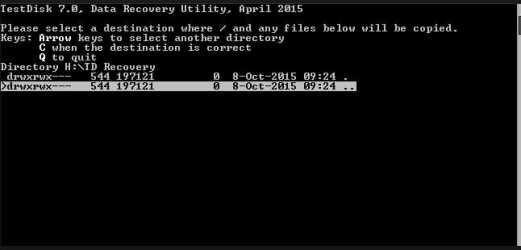
2nd image shows directory for copy.

I went ahead and issued copy command, seems like it is going to take a while so I will post back later today with results.
 

Attachments

  • hdh1.JPG
    hdh1.JPG
    44.5 KB · Views: 41
  • hdh.JPG
    hdh.JPG
    21.3 KB · Views: 41
  • hdh2.JPG
    hdh2.JPG
    24.7 KB · Views: 39

My Computer My Computer

Computer type
PC/Desktop
Computer Manufacturer/Model Number
Custom
OS
Windows 7 64 bit
CPU
i5 - 3550k
Motherboard
ASRock z77 Extreme6
Memory
ddr3 2x4gb
Graphics Card(s)
gtx 770
Hard Drives
Seagate external (now internal) 3tb hdd
OS drive - OCZ vertex 4 - 256 gb
Antivirus
NOD32
Browser
Chrome
Looks good. When completed, quit TestDisk, check your copied files and let us know.
 

My Computer My Computer

OS
Windows 7 Home Premium 32 bit
Okay, so it literally just now finished copying the files, with no problems to report!:D

What should I do next to get the drive back to original working condition, so i can transfer these files back to proper drive?
 

My Computer My Computer

Computer type
PC/Desktop
Computer Manufacturer/Model Number
Custom
OS
Windows 7 64 bit
CPU
i5 - 3550k
Motherboard
ASRock z77 Extreme6
Memory
ddr3 2x4gb
Graphics Card(s)
gtx 770
Hard Drives
Seagate external (now internal) 3tb hdd
OS drive - OCZ vertex 4 - 256 gb
Antivirus
NOD32
Browser
Chrome
Okay, so it literally just now finished copying the files, with no problems to report!:D

What should I do next to get the drive back to original working condition, so i can transfer these files back to proper drive?

If you're sure you have all your files off (check them to make sure they work first) then if it were me I would run clean on it again (make sure you do the right disk) then go to disk management and initialize it as gpt, make an NTFS partition with quick format, and then copy my data back. I would wait to see if Jumanji has any other suggestions first though.
 

My Computer My Computer

Computer type
PC/Desktop
Computer Manufacturer/Model Number
Custom
OS
10 Pro x64
CPU
Ryzen 9 3900X
Motherboard
Asrock x370 Tachi
Memory
64GB(4x16GB) DDR4
Graphics Card(s)
EVGA 1080ti FTW3
Sound Card
ASUS Xonar Essence STX (V4 Bursons), ODAC rev B, NFB-11, O2
Monitor(s) Displays
3xASUS PB278Q/R, Optoma HD142X
Screen Resolution
3x1440p, 1080p
Hard Drives
512GB 850 EVO(OS, Programs)
4TB (Movies)
3TB (Downloads)
3TB (Programs)
1TB HDD (Games)
2x6TB R1 (videos)
PSU
AX760
Case
Fractal Define R5
Cooling
NH-D15S
Keyboard
Massdrop Ctrl with Box Navy's
Mouse
G903, Alioth XXL Mat
Internet Speed
280/40
Antivirus
MBAM, ESET
Browser
Canary 64 Bit
Other Info
I also own a Thinkpad P50 Xeon 4K, X220T, X1C5
:thumbsup: OK, good. Once you check recheck and are convinced all files are OK, make a disk clean again.
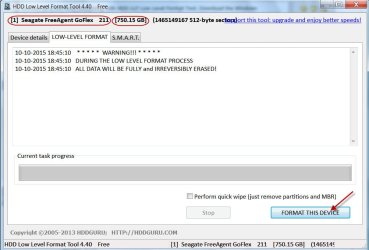
But .........

I never recommend a diskpart clean / cleanall for the simple reason many go wrong inadvertently and perform it on a wrong drive because of the cryptic notations in diskpart.

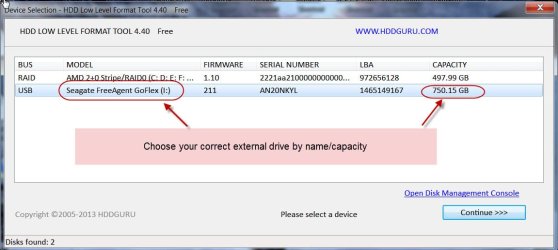
Instead do a low level formatting with HDD LLF Low Level Format Tool. Download the Windows executable (works without installation) HDDGURU: HDD LLF Low Level Format Tool

Remove all other external drives/pen drives from your PC

Right click on HDDLLF.4.40.exe and run as administrator.

Choose Low level Format and then FORMAT THIS DEVICE. This is equivalent to diskpart Cleanall ( If you check "Perform quick wipe ( just remove partitions and MBR) and then FORMAT THIS DEVICE it is equivalent to a diskpart clean) Since your drive is a 3TB it will take hours to complete the full format writing zeros to all sectors. So leave it overnight.

10-10-2015 18-46-39.jpg

10-10-2015 18-52-24.jpg

Once low level format is over, initialise your drive as GPT and format it with Windows Disk Management.
 

My Computer My Computer

OS
Windows 7 Home Premium 32 bit
Reformatting underway,
What are the benefits to reformatting to GPT as opposed to MBR?

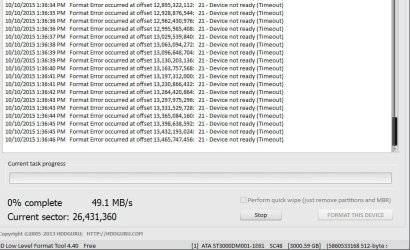
Also, the LLF screen is reading off errors, i posted a screenshot.

Looks like it is working, just not sure if i should stop due to error? (Sector number is increasing, and so is % complete)
 

Attachments

  • hdd low level format.JPG
    hdd low level format.JPG
    112.1 KB · Views: 2

My Computer My Computer

Computer type
PC/Desktop
Computer Manufacturer/Model Number
Custom
OS
Windows 7 64 bit
CPU
i5 - 3550k
Motherboard
ASRock z77 Extreme6
Memory
ddr3 2x4gb
Graphics Card(s)
gtx 770
Hard Drives
Seagate external (now internal) 3tb hdd
OS drive - OCZ vertex 4 - 256 gb
Antivirus
NOD32
Browser
Chrome
Format error. Device not ready. (Most probably your 3TB Faulty HDD is locked and held by some other program)

Stop and close the Low level format tool and shut down your PC.

Reboot your PC. Plug in only your Faulty 3TB external drive.

Wait for a few minutes. Do not run any program like Windows Disk Management etc., that can hold your HDD.

Straightaway start Low Level format Tool, select your Faulty 3TB external and format. Check it runs properly without any error.

Larger than 2TB drives need to be initialised and formatted as GPT. MBR initialised drives can only address maximum 2TB.If you initialise the drive as MBR you can see and use only 2TB. Balance will be shown as unallocated and you won't be able to do anything with it.

Note: I hope your are keeping away the HDD where you have copied your files, away safely.
Do not accidentally low level format that drive.
 
Last edited:

My Computer My Computer

OS
Windows 7 Home Premium 32 bit
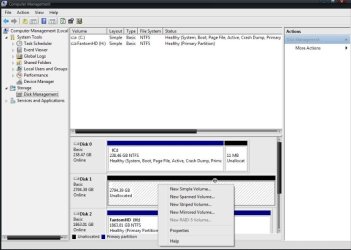
Okay, i did all the steps as instructed up to initializing drive as GPT. I am not sure how to format the drive now as it's not giving me the option, the screenshot shows all the options i have when the drive is selected within windows computer management.

In my screenshot, Disk 1 is the drive that was just initialized as GPT.
 

Attachments

  • hps.JPG
    hps.JPG
    56 KB · Views: 4

My Computer My Computer

Computer type
PC/Desktop
Computer Manufacturer/Model Number
Custom
OS
Windows 7 64 bit
CPU
i5 - 3550k
Motherboard
ASRock z77 Extreme6
Memory
ddr3 2x4gb
Graphics Card(s)
gtx 770
Hard Drives
Seagate external (now internal) 3tb hdd
OS drive - OCZ vertex 4 - 256 gb
Antivirus
NOD32
Browser
Chrome
Back
Top