Solved Recover disappearing partition

hastyle

New member
Member
VIP
Local time
10:02 AM
Messages
112
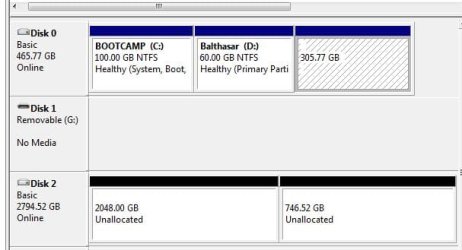
Hey guys, i tried to split an external hard drive i bought , and for some reason teh unallocated partition could not be formated or deleted, so i got partition magic, and as i booted up it gave me some error and i click yes to fix, and now my main hard drive is missing a partition , aggh i can see it in the disk management, but not sure what to do since i got a lot of work data on there.

Disk0 is missing the E drive ( 305.77 gb)

Disk 2 is the external i just bought

any suggestions?

thanks.

I got EASEUS and got my external merge and formatted properly, while i was at it, i took a glance at my computer drive, its showing the missing drive and i can explore it and view all the files using easeus, not sure what to do from here.
 

Attachments
  • Capture.JPG
    Capture.JPG
    30.4 KB · Views: 7
Last edited by a moderator:

My Computer My Computer

Computer Manufacturer/Model Number
Clone
OS
windows 7 Ultimate 32bit & 64bit
CPU
athlon 64 3500+ Venice
Motherboard
Asus A8R-MVP
Memory
2x1GB OCZ Gold dual-channel DDR @ 200MHZ 3-3-3-8
Graphics Card(s)
xfx 8600 gts
Monitor(s) Displays
3007fpw
Screen Resolution
2560x1600
Hard Drives
312.57GB Seagate ST3320620AS
244.20GB Western Digital WDC WD2500KS-00MJB0
488.39GB Western Digital WDC WD5000AAKS-00TMA0
PSU
Antec Truepower 2.0 380watts (came with case)
Case
Antec

My Computer My Computer

Computer type
PC/Desktop
Computer Manufacturer/Model Number
Self built custom
OS
64-bit Windows 11 Pro for Workstations
CPU
Intel i7-8700K OC'd to 5 GHz
Motherboard
ASUS ROG Maximus XI Formula Z390
Memory
64 GB (4x16GB) G.SKILL TridentZ RGB DDR4 3600 MHz
Graphics Card(s)
ASUS ROG-STRIX-GTX1080TI-O11G-GAMING
Sound Card
Integrated
Monitor(s) Displays
2 x Samsung Odyssey G7 27"
Screen Resolution
2560x1440
Hard Drives
1TB Samsung 990 PRO M.2,
4TB Samsung 990 PRO PRO M.2,
TerraMaster F8 SSD Plus NAS
PSU
Seasonic Prime Titanium 850W
Case
Thermaltake Core P3
Cooling
Corsair Hydro H115i
Keyboard
Logitech wireless K800
Mouse
Logitech MX Master 4
Internet Speed
2 Gb/s Download and 100 Mb/s Upload
Antivirus
Malwarebyte Anti-Malware Premium
Browser
Google Chrome
Other Info
Logitech Z625 speaker system,
Logitech BRIO 4K Pro webcam,
HP Color LaserJet Pro MFP M477fdn,
APC SMART-UPS RT 1000 XL - SURT1000XLI,
Galaxy S23 Plus phone

My Computer My Computer

Computer Manufacturer/Model Number
Clone
OS
windows 7 Ultimate 32bit & 64bit
CPU
athlon 64 3500+ Venice
Motherboard
Asus A8R-MVP
Memory
2x1GB OCZ Gold dual-channel DDR @ 200MHZ 3-3-3-8
Graphics Card(s)
xfx 8600 gts
Monitor(s) Displays
3007fpw
Screen Resolution
2560x1600
Hard Drives
312.57GB Seagate ST3320620AS
244.20GB Western Digital WDC WD2500KS-00MJB0
488.39GB Western Digital WDC WD5000AAKS-00TMA0
PSU
Antec Truepower 2.0 380watts (came with case)
Case
Antec
Go ahead and post another screenshot showing the full layout of Disk Management to see what it shows now. :)
 

My Computer My Computer

Computer type
PC/Desktop
Computer Manufacturer/Model Number
Self built custom
OS
64-bit Windows 11 Pro for Workstations
CPU
Intel i7-8700K OC'd to 5 GHz
Motherboard
ASUS ROG Maximus XI Formula Z390
Memory
64 GB (4x16GB) G.SKILL TridentZ RGB DDR4 3600 MHz
Graphics Card(s)
ASUS ROG-STRIX-GTX1080TI-O11G-GAMING
Sound Card
Integrated
Monitor(s) Displays
2 x Samsung Odyssey G7 27"
Screen Resolution
2560x1440
Hard Drives
1TB Samsung 990 PRO M.2,
4TB Samsung 990 PRO PRO M.2,
TerraMaster F8 SSD Plus NAS
PSU
Seasonic Prime Titanium 850W
Case
Thermaltake Core P3
Cooling
Corsair Hydro H115i
Keyboard
Logitech wireless K800
Mouse
Logitech MX Master 4
Internet Speed
2 Gb/s Download and 100 Mb/s Upload
Antivirus
Malwarebyte Anti-Malware Premium
Browser
Google Chrome
Other Info
Logitech Z625 speaker system,
Logitech BRIO 4K Pro webcam,
HP Color LaserJet Pro MFP M477fdn,
APC SMART-UPS RT 1000 XL - SURT1000XLI,
Galaxy S23 Plus phone
its still showing the same thing for my laptop drive
 

My Computer My Computer

Computer Manufacturer/Model Number
Clone
OS
windows 7 Ultimate 32bit & 64bit
CPU
athlon 64 3500+ Venice
Motherboard
Asus A8R-MVP
Memory
2x1GB OCZ Gold dual-channel DDR @ 200MHZ 3-3-3-8
Graphics Card(s)
xfx 8600 gts
Monitor(s) Displays
3007fpw
Screen Resolution
2560x1600
Hard Drives
312.57GB Seagate ST3320620AS
244.20GB Western Digital WDC WD2500KS-00MJB0
488.39GB Western Digital WDC WD5000AAKS-00TMA0
PSU
Antec Truepower 2.0 380watts (came with case)
Case
Antec
If you've been around here for 103 posts you should know by now that we use free Partition Wizard
boot CD which has never failed in countless thousands of paritioning operations, while all others can and will fail except Disk Mgmt.

But most haven't been here long enough to remember we identified early on that Partition Magic will ruin Win7.

What I would do is boot PW CD to run Partition Wizard Partition Recovery Wizard - Video Help. It will recover any partition that's only been deleted and not formatted over. If you've formatted it since then you'll have to try data recovery software which is not promising for that.
 
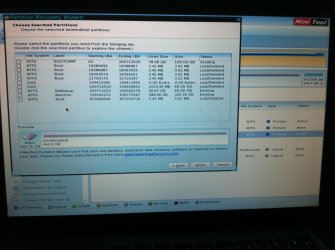
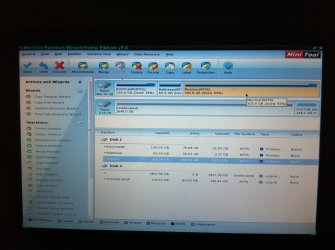
agh i guess i miss that memo ( at a costly price) ok i tried partition wizard, when i got into the program it recognize the partition as normal , so when i did hte scan it didn't find any unallocated partition
 

Attachments

  • photo(1).jpg
    photo(1).jpg
    449.4 KB · Views: 2
  • photo.jpg
    photo.jpg
    524.5 KB · Views: 2

My Computer My Computer

Computer Manufacturer/Model Number
Clone
OS
windows 7 Ultimate 32bit & 64bit
CPU
athlon 64 3500+ Venice
Motherboard
Asus A8R-MVP
Memory
2x1GB OCZ Gold dual-channel DDR @ 200MHZ 3-3-3-8
Graphics Card(s)
xfx 8600 gts
Monitor(s) Displays
3007fpw
Screen Resolution
2560x1600
Hard Drives
312.57GB Seagate ST3320620AS
244.20GB Western Digital WDC WD2500KS-00MJB0
488.39GB Western Digital WDC WD5000AAKS-00TMA0
PSU
Antec Truepower 2.0 380watts (came with case)
Case
Antec
What was the problem with assigning a drive letter in Disk Mgmt to the partition which appears to still be intact and full?

If it won't assign in Disk mgmt using the tutorial Brink posted then try Partition Wizard home version which gives you access to drive letters not available in boot mode.

If not and you can browse the data in PW as with Easeus then you can copy it out using the Win7 DVD or Repair CD with this method: Copy & Paste - in Windows Recovery Console
or Paragon Rescue Kit Free Edition 11.0 Free CD.

Then delete the partition and recreate it as Logical data partition: Partition Wizard Create Partition Video Help
 
Hastyle,

I noticed the thread is marked solved, so I just wanted to check in with you to make sure you got it sorted. :)
 

My Computer My Computer

Computer type
PC/Desktop
Computer Manufacturer/Model Number
Self built custom
OS
64-bit Windows 11 Pro for Workstations
CPU
Intel i7-8700K OC'd to 5 GHz
Motherboard
ASUS ROG Maximus XI Formula Z390
Memory
64 GB (4x16GB) G.SKILL TridentZ RGB DDR4 3600 MHz
Graphics Card(s)
ASUS ROG-STRIX-GTX1080TI-O11G-GAMING
Sound Card
Integrated
Monitor(s) Displays
2 x Samsung Odyssey G7 27"
Screen Resolution
2560x1440
Hard Drives
1TB Samsung 990 PRO M.2,
4TB Samsung 990 PRO PRO M.2,
TerraMaster F8 SSD Plus NAS
PSU
Seasonic Prime Titanium 850W
Case
Thermaltake Core P3
Cooling
Corsair Hydro H115i
Keyboard
Logitech wireless K800
Mouse
Logitech MX Master 4
Internet Speed
2 Gb/s Download and 100 Mb/s Upload
Antivirus
Malwarebyte Anti-Malware Premium
Browser
Google Chrome
Other Info
Logitech Z625 speaker system,
Logitech BRIO 4K Pro webcam,
HP Color LaserJet Pro MFP M477fdn,
APC SMART-UPS RT 1000 XL - SURT1000XLI,
Galaxy S23 Plus phone
hey no i have no solved the problem.

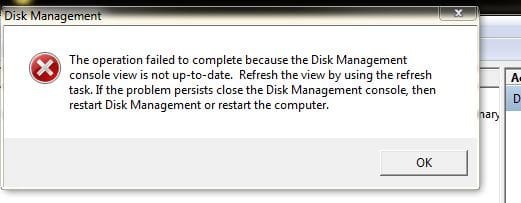
greg, i tried disk mgmt and this is the error i got (check attach image) just tried PW home version, said it was successful, but nothing appears in my computer, rebooted and the partition is still not here.

I will give the copy and paste a try, i notice in PW there is almost a similar feature to copy a partition or an entire drive, is that feature not as good as the one you recommended?

thanks.


What was the problem with assigning a drive letter in Disk Mgmt to the partition which appears to still be intact and full?

If it won't assign in Disk mgmt using the tutorial Brink posted then try Partition Wizard home version which gives you access to drive letters not available in boot mode.

If not and you can browse the data in PW as with Easeus then you can copy it out using the Win7 DVD or Repair CD with this method: Copy & Paste - in Windows Recovery Console
or Paragon Rescue Kit Free Edition 11.0 Free CD.

Then delete the partition and recreate it as Logical data partition: Partition Wizard Create Partition Video Help
 

Attachments

  • Capture.JPG
    Capture.JPG
    22 KB · Views: 2

My Computer My Computer

Computer Manufacturer/Model Number
Clone
OS
windows 7 Ultimate 32bit & 64bit
CPU
athlon 64 3500+ Venice
Motherboard
Asus A8R-MVP
Memory
2x1GB OCZ Gold dual-channel DDR @ 200MHZ 3-3-3-8
Graphics Card(s)
xfx 8600 gts
Monitor(s) Displays
3007fpw
Screen Resolution
2560x1600
Hard Drives
312.57GB Seagate ST3320620AS
244.20GB Western Digital WDC WD2500KS-00MJB0
488.39GB Western Digital WDC WD5000AAKS-00TMA0
PSU
Antec Truepower 2.0 380watts (came with case)
Case
Antec
The Disk Mgmt error is common in cases where Partition Magic - which is not Win7 compatible - is used and ruins Win7.

The solution which most commonly works as described in Disk Management Console view is not up-to-date. - Microsoft Community is uninstalling the HD and/or its driver in Device Manager, rebooting to reinstall it.

If that fails google the text of the Disk Mgmt error and work through all of the solutions suggested. If you're concerned about any just ask back here and keep us posted on your progress.
 
Hi Hastyle,

It is not my intention to override anybody's suggestions here but let you know other means which I feel may workout.

I had noted that running Partition Wizard you are able to see all the files in the problem partition. But Partition Wizard does not allow you to copy the files.

You may use Test Disk and the advantage here is that you may be able to not only confirm that the files exist but also copy the files to another external drive.

Straightaway go to the topic
Recovery with TestDisk: SanDisk Cruzer Blade 16GB in http://www.sevenforums.com/software...ive-turned-raw-partition-wizard-testdisk.html

In your case it will be your system drive and not SanDisk Cruzer Blade. :)

Once the partiitons are identified correctly, select the problem partition and press P and Enter. If you can see all the files select all the files and copy all the files to another external drive. ( You will see the necessary commands at the bottom of the Window. Make sure to connect an external drive with adequate space to copy files before you run TestDisk. Your external disk will also be shown in the Test Disk Window.)

TestDisk Download: http://www.cgsecurity.org/wiki/TestDisk

Once you have successfully copied the files and confirmed that all is OK, you can then format the partition. ( TestDisk can also rewrite the partition table, but I am a little bit wary since it is a system drive and also you had used Symantec/PowerQuest Partition Magic. It is preferable to copy away the data to another drive and format the partition with the OS without our meddling with MBR/PBR in anyway.)
 

My Computer My Computer

OS
Windows 7 Home Premium 32 bit
hey greg, Paragon Rescue Kit Free Edition worked, i got everything off reformatd the drive, now putting it back on. thanks you and to everyone else who replied :)
 

My Computer My Computer

Computer Manufacturer/Model Number
Clone
OS
windows 7 Ultimate 32bit & 64bit
CPU
athlon 64 3500+ Venice
Motherboard
Asus A8R-MVP
Memory
2x1GB OCZ Gold dual-channel DDR @ 200MHZ 3-3-3-8
Graphics Card(s)
xfx 8600 gts
Monitor(s) Displays
3007fpw
Screen Resolution
2560x1600
Hard Drives
312.57GB Seagate ST3320620AS
244.20GB Western Digital WDC WD2500KS-00MJB0
488.39GB Western Digital WDC WD5000AAKS-00TMA0
PSU
Antec Truepower 2.0 380watts (came with case)
Case
Antec
Back
Top