Recover Partition Table that vanished

Kova

New member
Local time
7:30 PM
Messages
18
Hello guys,
I saw this issue long time ago, when brother had it. Partition table just vanished, gone, I messed it up by trying to fix it and didn't do it right, formated disk on the end, wasn't big of the deal.

But Today it happened on my Seagate Baracuda 3TB, with 3 partitions.

Just vanished.

I first went to Control Panel to see is it there. And windows asked me a question, like disk is not partitioned, would I like to do MBR or GPT, and here I believe I made biggest mistake of all, I clicked MBR, as I forgot that it is GPT (STUPID ME)

Then I saw that 764 or so GB partition and rest unallocated, went to TestDisk and rest, saw only 2 partitions, then I got it, it should have been GPT, so I converted it in Cpanel back to GPT.

Now when I run Test disk or MiniDisk Recovery, it takes like 50 times slower to SCAN!
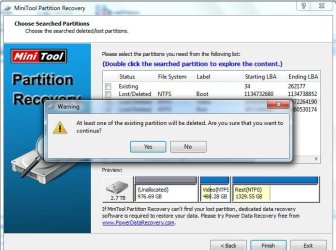
Couldnt wait for TestDisk so I left MiniDiskTool to find partitions, it found 3 partitions, but first says Boot, 2nd and 3rd are correct and I can even browse and see data, but if I don't select firts one it says it will delete one partition?? As you can see in attachment.

I would love to see what TestDisk says, I can't buy now another 3TB to clone, but I really want that one partition, it is most important one, all pictures, from day one of my life ... :(

So what I did in short:
clicked MBR (made first partition)
Then converted it in CPanel to GPT

Please tell me there is way to either undo this MBR or to find original Partition table for first Partition.,
Thank you very much.

P.S.
I know its first partition, I know when second start. Can I somehow force it to make it first from 0 to second.
 

Attachments
  • minidisktool.jpg
    minidisktool.jpg
    57.2 KB · Views: 45

My Computer My Computer

At a glance

Windwos 7 Ultimate 64 Biti78 GB Cruical DDR3nVidia 360m GTS
Computer type
PC/Desktop
Computer Manufacturer/Model Number
Toshiba Qosmio X500
OS
Windwos 7 Ultimate 64 Bit
CPU
i7
Memory
8 GB Cruical DDR3
Graphics Card(s)
nVidia 360m GTS
Hard Drives
OCZ Vertex 256 GB
Hitachi 1 TB
Seagate Baracuda 3TB
Antivirus
Microsoft Essential
Browser
All
Obviously we cannot see the listings which are obscured by the warning message. Can you please move it over?

It's also apparent from what we can see that you didn't tick all boxes on Lost/Deleted partitions it found.

Is the area showing in the preview (without all boxes checked) as Unallocated where the OS parition was? If not what exactly was there?
 
True, I moved it, but for screen shot I repeat it and forgot to move it again.
But part under it is not important as you can see it on the bottom under Preview. Don't make me run that test again it took hours till that part.

It shows
First Partition (with label Boot) that is line you can see and that is only problem I have! (that is how IT IS NOT SUPPOSED TO BE)
2nd Partition as said is under window and it looks fine. Label is good.
3rd Partition is under window and it has name and looks fine. Same as 2nd Label looks good.

What you ask has no sense to me, yes all were checked, but most important is first partition that was rewritten with Windows MBR Table.

You know what I did:
- after partition table was gone, for no reason
- I clicked create MBR (so it made MBR and showed first 764GB), I don't know how it works, but instead of showing me now first partition it shows that Unallocated, ...

And so far that is only problem, as program to recover partition can see beyond first and recover partitions after it.

First partition I repeat is most important, named Photos, but name is not shown as you can see on the image (first line above window that is covering two good partitions).

Dont know why it takes so long, but TestDisk is now analyzing for hours and it is just around 3%, I know it finds all it has to find around 26%-30% as other program did, and TestDisk at first run, before I converted disk to GPT, after that it is so slow.

Maybe I can help somebody, but it was External IcyBox case, connected over USB, once I connected it over esata I saw whole Partition in Windows (as unallocated), before that I saw it as 764GB Unallocated partition.

If anybody knows a way to fix first partition, please help.
 

My Computer My Computer

At a glance

Windwos 7 Ultimate 64 Biti78 GB Cruical DDR3nVidia 360m GTS
Computer type
PC/Desktop
Computer Manufacturer/Model Number
Toshiba Qosmio X500
OS
Windwos 7 Ultimate 64 Bit
CPU
i7
Memory
8 GB Cruical DDR3
Graphics Card(s)
nVidia 360m GTS
Hard Drives
OCZ Vertex 256 GB
Hitachi 1 TB
Seagate Baracuda 3TB
Antivirus
Microsoft Essential
Browser
All
If you changed from a GPT to a MBR partition on a UEFI install then it should have destroyed all data as this is a destructive reformat: Convert GPT Disk to MBR Disk - Windows 7 Forums

But you said you could see data and PW Partition Recovery Wizard found partitions so the question is will it still recover these because: the disk didn't actually convert or because it converted but did not destroy data or enough of partition table that PW cannot detect it.

We can see clearly that two of the four boxes are not checked. This is what I was referring to, to which you reply that you checked all the boxes. Did PW uncheck them with the error message?

What I would do is attempt to copy out your data using Copy & Paste - in Windows Recovery Console or Paragon Rescue Kit Free Edition 11.0 Free CD and then do a Clean Reinstall Windows 7 which steps will assure you get and keep a perfect install. This may be quicker than trying to recover from fatal results of your impulsive decision.

However there are some Gurus here who are better versed in PW Partition Recovery Wizard than am I so I will ask them to look at this.
 
OK, I am here on greg's request though I amn't a PW-PRW guru as he would try to make me believe.:)

OK, past is past. Let us start again as your external drive appears now.

Post a full screenshot of Window Disk Management with only your external drive connected. ( If theTestDisk scan is in progress, terminate it.) Make sure to hide the Console Tree and Action Pane in Windows Disk Management so that we get a full view.

Then post a screenshot of how it appears in Partition Wizard.( the first screen)

Then Run Partition Recovery Wizard quick scan and just post the screenshot when it finds the partitions.( Do not select any partition/partitions)

After you post the screenshot for us to see, you have to do some permutations and combinations in selecting the partitions, that will make the preview of the disk at the bottom full without any unalloacated space. That is, it should appear as it existed before.Only that would signify that PRW was able to find the beginning of the partitions successfully.

If no selected permutation/combination could show the drive in full in the preview map, PRW was unable to find the beginning of the partition.

In such a case we have to give up on it and go for data recovery. The best in that case would be PhotoRec, even if it takes a week to complete the scan.

Let us see. Post the screenshots so that we can see whether any permutation will work out - apart from your effort. ( Do not give the Finish command in PRW. Just cancel and you can rerun later.)

In the meantime and thereafter, do not try anything on your own. As long as you do not give any write command in PW or TestDisk and just stop with scanning, you will have better chances of data recovery.
 

My Computer My Computer

At a glance

Windows 7 Home Premium 32 bit
OS
Windows 7 Home Premium 32 bit
I hate Windows, HATE IT!
I mean, one click, and all photos that I made and had are gone.

Guys you don't help me, don't get me wrong, I'm thankful for your posts.
But if I saw that partition on any of programs, I would know what to do, I'm not guru, but if partition is visible, I would know how to recover partition table.

So let me tell you what I think happened.

I'm not sure why windows see 764GB when connected with USB, but I had it connected with USB all the time, and it was connected that way when it happened. Good part is that I clicked MBR when it was connected as it was. I'll explain later.
Over esata cable, whole disk is visible, whole 3TB, 2.7GB unallocated space. That is how Windows saw it. Or in my case after MBR thing I did, it saw 764GB + rest of the disk. That is how TestDisk saw it too, that is when I understood that I made mistake with MBR :( and turn it back to GPT.

As disk was not in any state (no MBR no GPT), was completely blank unallocated space, I clicked MBR, my bad, obviously no return point!

So for all people be CAREFUL if disk vanish don't click to make partition table.

As started, I believe that converting to MBR destroyed first 764GB of visible disk, rest was intact, as Windows didn't even see it, my first partition was 1TB, so as you said, if it's destructive, it did it up to 764GB, rest was intact.

That is why this program can see 2nd and 3rd partition, I don't see why would anything be checked or unchecked and what it has to do with it. First partition is not Boot and it is not visible. I unchecked it as I didn't want it to mess things even further, so I checked two that I know are good (but not so important)

PhotoRec (TestDisk) is now running for over 10 hours and it is just around 10%. Which is completely sick and slow, I believe in 2 days I will get to desired 26-30% to see if TestDisk can see first partition or not.

I can't believe that converting disk to MBR destroys everything and that is irreversible?!

My second question is, which I believe I have answer, but just to make sure.
In case that I still have data on first partition, is there a way to return it to the state it was, not random names? Please say they made something. I have over 20.000 images on that partition, and I can't imagine looking and renaming all of them one by one.

Thanks in advance.

P.S.
This is not BOOTABLE disk.
It was External case, with 3 partitions:
1st Photos (one that is GONE)
2nd Videos (one that is visible in recover programs)
3rd Rest (visible in recovery programs)

So no, formating, installing windows would not help on any way, as it is not bootable, not OS disk, it is External STORAGE disk.

Data on this this is only copy I have, STUPID, but it's really like that, I'm Photographer and I ordered Mac Mini, it stuck on Customs, was planning into backing up all images and stuff when it arrives as it has 1TB disk, and voila, during customs time, my External case decided to delete partition table, and stupid, I can say that and repeat, stupid Windows asked me to do MBR or GPT, instead of warning me that I will lose data, Windows obviously "thought" I had nothing on that disk as it couldn't see a thing!

So I clicked convert to MBR (it converted first 764GB of the disk to MBR), and all I try to do is to return partition table, and it looks like mission impossible.

First partition was most important one, with all images on one place, ... it was only temp solution to save disk space on my computer. And here it goes, only for couple of days of no backup and it went all wrong!
 
Last edited:

My Computer My Computer

At a glance

Windwos 7 Ultimate 64 Biti78 GB Cruical DDR3nVidia 360m GTS
Computer type
PC/Desktop
Computer Manufacturer/Model Number
Toshiba Qosmio X500
OS
Windwos 7 Ultimate 64 Bit
CPU
i7
Memory
8 GB Cruical DDR3
Graphics Card(s)
nVidia 360m GTS
Hard Drives
OCZ Vertex 256 GB
Hitachi 1 TB
Seagate Baracuda 3TB
Antivirus
Microsoft Essential
Browser
All
You need to realize Kova that you are being helped by a couple of extremely knowledgeable members. Please do yourself a favor and do exactly what they ask. Not only is that your best chance of recovering your data, but more importantly, you can learn a lot too.
 

My Computer My Computer

At a glance

Windows 7 64 Bit Home Premium SP1i7-3820GSkill F3-14900CL9Q - 16GBEVGA GeForce GTX660 - Driver 352.86
Computer type
PC/Desktop
Computer Manufacturer/Model Number
Home Built - Jan 2013
OS
Windows 7 64 Bit Home Premium SP1
CPU
i7-3820
Motherboard
Asus P9X79-PRO - Bios 4608
Memory
GSkill F3-14900CL9Q - 16GB
Graphics Card(s)
EVGA GeForce GTX660 - Driver 352.86
Sound Card
On board Realtek ALC898
Monitor(s) Displays
Acer S271HL
Screen Resolution
1920 x 1080
Hard Drives
#1- Samsung 840 Pro Series
#2- Western Digital WD1002FAEX Sata3 Black
#3- Western Digital WD1002FAEX Sata3 Black
PSU
Corsair CMPSU-850TX-V2 - 850 watt (by Seasonic)
Case
Corsair Obsidian 550D
Cooling
Standard 3 120mm case fans, Cooler Master Hyper 212 EVO
Keyboard
MS KC-0405
Mouse
Intellimouse 5-button
Internet Speed
56 Mbits/Sec (on a good day)
Antivirus
Avast & Malwarebytes
Browser
Firefox
Other Info
Asus DVD - DRW-24B1ST 24X
You need to realize Kova that you are being helped by a couple of extremely knowledgeable members. Please do yourself a favor and do exactly what they ask. Not only is that your best chance of recovering your data, but more importantly, you can learn a lot too.


:ditto:
 

My Computer My Computer

At a glance

Windows 10 Pro. 64/ version 1709 Windows 7 Pr...Intel i7-6800K @ 4.3Corsair Platinum 16 gig @2400EVGA GTX 1070 OC
Computer type
PC/Desktop
Computer Manufacturer/Model Number
Home made Desktop
OS
Windows 10 Pro. 64/ version 1709 Windows 7 Pro/64
CPU
Intel i7-6800K @ 4.3
Motherboard
ASUS X-99 Deluxe II
Memory
Corsair Platinum 16 gig @2400
Graphics Card(s)
EVGA GTX 1070 OC
Monitor(s) Displays
Asus 27" LED LCD/VE278Q
Screen Resolution
1920-1080 or 1280-720 HDMI
Hard Drives
INTEL SSD 730-240 Gb Sata 3.0/
PSU
EVGA Platium 1200W
Case
Phanteks Luxe Tempered Glass 8 fans/ one radiator
Cooling
XSPC/ Water Cooled CPU
Keyboard
Das 4 Professional
Mouse
Logitech M705/MX Anywhere 2-S
Internet Speed
100 mbits
Antivirus
Microsoft Security Essentials/ Malwarebytes Premium 3.0/ SAS
Browser
I.E. 11 default/Firefox/ ISP Time Warner Cable/Spectrum
Other Info
LG BluRay Burner/
Sound system-KLipsch-THX/
Icy Dock ssd Hot Swap bays.
I'm sorry, I'm pissed, stressed, sad, tired, and on top of that I'm sick too atm. I didn't mean no disrespect.
I'm running scan now, but I'm trying to figure this out too, why they need something that is explained and visible on that picture. As said, first partition Unallocated (recognized as Boot on last image) is only one important, to recover partition and files! 2nd and 3rd are not even important, even if found correctly, thus I don't think it is important that on last image it was overlapped, as it was both partitions there were found as they were.

I'm scanning again with different program, so far it found some partitions and one of the good ones, attachment bellow. It's still under 50%, but obviously didn't find first partition.


I repeat like a parrot, 1st partition was around 1TB, and on USB Windows saw around 765GB which I turned into MBR. Thus 2nd and 3rd partition were intact, just wrong partition table.
Converting 765GB back to GPT, I lost 1st partition, obviously, as this deep scan is showing as well, no 1st partition visible.
2nd is visible, 3rd not yet found, plenty to go.
 

Attachments

  • deepscan.jpg
    deepscan.jpg
    140.6 KB · Views: 1
  • windows.jpg
    windows.jpg
    120.9 KB · Views: 0
Last edited:

My Computer My Computer

At a glance

Windwos 7 Ultimate 64 Biti78 GB Cruical DDR3nVidia 360m GTS
Computer type
PC/Desktop
Computer Manufacturer/Model Number
Toshiba Qosmio X500
OS
Windwos 7 Ultimate 64 Bit
CPU
i7
Memory
8 GB Cruical DDR3
Graphics Card(s)
nVidia 360m GTS
Hard Drives
OCZ Vertex 256 GB
Hitachi 1 TB
Seagate Baracuda 3TB
Antivirus
Microsoft Essential
Browser
All

My Computer My Computer

At a glance

Windows 10 Pro. 64/ version 1709 Windows 7 Pr...Intel i7-6800K @ 4.3Corsair Platinum 16 gig @2400EVGA GTX 1070 OC
Computer type
PC/Desktop
Computer Manufacturer/Model Number
Home made Desktop
OS
Windows 10 Pro. 64/ version 1709 Windows 7 Pro/64
CPU
Intel i7-6800K @ 4.3
Motherboard
ASUS X-99 Deluxe II
Memory
Corsair Platinum 16 gig @2400
Graphics Card(s)
EVGA GTX 1070 OC
Monitor(s) Displays
Asus 27" LED LCD/VE278Q
Screen Resolution
1920-1080 or 1280-720 HDMI
Hard Drives
INTEL SSD 730-240 Gb Sata 3.0/
PSU
EVGA Platium 1200W
Case
Phanteks Luxe Tempered Glass 8 fans/ one radiator
Cooling
XSPC/ Water Cooled CPU
Keyboard
Das 4 Professional
Mouse
Logitech M705/MX Anywhere 2-S
Internet Speed
100 mbits
Antivirus
Microsoft Security Essentials/ Malwarebytes Premium 3.0/ SAS
Browser
I.E. 11 default/Firefox/ ISP Time Warner Cable/Spectrum
Other Info
LG BluRay Burner/
Sound system-KLipsch-THX/
Icy Dock ssd Hot Swap bays.
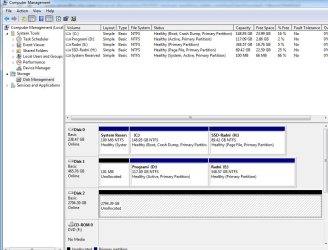
Why is Programs partition on another disk the only one marked Active, while the System partition isn't? Only the System partition should be marked Active.
Partition - Mark as Inactive - Windows 7 Forums
Mark Partition Active

I would not have Programs partition on another hard drive as these write registry keys that integrate themselves into the OS until uninstalled so should be on C, a part of the OS image.

I have no idea what you've done as your explanations are too convoluted even before you had the emotional outburst. But an EFI System partition shown is used to boot an OS so why would the disk have been connected by USB cable? Did it have an OS on it before you used it for storage?

If you didn't read the warning message it makes it clear when given the choice for MBR or GPT partition that it is formatting the drive. If you had any question about whether this would affect your data you should have asked or googled the message to find out immediately you should not do this at all if you want to save your data.
 
edited down.
 

My Computer My Computer

At a glance

Windwos 7 Ultimate 64 Biti78 GB Cruical DDR3nVidia 360m GTS
Computer type
PC/Desktop
Computer Manufacturer/Model Number
Toshiba Qosmio X500
OS
Windwos 7 Ultimate 64 Bit
CPU
i7
Memory
8 GB Cruical DDR3
Graphics Card(s)
nVidia 360m GTS
Hard Drives
OCZ Vertex 256 GB
Hitachi 1 TB
Seagate Baracuda 3TB
Antivirus
Microsoft Essential
Browser
All
Why is Programs partition on another disk the only one marked Active, while the System partition isn't? Only the System partition should be marked Active.

I would not have Programs partition on another hard drive as these write registry keys that integrate themselves into the OS until uninstalled so should be on C, a part of the OS image.

Thanks, done it, C: is now Active. Other disk (Programi), thanks for link to make it inactive. I don't have enough space for all programs on C and I don't want to waste SSD space for programs I don't use a lot, and I don't think they should all be on C:, I put most important programs on C, rest is on D:

I have no idea what you've done as your explanations are too convoluted even before you had the emotional outburst. But an EFI System partition shown is used to boot an OS so why would the disk have been connected by USB cable? Did it have an OS on it before you used it for storage?

Well I explained it simple, not sure what you don't get?! I explained it like 10 times, every single time it is same explanation. Simple Convert to MBR part of 3TB disk, which vanished on its own. On image above it is Disk 2 (on Partition Recovery it is Disk 3)

I'm not sure where did you get this EFI thing, as I don't see it in Control Panel, Windows???

If you didn't read the warning message it makes it clear when given the choice for MBR or GPT partition that it is formatting the drive. If you had any question about whether this would affect your data you should have asked or googled the message to find out immediately you should not do this at all if you want to save your data.

There was warning, but disk was not formatted! As it is not automatically after converting disk.
I know I made mistake no need to rub it on my nose, if I didn't make it, I wouldn't be here, obviously.
 

My Computer My Computer

At a glance

Windwos 7 Ultimate 64 Biti78 GB Cruical DDR3nVidia 360m GTS
Computer type
PC/Desktop
Computer Manufacturer/Model Number
Toshiba Qosmio X500
OS
Windwos 7 Ultimate 64 Bit
CPU
i7
Memory
8 GB Cruical DDR3
Graphics Card(s)
nVidia 360m GTS
Hard Drives
OCZ Vertex 256 GB
Hitachi 1 TB
Seagate Baracuda 3TB
Antivirus
Microsoft Essential
Browser
All
C is not the System partition. System Reserved is clearly the partition marked System. It should be marked Active.

A disk cannot partially be converted to MBR. If you got the prompt to choose MBR or GPT then it was asking you to initialize the disk because Windows was not reading any format for it. If you chose one of those then it reformatted the entire disk MBR. If you aborted it then nothing could have been expected to survive since it wipes the partition table first.

What did you find when you attempted to rescue your data as I suggested?

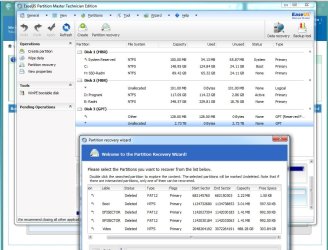
Easeus shows the first partition of Disk3 (the one with the Unallocated space for most of it) is 128mb Reserved which is the System partition on an EFI Win7 install. Partition Recovery also shows two other EFI sectors.

Why is the paging file on H. I'd move it back to C by turning it off and then back on: System Protection - Change Disk Space Usage

What appears to me is that a lot of tweaking and other messing around with the disks has caught up with you. You'd be much better off to wipe the SSD to do a perfect Clean Reinstall Windows 7 and then stick only with the tools and methods in the tutorial. This has worked for over a million others without a single complaint.

Wait for Jumanji to try to help you recover your partitions on the disk you formatted.
 
greg, I think I know what confuses you, I will try to be more clear with my problem.

External case was connected with USB, 3TB disk in it that vanished. When I checked on Control Panel Computer Management, Storage, it asked that question for MBR or GPT, I clicked MBR, then I saw just 765GB, as it was connected to USB. Once I connected it to esata, it showed 2 times Unallocated space, 765GB + rest of the space...
Then I converted whole disk to GPT.

Once I run scan, as shown above, I see some system partitions, fat32, etc, I'm not sure what is that.
I can't resize window from EaseUS Partition Recovery.
I can see all data, I can restore data even from first partition, that is good news, but bad one is, I'm not sure if I can get file and directory names as they were before.

2nd and 3rd partition are visible in Partition recovery, even on TestDisk, and I believe I could return those back. It reads Label from 2nd and 3rd from that 3TB disk just fine, meaning it knows how it was called, which letter it was.

Format was not made, or it was, as you said, right after my miss-click, that would mean it formatted 765GB as it was only thing Windows saw, when connected on USB.

I can share new scren shot from EaseUS Partition Recovery, as I can now see last (3rd) partition, called Rest.
Problem as stated is, that first one is not visible, or not visible like 2nd and 3rd, and I'm not sure is there a way to restore partition table, or I should jump right in to data recovery part.

2nd part that bothers me is that when I tried one tool it said something, one of the partitions will be deleted, to continue or cancel, that is from first image I sent here, so I was afraid to click Yes, as I need that data.

On other hand I don't want to restore all data, as I believe I can recover 2nd and 3rd partition, it would be best to recover 2nd and 3rd, then try to restore data from 1st. But I'm not sure, which move would preserve data that is right now on the disk and save 2nd and 3rd partitions.

Do you understand me, sorry I'm from Croatia, maybe my way of explaning is not so clear, I'm trying hard. Spent like 20 hours behind computer, watching scanning, reading articles, ways to solve this issue.

If convert to MBR formatted disk, then only chance is restore data, no need for me to try to recover that 1st partition, right?

I see lots of EFI Sector, and Boot, on that disk, but it was never Bootable, so I'm not sure what is it, why did it find it on the disk?
Will send screen shot of EaseUS Partition Recovery scan once it is completed, I'm scanning that 3TB disk. It's around 60% done right now.
 

My Computer My Computer

At a glance

Windwos 7 Ultimate 64 Biti78 GB Cruical DDR3nVidia 360m GTS
Computer type
PC/Desktop
Computer Manufacturer/Model Number
Toshiba Qosmio X500
OS
Windwos 7 Ultimate 64 Bit
CPU
i7
Memory
8 GB Cruical DDR3
Graphics Card(s)
nVidia 360m GTS
Hard Drives
OCZ Vertex 256 GB
Hitachi 1 TB
Seagate Baracuda 3TB
Antivirus
Microsoft Essential
Browser
All
I would work with Jumanji on Partition Recovery.

Meanwhile can you browse in to see your data to Copy & Paste - in Windows Recovery Console or if that fails try burning to CD with Windows Image Burner Paragon Rescue Kit Free Edition 11.0 Free . Copy your files to an external HD or USB flash stick. Now is the time to rescue any data you cannot afford to lose, since Partition Recovery is not a certain thing under the circumstances.
 
Hi Greg, problem is off course disk size, this is biggest of them all, one where I copied all important stuff, to remove it form my main computer disks.

I found one backup till March 2014, so I lose every single picture I took after that date till now.
I can browse files and directories under Partition Recovery, for 2nd Video and 3rd Rest partitions.

As this is biggest disk, and lots of data, I don't have enough space to copy data, and new disk is well above $130 :( which is way too much for me atm.

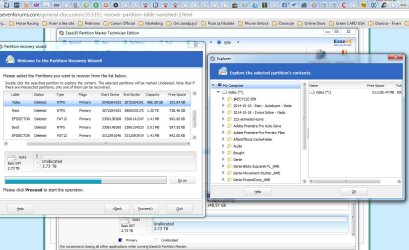
Here is screen shot of Partition Recovery 2nd Partition.
This program so far, doesn't see 1st one at all, there are only 2 partitions that are big, rest are some small, boot, mbr, etc., not even sure what they are.

In day or two I will get 1TB, so I believe I would have enough space to save all things, but how to copy paste, as I don't have those partitions restored just yet, all Windows see, as you can see, is unallocated space.

I will see if EaseUS can restore partitions (2 and 3) and make disk usable at all. There are couple of software that claim they can restore file names as well, do you think it is possible to do after format?
 

Attachments

  • 2ndPartition.jpg
    2ndPartition.jpg
    168.8 KB · Views: 5

My Computer My Computer

At a glance

Windwos 7 Ultimate 64 Biti78 GB Cruical DDR3nVidia 360m GTS
Computer type
PC/Desktop
Computer Manufacturer/Model Number
Toshiba Qosmio X500
OS
Windwos 7 Ultimate 64 Bit
CPU
i7
Memory
8 GB Cruical DDR3
Graphics Card(s)
nVidia 360m GTS
Hard Drives
OCZ Vertex 256 GB
Hitachi 1 TB
Seagate Baracuda 3TB
Antivirus
Microsoft Essential
Browser
All
Video and Rest are found and look just fine. Partitions sized around 3.01MB are fake stuff. the FAT12 partitons are FAKE as well. Video partition is explorable as shown in your screenhot. Rest is also explorable

Rest is starting just after Video (check their start LBA and end LBA). Do you see the three FAKE partitions are found inside REST?! Really fake stuff

Originally there were only 2 partions on disk (VIDEO and REST)? If not... what are you missing? Did you try undelete VIDEO and REST already?

I didn't read whole thread so maybe i'm asking something already posted.
 

My Computer My Computer

At a glance

Microsoft Windows 7 Home Premium 64-bits 7601...Intel(R) Core(TM) i3 CPU M 370 @ 2.40GHz4,00 GBATI Mobility Radeon HD 5400 Series
Computer type
Laptop
Computer Manufacturer/Model Number
ACER ASPIRE 5742G
OS
Microsoft Windows 7 Home Premium 64-bits 7601 Multiprocessor Free Service Pack 1
CPU
Intel(R) Core(TM) i3 CPU M 370 @ 2.40GHz
Motherboard
Acer Aspire 5742G
Memory
4,00 GB
Graphics Card(s)
ATI Mobility Radeon HD 5400 Series
Sound Card
(1) AMD High Definition Audio Device (2) Realtek High Defi
Screen Resolution
1366 x 768 x 32 bits (4294967296 colors) @ 60 Hz
Hard Drives
WDC WD5000BEVT-22ZAT0
Then copy out the files you don't have backed up. If PW can see them then they may be accessible but you have to browse using one of the methods I've given you twice.
 
Hi Kaktussoft, thanks for hopping in.

There were 3 partitions, first one was messed with MBR and format.

2nd and 3rd look good, will try to recover them after scan finishes. if not, then I will copy files as greg said, with option he gave me.

True 2nd Video and 3rd Rest were one after another, but first one was Photo (one missing here), I could see recovery files, but names were all messed up, which I'm trying to avoid here as well, among full partition recovery.

Greg sorry to bother, can you please confirm, should I try to recover 2nd and 3rd partition, or first try to copy files way you gave me link (twice)? Thanks.
 

My Computer My Computer

At a glance

Windwos 7 Ultimate 64 Biti78 GB Cruical DDR3nVidia 360m GTS
Computer type
PC/Desktop
Computer Manufacturer/Model Number
Toshiba Qosmio X500
OS
Windwos 7 Ultimate 64 Bit
CPU
i7
Memory
8 GB Cruical DDR3
Graphics Card(s)
nVidia 360m GTS
Hard Drives
OCZ Vertex 256 GB
Hitachi 1 TB
Seagate Baracuda 3TB
Antivirus
Microsoft Essential
Browser
All
Back
Top