
Solved Recovery image from bitlocked partition question

GeorgeilotS

New member
Member
Local time
7:05 AM
Messages
29
Hello,
I have windows 7 pro, and I would like to bitlock my D:/ drive, however I have a windows backup image of my C:/ drive on that bitlocked D:/ drive, and if I have to do a system restore from image, would i run into problems during this if I use the windows 7 recovery tools disc, or would it ask me to enter the bitlock password for D:/ and then I can choose the image?
Thank you
 

My Computer My Computer

Computer type
PC/Desktop
OS
Windows 7 x64 Pro, Windows 8.1 x64 Pro, Windows 10 TP 10041
First of all,BitLocker is in Windows 7 Ultimate and Enterprise only.

As far as I know,you will enter the password and choose the recovery image.

You can also go to Recovery Options by typing F8 during booting and select Repair Your Computer. It's the same thing as in your DVD.
If you don't see it,after logging on,go to Start,All Programs,Accessories,right-click Command Prompt and select "Run as administrator". When prompted by UAC,click Yes.Type:
reagentc /enable

I hope you find my advice helpful.
 

My Computer My Computer

Computer type
Laptop
Computer Manufacturer/Model Number
Lenovo G580 20150
OS
Windows 7 Ultimate SP1 64 bit
CPU
Intel Core i3-3110M Ivy Bridge
Motherboard
Lenovo INVALID U3E1 (Ivy Bridge)
Memory
4,00GB Single-Channel DDR3 798 MHz
Graphics Card(s)
Intel HD Graphics 4000,Nvidia GeForce 610M
Sound Card
Conexant HD SmartAudio
Monitor(s) Displays
Generic PnP Monitor, Sony BRAVIA KDL-46D3500 Full HD TV
Screen Resolution
1366x768, 1920x1080
Hard Drives
Seagate ST1000LM024 HN-M101MBB 1TB
Keyboard
AccuType
Internet Speed
72 Mbps
Antivirus
Microsoft Security Essentials
Browser
Internet Explorer 11
Other Info
PLDS DVD-RW DS8ABSH SCSI Device
VMware Workstation 11
Microsoft Office 2007 Enterprise,2010 Professional Plus,2013 Professional Plus
Sony MDR-XD150 Headset

VM's:Windows Vista SP2 x64,Windows Server 2003 Enterprise SP2 x86,Windows Server 2008 x86,Windows XP Professional x64 SP2
Oh shoot, I thought it came with Pro version. Oh well. I'm sorry to have wasted your time. I do however, appreciate your time and effort into answering my question, thank you for the information you have provided.
There is no way I can install Bitlocker afterwards eh? I just prefer to sticking with Microsoft products, rather then going for something like Veracrypt, to encrypt my partition.
 

My Computer My Computer

Computer type
PC/Desktop
OS
Windows 7 x64 Pro, Windows 8.1 x64 Pro, Windows 10 TP 10041
There is no way I can install Bitlocker afterwards eh? I just prefer to sticking with Microsoft products, rather then going for something like Veracrypt, to encrypt my partition.

In that case, you have two options -

1. Upgrade to "Ultimate" which of course will cost money.

2. Wait until the release of "Win 10". It's due to be released on this summer and all "Windows 7/8" users are eligible for a free upgrade. For a "Windows 7 Pro" license, you will get a free upgrade to "Win 10 Pro" which will have Bitlocker functionality.
 

My Computer My Computer

Computer type
PC/Desktop
OS
Windows 7 Ultimate x64
Thank you very much for that #2 option Anshad, I'm really glad Windows 10 Pro will have BitLocker with it I can wait until summer.
Question about number #1, would I just be able to purchase an Ultimate key I can just enter somewhere? Or do I have do download/buy from Microsoft a whole different copy of Windows and then enter the product key for Ultimate?
 

My Computer My Computer

Computer type
PC/Desktop
OS
Windows 7 x64 Pro, Windows 8.1 x64 Pro, Windows 10 TP 10041
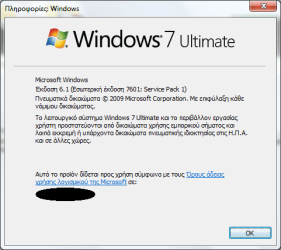
If you have Windows 7 Professional,you don't have BitLocker.
How to check your Windows 7 version:
Press Win+R to open Run and type:
winver
You will see something like this:

winver.png

Let me know about your version.
 

My Computer My Computer

Computer type
Laptop
Computer Manufacturer/Model Number
Lenovo G580 20150
OS
Windows 7 Ultimate SP1 64 bit
CPU
Intel Core i3-3110M Ivy Bridge
Motherboard
Lenovo INVALID U3E1 (Ivy Bridge)
Memory
4,00GB Single-Channel DDR3 798 MHz
Graphics Card(s)
Intel HD Graphics 4000,Nvidia GeForce 610M
Sound Card
Conexant HD SmartAudio
Monitor(s) Displays
Generic PnP Monitor, Sony BRAVIA KDL-46D3500 Full HD TV
Screen Resolution
1366x768, 1920x1080
Hard Drives
Seagate ST1000LM024 HN-M101MBB 1TB
Keyboard
AccuType
Internet Speed
72 Mbps
Antivirus
Microsoft Security Essentials
Browser
Internet Explorer 11
Other Info
PLDS DVD-RW DS8ABSH SCSI Device
VMware Workstation 11
Microsoft Office 2007 Enterprise,2010 Professional Plus,2013 Professional Plus
Sony MDR-XD150 Headset

VM's:Windows Vista SP2 x64,Windows Server 2003 Enterprise SP2 x86,Windows Server 2008 x86,Windows XP Professional x64 SP2

My Computer My Computer

Computer type
PC/Desktop
OS
Windows 7 Ultimate x64
Thank you both very much!
 

My Computer My Computer

Computer type
PC/Desktop
OS
Windows 7 x64 Pro, Windows 8.1 x64 Pro, Windows 10 TP 10041
You're welcome :)
 

My Computer My Computer

Computer type
Laptop
Computer Manufacturer/Model Number
Lenovo G580 20150
OS
Windows 7 Ultimate SP1 64 bit
CPU
Intel Core i3-3110M Ivy Bridge
Motherboard
Lenovo INVALID U3E1 (Ivy Bridge)
Memory
4,00GB Single-Channel DDR3 798 MHz
Graphics Card(s)
Intel HD Graphics 4000,Nvidia GeForce 610M
Sound Card
Conexant HD SmartAudio
Monitor(s) Displays
Generic PnP Monitor, Sony BRAVIA KDL-46D3500 Full HD TV
Screen Resolution
1366x768, 1920x1080
Hard Drives
Seagate ST1000LM024 HN-M101MBB 1TB
Keyboard
AccuType
Internet Speed
72 Mbps
Antivirus
Microsoft Security Essentials
Browser
Internet Explorer 11
Other Info
PLDS DVD-RW DS8ABSH SCSI Device
VMware Workstation 11
Microsoft Office 2007 Enterprise,2010 Professional Plus,2013 Professional Plus
Sony MDR-XD150 Headset

VM's:Windows Vista SP2 x64,Windows Server 2003 Enterprise SP2 x86,Windows Server 2008 x86,Windows XP Professional x64 SP2
Back
Top