Recycle Bin - Fix For Custom Icons Not Refreshing

How to Fix Custom Recycle Bin Icons Not Automatically Refreshing


   Information
The Recycle Bin provides a safety net when deleting files or folders. When you delete any of these items from your hard disk, Windows places it in the Recycle Bin and the Recycle Bin icon changes from empty to full.

Sometimes, when using different custom icons for both the Full and Empty Recycle Bin, the icons will not change to the proper icon when filled or emptied, unless you manually refresh the Desktop.

This will show you how to fix the refreshing problem when you use custom icons for the Recycle Bin in Vista and Windows 7.
   Tip
To use custom icons for the Recycle Bin, see this tutorial here - Desktop Icons - Add or Remove
   Note


  • If you change one or both icons to different ones after you have applied the changes in Regedit, you will need to apply the registry changes again for the new ones
  • Removable drives do not use or have a Recycyle Bin. Files deleted from removable drives are permanently deleted instead.


Here's How:
1. Open the Registry Editor by going to the Start Menu and typing in Regedit. Click yes for UAC prompt.

2. Navigate to-
Code:
HKEY_CURRENT_USER/Software/Microsoft/Windows/CurrentVersion/Explorer/CLSID/{645FF040-5081-101B-9F08-00AA002F954E}/Default Icon
3. In the right hand pane, double click on the (Default) string, and change the entry from this - %USERPROFILE%\Icons\blackhole.ico to this %USERPROFILE%\Icons\blackhole.ico,0
NOTE: Instead of blackhole.ico, you will have your custom icon file name instead.

4. Click OK.

5. Repeat Step 3 for the empty and full string entries as well. When done, it should look like this -

2009-09-13_185526.jpg
6. Close Regedit and the changes should apply without having to log off and on or restart. You can try it out by deleting something when it's Empty, and see if it changes to the Full custom icon.


That's it.
Airbot


Last edited by a moderator:
recycle bin

Thank You Very much!!! That's one thing less that will annoy me! Bill
 

My Computer

Computer Manufacturer/Model Number
alienware
OS
Windows 7 Ultimate
CPU
i7 920
Motherboard
micro atx x58
Memory
12 GB 1333
Graphics Card(s)
1.8 GB nvidia GTX 260
Sound Card
soundblaster XFI titanium fatality
Monitor(s) Displays
Dell 24" ultrasharp
Hard Drives
300 GB 10,000 RPM WD
2x300 GB WD USB
PSU
875 w
Case
aurora
Cooling
liquid
You're welcome Bill.
 

My Computer

Computer type
PC/Desktop
Computer Manufacturer/Model Number
Airbot 2.0
OS
Windows 7 Ultimate x64 SP1
CPU
Core i7 920 (D0) @ 4Ghz, *26c idle *65c full load on air
Motherboard
Asus P6X58D Premium - Sata 6Gb/s - USB 3.0
Memory
12GB DDR3 Corsair Dominator -CMD12GX3M6A1600C8 at 1600MHz
Graphics Card(s)
Zotac Geforce GTX 770
Sound Card
ASUS Xonar D2X
Monitor(s) Displays
1 LG 24" Flatron W2453V-PF 1 Samsung 24" P2450H both 2ms RT
Screen Resolution
1920x1080@60hz
Hard Drives
1 Samsung 250GB 840 Evo SSD
1 OCZ Vertex2 180GB SSD
1 TB Samsung Spinpoint F1 7200RPM 32MB cache
2 500GB WD Caviar Blacks 7200RPM 32MB cache (WD5001AALS)

Pioneer DVD Burner DVR-S18M
PSU
Corsair HX1000W
Case
Cooler Master HAF 932
Cooling
Case Fans *3 230mm, *1 140mm/CPU - *Tuniq Tower 120 Extreme
Keyboard
Logitech Wireless MK700
Mouse
Logitech Wireless MK700
Internet Speed
DL 15 Mbps UL 0.98 Mbps
Antivirus
None
Browser
Firefox Nightly
Other Info
Processor-7.7 *RAM- 7.9 *Graphics-7.9 *Gaming Graphics- 7.9 *SSD- 7.8 W.E.I final score= 7.7
*Phone- LG Nexus 5
I know this opic is quite done, but I wanted to add my own thanks. The ,0 worked for me too.
I thank you and my girlfriend does as well; I get very unpleasant when my computers don't do as I say. ;)
 

My Computer

Computer Manufacturer/Model Number
HP Probook 4720s
OS
Windows 7
CPU
Intel i5
Memory
4GB
Graphics Card(s)
ATI Radeon Mobility 512MB
Hard Drives
Just one. SATA II 500GB.
Thanks for this!!! It fixed the problem with my icon not refreshing. For some reason the ,0 was missing on all of them.
 

My Computer

Computer Manufacturer/Model Number
Custom
OS
Windows 7
CPU
AMD Quad Core
Motherboard
Asus
Memory
4GB DDR3
Graphics Card(s)
ATI
Sound Card
Int 7.1
Monitor(s) Displays
Tri 22" Acer widescreens, single 17" Dell/Acer letterbox
Screen Resolution
1920x1080
Hard Drives
Single Western Digital 640G
PSU
Corsair
Case
GMC
Cooling
Stock, Air
Keyboard
Dell media keyboard
Mouse
Wireless opticMicrosoft IntelliMouse, Wired ione laser mouse
Internet Speed
85Mbps FIBER
Other Info
Windows 7 since the beta days....
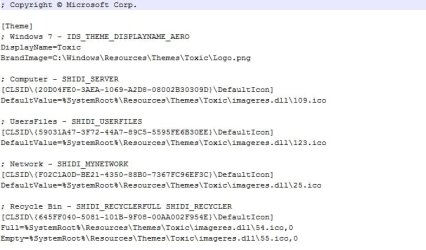
I found a better fix for this that doesn't need you to edit the registry, all you need to do is open the theme file with notepad and add ,0 after the icon name and then save it, then when you apply your theme it will add that to the registry as well and solve the problem, this way works better if you have multiple themes that have different icons and saves you having to do the fix every time you change your theme.

2010-10-29_104832.jpg
 

My Computer

Computer Manufacturer/Model Number
Home Brew
OS
Windows 7 Ultimate Vista Ultimate x64
CPU
Core 2 Duo E8500 3.16Ghz @ 3.8Ghz
Motherboard
eVGA 750i FTW
Memory
2x2Gigs Patriot PC2-6400 LL
Graphics Card(s)
Inno3D GeForce GTX260 216 SP
Monitor(s) Displays
ASUS VW222U 22" 2ms Response time
Screen Resolution
1680x1050
Hard Drives
SATA 150GB
SATA II 250GB
USB IDE 750GB Ext.
PSU
HYTEC 600W & Thermaltake 650W Toughpower Power Exp
Case
Thermaltake Armor LCS (Liquid Cooling System)
Cooling
Liquid Cooling System
Keyboard
Logitech G15 Gaming Keyboard
Mouse
Logitech G9 Gaming Mouse
This path will only work with your Icons. Besides the fix is just adding ",0" for every entry in the registry.
I suggest you just change the icons with the Windows GUI. Then run regedit.exe go to

HKEY_CURRENT_USER/Software/Microsoft/Windows/CurrentVersion/Explorer/CLSID/{645FF040-5081-101B-9F08-00AA002F954E}/Default Icon

And by each entry add at the end ",0" like this:
"D:\Projects\Icons\Chinese Box Recycle Bin\Neuromancer Chinese Box Empty.ico,0"
that is the path to your icon with added ",0"
That fixes the problem and lets you keep the original place of the icons you use.
Just don't move them :)

P.S. If you save the Theme after this the register change will be saved as well. If you edit the theme file and change the register there. Then apply the theme it will be the same as if you changed the register. The point is when you fixed the register - save the theme.
 

My Computer

OS
Windows 7 Ultimate x86
YOU ROCK!!!

Hey man, I tried your method and it worked like a charm, so I made an account just to say a big thankyou!!!!
 

My Computer

Computer Manufacturer/Model Number
Fujitsu-Siemens
OS
Windows 7 Ultimate 32-bit
CPU
Intel Core 2 Quad Q8300
Motherboard
Fujitsu-Siemens MS-7504VP-PV
Memory
4GB DDR2
Graphics Card(s)
nVidia GeForce 9600GT
Sound Card
Realtek High Definition Adapter
Monitor(s) Displays
1. Samsung SyncMaster 2233BW 2. Alba 422 Full HD LCD TV
Hard Drives
WDC WD6400AAKS-07A7B0 SATA HDD
Case
Factory Case
Does this apply to all type of icons? Becoz when i try to change one of my folder's icon, It doesn't change unless i refresh.
 

My Computer

OS
Windows 7 professional
Hello Engkhsky, and welcome to Seven Forums.

Sorry, but no. This tutorial is only for the Recycle Bin. :(

If you like, you can create a new thread in the "General Discussion" area to see if a solution for your issue may be found.
 

My Computer

Computer type
PC/Desktop
Computer Manufacturer/Model Number
Self built custom
OS
64-bit Windows 11 Pro for Workstations
CPU
Intel i7-8700K OC'd to 5 GHz
Motherboard
ASUS ROG Maximus XI Formula Z390
Memory
64 GB (4x16GB) G.SKILL TridentZ RGB DDR4 3600 MHz
Graphics Card(s)
ASUS ROG-STRIX-GTX1080TI-O11G-GAMING
Sound Card
Integrated
Monitor(s) Displays
2 x Samsung Odyssey G7 27"
Screen Resolution
2560x1440
Hard Drives
1TB Samsung 990 PRO M.2,
4TB Samsung 990 PRO PRO M.2,
TerraMaster F8 SSD Plus NAS
PSU
Seasonic Prime Titanium 850W
Case
Thermaltake Core P3
Cooling
Corsair Hydro H115i
Keyboard
Logitech wireless K800
Mouse
Logitech MX Master 4
Internet Speed
2 Gb/s Download and 100 Mb/s Upload
Antivirus
Malwarebyte Anti-Malware Premium
Browser
Google Chrome
Other Info
Logitech Z625 speaker system,
Logitech BRIO 4K Pro webcam,
HP Color LaserJet Pro MFP M477fdn,
APC SMART-UPS RT 1000 XL - SURT1000XLI,
Galaxy S23 Plus phone
Hello Engkhsky, and welcome to Seven Forums.

Sorry, but no. This tutorial is only for the Recycle Bin. :(

If you like, you can create a new thread in the "General Discussion" area to see if a solution for your issue may be found.


Thanks!
 

My Computer

OS
Windows 7 professional
@#%&!!&%#

Running W7 Home Premium x64 on an HP Envy 17-3090nr 3D and this just does not work,,,,,,?!........@#%&!#!!
The icons are still confused as ever, eradicate behaviour, nothing consistent.
I created a folder 'C:\Windows\Icons' for my custom Windows icons.
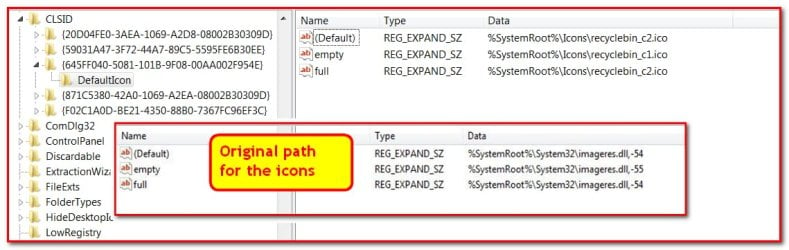
The reg changes to '%SystemRoot%\Icons\recyclebin_c2.ico' and looses the ',0' after I create the path 'C:\Windows\Icons\recyclebin_c2.ico,0'
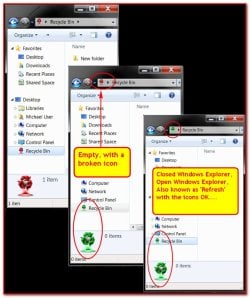
I start with an empty RB and threw a folder in there, opens fine, after it empty's, its messed up again, refresh and its fine.......
I've posted pics as to what I've done.

Q. I'm doing this from the USER ACCOUNT, should I be doing this in the ADMIN ACCOUNT?

Any advise as what to try next?,,,,,Or should I do a .dll mod and replace the icons there?
 

Attachments

  • 2013-06-27_203305.jpg
    2013-06-27_203305.jpg
    329.3 KB · Views: 195
  • 2013-06-27_211618b.jpg
    2013-06-27_211618b.jpg
    442.2 KB · Views: 173
Last edited:

My Computer

Computer type
Laptop
Computer Manufacturer/Model Number
HP ENVY 17-3090ND 3D
OS
W7 HP x64 SP1
CPU
Intel Quad i7-2670QM @ 2.2 - 3.4GHz. 4 Cores, 8 Threds
Motherboard
HP 168A Intel Sandybridge Rev.09 Southbridge HM65 Rev.05
Memory
8GB 1600MHz DDR3 (2x 4GB DDR3)
Graphics Card(s)
Intel HD 3000 + Radeon HD 7690M XT
Sound Card
INTEL-IDT/Beats Audio, 6 Speakers and Subwoofer
Monitor(s) Displays
17.5" - Infinity Eye 3 Monitor Capable
Screen Resolution
1920 x 1080, 120 Hz, Full HD
Hard Drives
Intel 80GB mSATA II SSD,
Hitachi 500GB SATA II HDD,
Hitachi 750GB SATA II HDD.
PSU
16.0 V
Case
Aluminium alloy
Cooling
2 Fans
Keyboard
Full - Backlit with variable lighting
Mouse
Image Pad - Microsoft Arc Mouse
Internet Speed
High Speed DSL
Antivirus
avast! home Free, MBAM Pro, Online Armor Firewall.
Browser
Firefox, IE
Other Info
Maintenance and service guide link:
http://h10032.www1.hp.com/ctg/Manual/c03317166.pdf

HP drivers and software link:
http://h10025.www1.hp.com/ewfrf/wc/softwareCategory?os=4063&lc=en&cc=us&dlc=en&sw_lang=&product=5218414
On my old Windows XP I had my custom icons located in the folder
"C:\Windows\system32\My_Icons",
so I used the same location in Windows 7.

That worked well for Explorer windows and many programs,
but in some programs the "Open/Save" dialog only showed
the generic icon for file types I had changed, and all custom folder
icons were completely ignored ... :(

So I changed the location to
"C:\Users\Public\My_Icons"
and now all works well.

Maybe a problem with the access rights, seems that Win 7 does
not even grant reading of his valuable system folder
(or the programs don't dare to take a look in there :) ).


Btw, I still love my old Windows ME trash WinME Empty & Full.png
so I ofc used it in Win 7 too and I was really angry that I had to refresh it
manually. It's a shame, that Microsoft isn't even able to get a
System Option to work properly ... :rolleyes:


So thanks a lot for this patch ! :thumbsup:

Regards,
Tom
 

My Computer

Computer type
PC/Desktop
Computer Manufacturer/Model Number
Custom Build
OS
Windows 7 Ultimate x64
CPU
Intel Sandy Bridge i5 2500K
Motherboard
ASUS P8 H67-M Pro Rev. 3
Memory
16 GB
Graphics Card(s)
Intel internal HD 3000
Sound Card
Realtek internal High Def Audio
Monitor(s) Displays
ViewSonic 24"
Case
Cooler Master - HAF 932 (Big Tower)
Cooling
CPU: EKL AG "Alpenfohn Brocken"
Mouse
SteelSeries Sensei
Antivirus
Kaspersky Internet Security
Browser
Avant (Tri-Core: IE, FireFox & Chrome Engine)

My Computer

Computer type
Laptop
Computer Manufacturer/Model Number
HP ENVY 17-3090ND 3D
OS
W7 HP x64 SP1
CPU
Intel Quad i7-2670QM @ 2.2 - 3.4GHz. 4 Cores, 8 Threds
Motherboard
HP 168A Intel Sandybridge Rev.09 Southbridge HM65 Rev.05
Memory
8GB 1600MHz DDR3 (2x 4GB DDR3)
Graphics Card(s)
Intel HD 3000 + Radeon HD 7690M XT
Sound Card
INTEL-IDT/Beats Audio, 6 Speakers and Subwoofer
Monitor(s) Displays
17.5" - Infinity Eye 3 Monitor Capable
Screen Resolution
1920 x 1080, 120 Hz, Full HD
Hard Drives
Intel 80GB mSATA II SSD,
Hitachi 500GB SATA II HDD,
Hitachi 750GB SATA II HDD.
PSU
16.0 V
Case
Aluminium alloy
Cooling
2 Fans
Keyboard
Full - Backlit with variable lighting
Mouse
Image Pad - Microsoft Arc Mouse
Internet Speed
High Speed DSL
Antivirus
avast! home Free, MBAM Pro, Online Armor Firewall.
Browser
Firefox, IE
Other Info
Maintenance and service guide link:
http://h10032.www1.hp.com/ctg/Manual/c03317166.pdf

HP drivers and software link:
http://h10025.www1.hp.com/ewfrf/wc/softwareCategory?os=4063&lc=en&cc=us&dlc=en&sw_lang=&product=5218414

My Computer

Computer type
PC/Desktop
Computer Manufacturer/Model Number
Self built custom
OS
64-bit Windows 11 Pro for Workstations
CPU
Intel i7-8700K OC'd to 5 GHz
Motherboard
ASUS ROG Maximus XI Formula Z390
Memory
64 GB (4x16GB) G.SKILL TridentZ RGB DDR4 3600 MHz
Graphics Card(s)
ASUS ROG-STRIX-GTX1080TI-O11G-GAMING
Sound Card
Integrated
Monitor(s) Displays
2 x Samsung Odyssey G7 27"
Screen Resolution
2560x1440
Hard Drives
1TB Samsung 990 PRO M.2,
4TB Samsung 990 PRO PRO M.2,
TerraMaster F8 SSD Plus NAS
PSU
Seasonic Prime Titanium 850W
Case
Thermaltake Core P3
Cooling
Corsair Hydro H115i
Keyboard
Logitech wireless K800
Mouse
Logitech MX Master 4
Internet Speed
2 Gb/s Download and 100 Mb/s Upload
Antivirus
Malwarebyte Anti-Malware Premium
Browser
Google Chrome
Other Info
Logitech Z625 speaker system,
Logitech BRIO 4K Pro webcam,
HP Color LaserJet Pro MFP M477fdn,
APC SMART-UPS RT 1000 XL - SURT1000XLI,
Galaxy S23 Plus phone
Pfffftttt!

Hello Michael,

If you have not already, you might see how using the method in the tutorial below to change the Recycle Bin's full and empty icons may work for you insstead.

http://www.sevenforums.com/tutorials/920-desktop-icons-change-restore-default-icon.html

Hope this helps, :)
Shawn


Riiiiight.....
Its still with the erratic behaviour,,,,reg fix or icon location change doesn't make a difference for me for CUSTOM RB icons.
2013-11-05_072619.jpg%7Eoriginal


I use both the 256² and the 128² icons for all my stuffff.
IDK,,,I just might be a little bit lazy not to upscale them...
2013-11-05_074726.jpg~original


No real difference in the look when it comes to using 128, for the most part their fine looking.
I'm using a 120Htz 1080p 17.5" screen, and its ½ screen size screen shot.

2013-11-05_074938.jpg~original


I'm just not getting the love from the RB icons,,,,,,,,
Med-06-1.gif~original


2013-11-05_082148b.jpg~original
 

My Computer

Computer type
Laptop
Computer Manufacturer/Model Number
HP ENVY 17-3090ND 3D
OS
W7 HP x64 SP1
CPU
Intel Quad i7-2670QM @ 2.2 - 3.4GHz. 4 Cores, 8 Threds
Motherboard
HP 168A Intel Sandybridge Rev.09 Southbridge HM65 Rev.05
Memory
8GB 1600MHz DDR3 (2x 4GB DDR3)
Graphics Card(s)
Intel HD 3000 + Radeon HD 7690M XT
Sound Card
INTEL-IDT/Beats Audio, 6 Speakers and Subwoofer
Monitor(s) Displays
17.5" - Infinity Eye 3 Monitor Capable
Screen Resolution
1920 x 1080, 120 Hz, Full HD
Hard Drives
Intel 80GB mSATA II SSD,
Hitachi 500GB SATA II HDD,
Hitachi 750GB SATA II HDD.
PSU
16.0 V
Case
Aluminium alloy
Cooling
2 Fans
Keyboard
Full - Backlit with variable lighting
Mouse
Image Pad - Microsoft Arc Mouse
Internet Speed
High Speed DSL
Antivirus
avast! home Free, MBAM Pro, Online Armor Firewall.
Browser
Firefox, IE
Other Info
Maintenance and service guide link:
http://h10032.www1.hp.com/ctg/Manual/c03317166.pdf

HP drivers and software link:
http://h10025.www1.hp.com/ewfrf/wc/softwareCategory?os=4063&lc=en&cc=us&dlc=en&sw_lang=&product=5218414
@ Tom

So this patch worked for you?
AND,,,,
Your custom icon folder is in 'User' profile.....(?)....
(...)


My Custom Icon Folder is NOT in MY user folder, it's in the public one:
"C:\Users\Public\My_Icons"

And I mean a folder, not a library (I'm not (yet) using libraries) :
Double-click on "C: >> Users >> Public" and make the folder there.

Maybe try another icon, located NOT in the Windows system folder ?


Regards,
Tom
 

My Computer

Computer type
PC/Desktop
Computer Manufacturer/Model Number
Custom Build
OS
Windows 7 Ultimate x64
CPU
Intel Sandy Bridge i5 2500K
Motherboard
ASUS P8 H67-M Pro Rev. 3
Memory
16 GB
Graphics Card(s)
Intel internal HD 3000
Sound Card
Realtek internal High Def Audio
Monitor(s) Displays
ViewSonic 24"
Case
Cooler Master - HAF 932 (Big Tower)
Cooling
CPU: EKL AG "Alpenfohn Brocken"
Mouse
SteelSeries Sensei
Antivirus
Kaspersky Internet Security
Browser
Avant (Tri-Core: IE, FireFox & Chrome Engine)
I give up.....

I give up.....
That's right....
I surrender, to the fact......Microsoft is incompetent
Trad-sex011-1.gif~original
and can't make a patch or fix since XP for this issue...
Seriously....
This simple mod should work with just an icon switch.

I give up.........
Huge-001.gif~original


Its endemic to MS, just like the PresentationFontCache.exe high CPU usage issue that still persists from XP,,,,that's pre XP SP1.....

This issue is dead to me.
Time to go home...
Trad-alien-1.gif~original
 

My Computer

Computer type
Laptop
Computer Manufacturer/Model Number
HP ENVY 17-3090ND 3D
OS
W7 HP x64 SP1
CPU
Intel Quad i7-2670QM @ 2.2 - 3.4GHz. 4 Cores, 8 Threds
Motherboard
HP 168A Intel Sandybridge Rev.09 Southbridge HM65 Rev.05
Memory
8GB 1600MHz DDR3 (2x 4GB DDR3)
Graphics Card(s)
Intel HD 3000 + Radeon HD 7690M XT
Sound Card
INTEL-IDT/Beats Audio, 6 Speakers and Subwoofer
Monitor(s) Displays
17.5" - Infinity Eye 3 Monitor Capable
Screen Resolution
1920 x 1080, 120 Hz, Full HD
Hard Drives
Intel 80GB mSATA II SSD,
Hitachi 500GB SATA II HDD,
Hitachi 750GB SATA II HDD.
PSU
16.0 V
Case
Aluminium alloy
Cooling
2 Fans
Keyboard
Full - Backlit with variable lighting
Mouse
Image Pad - Microsoft Arc Mouse
Internet Speed
High Speed DSL
Antivirus
avast! home Free, MBAM Pro, Online Armor Firewall.
Browser
Firefox, IE
Other Info
Maintenance and service guide link:
http://h10032.www1.hp.com/ctg/Manual/c03317166.pdf

HP drivers and software link:
http://h10025.www1.hp.com/ewfrf/wc/softwareCategory?os=4063&lc=en&cc=us&dlc=en&sw_lang=&product=5218414
I give up.....
That's right....
(...)
Sad to read, that you can't get it to work as it should ...

But reading it gives comfort to me, seeing that I'm not the only one
having specific problems, which seems to appear only in my system ...


Never give up (much easier to say than to do ...),
Tom
 

My Computer

Computer type
PC/Desktop
Computer Manufacturer/Model Number
Custom Build
OS
Windows 7 Ultimate x64
CPU
Intel Sandy Bridge i5 2500K
Motherboard
ASUS P8 H67-M Pro Rev. 3
Memory
16 GB
Graphics Card(s)
Intel internal HD 3000
Sound Card
Realtek internal High Def Audio
Monitor(s) Displays
ViewSonic 24"
Case
Cooler Master - HAF 932 (Big Tower)
Cooling
CPU: EKL AG "Alpenfohn Brocken"
Mouse
SteelSeries Sensei
Antivirus
Kaspersky Internet Security
Browser
Avant (Tri-Core: IE, FireFox & Chrome Engine)
This really SUX I have tried this and so many other "fixes" and nothing will work..... Micro$oft :mad: is so lame for not fixing this a long time ago. Im using Windows 8 X64 home :(.... I do wanna thank the ppl @ this site for their hard work on this and in fact it appears to have worked 4many so that's a good thing :) Thanks again folks.
MIKLO
 

My Computer

Computer type
PC/Desktop
Computer Manufacturer/Model Number
Dell
OS
windows 8 X64
Hello Miklo,

If you like, upload the icons you are using for your Recycle Bin, and I'll be happy to test them on my system to see if there may be an issue with them.

Where do you have the icons saved at on your system? This way I'll test using the same to get the best test results.
http://www.sevenforums.com/tutorials/9733-screenshots-files-upload-post-seven-forums.html
In addition, see if the tutorial below may be able to help if you have not already.
Recycle Bin
Hope this helps for now, :)
Shawn
 

My Computer

Computer type
PC/Desktop
Computer Manufacturer/Model Number
Self built custom
OS
64-bit Windows 11 Pro for Workstations
CPU
Intel i7-8700K OC'd to 5 GHz
Motherboard
ASUS ROG Maximus XI Formula Z390
Memory
64 GB (4x16GB) G.SKILL TridentZ RGB DDR4 3600 MHz
Graphics Card(s)
ASUS ROG-STRIX-GTX1080TI-O11G-GAMING
Sound Card
Integrated
Monitor(s) Displays
2 x Samsung Odyssey G7 27"
Screen Resolution
2560x1440
Hard Drives
1TB Samsung 990 PRO M.2,
4TB Samsung 990 PRO PRO M.2,
TerraMaster F8 SSD Plus NAS
PSU
Seasonic Prime Titanium 850W
Case
Thermaltake Core P3
Cooling
Corsair Hydro H115i
Keyboard
Logitech wireless K800
Mouse
Logitech MX Master 4
Internet Speed
2 Gb/s Download and 100 Mb/s Upload
Antivirus
Malwarebyte Anti-Malware Premium
Browser
Google Chrome
Other Info
Logitech Z625 speaker system,
Logitech BRIO 4K Pro webcam,
HP Color LaserJet Pro MFP M477fdn,
APC SMART-UPS RT 1000 XL - SURT1000XLI,
Galaxy S23 Plus phone
Back
Top