shashi5543
New member
- Local time
- 7:48 AM
- Messages
- 6
My Computer
At a glance
windows 7 32 bit
- OS
- windows 7 32 bit
- Screen Resolution
- 1280*800



 Imageres.dll corrupted.
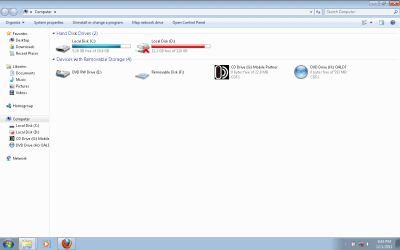
Your system is not in trouble. This icon is actually the icon of disconnected network drive. Somehow you have got your imageres.dll file (the file which stores all the system icons; iconpackager is a known guilty); and that is why it is showing the wrong one, alongwith a few of other system icons.does this(red icon on drive) pose any problem to the system??????????
could u guys notice that icon of d drive is different frm usual......................

i think its because of alienware theme that i uninstalled..............
If you read the post http://www.sevenforums.com/general-discussion/200304-red-cross-icon-local-drive-d.html#post1682997 , I have included alienware there in the list, too.i think its because of alienware theme that i uninstalled..............
thx arc...............Your system is not in trouble. This icon is actually the icon of disconnected network drive. Somehow you have got your imageres.dll file (the file which stores all the system icons; iconpackager is a known guilty); and that is why it is showing the wrong one, alongwith a few of other system icons.does this(red icon on drive) pose any problem to the system??????????
could u guys notice that icon of d drive is different frm usual......................
If you apply the trick I posted above, it will be solved then and there ... after a restart.
Shashi, these programs means Iconpackager, Alienware, Hyperdesk, etc programs which apply patches to the system files incompletely . If you uninstall these without applying the default windows theme, you must get trouble.in which context u have written "be cautious of using these programs."


