Shrinking size of boot partition to enable smaller image files
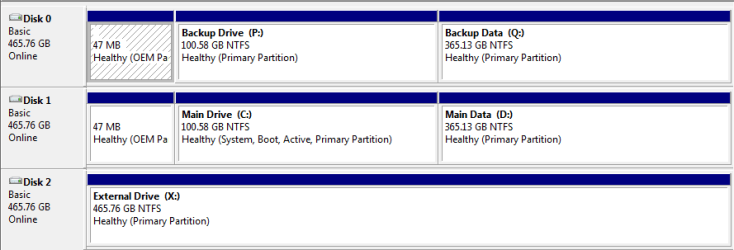
Okay, now that I finally got my 500 GB drives and partitions setup and working, I want to create a backup image file of my active boot partition.
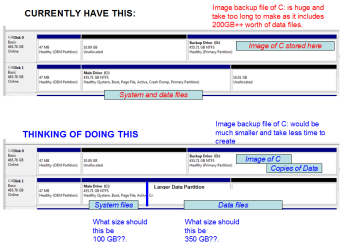
Easily done but problem is my boot partition is huge, as it contains my 200++ GB worth of user files ( and only 35GB worth of windows\program files). And the typical image backup programs (Win 7 backup, EaseUS, Macrium, Acronis WD 2009, Paragon, etc ) dont allow you to exxlude folders from an image. I wont go near the ultra buggy newer Acronis ones that do allow for exlusions.
So it occurs to me life would be much easier if I do what many do and have a smaller active partition for windows etc, and a larger one for data.
In that way I can create smaller image backups of the active partition, and do so much faster.
QUESTION - I can use something like Partiion Wizard (or Disk Management) to resize the partions on my main drive, but what size should I make the active C drive?? I dont want to run out of space by making too small, or end up with large image files if is too big. Would it make sense to say keep the active partitons at say 100GB?? Too big?? Too small?? Currently i have about 35 GB worth
of Windows and Program files.
Okay, now that I finally got my 500 GB drives and partitions setup and working, I want to create a backup image file of my active boot partition.
Easily done but problem is my boot partition is huge, as it contains my 200++ GB worth of user files ( and only 35GB worth of windows\program files). And the typical image backup programs (Win 7 backup, EaseUS, Macrium, Acronis WD 2009, Paragon, etc ) dont allow you to exxlude folders from an image. I wont go near the ultra buggy newer Acronis ones that do allow for exlusions.
So it occurs to me life would be much easier if I do what many do and have a smaller active partition for windows etc, and a larger one for data.
In that way I can create smaller image backups of the active partition, and do so much faster.
QUESTION - I can use something like Partiion Wizard (or Disk Management) to resize the partions on my main drive, but what size should I make the active C drive?? I dont want to run out of space by making too small, or end up with large image files if is too big. Would it make sense to say keep the active partitons at say 100GB?? Too big?? Too small?? Currently i have about 35 GB worth
of Windows and Program files.
Attachments
Last edited:
My Computer
At a glance
DELL Win 7 Home Premium 64 BitIntel Core i7-930 (8MB L2, 2.8GHz) // ntel Co...16GB // 18GB DDR3 SDRAM 1333Mhhz 6 DIMMS (3x2...AMD HD7570 // AMD Radeon HD6750 // ATI Radeon...
- Computer type
- PC/Desktop
- Computer Manufacturer/Model Number
- DELL XPS 8500 // DELL XPS Studio 9100 // DELL Dim 9200
- OS
- DELL Win 7 Home Premium 64 Bit
- CPU
- Intel Core i7-930 (8MB L2, 2.8GHz) // ntel Core 2 Quad Q6600
- Motherboard
- ?? // Dell A02 BIOS // ??
- Memory
- 16GB // 18GB DDR3 SDRAM 1333Mhhz 6 DIMMS (3x2, 3x4) //4 GB
- Graphics Card(s)
- AMD HD7570 // AMD Radeon HD6750 // ATI Radeon HD5670 1 GB GD
- Sound Card
- ?? // THX TruStudio PC //?
- Monitor(s) Displays
- Dual Dell 2405 WFP-HC24 //SAmsung 27" // Triple 19" LCD
- Screen Resolution
- 1900 x 1200
- Hard Drives
- Main :WD Caviar Black 1 TB SATA WD1002FAEX
Backup :WD Caviar Black 1 TB SATA WD1002FAEX
- PSU
- ?? // Ultra 900W // ??