Solved reflect updates

alexm

New member
Member
VIP
Local time
6:48 PM
Messages
132
I have made a macrium reflect recovery cd from a previous version of macrium reflect. I uninstalled that version some time ago. recently I d/l the latest version & backed up system reserve & "c" drive. Do I even need to make a recovery disk since I made one with the other version of macrium reflect. Also do I need to make a backup of system reserve If I have a recovery disk.
 

My Computer

Computer type
Laptop
Computer Manufacturer/Model Number
System Manufacturer Acer aspire 7736
OS
Microsoft Windows 7 Home Premium 64-bit 7601 Multiprocessor Free Service Pack 1
CPU
Pentium(R) Dual-Core CPU T4400 @ 2.20GHz
Motherboard
Acer JV50
Memory
3.00 GB
Graphics Card(s)
(1) Mobile Intel(R) 4 Series Express Chipset Family (2) Mo
Sound Card
(1) Intel(R) High Definition Audio HDMI (2) Realtek High D
Monitor(s) Displays
1600 x 900 x 59 hertz
Screen Resolution
1600 x 900 x 32 bits (4294967296 colors) @ 59 Hz
Hard Drives
Hitachi HTS545032B9A300
Hello alexm, i have used linux disks from previous versions of macrium in the past to boot into macriums recovery console without any problems, but i would recommend burning a new if you are able.

In regard to backing up the System Reserved partition have a look at this tutorial;

http://www.sevenforums.com/tutorials/128494-imaging-strategies.html
 

My Computer

Computer Manufacturer/Model Number
Hewlett Packard Compaq Presario CQ60-305au
OS
Windows Seven Home Premium 32bit SP1
CPU
AMD Athlon QI46 2.1Ghz
Motherboard
Wistron 303c
Memory
2048 Mb DDR2 SD RAM
Graphics Card(s)
NVidea GE GoForce 8200M G/256mb dedicated graphics memory
Sound Card
MCP78S NVidea high definition
Monitor(s) Displays
15.6" High definition Brightview Widescreen
Screen Resolution
1336x768
Hard Drives
Toshiba MK2555GSX ATA
Do I even need to make a recovery disk since I made one with the other version of macrium reflect.

Good question. I just go ahead and make a new recovery disk for each update.

~Maxx~

Reflect_Logo_100-1.png
 

My Computer

Computer Manufacturer/Model Number
HP HPE 270f
OS
Windows 7 x64 Home Premium
CPU
Intel Core i7 930 @ 2.8 Ghz Socket 1366 LGA
Motherboard
Pegatron Truckee v1.04E41
Memory
8 GB 1366 Mhz DDR3 (PC3-10700) RAM
Graphics Card(s)
ATI Radeon 5770 1 GB DDR5 RAM
Sound Card
Realtech High Definition
Monitor(s) Displays
32" Sony Bravia
Screen Resolution
1366 X 768
Hard Drives
Intel 25nm 120 GB Series 320 SSD HD Tune- 265 MBps Read/ 130 MBps Write

LaCie 1TB + 1TB RAID 0 eSATA Drive HD Tune- 160 MBps Read/ 90 MBps Write
Keyboard
Logitech Illuminated
Mouse
Logitech MX Revolution
Internet Speed
36.4 Mbps Maximum on a 37 Mbps Motorola SB501 Modem
There was an earlier release change ( i do not remember exactly when) of Macrium where they recommended to burn a new recovery disk. Since then, I always do. I also keep seperate recovery CDs for my 32bit and 64bit systems. That may be an overkill, but it takes only a few minutes and CDs are cheap.
 

My Computer

Computer Manufacturer/Model Number
HP, Dell, Gateway, Toshiba - 4 laptops and 2 desktops
OS
Vista, Windows7, Mint Mate, Zorin, Windows 8
CPU
from 1.6GHz Duo to i7
Monitor(s) Displays
2x HP w2207
Hard Drives
5x HDD, 7x SSD, 12x Externals
Keyboard
with trackball - no mices
Mouse
Trackball mice
Internet Speed
DSL 6000
The biggest change in the Linux boot CD in a long while has been upgrading the free version of Macrium to the same boot CD as the paid version. The main hassle with burning another boot CD is you should really test it before assuming it will work when the need arises. Sometimes I just can't get psyched to do yet another burn and boot test cycle esp. if there's nothing particularly new on the boot CD.

Short answer is, if you don't want to bother testing the new one, don't throw out the old one. ;)

edit: otoh if you really like commenting your backup images then it may be worth the hassle since the new boot CD is supposed to support viewing the comments in the restore program.
 

My Computer

Computer Manufacturer/Model Number
HP Media Center
OS
Windows 7 32 bit
CPU
AMD 5200+ dual core
Memory
2 GB
Graphics Card(s)
NVidia GeForce 6150SE 128 MB
Monitor(s) Displays
CRT
Screen Resolution
1280x1024
Hard Drives
500 GB Sata internal :

SIIG USB 3.0 docking stations w/WD Caviar Black 6 Gb/s drives
Keyboard
PS/2
Mouse
PS/2 Wheel Mouse
Other Info
SIIG USB 3.0 PCIexpress card.
can you guarantee that your boot-up disc is going to be forward-compatible for ever?

no

you might need one at a very awkward time - burn a new one now - it only takes minutes and costs pence.
 

My Computer

Computer Manufacturer/Model Number
mickey megabyte 1234
OS
ultimate 64 sp1
CPU
i5 2500K [email protected]
Motherboard
MSI P67A-GD53
Memory
8 gigs GSkill Ripjaws 1600
Graphics Card(s)
amd hd6950
Sound Card
creative x-fi gamer
Monitor(s) Displays
samsung 24"
Screen Resolution
1920x1080
Hard Drives
ocz vertex 2e 60 gig, samsung f3 1tb, buffalo 2tb ext
PSU
antec 550
Case
antec three hundred
Cooling
i'm a cooling fan
Keyboard
saitek eclipse ii
Mouse
logitech g3
Internet Speed
about 4 Mbps
Other Info
i love win7
MilesAhead made a good point though. If you burn any CD, you can never be sure whether the CD will really work. For that purpose I have a little procedure which tests the CD but cannot do any damage: (it looks more complicated than it really is)


Macrium test

1. Shrink 2GBs from C and define a logical volume (partition) - let's call it Y
2. Move some files (any files) into Y - I always also move the sample picture folder in (you'll see why)
3. Define a test folder on your external backup disk - call it Mtest
4. Make an image of Y to Mtest - requires that you make a new definition
5. Delete a couple of pictures from the sample picture folder on Y (I always use the 2 animals)
6. Reboot and tap (ESC, F2 or whatever it is on your system) to get into the BIOS boot sequence
7. Set your boot sequence to CD/DVD reader
8. Throw in the Macrium recovery CD and let it run, then hit Enter
9. Now you are in the recovery wizard, set it to Mtest where it says "Locate Image" and to Y where it says "Choose partition to overwrite with the image data".
Note: the partition letters may not be the same as on your system. Macrium uses its own lettering. Best is to go by the size of the partitions and open it with the little + in the front.
10. Watch out when it asks whether to replace the Master Boot Record - in this case say "do not replace" because this is only a data partition. If that were your system partition, you would replace the MBR provided you do not have a separate boot partition.
11. When you get the little window saying "Your computer will now reboot", you have to hit "Cancel" (on the bottom" to get it to reboot. That's a little strange way to end the session, but that's the way it is.
12. Check whether the 2 animals in the sample picture folder are back. That shows you that the recovery worked.

When you have done these steps, you did the whole cycle and have learned

1. That your recovery disk works
2. How to recover
3. That things work

Now you can delete the little 2GB partition and add it back to it's originating partition.
If you are not familiar with the creation and deletion of partitions, watch this tutorial: http://www.sevenforums.com/tutorials/72427-data-partition.html
 

My Computer

Computer Manufacturer/Model Number
HP, Dell, Gateway, Toshiba - 4 laptops and 2 desktops
OS
Vista, Windows7, Mint Mate, Zorin, Windows 8
CPU
from 1.6GHz Duo to i7
Monitor(s) Displays
2x HP w2207
Hard Drives
5x HDD, 7x SSD, 12x Externals
Keyboard
with trackball - no mices
Mouse
Trackball mice
Internet Speed
DSL 6000
Nice Wolfgang, very nice.
 

My Computer

Computer type
PC/Desktop
Computer Manufacturer/Model Number
Golden Mk. I.4
OS
Windows 10 Pro x64 ; Xubuntu x64
CPU
Intel i7 860 @ 2.80 GHz O/C'ed to 4.0GHz
Motherboard
Gigabyte P55A-UD3R Rev.1. Award BIOS F13
Memory
16GB Corsair Vengance DDR3 @ 661 MHz Dual Channel (9-9-9-24)
Graphics Card(s)
EVGA NVidia GTX 560 1024MB
Sound Card
Realtek Integrated
Monitor(s) Displays
Dual Samsung SyncMaster 2494HS
Screen Resolution
1920*1080 and 1920*1080
Hard Drives
1*Samsung 840 EVO 120GB SSD;
1*OCZ Vertex 2 60GB SSD;
2*Samsung F3 SpinPoint 1TB in RAID0;
1*Samsung F1 SpinPoint 1TB;
2*Western Digital 1TB External USB 3.0
1*Western Digital 500GB External USB 3.0
1*Seagate 500GB External USB 2.0
PSU
Thermaltake ToughPower QFan 750W
Case
Thermaltake Element S VK60001W2Z
Cooling
Corsair H60 Water Cooling, 2*230mm and 2*80mm case fans
Keyboard
Logitech G110
Mouse
Logitech MX518
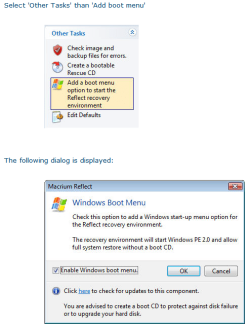
In addition to a burning a current copy of the Rescue CD Macrium Reflect also allows you to create an updatable Boot Menu on the computer.

~Maxx~

Reflect_Logo_100-1.png
 

Attachments

  • Boot 1.png
    Boot 1.png
    57.5 KB · Views: 13

My Computer

Computer Manufacturer/Model Number
HP HPE 270f
OS
Windows 7 x64 Home Premium
CPU
Intel Core i7 930 @ 2.8 Ghz Socket 1366 LGA
Motherboard
Pegatron Truckee v1.04E41
Memory
8 GB 1366 Mhz DDR3 (PC3-10700) RAM
Graphics Card(s)
ATI Radeon 5770 1 GB DDR5 RAM
Sound Card
Realtech High Definition
Monitor(s) Displays
32" Sony Bravia
Screen Resolution
1366 X 768
Hard Drives
Intel 25nm 120 GB Series 320 SSD HD Tune- 265 MBps Read/ 130 MBps Write

LaCie 1TB + 1TB RAID 0 eSATA Drive HD Tune- 160 MBps Read/ 90 MBps Write
Keyboard
Logitech Illuminated
Mouse
Logitech MX Revolution
Internet Speed
36.4 Mbps Maximum on a 37 Mbps Motorola SB501 Modem
In addition to a burning a current copy of the Rescue CD Macrium Reflect also allows you to create an updatable Boot Menu on the computer.

~Maxx~

Reflect_Logo_100-1.png
I think that is only an option in the Pro version - or did that come with the last update (which I have not yet installed).
 

My Computer

Computer Manufacturer/Model Number
HP, Dell, Gateway, Toshiba - 4 laptops and 2 desktops
OS
Vista, Windows7, Mint Mate, Zorin, Windows 8
CPU
from 1.6GHz Duo to i7
Monitor(s) Displays
2x HP w2207
Hard Drives
5x HDD, 7x SSD, 12x Externals
Keyboard
with trackball - no mices
Mouse
Trackball mice
Internet Speed
DSL 6000
Yep - only in Pro. I updated to the latest free Macrium last night and don't see that option (still only the Linux and BartPE options are showing).
 

My Computer

Computer type
PC/Desktop
Computer Manufacturer/Model Number
Golden Mk. I.4
OS
Windows 10 Pro x64 ; Xubuntu x64
CPU
Intel i7 860 @ 2.80 GHz O/C'ed to 4.0GHz
Motherboard
Gigabyte P55A-UD3R Rev.1. Award BIOS F13
Memory
16GB Corsair Vengance DDR3 @ 661 MHz Dual Channel (9-9-9-24)
Graphics Card(s)
EVGA NVidia GTX 560 1024MB
Sound Card
Realtek Integrated
Monitor(s) Displays
Dual Samsung SyncMaster 2494HS
Screen Resolution
1920*1080 and 1920*1080
Hard Drives
1*Samsung 840 EVO 120GB SSD;
1*OCZ Vertex 2 60GB SSD;
2*Samsung F3 SpinPoint 1TB in RAID0;
1*Samsung F1 SpinPoint 1TB;
2*Western Digital 1TB External USB 3.0
1*Western Digital 500GB External USB 3.0
1*Seagate 500GB External USB 2.0
PSU
Thermaltake ToughPower QFan 750W
Case
Thermaltake Element S VK60001W2Z
Cooling
Corsair H60 Water Cooling, 2*230mm and 2*80mm case fans
Keyboard
Logitech G110
Mouse
Logitech MX518
Also do I need to make a backup of system reserve If I have a recovery disk.
It doesn't make sense not to include it. It's a tiny partition added to the image set. Much of the time you won't need to replace it if it isn't damaged, but occasionally you will (eg. going to a new HDD). You have the option not to select it for reimaging if you choose.

If you use the free Macrium, the Hiren's Boot CD (v13) includes the Macrium pe capability as part of it's mini XP.
 

My Computer

Computer type
PC/Desktop
Computer Manufacturer/Model Number
Own build
OS
Windows 7x64 Home Premium SP1
CPU
Intel i7 2600k
Motherboard
ASUS P8Z68 Deluxe
Memory
G.Skill Ripjaws (DDR3-1600) 2x4GB
Graphics Card(s)
Nvidia GeForce GTS 450; Intel HD Graphics 3000(GT2+)
Monitor(s) Displays
Dell Ultrasharp IPS panel U2311H, Samsung SyncMaster P2350
Screen Resolution
1920x1080
Hard Drives
Samsung 850 Pro SSD 256GB, Samsung SSD 840 120GB, Seagates 1TB Barracuda ST31000528AS x2
PSU
Seasonic M12II 520W
Case
Lian Li Lancool PC-K60
Cooling
Case: 1x120mm, 3x140mm CPU: Hyper 212+
Keyboard
Logitech MK520 (wireless)
Mouse
Logitech MK520
Internet Speed
6-7 Mbps
Antivirus
Norton Security Premium, Malwarebytes on 2 (MSE on 3rd PC)
Browser
FireFox
Other Info
Audio: Logitech Z523 2.1
In the Macrium Reflect 4.2.3141 Chanhelog it states...

" After a recent Windows update, the 'Other Tasks' > 'Add recovery boot menu' option stopped working in Windows 7. This has been resolved."

So it sounds like the 'Add Recovery Boot Menu' in Other Tasks has been in previous free versions of Macrium Reflect and the problem has been resolved.

~Maxx~


Reflect_Logo_100-1.png
 

My Computer

Computer Manufacturer/Model Number
HP HPE 270f
OS
Windows 7 x64 Home Premium
CPU
Intel Core i7 930 @ 2.8 Ghz Socket 1366 LGA
Motherboard
Pegatron Truckee v1.04E41
Memory
8 GB 1366 Mhz DDR3 (PC3-10700) RAM
Graphics Card(s)
ATI Radeon 5770 1 GB DDR5 RAM
Sound Card
Realtech High Definition
Monitor(s) Displays
32" Sony Bravia
Screen Resolution
1366 X 768
Hard Drives
Intel 25nm 120 GB Series 320 SSD HD Tune- 265 MBps Read/ 130 MBps Write

LaCie 1TB + 1TB RAID 0 eSATA Drive HD Tune- 160 MBps Read/ 90 MBps Write
Keyboard
Logitech Illuminated
Mouse
Logitech MX Revolution
Internet Speed
36.4 Mbps Maximum on a 37 Mbps Motorola SB501 Modem
thanks to MITCHELL64 for the excellent link on ways to backup Images, but,WHS In post#4 referred to what my question was about. Also thanks WHS on the tutorial video clip on testing for a working backup. I will burn a new recovery disk
 

My Computer

Computer type
Laptop
Computer Manufacturer/Model Number
System Manufacturer Acer aspire 7736
OS
Microsoft Windows 7 Home Premium 64-bit 7601 Multiprocessor Free Service Pack 1
CPU
Pentium(R) Dual-Core CPU T4400 @ 2.20GHz
Motherboard
Acer JV50
Memory
3.00 GB
Graphics Card(s)
(1) Mobile Intel(R) 4 Series Express Chipset Family (2) Mo
Sound Card
(1) Intel(R) High Definition Audio HDMI (2) Realtek High D
Monitor(s) Displays
1600 x 900 x 59 hertz
Screen Resolution
1600 x 900 x 32 bits (4294967296 colors) @ 59 Hz
Hard Drives
Hitachi HTS545032B9A300
In regard to backing up the System Reserved partition have a look at this tutorial;

http://www.sevenforums.com/tutorials/128494-imaging-strategies.html
You are referencing incorrect information.

The system reserved partition does not contain the MBR . This incorrect information confuses people when it comes to the basic BIOS boot process. When an imaging program (or anything correct) refers to backing up or replacing the MBR it is referring to the Master Boot Record which is physically located on the first 512 bytes of the HDD. It contains a small amount of boot code and the disk partition table.

The system reserved partition is totally different and has a totally different role to the MBR. It's key elements are the boot manager and BCD (Boot Configuration Data table).
 

My Computer

Computer type
PC/Desktop
Computer Manufacturer/Model Number
Own build
OS
Windows 7x64 Home Premium SP1
CPU
Intel i7 2600k
Motherboard
ASUS P8Z68 Deluxe
Memory
G.Skill Ripjaws (DDR3-1600) 2x4GB
Graphics Card(s)
Nvidia GeForce GTS 450; Intel HD Graphics 3000(GT2+)
Monitor(s) Displays
Dell Ultrasharp IPS panel U2311H, Samsung SyncMaster P2350
Screen Resolution
1920x1080
Hard Drives
Samsung 850 Pro SSD 256GB, Samsung SSD 840 120GB, Seagates 1TB Barracuda ST31000528AS x2
PSU
Seasonic M12II 520W
Case
Lian Li Lancool PC-K60
Cooling
Case: 1x120mm, 3x140mm CPU: Hyper 212+
Keyboard
Logitech MK520 (wireless)
Mouse
Logitech MK520
Internet Speed
6-7 Mbps
Antivirus
Norton Security Premium, Malwarebytes on 2 (MSE on 3rd PC)
Browser
FireFox
Other Info
Audio: Logitech Z523 2.1
When I did a test backup and restore using Macrium paid version trial to decide if I wanted to buy it, at the end of the restore it offered to copy the saved MBR to disk. I allowed it to do so. This produced the bonus of fixing my partition table which was hosed by another imaging program when it tried to make a backup hidden partition on the HD. The MBR restore is an option of the normal restore process. Only thing is they don't give the option to restore the MBR only. Guess they don't want people fiddling with it.

If you want MBR only backup restore you can hunt down single purpose utilities that do it.
 

My Computer

Computer Manufacturer/Model Number
HP Media Center
OS
Windows 7 32 bit
CPU
AMD 5200+ dual core
Memory
2 GB
Graphics Card(s)
NVidia GeForce 6150SE 128 MB
Monitor(s) Displays
CRT
Screen Resolution
1280x1024
Hard Drives
500 GB Sata internal :

SIIG USB 3.0 docking stations w/WD Caviar Black 6 Gb/s drives
Keyboard
PS/2
Mouse
PS/2 Wheel Mouse
Other Info
SIIG USB 3.0 PCIexpress card.

My Computer

Computer type
PC/Desktop
Computer Manufacturer/Model Number
Own build
OS
Windows 7x64 Home Premium SP1
CPU
Intel i7 2600k
Motherboard
ASUS P8Z68 Deluxe
Memory
G.Skill Ripjaws (DDR3-1600) 2x4GB
Graphics Card(s)
Nvidia GeForce GTS 450; Intel HD Graphics 3000(GT2+)
Monitor(s) Displays
Dell Ultrasharp IPS panel U2311H, Samsung SyncMaster P2350
Screen Resolution
1920x1080
Hard Drives
Samsung 850 Pro SSD 256GB, Samsung SSD 840 120GB, Seagates 1TB Barracuda ST31000528AS x2
PSU
Seasonic M12II 520W
Case
Lian Li Lancool PC-K60
Cooling
Case: 1x120mm, 3x140mm CPU: Hyper 212+
Keyboard
Logitech MK520 (wireless)
Mouse
Logitech MK520
Internet Speed
6-7 Mbps
Antivirus
Norton Security Premium, Malwarebytes on 2 (MSE on 3rd PC)
Browser
FireFox
Other Info
Audio: Logitech Z523 2.1
I think Partition Wizard can rebuild the MBR too. It is in the Disk tab. Or are we talking about something different.
 

My Computer

Computer Manufacturer/Model Number
HP, Dell, Gateway, Toshiba - 4 laptops and 2 desktops
OS
Vista, Windows7, Mint Mate, Zorin, Windows 8
CPU
from 1.6GHz Duo to i7
Monitor(s) Displays
2x HP w2207
Hard Drives
5x HDD, 7x SSD, 12x Externals
Keyboard
with trackball - no mices
Mouse
Trackball mice
Internet Speed
DSL 6000

My Computer

Computer Manufacturer/Model Number
HP Media Center
OS
Windows 7 32 bit
CPU
AMD 5200+ dual core
Memory
2 GB
Graphics Card(s)
NVidia GeForce 6150SE 128 MB
Monitor(s) Displays
CRT
Screen Resolution
1280x1024
Hard Drives
500 GB Sata internal :

SIIG USB 3.0 docking stations w/WD Caviar Black 6 Gb/s drives
Keyboard
PS/2
Mouse
PS/2 Wheel Mouse
Other Info
SIIG USB 3.0 PCIexpress card.
please forgive my ignorance, and help me to reduce it some - i may wear a guru badge but both my ignorance and confusion remain vast...:o

can somebody please explain, in relatively simple terms, the difference between an mbr and a bootloader?

as i understand, mbr = master boot record, and contains partition data such as size, location on disk, name, and which are marked as primary, logical, active, etc. each physical disk must have one single master boot record. (even if you don't boot off it?)

whereas a bootloader is os-dependent software which relies on mbr data to present a bootmenu at boot, such as bcd or grub. only the primary boot disk as defined in the bios needs a bootloader. the bootloader lives on the active system boot partition.

have i got this right so far? or does the bootloader 'live' on the mbr?

so when you restore the mbr in macrium reflect, it isn't the same as restoring the bootloader? and may still result in an unbootable system that needs to be repaired by other means?

if i've got that right, what does restoring the mbr do, if it doesn't also restore the bootloader? :confused:

--------------------------------------------------------

as an aside, why do lots of people refer to the software as 'macrium'?

isn't 'macrium' a software company, and the program is called 'reflect'?
 

My Computer

Computer Manufacturer/Model Number
mickey megabyte 1234
OS
ultimate 64 sp1
CPU
i5 2500K [email protected]
Motherboard
MSI P67A-GD53
Memory
8 gigs GSkill Ripjaws 1600
Graphics Card(s)
amd hd6950
Sound Card
creative x-fi gamer
Monitor(s) Displays
samsung 24"
Screen Resolution
1920x1080
Hard Drives
ocz vertex 2e 60 gig, samsung f3 1tb, buffalo 2tb ext
PSU
antec 550
Case
antec three hundred
Cooling
i'm a cooling fan
Keyboard
saitek eclipse ii
Mouse
logitech g3
Internet Speed
about 4 Mbps
Other Info
i love win7
Back
Top