Solved Reformat gone bad - please help

So for argument's sake would not reformatting both drives mean that it isn't a clean install?
 

My Computer

Computer type
PC/Desktop
Computer Manufacturer/Model Number
Acer Aspire m3202
OS
Windows 7 Home Premium 64 bit
Antivirus
not at the moment - just reinstalled
arayfo1: Your last few posts are the type of things I'm looking for. Thanks
This thread is a bit jumbled and I wasn't sure if you had Internet connectivity on the machine in question or not .

Step 7 - gather your program installers...
You've said that you have all of the Acer drivers downloaded
You said that AutoCAD is the only program you are interseted in keeping but you think it is gone

So as far as I can tell, you have completed step 7.
 

My Computer

Computer type
Laptop
Computer Manufacturer/Model Number
HP Pavilion dv6-6c10us
OS
x64 (6.3.9600) Win8.1 Pro & soon dual boot x64 (6.1.7601) Win7_SP1 HomePrem
CPU
AMD A6-3420M APU with Radeon(tm) HD Graphics
Motherboard
Hewlett-Packard 1805
Memory
6.00 GB
Graphics Card(s)
AMD Radeon(TM) HD 6520G
Sound Card
(1) AMD High Definition Audio Device (2) IDT High Definiti
Monitor(s) Displays
HP W2072a 20" LCD (1600 x 900) @ 60 Hz
Screen Resolution
1366 x 768 x 32 bits (4294967296 colors) @ 60 Hz
Hard Drives
ST640LM0 00 HM641JI SATA Disk Device
Keyboard
Logitech k520 wireless KB
Mouse
Logitech m320 wireless mouse (bundled with KB)
Internet Speed
15/5 | 54 MB Wireless 'n'
Antivirus
Realtime: Defender or Avast | On-demand: Malwarebytes, ESET
Browser
IE 11 on Win8, IE 10 on win 7
Other Info
Media: [Gimp, Audacity, VLC] || Comm: [WEmail 2012, Skype] || Productivity: [OpenOffice,| Textpad] || Utils: [Sysinternals, cCleaner, Speccy, Defraggler]
Update: I'm moving my files from drive D and considering reformatting both drives C and D so that I know I have all previous version of Windows off of this machine.

Also, I think I may have corrupted the iso file the last time I attempted to download (and open) it from Windows 7 Direct Download Links so hopefully redoing step #2 will save me the risk of attempting another reinstall with a corrupted file.
 

My Computer

Computer type
PC/Desktop
Computer Manufacturer/Model Number
Acer Aspire m3202
OS
Windows 7 Home Premium 64 bit
Antivirus
not at the moment - just reinstalled
arayfo1: Your last few posts are the type of things I'm looking for. Thanks
This thread is a bit jumbled and I wasn't sure if you had Internet connectivity on the machine in question or not .

Step 7 - gather your program installers...
You've said that you have all of the Acer drivers downloaded
You said that AutoCAD is the only program you are interseted in keeping but you think it is gone

So as far as I can tell, you have completed step 7.

Yes, still no internet. Thanks for clearing that up about step 7. I think I'm gonna call it a night and try again in the morning. Please let me know if you think it is advisable to reformat both drives. I'm pretty sure I currently have 2 versions of windows 7 installed (one on each drive) as I somehow managed to skip the reformat process the last time.
 

My Computer

Computer type
PC/Desktop
Computer Manufacturer/Model Number
Acer Aspire m3202
OS
Windows 7 Home Premium 64 bit
Antivirus
not at the moment - just reinstalled
Also, while it's on my mind, and please tell me if this is already written out in the tutorial some place, how can I best avoid installing a third version of Windows on my pc? This might get really ridiculous if I don't avoid this now and end up with multiple downloads on my machine.
 

My Computer

Computer type
PC/Desktop
Computer Manufacturer/Model Number
Acer Aspire m3202
OS
Windows 7 Home Premium 64 bit
Antivirus
not at the moment - just reinstalled
arayfo1: Post 97 in particular was very informative.

It told me that
you did not have Internet (wired or wireless) on the machine
the 'proper' BIOS changes were to make the Flash drive ist in the boot order
you partitioned teh drive (doesn't matter what tool)
you used a pirate bay download
you created a new partition
==> is that what you meant by which allowed me to reformat what was left on drive c?
==> so you have a C: partition and a D: partion on your drive, is that correct?
==> How big is the C: partition (drive)?

You stated that you didn't understand when the C: partition would be formatted in the tutorial
you asked "Do I have to reformat the drive again?

I think Greg answered that the tutorial would handle the deletion and formatting.

Keep up the good work providing valuable information so members (and that includes you) don't get frustrated.

Now where are we?

Oh yeah - the install gave you an error. Britton suggested "Try downloading and making a new flash or DVD install media"
 

My Computer

Computer type
Laptop
Computer Manufacturer/Model Number
HP Pavilion dv6-6c10us
OS
x64 (6.3.9600) Win8.1 Pro & soon dual boot x64 (6.1.7601) Win7_SP1 HomePrem
CPU
AMD A6-3420M APU with Radeon(tm) HD Graphics
Motherboard
Hewlett-Packard 1805
Memory
6.00 GB
Graphics Card(s)
AMD Radeon(TM) HD 6520G
Sound Card
(1) AMD High Definition Audio Device (2) IDT High Definiti
Monitor(s) Displays
HP W2072a 20" LCD (1600 x 900) @ 60 Hz
Screen Resolution
1366 x 768 x 32 bits (4294967296 colors) @ 60 Hz
Hard Drives
ST640LM0 00 HM641JI SATA Disk Device
Keyboard
Logitech k520 wireless KB
Mouse
Logitech m320 wireless mouse (bundled with KB)
Internet Speed
15/5 | 54 MB Wireless 'n'
Antivirus
Realtime: Defender or Avast | On-demand: Malwarebytes, ESET
Browser
IE 11 on Win8, IE 10 on win 7
Other Info
Media: [Gimp, Audacity, VLC] || Comm: [WEmail 2012, Skype] || Productivity: [OpenOffice,| Textpad] || Utils: [Sysinternals, cCleaner, Speccy, Defraggler]
I am truly sorry if I offended you arayfo1. I was only trying to understand the situation and not to insult you at all. But its clear after so many overnights I've lost some perspective and since those I trust say I'm off base and not adding anything to the thread I will beg your pardon and bow out. :o

It's alright, Greg. It's probably best to hear how you guys really think from the start so that I have a better idea what the forum etiquette here is like. I have frequented other support groups, but this is the first I have frequented which is so technical based. It reminds me of when I used to call my stepdad up and try to talk to him about my car engine problems. He would always get frustrated and say, "Well, I can't diagnose it over the telephone!!!" So I have somewhat of an idea how frustrating this must be for the one who knows all of this stuff and uses it so much that you don't lose it and therefore can't really empathize with those of us who are truly ignorant about such things.
 

My Computer

Computer type
PC/Desktop
Computer Manufacturer/Model Number
Acer Aspire m3202
OS
Windows 7 Home Premium 64 bit
Antivirus
not at the moment - just reinstalled
I see you've decided to move the data off D: - you have an external drive that you're moving the data to?

In post 103 you're moving data on D: (to an external drive?) and
in post 106 you ask "How can I prevent installing a 3rd copy of Windows"

I think those two posts will make it much easier. No data on D: means the entire drive can be used for installing Windows. Creating partitons after a fresh install is easy.

I have two important questions:
Open a Windows Explorer window and post what drive are shown when you clcik on Computer
The machine you're working on is a 64 bit machine according to your system specs.
==> Is the machine you created the Windows install flash drive also a 64 bit machine?
 

My Computer

Computer type
Laptop
Computer Manufacturer/Model Number
HP Pavilion dv6-6c10us
OS
x64 (6.3.9600) Win8.1 Pro & soon dual boot x64 (6.1.7601) Win7_SP1 HomePrem
CPU
AMD A6-3420M APU with Radeon(tm) HD Graphics
Motherboard
Hewlett-Packard 1805
Memory
6.00 GB
Graphics Card(s)
AMD Radeon(TM) HD 6520G
Sound Card
(1) AMD High Definition Audio Device (2) IDT High Definiti
Monitor(s) Displays
HP W2072a 20" LCD (1600 x 900) @ 60 Hz
Screen Resolution
1366 x 768 x 32 bits (4294967296 colors) @ 60 Hz
Hard Drives
ST640LM0 00 HM641JI SATA Disk Device
Keyboard
Logitech k520 wireless KB
Mouse
Logitech m320 wireless mouse (bundled with KB)
Internet Speed
15/5 | 54 MB Wireless 'n'
Antivirus
Realtime: Defender or Avast | On-demand: Malwarebytes, ESET
Browser
IE 11 on Win8, IE 10 on win 7
Other Info
Media: [Gimp, Audacity, VLC] || Comm: [WEmail 2012, Skype] || Productivity: [OpenOffice,| Textpad] || Utils: [Sysinternals, cCleaner, Speccy, Defraggler]
You nailed it exactly! :p
"Well, I can't diagnose it over the telephone!!!"
 

My Computer

Computer type
Laptop
Computer Manufacturer/Model Number
HP Pavilion dv6-6c10us
OS
x64 (6.3.9600) Win8.1 Pro & soon dual boot x64 (6.1.7601) Win7_SP1 HomePrem
CPU
AMD A6-3420M APU with Radeon(tm) HD Graphics
Motherboard
Hewlett-Packard 1805
Memory
6.00 GB
Graphics Card(s)
AMD Radeon(TM) HD 6520G
Sound Card
(1) AMD High Definition Audio Device (2) IDT High Definiti
Monitor(s) Displays
HP W2072a 20" LCD (1600 x 900) @ 60 Hz
Screen Resolution
1366 x 768 x 32 bits (4294967296 colors) @ 60 Hz
Hard Drives
ST640LM0 00 HM641JI SATA Disk Device
Keyboard
Logitech k520 wireless KB
Mouse
Logitech m320 wireless mouse (bundled with KB)
Internet Speed
15/5 | 54 MB Wireless 'n'
Antivirus
Realtime: Defender or Avast | On-demand: Malwarebytes, ESET
Browser
IE 11 on Win8, IE 10 on win 7
Other Info
Media: [Gimp, Audacity, VLC] || Comm: [WEmail 2012, Skype] || Productivity: [OpenOffice,| Textpad] || Utils: [Sysinternals, cCleaner, Speccy, Defraggler]
Move your files, but you don't have to format.

There's an easier and better way which is part of the install process. Don't waste your time reformating.
Update: I'm moving my files from drive D and considering reformatting both drives C and D so that I know I have all previous version of Windows off of this machine.

Also, I think I may have corrupted the iso file the last time I attempted to download (and open) it from Windows 7 Direct Download Links so hopefully redoing step #2 will save me the risk of attempting another reinstall with a corrupted file.
 

My Computer

Computer type
Laptop
Computer Manufacturer/Model Number
HP Pavilion dv6-6c10us
OS
x64 (6.3.9600) Win8.1 Pro & soon dual boot x64 (6.1.7601) Win7_SP1 HomePrem
CPU
AMD A6-3420M APU with Radeon(tm) HD Graphics
Motherboard
Hewlett-Packard 1805
Memory
6.00 GB
Graphics Card(s)
AMD Radeon(TM) HD 6520G
Sound Card
(1) AMD High Definition Audio Device (2) IDT High Definiti
Monitor(s) Displays
HP W2072a 20" LCD (1600 x 900) @ 60 Hz
Screen Resolution
1366 x 768 x 32 bits (4294967296 colors) @ 60 Hz
Hard Drives
ST640LM0 00 HM641JI SATA Disk Device
Keyboard
Logitech k520 wireless KB
Mouse
Logitech m320 wireless mouse (bundled with KB)
Internet Speed
15/5 | 54 MB Wireless 'n'
Antivirus
Realtime: Defender or Avast | On-demand: Malwarebytes, ESET
Browser
IE 11 on Win8, IE 10 on win 7
Other Info
Media: [Gimp, Audacity, VLC] || Comm: [WEmail 2012, Skype] || Productivity: [OpenOffice,| Textpad] || Utils: [Sysinternals, cCleaner, Speccy, Defraggler]
//you created a new partition
==> is that what you meant by which allowed me to reformat what was left on drive c?
==> so you have a C: partition and a D: partion on your drive, is that correct?
==> How big is the C: partition (drive)?//

No, I mean I'm not sure about the terminology. I reformatted drive c so I guess technically it would be considered a new partition, but whenever all was done I had one clean drive and one drive with data still on it. Yes, I have both a C: partition as well as a D: partition. Both partitions are 290 gb each.

//You stated that you didn't understand when the C: partition would be formatted in the tutorial
you asked "Do I have to reformat the drive again?//

The first time I tried reinstalling Windows (prior to registering here) I was given the option. The second time using the download via the tutorial I was not given the option. But okay I'll look back over the tutorial and see what I can find about formatting.

//Now where are we?

Oh yeah - the install gave you an error. Britton suggested "Try downloading and making a new flash or DVD install media"//

Yes, will do. Thank you.

And excuse me if I ask questions that are listed on the tutorial. It could be I'm not aware how much information there is to take in there and take it for granted that I have taken it all in. I will admit I have not clicked each and every blue link there is either, so I'll try and look it over a bit more closely.

I hope you all have a good night and I'll talk to you tomorrow. ;)
 

My Computer

Computer type
PC/Desktop
Computer Manufacturer/Model Number
Acer Aspire m3202
OS
Windows 7 Home Premium 64 bit
Antivirus
not at the moment - just reinstalled
I see you've decided to move the data off D: - you have an external drive that you're moving the data to?

In post 103 you're moving data on D: (to an external drive?) and
in post 106 you ask "How can I prevent installing a 3rd copy of Windows"

I think those two posts will make it much easier. No data on D: means the entire drive can be used for installing Windows. Creating partitons after a fresh install is easy.

I have two important questions:
Open a Windows Explorer window and post what drive are shown when you clcik on Computer
The machine you're working on is a 64 bit machine according to your system specs.
==> Is the machine you created the Windows install flash drive also a 64 bit machine?

Yes, I have an external drive.

Yes, both machines are 64 bit machines. The major difference is that one pc has Windows 8 while the other has Windows 7. I would like to note that my pc came from the factory with Windows Vista on it, but came pre-packaged with a Windows 7 upgrade disk. I'm mildly curious to know if it wouldn't be easier to install Vista and upgrade to Windows 7 via my old upgrade disk.

Okay, not wasting my time reformatting.
 

My Computer

Computer type
PC/Desktop
Computer Manufacturer/Model Number
Acer Aspire m3202
OS
Windows 7 Home Premium 64 bit
Antivirus
not at the moment - just reinstalled
I would like to note that my pc came from the factory with Windows Vista on it, but came pre-packaged with a Windows 7 upgrade disk.
This information should have been clarified firstly. OTL

I'm mildly curious to know if it wouldn't be easier to install Vista and upgrade to Windows 7 via my old upgrade disk.
Though I cannot personally contest if it will be "easier", it is always a viable/possible approach.
 

My Computer

Computer type
Laptop
Computer Manufacturer/Model Number
ASUS N45SF
OS
Windows 7 Professional SP1 x64 (OEM)
CPU
Intel® Core™ i5 2430M/2410M Processor
Motherboard
Intel® HM65 Express Chipset
Memory
DDR3 1333 SODIMM (8GB)
Graphics Card(s)
NVIDIA® GeForce® GT 555M (2GB)
Sound Card
Realtek High Definition Audio
Monitor(s) Displays
14.0" LED Backlight
Screen Resolution
16:9 HD (1366x768)
Hard Drives
640GB Seagate (internal), 1TB Toshiba Canvio Portable, 2TB x 2 WD My Book Essential (external)
Antivirus
Malwarebytes Anti-Malware Home (Premium)
Browser
Waterfox
Other Info
Optical Drive: Slimtype DVD A DS8A5SH (Super-Multi DVD);
Audio: Bang & Olufsen ICEpower®, SonicMaster
Cool, now where getting somewhere (at least I'm understanding a lot more)... a few more questions
Right clcik on Computer on the start menu, select manage, then select Disk management

On the bottom there are rows that show the physical drives.
There are blocks on each row that show partitions (system reserve, C: ...)
What drive letters (partitions) are on the same row as c: ?
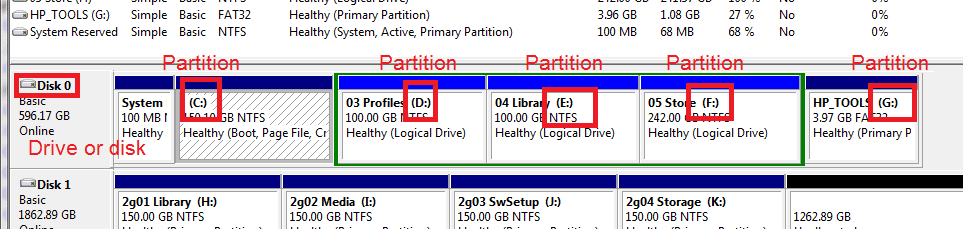
diskmng-sm.png

On Disk 0 -> I have C:, D:, E:, F:, and G:

Disk 1 is my external drive. I only want to know what partitions are on the same disk as C:

A lot of this information is to make sure I don't tell you the wrong thing. It would be much easier if you had an internet connection on that machine. You could post screenshots.


I wouldn't suggest installing Vista, then upgrading. You made me think though.

To make this work, you're going to need a license key for Windows 7. Normally it's on the COA sticker, but your box came with Vista and that key won't work for Win7.

look at the COA picture in the tutorial and check that you have a similar key that you used to upgrade.

 

My Computer

Computer type
Laptop
Computer Manufacturer/Model Number
HP Pavilion dv6-6c10us
OS
x64 (6.3.9600) Win8.1 Pro & soon dual boot x64 (6.1.7601) Win7_SP1 HomePrem
CPU
AMD A6-3420M APU with Radeon(tm) HD Graphics
Motherboard
Hewlett-Packard 1805
Memory
6.00 GB
Graphics Card(s)
AMD Radeon(TM) HD 6520G
Sound Card
(1) AMD High Definition Audio Device (2) IDT High Definiti
Monitor(s) Displays
HP W2072a 20" LCD (1600 x 900) @ 60 Hz
Screen Resolution
1366 x 768 x 32 bits (4294967296 colors) @ 60 Hz
Hard Drives
ST640LM0 00 HM641JI SATA Disk Device
Keyboard
Logitech k520 wireless KB
Mouse
Logitech m320 wireless mouse (bundled with KB)
Internet Speed
15/5 | 54 MB Wireless 'n'
Antivirus
Realtime: Defender or Avast | On-demand: Malwarebytes, ESET
Browser
IE 11 on Win8, IE 10 on win 7
Other Info
Media: [Gimp, Audacity, VLC] || Comm: [WEmail 2012, Skype] || Productivity: [OpenOffice,| Textpad] || Utils: [Sysinternals, cCleaner, Speccy, Defraggler]
Here's a basic outline of the steps in the tutorial. This is not meant to replace the infroamtion in the tutorial, only to give you an outline of the steps.
  • Download the Windows 7 iso
    Use the Windows 7 USB-DVD Download Tool to create the install Disc or Flashdrive
  • Back up your User files to an external drive
  • Run Belarc Advisor to create a report of hardware and software (including product keys)
    copy the output html file to an external drive
  • Find the discs for programs you want to reinstall after Windows is up and running
  • Downlaod the network card drivers (wired and wireless) to an external drive
  • Disconnect all external devices except keyboard, mouse, and monitor
  • Disconnect any extra internal hard drive(s) (you don't have to physically remove the drive(s) - just unplug the data cable)
  • Restart the machine, but interrupt to change boot order
    Flash 1st or DVD 1st
    Complete boot to external device
  • Windows install begins
    choose Custom Install
    then Drive Options (Advanced)
    Delete all partitions not needed
    repartition and format
  • Windows copies files and reboots a few times during the install
  • After Windows is installed, you'll have to install your network drivers
  • the 1st thing you must do is run Windows Update until there are no more updates.
-> This takes a long time.
 

My Computer

Computer type
Laptop
Computer Manufacturer/Model Number
HP Pavilion dv6-6c10us
OS
x64 (6.3.9600) Win8.1 Pro & soon dual boot x64 (6.1.7601) Win7_SP1 HomePrem
CPU
AMD A6-3420M APU with Radeon(tm) HD Graphics
Motherboard
Hewlett-Packard 1805
Memory
6.00 GB
Graphics Card(s)
AMD Radeon(TM) HD 6520G
Sound Card
(1) AMD High Definition Audio Device (2) IDT High Definiti
Monitor(s) Displays
HP W2072a 20" LCD (1600 x 900) @ 60 Hz
Screen Resolution
1366 x 768 x 32 bits (4294967296 colors) @ 60 Hz
Hard Drives
ST640LM0 00 HM641JI SATA Disk Device
Keyboard
Logitech k520 wireless KB
Mouse
Logitech m320 wireless mouse (bundled with KB)
Internet Speed
15/5 | 54 MB Wireless 'n'
Antivirus
Realtime: Defender or Avast | On-demand: Malwarebytes, ESET
Browser
IE 11 on Win8, IE 10 on win 7
Other Info
Media: [Gimp, Audacity, VLC] || Comm: [WEmail 2012, Skype] || Productivity: [OpenOffice,| Textpad] || Utils: [Sysinternals, cCleaner, Speccy, Defraggler]
To make this work, you're going to need a license key for Windows 7. Normally it's on the COA sticker, but your box came with Vista and that key won't work for Win7.
Hi Slartybart,

I have quick question. Don't Upgrade CDs come with their own upgrade product key?
 

My Computer

Computer type
Laptop
Computer Manufacturer/Model Number
ASUS N45SF
OS
Windows 7 Professional SP1 x64 (OEM)
CPU
Intel® Core™ i5 2430M/2410M Processor
Motherboard
Intel® HM65 Express Chipset
Memory
DDR3 1333 SODIMM (8GB)
Graphics Card(s)
NVIDIA® GeForce® GT 555M (2GB)
Sound Card
Realtek High Definition Audio
Monitor(s) Displays
14.0" LED Backlight
Screen Resolution
16:9 HD (1366x768)
Hard Drives
640GB Seagate (internal), 1TB Toshiba Canvio Portable, 2TB x 2 WD My Book Essential (external)
Antivirus
Malwarebytes Anti-Malware Home (Premium)
Browser
Waterfox
Other Info
Optical Drive: Slimtype DVD A DS8A5SH (Super-Multi DVD);
Audio: Bang & Olufsen ICEpower®, SonicMaster
You are correct Kathy. I missed the fact that it was an upgrade CD, thought it might have been an upgrade any time.

Still I want to make sure that arayfo1 has the key. They aren't printed on the disc.

Thanks
I have quick question. Don't Upgrade CDs come with their own upgrade product key?
 

My Computer

Computer type
Laptop
Computer Manufacturer/Model Number
HP Pavilion dv6-6c10us
OS
x64 (6.3.9600) Win8.1 Pro & soon dual boot x64 (6.1.7601) Win7_SP1 HomePrem
CPU
AMD A6-3420M APU with Radeon(tm) HD Graphics
Motherboard
Hewlett-Packard 1805
Memory
6.00 GB
Graphics Card(s)
AMD Radeon(TM) HD 6520G
Sound Card
(1) AMD High Definition Audio Device (2) IDT High Definiti
Monitor(s) Displays
HP W2072a 20" LCD (1600 x 900) @ 60 Hz
Screen Resolution
1366 x 768 x 32 bits (4294967296 colors) @ 60 Hz
Hard Drives
ST640LM0 00 HM641JI SATA Disk Device
Keyboard
Logitech k520 wireless KB
Mouse
Logitech m320 wireless mouse (bundled with KB)
Internet Speed
15/5 | 54 MB Wireless 'n'
Antivirus
Realtime: Defender or Avast | On-demand: Malwarebytes, ESET
Browser
IE 11 on Win8, IE 10 on win 7
Other Info
Media: [Gimp, Audacity, VLC] || Comm: [WEmail 2012, Skype] || Productivity: [OpenOffice,| Textpad] || Utils: [Sysinternals, cCleaner, Speccy, Defraggler]
Last question, I promise. :3

Can an upgrade product key work on a downloaded Retail Windows 7 ISO? I am curious myself haha.
 

My Computer

Computer type
Laptop
Computer Manufacturer/Model Number
ASUS N45SF
OS
Windows 7 Professional SP1 x64 (OEM)
CPU
Intel® Core™ i5 2430M/2410M Processor
Motherboard
Intel® HM65 Express Chipset
Memory
DDR3 1333 SODIMM (8GB)
Graphics Card(s)
NVIDIA® GeForce® GT 555M (2GB)
Sound Card
Realtek High Definition Audio
Monitor(s) Displays
14.0" LED Backlight
Screen Resolution
16:9 HD (1366x768)
Hard Drives
640GB Seagate (internal), 1TB Toshiba Canvio Portable, 2TB x 2 WD My Book Essential (external)
Antivirus
Malwarebytes Anti-Malware Home (Premium)
Browser
Waterfox
Other Info
Optical Drive: Slimtype DVD A DS8A5SH (Super-Multi DVD);
Audio: Bang & Olufsen ICEpower®, SonicMaster
Last answer, I promise. :3

Yes, an upgrade product key works on a downloaded Retail Windows 7 ISO

but I was not serious about "last answer" - just having a bit 'o fun.

Ask as many questions as you want, your previous post got me thinking and I asked some folks some questions. All questions are good, not so for all answers.:geek:

Last question, I promise. :3

Can an upgrade product key work on a downloaded Retail Windows 7 ISO? I am curious myself haha.
 

My Computer

Computer type
Laptop
Computer Manufacturer/Model Number
HP Pavilion dv6-6c10us
OS
x64 (6.3.9600) Win8.1 Pro & soon dual boot x64 (6.1.7601) Win7_SP1 HomePrem
CPU
AMD A6-3420M APU with Radeon(tm) HD Graphics
Motherboard
Hewlett-Packard 1805
Memory
6.00 GB
Graphics Card(s)
AMD Radeon(TM) HD 6520G
Sound Card
(1) AMD High Definition Audio Device (2) IDT High Definiti
Monitor(s) Displays
HP W2072a 20" LCD (1600 x 900) @ 60 Hz
Screen Resolution
1366 x 768 x 32 bits (4294967296 colors) @ 60 Hz
Hard Drives
ST640LM0 00 HM641JI SATA Disk Device
Keyboard
Logitech k520 wireless KB
Mouse
Logitech m320 wireless mouse (bundled with KB)
Internet Speed
15/5 | 54 MB Wireless 'n'
Antivirus
Realtime: Defender or Avast | On-demand: Malwarebytes, ESET
Browser
IE 11 on Win8, IE 10 on win 7
Other Info
Media: [Gimp, Audacity, VLC] || Comm: [WEmail 2012, Skype] || Productivity: [OpenOffice,| Textpad] || Utils: [Sysinternals, cCleaner, Speccy, Defraggler]
arayfo1:hold off on creating the install media until I post back.

I've asked some folks if adding Win8 to the mix presents any issues. I have another plan just in case... two plans actually.

No major differences, just some "how do we get from here to there" changes.
 

My Computer

Computer type
Laptop
Computer Manufacturer/Model Number
HP Pavilion dv6-6c10us
OS
x64 (6.3.9600) Win8.1 Pro & soon dual boot x64 (6.1.7601) Win7_SP1 HomePrem
CPU
AMD A6-3420M APU with Radeon(tm) HD Graphics
Motherboard
Hewlett-Packard 1805
Memory
6.00 GB
Graphics Card(s)
AMD Radeon(TM) HD 6520G
Sound Card
(1) AMD High Definition Audio Device (2) IDT High Definiti
Monitor(s) Displays
HP W2072a 20" LCD (1600 x 900) @ 60 Hz
Screen Resolution
1366 x 768 x 32 bits (4294967296 colors) @ 60 Hz
Hard Drives
ST640LM0 00 HM641JI SATA Disk Device
Keyboard
Logitech k520 wireless KB
Mouse
Logitech m320 wireless mouse (bundled with KB)
Internet Speed
15/5 | 54 MB Wireless 'n'
Antivirus
Realtime: Defender or Avast | On-demand: Malwarebytes, ESET
Browser
IE 11 on Win8, IE 10 on win 7
Other Info
Media: [Gimp, Audacity, VLC] || Comm: [WEmail 2012, Skype] || Productivity: [OpenOffice,| Textpad] || Utils: [Sysinternals, cCleaner, Speccy, Defraggler]
Back
Top