Cool, now where getting somewhere (at least I'm understanding a lot more)... a few more questions
Right clcik on Computer on the start menu, select manage, then select Disk management
On the bottom there are
rows that show the physical drives.
There are blocks on each row that show partitions (system reserve, C: ...)
What drive letters (partitions) are on the same row as c: ?
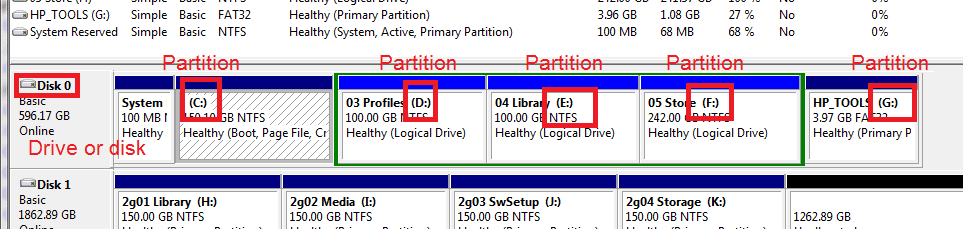
On Disk 0 -> I have C:, D:, E:, F:, and G:
Disk 1 is my external drive. I only want to know what partitions are on the same disk as C:
A lot of this information is to make sure I don't tell you the wrong thing. It would be much easier if you had an internet connection on that machine. You could post screenshots.
I wouldn't suggest installing Vista, then upgrading. You made me think though.
To make this work, you're going to need a license key for Windows 7. Normally it's on the COA sticker, but your box came with Vista and that key won't work for Win7.
look at the COA picture in the tutorial and check that you have a similar key that you used to upgrade.



