Solved Reformatted Windows // Can't connect to wifi or via ethernet

Download the Intel Management Engine Interface it is under special
 

My Computer My Computer

At a glance

windows 7 home 64bitINTEL-CORE I716GB
Computer Manufacturer/Model Number
W530-3630QM1
OS
windows 7 home 64bit
CPU
INTEL-CORE I7
Memory
16GB
Hard Drives
750GB
Browser
Chrome
Seen your message after I posted this, will download now :)


Info from cdm:

Windows IP Configuration

Host Name . . . . . . . . . . . . : Miro-PC
Primary Dns Suffix . . . . . . . :
Node Type . . . . . . . . . . . . : Hybrid
IP Routing Enabled. . . . . . . . : No
WINS Proxy Enabled. . . . . . . . : No

Ethernet adapter Local Area Connection 2:

Media State . . . . . . . . . . . : Media disconnected
Connection-specific DNS Suffix . : lan
Description . . . . . . . . . . . : Qualcomm Atheros AR8161/8165 PCI-E Gigabit Ethernet Controller (NDIS 6.20)
Physical Address. . . . . . . . . : 00-26-6C-19-F8-42
DHCP Enabled. . . . . . . . . . . : Yes
Autoconfiguration Enabled . . . . : Yes

Wireless LAN adapter Wireless Network Connection:

Media State . . . . . . . . . . . : Media disconnected
Connection-specific DNS Suffix . :
Description . . . . . . . . . . . : Atheros AR9485WB-EG Wireless Network Adapter
Physical Address. . . . . . . . . : 24-EC-99-1C-1C-D9
DHCP Enabled. . . . . . . . . . . : Yes
Autoconfiguration Enabled . . . . : Yes

Tunnel adapter isatap.lan:

Media State . . . . . . . . . . . : Media disconnected
Connection-specific DNS Suffix . :
Description . . . . . . . . . . . : Microsoft ISATAP Adapter
Physical Address. . . . . . . . . : 00-00-00-00-00-00-00-E0
DHCP Enabled. . . . . . . . . . . : No
Autoconfiguration Enabled . . . . : Yes

Tunnel adapter Teredo Tunneling Pseudo-Interface:

Media State . . . . . . . . . . . : Media disconnected
Connection-specific DNS Suffix . :
Description . . . . . . . . . . . : Teredo Tunneling Pseudo-Interface
Physical Address. . . . . . . . . : 00-00-00-00-00-00-00-E0
DHCP Enabled. . . . . . . . . . . : No
Autoconfiguration Enabled . . . . : Yes

Tunnel adapter isatap.{5E26B618-25B8-460B-AC80-6E4257A785DD}:

Media State . . . . . . . . . . . : Media disconnected
Connection-specific DNS Suffix . :
Description . . . . . . . . . . . : Microsoft ISATAP Adapter #2
Physical Address. . . . . . . . . : 00-00-00-00-00-00-00-E0
DHCP Enabled. . . . . . . . . . . : No
Autoconfiguration Enabled . . . . : Yes

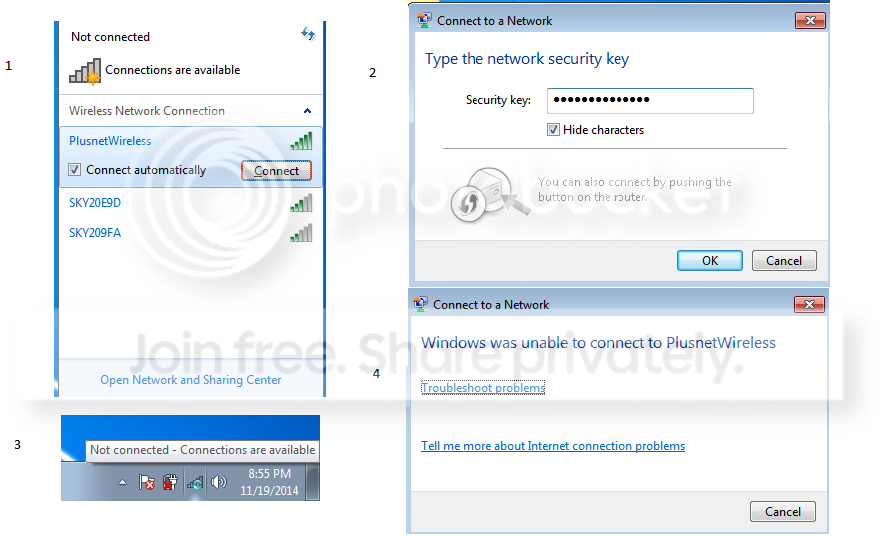
Plus, I also wanted to show you the steps of how the wifi connection fails ( not sure any help but anyway)

problem-2.png
 

My Computer My Computer

At a glance

Windows 7 Home Premium 64bit
Computer type
PC/Desktop
Computer Manufacturer/Model Number
Toshiba
OS
Windows 7 Home Premium 64bit
Is the WiFi set as Enabled ? ...
 

My Computer My Computer

At a glance

windows 7 home 64bitINTEL-CORE I716GB
Computer Manufacturer/Model Number
W530-3630QM1
OS
windows 7 home 64bit
CPU
INTEL-CORE I7
Memory
16GB
Hard Drives
750GB
Browser
Chrome
Is the WiFi set as Enabled ? ...

If you mean in the Network and Share Center, and then 'Change Adapter Settings' I have this:

enabled.png


So I assume it is enabled.

Installed the Intel Management Engine Interface, the error remains there.

Jee, this error is persistent ehh You have any more ideas oossibly?

At least you fixed the Ethernet cable, that's massive, big thanks again for that.
 

My Computer My Computer

At a glance

Windows 7 Home Premium 64bit
Computer type
PC/Desktop
Computer Manufacturer/Model Number
Toshiba
OS
Windows 7 Home Premium 64bit
There should be a Function Key which enables it .... For that you will need the Value Added Package
 

My Computer My Computer

At a glance

windows 7 home 64bitINTEL-CORE I716GB
Computer Manufacturer/Model Number
W530-3630QM1
OS
windows 7 home 64bit
CPU
INTEL-CORE I7
Memory
16GB
Hard Drives
750GB
Browser
Chrome
There should be a Function Key which enables it .... For that you will need the Value Added Package

Downloading right now, I'll let you know how I get on soon.

Hope the program is easy enough to use :p
 

My Computer My Computer

At a glance

Windows 7 Home Premium 64bit
Computer type
PC/Desktop
Computer Manufacturer/Model Number
Toshiba
OS
Windows 7 Home Premium 64bit
No problem
 

My Computer My Computer

At a glance

windows 7 home 64bitINTEL-CORE I716GB
Computer Manufacturer/Model Number
W530-3630QM1
OS
windows 7 home 64bit
CPU
INTEL-CORE I7
Memory
16GB
Hard Drives
750GB
Browser
Chrome
No problem

The Value Package is made up of quite few components i.e. http://prntscr.com/583q59
Do you know specifically which one is for Function Key and enabling it? I assume Common Driver or Utilities one, but after installing I can only find 2 of these in All Programs..( Flash Cards and Diagnostic Tool) xd
 

My Computer My Computer

At a glance

Windows 7 Home Premium 64bit
Computer type
PC/Desktop
Computer Manufacturer/Model Number
Toshiba
OS
Windows 7 Home Premium 64bit
Try Fn +F8 do any of the Function Keys work ?
 

My Computer My Computer

At a glance

windows 7 home 64bitINTEL-CORE I716GB
Computer Manufacturer/Model Number
W530-3630QM1
OS
windows 7 home 64bit
CPU
INTEL-CORE I7
Memory
16GB
Hard Drives
750GB
Browser
Chrome
Just found a Function Key Driver ... It is under the main Drivers page do not click on Windows 7 ...Click on More ...
 

My Computer My Computer

At a glance

windows 7 home 64bitINTEL-CORE I716GB
Computer Manufacturer/Model Number
W530-3630QM1
OS
windows 7 home 64bit
CPU
INTEL-CORE I7
Memory
16GB
Hard Drives
750GB
Browser
Chrome
Thank you! Some keys still don't work ( brightness, I can work out that myself though) however some do and I believe the Wifi one does.

When I switch off Wifi using Fn + 8 the connections disappear: Screenshot by Lightshot
When I turn on Wifi using Fn + 8 the connections appear: Screenshot by Lightshot

Turning it off and on didn't seem to help it though.
 

My Computer My Computer

At a glance

Windows 7 Home Premium 64bit
Computer type
PC/Desktop
Computer Manufacturer/Model Number
Toshiba
OS
Windows 7 Home Premium 64bit
Still not connected go to Network and Sharing Center / Click on Change Adapter Settings / Property's ... Post a screenshot Please
 

My Computer My Computer

At a glance

windows 7 home 64bitINTEL-CORE I716GB
Computer Manufacturer/Model Number
W530-3630QM1
OS
windows 7 home 64bit
CPU
INTEL-CORE I7
Memory
16GB
Hard Drives
750GB
Browser
Chrome
Btw, also a question? Why do you think I got this problem? Is it purely because of the ISO I used?

This one, Download Official Windows 7 SP1 ISO ( 32bit / 64bit ) from Microsoft

I mean, when I did reformat from my original Win 7 disc I had none of these problems. Now I gave disc away to friend, and don't have it at current time I had to use ISO and it seems to be missing stuff.

Or is it because the Toshiba has its own special software on the laptop? Since I did the reformat on desktop it wasn't associated to anything, hence reformating always tricker on laptops? But then again if I used that ISO to reformat my desktop, I would presume it would still be missing these essential drivers.
 

My Computer My Computer

At a glance

Windows 7 Home Premium 64bit
Computer type
PC/Desktop
Computer Manufacturer/Model Number
Toshiba
OS
Windows 7 Home Premium 64bit

My Computer My Computer

At a glance

Windows 7 Home Premium 64bit
Computer type
PC/Desktop
Computer Manufacturer/Model Number
Toshiba
OS
Windows 7 Home Premium 64bit
No problem :)
 

My Computer My Computer

At a glance

windows 7 home 64bitINTEL-CORE I716GB
Computer Manufacturer/Model Number
W530-3630QM1
OS
windows 7 home 64bit
CPU
INTEL-CORE I7
Memory
16GB
Hard Drives
750GB
Browser
Chrome
No problem :)

So reformatted using these ISO, but same problems, same drivers missing..I got to a point I got it yesterday..only the Unkown Device problem on the Intel driver, can't connect through Wifi, but can at least Ethernet. It's a pain, but can be used at least. Any more ideas? I might go up to a repair shop and see what they think. Alongside this I got one more big problem and hopefully you may help:)

Might as well post this issue here, keep it all together.

So after reformat, aside the network issue, the resolution was bit messed up and still is. In the resolution tab I only have two options...and that wouldn't be problem if the highest possible before refomat was present..but it isn't.. I installed AMD Display Drivers, Intel Display Drivers and Toshiba Resolution from the drivers section on their support site, but that didn't help :(

How can this be fixed?

res.png
 

My Computer My Computer

At a glance

Windows 7 Home Premium 64bit
Computer type
PC/Desktop
Computer Manufacturer/Model Number
Toshiba
OS
Windows 7 Home Premium 64bit
Look under other Versions for the Graphics ... There is one Dated 2013 ...

See if we can sort that issue first
 

My Computer My Computer

At a glance

windows 7 home 64bitINTEL-CORE I716GB
Computer Manufacturer/Model Number
W530-3630QM1
OS
windows 7 home 64bit
CPU
INTEL-CORE I7
Memory
16GB
Hard Drives
750GB
Browser
Chrome
Look under other Versions for the Graphics ... There is one Dated 2013 ...

See if we can sort that issue first

Fixed :)

Actually I just purely forgot about Toshiba site, went onto AMD and they had auto update software. Got that and fixed the issue :)

Now onto next minor one before Wifi, the function keys, some work (enabling disabling touchpad for example) but for me most important ones, controlling brightness of the screen don't. Any ideas for this? Do I need extra software or can set that manually without using function keys?

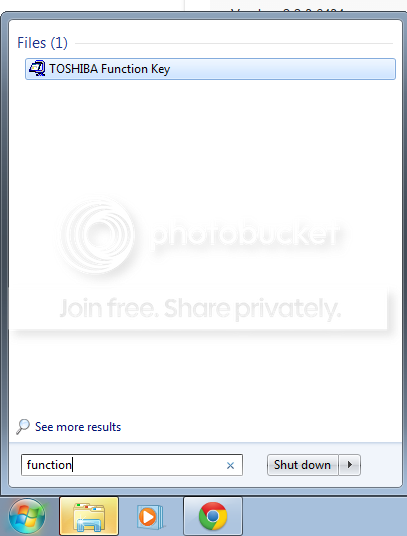
Now I installed Function Key from their site, plus Added Value Package, but for example Function Key they seem to be impossible to find ie it only find the download file used for installation...

function.png


Now When I press Fn + F2 or F3 the brightness icon comes up, but it doesn't do anything.
 

My Computer My Computer

At a glance

Windows 7 Home Premium 64bit
Computer type
PC/Desktop
Computer Manufacturer/Model Number
Toshiba
OS
Windows 7 Home Premium 64bit
Right click on the Desktop Personalize / Display /Adjust Brightness
 

My Computer My Computer

At a glance

windows 7 home 64bitINTEL-CORE I716GB
Computer Manufacturer/Model Number
W530-3630QM1
OS
windows 7 home 64bit
CPU
INTEL-CORE I7
Memory
16GB
Hard Drives
750GB
Browser
Chrome
Back
Top