
You are using an out of date browser. It may not display this or other websites correctly.
You should upgrade or use an alternative browser.
You should upgrade or use an alternative browser.
Refurbisher who actually restores to excellent working condition
- Thread starter Janesdf
- Start date

Hi,
The small form factors usually have very poor ventilation
Usually one fan on the cpu and that's about it
So keep it clean and watch the temperatures
Download Real Temp 3.70 | techPowerUp
The small form factors usually have very poor ventilation
Usually one fan on the cpu and that's about it
So keep it clean and watch the temperatures
Download Real Temp 3.70 | techPowerUp
My Computer
At a glance
Win-7-Pro64bit 7-H-Prem-64biti7-5930K 2nd i9-9940x both water blocked VRM'...Trident-z 3200C14 2nd Trident-z 3600C16EVGA 1080ti ftw3 2nd Titan Xp both water blocked
- Computer type
- PC/Desktop
- Computer Manufacturer/Model Number
- Custom assembled by me :}
- OS
- Win-7-Pro64bit 7-H-Prem-64bit
- CPU
- i7-5930K 2nd i9-9940x both water blocked VRM's too
- Motherboard
- ASUS SABERTOOTH X99 2nd ASUS x299 Apex
- Memory
- Trident-z 3200C14 2nd Trident-z 3600C16
- Graphics Card(s)
- EVGA 1080ti ftw3 2nd Titan Xp both water blocked
- Sound Card
- Built-in Realtek
- Monitor(s) Displays
- 1-AOC G2460PG 24"G-Sync 144Hz/ 2nd 1-ASUS VG248QE 24" 144Hz
- Screen Resolution
- 1920 x 1080 144Hz
- Hard Drives
- 2-Samsung M.2 Evo & Evo Plus
2-Samsung 850 EVO 500GB SSD's/ 3-2.5 W.D. Black 1tb-&3-1tb/3-3.5 WD Black 1tb hdd's
- PSU
- EVGA SuperNOVA 1000-P2 2nd 1200-P2
- Case
- 2-Corsair Obsidian Series 450D Black ATX Mid Tower
- Cooling
- Custom water loops
- Keyboard
- Logitech G710+/ 2nd Logitech G910
- Mouse
- 2-RedDragon M901 Perdition 16400 dpi Gaming mouse = wired
- Internet Speed
- Comcast Ping 19ms 89.31mbps download speed 6.12mbps upload
- Antivirus
- Malwarebytes Pro/ Superantispyware Pro
- Browser
- FireFox & Pale moon
- Other Info
- 2nd ASUS X299 Apex/Intel i9-9940x with Custom water loop/7H-Prem-x64/Corsair 450D case/Ram Trident-z 3600C16 4x8gb / Samsung970Evo plus 500gb SSD/Dual ssd EZ swap evo/PSU EVGA SuperNova 1200w-P2 80+Platinum/GPU Titan Xp /8-ML-140 on push-pull on 2-280GTX rads
What He said and to add repairing /replacing parts is more difficult/propriety thus more expensive.Hi,
The small form factors usually have very poor ventilation
Usually one fan on the cpu and that's about it
So keep it clean and watch the temperatures
Download Real Temp 3.70 | techPowerUp
Edit I own the one I referenced and I have it still running in my office with 7 pro still running strong 5 yrs later. I have sold and upgraded to windows 10 several of these in the last few months.
My Computer
At a glance
Windows 8.1 x64
- Computer type
- PC/Desktop
- OS
- Windows 8.1 x64
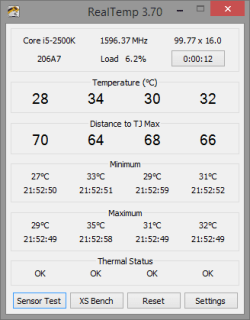
It looks like I will be returning this one also. I noticed a mild burning smell after about 5 hours of use a couple of days ago, but thought it was coming from the neighbors fireplace. Well, noticed that smell again this evening after about three hours of use and I'm sure now, that it's from this Lenovo Thinkcentre M58 Ultra Small Form Factor. I followed your advice to download Realtemp_370, clicked the application to start it, but frankly, I find it confusing. My next email will be to the seller, but before I do, I've attached a screenshot of RealTemp. Please let me know what they mean and your suggestion, which will probably be to buy a new desktop. Sheesh!
Attachments

My Computer
At a glance
Windows 7
- OS
- Windows 7
38c is not bad that is pretty good actually and the same as I see on my acer rebuild.
Not sure why it says 42c to theright left of it though ?
I message someone he's used real temp longer than I have I've never used the sensor test I just left it alone on the default install settings.
Thanks for joining us Jack
Jane you can minimize real temp and the temp # will stay on the taskbar
Then just monitor it,
View attachment 373402
Not sure why it says 42c to the
I message someone he's used real temp longer than I have I've never used the sensor test I just left it alone on the default install settings.
Thanks for joining us Jack
Jane you can minimize real temp and the temp # will stay on the taskbar
Then just monitor it,
View attachment 373402
Last edited:
My Computer
At a glance
Win-7-Pro64bit 7-H-Prem-64biti7-5930K 2nd i9-9940x both water blocked VRM'...Trident-z 3200C14 2nd Trident-z 3600C16EVGA 1080ti ftw3 2nd Titan Xp both water blocked
- Computer type
- PC/Desktop
- Computer Manufacturer/Model Number
- Custom assembled by me :}
- OS
- Win-7-Pro64bit 7-H-Prem-64bit
- CPU
- i7-5930K 2nd i9-9940x both water blocked VRM's too
- Motherboard
- ASUS SABERTOOTH X99 2nd ASUS x299 Apex
- Memory
- Trident-z 3200C14 2nd Trident-z 3600C16
- Graphics Card(s)
- EVGA 1080ti ftw3 2nd Titan Xp both water blocked
- Sound Card
- Built-in Realtek
- Monitor(s) Displays
- 1-AOC G2460PG 24"G-Sync 144Hz/ 2nd 1-ASUS VG248QE 24" 144Hz
- Screen Resolution
- 1920 x 1080 144Hz
- Hard Drives
- 2-Samsung M.2 Evo & Evo Plus
2-Samsung 850 EVO 500GB SSD's/ 3-2.5 W.D. Black 1tb-&3-1tb/3-3.5 WD Black 1tb hdd's
- PSU
- EVGA SuperNOVA 1000-P2 2nd 1200-P2
- Case
- 2-Corsair Obsidian Series 450D Black ATX Mid Tower
- Cooling
- Custom water loops
- Keyboard
- Logitech G710+/ 2nd Logitech G910
- Mouse
- 2-RedDragon M901 Perdition 16400 dpi Gaming mouse = wired
- Internet Speed
- Comcast Ping 19ms 89.31mbps download speed 6.12mbps upload
- Antivirus
- Malwarebytes Pro/ Superantispyware Pro
- Browser
- FireFox & Pale moon
- Other Info
- 2nd ASUS X299 Apex/Intel i9-9940x with Custom water loop/7H-Prem-x64/Corsair 450D case/Ram Trident-z 3600C16 4x8gb / Samsung970Evo plus 500gb SSD/Dual ssd EZ swap evo/PSU EVGA SuperNova 1200w-P2 80+Platinum/GPU Titan Xp /8-ML-140 on push-pull on 2-280GTX rads

Here I am.
It would be very helpful to have the system specs filled in.
Use this tutorial by Brink.
http://www.sevenforums.com/tutorials/180324-system-info-see-your-system-specs.html
You have got so many post on all the laptop/desktop you have used, we need to know exactly what troubled computer we are dealing with.
It would be very helpful to have the system specs filled in.
Use this tutorial by Brink.
http://www.sevenforums.com/tutorials/180324-system-info-see-your-system-specs.html
You have got so many post on all the laptop/desktop you have used, we need to know exactly what troubled computer we are dealing with.
My Computer
At a glance
Windows 10 Pro. 64/ version 1709 Windows 7 Pr...Intel i7-6800K @ 4.3Corsair Platinum 16 gig @2400EVGA GTX 1070 OC
- Computer type
- PC/Desktop
- Computer Manufacturer/Model Number
- Home made Desktop
- OS
- Windows 10 Pro. 64/ version 1709 Windows 7 Pro/64
- CPU
- Intel i7-6800K @ 4.3
- Motherboard
- ASUS X-99 Deluxe II
- Memory
- Corsair Platinum 16 gig @2400
- Graphics Card(s)
- EVGA GTX 1070 OC
- Monitor(s) Displays
- Asus 27" LED LCD/VE278Q
- Screen Resolution
- 1920-1080 or 1280-720 HDMI
- Hard Drives
- INTEL SSD 730-240 Gb Sata 3.0/
- PSU
- EVGA Platium 1200W
- Case
- Phanteks Luxe Tempered Glass 8 fans/ one radiator
- Cooling
- XSPC/ Water Cooled CPU
- Keyboard
- Das 4 Professional
- Mouse
- Logitech M705/MX Anywhere 2-S
- Internet Speed
- 100 mbits
- Antivirus
- Microsoft Security Essentials/ Malwarebytes Premium 3.0/ SAS
- Browser
- I.E. 11 default/Firefox/ ISP Time Warner Cable/Spectrum
- Other Info
- LG BluRay Burner/
Sound system-KLipsch-THX/
Icy Dock ssd Hot Swap bays.
Thanks for the HP info, it's now off the table. What do you think of this? Lenovo Thinkcentre M58 Ultra Small Form Factor Desktop - Core 2 Duo E7400 2.8Ghz - 4GB RAM - 160GB HDD - DVDRW - Windows 7 Home Premium 64-bit Installed - Newegg.com
Looks like this one Jack and thanks for joining us
My Computer
At a glance
Win-7-Pro64bit 7-H-Prem-64biti7-5930K 2nd i9-9940x both water blocked VRM'...Trident-z 3200C14 2nd Trident-z 3600C16EVGA 1080ti ftw3 2nd Titan Xp both water blocked
- Computer type
- PC/Desktop
- Computer Manufacturer/Model Number
- Custom assembled by me :}
- OS
- Win-7-Pro64bit 7-H-Prem-64bit
- CPU
- i7-5930K 2nd i9-9940x both water blocked VRM's too
- Motherboard
- ASUS SABERTOOTH X99 2nd ASUS x299 Apex
- Memory
- Trident-z 3200C14 2nd Trident-z 3600C16
- Graphics Card(s)
- EVGA 1080ti ftw3 2nd Titan Xp both water blocked
- Sound Card
- Built-in Realtek
- Monitor(s) Displays
- 1-AOC G2460PG 24"G-Sync 144Hz/ 2nd 1-ASUS VG248QE 24" 144Hz
- Screen Resolution
- 1920 x 1080 144Hz
- Hard Drives
- 2-Samsung M.2 Evo & Evo Plus
2-Samsung 850 EVO 500GB SSD's/ 3-2.5 W.D. Black 1tb-&3-1tb/3-3.5 WD Black 1tb hdd's
- PSU
- EVGA SuperNOVA 1000-P2 2nd 1200-P2
- Case
- 2-Corsair Obsidian Series 450D Black ATX Mid Tower
- Cooling
- Custom water loops
- Keyboard
- Logitech G710+/ 2nd Logitech G910
- Mouse
- 2-RedDragon M901 Perdition 16400 dpi Gaming mouse = wired
- Internet Speed
- Comcast Ping 19ms 89.31mbps download speed 6.12mbps upload
- Antivirus
- Malwarebytes Pro/ Superantispyware Pro
- Browser
- FireFox & Pale moon
- Other Info
- 2nd ASUS X299 Apex/Intel i9-9940x with Custom water loop/7H-Prem-x64/Corsair 450D case/Ram Trident-z 3600C16 4x8gb / Samsung970Evo plus 500gb SSD/Dual ssd EZ swap evo/PSU EVGA SuperNova 1200w-P2 80+Platinum/GPU Titan Xp /8-ML-140 on push-pull on 2-280GTX rads
Not sure why it says 42c to therightleft of it though ?
One core is a little hotter than the other.
My Computer
At a glance
Win 10 Pro x64Intel I5-2500K @3.3GHz16GB G.Skill Ripjaws X (4x4GB)EVGA GeForce 750 Ti SC 2GB
- Computer type
- PC/Desktop
- Computer Manufacturer/Model Number
- Self Built
- OS
- Win 10 Pro x64
- CPU
- Intel I5-2500K @3.3GHz
- Motherboard
- Asrock P67 Extreme4
- Memory
- 16GB G.Skill Ripjaws X (4x4GB)
- Graphics Card(s)
- EVGA GeForce 750 Ti SC 2GB
- Sound Card
- ASUS Xonar DG 5.1 Channels 24-bit 96KHz PCI Interface Sound
- Monitor(s) Displays
- auria eq2367
- Screen Resolution
- 1920 x 1080
- Hard Drives
- 250GB Samsung 850 EVO SSD
1TB WD Blue
1TB Hitachi
- PSU
- SeaSonic X 650W 80 Plus Gold
- Case
- Corsair Obsidian 750D
- Cooling
- Corsair H60, Three 140mm case fans
- Keyboard
- Logitech Wireless Keyboard K520
- Mouse
- Logitech Wireless Mouse M310
- Internet Speed
- Wave Broadband ~ 100 dn 5 up
- Antivirus
- Windows Defender, Malwarebytes Premium
- Browser
- Edge, IE11, Chrome
- Other Info
- Laptop specs: HP g7-1365dx /
CPU: AMD A6-3420M APU with Radeon(tm) HD Graphics /
RAM: Crucial 8Gb (2x4Gb) /
SSD: Crucial M4-CT128M4SSD2 ATA Device/ FW 000F /
GFX: AMD Radeon HD 6520G /
OS: Windows 10 Pro x64
Okay.
Tcase is 74.1C on the chip
In my experience the older Intel chips always read about 8 to 10 deg hotter at idle with programs compared to Bios.
I lapped my i7960 and it's water block and did get the temps a couple degrees closer to each other. It really didn't mean much except a lot of work.
**My concern is the smell Janesdf is getting.**
It would be nice to know what the temps are at 75% to 100 % load on the system. Remember under that kind of load the temps must be watched very closely. They can clime very fast it the cooling isn't proper.
This old of system if it hasn't been done I would recommend doing a cleanup of everything and the cpu and cooling block and fan and installing new compound.
Of course a after market cooler would be better but I don't know if one could find one that would fit.
The smell can be normal temps but the garbage that a old system can gather could make a smell at normal temps.
Remember 42C is 107F and dust and crud can make a smell at those temps.
It would also be nice to see the video card temps.
That can be done with real temps under Settings.
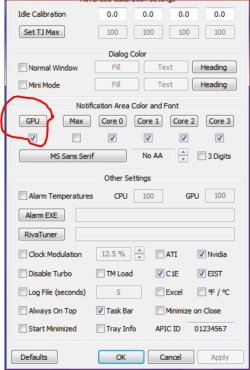
Tcase is 74.1C on the chip
The old Intel cpu's would be considered normal 3 to 4 degrees difference between cores.Intel® Core™2 Duo Processor E7400
In my experience the older Intel chips always read about 8 to 10 deg hotter at idle with programs compared to Bios.
I lapped my i7960 and it's water block and did get the temps a couple degrees closer to each other. It really didn't mean much except a lot of work.
**My concern is the smell Janesdf is getting.**
It would be nice to know what the temps are at 75% to 100 % load on the system. Remember under that kind of load the temps must be watched very closely. They can clime very fast it the cooling isn't proper.
This old of system if it hasn't been done I would recommend doing a cleanup of everything and the cpu and cooling block and fan and installing new compound.
Of course a after market cooler would be better but I don't know if one could find one that would fit.
The smell can be normal temps but the garbage that a old system can gather could make a smell at normal temps.
Remember 42C is 107F and dust and crud can make a smell at those temps.
It would also be nice to see the video card temps.
That can be done with real temps under Settings.
Last edited:
My Computer
At a glance
Windows 10 Pro. 64/ version 1709 Windows 7 Pr...Intel i7-6800K @ 4.3Corsair Platinum 16 gig @2400EVGA GTX 1070 OC
- Computer type
- PC/Desktop
- Computer Manufacturer/Model Number
- Home made Desktop
- OS
- Windows 10 Pro. 64/ version 1709 Windows 7 Pro/64
- CPU
- Intel i7-6800K @ 4.3
- Motherboard
- ASUS X-99 Deluxe II
- Memory
- Corsair Platinum 16 gig @2400
- Graphics Card(s)
- EVGA GTX 1070 OC
- Monitor(s) Displays
- Asus 27" LED LCD/VE278Q
- Screen Resolution
- 1920-1080 or 1280-720 HDMI
- Hard Drives
- INTEL SSD 730-240 Gb Sata 3.0/
- PSU
- EVGA Platium 1200W
- Case
- Phanteks Luxe Tempered Glass 8 fans/ one radiator
- Cooling
- XSPC/ Water Cooled CPU
- Keyboard
- Das 4 Professional
- Mouse
- Logitech M705/MX Anywhere 2-S
- Internet Speed
- 100 mbits
- Antivirus
- Microsoft Security Essentials/ Malwarebytes Premium 3.0/ SAS
- Browser
- I.E. 11 default/Firefox/ ISP Time Warner Cable/Spectrum
- Other Info
- LG BluRay Burner/
Sound system-KLipsch-THX/
Icy Dock ssd Hot Swap bays.

- Local time
- 12:29 PM
- Messages
- 318
No refurbs here. I buy new. With warranty.
How much did the OP save by purchasing two defective refurbs?
That's not for me.
How much did the OP save by purchasing two defective refurbs?
That's not for me.
My Computer
At a glance
Windows 10 x64i7-7700K16 GB 2400 MHzGTX 1060
- Computer type
- PC/Desktop
- Computer Manufacturer/Model Number
- Dell
- OS
- Windows 10 x64
- CPU
- i7-7700K
- Memory
- 16 GB 2400 MHz
- Graphics Card(s)
- GTX 1060
- Sound Card
- Integrated, plus external Presonus Audiobox USB
- Monitor(s) Displays
- 2x AOC 27"
- Screen Resolution
- 1920x1080
- Hard Drives
- 512 GB M.2 SSD
2 TB 7200 RPM disk
- Internet Speed
- 110 Mbps
- Browser
- Firefox
margrave, had you taken the time to read my posts, you would have seen that one unit I purchased was BRAND NEW, and it was defective! As for the two defective refurbs, how would I or anyone know they were defective unless we used them! Use some common sense and we can do without your snide comments which bring nothing to the conversation!
My Computer
At a glance
Windows 7
- OS
- Windows 7
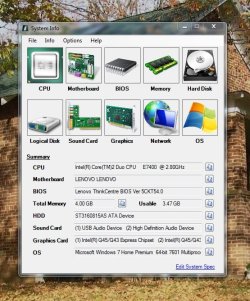
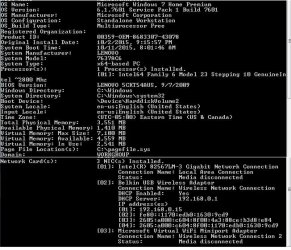
Attached is a screen shot of the system settings. Jane
Here I am.
It would be very helpful to have the system specs filled in.
Use this tutorial by Brink.
http://www.sevenforums.com/tutorials/180324-system-info-see-your-system-specs.html
You have got so many post on all the laptop/desktop you have used, we need to know exactly what troubled computer we are dealing with.
Attachments
My Computer
At a glance
Windows 7
- OS
- Windows 7
Please read the tutorial again. We need the specs installed in the My System Specs in the lower left corner of your post.
My Computer
At a glance
Windows 10 Pro. 64/ version 1709 Windows 7 Pr...Intel i7-6800K @ 4.3Corsair Platinum 16 gig @2400EVGA GTX 1070 OC
- Computer type
- PC/Desktop
- Computer Manufacturer/Model Number
- Home made Desktop
- OS
- Windows 10 Pro. 64/ version 1709 Windows 7 Pro/64
- CPU
- Intel i7-6800K @ 4.3
- Motherboard
- ASUS X-99 Deluxe II
- Memory
- Corsair Platinum 16 gig @2400
- Graphics Card(s)
- EVGA GTX 1070 OC
- Monitor(s) Displays
- Asus 27" LED LCD/VE278Q
- Screen Resolution
- 1920-1080 or 1280-720 HDMI
- Hard Drives
- INTEL SSD 730-240 Gb Sata 3.0/
- PSU
- EVGA Platium 1200W
- Case
- Phanteks Luxe Tempered Glass 8 fans/ one radiator
- Cooling
- XSPC/ Water Cooled CPU
- Keyboard
- Das 4 Professional
- Mouse
- Logitech M705/MX Anywhere 2-S
- Internet Speed
- 100 mbits
- Antivirus
- Microsoft Security Essentials/ Malwarebytes Premium 3.0/ SAS
- Browser
- I.E. 11 default/Firefox/ ISP Time Warner Cable/Spectrum
- Other Info
- LG BluRay Burner/
Sound system-KLipsch-THX/
Icy Dock ssd Hot Swap bays.
Layback Bear, Thanks for your input, but being that I've only had it for about a week, I'm not willing to invest any money into a refurb that I just bought.
Even though I purchased a brand new Lenovo M53 which also proved to be defective (see my earlier post), at this point, I think I will move away from Lenovo altogether, and purchase something else, brand new. But I do have to say that for the time being, other than the burning smell which is noticeable after about 3 hours of use, this Lenovo 58 is running, in all other aspects, like a new pc.
Jane
Even though I purchased a brand new Lenovo M53 which also proved to be defective (see my earlier post), at this point, I think I will move away from Lenovo altogether, and purchase something else, brand new. But I do have to say that for the time being, other than the burning smell which is noticeable after about 3 hours of use, this Lenovo 58 is running, in all other aspects, like a new pc.
Jane
Okay.
Tcase is 74.1C on the chip
The old Intel cpu's would be considered normal 3 to 4 degrees difference between cores.Intel® Core™2 Duo Processor E7400
In my experience the older Intel chips always read about 8 to 10 deg hotter at idle with programs compared to Bios.
I lapped my i7960 and it's water block and did get the temps a couple degrees closer to each other. It really didn't mean much except a lot of work.
**My concern is the smell Janesdf is getting.**
It would be nice to know what the temps are at 75% to 100 % load on the system. Remember under that kind of load the temps must be watched very closely. They can clime very fast it the cooling isn't proper.
This old of system if it hasn't been done I would recommend doing a cleanup of everything and the cpu and cooling block and fan and installing new compound.
Of course a after market cooler would be better but I don't know if one could find one that would fit.
The smell can be normal temps but the garbage that a old system can gather could make a smell at normal temps.
Remember 42C is 107F and dust and crud can make a smell at those temps.
It would also be nice to see the video card temps.
That can be done with real temps under Settings.
View attachment 373406
My Computer
At a glance
Windows 7
- OS
- Windows 7
Hi,
Yep real temp was just something to monitor the readings being this has a limited return policy and I believe opposed to the other ones this one has a exchange only term I believe
System info will help you fill in the info in your system spec's page just go to each section and get the info from it and add it to the spec's page
Also add which security you are using which I would recommend Panda free so I'm not sure what came on it as a free trail...?
The smell is most concerning
Yep real temp was just something to monitor the readings being this has a limited return policy and I believe opposed to the other ones this one has a exchange only term I believe
System info will help you fill in the info in your system spec's page just go to each section and get the info from it and add it to the spec's page
Also add which security you are using which I would recommend Panda free so I'm not sure what came on it as a free trail...?
The smell is most concerning
My Computer
At a glance
Win-7-Pro64bit 7-H-Prem-64biti7-5930K 2nd i9-9940x both water blocked VRM'...Trident-z 3200C14 2nd Trident-z 3600C16EVGA 1080ti ftw3 2nd Titan Xp both water blocked
- Computer type
- PC/Desktop
- Computer Manufacturer/Model Number
- Custom assembled by me :}
- OS
- Win-7-Pro64bit 7-H-Prem-64bit
- CPU
- i7-5930K 2nd i9-9940x both water blocked VRM's too
- Motherboard
- ASUS SABERTOOTH X99 2nd ASUS x299 Apex
- Memory
- Trident-z 3200C14 2nd Trident-z 3600C16
- Graphics Card(s)
- EVGA 1080ti ftw3 2nd Titan Xp both water blocked
- Sound Card
- Built-in Realtek
- Monitor(s) Displays
- 1-AOC G2460PG 24"G-Sync 144Hz/ 2nd 1-ASUS VG248QE 24" 144Hz
- Screen Resolution
- 1920 x 1080 144Hz
- Hard Drives
- 2-Samsung M.2 Evo & Evo Plus
2-Samsung 850 EVO 500GB SSD's/ 3-2.5 W.D. Black 1tb-&3-1tb/3-3.5 WD Black 1tb hdd's
- PSU
- EVGA SuperNOVA 1000-P2 2nd 1200-P2
- Case
- 2-Corsair Obsidian Series 450D Black ATX Mid Tower
- Cooling
- Custom water loops
- Keyboard
- Logitech G710+/ 2nd Logitech G910
- Mouse
- 2-RedDragon M901 Perdition 16400 dpi Gaming mouse = wired
- Internet Speed
- Comcast Ping 19ms 89.31mbps download speed 6.12mbps upload
- Antivirus
- Malwarebytes Pro/ Superantispyware Pro
- Browser
- FireFox & Pale moon
- Other Info
- 2nd ASUS X299 Apex/Intel i9-9940x with Custom water loop/7H-Prem-x64/Corsair 450D case/Ram Trident-z 3600C16 4x8gb / Samsung970Evo plus 500gb SSD/Dual ssd EZ swap evo/PSU EVGA SuperNova 1200w-P2 80+Platinum/GPU Titan Xp /8-ML-140 on push-pull on 2-280GTX rads
My Computer
At a glance
Windows 7
- OS
- Windows 7
No need to run it daily 
I would however install Malwarebytes free.
And no need to run it daily either just once a week.
I would however install Malwarebytes free.
And no need to run it daily either just once a week.
My Computer
At a glance
Win-7-Pro64bit 7-H-Prem-64biti7-5930K 2nd i9-9940x both water blocked VRM'...Trident-z 3200C14 2nd Trident-z 3600C16EVGA 1080ti ftw3 2nd Titan Xp both water blocked
- Computer type
- PC/Desktop
- Computer Manufacturer/Model Number
- Custom assembled by me :}
- OS
- Win-7-Pro64bit 7-H-Prem-64bit
- CPU
- i7-5930K 2nd i9-9940x both water blocked VRM's too
- Motherboard
- ASUS SABERTOOTH X99 2nd ASUS x299 Apex
- Memory
- Trident-z 3200C14 2nd Trident-z 3600C16
- Graphics Card(s)
- EVGA 1080ti ftw3 2nd Titan Xp both water blocked
- Sound Card
- Built-in Realtek
- Monitor(s) Displays
- 1-AOC G2460PG 24"G-Sync 144Hz/ 2nd 1-ASUS VG248QE 24" 144Hz
- Screen Resolution
- 1920 x 1080 144Hz
- Hard Drives
- 2-Samsung M.2 Evo & Evo Plus
2-Samsung 850 EVO 500GB SSD's/ 3-2.5 W.D. Black 1tb-&3-1tb/3-3.5 WD Black 1tb hdd's
- PSU
- EVGA SuperNOVA 1000-P2 2nd 1200-P2
- Case
- 2-Corsair Obsidian Series 450D Black ATX Mid Tower
- Cooling
- Custom water loops
- Keyboard
- Logitech G710+/ 2nd Logitech G910
- Mouse
- 2-RedDragon M901 Perdition 16400 dpi Gaming mouse = wired
- Internet Speed
- Comcast Ping 19ms 89.31mbps download speed 6.12mbps upload
- Antivirus
- Malwarebytes Pro/ Superantispyware Pro
- Browser
- FireFox & Pale moon
- Other Info
- 2nd ASUS X299 Apex/Intel i9-9940x with Custom water loop/7H-Prem-x64/Corsair 450D case/Ram Trident-z 3600C16 4x8gb / Samsung970Evo plus 500gb SSD/Dual ssd EZ swap evo/PSU EVGA SuperNova 1200w-P2 80+Platinum/GPU Titan Xp /8-ML-140 on push-pull on 2-280GTX rads
This below are two responses I received from the seller in regard to the burning smell.
"Most of the time any burning smell is from dust build up on the video adapter or power supply. The smell itself is not indicative of any problems, just something that's happening. Streaming video and simple games can put a lot of stress on the older generation built in graphics adapters, especially HD video."
"They should be fine for doing what you described for well beyond the 8 hour periods. Let me know if there are any functional issues, but the heat/smell should not affect that though."
Last night, after about 3-4 hours of use, no burning smell and after three hours of use this morning, no smell, so far.
Thrash, I'm following your suggestion to install Malwarebytes and run it weekly, instead of daily. Thanks again for all of your help and the help of members who responded.
Jane
"Most of the time any burning smell is from dust build up on the video adapter or power supply. The smell itself is not indicative of any problems, just something that's happening. Streaming video and simple games can put a lot of stress on the older generation built in graphics adapters, especially HD video."
"They should be fine for doing what you described for well beyond the 8 hour periods. Let me know if there are any functional issues, but the heat/smell should not affect that though."
Last night, after about 3-4 hours of use, no burning smell and after three hours of use this morning, no smell, so far.
Thrash, I'm following your suggestion to install Malwarebytes and run it weekly, instead of daily. Thanks again for all of your help and the help of members who responded.
Jane
My Computer
At a glance
Windows 7
- OS
- Windows 7
Makes me think he didn't really clean it out before selling it if he's talking about dust.... in there :/
Monitor the temperatures and of course smell
Next time he says something about heat/ stress give him the real temp readings
Monitor the temperatures and of course smell
Next time he says something about heat/ stress give him the real temp readings
My Computer
At a glance
Win-7-Pro64bit 7-H-Prem-64biti7-5930K 2nd i9-9940x both water blocked VRM'...Trident-z 3200C14 2nd Trident-z 3600C16EVGA 1080ti ftw3 2nd Titan Xp both water blocked
- Computer type
- PC/Desktop
- Computer Manufacturer/Model Number
- Custom assembled by me :}
- OS
- Win-7-Pro64bit 7-H-Prem-64bit
- CPU
- i7-5930K 2nd i9-9940x both water blocked VRM's too
- Motherboard
- ASUS SABERTOOTH X99 2nd ASUS x299 Apex
- Memory
- Trident-z 3200C14 2nd Trident-z 3600C16
- Graphics Card(s)
- EVGA 1080ti ftw3 2nd Titan Xp both water blocked
- Sound Card
- Built-in Realtek
- Monitor(s) Displays
- 1-AOC G2460PG 24"G-Sync 144Hz/ 2nd 1-ASUS VG248QE 24" 144Hz
- Screen Resolution
- 1920 x 1080 144Hz
- Hard Drives
- 2-Samsung M.2 Evo & Evo Plus
2-Samsung 850 EVO 500GB SSD's/ 3-2.5 W.D. Black 1tb-&3-1tb/3-3.5 WD Black 1tb hdd's
- PSU
- EVGA SuperNOVA 1000-P2 2nd 1200-P2
- Case
- 2-Corsair Obsidian Series 450D Black ATX Mid Tower
- Cooling
- Custom water loops
- Keyboard
- Logitech G710+/ 2nd Logitech G910
- Mouse
- 2-RedDragon M901 Perdition 16400 dpi Gaming mouse = wired
- Internet Speed
- Comcast Ping 19ms 89.31mbps download speed 6.12mbps upload
- Antivirus
- Malwarebytes Pro/ Superantispyware Pro
- Browser
- FireFox & Pale moon
- Other Info
- 2nd ASUS X299 Apex/Intel i9-9940x with Custom water loop/7H-Prem-x64/Corsair 450D case/Ram Trident-z 3600C16 4x8gb / Samsung970Evo plus 500gb SSD/Dual ssd EZ swap evo/PSU EVGA SuperNova 1200w-P2 80+Platinum/GPU Titan Xp /8-ML-140 on push-pull on 2-280GTX rads
Similar threads
- Replies
- 3
- Views
- 1K

- Replies
- 6
- Views
- 10K

- Sticky
- Replies
- 89
- Views
- 219K
