Registering my email account in Windows Live Mail and log in problems

redhotchestnut

New member
Local time
7:50 AM
Messages
4
Hello

I am new here and just purchased a laptop with Windows 7 on it and Windows Live Mail already installed.
My previous laptop (still up and running, but mainly just to check emails now) had Outlook Express and was set up many years ago when it was new.
Do I need to completely close down or delete the Outlook Express before I open up a new account in Windows Live Mail with the same email address?
I've tried opening up and putting server details, username/password into Windows Live Mail - and it's accepted it.
However when I go to send/receive mail - it keeps asking me to log in and give my password, and that it's incorrect - when I know it is actually correct?

Am I doing something wrong here? Or how can I open up my emails on my new laptop via Windows Live Mail?

I have Microsoft Security Essentials running as my antivirus protection.

I am hopeful I am doing something very silly and someone might be able to help me with this, as I'm not very computer minded - simple instructions please if anyone has suggestions.

Thanks in advance.
 

My Computer My Computer

At a glance

Windows 7 64 bit
OS
Windows 7 64 bit
...Do I need to completely close down or delete the Outlook Express before I open up a new account in Windows Live Mail...
...it keeps asking me to log in and give my password, and that it's incorrect - when I know it is actually correct?
Since you're using Windows 7 for WLM and OE for XP they can't simultaneously be on the same PC. However both programs can be set up on their respective PCs at the same time; just keep in mind that if you download your mail on one PC you won't see it on the other afterwards unless you choose the option to "keep mail on server".

If OE is working, look carefully at every tab of Account Properties and set up WLM the same way. WLM is the replacement for OE for Windows 7 and will work if set up the same.
 

My Computer My Computer

At a glance

Windows 8 Pro w/MC 32-bitIntel Atom 1.86 GHz2 GBIntel GMA 500
Computer type
PC/Desktop
Computer Manufacturer/Model Number
OQO 2+
OS
Windows 8 Pro w/MC 32-bit
CPU
Intel Atom 1.86 GHz
Motherboard
OQO 2+
Memory
2 GB
Graphics Card(s)
Intel GMA 500
Sound Card
IDT
Monitor(s) Displays
LCD
Screen Resolution
800 x 480 (portable) 1280 x 1024 (docked)
Hard Drives
64 GB SSD
PSU
9 Ah Battery (portable) or OQO Brick (docked)
Case
Shirt Pocket Sized
Cooling
Tiny Fan
Keyboard
Slide out (portable) DiNovo Edge (docked)
Mouse
Eraser head (portable) Logitech Bluetooth (docked)
Internet Speed
WWAN or 802.11G (portable) T1 (docked)
Browser
IE 10
Other Info
DVD-RW OQO Docking Station
Hi redhotchestnut, welcome to Seven Forums.
Go to programs and features, click WLE and select repair.
Then check accounts settings and tick remember password.
 

My Computer My Computer

At a glance

Win7 H.Prem. 32bit+SP1
Computer Manufacturer/Model Number
Look in my Signature.
OS
Win7 H.Prem. 32bit+SP1
Thank you both for replying to my post.

I do have two laptops now, one set up with Outlook Express (email fine sending and receiving) and the other set up with Windows Live. I have opened an email account on Windows Live and exactly copied the settings from Outlook Express, but it's just not accepting it nor connecting to it. I keep getting the error message asking for my username and password.

I did go onto WLE and set it to repair and it carried it out fine. Closed the account in Windows Live, rebooted the laptop and tried setting it up again.

Unfortunately I have the same problem still.

I am using a tiscali email address, not sure if this is the problem, but as I'm already accessing emails on Outlook Express, probably not?

It just seems Windows Live doesn't like my email address or the settings, which are identical to Outlook Express.

This is the first time I've used Windows Live, so not sure what to make of it, but feel it shouldn't really be this complicated to set up an email account and receive/send emails?

Any further thoughts please to help me?
 

My Computer My Computer

At a glance

Windows 7 64 bit
OS
Windows 7 64 bit
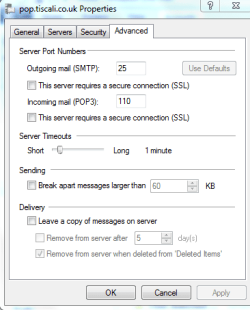
Can you post an image of your Tiscali Account's advanced tab.
 

My Computer My Computer

At a glance

Win7 H.Prem. 32bit+SP1
Computer Manufacturer/Model Number
Look in my Signature.
OS
Win7 H.Prem. 32bit+SP1
Do you want this from my Outlook Express set up - or the Windows Live set up or both?

I might have to copy the details down and put them in here as not sure how to put them in a posting sorry.
 

My Computer My Computer

At a glance

Windows 7 64 bit
OS
Windows 7 64 bit
Do you want this from my Outlook Express set up - or the Windows Live set up or both?

I might have to copy the details down and put them in here as not sure how to put them in a posting sorry.
Just the WLM account
This will help you post an image, going 'Advanced' on this forum is not needed.
View attachment 174535
 
Last edited:

My Computer My Computer

At a glance

Win7 H.Prem. 32bit+SP1
Computer Manufacturer/Model Number
Look in my Signature.
OS
Win7 H.Prem. 32bit+SP1
advanced wlm image.PNG

Thank you, I'm learning all the time, haven't done that before! Hope this is OK?
 

My Computer My Computer

At a glance

Windows 7 64 bit
OS
Windows 7 64 bit
Tick both SSL boxes, POP3 will change to 995, SMTP will stay at 25, change to 465 or 587, set timeouts to maximum. Untick remove from server, tick Leave a copy of message on server. Apply & OK.
 

My Computer My Computer

At a glance

Win7 H.Prem. 32bit+SP1
Computer Manufacturer/Model Number
Look in my Signature.
OS
Win7 H.Prem. 32bit+SP1
Back
Top