
- Local time
- 6:40 AM
- Messages
- 70
You will need to use some "substring ** commands to dig out the errors in the CBS.log" as that file is HUGE. And then good luck. It can be a pain to isolate the files and find replacements as uncorrected errors are due to the backups being hosed as well.
Anything touched by SFC will have a [SR] in the entry, but they will be far too many of these in the CBS file. And CBS has a ton of other crap in them.
How do I analyze the command to detect corrupt files in Windows 7? - Super User
Search for:
"corrup"
"repair"
"Repairing corrupted file"
"Cannot repair member file"
"Repaired file"
Easiest to do this in a command prompt and log in to the directory that includes. CBS.log
then you can use something like
findstr /c:"Cannot repair" CBS.log | More
Or redirect the output to a text file
> sfcdetails.txt
instead of piping thru More
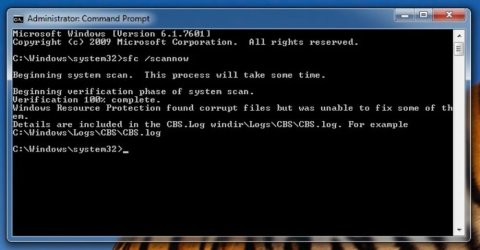
As I noted earlier: When I try to open the CBC.log file, access is denied!!
I opened the command prompt as Admin. before generating the SFC logfile. The CBS.log file is 1.58mb and permissions are read/write for Admin.
Do I have to generate the logfile in SAFE mode? If so, this brings up another problem: I CAN NO LONGER CALL UP THE ADVANCED BOOT OPTIONS MENU BY HOLDING F6!!!!
Do I have to boot into command prompt using a boot disk?
HEEEEEELLLLLPPPPPP!!!!!.............this started out as 1 problem and has grown to 3.
Attachments
My Computer
At a glance
Win 7 64 bit Home PremiumAMD A6 6400K8 bg
- Computer type
- PC/Desktop
- Computer Manufacturer/Model Number
- custom build
- OS
- Win 7 64 bit Home Premium
- CPU
- AMD A6 6400K
- Motherboard
- Gigabyte
- Memory
- 8 bg
- Hard Drives
- SSD plus HDD


