
Registry Anomaly

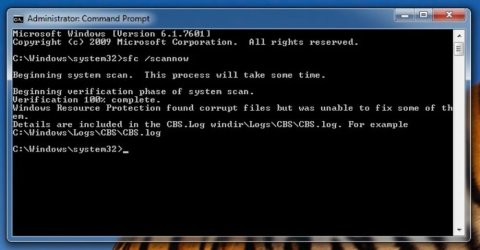
You will need to use some "substring ** commands to dig out the errors in the CBS.log" as that file is HUGE. And then good luck. It can be a pain to isolate the files and find replacements as uncorrected errors are due to the backups being hosed as well.

Anything touched by SFC will have a [SR] in the entry, but they will be far too many of these in the CBS file. And CBS has a ton of other crap in them.

How do I analyze the command to detect corrupt files in Windows 7? - Super User

Search for:

"corrup"
"repair"
"Repairing corrupted file"
"Cannot repair member file"
"Repaired file"

Easiest to do this in a command prompt and log in to the directory that includes. CBS.log

then you can use something like

findstr /c:"Cannot repair" CBS.log | More

Or redirect the output to a text file

> sfcdetails.txt

instead of piping thru More

As I noted earlier: When I try to open the CBC.log file, access is denied!!

I opened the command prompt as Admin. before generating the SFC logfile. The CBS.log file is 1.58mb and permissions are read/write for Admin.

Do I have to generate the logfile in SAFE mode? If so, this brings up another problem: I CAN NO LONGER CALL UP THE ADVANCED BOOT OPTIONS MENU BY HOLDING F6!!!!

Do I have to boot into command prompt using a boot disk?

HEEEEEELLLLLPPPPPP!!!!!.............this started out as 1 problem and has grown to 3.
 

Attachments
  • 1.JPG
    1.JPG
    88 KB · Views: 0

My Computer

Computer type
PC/Desktop
Computer Manufacturer/Model Number
custom build
OS
Win 7 64 bit Home Premium
CPU
AMD A6 6400K
Motherboard
Gigabyte
Memory
8 bg
Hard Drives
SSD plus HDD
You must need to change Permissions - not sure on that one. That doesn't make sense.

And yes one to three is typical when a machine is hosed.

Are you sure F6 is the correct one for your machine? What IS your machine?

Do you have a System Repair disk?

And yes - Safe mode would be best at this point.
 

My Computer

Computer type
PC/Desktop
OS
Windows 7 Pro 64
Joe - please try to keep posts in one thread. Please.

Are you pressing it every second or so after turning on the machine?
 

My Computer

Computer type
PC/Desktop
OS
Windows 7 Pro 64
I corrected my link error in prior post(s) Try this link, think my copy & paste didn't work for link System Update Redness Tool x64

If you download and run SURT it will create a temporary file located at: C:\Windows\Logs\CBS\ with a section that indicates missing or corrupt files (easier to read) I should have the missing cats, mums, or manifests in my repository 400,000+ files.
 

My Computer

Computer type
PC/Desktop
Computer Manufacturer/Model Number
HP Desktop & Compaq Laptop
OS
Win 10 x64, Linux Lite, Win 7 x64, BlackArch, & Kali
Hard Drives
Samsung 850 Pro 256Gb,
Hitachi HDD 1Tb,
Crucial MX SSD 250Gb
Segate 3Tb USB 3.0 Ext. Backup HDD
Internet Speed
150Mbps dn, 20Mbps up
Antivirus
Avast Free, Malwarebytes Anti-Exploit & Anti-Ransomware
Browser
Firefox, Chrome, Opera, & VPN
Joe - please try to keep posts in one thread. Please.

Are you pressing it every second or so after turning on the machine?

I didn't want to further complicate an already complicated thread, but better this way, for me anyway.

Tried continuous press, press very quickly, and press every second or so.

It always worked before, no matter what pressing frequency I used.

Replaced keyboard last month. Tested just before with an online keyboard tester and ALL keys work, including F8. Also, F12 (boot options) works as well.
 

My Computer

Computer type
PC/Desktop
Computer Manufacturer/Model Number
custom build
OS
Win 7 64 bit Home Premium
CPU
AMD A6 6400K
Motherboard
Gigabyte
Memory
8 bg
Hard Drives
SSD plus HDD
Try this link, think my copy paste didn't work for link System Update Redness Tool x64

Yes.............already got around the typo.

I added a program to short-circuit the automatic Win 10 upgrade. Will playing with the update manager get me back into those annoying (and resource killing) update downloads.

I shut off auto update and do my own every couple weeks.
 

My Computer

Computer type
PC/Desktop
Computer Manufacturer/Model Number
custom build
OS
Win 7 64 bit Home Premium
CPU
AMD A6 6400K
Motherboard
Gigabyte
Memory
8 bg
Hard Drives
SSD plus HDD
You must need to change Permissions - not sure on that one. That doesn't make sense.

And yes one to three is typical when a machine is hosed.

Are you sure F6 is the correct one for your machine? What IS your machine?

Do you have a System Repair disk?

And yes - Safe mode would be best at this point.

Admin (ME) has full read/write permissions already.

Yes, it has always been F8.

Home built by me. AMD dual core x64 bit
16 Gb ram
SSD primary 210gb, HDD secondary Seagate Barracuda 1tb

Windows 7 x64 / UBUNTU dual boot
Gigabyte mainboard
 

My Computer

Computer type
PC/Desktop
Computer Manufacturer/Model Number
custom build
OS
Win 7 64 bit Home Premium
CPU
AMD A6 6400K
Motherboard
Gigabyte
Memory
8 bg
Hard Drives
SSD plus HDD
SystemUpdateReadinessTool creates its own temporary log at: C:\Windows\Logs\CBS\CheckSUR is much easier to read and will open in Notepad.
 

My Computer

Computer type
PC/Desktop
Computer Manufacturer/Model Number
HP Desktop & Compaq Laptop
OS
Win 10 x64, Linux Lite, Win 7 x64, BlackArch, & Kali
Hard Drives
Samsung 850 Pro 256Gb,
Hitachi HDD 1Tb,
Crucial MX SSD 250Gb
Segate 3Tb USB 3.0 Ext. Backup HDD
Internet Speed
150Mbps dn, 20Mbps up
Antivirus
Avast Free, Malwarebytes Anti-Exploit & Anti-Ransomware
Browser
Firefox, Chrome, Opera, & VPN
SystemUpdateReadinessTool creates its own temporary log at: C:\Windows\Logs\CBS\CheckSUR is much easier to read and will open in Notepad.

Great.

There are 2 logs generated at that location:

CheckSUR,log
and
CheckSURpersist.log

should I attach both?
 

My Computer

Computer type
PC/Desktop
Computer Manufacturer/Model Number
custom build
OS
Win 7 64 bit Home Premium
CPU
AMD A6 6400K
Motherboard
Gigabyte
Memory
8 bg
Hard Drives
SSD plus HDD
I'm much more concerned that I can no longer get into safe mode.
 

My Computer

Computer type
PC/Desktop
Computer Manufacturer/Model Number
custom build
OS
Win 7 64 bit Home Premium
CPU
AMD A6 6400K
Motherboard
Gigabyte
Memory
8 bg
Hard Drives
SSD plus HDD
Attach CheckSUR.log!

CbsPersist.cab, is a compressed/zipped folder. When the CheckSUR.log gets to a specific size it is archived into the ----, you guessed it CbsPersist.cab, which you can delete, all of them without issue. I most likely have all the files/folders SURT (System Update Readiness Tool) discovers as missing/corrupt. If I don't have them I can obtain them, and add to archive. CheckSUR.log is usually active during windows session and you should be able to copy, paste, but not delete it, at least not delete it by right-click, delete.

Can deal with non-access to safe mode and others after you correct SURT identified errors.

Question: Do you have installation disk for Windows 7 64 bit? Or a Win7x64 ISO file?
 
Last edited:

My Computer

Computer type
PC/Desktop
Computer Manufacturer/Model Number
HP Desktop & Compaq Laptop
OS
Win 10 x64, Linux Lite, Win 7 x64, BlackArch, & Kali
Hard Drives
Samsung 850 Pro 256Gb,
Hitachi HDD 1Tb,
Crucial MX SSD 250Gb
Segate 3Tb USB 3.0 Ext. Backup HDD
Internet Speed
150Mbps dn, 20Mbps up
Antivirus
Avast Free, Malwarebytes Anti-Exploit & Anti-Ransomware
Browser
Firefox, Chrome, Opera, & VPN
Thank you! Glad we can address all 3 issues in a step wise fashion. Attached is the CheckSUR log.

I have a bootable Win7 x64 Repair disk. I also have a Windows 7 x 64 install disk with no validation key.

I have both Windows partition and data partition backups about 3 weeks old. Data backup created by SyncToy. Windows partition (image) created by Macrium.

PS: Most of the items listed in the log refer to AVAST. I uninstalled AVAST a few years ago, and had removed all reference to AVAST from the registry long ago.
 

Attachments

My Computer

Computer type
PC/Desktop
Computer Manufacturer/Model Number
custom build
OS
Win 7 64 bit Home Premium
CPU
AMD A6 6400K
Motherboard
Gigabyte
Memory
8 bg
Hard Drives
SSD plus HDD
Didn't know you had Win7 disk. Is it the same as your Machine? 64bit. Is that what you used to install windows?
There are several ways to extract your 25 character product key from your machine, Magic Jellybean, Belarc Advisor, or a small batch file I have.

Was thinking about your registry issue. If you deleted keys more than a week or two, the RegBack folded probably contains a copy of the registry alteration.

Are you familiar with a Repair Install/In-place upgrade. Read this tutorial by Shawn Brink Repair Install
Brian at Britec Computers has an excellent video on it Repair Install
I've done so many I couldn't even guess the number! It's pretty easy.

Will correct your issues. When you uninstall Avast, you should run AvastClear
Manual alteration of the registry is not a good practice in general. I try to avoid it unless absolutely necessary.

If your Win7 disk is x64 and not Home Premium, you can alter, rename or remove the ei.cfg file on the disk and make it AIO (all in one) however, you can only repair install the version you already have installed.

Peruse Brinks tutorial and Britec video and let me know what you think. I'm going to be watching the Daytona 500 for the next few hours!
 

My Computer

Computer type
PC/Desktop
Computer Manufacturer/Model Number
HP Desktop & Compaq Laptop
OS
Win 10 x64, Linux Lite, Win 7 x64, BlackArch, & Kali
Hard Drives
Samsung 850 Pro 256Gb,
Hitachi HDD 1Tb,
Crucial MX SSD 250Gb
Segate 3Tb USB 3.0 Ext. Backup HDD
Internet Speed
150Mbps dn, 20Mbps up
Antivirus
Avast Free, Malwarebytes Anti-Exploit & Anti-Ransomware
Browser
Firefox, Chrome, Opera, & VPN
Reviewing that CheckSur.log file, it looks like all that is left is some avast garbage that should not cause problems. AvastClear may remove that stuff.

You might want to also run SFCfix from Sysnative. It will clean more than SFC scannow does.

If you decide to do the Repair Install, should be no need to do this.
 

My Computer

Computer type
PC/Desktop
OS
Windows 7 Pro 64
Snick and Jo,

I just installed and ran AvastClear. Then I opened regedit and found 5 instances of Avast in the registry, which I'll leave alone. Then I reinstalled SURT and here is the new logfile. It found the same 6 unrepaired components which were logged the first time.

So:

Can I now remove those 6 AVAST references from the registry?
Are those 6 unrepaired components worth fixing?
We have 2 more steps left, fixing damaged files reported in SFC, and fixing the failure of F8 to display advanced boot options. What should I do next?
 

Attachments

My Computer

Computer type
PC/Desktop
Computer Manufacturer/Model Number
custom build
OS
Win 7 64 bit Home Premium
CPU
AMD A6 6400K
Motherboard
Gigabyte
Memory
8 bg
Hard Drives
SSD plus HDD
Didn't know you had Win7 disk. Is it the same as your Machine? 64bit. Is that what you used to install windows?
There are several ways to extract your 25 character product key from your machine, Magic Jellybean, Belarc Advisor, or a small batch file I have.

Was thinking about your registry issue. If you deleted keys more than a week or two, the RegBack folded probably contains a copy of the registry alteration.

Are you familiar with a Repair Install/In-place upgrade. Read this tutorial by Shawn Brink Repair Install
Brian at Britec Computers has an excellent video on it Repair Install
I've done so many I couldn't even guess the number! It's pretty easy.

Will correct your issues. When you uninstall Avast, you should run AvastClear
Manual alteration of the registry is not a good practice in general. I try to avoid it unless absolutely necessary.

If your Win7 disk is x64 and not Home Premium, you can alter, rename or remove the ei.cfg file on the disk and make it AIO (all in one) however, you can only repair install the version you already have installed.

Peruse Brinks tutorial and Britec video and let me know what you think. I'm going to be watching the Daytona 500 for the next few hours!

The Win install disk is same as my installation...............Home Premium x64. I don't remember, honestly if it's the same as the one I used to install the OS. I seem to remember downloading the OS from a computer store online at a discounted price.

It appears that the reg is OK, right? A backup from two weeks ago won't solve the funky stalling issue because that's been going on for maybe 2 months.

Repair install is what I had in mind, if I can't fix/replace damaged files found by SFC, as well as getting F8 to work again.
 

My Computer

Computer type
PC/Desktop
Computer Manufacturer/Model Number
custom build
OS
Win 7 64 bit Home Premium
CPU
AMD A6 6400K
Motherboard
Gigabyte
Memory
8 bg
Hard Drives
SSD plus HDD
Reviewing that CheckSur.log file, it looks like all that is left is some avast garbage that should not cause problems. AvastClear may remove that stuff.

You might want to also run SFCfix from Sysnative. It will clean more than SFC scannow does.

If you decide to do the Repair Install, should be no need to do this.

Ran AvastClear; see my other post.

Just ran SFCfix Sysnative. It only ran for about 2 seconds before generating the attached logfile.
 

Attachments

My Computer

Computer type
PC/Desktop
Computer Manufacturer/Model Number
custom build
OS
Win 7 64 bit Home Premium
CPU
AMD A6 6400K
Motherboard
Gigabyte
Memory
8 bg
Hard Drives
SSD plus HDD
SFCFix file indicates nothing more left. Looks like we may have cleaned up a lot.


WRT the stranded Avast Registry entries - leave them alone unless you really know what you are doing. They should not be causing any problems you have been having now.

At this point you should probably work with Snick on the install if you are wanting to do that.

Regarding F8 key issue. Was the issue that you could get into Windows regular Mode, but not safe mode? If so, check here:

Windows 7/10 Safe Mode - F8 Not Working?
 

My Computer

Computer type
PC/Desktop
OS
Windows 7 Pro 64
You could always try reinstalling avast, then uninstall with Control Panel, uninstall a program, or Revo Uninstaller, then run Avastclean. It will most likely remove the rogue entries. Safe way if it will work! JoWazzoo is correct, it is not your issue, and altering the registry is usually not a good idea. If it ain't broke, don't fix it! Repair install will not alter those entries, at least is shouldn't!
 

My Computer

Computer type
PC/Desktop
Computer Manufacturer/Model Number
HP Desktop & Compaq Laptop
OS
Win 10 x64, Linux Lite, Win 7 x64, BlackArch, & Kali
Hard Drives
Samsung 850 Pro 256Gb,
Hitachi HDD 1Tb,
Crucial MX SSD 250Gb
Segate 3Tb USB 3.0 Ext. Backup HDD
Internet Speed
150Mbps dn, 20Mbps up
Antivirus
Avast Free, Malwarebytes Anti-Exploit & Anti-Ransomware
Browser
Firefox, Chrome, Opera, & VPN
Back
Top