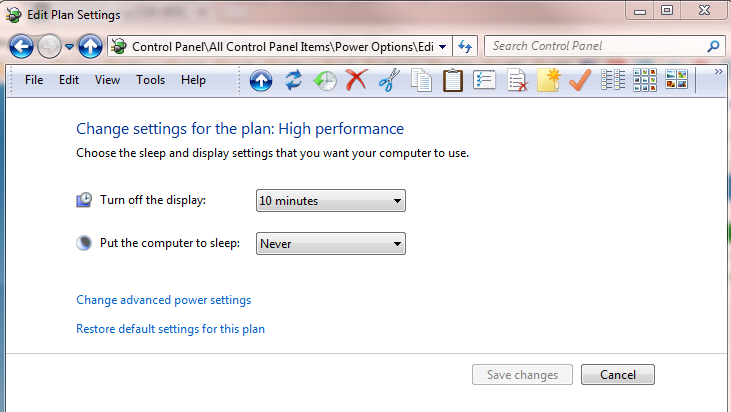
Does anyone know where in the registry this (currently 10 minute) timeout value is stored? I'd quite like to setup a few .reg files with different values that I can quickly click on to change this value.
My Computer
Computer Manufacturer/Model Number
Custom build
OS
Windows 7 Pro x64
CPU
i7-2600K @ 3.5GHz
Motherboard
Gigabyte GA-P67A-UD5
Memory
16GB DDR3-1600
Graphics Card(s)
Gigabyte HD5850 "OC" 1GB
Sound Card
basic motherboard onboard, with Logitech Z4 speakers
Monitor(s) Displays
1.LG 27" E2750V, 2.Samsung 19" 913N
Screen Resolution
1920x1080, 1280x1024
Hard Drives
Intel X25-M G2 160GB SSD, 2TB SATA 600 internal, 2TB SATA 600 USB3.0 external
PSU
Seasonic X-460FL 80+ Gold
Case
Fractal "Define R3"
Cooling
Scythe BIG Shuriken
Keyboard
Logitech Illuminated 920-000914 (Super super quiet)
If you like, you could set the time you like to use in different power plans, then use the tutorial below to create shortcuts to quickly switch between using a power plan with the settings you want.
If you like, you could set the time you like to use in different power plans, then use the tutorial below to create shortcuts to quickly switch between using a power plan with the settings you want.
Thanks for that. I got the info I needed from that. I wasn't aware of the CMD line Powercfg command. Now I see that I just needed to create a few copies of my high performance power plan and can create batch files to switch to the one I want
My Computer
Computer Manufacturer/Model Number
Custom build
OS
Windows 7 Pro x64
CPU
i7-2600K @ 3.5GHz
Motherboard
Gigabyte GA-P67A-UD5
Memory
16GB DDR3-1600
Graphics Card(s)
Gigabyte HD5850 "OC" 1GB
Sound Card
basic motherboard onboard, with Logitech Z4 speakers
Monitor(s) Displays
1.LG 27" E2750V, 2.Samsung 19" 913N
Screen Resolution
1920x1080, 1280x1024
Hard Drives
Intel X25-M G2 160GB SSD, 2TB SATA 600 internal, 2TB SATA 600 USB3.0 external
PSU
Seasonic X-460FL 80+ Gold
Case
Fractal "Define R3"
Cooling
Scythe BIG Shuriken
Keyboard
Logitech Illuminated 920-000914 (Super super quiet)