
You are using an out of date browser. It may not display this or other websites correctly.
You should upgrade or use an alternative browser.
You should upgrade or use an alternative browser.
Reinstall Win7 what updates to avoid for telemetry & winX preparation?
- Thread starter Marie SWE
- Start date

Yeah, just like now felt draining all my resources searching anywhere just to fix the issue of sound in my host. I think I need a break for this and have some coffeeIt's good to be curious, the more questions asked, the more you learn.

You must be a nice personI'm extremely curious, so I've learned a lot over the years.

My Computer
At a glance
Windows 7 guest, Debian hostAMD FX-6100DDR3/16384 MBytes/2000.6MHzAMD Radeon HD 5500 Series
- Computer type
- PC/Desktop
- Computer Manufacturer/Model Number
- MSI
- OS
- Windows 7 guest, Debian host
- CPU
- AMD FX-6100
- Motherboard
- 880GMS-E41(FX)(MS-7641)
- Memory
- DDR3/16384 MBytes/2000.6MHz
- Graphics Card(s)
- AMD Radeon HD 5500 Series
- Sound Card
- Built-in
- Monitor(s) Displays
- Samsung SyncMaster S23B300
- Screen Resolution
- 1920x1080
- Hard Drives
- ST1000DM003-9YN162 ATA Device
WDC WD5000AAKX-00ERMAQ ATA Device
- PSU
- 500W NAXN
- Case
- APOLLO
- Cooling
- XY
- Keyboard
- Logitech
- Mouse
- Samsung
- Internet Speed
- .79Mbps/1.71Mbps
- Antivirus
- Microsoft Security Essentials
- Browser
- Google Chrome/FireFox/Internet Explorer
- Other Info
- 3in1 creative speaker
Yeah, just like now felt draining all my resources searching anywhere just to fix the issue of sound in my host. I think I need a break for this and have some coffee
You must be a nice person
I understand exactly what you mean.... I've been drinking a lot of coffee the last few days with a messy windows7 computer, updates and I'm trying to learn Linux at the same time.
 maybe you have seen my other threads about my windows computer.*hahaha*
Well I have the philosophy that if I'm being nice and happy, maybe it rubs off on others.
But I will not hide the fact that I also have a hot temper if someone is stupid or bitchy.
"Always be nice until it's time to not be nice". It is such a good expression as Patrick Swayze saying in the movie Road House.
My Computer
At a glance
Linux:Debian, Kali.. 2xWin8.1,2x,1x7Pro, Retr...cpu's intel 8088 up to intel i7 gen9.. dual x...oldest 1024KB newest 64GBmostly internals i don't game
- Computer type
- PC/Desktop
- Computer Manufacturer/Model Number
- AsusX53, Aspire E1-572. AsusUX32A, HP Pro3130mt+3010mt, HP Proliant ML150G3, 3xCustom, i3, i5, i7
- OS
- Linux:Debian, Kali.. 2xWin8.1,2x,1x7Pro, Retro:1x2003server.1xXPpro, 1xW2k,1x98SE,1x95,1x3.11
- CPU
- cpu's intel 8088 up to intel i7 gen9.. dual xenon on server
- Motherboard
- a lot of them :-)
- Memory
- oldest 1024KB newest 64GB
- Graphics Card(s)
- mostly internals i don't game
- Sound Card
- old retro=soundblaster.. newer ones internal
- Monitor(s) Displays
- smalest 12" largest 26"
- Internet Speed
- 100/100
- Antivirus
- NortonInternetSecurity, MS, Avast, (not on the same computer
- Browser
- IE8, IE9. IE11, Firefox
- Other Info
- I can't fit all info on all my computers in these fields :-D
I plan to put the list in my first post soon so everyone easily can find the list
Is there anyone else who has a point of view or would like to add something to the list I posted on page 3? KB-list
I intend to include the CMD file as dg1261 created include dg1261's description as goes with it.
Any thoughts??
Is there anyone else who has a point of view or would like to add something to the list I posted on page 3? KB-list
I intend to include the CMD file as dg1261 created include dg1261's description as goes with it.
Any thoughts??
My Computer
At a glance
Linux:Debian, Kali.. 2xWin8.1,2x,1x7Pro, Retr...cpu's intel 8088 up to intel i7 gen9.. dual x...oldest 1024KB newest 64GBmostly internals i don't game
- Computer type
- PC/Desktop
- Computer Manufacturer/Model Number
- AsusX53, Aspire E1-572. AsusUX32A, HP Pro3130mt+3010mt, HP Proliant ML150G3, 3xCustom, i3, i5, i7
- OS
- Linux:Debian, Kali.. 2xWin8.1,2x,1x7Pro, Retro:1x2003server.1xXPpro, 1xW2k,1x98SE,1x95,1x3.11
- CPU
- cpu's intel 8088 up to intel i7 gen9.. dual xenon on server
- Motherboard
- a lot of them :-)
- Memory
- oldest 1024KB newest 64GB
- Graphics Card(s)
- mostly internals i don't game
- Sound Card
- old retro=soundblaster.. newer ones internal
- Monitor(s) Displays
- smalest 12" largest 26"
- Internet Speed
- 100/100
- Antivirus
- NortonInternetSecurity, MS, Avast, (not on the same computer
- Browser
- IE8, IE9. IE11, Firefox
- Other Info
- I can't fit all info on all my computers in these fields :-D
well i have the philosophy that if i'm being nice and happy, maybe it rubs off on others.
But i will not hide the fact that i also have a hot temper if someone is stupid or bitchy.
My Computer
At a glance
Windows 7 guest, Debian hostAMD FX-6100DDR3/16384 MBytes/2000.6MHzAMD Radeon HD 5500 Series
- Computer type
- PC/Desktop
- Computer Manufacturer/Model Number
- MSI
- OS
- Windows 7 guest, Debian host
- CPU
- AMD FX-6100
- Motherboard
- 880GMS-E41(FX)(MS-7641)
- Memory
- DDR3/16384 MBytes/2000.6MHz
- Graphics Card(s)
- AMD Radeon HD 5500 Series
- Sound Card
- Built-in
- Monitor(s) Displays
- Samsung SyncMaster S23B300
- Screen Resolution
- 1920x1080
- Hard Drives
- ST1000DM003-9YN162 ATA Device
WDC WD5000AAKX-00ERMAQ ATA Device
- PSU
- 500W NAXN
- Case
- APOLLO
- Cooling
- XY
- Keyboard
- Logitech
- Mouse
- Samsung
- Internet Speed
- .79Mbps/1.71Mbps
- Antivirus
- Microsoft Security Essentials
- Browser
- Google Chrome/FireFox/Internet Explorer
- Other Info
- 3in1 creative speaker
Thanks, Marie, for the extensive list in post #30. I appreciate the brief description you added beside each KB update.
My preferred method of updating a clean install is via WSUS Offline Update, which downloads all currently active updates for offline installation on any system, not just the system on which the downloading is being done. It only concerns itself with critical/security updates, not the optional updates.
I've compared Marie's list with what WSUS Offline Update says are currently active updates, and only 11 of those on Marie's list appear to still be active:KB971033I think that implies the rest have been superceded and wouldn't be offered by WU anymore. It's also possible some on Marie's list might be categorized as optional (e.g., perhaps the time zone updates?), which could still be active but WSUS Offline isn't checking those.
KB2670838
KB2830477
KB2834140
KB2882822
KB2923545
KB2976897
KB3042058
KB3086255
KB3159398
KB3161608
Nevertheless, it's always preferable to have more information than too little, so Marie's legwork to pull together that list is appreciated. If nothing else, it can be useful for checking what updates might already be on your system and candidates for uninstallation.
If anyone is interested, I cut-and-pasted Marie's list (from KB894199 through KB3161647) and ran it through a quick perl script to convert it to a .cmd file that can be used to bulk uninstall the updates on Marie's list. (I didn't include Marie's monthly rollup list, because I think she only meant to list them, not necessarily uninstall them.)
To use the attached .cmd file, extract it and place it on your desktop. Right-click and choose to "Run as administrator". It will look for any updates on Marie's list and, if found, uninstall them. Finish with a system reboot.
Of course, it would be wise to make a backup image of your OS partition before doing this, just in case uninstalling one of those updates destabilizes your system. I tried the .cmd script on a Win7 VM, with no adverse effects, but better to be safe than sorry.
Hello again
To compliment your list of active KB updates, I was offered all of these from my list.
Some of them i did install.. It's not a pure bad, bad list, it's only a to be aware of the list
Note:: this is on a reinstalled HP with factory recovery discs OEM win7 Pro x64 SP1. So it may vary for you others with other OEM or retail installations.
This is with only IE9 installed. After I install IE11 it may be more.. But i have to wait 6 more hours so it becomes new date so I easy can identify sneaky KB's that comes with IE11
//Marie
------------------------------------------------------------------------------------
*KB971033 Update for activation and validation components in Windows Activation Technologies for Windows 7.
*KB2505438 - Slow performance in applications that use the DirectWrite API on a computer that is running Windows 7 or Windows Server 2008 R2 = It often breaks fonts (see also KB454826)
*KB2506928 fixes an issue in which a link in an .html file that you open in Outlook does not work. This issue occurs on a Win7 that has IE9
*KB2545698 (IE9)
*KB2592687 Remote desktop protocol
*KB2660075 Time and date if the time one is set to samoa
*KB2670838 - Platform update for Windows 7 SP1 and Windows Server 2008 R2 SP1 = breaks AERO functionality and gives you blurry fonts on some websites. And brakes Resource monitor in 125DPI in classic mode
*KB2719857 Fix for USB RNDIS device to connect to a 3G or 4G network in Windows 7 fix for a computer that is running Windows 7
*KB2726535 Adds South sudan to the list o countries
*KB2732059 fix for cannot open an .oxps file in Windows 7
*KB2830477 Remote Desktopp Connection (RDC) 8.1 client update
*KB2834140 Stop error "0x00000050" after you install update 2670838 on a computer that is running Windows 7 SP1
*KB2840149 security update for the Windows file system kernel-mode driver (ntfs.sys) Some have had some boot problems with it.
*KB2952664 - is the Windows 7 nagware patch that touts the Windows 10 upgrade. Prepares system for upgrade to Windows 10 (sends a bunch of telemetry data to M$, reported to corrupt system files)
*KB2966583Improvements for the System Update Readiness Tool in Windows 7
*KB2970228 Russian ruble symbol
*KB3006137 Update changes the currency symbol of Lithuania from the Lithuanian litas (Lt) to the euro (€) in Windows
*KB3013531 Some says win10 ralated MS says to support copying .mkv files to Windows Phone from a computer that is running Windows
*KB3021917 prepares system for upgrade to Windows 10 (CEIP) This update performs diagnostics in Windows 7 Service Pack 1 (SP1) in order to determine whether performance issues may be encountered when the latest Windows operating system is installed. Telemetry is sent back to Microsoft for those computers that participate in the Windows Customer Experience Improvement Program (CEIP).
*KB3040272 fix.. Start time increases after another language pack is added to Windows.. very little info.
*KB3042058 (microsoft claims its a security update, but it contains winlogon spying)
*KB3054476 A little bit fishy, no real info and many avoid it. MS says:This update helps Microsoft improve the experiences when users run stream.sys driver-based applications in Windows 7 Service Pack 1 (SP1
*KB3068708 installs telemetry service, prepares system for upgrade to Windows 10
*KB3078667 Some says bad and win10 related. MS says: fix for System malfunction because memory leak occurs in dwm.exe in Windows 7
*KB3080079 Some have said bad win10/telemetry.. MS says: Update to add RDS support for TLS 1.1 and TLS 1.2 in Windows 7
*KB3080149 Update for customer experience and diagnostic telemetry, CEIP
*KB3086255 (Flagged as an Important update. It disables SafeDisc games in Windows Vista, 7, and 8/8.1)
*Kb3112343 is the update for Windows 7 users. Both are for making your upgrade to windows 10 easier and better
*Kb3118401 Update Universal C Runtime (CRT) Windows 10 universal CRT
*KB3135445 it is a fix to the WU client (it maybe a Windows 10 Upgrade for Windows 7)
*KB3138612 win10 related (Fishy update to for Windows Updates)
*KB3139923 Found this info on ask woody. KB3075249 is no longer offered anymore as it is superseded by KB3139923-v2. MS says: Fix for Windows installer (MSI) repair doesn't work when MSI package is installed on an HTTP share in Windows
*KB3146706 - Security update for Windows OLE. Not needed. Break pirate copies of Windows 7.
*KB3159398 I read that several users have decided to postpone the patchKB3159398 for certain problems that it causes :
*KB3161102 Removes Windows Journal component.
*KB3170735 Is on many block lists. Says Win 10 related. MS says:July 2016 Update for Windows Journal... No real info about what it is in it.
---------------------------- Monthly rollups----------------
*KB3172605 July 2016 update rollup includes some new improvements and fixes including the improvements from June 2016 update roll up KB3161608 for the Windows 7 SP1
*KB3179573 August 2016 update rollup includes some new improvements and fixes for the Windows 7 Service Pack 1 (SP1)
*KB3184143 Remove software related to the Windows 10 free upgrade offer.
*KB3185278 September quality rollup The September 2016 update rollup includes some new improvements and fixes for the Windows 7 Service Pack 1 (SP1)
WindowsUpdateClient list of all the Win7 WUC updates (I've hidden them all):
My Computer
At a glance
Linux:Debian, Kali.. 2xWin8.1,2x,1x7Pro, Retr...cpu's intel 8088 up to intel i7 gen9.. dual x...oldest 1024KB newest 64GBmostly internals i don't game
- Computer type
- PC/Desktop
- Computer Manufacturer/Model Number
- AsusX53, Aspire E1-572. AsusUX32A, HP Pro3130mt+3010mt, HP Proliant ML150G3, 3xCustom, i3, i5, i7
- OS
- Linux:Debian, Kali.. 2xWin8.1,2x,1x7Pro, Retro:1x2003server.1xXPpro, 1xW2k,1x98SE,1x95,1x3.11
- CPU
- cpu's intel 8088 up to intel i7 gen9.. dual xenon on server
- Motherboard
- a lot of them :-)
- Memory
- oldest 1024KB newest 64GB
- Graphics Card(s)
- mostly internals i don't game
- Sound Card
- old retro=soundblaster.. newer ones internal
- Monitor(s) Displays
- smalest 12" largest 26"
- Internet Speed
- 100/100
- Antivirus
- NortonInternetSecurity, MS, Avast, (not on the same computer
- Browser
- IE8, IE9. IE11, Firefox
- Other Info
- I can't fit all info on all my computers in these fields :-D
Hi everybody.
I'm sporadically back after a long break. It has been up and down in my life, with good and bad things.
My Win7 computers have no security updates since December 2017 because I wanted to avoid spectre and meltdown patch. so I kidnap my own thread with some questions... if that is okay?
So I wonder about these ones.. Which of these are safe to install since I want to avoid spectre and meltdown?
January 3, 2018—KB4056897 (Security-only update)Contains spectre/meltdown patch
February 13, 2018—KB4074587 (Security-only update)
March 13, 2018—KB4088878 (Security-only update)
March 1, 2018—KB4091290 <----- What does this do?
April 10, 2018—KB4093108 (Security-only update)
May 8, 2018—KB4103712 (Security-only update)
June 12, 2018—KB4284867 (Security-only update)
July 10, 2018—KB4338823 (Security-only update)
August 14, 2018—KB4343899 (Security-only update)
September 11, 2018—KB4457145 (Security-only update)
October 9, 2018—KB4462915 (Security-only update)
November 13, 2018—KB4467106 (Security-only update)
December 11, 2018—KB4471328 (Security-only update)
January 8, 2019—KB4480960 (Security-only update)
February 12, 2019—KB4486564 (Security-only update)
.
I thank you all for the answers in advance.
Kind regards. Marie
I'm sporadically back after a long break. It has been up and down in my life, with good and bad things.
My Win7 computers have no security updates since December 2017 because I wanted to avoid spectre and meltdown patch. so I kidnap my own thread with some questions... if that is okay?
So I wonder about these ones.. Which of these are safe to install since I want to avoid spectre and meltdown?
January 3, 2018—KB4056897 (Security-only update)Contains spectre/meltdown patch
February 13, 2018—KB4074587 (Security-only update)
March 13, 2018—KB4088878 (Security-only update)
March 1, 2018—KB4091290 <----- What does this do?
April 10, 2018—KB4093108 (Security-only update)
May 8, 2018—KB4103712 (Security-only update)
June 12, 2018—KB4284867 (Security-only update)
July 10, 2018—KB4338823 (Security-only update)
August 14, 2018—KB4343899 (Security-only update)
September 11, 2018—KB4457145 (Security-only update)
October 9, 2018—KB4462915 (Security-only update)
November 13, 2018—KB4467106 (Security-only update)
December 11, 2018—KB4471328 (Security-only update)
January 8, 2019—KB4480960 (Security-only update)
February 12, 2019—KB4486564 (Security-only update)
.
I thank you all for the answers in advance.
Kind regards. Marie
Last edited:
My Computer
At a glance
Linux:Debian, Kali.. 2xWin8.1,2x,1x7Pro, Retr...cpu's intel 8088 up to intel i7 gen9.. dual x...oldest 1024KB newest 64GBmostly internals i don't game
- Computer type
- PC/Desktop
- Computer Manufacturer/Model Number
- AsusX53, Aspire E1-572. AsusUX32A, HP Pro3130mt+3010mt, HP Proliant ML150G3, 3xCustom, i3, i5, i7
- OS
- Linux:Debian, Kali.. 2xWin8.1,2x,1x7Pro, Retro:1x2003server.1xXPpro, 1xW2k,1x98SE,1x95,1x3.11
- CPU
- cpu's intel 8088 up to intel i7 gen9.. dual xenon on server
- Motherboard
- a lot of them :-)
- Memory
- oldest 1024KB newest 64GB
- Graphics Card(s)
- mostly internals i don't game
- Sound Card
- old retro=soundblaster.. newer ones internal
- Monitor(s) Displays
- smalest 12" largest 26"
- Internet Speed
- 100/100
- Antivirus
- NortonInternetSecurity, MS, Avast, (not on the same computer
- Browser
- IE8, IE9. IE11, Firefox
- Other Info
- I can't fit all info on all my computers in these fields :-D

Welcome back Marie.
I have installed the security only updates from MS catalog - Win 7 SP1 update history.
I have installed and run Spybot Anti-Beacon Spybot Anti-Beacon - Spybot Anti-Malware and Antivirus : Spybot Anti-Malware and Antivirus
You can use Dism++ (it will tell you witch update to avoid to skip telemetry. https://www.chuyu.me/en/index.html
I have installed the security only updates from MS catalog - Win 7 SP1 update history.
I have installed and run Spybot Anti-Beacon Spybot Anti-Beacon - Spybot Anti-Malware and Antivirus : Spybot Anti-Malware and Antivirus
You can use Dism++ (it will tell you witch update to avoid to skip telemetry. https://www.chuyu.me/en/index.html
Last edited:
My Computers
-
At a glance
Windows 7 HP 64i5 6600K - 800MHz to 4200MHz4+4G GSkill DDR4 3000IG - Intel 530- Computer type
- PC/Desktop
- Computer Manufacturer/Model Number
- custom build
- OS
- Windows 7 HP 64
- CPU
- i5 6600K - 800MHz to 4200MHz
- Motherboard
- GA-Z170-HD3P
- Memory
- 4+4G GSkill DDR4 3000
- Graphics Card(s)
- IG - Intel 530
- Monitor(s) Displays
- Samsung 226BW
- Screen Resolution
- 1680x1050
- Hard Drives
- (1) -1 SM951 – 128GB M.2 AHCI PCIe SSD drive for Windows 7 and Lubuntu
(2) -1 WD SATA 3 - 1T for Data
(3) -1 WD SATA 3 - 1T for backup
- PSU
- Thermaltake 450W TR2 gold
- Keyboard
- Old and good Chicony mechanical keyboard
- Mouse
- Logitech mX performance - 9 buttons (had to disable some)
- Internet Speed
- 500Mb/s
- Browser
- Firefox 64
- Other Info
- TinyWall firewall
-
At a glance
Windows 7 Proi7-4500U 800MHz to 3.0GHz(4+4)G DDR3 1600IG intel 4400 + NVIDIA GeForce GT 745M- Computer type
- Laptop
- System Manufacturer/Model Number
- Asus Q550LF
- OS
- Windows 7 Pro
- CPU
- i7-4500U 800MHz to 3.0GHz
- Motherboard
- Asus Q550LF
- Memory
- (4+4)G DDR3 1600
- Graphics Card(s)
- IG intel 4400 + NVIDIA GeForce GT 745M
- Sound Card
- Realtek
- Monitor(s) Displays
- LG Display LP156WF4-SPH1
- Screen Resolution
- 1920 x 1080
- Hard Drives
- BX500 120G SSD for Windows and programs +
1T HDD for data
- Internet Speed
- 500 Mb/s
- Browser
- Firefox
- Other Info
- TinyWall firewall

I stopped installing updates and rolled back to December 2017. There were just too many broken updates starting in 2018. The absolute worst was the "fix" for Spectre/Meltdown bug. It so badly crippled my computer, it was pretty much useless.
My Computer
At a glance
Win 7 Ultimate 64 bitIntel i7-3930KKingston HyperX Genesis 32GB Kit (8x4GB Modul...MSI R7850 Twin Frozr 2GD5/OC Radeon HD 7850 2...
- Computer type
- PC/Desktop
- Computer Manufacturer/Model Number
- Custom Build
- OS
- Win 7 Ultimate 64 bit
- CPU
- Intel i7-3930K
- Motherboard
- ASUS P9X79 WS
- Memory
- Kingston HyperX Genesis 32GB Kit (8x4GB Modules) 1600MHz DDR
- Graphics Card(s)
- MSI R7850 Twin Frozr 2GD5/OC Radeon HD 7850 2GB 256-bit GDDR
- Sound Card
- Asus Xonar Essence STX
- Monitor(s) Displays
- 3x Asus VG248QE 24", Vizio 32" TV
- Screen Resolution
- 1920 x 1080, ?
- Hard Drives
- Samsung 128GB 840 Pro SSD (1),
Samsung 4TB 850 EVO SSDs (4)
Samsung 4TB 850 EVO SSDs (16) external backup drives used in 2.5" hot swap bays in the computer.
- PSU
- Corsair HX750w
- Case
- Antec Two Hundred v2 (modified)
- Cooling
- Cooler Master GeminII S524 120mm (fan replaced with a 140mm)
- Keyboard
- Logitech G510s
- Mouse
- Logitech M525 (two in use)
- Internet Speed
- =< 32Mbps down, 8Mbps up
- Antivirus
- AVAST!, MBAM, SAS, Spybot S&D (all but MBAM free) Glary Util
- Browser
- IE11
- Other Info
- LSI 9211-8i HBA card (8 SATA III ports), 2.5" & 3.5" Hot Swap Bays, HooToo HT-CR001 PCI-E to USB 3.0 Internal Hub + 6 Slot Card Reader, and LG Model CH12LS28 BD-ROM Optical Drive. Also, ScanSnap S1500 ADF duplexing scanner, Canon 9000F flat bed scanner, Corsair SP2500 2.1 speakers, Samsung CLP 415nw laser color printer, Cyberpower PP2200SW UPS

Welcome back Marie SWE  .
.
.My Computer
At a glance
Win 7 HP SP1 64-bit Vista HB SP2 32-bit Linux...Intel(R) Pentium(R) CPU P6200 @ 2.13GHz4.00 GBIntel(R) Graphics Media Accelerator HD
- Computer type
- Laptop
- Computer Manufacturer/Model Number
- Fujitsu LIFEBOOK
- OS
- Win 7 HP SP1 64-bit Vista HB SP2 32-bit Linux Mint 18.3
- CPU
- Intel(R) Pentium(R) CPU P6200 @ 2.13GHz
- Motherboard
- FUJITSU FJNBB06
- Memory
- 4.00 GB
- Graphics Card(s)
- Intel(R) Graphics Media Accelerator HD
- Sound Card
- [1] Realtek High Definition Audio [2] Intel(R) Display Audio
- Screen Resolution
- 1366 x 768 x 32 bits (4294967296 colors) @ 59 Hz
- Hard Drives
- TOSHIBA MK5076GSX
- Antivirus
- AVG FREE
Welcome back Marie.
I have installed the security only updates from MS catalog - Win 7 SP1 update history.
I have installed and run Spybot Anti-Beacon Spybot Anti-Beacon - Spybot Anti-Malware and Antivirus : Spybot Anti-Malware and Antivirus
You can use Dism++ (it will tell you witch update to avoid to skip telemetry. https://www.chuyu.me/en/index.html
Thanks
I also only install security updates from MS catalog.
But it isn't obviously written in MS catalog if the updates contain specter and meltdown. and whether the updates cause more problems than they protect:huh:
I stopped installing updates and rolled back to December 2017. There were just too many broken updates starting in 2018. The absolute worst was the "fix" for Spectre/Meltdown bug. It so badly crippled my computer, it was pretty much useless.
I also stopped installing the updates in December 2017 just to wait for them to stop pushing the spectre-meltdown updates.
And in end of May 2018 my life started to become a bit stressful, so I didn't have the time or energy to think about my computers..
And it doesn't feel good to have computers with one year without security updates

Thanks.Welcome back Marie SWE
My Computer
At a glance
Linux:Debian, Kali.. 2xWin8.1,2x,1x7Pro, Retr...cpu's intel 8088 up to intel i7 gen9.. dual x...oldest 1024KB newest 64GBmostly internals i don't game
- Computer type
- PC/Desktop
- Computer Manufacturer/Model Number
- AsusX53, Aspire E1-572. AsusUX32A, HP Pro3130mt+3010mt, HP Proliant ML150G3, 3xCustom, i3, i5, i7
- OS
- Linux:Debian, Kali.. 2xWin8.1,2x,1x7Pro, Retro:1x2003server.1xXPpro, 1xW2k,1x98SE,1x95,1x3.11
- CPU
- cpu's intel 8088 up to intel i7 gen9.. dual xenon on server
- Motherboard
- a lot of them :-)
- Memory
- oldest 1024KB newest 64GB
- Graphics Card(s)
- mostly internals i don't game
- Sound Card
- old retro=soundblaster.. newer ones internal
- Monitor(s) Displays
- smalest 12" largest 26"
- Internet Speed
- 100/100
- Antivirus
- NortonInternetSecurity, MS, Avast, (not on the same computer
- Browser
- IE8, IE9. IE11, Firefox
- Other Info
- I can't fit all info on all my computers in these fields :-D
Hi Marie SWE,
A quick, safe and easy way to update is to use DISM++!
DISM++ - Basic Overview
DISM++ is a FREE implementation tool that has the ability to perform Windows Updates [WU]. Some of the advantages [but not all] are:
[1] The GUI is very easy to understand and use.
[2] It is much faster than M$’s WU because it uses a different engine.
[3] It downloads the latest WU DB from the M$ servers, scans your OS, and then lists the updates available.
[4] It doesn’t install superseded updates like M$ does.
[5] It gives you the option of what you want to install.
[6] The pre-ticked updates are what is recommended and are similar to the WU critical and recommended updates. The un-ticked updates are similar to the WU optional updates.
[7] It warns you if an update:
[9] It can be used to either update an install.wim image OFFLINE, or to update the LIVE OS.
I hope this helps!
A quick, safe and easy way to update is to use DISM++!
DISM++ - Basic Overview
DISM++ is a FREE implementation tool that has the ability to perform Windows Updates [WU]. Some of the advantages [but not all] are:
[1] The GUI is very easy to understand and use.
[2] It is much faster than M$’s WU because it uses a different engine.
[3] It downloads the latest WU DB from the M$ servers, scans your OS, and then lists the updates available.
[4] It doesn’t install superseded updates like M$ does.
[5] It gives you the option of what you want to install.
[6] The pre-ticked updates are what is recommended and are similar to the WU critical and recommended updates. The un-ticked updates are similar to the WU optional updates.
[7] It warns you if an update:
- Includes telemetry.
- Has known issues with certain hardware.
- Needs exclusive access.
- Is suspect.
- Your OS doesn't need it.
- Has any other known issues.
[9] It can be used to either update an install.wim image OFFLINE, or to update the LIVE OS.
I hope this helps!
My Computer
At a glance
Win 7 HP SP1 64-bit Vista HB SP2 32-bit Linux...Intel(R) Pentium(R) CPU P6200 @ 2.13GHz4.00 GBIntel(R) Graphics Media Accelerator HD
- Computer type
- Laptop
- Computer Manufacturer/Model Number
- Fujitsu LIFEBOOK
- OS
- Win 7 HP SP1 64-bit Vista HB SP2 32-bit Linux Mint 18.3
- CPU
- Intel(R) Pentium(R) CPU P6200 @ 2.13GHz
- Motherboard
- FUJITSU FJNBB06
- Memory
- 4.00 GB
- Graphics Card(s)
- Intel(R) Graphics Media Accelerator HD
- Sound Card
- [1] Realtek High Definition Audio [2] Intel(R) Display Audio
- Screen Resolution
- 1366 x 768 x 32 bits (4294967296 colors) @ 59 Hz
- Hard Drives
- TOSHIBA MK5076GSX
- Antivirus
- AVG FREE
Thank you for the tip.Hi Marie SWE,
A quick, safe and easy way to update is to use DISM++!
DISM++ - Basic Overview
DISM++ is a FREE implementation tool that has the ability to perform Windows Updates [WU]. Some of the advantages [but not all] are:
[1] The GUI is very easy to understand and use.
[2] It is much faster than M$’s WU because it uses a different engine.
[3] It downloads the latest WU DB from the M$ servers, scans your OS, and then lists the updates available.
[4] It doesn’t install superseded updates like M$ does.
[5] It gives you the option of what you want to install.
[6] The pre-ticked updates are what is recommended and are similar to the WU critical and recommended updates. The un-ticked updates are similar to the WU optional updates.
[7] It warns you if an update:
[8] It doesn’t require re-booting between updates.
- Includes telemetry.
- Has known issues with certain hardware.
- Needs exclusive access.
- Is suspect.
- Your OS doesn't need it.
- Has any other known issues.
[9] It can be used to either update an install.wim image OFFLINE, or to update the LIVE OS.
I hope this helps!
I don't want to use third-party applications for windows updates. maybe I can have a lab computer running the program to get the messages, but to install the updates manually on my others computers.
I guess I have to use google and search the KB updates to see which of these KB's I listed, should and should not install.
My Computer
At a glance
Linux:Debian, Kali.. 2xWin8.1,2x,1x7Pro, Retr...cpu's intel 8088 up to intel i7 gen9.. dual x...oldest 1024KB newest 64GBmostly internals i don't game
- Computer type
- PC/Desktop
- Computer Manufacturer/Model Number
- AsusX53, Aspire E1-572. AsusUX32A, HP Pro3130mt+3010mt, HP Proliant ML150G3, 3xCustom, i3, i5, i7
- OS
- Linux:Debian, Kali.. 2xWin8.1,2x,1x7Pro, Retro:1x2003server.1xXPpro, 1xW2k,1x98SE,1x95,1x3.11
- CPU
- cpu's intel 8088 up to intel i7 gen9.. dual xenon on server
- Motherboard
- a lot of them :-)
- Memory
- oldest 1024KB newest 64GB
- Graphics Card(s)
- mostly internals i don't game
- Sound Card
- old retro=soundblaster.. newer ones internal
- Monitor(s) Displays
- smalest 12" largest 26"
- Internet Speed
- 100/100
- Antivirus
- NortonInternetSecurity, MS, Avast, (not on the same computer
- Browser
- IE8, IE9. IE11, Firefox
- Other Info
- I can't fit all info on all my computers in these fields :-D

I plan to put the list in my first post soon so everyone easily can find the list
Is there anyone else who has a point of view or would like to add something to the list I posted on page 3? KB-list
I intend to include the CMD file as dg1261 created include dg1261's description as goes with it.
Any thoughts??
The list i have from the fellow who built my computer, has 18 updates. You have only 11.
2952664 (Windows 10 Upgrade preparation)
2976978 (Windows 10 Upgrade preparation)
2977759 (Windows 10 Upgrade preparation)
2990214 (Windows 10 Upgrade preparation)
3021917 (Windows 10 Upgrade preparation + Telemetry)
3022345 (Telemetry); may affect System File Checker
3035583 (Windows 10 upgrade preparation)
3050265 (a June 2015 replacement for 2990214)
3065987 (a July 2015 replacement for 2990214) might allow a way to block other Win 10 related KBs.
3068708 (Telemetry) (a later replacement for 3022345)
3075249 (Telemetry); first seen 8/19/15
3080149 (Telemetry); first seen 8/19/15
3090045 (update revision)
3112343 (Windows 10 attack vector)
3123862 (Upgrade vector)
3133977 (Windows 7 'Bitlocker' = Asus landmine)
3139929 SECURITY update that includes ad-ware
317304 The final nag
My Computer
At a glance
Win 7 Ult 64-bitG620 2.6GHZ Pentium R6 GB
- Computer type
- PC/Desktop
- Computer Manufacturer/Model Number
- HP p6-2020t
- OS
- Win 7 Ult 64-bit
- CPU
- G620 2.6GHZ Pentium R
- Memory
- 6 GB
- Monitor(s) Displays
- 25" HPLV2311
- Screen Resolution
- 1920 x 1200
- Hard Drives
- 1 SATA, 1 exterior SATA
- Case
- HP
- Cooling
- PSU
- Antivirus
- Glasswire
- Browser
- Waterfox; Firefox; Chrome for work
- Other Info
- Firewall--Glasswire
Similar specs in Gateway DX4200
Verizon FIOS Wired network
1 other Win7 computer-- has SSD
The list i have from the fellow who built my computer, has 18 updates. You have only 11.
2952664 (Windows 10 Upgrade preparation)
2976978 (Windows 10 Upgrade preparation)
2977759 (Windows 10 Upgrade preparation)
2990214 (Windows 10 Upgrade preparation)
3021917 (Windows 10 Upgrade preparation + Telemetry)
3022345 (Telemetry); may affect System File Checker
3035583 (Windows 10 upgrade preparation)
3050265 (a June 2015 replacement for 2990214)
3065987 (a July 2015 replacement for 2990214) might allow a way to block other Win 10 related KBs.
3068708 (Telemetry) (a later replacement for 3022345)
3075249 (Telemetry); first seen 8/19/15
3080149 (Telemetry); first seen 8/19/15
3090045 (update revision)
3112343 (Windows 10 attack vector)
3123862 (Upgrade vector)
3133977 (Windows 7 'Bitlocker' = Asus landmine)
3139929 SECURITY update that includes ad-ware
317304 The final nag
3173040 you missed a zero at the end.. i guess/hope it was a typo
All of this above is listed in my list on page 3
I didn't list 3133977 Bitlocker.. since it is not telemetry or windows 10 related.. and it's works on my computers
I thank you for your message.
And I added your tip about 3133977.My Computer
At a glance
Linux:Debian, Kali.. 2xWin8.1,2x,1x7Pro, Retr...cpu's intel 8088 up to intel i7 gen9.. dual x...oldest 1024KB newest 64GBmostly internals i don't game
- Computer type
- PC/Desktop
- Computer Manufacturer/Model Number
- AsusX53, Aspire E1-572. AsusUX32A, HP Pro3130mt+3010mt, HP Proliant ML150G3, 3xCustom, i3, i5, i7
- OS
- Linux:Debian, Kali.. 2xWin8.1,2x,1x7Pro, Retro:1x2003server.1xXPpro, 1xW2k,1x98SE,1x95,1x3.11
- CPU
- cpu's intel 8088 up to intel i7 gen9.. dual xenon on server
- Motherboard
- a lot of them :-)
- Memory
- oldest 1024KB newest 64GB
- Graphics Card(s)
- mostly internals i don't game
- Sound Card
- old retro=soundblaster.. newer ones internal
- Monitor(s) Displays
- smalest 12" largest 26"
- Internet Speed
- 100/100
- Antivirus
- NortonInternetSecurity, MS, Avast, (not on the same computer
- Browser
- IE8, IE9. IE11, Firefox
- Other Info
- I can't fit all info on all my computers in these fields :-D

- Local time
- 6:43 PM
- Messages
- 2,099
Remove telemetry updates for Windows 7 and 8.1 . GitHub
That has a list of updates to avoid and a script that will check for them. Check the last post.
That has a list of updates to avoid and a script that will check for them. Check the last post.
My Computers
-
At a glance
Windows 7 pro/Windows 10 ProIntel i7 860 Quad core 2.8 ghz8 gbATI Radeon HD 5770 1 gb ram- Computer type
- PC/Desktop
- Computer Manufacturer/Model Number
- HP Pavillion Elite HPE-250f
- OS
- Windows 7 pro/Windows 10 Pro
- CPU
- Intel i7 860 Quad core 2.8 ghz
- Memory
- 8 gb
- Graphics Card(s)
- ATI Radeon HD 5770 1 gb ram
- Monitor(s) Displays
- Alienware 25 AW2521HF & Viewsonic
- Screen Resolution
- 1920 x1080 & 1680x1050
- Hard Drives
- WD blue 1 tb & 500 gb.
- Browser
- FF of course.
-
At a glance
Windows 2012 R2 Data center/Linux Minti3 9100 3.6GHz, 8M cache, 4C/4T8GB 2666MT/s DDR4 ECC UDIMM- Computer type
- PC/Desktop
- System Manufacturer/Model Number
- Dell Poweredge T140
- OS
- Windows 2012 R2 Data center/Linux Mint
- CPU
- i3 9100 3.6GHz, 8M cache, 4C/4T
- Memory
- 8GB 2666MT/s DDR4 ECC UDIMM
- Monitor(s) Displays
- Viewsonic
- Screen Resolution
- 1680x1050
- Hard Drives
- 1 TB & 750 GB
Hi Marie SWE,
A quick, safe and easy way to update is to use DISM++!
DISM++ - Basic Overview
DISM++ is a FREE implementation tool that has the ability to perform Windows Updates [WU]. Some of the advantages [but not all] are:
[1] The GUI is very easy to understand and use.
[2] It is much faster than M$’s WU because it uses a different engine.
[3] It downloads the latest WU DB from the M$ servers, scans your OS, and then lists the updates available.
[4] It doesn’t install superseded updates like M$ does.
[5] It gives you the option of what you want to install.
[6] The pre-ticked updates are what is recommended and are similar to the WU critical and recommended updates. The un-ticked updates are similar to the WU optional updates.
[7] It warns you if an update:
[8] It doesn’t require re-booting between updates.
- Includes telemetry.
- Has known issues with certain hardware.
- Needs exclusive access.
- Is suspect.
- Your OS doesn't need it.
- Has any other known issues.
[9] It can be used to either update an install.wim image OFFLINE, or to update the LIVE OS.
I hope this helps!
Do have a link and instructions for this?
My Computer
At a glance
Win 7 Ultimate 64 bitIntel i7-3930KKingston HyperX Genesis 32GB Kit (8x4GB Modul...MSI R7850 Twin Frozr 2GD5/OC Radeon HD 7850 2...
- Computer type
- PC/Desktop
- Computer Manufacturer/Model Number
- Custom Build
- OS
- Win 7 Ultimate 64 bit
- CPU
- Intel i7-3930K
- Motherboard
- ASUS P9X79 WS
- Memory
- Kingston HyperX Genesis 32GB Kit (8x4GB Modules) 1600MHz DDR
- Graphics Card(s)
- MSI R7850 Twin Frozr 2GD5/OC Radeon HD 7850 2GB 256-bit GDDR
- Sound Card
- Asus Xonar Essence STX
- Monitor(s) Displays
- 3x Asus VG248QE 24", Vizio 32" TV
- Screen Resolution
- 1920 x 1080, ?
- Hard Drives
- Samsung 128GB 840 Pro SSD (1),
Samsung 4TB 850 EVO SSDs (4)
Samsung 4TB 850 EVO SSDs (16) external backup drives used in 2.5" hot swap bays in the computer.
- PSU
- Corsair HX750w
- Case
- Antec Two Hundred v2 (modified)
- Cooling
- Cooler Master GeminII S524 120mm (fan replaced with a 140mm)
- Keyboard
- Logitech G510s
- Mouse
- Logitech M525 (two in use)
- Internet Speed
- =< 32Mbps down, 8Mbps up
- Antivirus
- AVAST!, MBAM, SAS, Spybot S&D (all but MBAM free) Glary Util
- Browser
- IE11
- Other Info
- LSI 9211-8i HBA card (8 SATA III ports), 2.5" & 3.5" Hot Swap Bays, HooToo HT-CR001 PCI-E to USB 3.0 Internal Hub + 6 Slot Card Reader, and LG Model CH12LS28 BD-ROM Optical Drive. Also, ScanSnap S1500 ADF duplexing scanner, Canon 9000F flat bed scanner, Corsair SP2500 2.1 speakers, Samsung CLP 415nw laser color printer, Cyberpower PP2200SW UPS

- Local time
- 12:43 AM
- Messages
- 16,792
https://www.chuyu.me/en/index.html
The UI is very obvious.
I am just about to update install.wim, so will take some screenshots.
The UI is very obvious.
I am just about to update install.wim, so will take some screenshots.
My Computers
-
At a glance
7 X64i5 84002x8gb 3200mhz- Computer type
- PC/Desktop
- OS
- 7 X64
- CPU
- i5 8400
- Motherboard
- gigabyte b365m ds3h
- Memory
- 2x8gb 3200mhz
- Hard Drives
- various
- PSU
- pure power 11 400w cm
- Case
- Coolermaster
- Cooling
- cryorig m9i
-
At a glance
7x64g54008gb ddr4 2400- Computer type
- PC/Desktop
- OS
- 7x64
- CPU
- g5400
- Motherboard
- ga b365m ds3h
- Memory
- 8gb ddr4 2400
- PSU
- xfx pro 450w
- Local time
- 12:43 AM
- Messages
- 16,792
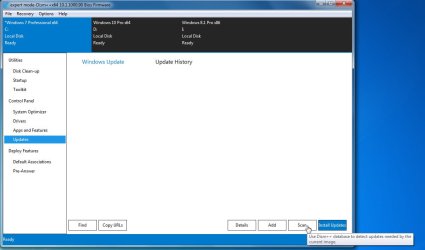
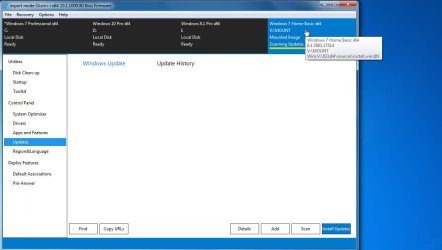
To update the current running OS ( C: highlighted in blue ), just click updates in left pane, then scan at bottom right.
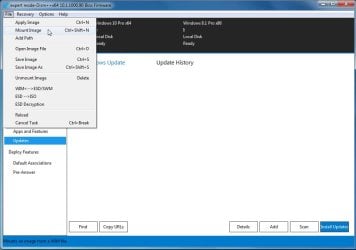
To install updates or Drivers into a wim - click File > Mount image
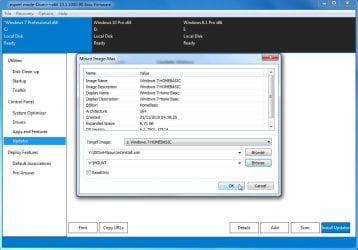
Browse to the wim file and the mount folder. Select which image to mount in the Target Image dropdown ( I selected 1. HomeBasic ). click ok.
It mounts in a few seconds. Make sure it is highlighted in blue, then click open session.

To install updates or Drivers into a wim - click File > Mount image
Browse to the wim file and the mount folder. Select which image to mount in the Target Image dropdown ( I selected 1. HomeBasic ). click ok.
It mounts in a few seconds. Make sure it is highlighted in blue, then click open session.
Last edited:
My Computers
-
At a glance
7 X64i5 84002x8gb 3200mhz- Computer type
- PC/Desktop
- OS
- 7 X64
- CPU
- i5 8400
- Motherboard
- gigabyte b365m ds3h
- Memory
- 2x8gb 3200mhz
- Hard Drives
- various
- PSU
- pure power 11 400w cm
- Case
- Coolermaster
- Cooling
- cryorig m9i
-
At a glance
7x64g54008gb ddr4 2400- Computer type
- PC/Desktop
- OS
- 7x64
- CPU
- g5400
- Motherboard
- ga b365m ds3h
- Memory
- 8gb ddr4 2400
- PSU
- xfx pro 450w
- Local time
- 12:43 AM
- Messages
- 16,792
Select Updates in left pane, then click Scan
[ OR if you want to add/remove drivers, select Drivers in the left pane]
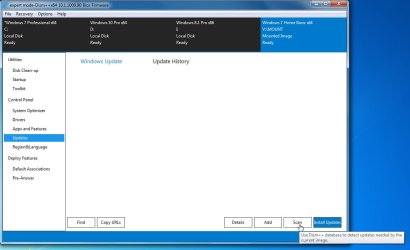
It will download the MS database (wsusscn2.cab ) and scans the highlighted OS. Then pops up a list with recommended security already ticked
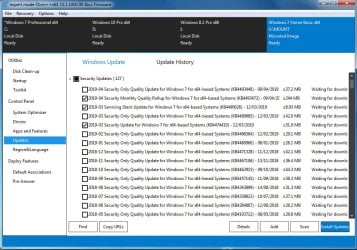
You can scroll down and tick some optionals, like this:
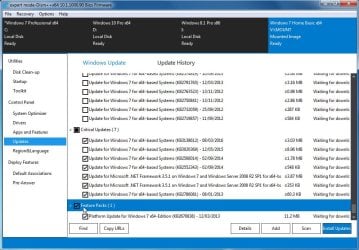
Then click install at bottom right and off she goes. If you have ticked something with telemetry or known issues, it will pop up a window so you can avoid installing it.
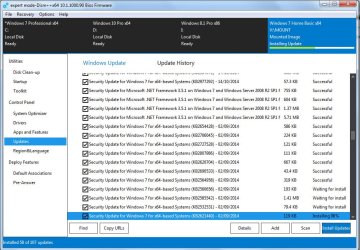
[ OR if you want to add/remove drivers, select Drivers in the left pane]
It will download the MS database (wsusscn2.cab ) and scans the highlighted OS. Then pops up a list with recommended security already ticked
You can scroll down and tick some optionals, like this:
Then click install at bottom right and off she goes. If you have ticked something with telemetry or known issues, it will pop up a window so you can avoid installing it.
Attachments
Last edited:
My Computers
-
At a glance
7 X64i5 84002x8gb 3200mhz- Computer type
- PC/Desktop
- OS
- 7 X64
- CPU
- i5 8400
- Motherboard
- gigabyte b365m ds3h
- Memory
- 2x8gb 3200mhz
- Hard Drives
- various
- PSU
- pure power 11 400w cm
- Case
- Coolermaster
- Cooling
- cryorig m9i
-
At a glance
7x64g54008gb ddr4 2400- Computer type
- PC/Desktop
- OS
- 7x64
- CPU
- g5400
- Motherboard
- ga b365m ds3h
- Memory
- 8gb ddr4 2400
- PSU
- xfx pro 450w
Similar threads
- Replies
- 5
- Views
- 20K
- Replies
- 5
- Views
- 6K

