Reinstall Win7 what updates to avoid for telemetry & winX preparation?

Worth scanning a second time, because it may offer extra updates now the first lot have been installed.

On a live OS on next restart any pending updates will complete.

107 have just been installed into my mounted wim. Scanning again now.

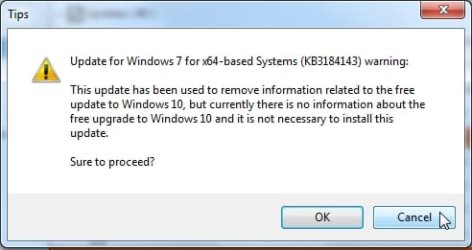
if you tick something dodgy, it will tell you - just click cancel and it won't be installed

tips.jpg
 

My Computers My Computers

  • At a glance

    7 X64i5 84002x8gb 3200mhz
    Computer type
    PC/Desktop
    OS
    7 X64
    CPU
    i5 8400
    Motherboard
    gigabyte b365m ds3h
    Memory
    2x8gb 3200mhz
    Hard Drives
    various
    PSU
    pure power 11 400w cm
    Case
    Coolermaster
    Cooling
    cryorig m9i
  • At a glance

    7x64g54008gb ddr4 2400
    Computer type
    PC/Desktop
    OS
    7x64
    CPU
    g5400
    Motherboard
    ga b365m ds3h
    Memory
    8gb ddr4 2400
    PSU
    xfx pro 450w
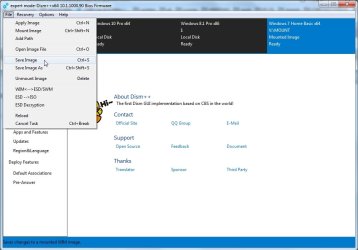
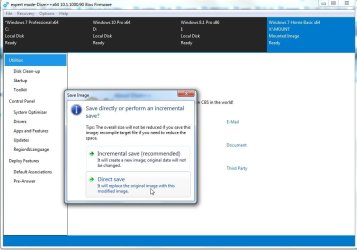
Save the image

save1.jpg

save2.jpg


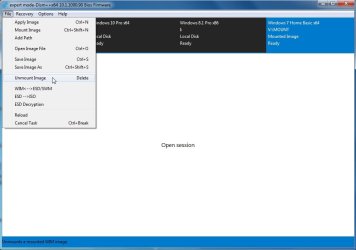
Then Unmount

unmount-image.jpg
 

My Computers My Computers

  • At a glance

    7 X64i5 84002x8gb 3200mhz
    Computer type
    PC/Desktop
    OS
    7 X64
    CPU
    i5 8400
    Motherboard
    gigabyte b365m ds3h
    Memory
    2x8gb 3200mhz
    Hard Drives
    various
    PSU
    pure power 11 400w cm
    Case
    Coolermaster
    Cooling
    cryorig m9i
  • At a glance

    7x64g54008gb ddr4 2400
    Computer type
    PC/Desktop
    OS
    7x64
    CPU
    g5400
    Motherboard
    ga b365m ds3h
    Memory
    8gb ddr4 2400
    PSU
    xfx pro 450w
I have no doubt the GUI is obvious to you but it isn't to me. How would I do an offline update? I'm setting up a previously unused new notebook with Win 7 Pro and I'm reluctant to connect it to the internet until after the updates are installed. I also don't want to install any updates after 12/2017. I can download them from another computer.
 

My Computer My Computer

At a glance

Win 7 Ultimate 64 bitIntel i7-3930KKingston HyperX Genesis 32GB Kit (8x4GB Modul...MSI R7850 Twin Frozr 2GD5/OC Radeon HD 7850 2...
Computer type
PC/Desktop
Computer Manufacturer/Model Number
Custom Build
OS
Win 7 Ultimate 64 bit
CPU
Intel i7-3930K
Motherboard
ASUS P9X79 WS
Memory
Kingston HyperX Genesis 32GB Kit (8x4GB Modules) 1600MHz DDR
Graphics Card(s)
MSI R7850 Twin Frozr 2GD5/OC Radeon HD 7850 2GB 256-bit GDDR
Sound Card
Asus Xonar Essence STX
Monitor(s) Displays
3x Asus VG248QE 24", Vizio 32" TV
Screen Resolution
1920 x 1080, ?
Hard Drives
Samsung 128GB 840 Pro SSD (1),
Samsung 4TB 850 EVO SSDs (4)
Samsung 4TB 850 EVO SSDs (16) external backup drives used in 2.5" hot swap bays in the computer.
PSU
Corsair HX750w
Case
Antec Two Hundred v2 (modified)
Cooling
Cooler Master GeminII S524 120mm (fan replaced with a 140mm)
Keyboard
Logitech G510s
Mouse
Logitech M525 (two in use)
Internet Speed
=< 32Mbps down, 8Mbps up
Antivirus
AVAST!, MBAM, SAS, Spybot S&D (all but MBAM free) Glary Util
Browser
IE11
Other Info
LSI 9211-8i HBA card (8 SATA III ports), 2.5" & 3.5" Hot Swap Bays, HooToo HT-CR001 PCI-E to USB 3.0 Internal Hub + 6 Slot Card Reader, and LG Model CH12LS28 BD-ROM Optical Drive. Also, ScanSnap S1500 ADF duplexing scanner, Canon 9000F flat bed scanner, Corsair SP2500 2.1 speakers, Samsung CLP 415nw laser color printer, Cyberpower PP2200SW UPS
Dism++ can be pointed at any Os that is attached. In the screenshots , the machine is booted into win7 on C. dism++ can update any of the other OS that are not online.

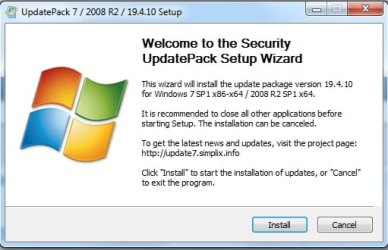
Alternatively, you can use Simplix. Download the pack on another machine (it is about 700 mb ) then just copy it via usb stick to your notebook.

download-full-702mb-pack

There is also a little downloader for it here:
https://update7.simplix.info/UpdatePack7R2.exe


It has updates to 19/4/2019 no telemetry or gwt stuff is included.

simplix.jpg
 

My Computers My Computers

  • At a glance

    7 X64i5 84002x8gb 3200mhz
    Computer type
    PC/Desktop
    OS
    7 X64
    CPU
    i5 8400
    Motherboard
    gigabyte b365m ds3h
    Memory
    2x8gb 3200mhz
    Hard Drives
    various
    PSU
    pure power 11 400w cm
    Case
    Coolermaster
    Cooling
    cryorig m9i
  • At a glance

    7x64g54008gb ddr4 2400
    Computer type
    PC/Desktop
    OS
    7x64
    CPU
    g5400
    Motherboard
    ga b365m ds3h
    Memory
    8gb ddr4 2400
    PSU
    xfx pro 450w
Thanks but your first paragraph went right over my head. I have no Idea what you are talking about.

I would have to use the downloader in your second link (I flat do NOT trust MEGA) but Id on't know if it comes from MEGA or not. Also, based on your screenshot, I would not be able to pick and choose the updates to install (as I stated before, I do NOT want anything past 12/2017).
 

My Computer My Computer

At a glance

Win 7 Ultimate 64 bitIntel i7-3930KKingston HyperX Genesis 32GB Kit (8x4GB Modul...MSI R7850 Twin Frozr 2GD5/OC Radeon HD 7850 2...
Computer type
PC/Desktop
Computer Manufacturer/Model Number
Custom Build
OS
Win 7 Ultimate 64 bit
CPU
Intel i7-3930K
Motherboard
ASUS P9X79 WS
Memory
Kingston HyperX Genesis 32GB Kit (8x4GB Modules) 1600MHz DDR
Graphics Card(s)
MSI R7850 Twin Frozr 2GD5/OC Radeon HD 7850 2GB 256-bit GDDR
Sound Card
Asus Xonar Essence STX
Monitor(s) Displays
3x Asus VG248QE 24", Vizio 32" TV
Screen Resolution
1920 x 1080, ?
Hard Drives
Samsung 128GB 840 Pro SSD (1),
Samsung 4TB 850 EVO SSDs (4)
Samsung 4TB 850 EVO SSDs (16) external backup drives used in 2.5" hot swap bays in the computer.
PSU
Corsair HX750w
Case
Antec Two Hundred v2 (modified)
Cooling
Cooler Master GeminII S524 120mm (fan replaced with a 140mm)
Keyboard
Logitech G510s
Mouse
Logitech M525 (two in use)
Internet Speed
=< 32Mbps down, 8Mbps up
Antivirus
AVAST!, MBAM, SAS, Spybot S&D (all but MBAM free) Glary Util
Browser
IE11
Other Info
LSI 9211-8i HBA card (8 SATA III ports), 2.5" & 3.5" Hot Swap Bays, HooToo HT-CR001 PCI-E to USB 3.0 Internal Hub + 6 Slot Card Reader, and LG Model CH12LS28 BD-ROM Optical Drive. Also, ScanSnap S1500 ADF duplexing scanner, Canon 9000F flat bed scanner, Corsair SP2500 2.1 speakers, Samsung CLP 415nw laser color printer, Cyberpower PP2200SW UPS
Hi Lady Fitzgerald,

How would I do an offline update? I'm setting up a previously unused new notebook with Win 7 Pro and I'm reluctant to connect it to the internet until after the updates are installed. I also don't want to install any updates after 12/2017. I can download them from another computer.
Thanks but your first paragraph went right over my head. I have no Idea what you are talking about.

If you are going to use a Win 7 installation disk or ISO then you can mount it and run DISM++ to update the mounted ISO and then create a new installation USB [because the ISO will be larger than what will fit onto a DVD].

Also, based on your screenshot, I would not be able to pick and choose the updates to install (as I stated before, I do NOT want anything past 12/2017).

What is the reason for not installing anything past 12/2017?

DISM++ will not install any Win 10 or suspect updates as it will warn you beforehand!

I hope this helps!
 

My Computer My Computer

At a glance

Win 7 HP SP1 64-bit Vista HB SP2 32-bit Linux...Intel(R) Pentium(R) CPU P6200 @ 2.13GHz4.00 GBIntel(R) Graphics Media Accelerator HD
Computer type
Laptop
Computer Manufacturer/Model Number
Fujitsu LIFEBOOK
OS
Win 7 HP SP1 64-bit Vista HB SP2 32-bit Linux Mint 18.3
CPU
Intel(R) Pentium(R) CPU P6200 @ 2.13GHz
Motherboard
FUJITSU FJNBB06
Memory
4.00 GB
Graphics Card(s)
Intel(R) Graphics Media Accelerator HD
Sound Card
[1] Realtek High Definition Audio [2] Intel(R) Display Audio
Screen Resolution
1366 x 768 x 32 bits (4294967296 colors) @ 59 Hz
Hard Drives
TOSHIBA MK5076GSX
Antivirus
AVG FREE
Ok, maybe I'm doing a lousy job of explaining my situation. I have a brand new notebook with Win 7 Pro on it I bought as a spare several years ago but I never fired it up. I recently started up and did the initial steps to set it up. However, I haven't downloaded any Win 7 updates yet because I'm reluctant to connect it to the internet until I have all the updates on it. Instead, I want to download all the updates, minus any problem ones (GWX and related updates weren't the only problem updates) on a different computer, then use a USB stick to copy them to the new notebook for installation.

When I tried to use DISM++ to download the updates on another computer, all I got were the updates I had already rejected on that computer, which doesn't do me a darned bit of good.

...What is the reason for not installing anything past 12/2017?...

It was after 12/2017 that MS started releasing a stream of updates, the worst being the Specter/Meltdown "fix" (some "fix"! :sarc: , it slowed down my computers so much, they were useless; trying to use more than one tab in a browser would crash them!) that would break my computers (Win 10 had, and still has, a similar string bad updates) so I got fed up and restored an image from 12/2017 and haven't had any problems since then.

Is there any way to use DSM++ on another computer to get ALL the damned updates without it weeding out the ones already installed on that computer so I can pick and choose what I want to install on the other new computer?
 

My Computer My Computer

At a glance

Win 7 Ultimate 64 bitIntel i7-3930KKingston HyperX Genesis 32GB Kit (8x4GB Modul...MSI R7850 Twin Frozr 2GD5/OC Radeon HD 7850 2...
Computer type
PC/Desktop
Computer Manufacturer/Model Number
Custom Build
OS
Win 7 Ultimate 64 bit
CPU
Intel i7-3930K
Motherboard
ASUS P9X79 WS
Memory
Kingston HyperX Genesis 32GB Kit (8x4GB Modules) 1600MHz DDR
Graphics Card(s)
MSI R7850 Twin Frozr 2GD5/OC Radeon HD 7850 2GB 256-bit GDDR
Sound Card
Asus Xonar Essence STX
Monitor(s) Displays
3x Asus VG248QE 24", Vizio 32" TV
Screen Resolution
1920 x 1080, ?
Hard Drives
Samsung 128GB 840 Pro SSD (1),
Samsung 4TB 850 EVO SSDs (4)
Samsung 4TB 850 EVO SSDs (16) external backup drives used in 2.5" hot swap bays in the computer.
PSU
Corsair HX750w
Case
Antec Two Hundred v2 (modified)
Cooling
Cooler Master GeminII S524 120mm (fan replaced with a 140mm)
Keyboard
Logitech G510s
Mouse
Logitech M525 (two in use)
Internet Speed
=< 32Mbps down, 8Mbps up
Antivirus
AVAST!, MBAM, SAS, Spybot S&D (all but MBAM free) Glary Util
Browser
IE11
Other Info
LSI 9211-8i HBA card (8 SATA III ports), 2.5" & 3.5" Hot Swap Bays, HooToo HT-CR001 PCI-E to USB 3.0 Internal Hub + 6 Slot Card Reader, and LG Model CH12LS28 BD-ROM Optical Drive. Also, ScanSnap S1500 ADF duplexing scanner, Canon 9000F flat bed scanner, Corsair SP2500 2.1 speakers, Samsung CLP 415nw laser color printer, Cyberpower PP2200SW UPS
Is there any way to use DSM++ on another computer to get ALL the damned updates without it weeding out the ones already installed on that computer so I can pick and choose what I want to install on the other new computer?

There is a workaround for your situation.

Use something else to download the .msu and cab files you want into a folder on your current machine.

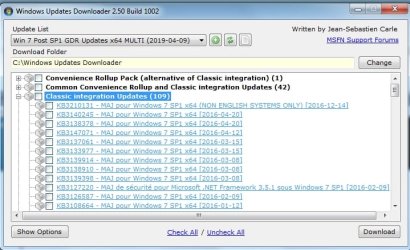
little program called WUD to download them- it tells you what they are - dates . etc

View attachment WUDSetup.zip

Windows Updates Downloader (WUD) Program Files

Updated lists the program needs:

12-04-19
win7x64list
win7x86 list

post-sp1-updates-for-windows-7-updated-12042019

Dble click on the update list file and it automatically associates with the WUD program.

WUD.jpg


Then copy that folder of updates to your new machine.

Then use dism++ to install the updates from that folder.
 
Last edited:

My Computers My Computers

  • At a glance

    7 X64i5 84002x8gb 3200mhz
    Computer type
    PC/Desktop
    OS
    7 X64
    CPU
    i5 8400
    Motherboard
    gigabyte b365m ds3h
    Memory
    2x8gb 3200mhz
    Hard Drives
    various
    PSU
    pure power 11 400w cm
    Case
    Coolermaster
    Cooling
    cryorig m9i
  • At a glance

    7x64g54008gb ddr4 2400
    Computer type
    PC/Desktop
    OS
    7x64
    CPU
    g5400
    Motherboard
    ga b365m ds3h
    Memory
    8gb ddr4 2400
    PSU
    xfx pro 450w
Just got hit with the "Unsupported Hardware" Nag and I need to know what Update installed the damn thing
 

My Computer My Computer

At a glance

Win7-64/Sp1 UltimateAMD Ryzen 5 160064GBGTX 1060 6GB
Computer type
PC/Desktop
Computer Manufacturer/Model Number
White Box
OS
Win7-64/Sp1 Ultimate
CPU
AMD Ryzen 5 1600
Motherboard
Asrock B450m Pro
Memory
64GB
Graphics Card(s)
GTX 1060 6GB
Hard Drives
Boot = Crucial MX500 250GB M2 Sata/AHCI
LSI 9211-8i HBA/IT card
Port1 = 1x Team Group GX2 256GB SSD (boot)
1x Crucial MX500 1TB (Raid 1 storage)
2x Team Group GX2 1TB (storage)
Port2 = 1x Team Group GX2 256GB SSD (boot)
1x Crucial MX500 1TB
PSU
EVGA B450
Keyboard
88 key (TKL) mechanical

My Computers My Computers

  • At a glance

    7 X64i5 84002x8gb 3200mhz
    Computer type
    PC/Desktop
    OS
    7 X64
    CPU
    i5 8400
    Motherboard
    gigabyte b365m ds3h
    Memory
    2x8gb 3200mhz
    Hard Drives
    various
    PSU
    pure power 11 400w cm
    Case
    Coolermaster
    Cooling
    cryorig m9i
  • At a glance

    7x64g54008gb ddr4 2400
    Computer type
    PC/Desktop
    OS
    7x64
    CPU
    g5400
    Motherboard
    ga b365m ds3h
    Memory
    8gb ddr4 2400
    PSU
    xfx pro 450w
Much better to avoid the updates instead of working around the issue after a clean install. Got the numbers or are you going to be like everyone else on the net and not share that information?
 

My Computer My Computer

At a glance

Win7-64/Sp1 UltimateAMD Ryzen 5 160064GBGTX 1060 6GB
Computer type
PC/Desktop
Computer Manufacturer/Model Number
White Box
OS
Win7-64/Sp1 Ultimate
CPU
AMD Ryzen 5 1600
Motherboard
Asrock B450m Pro
Memory
64GB
Graphics Card(s)
GTX 1060 6GB
Hard Drives
Boot = Crucial MX500 250GB M2 Sata/AHCI
LSI 9211-8i HBA/IT card
Port1 = 1x Team Group GX2 256GB SSD (boot)
1x Crucial MX500 1TB (Raid 1 storage)
2x Team Group GX2 1TB (storage)
Port2 = 1x Team Group GX2 256GB SSD (boot)
1x Crucial MX500 1TB
PSU
EVGA B450
Keyboard
88 key (TKL) mechanical
what if they all do ?

KB4012218 and KB4012219 were at the start of the policy change.
 

My Computers My Computers

  • At a glance

    7 X64i5 84002x8gb 3200mhz
    Computer type
    PC/Desktop
    OS
    7 X64
    CPU
    i5 8400
    Motherboard
    gigabyte b365m ds3h
    Memory
    2x8gb 3200mhz
    Hard Drives
    various
    PSU
    pure power 11 400w cm
    Case
    Coolermaster
    Cooling
    cryorig m9i
  • At a glance

    7x64g54008gb ddr4 2400
    Computer type
    PC/Desktop
    OS
    7x64
    CPU
    g5400
    Motherboard
    ga b365m ds3h
    Memory
    8gb ddr4 2400
    PSU
    xfx pro 450w
Thanks to a seemingly unfixable software issue with my USB drivers I am about to be forced to reinstall my copy of Win 7, but after reading through this thread I'm feeling a bit overwhelmed, to much information and too many options... I have no idea what to proceed with.

I was originally considering using an ISO from 2015 with pre-telemetry updates included instead of my original disc, but I am also concerned about not being able to fix another problem I have, which is a complete inability to update my video driver past Catalyst 14.8... Every post 14.8 driver will periodically cause my system to hard lock to a black screen. I wonder if more recent windows updates might help in fixing some incompatibility there?

What I truly want is to update windows as far as I can but avoiding all verified telemetry and windows 10 bloat updates as well as any patches for spectre/meltdown. I'm not very confident about tinkering with this stuff, can anyone please advise the most painless route?
 

My Computer My Computer

At a glance

Windows 7 Ultimate x64Intel i7 4790K16GB DDR3Radeon R9 290X
Computer type
PC/Desktop
Computer Manufacturer/Model Number
custom build
OS
Windows 7 Ultimate x64
CPU
Intel i7 4790K
Motherboard
MSI Z97 Gaming 7
Memory
16GB DDR3
Graphics Card(s)
Radeon R9 290X
PSU
1000W Corsair
Case
Coolermaster Cosmos II
Simplix

Install from the standard Ms win7 SP1 iso.

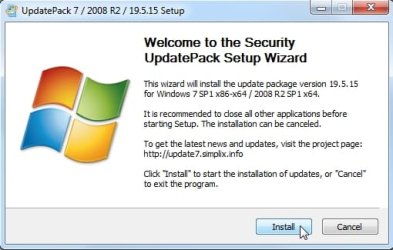
Then run the updatepack. Click install. Go to lunch.

simplix-ui.jpg

It does it all automatically, it will reboot a couple of times and cleans up when finished. When you get back from lunch it is all done. No telemetry. No processor checks. It also installs the correct usb3 drivers.
 
Last edited:

My Computers My Computers

  • At a glance

    7 X64i5 84002x8gb 3200mhz
    Computer type
    PC/Desktop
    OS
    7 X64
    CPU
    i5 8400
    Motherboard
    gigabyte b365m ds3h
    Memory
    2x8gb 3200mhz
    Hard Drives
    various
    PSU
    pure power 11 400w cm
    Case
    Coolermaster
    Cooling
    cryorig m9i
  • At a glance

    7x64g54008gb ddr4 2400
    Computer type
    PC/Desktop
    OS
    7x64
    CPU
    g5400
    Motherboard
    ga b365m ds3h
    Memory
    8gb ddr4 2400
    PSU
    xfx pro 450w
Hi Sevenfox,

Welcome to SevenForums!

[Q1] Thanks to a seemingly unfixable software issue with my USB drivers I am about to be forced to reinstall my copy of Win 7, but after reading through this thread I'm feeling a bit overwhelmed, to much information and too many options... I have no idea what to proceed with.

[Q2] I was originally considering using an ISO from 2015 with pre-telemetry updates included instead of my original disc, but I am also concerned about not being able to fix another problem I have, which is a complete inability to update my video driver past Catalyst 14.8... Every post 14.8 driver will periodically cause my system to hard lock to a black screen. I wonder if more recent windows updates might help in fixing some incompatibility there?

[Q3] What I truly want is to update windows as far as I can but avoiding all verified telemetry and windows 10 bloat updates as well as any patches for spectre/meltdown. I'm not very confident about tinkering with this stuff, can anyone please advise the most painless route?

[Q1] What exactly is the problem?

[1] Have you installed any new hardware, software or updates prior to this happening?
[2] Have you checked if it is something getting loaded at startup [Start => msconfig => Startup tab] that is causing the problem?
[3] Have you tried running chkdsk - Check Disk?
[4] Have you tried running SFC - System File Checker?
[5] Are there any yellow triangles in Device Manager [Start => Control Panel => Device Manager => Expand ALL nodes]?

[Q2] You could use your oringinal disk [does it include SP1?] and then update your system using DISM++.

[Q3] You can achieve this by running DISM++.

DISM++ - Basic Overview

DISM++ is a FREE implementation tool that has the ability to perform Windows Updates [WU]. Some of the advantages [but not all] are:

[1] The GUI is very easy to understand and use.
[2] It is much faster than M$’s WU because it uses a different engine.
[3] It downloads the latest WU DB from the M$ servers, scans your OS, and then lists the updates available.
[4] It doesn’t install superseded updates like M$ does.
[5] It gives you the option of what you want to install.
[6] The pre-ticked updates are what is recommended and are similar to the WU critical and recommended updates. The un-ticked updates are similar to the WU optional updates.

[7] It warns you if an update:
  • Includes telemetry.
  • Has known issues with certain hardware.
  • Needs exclusive access.
  • Is suspect.
  • Your OS doesn't need it.
  • Has any other known issues.
[8] It doesn’t require re-booting between updates.[9] It can be used to either update an install.wim image OFFLINE, or to update the LIVE OS.

If you decide to use DISM++, then it is best to run the DISM++ Windows updates a couple of times to make sure you get ALL the updates that are needed. DON’T install ANY of the ORANGE updates though [see numbers [6] and [7] above]. It can also install the required .NET Framework updates. Then just run WU to see what other updates are available, if any.

DISM++ - Run Windows Updates On The LIVE OS

NOTE: The light blue text below are links to the relevant websites and programs, just click them!

DISM++ Direct download [zip] => DISM++.

Here is the quick procedure guide:

[1] Download the latest version of DISM++ [see the DISM++ Direct download [zip] link above].
[2] Extract the files using something like 7-Zip here => 7-Zip.
[3] Turn Sleep mode OFF in Power Options [you can turn it back on after you have finished].
[4] Double-click Dism++x86 or Dism++x64 and then click Run.
[5] Click Updates in the left-hand pane and then click Scan [bottom right].
[6] Once the scan has completed, click Install Updates [blue button to the right of Scan].

[7] If any warning pop-ups appear [see item [7] in the Basic Overview above], click Cancel and it will skip that one. There could be several of these appear so click Cancel to all of them.

[8] It is advisable to run the DISM++ WU a couple of times. To do this, just re-boot and Scan again [from number [4] above].

[9] Run M$ WU [Windows Update] to see if there are any other updates available.

I hope this helps!

 

My Computer My Computer

At a glance

Win 7 HP SP1 64-bit Vista HB SP2 32-bit Linux...Intel(R) Pentium(R) CPU P6200 @ 2.13GHz4.00 GBIntel(R) Graphics Media Accelerator HD
Computer type
Laptop
Computer Manufacturer/Model Number
Fujitsu LIFEBOOK
OS
Win 7 HP SP1 64-bit Vista HB SP2 32-bit Linux Mint 18.3
CPU
Intel(R) Pentium(R) CPU P6200 @ 2.13GHz
Motherboard
FUJITSU FJNBB06
Memory
4.00 GB
Graphics Card(s)
Intel(R) Graphics Media Accelerator HD
Sound Card
[1] Realtek High Definition Audio [2] Intel(R) Display Audio
Screen Resolution
1366 x 768 x 32 bits (4294967296 colors) @ 59 Hz
Hard Drives
TOSHIBA MK5076GSX
Antivirus
AVG FREE

My Computers My Computers

  • At a glance

    7 X64i5 84002x8gb 3200mhz
    Computer type
    PC/Desktop
    OS
    7 X64
    CPU
    i5 8400
    Motherboard
    gigabyte b365m ds3h
    Memory
    2x8gb 3200mhz
    Hard Drives
    various
    PSU
    pure power 11 400w cm
    Case
    Coolermaster
    Cooling
    cryorig m9i
  • At a glance

    7x64g54008gb ddr4 2400
    Computer type
    PC/Desktop
    OS
    7x64
    CPU
    g5400
    Motherboard
    ga b365m ds3h
    Memory
    8gb ddr4 2400
    PSU
    xfx pro 450w

My Computer My Computer

At a glance

Win 7 HP SP1 64-bit Vista HB SP2 32-bit Linux...Intel(R) Pentium(R) CPU P6200 @ 2.13GHz4.00 GBIntel(R) Graphics Media Accelerator HD
Computer type
Laptop
Computer Manufacturer/Model Number
Fujitsu LIFEBOOK
OS
Win 7 HP SP1 64-bit Vista HB SP2 32-bit Linux Mint 18.3
CPU
Intel(R) Pentium(R) CPU P6200 @ 2.13GHz
Motherboard
FUJITSU FJNBB06
Memory
4.00 GB
Graphics Card(s)
Intel(R) Graphics Media Accelerator HD
Sound Card
[1] Realtek High Definition Audio [2] Intel(R) Display Audio
Screen Resolution
1366 x 768 x 32 bits (4294967296 colors) @ 59 Hz
Hard Drives
TOSHIBA MK5076GSX
Antivirus
AVG FREE
[Q1] What exactly is the problem?

Hard to pinpoint, against my better judgement I let a friend who claims to be a "pro" at fixing pcs poke around my system via team viewer, he replaced my USB, video and sound drivers, ticked every box in ccleaner and ran it, installed some 'optimization' software from IObit, and promptly stopped him right as he was going to defrag my SSD.

Everything still seemed fine at this point (once I downgraded my now instantly blackscreening video drivers) but I had unplugged all my usual USB drives. I decided to flash my BIOS the next morning (to see if that might help compatibility with my video card) and all went well, so I plugged in an external drive to do some stuff and it wasn't there, in fact my back hub was now refusing to recognize ANY storage device but could still read HIDs. I grabbed the recommended USB drivers from MSI, updated via device manager and suddenly lost ALL my USB HDD support, I kept getting 'driver was unable to be installed correctly' any time I booted up or tried to refresh. I tried updating the chipset drivers too to no avail. Everything HDD just ended up under 'unrecognized devices'. I grabbed a PS2 mouse and keyboard, tried removing ALL USB drivers and then reinstalling but a this point I lost everything except the PS2 keyboard and reinstalling only got me my USB keyboard back.

My PC has just spent a week in a shop (it's still there, using a laptop atm), and they couldn't even get my system to read a mouse at all, and after checking my hardware with their own windows drives, the advice came back as 'your hardware is fine, but software has seriously corrupted somewhere and I can't fix it, you're best off reinstalling windows'.

For the record, I had tried each of the steps you mentioned and no hardware changes have been made since I had this system built nearly 5 years ago, I have simply never been able to upgrade past catalyst 14.8 without getting frequent, random hard locks.

[Q2] You could use your oringinal disk [does it include SP1?] and then update your system using DISM++.

I've had this Win 7 disc for about 5 years, I've never actually needed to run it myself yet and am not sure how up to date it would be. How could I tell the build date of my disc? I'd check but it's in the shop with my PC. Hopefully I can bring it home tomorrow.

[Q3] You can achieve this by running DISM++.

So I would simply let DISM++ scan, then install what it recommends whilst denying any updates it warns me about?

I keep wondering if one of those optional updates has some compatibility fixes for my video card, but it feels like there's no way to know unless I do a blanket update. :/
 
Last edited:

My Computer My Computer

At a glance

Windows 7 Ultimate x64Intel i7 4790K16GB DDR3Radeon R9 290X
Computer type
PC/Desktop
Computer Manufacturer/Model Number
custom build
OS
Windows 7 Ultimate x64
CPU
Intel i7 4790K
Motherboard
MSI Z97 Gaming 7
Memory
16GB DDR3
Graphics Card(s)
Radeon R9 290X
PSU
1000W Corsair
Case
Coolermaster Cosmos II
Simplix

Install from the standard Ms win7 SP1 iso.

Then run the updatepack. Click install. Go to lunch.

View attachment 408450

It does it all automatically, it will reboot a couple of times and cleans up when finished. When you get back from lunch it is all done. No telemetry. No processor checks. It also installs the correct usb3 drivers.

This seems unexpectedly convenient, I will have to seriously consider this as well as DISM. Thank you.

Does this skip the spectre/meltdown patches?
 

My Computer My Computer

At a glance

Windows 7 Ultimate x64Intel i7 4790K16GB DDR3Radeon R9 290X
Computer type
PC/Desktop
Computer Manufacturer/Model Number
custom build
OS
Windows 7 Ultimate x64
CPU
Intel i7 4790K
Motherboard
MSI Z97 Gaming 7
Memory
16GB DDR3
Graphics Card(s)
Radeon R9 290X
PSU
1000W Corsair
Case
Coolermaster Cosmos II
paul,

I don't know how Simplix does it. The usual way is to use wufuc, sure I saw it mentioned somewhere - MDL possibly. In any case it is irrelevant for the OP who is using i7 4790K
 

My Computers My Computers

  • At a glance

    7 X64i5 84002x8gb 3200mhz
    Computer type
    PC/Desktop
    OS
    7 X64
    CPU
    i5 8400
    Motherboard
    gigabyte b365m ds3h
    Memory
    2x8gb 3200mhz
    Hard Drives
    various
    PSU
    pure power 11 400w cm
    Case
    Coolermaster
    Cooling
    cryorig m9i
  • At a glance

    7x64g54008gb ddr4 2400
    Computer type
    PC/Desktop
    OS
    7x64
    CPU
    g5400
    Motherboard
    ga b365m ds3h
    Memory
    8gb ddr4 2400
    PSU
    xfx pro 450w
Back
Top