Reinstalling an OS in a dual boot system

Evilhugbear

New member
Power User
Local time
11:15 PM
Messages
132
Hey guys,

I am dual booting Ubuntu 10.04 and Windows Seven in my setup and I want to install the newest Ubuntu version over top the old Ubuntu but keep the Windows seven. Is there anything special I need to do? Or can I just delete Ubuntu's partition and install the new OS on it?

Hopefully this makes sense :P

Thanks
 

My Computer My Computer

At a glance

Windows 7 Ultimate x64AMD Phenom II x4 955 Black Edition OC'd to 3....8GB Patriot DDR3Gigabyte Windforce GTX 670
OS
Windows 7 Ultimate x64
CPU
AMD Phenom II x4 955 Black Edition OC'd to 3.8GHz
Motherboard
Asrock
Memory
8GB Patriot DDR3
Graphics Card(s)
Gigabyte Windforce GTX 670
Sound Card
Integrated into mobo
Monitor(s) Displays
Acer 20 inch
Screen Resolution
1680x1050
PSU
Corsair HX750W
Case
HAF X
Mouse
Razor
It's best to install Ubuntu on a separate HD booted via BIOS as GRUB will corrupt Win7.
 
There is no way to fix this?
 

My Computer My Computer

At a glance

Windows 7 Ultimate x64AMD Phenom II x4 955 Black Edition OC'd to 3....8GB Patriot DDR3Gigabyte Windforce GTX 670
OS
Windows 7 Ultimate x64
CPU
AMD Phenom II x4 955 Black Edition OC'd to 3.8GHz
Motherboard
Asrock
Memory
8GB Patriot DDR3
Graphics Card(s)
Gigabyte Windforce GTX 670
Sound Card
Integrated into mobo
Monitor(s) Displays
Acer 20 inch
Screen Resolution
1680x1050
PSU
Corsair HX750W
Case
HAF X
Mouse
Razor
Why not just upgrade?

Open the /etc/update-manager/release-upgrades file and set Prompt=normal (you will need super user privileges – sudo). By default, this is set to lts, which will only prompt when a LTS upgrade is available.

Once you have done that, go back to the Update Manager, and click Check button. Now the Upgrade to 10.10 button will appear.

If you want to do a clean ubuntu installation then on the disk partition screen select your old ubuntu install partitions.
 

My Computer My Computer

At a glance

Windows 7 professional x86/P4 2.61.50GBNvidia geForce 6600GT
OS
Windows 7 professional x86/
CPU
P4 2.6
Memory
1.50GB
Graphics Card(s)
Nvidia geForce 6600GT
The latest 10.10 release allows you to choose the destination drive as the place to see Grub installed. Having custom installed the new release on usb flash drives while booted in 7 I can boot from the flash and still choose to boot into 7 without any mbr changes seen on the 7 host drive.

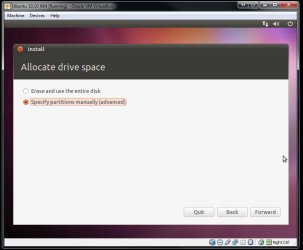
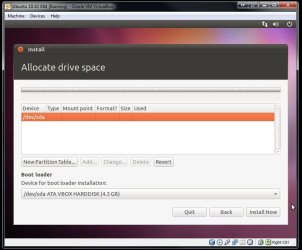
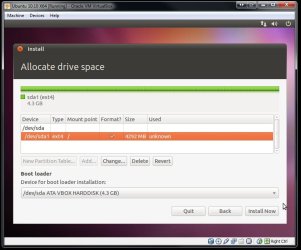
The flash drive was the drive selected for Grub during the installation when the prompt screen for selecting which drive will see Grub appears. That could also as easily been for a custom install onto a second drive. The installer will automatically prompt that it will be reformatting the root partition selected during the install. That will take care of the previous release you have on now.

The screens here are from an install onto VBox showing the manual options available for selecting where the mount point "/" is designated as well as where Grub will go. That will avoid trashing the 7 mbr entirely.
 

Attachments

  • Ubuntu 10_10 x64 Going on VBox 3.jpg
    Ubuntu 10_10 x64 Going on VBox 3.jpg
    42.1 KB · Views: 3
  • Ubuntu 10_10 x64 Going on VBox 4.jpg
    Ubuntu 10_10 x64 Going on VBox 4.jpg
    57.8 KB · Views: 4
  • Ubuntu 10_10 x64 Going on VBox 5.jpg
    Ubuntu 10_10 x64 Going on VBox 5.jpg
    62 KB · Views: 5

My Computers My Computers

  • At a glance

    W7 Ultimate x64/W10 Pro x64/W11 Pro Triple Bo...AMD Phenom II X4 975 Deneb 3.6ghz - 965 2nd r...Kingston Hyper X DDR3 1600 1.5v 16gb - Hyper ...MSI HD Radeon 5750 1gb - MSI HD Radeon 6450 o...
    Computer type
    PC/Desktop
    Computer Manufacturer/Model Number
    Custom builds = 2
    OS
    W7 Ultimate x64/W10 Pro x64/W11 Pro Triple Boot - Main PC W7 Remote PC Micro ATX W7 Pro x64/W11 Pro
    CPU
    AMD Phenom II X4 975 Deneb 3.6ghz - 965 2nd remote pc
    Motherboard
    Gigabyte GA-790XTA-UD4-Gigabyte GA-880GM-D2H remote pc
    Memory
    Kingston Hyper X DDR3 1600 1.5v 16gb - Hyper X Fury 8gb 2nd
    Graphics Card(s)
    MSI HD Radeon 5750 1gb - MSI HD Radeon 6450 on mini tower
    Sound Card
    Creative Labs X-Fi Xtreme Audio P - Realtek onooard 2nd case
    Monitor(s) Displays
    ASUS VW199T-P 19" HP 2082a Main-HP 2082a 20" remote pc
    Screen Resolution
    Asus 1440x900 - HP 1600x900
    Hard Drives
    WD Black 1TB HD per OS W7, W10, and pending W11 presently on 500gb OS Drive - Pending Triple 1TB HDs for Spanned Storage/backup volume
    Single 2TB external USB enclosure, single 1TB System 7 Host/Boot drive, Pending 8TB external HD for system image b
    PSU
    Corsair 750TX - primary / Corsair CX600 - second
    Case
    Antec 900-2 - SSD compatible / NZXT Vulcan mini tower
    Cooling
    Zalman CNPS9900A
    Keyboard
    AZIO L70 Backlit Letters Gaming - ONN Cordless/USB
    Mouse
    MSI DS200 Programmable, Logitech Cordless
    Internet Speed
    30mbps upgrade - primary hard wired - mini tower usb WiFi
    Antivirus
    GFI VIPRE Internet Security 2014 on W7 2016 beta on W10,
    Browser
    Cyberfox, WaterFox 64bit FF variants, FireFox x64, Pale Moon
    Other Info
    Accomdata fan cooled usb 2.0 PIDE/Sata II, III external enclosure.
    Sambient usb/eSata PATA/Sata II, III external enclosure.
  • At a glance

    W7 Pro x64/W11 ProAMD Deneb 3.6ghz - 965Kingston Hyper X Fury 8gbMSI HD Radeon 6450 DVI Output
    Computer type
    PC/Desktop
    System Manufacturer/Model Number
    CUSTOM ASSEMBLY
    OS
    W7 Pro x64/W11 Pro
    CPU
    AMD Deneb 3.6ghz - 965
    Motherboard
    Gigabyte GA-880GM-D2H remote pc
    Memory
    Kingston Hyper X Fury 8gb
    Graphics Card(s)
    MSI HD Radeon 6450 DVI Output
    Sound Card
    Realtek onooard Creative or Other separate PENDING
    Monitor(s) Displays
    VIZIO 32" LCD TV Separate LCD Pending
    Screen Resolution
    1600x1080
    Hard Drives
    WD 500GB OS Host/Boot WD Green 1TB Storage/Backup
    PSU
    Corsair 600W - THERMALTAKE 600W spare case
    Case
    NZXT Vulcan mini tower
    Cooling
    Twin 120mm Top Fans - 240mm Side Cover
    Keyboard
    ONN Cordless/USB Logitech Cordless
    Mouse
    ONN USB/Cordless - Logitech Cordless
    Internet Speed
    DSL 5G
    Browser
    MS Edge, FireFox, WaterFox x64, FireFox Nightly
    Other Info
    OS Testing-Remote Access to Main TeamViewer
I think I may just end up reinstalling Windows 7 and Ubuntu 10.10. My Windows 7 has been acting weird, and I want Ubuntu 10.10 :P.

The best way to install this is Ubuntu first, then Windows 7, right?

Sorry :P
 

My Computer My Computer

At a glance

Windows 7 Ultimate x64AMD Phenom II x4 955 Black Edition OC'd to 3....8GB Patriot DDR3Gigabyte Windforce GTX 670
OS
Windows 7 Ultimate x64
CPU
AMD Phenom II x4 955 Black Edition OC'd to 3.8GHz
Motherboard
Asrock
Memory
8GB Patriot DDR3
Graphics Card(s)
Gigabyte Windforce GTX 670
Sound Card
Integrated into mobo
Monitor(s) Displays
Acer 20 inch
Screen Resolution
1680x1050
PSU
Corsair HX750W
Case
HAF X
Mouse
Razor
Windows first. Windows likes to overwrite whatever MBR is there first and only adds itself.

GRUB will recognize and add in other installs. (Or should).

~Lordbob
 

My Computer My Computer

At a glance

Windows 7 Ultimate x64, Mint 9Intel i5-2500k2x 4Gb Corsair VENGEANCE DDR3-1600NVidia GeForce N260GTX Twin Frozr
Computer Manufacturer/Model Number
Hera
OS
Windows 7 Ultimate x64, Mint 9
CPU
Intel i5-2500k
Motherboard
ASUS P8P67 Pro
Memory
2x 4Gb Corsair VENGEANCE DDR3-1600
Graphics Card(s)
NVidia GeForce N260GTX Twin Frozr
Sound Card
Realtek HD OnBoard Audio
Monitor(s) Displays
ASUS 24" Monitor
Screen Resolution
1920x1080
Hard Drives
G.SKILL Phoenix Series 60GB SATA II MLC Internal Solid State Drive (SSD)
SAMSUNG Spinpoint F3R 1TB 7200 RPM 32MB Cache SATA II
PSU
Cooler Master Real Power Pro 750W
Case
Cooler Master Haf 932
Cooling
Fans
Keyboard
Razer Tarantula
Mouse
Razer Lachesis
Internet Speed
not fast enough
It depends on how you go through the installation. You can use the Grub options for 7 while seeing ubuntu go on last. For the custom install of 10.10 on a flash drive you can easily treat the flash drive like an internal drive and simply pointing everything at the target drive.

Using the manual not automatic partitioning options you can see Grub go to the ubuntu drive without touching anything on 7's and still be able to load 7 when booting from the Linux drive having an entry for 7. The Grub installer will automatically detect any other OSs present on the system and create a boot entry right under the default seen for ubuntu.

But you have to make sure the second drive is set as well as seeing the root/file system partition made the mount point "/" as shown in the screens earlier. That is what to direct Grub at. The Grub installer usually appears last for selecting where Grub will be installed. A slight improvement with the new installer seen.
 

My Computers My Computers

  • At a glance

    W7 Ultimate x64/W10 Pro x64/W11 Pro Triple Bo...AMD Phenom II X4 975 Deneb 3.6ghz - 965 2nd r...Kingston Hyper X DDR3 1600 1.5v 16gb - Hyper ...MSI HD Radeon 5750 1gb - MSI HD Radeon 6450 o...
    Computer type
    PC/Desktop
    Computer Manufacturer/Model Number
    Custom builds = 2
    OS
    W7 Ultimate x64/W10 Pro x64/W11 Pro Triple Boot - Main PC W7 Remote PC Micro ATX W7 Pro x64/W11 Pro
    CPU
    AMD Phenom II X4 975 Deneb 3.6ghz - 965 2nd remote pc
    Motherboard
    Gigabyte GA-790XTA-UD4-Gigabyte GA-880GM-D2H remote pc
    Memory
    Kingston Hyper X DDR3 1600 1.5v 16gb - Hyper X Fury 8gb 2nd
    Graphics Card(s)
    MSI HD Radeon 5750 1gb - MSI HD Radeon 6450 on mini tower
    Sound Card
    Creative Labs X-Fi Xtreme Audio P - Realtek onooard 2nd case
    Monitor(s) Displays
    ASUS VW199T-P 19" HP 2082a Main-HP 2082a 20" remote pc
    Screen Resolution
    Asus 1440x900 - HP 1600x900
    Hard Drives
    WD Black 1TB HD per OS W7, W10, and pending W11 presently on 500gb OS Drive - Pending Triple 1TB HDs for Spanned Storage/backup volume
    Single 2TB external USB enclosure, single 1TB System 7 Host/Boot drive, Pending 8TB external HD for system image b
    PSU
    Corsair 750TX - primary / Corsair CX600 - second
    Case
    Antec 900-2 - SSD compatible / NZXT Vulcan mini tower
    Cooling
    Zalman CNPS9900A
    Keyboard
    AZIO L70 Backlit Letters Gaming - ONN Cordless/USB
    Mouse
    MSI DS200 Programmable, Logitech Cordless
    Internet Speed
    30mbps upgrade - primary hard wired - mini tower usb WiFi
    Antivirus
    GFI VIPRE Internet Security 2014 on W7 2016 beta on W10,
    Browser
    Cyberfox, WaterFox 64bit FF variants, FireFox x64, Pale Moon
    Other Info
    Accomdata fan cooled usb 2.0 PIDE/Sata II, III external enclosure.
    Sambient usb/eSata PATA/Sata II, III external enclosure.
  • At a glance

    W7 Pro x64/W11 ProAMD Deneb 3.6ghz - 965Kingston Hyper X Fury 8gbMSI HD Radeon 6450 DVI Output
    Computer type
    PC/Desktop
    System Manufacturer/Model Number
    CUSTOM ASSEMBLY
    OS
    W7 Pro x64/W11 Pro
    CPU
    AMD Deneb 3.6ghz - 965
    Motherboard
    Gigabyte GA-880GM-D2H remote pc
    Memory
    Kingston Hyper X Fury 8gb
    Graphics Card(s)
    MSI HD Radeon 6450 DVI Output
    Sound Card
    Realtek onooard Creative or Other separate PENDING
    Monitor(s) Displays
    VIZIO 32" LCD TV Separate LCD Pending
    Screen Resolution
    1600x1080
    Hard Drives
    WD 500GB OS Host/Boot WD Green 1TB Storage/Backup
    PSU
    Corsair 600W - THERMALTAKE 600W spare case
    Case
    NZXT Vulcan mini tower
    Cooling
    Twin 120mm Top Fans - 240mm Side Cover
    Keyboard
    ONN Cordless/USB Logitech Cordless
    Mouse
    ONN USB/Cordless - Logitech Cordless
    Internet Speed
    DSL 5G
    Browser
    MS Edge, FireFox, WaterFox x64, FireFox Nightly
    Other Info
    OS Testing-Remote Access to Main TeamViewer
Back
Top