Reinstalling W7 on Laptop From Friend - Not Sure Which Install Type

It would best to get a ISO from a good source, first.
 

My Computer My Computer

At a glance

ME/XP/Vista/Win7
OS
ME/XP/Vista/Win7
To create the installation USB Drive I followed instructions from PC Magazine. It boots the installer fine.

All I did was delete the ei.cfg, I didn't use the tool. Should I reboot into W7 and redo it with the tool or am I good to proceed?
 

My Computer My Computer

At a glance

W7 x64
Computer Manufacturer/Model Number
Lenovo X201t Tablet
OS
W7 x64
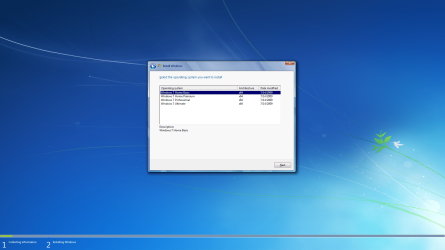
I just need to be sure that after deleting the ei.cfg file I will only be greeted with 4 options, not 8 -- 4 for Retail and 4 for OEM. Once I get that and I'm sure I'm installing the right version of W7 Pro I'll stop asking stupid questions hahaha
 

My Computer My Computer

At a glance

W7 x64
Computer Manufacturer/Model Number
Lenovo X201t Tablet
OS
W7 x64
The installer versions haven't been divided between retail and OEM since XP.

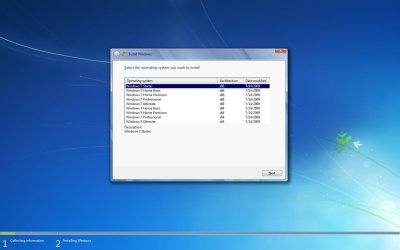
If the stick boots and gives you Pro version to choose, then it is good for retail or OEM.
 
It might look like this ;)
 

Attachments

  • All_In_One_Win7_DVD.jpg
    All_In_One_Win7_DVD.jpg
    62.4 KB · Views: 10

My Computer My Computer

At a glance

Win7 Enterprise, Win7 x86 (Ult 7600), Win7 x6...AMD fx8350 4ghz, AMD-32 2400mhz, AMD-64 3200m...2gb, 4gb on the Ult 7600, 4gb on Technet RTM,...Draw my own Graphics, several nVidia cards
Computer type
PC/Desktop
Computer Manufacturer/Model Number
Built them myself, Science Experiments !
OS
Win7 Enterprise, Win7 x86 (Ult 7600), Win7 x64 Ult 7600, TechNet RTM on AMD x64 (2.8Ghz)
CPU
AMD fx8350 4ghz, AMD-32 2400mhz, AMD-64 3200mhz, AMDx64 2.8G
Motherboard
SIS 755, ECS-K8M890M-M (Ult 7600), GigaByte & others
Memory
2gb, 4gb on the Ult 7600, 4gb on Technet RTM, 32gb on FX8350
Graphics Card(s)
Draw my own Graphics, several nVidia cards
Sound Card
on motherboard
Monitor(s) Displays
19" flat scr, 28" I-Inc widescr,22" Emprex Widescr, 23" Acer
Screen Resolution
1280 x 1024, 1440 x 900, 1920 x 1080
Hard Drives
6 pata Ide HD's & 2 Sata HD's
added 80gb external on Ult 7600 computer,
numerous extra 1tb, 2TB, 3Tb SATA HD's
A collection of ext HD Docks w/ HDs
PSU
430w, 550w, 600w, 700, 800, etc
Case
All Generic Full Towers
Cooling
Open Air & a few fans, some w/ colored LEDs
Keyboard
Compaq & Dell recycled from GoodWill
Mouse
Made in China Optical Wired Mouse
Internet Speed
Fast Cable InterNet
Antivirus
AVG Free on 24 different Desktops, NO Problems!
Browser
IE 8 is preferred, but use FireFox sometimes
Other Info
Linksys Routers, switches, & Hubs
Too Many USB Flash Drives to count, Biggest is 64GB !
Eight computers in my home network.
Sixteen computers at my business network.
Linked via TeamViewer !
Lots of old used spare computer parts everywhere!
Yup, I'm booting the installer.

I haven't done an install since XP, hence my confusion... I was using a Macbook Pro until W7 came out because I HATE Vista.

Doc, mine looks like that minus the 32bit stuff.


-Mike
 

My Computer My Computer

At a glance

W7 x64
Computer Manufacturer/Model Number
Lenovo X201t Tablet
OS
W7 x64
Installing now, hoping for the best...

Thanks so much for the help guys, I really appreciate it!


-Mike
 

My Computer My Computer

At a glance

W7 x64
Computer Manufacturer/Model Number
Lenovo X201t Tablet
OS
W7 x64
It will work as long as your ISO isn't infected or had something added. Read the download comments and scan for viruses.


Boot the Windows 7 installer, choose Custom Install, then Drive Options (Advanced) to Delete all partitions not needed, following illustrated steps given here: Clean Install Windows 7

If you Delete all partitions to create New ones and Format, the installer will issue a 100mb System Reserved boot partition which conveniently places the Repair Console (normally only on the DVD or Repair CD) on the F8 Advanced Boot Options menu. Partition as you wish and Format before installing to first OS partition.

The installer is mostly driver-complete, with newer arriving quickly via optional Windows Updates. Just in case, have your Wireless driver on flash stick or CD so you can get online quickly. Then enable hardware driver auto-updating and check for optional Updates frequently.

Any drivers still missing in Device Manager can be found on the Support Downloads webpage for your model computer or device. Driver Install - Device Manager

Install updates and then programs slowly over time to gauge performance changes after each. Don't let any programs write themselves into msconfig>Startup as they slow startup, become freeloaders on your RAM/CPU and can spy on you. I only allow AV and gadgets. Startup Programs - Change

Use a lightweight free AV like MS Security Essentials which works perfectly with Windows 7 Firewall. http://www.microsoft.com/security_essentials/

When it is finished, clean and order the HD perfectly using state-of-the-art free CCleaner Disk and Registry tabs, then Puran boot-time defragger + full Disk Check after adding Intelligent Optimizer on Additional Operations tab:
CCleaner - Free software downloads and software reviews - CNET Download.com
http://download.cnet.com/Puran-Defra...-75115626.html

Finally save a Windows 7 Backup image externally so you never have to reinstall again, just reimage the HD (or replacement) using DVD/Repair CD with the stored image. Backup Complete Computer - Create an Image Backup
 

My Computers My Computers

  • At a glance

    Windows 11 ProRyzen 9 5900X32GB G Skill DDR4-3600EVGA RTX 3080 FTW 3 Ultra
    Computer type
    PC/Desktop
    Computer Manufacturer/Model Number
    ALWAYS UNDER CONSTRUCTION
    OS
    Windows 11 Pro
    CPU
    Ryzen 9 5900X
    Motherboard
    Asus X570 Crosshair Viii Hero
    Memory
    32GB G Skill DDR4-3600
    Graphics Card(s)
    EVGA RTX 3080 FTW 3 Ultra
    Sound Card
    On Board/Sennheiser PC37X Headset
    Monitor(s) Displays
    3 X Asus 27"
    Screen Resolution
    2560x1440
    Hard Drives
    2 X 1 TB NVME drives
    PSU
    EVGA 850
    Case
    Phanteks Eclipse P400A
    Cooling
    EVGA 280 AIO
    Keyboard
    Logitech G510s/ Logitech G13
    Mouse
    Logitech G502
    Internet Speed
    24/1
    Antivirus
    ESET/MBAM Pro/SAS Pro
    Browser
    Chrome/ Firefox/ Edge
  • At a glance

    Windows 11 ProIntel Ultra 9 288V32 GB LPDDR5X 8533
    Computer type
    Laptop
    System Manufacturer/Model Number
    Dell 16 Plus
    OS
    Windows 11 Pro
    CPU
    Intel Ultra 9 288V
    Memory
    32 GB LPDDR5X 8533
    Monitor(s) Displays
    16" Mini-LED HDR600 Touch 90 Hz
    Screen Resolution
    2560X1600
    Hard Drives
    1 TB NVME
Bad news guys!!

Whenever I type my product key, click 'next' and it says "this key is not valid"!!

What is going on?? This is the exact key from the bottom of my laptop that says, "Windows 7 Pro OA"


PLS HELP!
 

My Computer My Computer

At a glance

W7 x64
Computer Manufacturer/Model Number
Lenovo X201t Tablet
OS
W7 x64
Okay so I tried my Ultimate Key from my Belarc Advisor Printout and it said "This product key is for a different Windows SKU"...

Should I reinstall from my pen drive and select W7 instead?


Thx!
 

My Computer My Computer

At a glance

W7 x64
Computer Manufacturer/Model Number
Lenovo X201t Tablet
OS
W7 x64
Don't put the key in and uncheck the validate box.
 

My Computers My Computers

  • At a glance

    Windows 11 ProRyzen 9 5900X32GB G Skill DDR4-3600EVGA RTX 3080 FTW 3 Ultra
    Computer type
    PC/Desktop
    Computer Manufacturer/Model Number
    ALWAYS UNDER CONSTRUCTION
    OS
    Windows 11 Pro
    CPU
    Ryzen 9 5900X
    Motherboard
    Asus X570 Crosshair Viii Hero
    Memory
    32GB G Skill DDR4-3600
    Graphics Card(s)
    EVGA RTX 3080 FTW 3 Ultra
    Sound Card
    On Board/Sennheiser PC37X Headset
    Monitor(s) Displays
    3 X Asus 27"
    Screen Resolution
    2560x1440
    Hard Drives
    2 X 1 TB NVME drives
    PSU
    EVGA 850
    Case
    Phanteks Eclipse P400A
    Cooling
    EVGA 280 AIO
    Keyboard
    Logitech G510s/ Logitech G13
    Mouse
    Logitech G502
    Internet Speed
    24/1
    Antivirus
    ESET/MBAM Pro/SAS Pro
    Browser
    Chrome/ Firefox/ Edge
  • At a glance

    Windows 11 ProIntel Ultra 9 288V32 GB LPDDR5X 8533
    Computer type
    Laptop
    System Manufacturer/Model Number
    Dell 16 Plus
    OS
    Windows 11 Pro
    CPU
    Intel Ultra 9 288V
    Memory
    32 GB LPDDR5X 8533
    Monitor(s) Displays
    16" Mini-LED HDR600 Touch 90 Hz
    Screen Resolution
    2560X1600
    Hard Drives
    1 TB NVME
:ditto: See if the install continue forward to completion
 

My Computer My Computer

At a glance

Win7 Enterprise, Win7 x86 (Ult 7600), Win7 x6...AMD fx8350 4ghz, AMD-32 2400mhz, AMD-64 3200m...2gb, 4gb on the Ult 7600, 4gb on Technet RTM,...Draw my own Graphics, several nVidia cards
Computer type
PC/Desktop
Computer Manufacturer/Model Number
Built them myself, Science Experiments !
OS
Win7 Enterprise, Win7 x86 (Ult 7600), Win7 x64 Ult 7600, TechNet RTM on AMD x64 (2.8Ghz)
CPU
AMD fx8350 4ghz, AMD-32 2400mhz, AMD-64 3200mhz, AMDx64 2.8G
Motherboard
SIS 755, ECS-K8M890M-M (Ult 7600), GigaByte & others
Memory
2gb, 4gb on the Ult 7600, 4gb on Technet RTM, 32gb on FX8350
Graphics Card(s)
Draw my own Graphics, several nVidia cards
Sound Card
on motherboard
Monitor(s) Displays
19" flat scr, 28" I-Inc widescr,22" Emprex Widescr, 23" Acer
Screen Resolution
1280 x 1024, 1440 x 900, 1920 x 1080
Hard Drives
6 pata Ide HD's & 2 Sata HD's
added 80gb external on Ult 7600 computer,
numerous extra 1tb, 2TB, 3Tb SATA HD's
A collection of ext HD Docks w/ HDs
PSU
430w, 550w, 600w, 700, 800, etc
Case
All Generic Full Towers
Cooling
Open Air & a few fans, some w/ colored LEDs
Keyboard
Compaq & Dell recycled from GoodWill
Mouse
Made in China Optical Wired Mouse
Internet Speed
Fast Cable InterNet
Antivirus
AVG Free on 24 different Desktops, NO Problems!
Browser
IE 8 is preferred, but use FireFox sometimes
Other Info
Linksys Routers, switches, & Hubs
Too Many USB Flash Drives to count, Biggest is 64GB !
Eight computers in my home network.
Sixteen computers at my business network.
Linked via TeamViewer !
Lots of old used spare computer parts everywhere!
So I reinstalled using W7 Ultimate and the key reported in Belarc Advisor and so far so good, it let me get to my desktop now I just need to make sure it activates and updates...


-Mike
 

My Computer My Computer

At a glance

W7 x64
Computer Manufacturer/Model Number
Lenovo X201t Tablet
OS
W7 x64
I thought W7 automatically installed drivers... Not even my laptops nic card is working... Guess I'm going to need to get drivers off my mac...


-Mike
 

My Computer My Computer

At a glance

W7 x64
Computer Manufacturer/Model Number
Lenovo X201t Tablet
OS
W7 x64
Did you check let win7 go online & get automatic updates ? & be connected to the internet!
 

My Computer My Computer

At a glance

Win7 Enterprise, Win7 x86 (Ult 7600), Win7 x6...AMD fx8350 4ghz, AMD-32 2400mhz, AMD-64 3200m...2gb, 4gb on the Ult 7600, 4gb on Technet RTM,...Draw my own Graphics, several nVidia cards
Computer type
PC/Desktop
Computer Manufacturer/Model Number
Built them myself, Science Experiments !
OS
Win7 Enterprise, Win7 x86 (Ult 7600), Win7 x64 Ult 7600, TechNet RTM on AMD x64 (2.8Ghz)
CPU
AMD fx8350 4ghz, AMD-32 2400mhz, AMD-64 3200mhz, AMDx64 2.8G
Motherboard
SIS 755, ECS-K8M890M-M (Ult 7600), GigaByte & others
Memory
2gb, 4gb on the Ult 7600, 4gb on Technet RTM, 32gb on FX8350
Graphics Card(s)
Draw my own Graphics, several nVidia cards
Sound Card
on motherboard
Monitor(s) Displays
19" flat scr, 28" I-Inc widescr,22" Emprex Widescr, 23" Acer
Screen Resolution
1280 x 1024, 1440 x 900, 1920 x 1080
Hard Drives
6 pata Ide HD's & 2 Sata HD's
added 80gb external on Ult 7600 computer,
numerous extra 1tb, 2TB, 3Tb SATA HD's
A collection of ext HD Docks w/ HDs
PSU
430w, 550w, 600w, 700, 800, etc
Case
All Generic Full Towers
Cooling
Open Air & a few fans, some w/ colored LEDs
Keyboard
Compaq & Dell recycled from GoodWill
Mouse
Made in China Optical Wired Mouse
Internet Speed
Fast Cable InterNet
Antivirus
AVG Free on 24 different Desktops, NO Problems!
Browser
IE 8 is preferred, but use FireFox sometimes
Other Info
Linksys Routers, switches, & Hubs
Too Many USB Flash Drives to count, Biggest is 64GB !
Eight computers in my home network.
Sixteen computers at my business network.
Linked via TeamViewer !
Lots of old used spare computer parts everywhere!
I thought W7 automatically installed drivers... Not even my laptops nic card is working... Guess I'm going to need to get drivers off my mac...


-Mike

At least four times I posted the link to the steps to get a perfect install: Reinstalling Windows 7

I even copied and pasted the steps into my last post last night including this one:

Just in case, have your Wireless driver on flash stick or CD so you can get online quickly. Then enable hardware driver auto-updating and check for drivers in optional Windows Updates frequently.

Any drivers still missing in Device Manager can be found on the Support Downloads webpage for your model computer or device. Driver Install - Device Manager
Why would you try inserting the Ultimate Product Key if you were installing Pro as discussed?

Googling "Windows 7 Pro OA" finds this from MS:

OA 2.0 represents the activation technology that is in place at the time of the Windows 7 Professional Edition release. This occurs before the PC ships to an organization. The copy of Windows 7 Professional Edition that the OEM installs on a PC is only valid on that particular PC and can be reinstalled and reactivated only from the recovery media that is provided by the OEM.
Another post says that Phone Activation works on OA version.
 
Back
Top