Released: Intel Chipset Software 9.1.1.1014

Vipermk2

Transdimensional Spud
Power User
Local time
7:42 PM
Messages
206
Location
Peak District, UK
Intel Chipset Software Installation 9.1.1.1014 WHQL


Follow this link
 

My Computer

Computer type
PC/Desktop
Computer Manufacturer/Model Number
Custom build using Mainly ASUS equipment
OS
Windows 10 Pro x64
CPU
Intel i7 5930k 3.5 O/C @ 4.2ghz
Motherboard
Asus Rampage V Extreme: BIOS 1902
Memory
32Gb Dominator Platinum (4x 8GB) 2666MHz
Graphics Card(s)
Asus GeForce GTX980Ti Matrix Platinum 6Gb
Sound Card
Onboard Realtek HD (SPDIF)
Monitor(s) Displays
Primary: Asus PB287Q 28" 4K, Secondary: Samsung 55" 4k
Screen Resolution
3840 x 2160
Hard Drives
1 x SM-951 .M2 SSD 512Gb (System)
1 x Samsung 850 Pro 256Gb SSD (Games)
1 x OCZ Vector 150 240Gb SSD (Games)
3 x Western Digital Caviar Black 1TB S300 16mb 7200rpm :
1 x 10Gb RamDisk
PSU
Corsair CMPSU-850AX
Case
Coolermaster Stormtrooper
Cooling
Noctua NH-D14 SE2011
Keyboard
Apple Keyboard USB
Mouse
Logitech MX Master
Internet Speed
76mb down /16mb up
Antivirus
ESET NOD V8
Browser
Firefox, Chrome, Opera, IE
Other Info
CPU Idle Temp = 36°
CPU Load Temp = 48° @100% for 40mins

Asus - RT-AC68U Router
Just tried and ended up with my first BSOD :) Crash report shows that ctoss2k.sys caused it (I have Creative Audigy 2 ZS)

In the readme, it says that it's compaitable with Windows 7 RC.
 

My Computer

OS
Windows 7 RTM x64
CPU
Intel Core 2 Duo E6750 @ 3.2Ghz
Motherboard
Gigabyte P35-DQ6
Memory
4 x 1GB OCZ Flexxx CL3
Graphics Card(s)
nVIDIA GeForce 8800GT
Sound Card
Creative Audigy ZS Platinium Pro
Monitor(s) Displays
22" Samsung 2232BW
Screen Resolution
1680*1050
Hard Drives
2 x 320GB Seagate 7200.11 (RAID0)
1TB Western Digital 7200rpm
PSU
Tagan 380Watt
Case
Thermaltake VA3000SWA
Cooling
Stock + 12cm Case Fans
Keyboard
Logitech S510
Mouse
Logitech G5
Internet Speed
4mbits/1mbits
Install it with the -overall command, it will update every intel driver, even the default microsoft ones.
 

My Computer

OS
Windows 7 build 7229 x64
CPU
Intel core 2 quad Q9450 @ default clock
Motherboard
MSI X48C platinum
Memory
8Go (4x2Go) DDR3 Gskill @ 1333mhz
Graphics Card(s)
Saphirre Ati HD 4870 512mo
Sound Card
Asus Xonar D2 Pci
Monitor(s) Displays
Iiyama prolite B2403WS
Screen Resolution
1920x1200
Hard Drives
2 Samsung 1To
PSU
Corsair 550w
Case
Silverstone TJ05
Keyboard
Logitech wave 450
Mouse
Razer/microsoft Habu
Internet Speed
8mb
Updated smoothly thanks.
 

My Computer

OS
Windows 7 7232b x64
CPU
Intel Q8300 @ 2500 Mhz
Motherboard
Gigabyte EP45-DS3R
Memory
OCZ 4x2GB DDR2 1066 Mhz
Graphics Card(s)
Palit 512MB 9800GTX+
Sound Card
Realtek HD
Monitor(s) Displays
Samsung T220
Screen Resolution
1680x1050
Hard Drives
WD 500GB 32MB, Samsung 200GB 8MB
PSU
OCZ 600SXS
Case
CoolerMaster Centurion CAC-T05
Cooling
Arctic Cooling Fans
Other Info
Epson v500
Install it with the -overall command, it will update every intel driver, even the default microsoft ones.

Nice. I never knew about this command. I just tried it worked perfectly. Thanks..
 

My Computer

Computer Manufacturer/Model Number
Dell XPS 15 L502x
OS
Windows 7 x64
CPU
Intel i5-2430m 2.40 GHz
Motherboard
XPS 15 L502x
Memory
Corsair DDR3 16GB
Graphics Card(s)
Nvidia GT525m 1GB / Intel HD Graphics 3000
Sound Card
Realtek HD Audio
Monitor(s) Displays
15.6" Laptop B+RG LED Display
Screen Resolution
1920x1080
Hard Drives
OCZ Agility 3 60GB
Seagate Momentus 750GB 7200RPM
PSU
Internal PSU
Case
Laptop BackPack
Cooling
Air
Keyboard
Standard
Mouse
Synaptics Touchpad
How do you Install it with the -overall command ?

run from the command prompt is one way. you could also use run option from the start menu if you have it shown.
 

My Computer

Computer Manufacturer/Model Number
Dell XPS 15 L502x
OS
Windows 7 x64
CPU
Intel i5-2430m 2.40 GHz
Motherboard
XPS 15 L502x
Memory
Corsair DDR3 16GB
Graphics Card(s)
Nvidia GT525m 1GB / Intel HD Graphics 3000
Sound Card
Realtek HD Audio
Monitor(s) Displays
15.6" Laptop B+RG LED Display
Screen Resolution
1920x1080
Hard Drives
OCZ Agility 3 60GB
Seagate Momentus 750GB 7200RPM
PSU
Internal PSU
Case
Laptop BackPack
Cooling
Air
Keyboard
Standard
Mouse
Synaptics Touchpad
Does it work on Intel GM965 Mobile Express Chipset? I tried the earlier version of 9.1 Chipset and it says it's for GM965 Mobile Express but it then extracts and click "instal" and then immediately says "Finished" without installing anything...

BTW this is on Vista x64.

How do I exactly work the cmd prompt thingy? elaborate on the procedures please :).

The latest I have installed is 9.0
 

My Computer

Computer Manufacturer/Model Number
HP Compaq Presario C762NR
OS
Windows 7™ Home Premium x64/Sony PS3 XrossMediaBar™ FW 3.30/Sony PSP XrossMediaBar™ FW 6.20
CPU
Intel Pentium Dual-Core T2370 (1.73GHz/533MHz FSB/1MB Cache)
Motherboard
HP 30D9
Memory
Kingston HyperX 2GB/Hyundai 512MB (2.5GB/667MHz)
Graphics Card(s)
Intel GMA X3100 (GM965 Express/384MB VRAM)
Sound Card
Conexant HD SmartAudio 221
Monitor(s) Displays
Samsung 15.4" WXGA HD BrightView
Screen Resolution
1280*800
Hard Drives
Hitachi TravelStar 160GB (5400RPM/1.5GB)
Keyboard
HP MultiMedia Keyboard
Mouse
Microsoft Wireless Notebook Optical Mouse 3000
Internet Speed
Comcast (16MB)
Hmm weird, I just ran the file, and all it did was install 2 things, both version 7.0 but one was interesting: High Precision Timer...no idea what that's for but the previous 9.1 update refused to install anything...weird...:huh:
 

My Computer

Computer Manufacturer/Model Number
HP Compaq Presario C762NR
OS
Windows 7™ Home Premium x64/Sony PS3 XrossMediaBar™ FW 3.30/Sony PSP XrossMediaBar™ FW 6.20
CPU
Intel Pentium Dual-Core T2370 (1.73GHz/533MHz FSB/1MB Cache)
Motherboard
HP 30D9
Memory
Kingston HyperX 2GB/Hyundai 512MB (2.5GB/667MHz)
Graphics Card(s)
Intel GMA X3100 (GM965 Express/384MB VRAM)
Sound Card
Conexant HD SmartAudio 221
Monitor(s) Displays
Samsung 15.4" WXGA HD BrightView
Screen Resolution
1280*800
Hard Drives
Hitachi TravelStar 160GB (5400RPM/1.5GB)
Keyboard
HP MultiMedia Keyboard
Mouse
Microsoft Wireless Notebook Optical Mouse 3000
Internet Speed
Comcast (16MB)
What I do is:
Create a shortcut of the driver .exe file (INF_allOS_9.1.1.1014_PV.exe)
Then right click/properties on this shortcut
On the "target" box, simply add the command at the end of the line (don't forget to put a space before -overall)
You should see something like this:
...\INF_allOS_9.1.1.1014_PV.exe" -overall

Click apply/ok and double click the sortchut to run the driver installation (you"ll need to reboot after installing these drivers).
 

My Computer

OS
Windows 7 build 7229 x64
CPU
Intel core 2 quad Q9450 @ default clock
Motherboard
MSI X48C platinum
Memory
8Go (4x2Go) DDR3 Gskill @ 1333mhz
Graphics Card(s)
Saphirre Ati HD 4870 512mo
Sound Card
Asus Xonar D2 Pci
Monitor(s) Displays
Iiyama prolite B2403WS
Screen Resolution
1920x1200
Hard Drives
2 Samsung 1To
PSU
Corsair 550w
Case
Silverstone TJ05
Keyboard
Logitech wave 450
Mouse
Razer/microsoft Habu
Internet Speed
8mb
Wow, thanks a lot! :) I've noticed it overwritten a bunch of default Windows drivers and bunch of "version 1.0" drivers for various Intel parts and they are developed in June of 2009 where it used to say 2006 or 2007. Computer instantly feels quicker now and internet speed has increased greatly...:geek:
 

My Computer

Computer Manufacturer/Model Number
HP Compaq Presario C762NR
OS
Windows 7™ Home Premium x64/Sony PS3 XrossMediaBar™ FW 3.30/Sony PSP XrossMediaBar™ FW 6.20
CPU
Intel Pentium Dual-Core T2370 (1.73GHz/533MHz FSB/1MB Cache)
Motherboard
HP 30D9
Memory
Kingston HyperX 2GB/Hyundai 512MB (2.5GB/667MHz)
Graphics Card(s)
Intel GMA X3100 (GM965 Express/384MB VRAM)
Sound Card
Conexant HD SmartAudio 221
Monitor(s) Displays
Samsung 15.4" WXGA HD BrightView
Screen Resolution
1280*800
Hard Drives
Hitachi TravelStar 160GB (5400RPM/1.5GB)
Keyboard
HP MultiMedia Keyboard
Mouse
Microsoft Wireless Notebook Optical Mouse 3000
Internet Speed
Comcast (16MB)
Glad it helped you :)
BTW I don't take credit for this install method, I found it on another forum. I never knew about this command line too ^^
 

My Computer

OS
Windows 7 build 7229 x64
CPU
Intel core 2 quad Q9450 @ default clock
Motherboard
MSI X48C platinum
Memory
8Go (4x2Go) DDR3 Gskill @ 1333mhz
Graphics Card(s)
Saphirre Ati HD 4870 512mo
Sound Card
Asus Xonar D2 Pci
Monitor(s) Displays
Iiyama prolite B2403WS
Screen Resolution
1920x1200
Hard Drives
2 Samsung 1To
PSU
Corsair 550w
Case
Silverstone TJ05
Keyboard
Logitech wave 450
Mouse
Razer/microsoft Habu
Internet Speed
8mb
Does anyone know of any chance that Intel will release Matrix Storage Manager drivers for 7? I have to use the latest 8.8 Vista driver in Vista SP2 compatability mode to install and detect my Hitachi HD drivers too. I know Intel is continuing the Chipset drivers and GM965 graphic drivers for 7..
 

My Computer

Computer Manufacturer/Model Number
HP Compaq Presario C762NR
OS
Windows 7™ Home Premium x64/Sony PS3 XrossMediaBar™ FW 3.30/Sony PSP XrossMediaBar™ FW 6.20
CPU
Intel Pentium Dual-Core T2370 (1.73GHz/533MHz FSB/1MB Cache)
Motherboard
HP 30D9
Memory
Kingston HyperX 2GB/Hyundai 512MB (2.5GB/667MHz)
Graphics Card(s)
Intel GMA X3100 (GM965 Express/384MB VRAM)
Sound Card
Conexant HD SmartAudio 221
Monitor(s) Displays
Samsung 15.4" WXGA HD BrightView
Screen Resolution
1280*800
Hard Drives
Hitachi TravelStar 160GB (5400RPM/1.5GB)
Keyboard
HP MultiMedia Keyboard
Mouse
Microsoft Wireless Notebook Optical Mouse 3000
Internet Speed
Comcast (16MB)
What I do is:
Create a shortcut of the driver .exe file (INF_allOS_9.1.1.1014_PV.exe)
Then right click/properties on this shortcut
On the "target" box, simply add the command at the end of the line (don't forget to put a space before -overall)
You should see something like this:
...\INF_allOS_9.1.1.1014_PV.exe" -overall

Click apply/ok and double click the sortchut to run the driver installation (you"ll need to reboot after installing these drivers).
You also helped me as I never knew about this command line option & I'm somewhat of a computer tech...LOL :o
Just goes to show you can always learn something new you never knew before if you just keep you eyes & ears open! :D
Thanks a lot NiukNiuk for this as I noticed the Windows drivers wouldn't overwrite doing the normal chipset installation at all. :confused:

Now I know how though!
This should help my Badaxe 2 setup a lot on stability...
Btw, the installation went perfectly & it's running very smooth & fast!
My memory (RAM) throughput has increased by 1000mbs! :p
 
Last edited:

My Computer

Computer Manufacturer/Model Number
ABS Tech Ultimate X9
OS
Windows® 7 Ultimate x64 SP1
CPU
Intel Core 2 Duo E8400 (E0) @ 4.0GHz
Motherboard
ASUS P5Q Pro Turbo / 1780 FSB
Memory
G.SKILL-F2-8500CL5D-4GBPK (2x2Gbs) (5-5-5-15) @ 1067Mhz
Graphics Card(s)
EVGA GTX 470 SC (845/1690/2000) 160Gbs
Sound Card
VIA HD Audio / Boston Acoustics
Monitor(s) Displays
Acer X222W HD 22" LCD 2500:1 / 5ms
Screen Resolution
1680x1050
Hard Drives
Seagate Barracuda SATAII 2 x 320GB
Seagate Barracuda SATAII 1Tb
Intel® Rapid Storage Technology v10.1.0.1008
AHCI-NCQ Enabled
PSU
Silent Pro GOLD 80 PLUS 800w /95% efficiency / SLI-Crossfire
Case
ABS Stealth Black-Custom
Cooling
CoolerMaster V6GT 6 Heatpipe 200w CPU Cooler
Keyboard
Logitech G15 Gaming Keyboard (Old Style Blue!)
Mouse
Logitech MX518 Gaming Mouse
Internet Speed
1Mbs-up/ 6Mbs-down
Does anyone know of any chance that Intel will release Matrix Storage Manager drivers for 7? I have to use the latest 8.8 Vista driver in Vista SP2 compatability mode to install and detect my Hitachi HD drivers too. I know Intel is continuing the Chipset drivers and GM965 graphic drivers for 7..

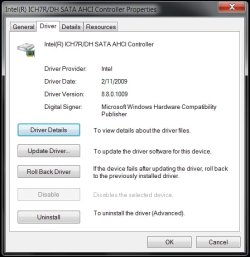
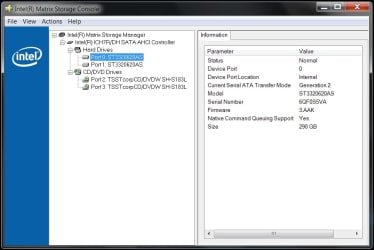
As a matter of a fact Yes, they have released Windows 7 Beta drivers, BUT the Vista drivers are more stable so I'd stick with them as the Windows 7 drivers are still in Alpha development stage...
I installed the Intel Matrix Storage Manager Vista drivers without being in compatibility mode & they installed & work perfectly.

Yes, I've already tested them out on my Badaxe 2 setup, but if you want to give them a go here they are! ;)
Btw, the new Intel chipset drivers below are the same for Windows 7 as they are for Vista & XP if you look at the version numbers! Exactly the same drivers!

Windows 7 Beta Drivers
[FONT=Arial,helvetica]
Chipset: INF Update Utility for Intel® Desktop Boards (Windows* 7 Beta)
[/FONT][FONT=Arial,helvetica] (2675KB)[/FONT]
[FONT=Arial,helvetica]9.1.1.1014[/FONT][FONT=Arial,helvetica]6/16/2009[/FONT][FONT=Arial,helvetica]Download[/FONT]
spacer.gif
[FONT=Arial,helvetica]Installs the chipset INF driver version 9.1.1.1014 for Intel® Desktop Boards.[/FONT]
spacer.gif

spacer.gif
spacer.gif
spacer.gif

[FONT=Arial,helvetica]OS:[/FONT][FONT=Arial,helvetica]Windows 7, 32-bit*, Windows 7, 64-bit*[/FONT]
spacer.gif
spacer.gif
[FONT=Arial,helvetica]12.[/FONT]
flag.gif
[FONT=Arial,helvetica]RAID: Intel® Matrix Storage Manager Driver for Intel Desktop Boards (Windows* 7 Beta)[/FONT][FONT=Arial,helvetica] (197KB)[/FONT]
[FONT=Arial,helvetica]8.9.0.1014[/FONT][FONT=Arial,helvetica]4/15/2009[/FONT]
spacer.gif
spacer.gif
[FONT=Arial,helvetica]Installs the Intel® Matrix Storage Technology (RAID) driver version 8.9.0.1014 for Intel® Desktop Boards.[/FONT]
spacer.gif

spacer.gif
spacer.gif
spacer.gif

[FONT=Arial,helvetica]OS:[/FONT][FONT=Arial,helvetica]Windows 7, 32-bit*, Windows 7, 64-bit*, Windows Vista* 32, Windows Vista* 64, Windows* XP Home Edition, Windows* XP Media Center Edition, Windows* XP Professional, Windows* XP Professional x64 Edition[/FONT]
spacer.gif
spacer.gif
spacer.gif
[FONT=Arial,helvetica]Download File(s):English(1 of 3)[FONT=Arial,helvetica] 197KB[/FONT], English(2 of 3)[FONT=Arial,helvetica] 226KB[/FONT], English(3 of 3)[FONT=Arial,helvetica] 23623KB[/FONT]
spacer.gif
[/FONT]
spacer.gif
[FONT=Arial,helvetica]13.[/FONT]
flag.gif
[FONT=Arial,helvetica]RAID: Marvell* 88SE6145 SATA Driver (Windows* 7 Beta)[/FONT][FONT=Arial,helvetica] (280KB)[/FONT]
[FONT=Arial,helvetica]1.2.0.60[/FONT][FONT=Arial,helvetica]1/6/2009[/FONT]
spacer.gif
spacer.gif
[FONT=Arial,helvetica]Installs the Marvell* (RAID) driver version 1.2.0.60 for Intel® Desktop Boards.[/FONT]
spacer.gif

spacer.gif
spacer.gif
spacer.gif

[FONT=Arial,helvetica]OS:[/FONT][FONT=Arial,helvetica]Windows 7, 32-bit*, Windows 7, 64-bit*, Windows Vista* 32, Windows Vista* 64, Windows* XP Home Edition, Windows* XP Media Center Edition, Windows* XP Professional, Windows* XP Professional x64 Edition[/FONT]
spacer.gif
spacer.gif
spacer.gif
[FONT=Arial,helvetica]Download File(s):English(1 of 2)[FONT=Arial,helvetica] 280KB[/FONT], English(2 of 2)[FONT=Arial,helvetica] 13584KB

Same as Windows 7 Beta drivers

[/FONT]
[/FONT][FONT=Arial,helvetica].[/FONT][FONT=Arial,helvetica]Chipset: INF Update Utility for Intel® Desktop Boards[/FONT][FONT=Arial,helvetica] (2675KB)[/FONT]
[FONT=Arial,helvetica]9.1.1.1014[/FONT][FONT=Arial,helvetica]6/16/2009[/FONT][FONT=Arial,helvetica]Download[/FONT]
spacer.gif
[FONT=Arial,helvetica]Installs the chipset INF driver version 9.1.1.1014 for Intel® Desktop Boards.[/FONT]
spacer.gif

latest.gif
spacer.gif
spacer.gif

[FONT=Arial,helvetica]OS:[/FONT][FONT=Arial,helvetica]Windows Vista* 32, Windows Vista* 64, Windows* 2000, Windows* XP Home Edition, Windows* XP Media Center Edition, Windows* XP Professional, Windows* XP Professional x64 Edition[/FONT]
[FONT=Arial,helvetica]
spacer.gif
[/FONT]
spacer.gif
 

Attachments

  • Intel Matrix Storage Manager SATA-AHCI v8.8.0.1009.jpg
    Intel Matrix Storage Manager SATA-AHCI v8.8.0.1009.jpg
    37.8 KB · Views: 84
  • Intel Matrix Storage Console.jpg
    Intel Matrix Storage Console.jpg
    49 KB · Views: 103
Last edited:

My Computer

Computer Manufacturer/Model Number
ABS Tech Ultimate X9
OS
Windows® 7 Ultimate x64 SP1
CPU
Intel Core 2 Duo E8400 (E0) @ 4.0GHz
Motherboard
ASUS P5Q Pro Turbo / 1780 FSB
Memory
G.SKILL-F2-8500CL5D-4GBPK (2x2Gbs) (5-5-5-15) @ 1067Mhz
Graphics Card(s)
EVGA GTX 470 SC (845/1690/2000) 160Gbs
Sound Card
VIA HD Audio / Boston Acoustics
Monitor(s) Displays
Acer X222W HD 22" LCD 2500:1 / 5ms
Screen Resolution
1680x1050
Hard Drives
Seagate Barracuda SATAII 2 x 320GB
Seagate Barracuda SATAII 1Tb
Intel® Rapid Storage Technology v10.1.0.1008
AHCI-NCQ Enabled
PSU
Silent Pro GOLD 80 PLUS 800w /95% efficiency / SLI-Crossfire
Case
ABS Stealth Black-Custom
Cooling
CoolerMaster V6GT 6 Heatpipe 200w CPU Cooler
Keyboard
Logitech G15 Gaming Keyboard (Old Style Blue!)
Mouse
Logitech MX518 Gaming Mouse
Internet Speed
1Mbs-up/ 6Mbs-down
What I do is:
Create a shortcut of the driver .exe file (INF_allOS_9.1.1.1014_PV.exe)
Then right click/properties on this shortcut
On the "target" box, simply add the command at the end of the line (don't forget to put a space before -overall)
You should see something like this:
...\INF_allOS_9.1.1.1014_PV.exe" -overall

Click apply/ok and double click the sortchut to run the driver installation (you"ll need to reboot after installing these drivers).
I used that command and worked flawlessly :D thank you!


Wow, thanks a lot! :) I've noticed it overwritten a bunch of default Windows drivers and bunch of "version 1.0" drivers for various Intel parts and they are developed in June of 2009 where it used to say 2006 or 2007. Computer instantly feels quicker now and internet speed has increased greatly...:geek:
Me too, it took around 30 seconds to install everything.
 

My Computer

OS
Windows 7 Ultimate RTM x64
CPU
Intel Q9550 @ Stock
Motherboard
ASUS P5K -1201 BIOS-
Memory
G.Skill 2x2GB DDR2 800mhz 4-4-4-12
Graphics Card(s)
SAPPHIRE HD5850 1GB
Sound Card
Sound Blaster Audigy 2 ZS
Monitor(s) Displays
Dell 2209WA
Screen Resolution
1680x1050 @ 60hz
Hard Drives
Western Digital Caviar Black 640GB SATA2 32mb
PSU
Antec True Power Trio 650w
Case
Coolermaster CM 690
Cooling
Arctic Cooling Freezer 7 Pro + Tuniq TX-2
Keyboard
Microsoft Digital Media Pro
Mouse
Razer DeathAdder
Internet Speed
Ciudad Internet 5mb/s (Download: 500kb/s - Upload: 27kb/s)
Does anyone know of any chance that Intel will release Matrix Storage Manager drivers for 7? I have to use the latest 8.8 Vista driver in Vista SP2 compatability mode to install and detect my Hitachi HD drivers too. I know Intel is continuing the Chipset drivers and GM965 graphic drivers for 7..

Try here --> Intel Matrix Storage Manager

I'm using 8.9.0.1015 version without an issue in Windows 7 x64.
 

My Computer

Computer Manufacturer/Model Number
Dell XPS 15 L502x
OS
Windows 7 x64
CPU
Intel i5-2430m 2.40 GHz
Motherboard
XPS 15 L502x
Memory
Corsair DDR3 16GB
Graphics Card(s)
Nvidia GT525m 1GB / Intel HD Graphics 3000
Sound Card
Realtek HD Audio
Monitor(s) Displays
15.6" Laptop B+RG LED Display
Screen Resolution
1920x1080
Hard Drives
OCZ Agility 3 60GB
Seagate Momentus 750GB 7200RPM
PSU
Internal PSU
Case
Laptop BackPack
Cooling
Air
Keyboard
Standard
Mouse
Synaptics Touchpad
Thanks everyone :), I wish Intels driver database wasn't such a cluster F&^% and really outdated at times. Where does everyone find the Beta drivers for 7 though?
 

My Computer

Computer Manufacturer/Model Number
HP Compaq Presario C762NR
OS
Windows 7™ Home Premium x64/Sony PS3 XrossMediaBar™ FW 3.30/Sony PSP XrossMediaBar™ FW 6.20
CPU
Intel Pentium Dual-Core T2370 (1.73GHz/533MHz FSB/1MB Cache)
Motherboard
HP 30D9
Memory
Kingston HyperX 2GB/Hyundai 512MB (2.5GB/667MHz)
Graphics Card(s)
Intel GMA X3100 (GM965 Express/384MB VRAM)
Sound Card
Conexant HD SmartAudio 221
Monitor(s) Displays
Samsung 15.4" WXGA HD BrightView
Screen Resolution
1280*800
Hard Drives
Hitachi TravelStar 160GB (5400RPM/1.5GB)
Keyboard
HP MultiMedia Keyboard
Mouse
Microsoft Wireless Notebook Optical Mouse 3000
Internet Speed
Comcast (16MB)
Hey guys, do you know why in RC 7100 are all the chipset drivers installed (like in Vista e.g.) and in others builds just 3 or 4? I think best for me is RC due to this. Those default drivers don´t working fine on my rig.
 

My Computer

OS
W7 x64
CPU
Q6600 @ 3,6 Ghz
Motherboard
Asus P5Q Deluxe 1702
Memory
4Gb Mushkin Redline 1000 PL7
Graphics Card(s)
Gigabyte GTX260
Sound Card
ADI2000B
Monitor(s) Displays
Viewsonic VX2025WM
Screen Resolution
1680x1050
Hard Drives
WD 1TB BLACK
WD 1TB GREEN
PSU
Hiper M880
Case
Antec 1200
Cooling
Noctua NH-U12P P&P
Does this work on Mobile Chipset GM965?
 

My Computer

Computer Manufacturer/Model Number
Toshiba Satellite M205-S4806
OS
Windows 7 Home Premium x64
CPU
Intel(R) Core(TM)2 Duo CPU T5450 @ 1.66GHz
Memory
4 GB Texas Instruments PCIxx12 Integrated FlashMedia Control
Graphics Card(s)
Mobile Intel(R) 965 Express Chipset Family
Sound Card
Realtek HD Audio
Monitor(s) Displays
Laptop Monitor
Screen Resolution
1280x800
Hard Drives
200 GB Hitachi HTS542520K9SA00 ATA Device
Keyboard
Laptop Keyboard
Mouse
Synaptics Touchpad
Internet Speed
Broadband, up to 1.2 MB/s
Back
Top