Released: Intel Chipset Software 9.1.1.1014

Thanks for the update. Just ran it with the -overall command and it worked great. Thanks...
 

My Computer My Computer

Computer Manufacturer/Model Number
Gateway P-6138FX
OS
Windows 7 RC x64
CPU
C2D T8300 2.4Ghz
Memory
4 GB
Graphics Card(s)
Nvidia GeForce 8800M GTS 512 MB
Screen Resolution
1440 x 900

My Computer My Computer

Computer Manufacturer/Model Number
HP 6720s
OS
Microsoft Windows 7 Ultimate
CPU
Mobile Intel Celeron M 530, 1733 MHz (13 x 133)
Motherboard
Intel Crestline GLE960/GME965
Memory
2038 MB (DDR2-667 DDR2 SDRAM)
Graphics Card(s)
Intel GMA X3100
Sound Card
Analog Devices AD1981HD @ Intel 82801HBM ICH8M
Monitor(s) Displays
AU Optronics B154EW02 V7 [15.4" LCD]
Screen Resolution
1280 x 800
Hard Drives
TOSHIBA MK1246GSX ATA Device (120 GB, 5400 RPM, SATA-II)
Maxtor 3200 USB Device (372 GB, USB)
Okay, those of you wiht Mobile GM965 Chipset, I have installed 9.0 and now finally able to do this 9.1 build. Does it only install 8.6 drivers? or the full 9.0/9.1 drivers? Because I still have some 2007/2008 drivers installed even though I did the -overall command, it did install some new 2008/2009 drivers that other Chipset builds didn't. It just seems that the newer Intel Chipset drivers over-install the same old drivers as the last driver does. Hope I'm making sense...
 

My Computer My Computer

Computer Manufacturer/Model Number
HP Compaq Presario C762NR
OS
Windows 7™ Home Premium x64/Sony PS3 XrossMediaBar™ FW 3.30/Sony PSP XrossMediaBar™ FW 6.20
CPU
Intel Pentium Dual-Core T2370 (1.73GHz/533MHz FSB/1MB Cache)
Motherboard
HP 30D9
Memory
Kingston HyperX 2GB/Hyundai 512MB (2.5GB/667MHz)
Graphics Card(s)
Intel GMA X3100 (GM965 Express/384MB VRAM)
Sound Card
Conexant HD SmartAudio 221
Monitor(s) Displays
Samsung 15.4" WXGA HD BrightView
Screen Resolution
1280*800
Hard Drives
Hitachi TravelStar 160GB (5400RPM/1.5GB)
Keyboard
HP MultiMedia Keyboard
Mouse
Microsoft Wireless Notebook Optical Mouse 3000
Internet Speed
Comcast (16MB)
Try here --> Intel Matrix Storage Manager

I'm using 8.9.0.1015 version without an issue in Windows 7 x64.

Thanks :), noticed that theres a "stable" version of 8.8.2 which didn't contain any setup files but I manually update it through the Device Manager/INF files, no problems. redid the WEI score and my graphics went up from 2.4 to 2.7 interesting lol. :geek:.
 

My Computer My Computer

Computer Manufacturer/Model Number
HP Compaq Presario C762NR
OS
Windows 7™ Home Premium x64/Sony PS3 XrossMediaBar™ FW 3.30/Sony PSP XrossMediaBar™ FW 6.20
CPU
Intel Pentium Dual-Core T2370 (1.73GHz/533MHz FSB/1MB Cache)
Motherboard
HP 30D9
Memory
Kingston HyperX 2GB/Hyundai 512MB (2.5GB/667MHz)
Graphics Card(s)
Intel GMA X3100 (GM965 Express/384MB VRAM)
Sound Card
Conexant HD SmartAudio 221
Monitor(s) Displays
Samsung 15.4" WXGA HD BrightView
Screen Resolution
1280*800
Hard Drives
Hitachi TravelStar 160GB (5400RPM/1.5GB)
Keyboard
HP MultiMedia Keyboard
Mouse
Microsoft Wireless Notebook Optical Mouse 3000
Internet Speed
Comcast (16MB)
Hey guys, do you know why in RC 7100 are all the chipset drivers installed (like in Vista e.g.) and in others builds just 3 or 4? I think best for me is RC due to this. Those default drivers don´t working fine on my rig.


Well didn´t read well this thread and it solved my driver problems with -overall command. Thanks!
 

My Computer My Computer

OS
W7 x64
CPU
Q6600 @ 3,6 Ghz
Motherboard
Asus P5Q Deluxe 1702
Memory
4Gb Mushkin Redline 1000 PL7
Graphics Card(s)
Gigabyte GTX260
Sound Card
ADI2000B
Monitor(s) Displays
Viewsonic VX2025WM
Screen Resolution
1680x1050
Hard Drives
WD 1TB BLACK
WD 1TB GREEN
PSU
Hiper M880
Case
Antec 1200
Cooling
Noctua NH-U12P P&P
My system was stuck at "welcome" screen after installed the driver. I had to reboot into safe mode. I did nothing there just restarted then everything became normal.
 

My Computer My Computer

OS
windows 7 64bit
Is this also for the x58 chipset? Excuse me if this is a silly question.
 

My Computer My Computer

Computer Manufacturer/Model Number
me
OS
Windows 7 Home Premium 64 bit
CPU
i7 920
Motherboard
Asus P6T
Memory
6 gb OCZ Platinum DDR3 1600
Graphics Card(s)
Radeon HD4870
Sound Card
X-Fi Titanium
Screen Resolution
1680x1050
PSU
OCZ ModXStream 600w
Case
Lian Li PC-60BPlus
Cooling
Vigor Monsoon III LT
Keyboard
Logitech DiNovo
Mouse
Logitech DiNovo
Internet Speed
Cox preferred cable
I have the same question but only for the X38? Version 9.0.0.1008 dated 6/2/2008 is the latest driver for X38 on the Intel site. Also, will the newer driver work for vista x64?
 

My Computer My Computer

OS
Vista 64
CPU
Intel QX9650
Motherboard
ASUS P5E3 Deluxe WiFi/AP
Memory
Corsair DDR3 1600
Graphics Card(s)
eVGA GTX 295
Sound Card
Creative x-Fi Fatality
Monitor(s) Displays
Dell 2408WFP
Hard Drives
Intel x25-M 160GB
WD 1TB
PSU
Thermaltake 850w
Case
Gigabyte Mercury Pro
Cooling
Water
The Intel Chipset Software Installation Utility will install Windows INF files to the target OS. These files outline to the operating system how to configure the Intel chipset components in order to ensure that the following features function properly:

· Core PCI and ISAPNP Services
· AGP Support
· IDE/ATA33/ATA66/ATA100 Storage Support
· SATA Storage Support
· USB Support
· Identification of Intel® Chipset Components in the Device Manager


Intel Chipset Software Installation Utility can be installed in three modes: Interactive, Silent and Unattended Preload. Interactive Mode requires user input during installation; Silent Mode and Unattended Preload do not.

This software also offers a set of command line flags, which provide additional installation choices. The command line flags are not case sensitive.

This download is also valid for the products listed below:

Intel® 3 Series Chipsets
Intel® 4 Series Chipset
Intel® 6300ESB I/O Controller Hub
Intel® 848P Chipset
Intel® 865 Chipset Family
Intel® 875P Chipset
Intel® 910 Express Chipset Family
Intel® 915 Express Chipset Family
Intel® 925X Express Chipset Family
Intel® 945 Express Chipset Family
Intel® 946 Express Chipset Family
Intel® 955X Express Chipset
Intel® 965 Express Chipset Family
Intel® 975X Express Chipset
Intel® Centrino® Duo Processor Technology
Intel® Centrino® Processor Technology
Intel® Chipset Software Installation Utility
Intel® E7210 Chipset
Intel® E7221 Chipset
Intel® E7230 Chipset
Intel® E7320 Chipset
Intel® E7520 Chipset
Intel® E7525 Chipset
Intel® E8500 Chipset
Intel® E8501 Chipset
Mobile Intel® 910GML Express Chipset
Mobile Intel® 915 Express Chipset Family
Mobile Intel® 945 Express Chipset Family
 

My Computer My Computer

Computer Manufacturer/Model Number
HP 6720s
OS
Microsoft Windows 7 Ultimate
CPU
Mobile Intel Celeron M 530, 1733 MHz (13 x 133)
Motherboard
Intel Crestline GLE960/GME965
Memory
2038 MB (DDR2-667 DDR2 SDRAM)
Graphics Card(s)
Intel GMA X3100
Sound Card
Analog Devices AD1981HD @ Intel 82801HBM ICH8M
Monitor(s) Displays
AU Optronics B154EW02 V7 [15.4" LCD]
Screen Resolution
1280 x 800
Hard Drives
TOSHIBA MK1246GSX ATA Device (120 GB, 5400 RPM, SATA-II)
Maxtor 3200 USB Device (372 GB, USB)
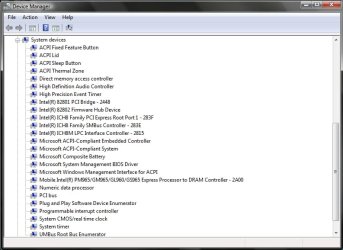
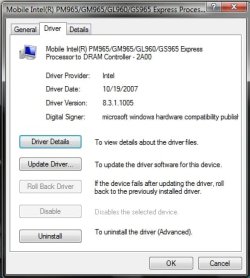
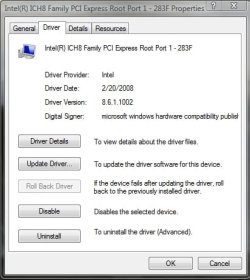
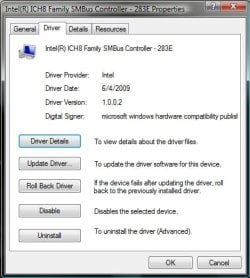
What's funny about the Chipset 9.0 + 9.1 is that it always installs the older 8.0 series of Chipset drivers on GM965 Express. Only when I run -overall command it installs SOME updated 2009 drivers. So technically, the newer 9.0 + chipset drivers aren't for GM965... bummer... :(

**I'll add pictures of what I'm talking about soon...:)
 

My Computer My Computer

Computer Manufacturer/Model Number
HP Compaq Presario C762NR
OS
Windows 7™ Home Premium x64/Sony PS3 XrossMediaBar™ FW 3.30/Sony PSP XrossMediaBar™ FW 6.20
CPU
Intel Pentium Dual-Core T2370 (1.73GHz/533MHz FSB/1MB Cache)
Motherboard
HP 30D9
Memory
Kingston HyperX 2GB/Hyundai 512MB (2.5GB/667MHz)
Graphics Card(s)
Intel GMA X3100 (GM965 Express/384MB VRAM)
Sound Card
Conexant HD SmartAudio 221
Monitor(s) Displays
Samsung 15.4" WXGA HD BrightView
Screen Resolution
1280*800
Hard Drives
Hitachi TravelStar 160GB (5400RPM/1.5GB)
Keyboard
HP MultiMedia Keyboard
Mouse
Microsoft Wireless Notebook Optical Mouse 3000
Internet Speed
Comcast (16MB)
This last Intel release should work perfect with X58 chipsets. I will try it next week on one friend´s rig, p6t deluxe, 920 D0, ...
 

My Computer My Computer

OS
W7 x64
CPU
Q6600 @ 3,6 Ghz
Motherboard
Asus P5Q Deluxe 1702
Memory
4Gb Mushkin Redline 1000 PL7
Graphics Card(s)
Gigabyte GTX260
Sound Card
ADI2000B
Monitor(s) Displays
Viewsonic VX2025WM
Screen Resolution
1680x1050
Hard Drives
WD 1TB BLACK
WD 1TB GREEN
PSU
Hiper M880
Case
Antec 1200
Cooling
Noctua NH-U12P P&P
Duderino ... that looks like it came from a readme. Which version of the chipset utility did it come from?
 

My Computer My Computer

OS
Vista 64
CPU
Intel QX9650
Motherboard
ASUS P5E3 Deluxe WiFi/AP
Memory
Corsair DDR3 1600
Graphics Card(s)
eVGA GTX 295
Sound Card
Creative x-Fi Fatality
Monitor(s) Displays
Dell 2408WFP
Hard Drives
Intel x25-M 160GB
WD 1TB
PSU
Thermaltake 850w
Case
Gigabyte Mercury Pro
Cooling
Water
Heres are SOME of the pictures I promised to show what I'm talking about:

**As you can see in the pictures, the drivers are of various dates from usually the 8.0 Chipset days...since 9.0 and 9.1 are completely new, why am I still using 2007 and 2008 drivers? the only exception of 9.1 installing 2 things that came out in June 2009. Weird.
 

Attachments

  • DM1.jpg
    DM1.jpg
    54.3 KB · Views: 39
  • DM2.jpg
    DM2.jpg
    30.4 KB · Views: 36
  • DM3.jpg
    DM3.jpg
    27.9 KB · Views: 32
  • DM4.jpg
    DM4.jpg
    30.1 KB · Views: 27

My Computer My Computer

Computer Manufacturer/Model Number
HP Compaq Presario C762NR
OS
Windows 7™ Home Premium x64/Sony PS3 XrossMediaBar™ FW 3.30/Sony PSP XrossMediaBar™ FW 6.20
CPU
Intel Pentium Dual-Core T2370 (1.73GHz/533MHz FSB/1MB Cache)
Motherboard
HP 30D9
Memory
Kingston HyperX 2GB/Hyundai 512MB (2.5GB/667MHz)
Graphics Card(s)
Intel GMA X3100 (GM965 Express/384MB VRAM)
Sound Card
Conexant HD SmartAudio 221
Monitor(s) Displays
Samsung 15.4" WXGA HD BrightView
Screen Resolution
1280*800
Hard Drives
Hitachi TravelStar 160GB (5400RPM/1.5GB)
Keyboard
HP MultiMedia Keyboard
Mouse
Microsoft Wireless Notebook Optical Mouse 3000
Internet Speed
Comcast (16MB)
I will try this driver thanks, my only concern is, is it easy to rollback if undesirable affects?
 

My Computer My Computer

Computer type
PC/Desktop
Computer Manufacturer/Model Number
home built
OS
windows 8.1 Pro x64
CPU
intel i5 4670k @ 4.3ghz
Motherboard
asus z87-plus
Memory
16 gig ram ddr3 @ 1600 corsair vengeance
Graphics Card(s)
evga 970 GTX 4 GIG FTW ACX 2.0
Sound Card
asus xonar D2X
Monitor(s) Displays
benq gw2765ht
Screen Resolution
2560x1440
Hard Drives
Samsung 850 pro SSD 512gig - boot device wooosh
WD black cavalier 640gig WD6401AALS
Seagate 500gig ST3500630AS
WD 2TB Green WDC20EARS
2 x WD Red 3TB WD30EFRX
Samsung 750gig HD753LG - on asmedia controller
PSU
coolermaster silent pro 600watt modular
Case
fractal define R4
Cooling
artic freezer i30, 3 case fans
Keyboard
microsoft business ps2 keyboard
Mouse
microsoft optical black mouse
Internet Speed
80/20 FTTC SkyBB
Antivirus
Nod32 AV v8, HitmanProAlert, SRP, System Hardening
Browser
Chrome x64
Other Info
Intel controller is in AHCI mode currently using IaSTOR 12.8.0.1016 drivers

My Computer My Computer

Computer Manufacturer/Model Number
HP 6720s
OS
Microsoft Windows 7 Ultimate
CPU
Mobile Intel Celeron M 530, 1733 MHz (13 x 133)
Motherboard
Intel Crestline GLE960/GME965
Memory
2038 MB (DDR2-667 DDR2 SDRAM)
Graphics Card(s)
Intel GMA X3100
Sound Card
Analog Devices AD1981HD @ Intel 82801HBM ICH8M
Monitor(s) Displays
AU Optronics B154EW02 V7 [15.4" LCD]
Screen Resolution
1280 x 800
Hard Drives
TOSHIBA MK1246GSX ATA Device (120 GB, 5400 RPM, SATA-II)
Maxtor 3200 USB Device (372 GB, USB)
Where do you guys find these new Intel releases and Beta software from them? their website is one craptastic place to visit. They rarely even have the latest version for the corresponding device anyway, 1 or 2 complete builds might have gone by before they even attempt to update the site...:huh:
 

My Computer My Computer

Computer Manufacturer/Model Number
HP Compaq Presario C762NR
OS
Windows 7™ Home Premium x64/Sony PS3 XrossMediaBar™ FW 3.30/Sony PSP XrossMediaBar™ FW 6.20
CPU
Intel Pentium Dual-Core T2370 (1.73GHz/533MHz FSB/1MB Cache)
Motherboard
HP 30D9
Memory
Kingston HyperX 2GB/Hyundai 512MB (2.5GB/667MHz)
Graphics Card(s)
Intel GMA X3100 (GM965 Express/384MB VRAM)
Sound Card
Conexant HD SmartAudio 221
Monitor(s) Displays
Samsung 15.4" WXGA HD BrightView
Screen Resolution
1280*800
Hard Drives
Hitachi TravelStar 160GB (5400RPM/1.5GB)
Keyboard
HP MultiMedia Keyboard
Mouse
Microsoft Wireless Notebook Optical Mouse 3000
Internet Speed
Comcast (16MB)

My Computer My Computer

OS
Windows 7 Ultimate RTM x64
CPU
Intel Q9550 @ Stock
Motherboard
ASUS P5K -1201 BIOS-
Memory
G.Skill 2x2GB DDR2 800mhz 4-4-4-12
Graphics Card(s)
SAPPHIRE HD5850 1GB
Sound Card
Sound Blaster Audigy 2 ZS
Monitor(s) Displays
Dell 2209WA
Screen Resolution
1680x1050 @ 60hz
Hard Drives
Western Digital Caviar Black 640GB SATA2 32mb
PSU
Antec True Power Trio 650w
Case
Coolermaster CM 690
Cooling
Arctic Cooling Freezer 7 Pro + Tuniq TX-2
Keyboard
Microsoft Digital Media Pro
Mouse
Razer DeathAdder
Internet Speed
Ciudad Internet 5mb/s (Download: 500kb/s - Upload: 27kb/s)
Wow, thanks a lot! :) I've noticed it overwritten a bunch of default Windows drivers and bunch of "version 1.0" drivers for various Intel parts and they are developed in June of 2009 where it used to say 2006 or 2007. Computer instantly feels quicker now and internet speed has increased greatly...:geek:

You guys do know that there is not a single "driver" containing within the Intel Chipset Software package.

All this package does is identify your chipset features if it does not have built in existing support and nothing more. Windows 7 properly detects all Intel chipsets up through the X58 with no issue. Using or not using this update will have zero affect on your system (or it's performance)

If you are not sure - take a good close look at a few "drivers" and notice that MS wrote them all...even after this so called "update". The only exception would be the Matrix storage download - if you use that...

Cheers!

VP
 

My Computer My Computer

Computer type
PC/Desktop
Computer Manufacturer/Model Number
Custom Build
OS
Windows 7 Professional SP1
You guys do know that there is not a single "driver" containing within the Intel Chipset Software package.

All this package does is identify your chipset features if it does not have built in existing support and nothing more. Windows 7 properly detects all Intel chipsets up through the X58 with no issue. Using or not using this update will have zero affect on your system (or it's performance)

If you are not sure - take a good close look at a few "drivers" and notice that MS wrote them all...even after this so called "update". The only exception would be the Matrix storage download - if you use that...

Cheers!

VP
Please substantiate and provide specific examples.
 
Please substantiate and provide specific examples.

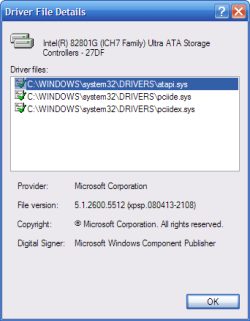
Don't have to - AlexT2889 already did that with his screen shots a little earlier on this page. In each of his screen caps you can see Intel referenced with dates ranging from 2007 to 2009. What he is not showing is what is under the "driver details" button on those screencaps. If he clicked on those - he would see the actual drivers are the original drivers as installed by Microsoft.

But if you insist :) Please find caps from my XP SP3 box....that was updated by an earlier (July/august 2008 Intel Chipset Installer). I know this is not WIndows 7 RTM - but the end result is the same...

The first cap shows the Intel 82801 Ultra ATA "driver" page from Device Manager...sure - the Driver Provider field says "Intel" with an 11/15/2006 date blah blah - and then the this page makes the user believe that the "magical" chipset installer put some sort of snazzy new Intel ATA driver in place (8.2.0.1011)....but if you look at the actual driver files by clicking on Driver Details (in the Drivers cap) you will see it's still the old Microsoft XP supplied atapi.sys etc etc...that it actually running on the box.

The referenced "driver" on this page 8.2.0.1011 - is simply the version number of the Intel Chipset Software installer used. If AlexT2889 was to click on Driver Detials in his exampels above - I believe he would be able to piece together the same.

Just so we are on the same page - I define a real "driver" as a specific xxx.sys file that actually replaces an existing installed .sys file to bring a updated version or increased performance to the table. You will not find any *.sys files or any other "drivers" in the Intel chipset installer package. And then there is this - right from the Intel page...

"The Intel® Chipset Device Software installs the Windows* INF files. The INF files inform the operating system how to properly configure the chipset for specific functionality, such as USB and core PCI."

It's Intel themselves that started this misleading mess by slapping the word "drivers" on this package when it's simply a collection of "up to date" inf files. Do you actually believe this thing would be only 2.6 mb in size if had a huge "driver" payload?

Bottom line - no "real" updated .sys files are written to your machine with this installer. Anyone who is reporting "faster" performance or newer better drivers has swallowed a huge placebo pill....

Cheers!

 

Attachments

  • ICH7 Page 1.png
    ICH7 Page 1.png
    15.2 KB · Views: 9
  • ICH7 Drivers.png
    ICH7 Drivers.png
    7.9 KB · Views: 24
Last edited:

My Computer My Computer

Computer type
PC/Desktop
Computer Manufacturer/Model Number
Custom Build
OS
Windows 7 Professional SP1
Back
Top