
Reliability Monitor crashes Windows Explorer, event name BEX64

octiceps

New member
Local time
11:30 AM
Messages
17
Hi everybody,

On the laptop listed in my sig, Windows Explorer will crash and reset itself while trying to load the Reliability Report from the Windows Action Center. This just started today and doesn't happen every single time when generating the report. It only happens when I exit out of the report and then reload it very fast by pressing the back and forward keys in quick succession on my mouse. When I do this, the window will hang on the screen with the green loading bar that says "Reliability Monitor is generating the report. Please wait..." and a new popup will appear telling me that Windows Explorer has crashed and is resetting itself. I would be very grateful if somebody can please interpret the error report of this incident and tell me how I can fix the problem.
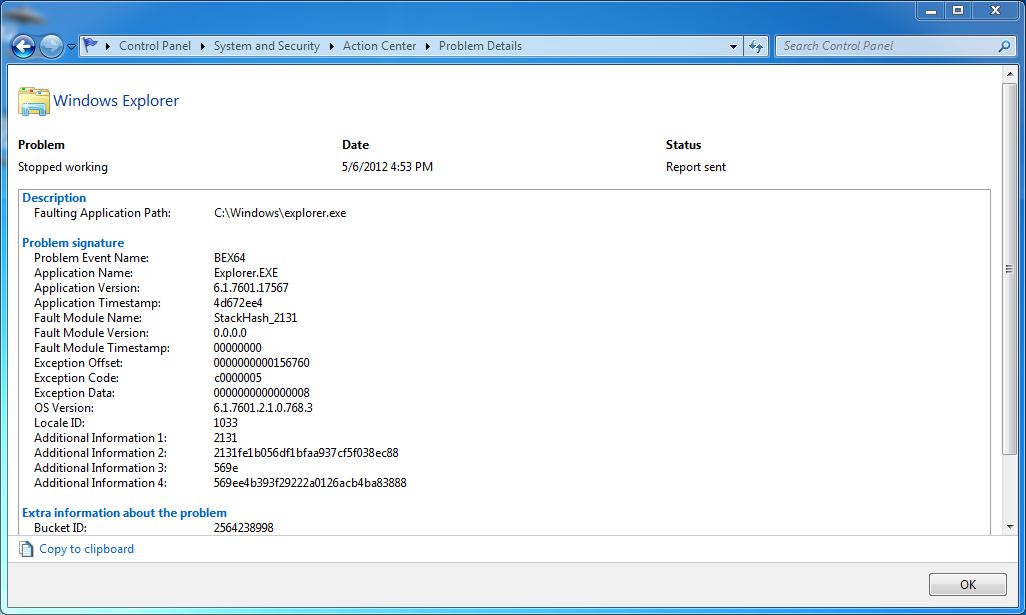
Hl7QX.jpg
 

My Computer My Computer

At a glance

Windows 7 Pro x64i5-8600K2x8GB DDR4 3000MHz CL16GTX 1080
Computer type
Laptop
Computer Manufacturer/Model Number
Clevo P750TM1-G
OS
Windows 7 Pro x64
CPU
i5-8600K
Motherboard
Z370
Memory
2x8GB DDR4 3000MHz CL16
Graphics Card(s)
GTX 1080
Sound Card
Realtek ALC899
Monitor(s) Displays
15.6" G-Sync
Screen Resolution
1920x1080 120Hz 3ms
Hard Drives
512GB SSD
1TB 7200RPM HDD
PSU
330W
Mouse
Logitech G403 Wireless
Please provide us with your Event Viewer administrative logs by following these steps:
  1. Click Start Menu
  2. Type eventvwr into Search programs and files (do not hit enter)
  3. Right click eventvwr.exe and click Run as administrator
  4. Expand Custom Views
  5. Click Administrative Events
  6. Right click Administrative Events
  7. Save all Events in Custom View As...
  8. Save them in a folder where you will remember which folder and save as Errors.evtx
  9. When asked, save the display information in English.
  10. Go to where you saved Errors.evtx
  11. Create a new folder by right clicking in a blank area within the folder Errors.evtx is saved in. You could also click New Folder at the top of the directory under the directory path box.
  12. Name the new folder Errors.
  13. Place Errors.evtx and the LocaleMetaData folder into the new Errors folder.
  14. Right click the Errors folder -> send to -> compressed (zipped) folder
  15. Upload the .zip file here.


The faulting module does not appear to be a system file, so I suspect a 3rd party application or service is conflicting with explorer.exe; http://www.sevenforums.com/tutorial...ation-conflicts-performing-clean-startup.html.
 

My Computer My Computer

At a glance

Windows 7 Home Premium 64 BitIntel(R) Core(TM)2 Quad CPU Q9550 @ 2.83GHz6.00 GB Hundai HMT125U6BFR8C-H9ATI Radeon HD 4850
Computer Manufacturer/Model Number
HP Pavilion e9110t
OS
Windows 7 Home Premium 64 Bit
CPU
Intel(R) Core(TM)2 Quad CPU Q9550 @ 2.83GHz
Motherboard
Pegatron IPIEL-LA3
Memory
6.00 GB Hundai HMT125U6BFR8C-H9
Graphics Card(s)
ATI Radeon HD 4850
Sound Card
Realtek High Definition Audio/ATI High Definition Audio
Monitor(s) Displays
Acer AL2216W
Screen Resolution
1680x1050
Hard Drives
Hitachi HDP725050GLA360 ATA Device 500 GB
PSU
Unknown/installed by HP
Case
HP generic case
Cooling
Intel Stock Cooling
Keyboard
HP Keyboard
Mouse
HP Mouse
Internet Speed
Download: 19.15 Mbps Upload: 1.67 Mbps
Other Info
Network Adapter Realtek RTL8168D/8111D Family PCI-E Gigabit Ethernet NIC (NDIS 6.20)
Network Adapter 802.11n Wireless PCI Express Card LAN Adapter
Thank you so much for your reply, writhziden. I've attached the .zip file of the log.
 

My Computer My Computer

At a glance

Windows 7 Pro x64i5-8600K2x8GB DDR4 3000MHz CL16GTX 1080
Computer type
Laptop
Computer Manufacturer/Model Number
Clevo P750TM1-G
OS
Windows 7 Pro x64
CPU
i5-8600K
Motherboard
Z370
Memory
2x8GB DDR4 3000MHz CL16
Graphics Card(s)
GTX 1080
Sound Card
Realtek ALC899
Monitor(s) Displays
15.6" G-Sync
Screen Resolution
1920x1080 120Hz 3ms
Hard Drives
512GB SSD
1TB 7200RPM HDD
PSU
330W
Mouse
Logitech G403 Wireless
The problem appears to be related to your Steam installation. You also have some sidebyside errors related to your Autodesk software. First, uninstall all Visual C++ Redistributables software through Start Menu -> Control Panel -> Uninstall a program. Then uninstall the Autodesk and Steam software the same way.

Once you have finished uninstalling the software, install the following:
Make sure to install both the x86 and x64 versions. Then install their updates through Windows Update.


Are you using any optimization software that does registry cleaning or file cleaning? Such software is known to cause problems like what you have seen...
 

My Computer My Computer

At a glance

Windows 7 Home Premium 64 BitIntel(R) Core(TM)2 Quad CPU Q9550 @ 2.83GHz6.00 GB Hundai HMT125U6BFR8C-H9ATI Radeon HD 4850
Computer Manufacturer/Model Number
HP Pavilion e9110t
OS
Windows 7 Home Premium 64 Bit
CPU
Intel(R) Core(TM)2 Quad CPU Q9550 @ 2.83GHz
Motherboard
Pegatron IPIEL-LA3
Memory
6.00 GB Hundai HMT125U6BFR8C-H9
Graphics Card(s)
ATI Radeon HD 4850
Sound Card
Realtek High Definition Audio/ATI High Definition Audio
Monitor(s) Displays
Acer AL2216W
Screen Resolution
1680x1050
Hard Drives
Hitachi HDP725050GLA360 ATA Device 500 GB
PSU
Unknown/installed by HP
Case
HP generic case
Cooling
Intel Stock Cooling
Keyboard
HP Keyboard
Mouse
HP Mouse
Internet Speed
Download: 19.15 Mbps Upload: 1.67 Mbps
Other Info
Network Adapter Realtek RTL8168D/8111D Family PCI-E Gigabit Ethernet NIC (NDIS 6.20)
Network Adapter 802.11n Wireless PCI Express Card LAN Adapter
The problem appears to be related to your Steam installation. You also have some sidebyside errors related to your Autodesk software. First, uninstall all Visual C++ Redistributables software through Start Menu -> Control Panel -> Uninstall a program. Then uninstall the Autodesk and Steam software the same way.

Once you have finished uninstalling the software, install the following:
Make sure to install both the x86 and x64 versions. Then install their updates through Windows Update.


Are you using any optimization software that does registry cleaning or file cleaning? Such software is known to cause problems like what you have seen...

Wow. That's a bombshell, but thanks so much for analyzing the log and telling me this. I had no idea that I had problems with my Steam and Autodesk Maya 2012 installations. To answer you question, I am not currently using any optimization software that does registry cleaning or file cleaning such as CCleaner, but I do use Driver Sweeper once every 3 months to remove any traces of old AMD graphics drivers when I update them quarterly. After that, I remove Driver Sweeper and reinstall it 3 months later when I need to use it again.

Now that you've taken a look at my error log, could you also, perhaps, shed a little light on this "hl2.exe has stopped working" error, problem event name "BEX?" I'm wondering if this is somehow related to my Windows Explorer crash.
View attachment 210775

As you could probably tell, my log was riddled with this error because this error gets logged every single time I exit out of a Source Engine game such as Team Fortress 2, Counter-Strike: Source, etc. The weird thing is that it gets logged without any obvious visual cue in that there is no popup or anything that appears whenever this error takes place. I would say that 99% of all errors that show up in my Reliability Monitor are due to this.
View attachment 210776

You seem very knowledgeable about the inner workings of Windows 7 and I would be absolutely ecstatic if you could pinpoint what this "hl2.exe has stopped working" error is caused by. This issue has persisted through multiple reformats of my OS and is really the only thing that is keeping my system from rock-solid stability.
 

My Computer My Computer

At a glance

Windows 7 Pro x64i5-8600K2x8GB DDR4 3000MHz CL16GTX 1080
Computer type
Laptop
Computer Manufacturer/Model Number
Clevo P750TM1-G
OS
Windows 7 Pro x64
CPU
i5-8600K
Motherboard
Z370
Memory
2x8GB DDR4 3000MHz CL16
Graphics Card(s)
GTX 1080
Sound Card
Realtek ALC899
Monitor(s) Displays
15.6" G-Sync
Screen Resolution
1920x1080 120Hz 3ms
Hard Drives
512GB SSD
1TB 7200RPM HDD
PSU
330W
Mouse
Logitech G403 Wireless
That is actually the error that I was speaking of regarding your Steam installation. After you uninstall and re-install Steam, post back whether that error stops.

Also, are you running with a clean startup at the moment? If you have antivirus software, it should be the only software in the startup list and in services that is starting. You may also want to keep the Steam and Autodesk services and startup items checked before uninstalling so the re-install does not create duplicates.
 

My Computer My Computer

At a glance

Windows 7 Home Premium 64 BitIntel(R) Core(TM)2 Quad CPU Q9550 @ 2.83GHz6.00 GB Hundai HMT125U6BFR8C-H9ATI Radeon HD 4850
Computer Manufacturer/Model Number
HP Pavilion e9110t
OS
Windows 7 Home Premium 64 Bit
CPU
Intel(R) Core(TM)2 Quad CPU Q9550 @ 2.83GHz
Motherboard
Pegatron IPIEL-LA3
Memory
6.00 GB Hundai HMT125U6BFR8C-H9
Graphics Card(s)
ATI Radeon HD 4850
Sound Card
Realtek High Definition Audio/ATI High Definition Audio
Monitor(s) Displays
Acer AL2216W
Screen Resolution
1680x1050
Hard Drives
Hitachi HDP725050GLA360 ATA Device 500 GB
PSU
Unknown/installed by HP
Case
HP generic case
Cooling
Intel Stock Cooling
Keyboard
HP Keyboard
Mouse
HP Mouse
Internet Speed
Download: 19.15 Mbps Upload: 1.67 Mbps
Other Info
Network Adapter Realtek RTL8168D/8111D Family PCI-E Gigabit Ethernet NIC (NDIS 6.20)
Network Adapter 802.11n Wireless PCI Express Card LAN Adapter
Please Bex64 Error 2016

Hello, I have recently run into the Bex64 Error and would like to ask if you could take a look, please.

It started when I was installing BitDefender. I've removed it now and run the remove tool too.

I've also gone ahead and used Revo Uninstaller, Ccleaner and Installed Webroot and Malwarebytes to make sure it was not the registry or Virus/Malware.

but unfortunately every 15 to 30 mins I get the Explorer Crash please restart.

I've included the zip that you showed how to make from earlier post.
 

My Computer My Computer

At a glance

Windows 7 Pro x64QuadCore AMD A4-6210, 1800 MHzSK Hynix HMT451S6BFR8A-PB 4 GB DDR3-1600 DDR3...AMD Radeon(TM) R3 Graphics (512 MB)
Computer type
Laptop
Computer Manufacturer/Model Number
HP
OS
Windows 7 Pro x64
CPU
QuadCore AMD A4-6210, 1800 MHz
Motherboard
Hewlett-Packard HP 355 G2
Memory
SK Hynix HMT451S6BFR8A-PB 4 GB DDR3-1600 DDR3 SDRAM
Graphics Card(s)
AMD Radeon(TM) R3 Graphics (512 MB)
Hard Drives
TOSHIBA MK2555GSX SATA Disk Device (250 GB, 5400 RPM, SATA-II)
Antivirus
Webroot SecureAnywhere
Browser
Opera & Chrome
Back
Top