Reliable temps.?

nbkp

New member
Local time
7:47 PM
Messages
68
I've noticed strange temps in SpeedFan. Only 1 seems really weird, as I don't have a liquid nitrogen cooled PC.

speedfansnip.jpg


Could I trust (any of) these temps?
 

My Computer

Computer Manufacturer/Model Number
Home grown
OS
Windows 7 Ultimate x64
CPU
AMD Phenom II X4 965BE
Motherboard
ASRock M3A790GXH/USB3
Memory
2x 2GB DDR3 PC3-12800C9 1600MHz (Corsair XMS3)
Graphics Card(s)
Gainward GTX 465 1GB GDDR5
Sound Card
Realtek HD 7.1 onboard
Monitor(s) Displays
LG Flatron W2361V
Screen Resolution
1920*1080
Hard Drives
160GB (Boot drive)
2x 500GB RAID0
PSU
G7 Extreme Power 780w
Case
XClio A380BK-36
Cooling
CPU- CNPS 9700
Keyboard
Saitek Cyborg Keyboard
Mouse
Cooler Master Storm Inferno
Internet Speed
8MBPS
it is probably a non-existant sensor that speedfan is trying to read. Since there isn't a sensor there it gives back a dummy value.
 

My Computer

Computer type
Laptop
Computer Manufacturer/Model Number
ASUS G60-RBBX05
OS
Win7 Home Premium 64x
CPU
Intel Core 2 Duo P7450 / 2.13 GHz (2.29 with Extreme Turbo)
Memory
4 GB PC-6400 Hyundai (2X2) at 800Mhz
Graphics Card(s)
NVIDIA GeForce GTX 260M 1GB DDR3 VRAM
Monitor(s) Displays
16" LED Backlit
Screen Resolution
1366 x 768 on laptop 1600x1050 max res on 22" external mon
Hard Drives
OCZ Agility 3 60GB SSD / 320 GB - Serial ATA-150 - 7200 rpm
PSU
6-cell Lithium ion { lasts 1.5 hours }
Case
ASUS G60 Laptop
Keyboard
Chicklet type back-lit (white light) keyboard
Mouse
Logitech G9 Laser Mouse 3200dpi and 1000 reports per minute
Internet Speed
Comcast 8.60mb/s up - 3.11mb/s down
Antivirus
MSE
Browser
Firefox
Other Info
General mid-budget gaming Comp. Low batterylife - High FrameRates - currently overheating problems :(

2nd Rig: Case: Rosewill BLACKHAWK Gaming ATX Mid Tower Computer Case

Mobo: GIGABYTE GA-990FXA-UD3
CPU: AMD FX-6200 Zambezi 3.8GHz (4.1GHz Turbo)
Heatsink: COOLER MASTER V8 CPU Cooler
RAM: Patriot Viper 3 8GB (2 x 4GB) 240-Pin DDR3 SDRAM 1866 (PC3 15000)
GPU: SAPPHIRE Radeon HD 6850 1GB 2
it is probably a non-existant sensor that speedfan is trying to read. Since there isn't a sensor there it gives back a dummy value.

K thanks, juts one more thing.

My fan speeds look quite low, but I think I have no control over the speed. I cannot change it in BIOS, and I also can't chancge it with SpeedFan, and one other program which I can't remember.
 

My Computer

Computer Manufacturer/Model Number
Home grown
OS
Windows 7 Ultimate x64
CPU
AMD Phenom II X4 965BE
Motherboard
ASRock M3A790GXH/USB3
Memory
2x 2GB DDR3 PC3-12800C9 1600MHz (Corsair XMS3)
Graphics Card(s)
Gainward GTX 465 1GB GDDR5
Sound Card
Realtek HD 7.1 onboard
Monitor(s) Displays
LG Flatron W2361V
Screen Resolution
1920*1080
Hard Drives
160GB (Boot drive)
2x 500GB RAID0
PSU
G7 Extreme Power 780w
Case
XClio A380BK-36
Cooling
CPU- CNPS 9700
Keyboard
Saitek Cyborg Keyboard
Mouse
Cooler Master Storm Inferno
Internet Speed
8MBPS
Some motherboards/BIOS do not allow these types of modifications. the fan speed will probably change automatically when temps raise due to gaming and such.
 

My Computer

Computer type
Laptop
Computer Manufacturer/Model Number
ASUS G60-RBBX05
OS
Win7 Home Premium 64x
CPU
Intel Core 2 Duo P7450 / 2.13 GHz (2.29 with Extreme Turbo)
Memory
4 GB PC-6400 Hyundai (2X2) at 800Mhz
Graphics Card(s)
NVIDIA GeForce GTX 260M 1GB DDR3 VRAM
Monitor(s) Displays
16" LED Backlit
Screen Resolution
1366 x 768 on laptop 1600x1050 max res on 22" external mon
Hard Drives
OCZ Agility 3 60GB SSD / 320 GB - Serial ATA-150 - 7200 rpm
PSU
6-cell Lithium ion { lasts 1.5 hours }
Case
ASUS G60 Laptop
Keyboard
Chicklet type back-lit (white light) keyboard
Mouse
Logitech G9 Laser Mouse 3200dpi and 1000 reports per minute
Internet Speed
Comcast 8.60mb/s up - 3.11mb/s down
Antivirus
MSE
Browser
Firefox
Other Info
General mid-budget gaming Comp. Low batterylife - High FrameRates - currently overheating problems :(

2nd Rig: Case: Rosewill BLACKHAWK Gaming ATX Mid Tower Computer Case

Mobo: GIGABYTE GA-990FXA-UD3
CPU: AMD FX-6200 Zambezi 3.8GHz (4.1GHz Turbo)
Heatsink: COOLER MASTER V8 CPU Cooler
RAM: Patriot Viper 3 8GB (2 x 4GB) 240-Pin DDR3 SDRAM 1866 (PC3 15000)
GPU: SAPPHIRE Radeon HD 6850 1GB 2

My Computer

Computer type
PC/Desktop
Computer Manufacturer/Model Number
Custom
OS
Win 10 Home Premium 64 Bit
CPU
I7 5930K @ 4.5
Motherboard
Asus X99 s
Memory
16GB Kingston Hyper X Fury DDR4
Graphics Card(s)
EVGA 980ti SC + ACX 2.0
Sound Card
Onboard
Monitor(s) Displays
ROG Swift PG278Q
Screen Resolution
2560x1440
Hard Drives
Kingston Hyper X 250gb SSD
Samsung 2TB mechanical
PSU
Corsair RM 850
Case
NZXT H440 Red
Cooling
Corsair H100i GTX
Keyboard
Razer Reclusa
Mouse
Logitech G5 Gamer
Internet Speed
34mb
Antivirus
Eset Smart Security
Browser
Firefox
I've noticed strange temps in SpeedFan. Only 1 seems really weird, as I don't have a liquid nitrogen cooled PC.

speedfansnip.jpg


Could I trust (any of) these temps?
One thing about your temps. Temp1, which is usually the CPU temp, seems a tad warm, but it may actually be something else. I think you have a Brisbane core Athlon, judging by the number (I have a 5000+ with the same core in my server), and they have a notorious core temp diode sensor bug, that doesn't read the core temp properly. You can't trust the core temp that most programs will give you. I've read on the AMD forums that you can often approximate by offsetting the core temp value by 23C, but that is not true with mine. Mine bounces all over the place and is completely unreliable.

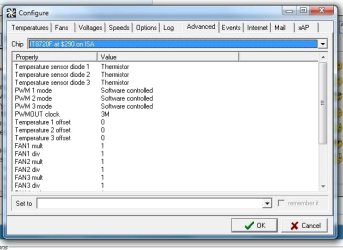
Most ASUS boards have the CPU thermal sensor in reasonable proximity to the CPU itself, and it's usually accurate within a degree or two. Your fan speeds are rather low. Do you have Cool and Quiet enabled? If Temp1 is actually showing your CPU temp, that's quite high. I think you can safely ignore Temp2, as it doesn't seem to be attached to a sensor. It might be an idea to check in the configure\advanced tab in speedfan:

WEI005.jpg

And make sure your offsets are at zero.

Also, can you post your CPU's Vcore Voltage? You can get that with CPUID. CPUID also makes a good hardware monitor that allows a comparison with Speedfan. Coretemp will give you a false reading because of the Brisbane core temp bug, but I would be interested to see what you get from CPUID's HWMonitor.
 

My Computer

Computer type
PC/Desktop
Computer Manufacturer/Model Number
Mellon Labs (custom build)
OS
Win 7 Pro x64/Win 10 Pro x64 dual boot
CPU
AMD FX 8350 Vishera @ 4200
Motherboard
ASUS M5A97 R2.0
Memory
16 GB Mushkin Blackline DDR3-2400 @ 1866 (9-10-10-10-31)
Graphics Card(s)
XFX Radeon R9 280 Double D Black Edition
Sound Card
Realtek HD Audio on MB. Sounds great.
Monitor(s) Displays
Acer 24", Acer 22"
Screen Resolution
3840 x 1080
Hard Drives
1 x Mushkin Chronos 120 GB SSD (Win 10)
1 x Samsung 850 EVO 250 GB SSD (Win 7)
1 x WD 1TB SATA Blue
1 x WD 1TB SATA Green
PSU
Corsair TX-750
Case
CoolerMaster HAF 912+
Cooling
Coolermaster Seidon 240M Liquid AIO. 6 case fans
Keyboard
Logitech G710+
Mouse
Logitech G500s
Internet Speed
Much better since I got fiber, but still way overpriced.
Antivirus
MSE, Malware Bytes for scanning
Browser
Firefox
Other Info
Corsair VOID USB headphones.

A Mellon Labs X-1 - LCD Smartie driven system status display.

Brought to you by the letter E
Back
Top