Remapping keyboard for current user only

jbum

New member
Local time
12:00 AM
Messages
9
Hi,

I'm not sure if this is the right forum but "customizations" is the closest thing topic I can think of for my problem.

I used to use the scancode map registry key to remap my ctrl/caps lock/esc key in Windows XP. I was able to do this system wide or just for a particular user (hkey_current_user key).

However, in Windows 7 (and possibly Vista), the user only setting does not take effect.

Does anyone know anything about this? Has that support been dropped?
The key I use is hkey_current_user/keyboard layout/scancode map.

Thanks!
jbum
 

My Computer

OS
Windows 7
Hi,

I'm not sure if this is the right forum but "customizations" is the closest thing topic I can think of for my problem.

I used to use the scancode map registry key to remap my ctrl/caps lock/esc key in Windows XP. I was able to do this system wide or just for a particular user (hkey_current_user key).

However, in Windows 7 (and possibly Vista), the user only setting does not take effect.

Does anyone know anything about this? Has that support been dropped?
The key I use is hkey_current_user/keyboard layout/scancode map.

Thanks!
jbum

Jbum

It may still work, but the key may be different. Win 7 has a slew of new keys and values. Isnt there another app that would do the same thing?


Ken
 

My Computer

Computer Manufacturer/Model Number
HP Pavillion dv-7 1005 Tx
OS
Win 8 Release candidate 8400
CPU
[email protected]
Memory
4 gigs
Graphics Card(s)
Nvidia 9600M
Sound Card
HD built-in
Monitor(s) Displays
17" Wxga
Screen Resolution
1440x900
Cooling
none
Internet Speed
45Mb down 5Mb up

My Computer

Computer Manufacturer/Model Number
Apple Macbook Pro (April 2009)
OS
W7 Ult. x64 | OS X
CPU
Intel Mobile Core 2 Duo 2.93Ghz [T9800 Penryn]
Motherboard
NVIDIA nForce 730i Rev. B1 [Mac-F2268EC8 (U2E1)]
Memory
4096MB Samsung DDR3 Dual Channel [PC3-8500F 1066Mhz]
Graphics Card(s)
NVIDIA GeForce 9600M GT 512MB [G96M Rev. C1]
Sound Card
SB X-Fi Surround 5.1 USB | Onboard Realtek (Disabled)
Monitor(s) Displays
Acer x223wbd 22" | Apple Anti-Glare 17" (Disabled)
Screen Resolution
{Current} 1440x900 {Acer} 1680x1050 {Apple} 1920x1200
Hard Drives
{Internal}
Seagate Momentus 320GB 2.5" 7200RPM [ST9320421AS]

{Externals}
LaCie 320GB USB 2.0 HDD [301284UR]
LaCie 750GB USB 2.0 FW400 eSATA HDD [301314U]
LaCie 1TB USB 2.0 HDD [301304UR]
PSU
Magsafe
Case
Aluminum/Unibody (MBP52)
Cooling
2 x 6000 RPM Fans
Keyboard
Logitech G-15v2 [PN 920-000379]
Mouse
Logitech G-9 [PN 910-000338]
Internet Speed
12Mbps/2.5Mbps w/ 24Mbps Speed Boost [Comcast]
Other Info
Logitech X-540 Speakers [PN 970223-0122]
Sennheiser PC-151 Headset
Hi,

I'm not sure if this is the right forum but "customizations" is the closest thing topic I can think of for my problem.

I used to use the scancode map registry key to remap my ctrl/caps lock/esc key in Windows XP. I was able to do this system wide or just for a particular user (hkey_current_user key).

However, in Windows 7 (and possibly Vista), the user only setting does not take effect.

Does anyone know anything about this? Has that support been dropped?
The key I use is hkey_current_user/keyboard layout/scancode map.

Thanks!
jbum

Jbum

It may still work, but the key may be different. Win 7 has a slew of new keys and values. Isnt there another app that would do the same thing?


Ken

Perhaps it's configure using a different key now but I have no clue what that would be. I'm not really using an app to do this currently.
 

My Computer

OS
Windows 7
I don't see anything in my registry that has that value in HKEY_Current_User/Keyboard

You can try this program, don't know much about it though:
KeyTweak Homepage

Or try this method:
Map Any Key to Any Key on Windows 7 / XP / Vista - How-To Geek

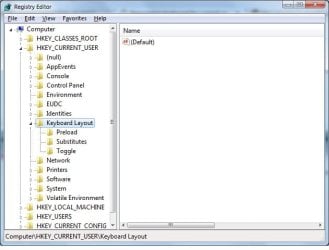
I've attached a screenshot of my registry to show you the "Keyboard Layout" entry.

I tried using the KeyTweak app but that creates a 'system wide' registry entry, which I don't want. There doesn't seem to be a way to do it for a particular user. I share my computer with others and do not want to affect the keyboard mapping for the entire computer.

I believe the second link points to an app that does the same thing. Both apps write to the registry under hkey_local_machine/*/*/*/Keyboard Layout

Thanks.
 

Attachments

  • registry.jpg
    registry.jpg
    33.7 KB · Views: 62

My Computer

OS
Windows 7

My Computer

Computer type
PC/Desktop
Computer Manufacturer/Model Number
Medion Erazer (note to self: insert model number) - with custom additions
OS
Windows 10 Pro x64
CPU
Intel Core i5 7400 @ 3.00GHz
Motherboard
OEM supllied with PC
Memory
8GB 2133Mhz DDR4 (OEM supplied)
Graphics Card(s)
Gygabyte Windforce GTX 1050Ti (Factory Overclocked)
Sound Card
Realtek
Monitor(s) Displays
Acer Al1980 + HKC
Screen Resolution
1360*768(HKC) / 1280*1024(Acer)
Hard Drives
1TB Toshiba
1TB WD Caviar Green
120GB Samsung Evo 840
PSU
OEM supplied (no power rating on case)
Case
OEM Supplied
Cooling
Stock
Keyboard
Logitech Wireless
Mouse
Logitect Wireless
Internet Speed
40Mb/s Down 10Mb/s Up
Antivirus
Defender
Browser
Firefox
Thanks for trying to help but "KeyTweak" was already mentioned by a previous poster. I tried it and it configures the "system" level keyboard mappings.

I am not interested in system level tweaks that affects "all" users. I just want to configure it for my account only.

In Windows XP and previous versions of Windows, I was able to create a hkey_current_user/Keyboard Layout/Scancode Map entry to do this just for my account. Apparently, this support was removed or there is a bug preventing this from working.

Would love to know if anyone knows or if there is a contact info for MS support.
 

My Computer

OS
Windows 7
Back
Top