
Remember Folders View

Falco77

New member
Local time
5:00 PM
Messages
40
Hi all, I would like to know, how can I make Windows 7 to remember each view of my folders? Indeed, I can't do it, and if I change the view just in one folder it changes it the same way on the previous and others folders. Ain't so happy when it does that...
 

My Computer

OS
Windows 7 Public Beta x64 Build 7000
Great. Now if only we had a way for Win7 to remember our folder window size. :(
 

My Computer

Computer Manufacturer/Model Number
Custom
OS
Windows 7
CPU
Pentium D 2.66
Motherboard
Asus P5ND2-SLi
Memory
4 gigs DDR2
Graphics Card(s)
BFG nVidia 8600 GT OC
Sound Card
nForce 4 (realtek)
Monitor(s) Displays
Samsung 204B
Screen Resolution
1600x1200
Hard Drives
Western Digital Raptor 150
Western Digital 320 (both SATA)
PSU
BFG 600 watt
Cooling
fan
Keyboard
MS Natural
Mouse
MS Sidewinder
Internet Speed
10 mb
Hello FreakyFerret,

As a test, size the window how you like it, close it, and open the same window again to see if it opens the same size as it was last closed.
 

My Computer

Computer type
PC/Desktop
Computer Manufacturer/Model Number
Self built custom
OS
64-bit Windows 11 Pro for Workstations
CPU
Intel i7-8700K OC'd to 5 GHz
Motherboard
ASUS ROG Maximus XI Formula Z390
Memory
64 GB (4x16GB) G.SKILL TridentZ RGB DDR4 3600 MHz
Graphics Card(s)
ASUS ROG-STRIX-GTX1080TI-O11G-GAMING
Sound Card
Integrated
Monitor(s) Displays
2 x Samsung Odyssey G7 27"
Screen Resolution
2560x1440
Hard Drives
1TB Samsung 990 PRO M.2,
4TB Samsung 990 PRO PRO M.2,
TerraMaster F8 SSD Plus NAS
PSU
Seasonic Prime Titanium 850W
Case
Thermaltake Core P3
Cooling
Corsair Hydro H115i
Keyboard
Logitech wireless K800
Mouse
Logitech MX Master 4
Internet Speed
2 Gb/s Download and 100 Mb/s Upload
Antivirus
Malwarebyte Anti-Malware Premium
Browser
Google Chrome
Other Info
Logitech Z625 speaker system,
Logitech BRIO 4K Pro webcam,
HP Color LaserJet Pro MFP M477fdn,
APC SMART-UPS RT 1000 XL - SURT1000XLI,
Galaxy S23 Plus phone
Hey Brink. It will. However, if I open a different window, change the size to what I want, then open the first window, the first window is the size of the second window.

In XP, each "folder" window remember its individual sizes. :huh:
 

My Computer

Computer Manufacturer/Model Number
Custom
OS
Windows 7
CPU
Pentium D 2.66
Motherboard
Asus P5ND2-SLi
Memory
4 gigs DDR2
Graphics Card(s)
BFG nVidia 8600 GT OC
Sound Card
nForce 4 (realtek)
Monitor(s) Displays
Samsung 204B
Screen Resolution
1600x1200
Hard Drives
Western Digital Raptor 150
Western Digital 320 (both SATA)
PSU
BFG 600 watt
Cooling
fan
Keyboard
MS Natural
Mouse
MS Sidewinder
Internet Speed
10 mb
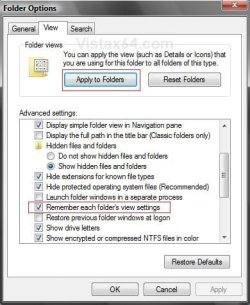
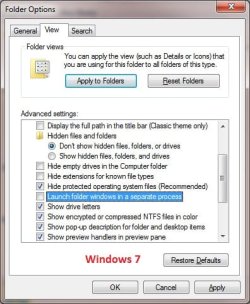
Well, it looks like this option was removed in Windows 7 from Vista. Not good. :(

I would recommend to send feedback to Microsoft on this. Hopefully with enough feedback they will add it back.

Vista.jpgWindows7.jpg
 

My Computer

Computer type
PC/Desktop
Computer Manufacturer/Model Number
Self built custom
OS
64-bit Windows 11 Pro for Workstations
CPU
Intel i7-8700K OC'd to 5 GHz
Motherboard
ASUS ROG Maximus XI Formula Z390
Memory
64 GB (4x16GB) G.SKILL TridentZ RGB DDR4 3600 MHz
Graphics Card(s)
ASUS ROG-STRIX-GTX1080TI-O11G-GAMING
Sound Card
Integrated
Monitor(s) Displays
2 x Samsung Odyssey G7 27"
Screen Resolution
2560x1440
Hard Drives
1TB Samsung 990 PRO M.2,
4TB Samsung 990 PRO PRO M.2,
TerraMaster F8 SSD Plus NAS
PSU
Seasonic Prime Titanium 850W
Case
Thermaltake Core P3
Cooling
Corsair Hydro H115i
Keyboard
Logitech wireless K800
Mouse
Logitech MX Master 4
Internet Speed
2 Gb/s Download and 100 Mb/s Upload
Antivirus
Malwarebyte Anti-Malware Premium
Browser
Google Chrome
Other Info
Logitech Z625 speaker system,
Logitech BRIO 4K Pro webcam,
HP Color LaserJet Pro MFP M477fdn,
APC SMART-UPS RT 1000 XL - SURT1000XLI,
Galaxy S23 Plus phone
Thanks, Brink. That was the first thing I did once I installed 7 a while back.

I tend to have a lot of folders open at once. So much I made a specialized toolbar on the taskbar that points to a shortcut for each one. I have a computer that acts like a file server and download machine. I keep this one as lean as possible since it's for gaming and my main machine. The file server has a USB 1 TB drive the house shares. I have folders pointing to --

A personal storage folder on a USB drive on the "server"
Burn subfolder
Games subfolderA subfolder in the games one
Movies folder
TV show folder
Downloads folder

Each folder has a particular window size that is optimal for having them all open at once. This "all windows = 1 size" thing is annoying. :mad:
 

My Computer

Computer Manufacturer/Model Number
Custom
OS
Windows 7
CPU
Pentium D 2.66
Motherboard
Asus P5ND2-SLi
Memory
4 gigs DDR2
Graphics Card(s)
BFG nVidia 8600 GT OC
Sound Card
nForce 4 (realtek)
Monitor(s) Displays
Samsung 204B
Screen Resolution
1600x1200
Hard Drives
Western Digital Raptor 150
Western Digital 320 (both SATA)
PSU
BFG 600 watt
Cooling
fan
Keyboard
MS Natural
Mouse
MS Sidewinder
Internet Speed
10 mb
With Vista, XDN Tweaker was a life saver for me, I nearly gave up on Vista until finding this.

XdN » XdN Tweaker

I've not had any problem with 7 not remembering folder views, 'yet', but XDN Tweaker supports win 7.
 

My Computer

Computer Manufacturer/Model Number
Self Build
OS
Windows RC 7100 x64, Vista Ultimate x64,
CPU
Intel Q6700
Motherboard
Asus P5Q3 Deluxe wi-fi
Memory
Corsair DDR3 4gb
Graphics Card(s)
ATI X1650
Monitor(s) Displays
LCD
Hard Drives
WD 1500gb 10k
WD 320gb 7.5k
WD 320gb 7.5k
Samsung 750gb 7.5k
PSU
Enermax 500w
Case
Lian-Li PC-7B Plus
Cooling
Scythe Infinity
Keyboard
Logitech cordless
Mouse
Logitech cordless
Internet Speed
20meg Cable
DJS, 7 remembers my folder views. It doesn't remember the size of the window for each folder.
 

My Computer

Computer Manufacturer/Model Number
Custom
OS
Windows 7
CPU
Pentium D 2.66
Motherboard
Asus P5ND2-SLi
Memory
4 gigs DDR2
Graphics Card(s)
BFG nVidia 8600 GT OC
Sound Card
nForce 4 (realtek)
Monitor(s) Displays
Samsung 204B
Screen Resolution
1600x1200
Hard Drives
Western Digital Raptor 150
Western Digital 320 (both SATA)
PSU
BFG 600 watt
Cooling
fan
Keyboard
MS Natural
Mouse
MS Sidewinder
Internet Speed
10 mb
That option was removed from the Folder options because it's now the Default behavior for Windows and is no longer needed.
I don't think there's more than 5 people in the World who didn't have that option enabled so it just made sense for MS to make it the default.

Although, when I first installed 7048, I was having trouble with Notepad not opening in it's last dragged position and size for the first few times. Now it remembers properly
 

My Computer

Computer Manufacturer/Model Number
Personal Build
OS
Vista Ult 64bit - Windows 7 Ult 7264 64bit
CPU
Intel Core 2 Duo E6750
Motherboard
Asus Commando
Memory
4 G's Crucial Ballistix Tracer
Graphics Card(s)
BFG Nvidia 8800 GTS 340
Sound Card
Creative Sound Blaster X-FI Platinum FATAL1TY
Monitor(s) Displays
2-22" HP W2207 LCD
Screen Resolution
1920 x 1080
Hard Drives
3 x 500G WD Caviar SATA II
PSU
Enermax Noise Taker II 600W
Case
NZXT Lexa Classic (dual doored & windowed)
Cooling
Zalman 9700 CPU cooler - 4 x 120mm, 1 x 90mm fans
Keyboard
Logitech MX 5500
Mouse
Logitech MX Revolution
Internet Speed
Blazing...
Chappy, are you saying your individual folders open to their last size?

For instance, you open Music folder so it only takes up lower left quarter of screen.
Then open Videos folder so it takes up the upper left quarter.
Then close Music. Then close Videos.
When you reopen Music, it's back at the bottom, not at the top?
 

My Computer

Computer Manufacturer/Model Number
Custom
OS
Windows 7
CPU
Pentium D 2.66
Motherboard
Asus P5ND2-SLi
Memory
4 gigs DDR2
Graphics Card(s)
BFG nVidia 8600 GT OC
Sound Card
nForce 4 (realtek)
Monitor(s) Displays
Samsung 204B
Screen Resolution
1600x1200
Hard Drives
Western Digital Raptor 150
Western Digital 320 (both SATA)
PSU
BFG 600 watt
Cooling
fan
Keyboard
MS Natural
Mouse
MS Sidewinder
Internet Speed
10 mb
Now it works fine for me. Don't need the option haha.

(Sorry double post.)
 

My Computer

OS
Windows 7 Public Beta x64 Build 7000
Falco77,

I'm happy to hear that it is working for you now. Was there anything that you did to get it to work for you?
 

My Computer

Computer type
PC/Desktop
Computer Manufacturer/Model Number
Self built custom
OS
64-bit Windows 11 Pro for Workstations
CPU
Intel i7-8700K OC'd to 5 GHz
Motherboard
ASUS ROG Maximus XI Formula Z390
Memory
64 GB (4x16GB) G.SKILL TridentZ RGB DDR4 3600 MHz
Graphics Card(s)
ASUS ROG-STRIX-GTX1080TI-O11G-GAMING
Sound Card
Integrated
Monitor(s) Displays
2 x Samsung Odyssey G7 27"
Screen Resolution
2560x1440
Hard Drives
1TB Samsung 990 PRO M.2,
4TB Samsung 990 PRO PRO M.2,
TerraMaster F8 SSD Plus NAS
PSU
Seasonic Prime Titanium 850W
Case
Thermaltake Core P3
Cooling
Corsair Hydro H115i
Keyboard
Logitech wireless K800
Mouse
Logitech MX Master 4
Internet Speed
2 Gb/s Download and 100 Mb/s Upload
Antivirus
Malwarebyte Anti-Malware Premium
Browser
Google Chrome
Other Info
Logitech Z625 speaker system,
Logitech BRIO 4K Pro webcam,
HP Color LaserJet Pro MFP M477fdn,
APC SMART-UPS RT 1000 XL - SURT1000XLI,
Galaxy S23 Plus phone
Not really. I saw that in other folders than those in Libraries I was able tu change the view of the folders whereas in Libraries where are Documets, Pictutes, Videos etc... when you try to change the view it changes it also in the previous folders. Strange a little bit.
 

My Computer

OS
Windows 7 Public Beta x64 Build 7000
Yeah, that would be normal. A Library is used to group all the of the included folders from different locations in the Library together to make them easier to access. As you have figured out, all changes made in any of the included folders in a Library will be made to all of them. However, changes made Windows Explorer should be remembered per folder instead.
 

My Computer

Computer type
PC/Desktop
Computer Manufacturer/Model Number
Self built custom
OS
64-bit Windows 11 Pro for Workstations
CPU
Intel i7-8700K OC'd to 5 GHz
Motherboard
ASUS ROG Maximus XI Formula Z390
Memory
64 GB (4x16GB) G.SKILL TridentZ RGB DDR4 3600 MHz
Graphics Card(s)
ASUS ROG-STRIX-GTX1080TI-O11G-GAMING
Sound Card
Integrated
Monitor(s) Displays
2 x Samsung Odyssey G7 27"
Screen Resolution
2560x1440
Hard Drives
1TB Samsung 990 PRO M.2,
4TB Samsung 990 PRO PRO M.2,
TerraMaster F8 SSD Plus NAS
PSU
Seasonic Prime Titanium 850W
Case
Thermaltake Core P3
Cooling
Corsair Hydro H115i
Keyboard
Logitech wireless K800
Mouse
Logitech MX Master 4
Internet Speed
2 Gb/s Download and 100 Mb/s Upload
Antivirus
Malwarebyte Anti-Malware Premium
Browser
Google Chrome
Other Info
Logitech Z625 speaker system,
Logitech BRIO 4K Pro webcam,
HP Color LaserJet Pro MFP M477fdn,
APC SMART-UPS RT 1000 XL - SURT1000XLI,
Galaxy S23 Plus phone
Back
Top