Remote Desktop Connection (RDC) - Network

How to Enable Windows to Make and Accept a Remote Desktop Connection

   Information
This tutorial will show you how to enable Remote Desktop Connection, and to connect remotely in Vista, Windows 7, and Windows 8.


   Warning
While all editions of Vista, Windows 7, and Windows 8 can be a remote desktop client...
  • Only the Vista Business, Ultimate, and Enterprise editions can host a remote desktop connection.
  • Only the Windows 7 Professional, Ultimate, and Enterprise editions can host a remote desktop connection.
  • Only the Windows 8 Pro and Enterprise editions can host a remote desktop connection.


FIRST

To Enable Remote Connection


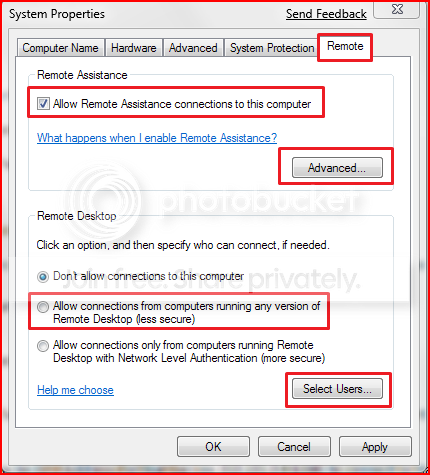
1. Go to Control Panel>System>Advanced System Settings
SystemProperties.png

2. Go to Remote tab.

3. Under Remote Assistance, put a check mark on Allow Remote Assistance connections to this computer.
Note: This automatically adds Remote Desktop exception to Windows Firewall.

4. Click on Apply.


OPTION ONE

To Connect to a Remote Desktop (Local Area Connectivity)


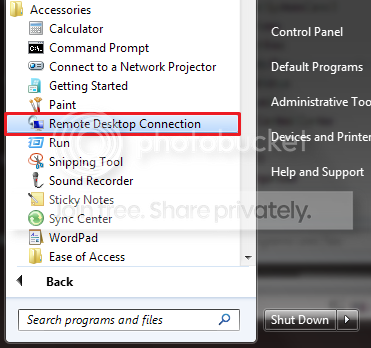
1. Go to Start>All Programs>Accessories>Remote Desktop Connection
NOTE: You could also press the Windows + R keys to open the Run dialog, type mstsc.exe, and press Enter.
RDCLocation.png

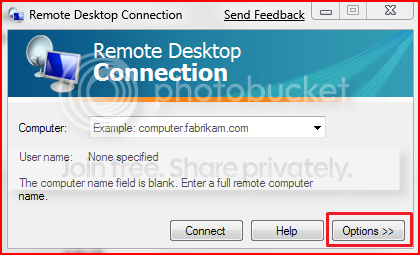
2. Enter the Computer Name or IP address of the computer you wish to connect to.
RemoteDesktopConnection.png

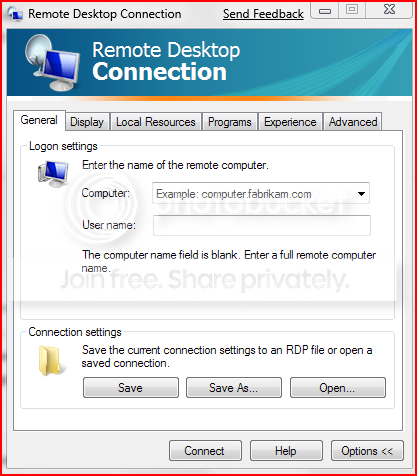
3. For more connection options, click on Options
NOTE: Here you can save the connection profile, adjust display properties, run specified programs upon connection, adjust connection bandwidth, etc. For more information on specific tabs, click on Help.
RemoteDesktopConnectionExpanded.png

4. Click on Connect.

5. Enter your log in credentials of a user account on the remote computer that is allowed to do a remote desktop connection.
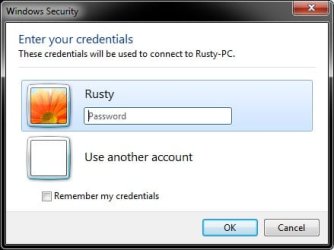
Credentials.jpg


OPTION TWO

Enable Windows to Accept Remote Desktop Connection (Local Area Connectivity)


1. Go to Control Panel>System>Advanced System Settings
SystemProperties.png

2. Go to Remote tab.

3. Under Remote Assistance, put a check mark on Allow Remote Assistance connections to this computer
Note: This automatically adds Remote Desktop exception in Windows Firewall.

4. Click on Advanced...
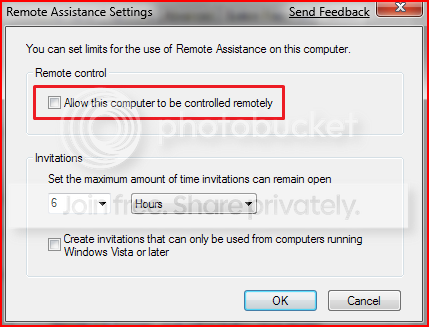
RemoteAssistantSettings.png

5. Put a check mark on Allow this computer to be controlled remotely.

6. Click on OK.
Note: This automatically adds Remote Assistance exception in Windows Firewall.

7. Remote Desktop Connection behind a router (Single computer)
A) Configure your router's port forwarding to allow connections on port 3389
B) Now in RDC just type the IP address supplied by your ISP
8. Remote Desktop Connection behind a router (Multiple computers)
A) For each computer you want to remotely connect to you have to configure each computer to listen to different ports to avoid port conflicts by changing the registry key in:

HKEY_LOCAL_MACHINE\System\CurrentControlSet\Control\Terminal Server\WinStations\RDP-Tcp\PortNumber
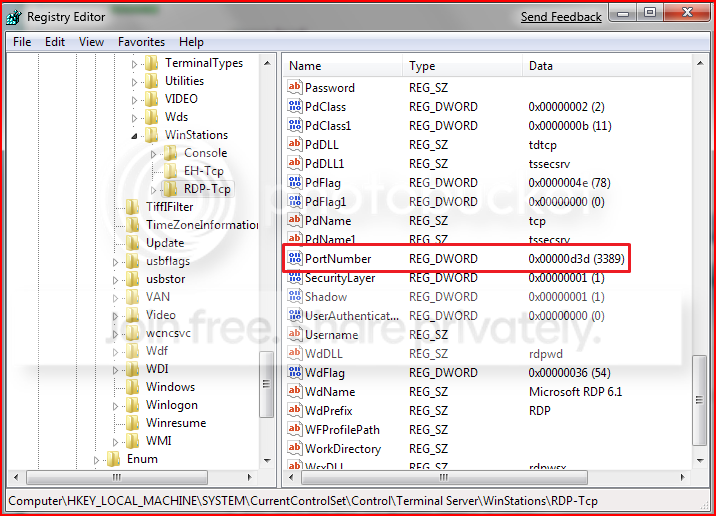
PortConfiguration.png

B) Port Numbers are in Decimal format
Note: To avoid conflict with other programs it is suggested to select a port between 49152 and 65535.

C) Now take that number you've chosen your computer to listen to and configure your router to port forward to that number

D) To connect to that computer your format will now be ISPIPAddress:PortNumber (ex. 222.222.2.8:1234) to connect to that specific computer behind the router
Important: If you have a firewall software running, that too has to be configured to allow communication to the port you opened in your router as well.

Note: The above steps assumes that you're not part of a domain.

 
Last edited by a moderator:
Hi everyone,

I'm having an odd issue with RDP. I have two computers with Windows 7 Ultimate on each. I can remote in ONCE from one computer to the other, but when I disconnect I have to go to the other computer and manually reboot before I can connect again. Does anyone have any idea what might be going on?

I'm running ZoneAlarm Antivirus 2010 on both PCs if that matters.

Thanks!
 

My Computer

OS
Windows 7 Ultimate
Welcome Mr Cmonster!

It sounds like a firewall/antivirus is causing the issue here. I suggest disabling ZA on your host machine for the time being.
 

My Computer

Computer Manufacturer/Model Number
Custom
OS
Windows 7 Professional x64
CPU
Intel i7 2600K OC'd @ 4620 MHz
Motherboard
Asus P8Z68-V Pro
Memory
16GB GSkill Sniper 2133 Mhz (4x4GB)
Graphics Card(s)
EVGA GeForce GTX 480 SuperClocked+
Sound Card
Realtek High Definition Audio
Monitor(s) Displays
2x Acer S273HLbmii 27"
Screen Resolution
2 x 1920x1080
Hard Drives
64GB Crucial M4 SSD

Storage: Hitachi 1TB 5400RPM, Samsung 1.5TB 5400RPM
PSU
Corsair HW Series 750w (modular)
Case
Cooler Master HAF 932 Advanced Blue Edition
Cooling
CM Hyper 212+ CPU cooler, 3x 230mm + 1x 140mm case fans
Keyboard
Logitech MK320 (wireless)
Mouse
Logitech MK320 (wireless)
Internet Speed
30 Mb/s : 2 Mb/s
when I try remote access to my PC with my other PC it dont let. I tryed to access with my IP
 

My Computer

Computer type
PC/Desktop
Computer Manufacturer/Model Number
Custom Built
OS
Windows 7 Ultimate x64 Service Pack 1
CPU
Intel Core i7-3770K Ivy Bridge Quad-Core 3.5GHz (4180.19MHz)
Motherboard
ASUS P8Z77-V LX
Memory
Corsair 32GB (4 x 8GB) Vengeance, DDR3 1600MHz, CL10, 1.5V
Graphics Card(s)
Asus GeForce DUAL-GTX1060-O6G
Sound Card
Asus XONAR DG, 90-YAA0K0-0UAN0BZ
Monitor(s) Displays
Iiyama 24" XB2483HSU, BenQ GW2470HL 24", UE32EH4005
Screen Resolution
1920x1080 60Hz, 1920x1080 60Hz, 1366x768 60Hz
Hard Drives
WDS500G1B0A-00H9H0, S3Z9NB0K316712Z, S3YVNB0KB15768W, ST2000DM001-1CH164, ST3000DM002-1BJ166, ST3000DM008-2DM166
PSU
Corsair PSU TX V2 750W 14CM ATX2.31 80+
Case
Fractal Design Define R6 - Black, ATX
Cooling
CORSAIR Hydro Series H100z Liquid Cooler
Keyboard
Logitech Gaming Keyboard G510
Mouse
SteelSeries RIVAL 500 GAMING MOUSE
Internet Speed
ADSL, 350/20Mbit/s FullRate
Antivirus
Malwarebytes Premium 3.7.1 + Windows Defender
Browser
Mozilla Firefox, Google Chrome
Other Info
TP-Link TG-3468 PCI-Express Gigabit Network Card
What OS are both of them? Home Premium, Professional, Ultimate?
 

My Computer

Computer Manufacturer/Model Number
Custom
OS
Windows 7 Professional x64
CPU
Intel i7 2600K OC'd @ 4620 MHz
Motherboard
Asus P8Z68-V Pro
Memory
16GB GSkill Sniper 2133 Mhz (4x4GB)
Graphics Card(s)
EVGA GeForce GTX 480 SuperClocked+
Sound Card
Realtek High Definition Audio
Monitor(s) Displays
2x Acer S273HLbmii 27"
Screen Resolution
2 x 1920x1080
Hard Drives
64GB Crucial M4 SSD

Storage: Hitachi 1TB 5400RPM, Samsung 1.5TB 5400RPM
PSU
Corsair HW Series 750w (modular)
Case
Cooler Master HAF 932 Advanced Blue Edition
Cooling
CM Hyper 212+ CPU cooler, 3x 230mm + 1x 140mm case fans
Keyboard
Logitech MK320 (wireless)
Mouse
Logitech MK320 (wireless)
Internet Speed
30 Mb/s : 2 Mb/s
PC OS what i use is Win7 Ultimate 64bit and that other PC OS is WinXP Pro SP3 32bit
I was wondering, can i somehow start up my PC by remote? I really would like it so, if im not home and my PC is off, I can start up PC by remote. IS it possible so?
 

My Computer

Computer type
PC/Desktop
Computer Manufacturer/Model Number
Custom Built
OS
Windows 7 Ultimate x64 Service Pack 1
CPU
Intel Core i7-3770K Ivy Bridge Quad-Core 3.5GHz (4180.19MHz)
Motherboard
ASUS P8Z77-V LX
Memory
Corsair 32GB (4 x 8GB) Vengeance, DDR3 1600MHz, CL10, 1.5V
Graphics Card(s)
Asus GeForce DUAL-GTX1060-O6G
Sound Card
Asus XONAR DG, 90-YAA0K0-0UAN0BZ
Monitor(s) Displays
Iiyama 24" XB2483HSU, BenQ GW2470HL 24", UE32EH4005
Screen Resolution
1920x1080 60Hz, 1920x1080 60Hz, 1366x768 60Hz
Hard Drives
WDS500G1B0A-00H9H0, S3Z9NB0K316712Z, S3YVNB0KB15768W, ST2000DM001-1CH164, ST3000DM002-1BJ166, ST3000DM008-2DM166
PSU
Corsair PSU TX V2 750W 14CM ATX2.31 80+
Case
Fractal Design Define R6 - Black, ATX
Cooling
CORSAIR Hydro Series H100z Liquid Cooler
Keyboard
Logitech Gaming Keyboard G510
Mouse
SteelSeries RIVAL 500 GAMING MOUSE
Internet Speed
ADSL, 350/20Mbit/s FullRate
Antivirus
Malwarebytes Premium 3.7.1 + Windows Defender
Browser
Mozilla Firefox, Google Chrome
Other Info
TP-Link TG-3468 PCI-Express Gigabit Network Card
PC OS what i use is Win7 Ultimate 64bit and that other PC OS is WinXP Pro SP3 32bit
I was wondering, can i somehow start up my PC by remote? I really would like it so, if im not home and my PC is off, I can start up PC by remote. IS it possible so?
You can use a Wake on LAN client for that. Here is one I like: Depicus

If you need help setting it up, post in the networking section of this forum, and someone will walk you through it.

PM or VM me with a link to your thread, and if no one else responds first, I'll do it.
 

My Computer

Computer Manufacturer/Model Number
Custom
OS
Windows 7 Professional x64
CPU
Intel i7 2600K OC'd @ 4620 MHz
Motherboard
Asus P8Z68-V Pro
Memory
16GB GSkill Sniper 2133 Mhz (4x4GB)
Graphics Card(s)
EVGA GeForce GTX 480 SuperClocked+
Sound Card
Realtek High Definition Audio
Monitor(s) Displays
2x Acer S273HLbmii 27"
Screen Resolution
2 x 1920x1080
Hard Drives
64GB Crucial M4 SSD

Storage: Hitachi 1TB 5400RPM, Samsung 1.5TB 5400RPM
PSU
Corsair HW Series 750w (modular)
Case
Cooler Master HAF 932 Advanced Blue Edition
Cooling
CM Hyper 212+ CPU cooler, 3x 230mm + 1x 140mm case fans
Keyboard
Logitech MK320 (wireless)
Mouse
Logitech MK320 (wireless)
Internet Speed
30 Mb/s : 2 Mb/s
Hello, I have two computers, corporate notebook which is in domain, microsoft exchange service is on our netowrk and the second one, presonal, is Mac with RDC OSX (or virtual machine with win). I have connected Mac to the notebook via LAN. Questions is, if it is possible to connect from Mac to the corporate notebook outside of company. Thank you !!
 

My Computer

OS
Mac OS
bluetooth problem

hai guys!!

I have problem to turn my sony vaio PCG-7192l's bluetooth, of coures I clik on bluetooth key in start menue but automaticlay is dispeared, and while I want to try send some thing just face that " make sure your blutooth is turned on" some thing like that.

:doh:
 

My Computer

Computer Manufacturer/Model Number
sony vaio, PCG-7192l
OS
windows 7
CPU
2.20 daul core
Motherboard
intel
Memory
4GB
Graphics Card(s)
1750MB
Sound Card
yes
Monitor(s) Displays
16 inch
Hard Drives
300GB
I found this solution for Home Premium editions and below: Enable Remote Desktop Connection In Windows 7 Home Premium
From this forum: Windows 7 Home Premium - Remote Desktop

LET ME SAY I HAVE NOT TRIED IT SO I CANNOT VERIFY THAT IT IS OK. Maybe someone else that is far smarter than I can comment?

Why the hell would MS NOT have the ability to connect to all PC's remotely? It is so stupid and I would not have bought the OS version if I had of known. The joys of buying a PC and then spending days and weeks to get it working like the old one...

John
 

My Computer

OS
Windows 7
I have just got off the phone with MS support and they have confirmed that you cannot remotely log in to your PC if you have Home Premium. You casn upgrade to a higher version for the steal of a price of $179 Australian. That is a damn joke. I am not a happy camper....
 

My Computer

OS
Windows 7

My Computer

Computer Manufacturer/Model Number
Custom
OS
Windows 7 Professional x64
CPU
Intel i7 2600K OC'd @ 4620 MHz
Motherboard
Asus P8Z68-V Pro
Memory
16GB GSkill Sniper 2133 Mhz (4x4GB)
Graphics Card(s)
EVGA GeForce GTX 480 SuperClocked+
Sound Card
Realtek High Definition Audio
Monitor(s) Displays
2x Acer S273HLbmii 27"
Screen Resolution
2 x 1920x1080
Hard Drives
64GB Crucial M4 SSD

Storage: Hitachi 1TB 5400RPM, Samsung 1.5TB 5400RPM
PSU
Corsair HW Series 750w (modular)
Case
Cooler Master HAF 932 Advanced Blue Edition
Cooling
CM Hyper 212+ CPU cooler, 3x 230mm + 1x 140mm case fans
Keyboard
Logitech MK320 (wireless)
Mouse
Logitech MK320 (wireless)
Internet Speed
30 Mb/s : 2 Mb/s
How to use remote desktop b etween a win7 and win xp ?
 

My Computer

Computer Manufacturer/Model Number
Dell Inspiron 6000
OS
Windows 7 Ultimate x32bit
Memory
1Gb
Hard Drives
60Gb Internal
Mouse
Dell
How to use remote desktop b etween a win7 and win xp ?

Read my reply, it worked for me with the download. What version of XP do you have? Again my reply tells you what does and does not work.
 

My Computer

OS
Windows 7
Hi

I cant seem to be able to remote desktop to an XP SP3 machine from my Windows 7 pro desktop. My colleague who has an XP SP3 desktop can remote desktop fine to the other XP SP3 machine.

Can i get some help on this please?

Thanks
 

My Computer

OS
Windows 7 pro
Hi

I cant seem to be able to remote desktop to an XP SP3 machine from my Windows 7 pro desktop. My colleague who has an XP SP3 desktop can remote desktop fine to the other XP SP3 machine.

Can i get some help on this please?

Thanks
Hello Zain,

Make sure any firewalls on your client are disabled.
 

My Computer

Computer Manufacturer/Model Number
Custom
OS
Windows 7 Professional x64
CPU
Intel i7 2600K OC'd @ 4620 MHz
Motherboard
Asus P8Z68-V Pro
Memory
16GB GSkill Sniper 2133 Mhz (4x4GB)
Graphics Card(s)
EVGA GeForce GTX 480 SuperClocked+
Sound Card
Realtek High Definition Audio
Monitor(s) Displays
2x Acer S273HLbmii 27"
Screen Resolution
2 x 1920x1080
Hard Drives
64GB Crucial M4 SSD

Storage: Hitachi 1TB 5400RPM, Samsung 1.5TB 5400RPM
PSU
Corsair HW Series 750w (modular)
Case
Cooler Master HAF 932 Advanced Blue Edition
Cooling
CM Hyper 212+ CPU cooler, 3x 230mm + 1x 140mm case fans
Keyboard
Logitech MK320 (wireless)
Mouse
Logitech MK320 (wireless)
Internet Speed
30 Mb/s : 2 Mb/s
I tried teamviewer as recommended by Jonathan_King and it worked like a charm no hassle. You just have to share the id and password and it works. I even tried between mac and xp both worked perfectly.
 

My Computer

Computer Manufacturer/Model Number
Dell Inspiron 6000
OS
Windows 7 Ultimate x32bit
Memory
1Gb
Hard Drives
60Gb Internal
Mouse
Dell
this thread is perfect for my question :)


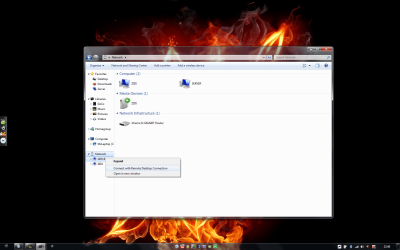
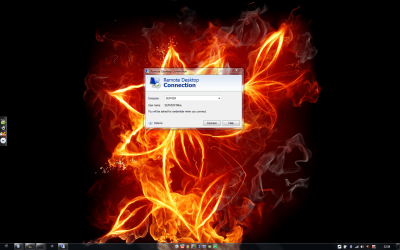
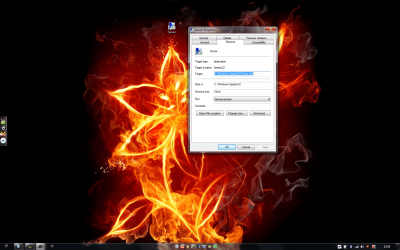
is there a way to change the target location like in my 3rd picture, so it don't start like the 2nd picture, but it start right away, like it would after i pressed the " Connect with Remote Desktop Connection, in my 1st picture ? :)

Appreciate all the help i can get :)
 

Attachments

  • Untitled.png
    Untitled.png
    147.8 KB · Views: 198
  • Untitled2.png
    Untitled2.png
    420.2 KB · Views: 211
  • Untitled3.png
    Untitled3.png
    369.9 KB · Views: 227

My Computer

Computer Manufacturer/Model Number
LG Notebook
OS
Windows 7 Ultimate x64
CPU
2.1Ghz
Motherboard
N/A
Memory
3Gb
Graphics Card(s)
nVidia 8600M GT
Sound Card
Realtek HD Audio
Monitor(s) Displays
17.1" TFT ( WSXGA+ ) - Glare
Screen Resolution
17.1"
Hard Drives
320Gig disc
PSU
N/A
Case
Laptop Case =)
Cooling
Laptop again xD
Keyboard
Builtin @ Laptop =)
Mouse
Razer Copperhead
Internet Speed
100/100Mb :) Swe Connection =D
Other Info
i eat metal :D
this thread is perfect for my question :)


is there a way to change the target location like in my 3rd picture, so it don't start like the 2nd picture, but it start right away, like it would after i pressed the " Connect with Remote Desktop Connection, in my 1st picture ? :)

Appreciate all the help i can get :)
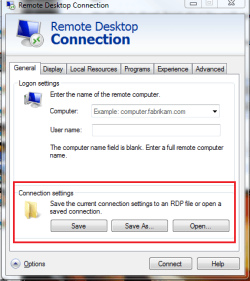
Have you tried this?

Capture.PNG
 

My Computer

Computer Manufacturer/Model Number
Custom
OS
Windows 7 Professional x64
CPU
Intel i7 2600K OC'd @ 4620 MHz
Motherboard
Asus P8Z68-V Pro
Memory
16GB GSkill Sniper 2133 Mhz (4x4GB)
Graphics Card(s)
EVGA GeForce GTX 480 SuperClocked+
Sound Card
Realtek High Definition Audio
Monitor(s) Displays
2x Acer S273HLbmii 27"
Screen Resolution
2 x 1920x1080
Hard Drives
64GB Crucial M4 SSD

Storage: Hitachi 1TB 5400RPM, Samsung 1.5TB 5400RPM
PSU
Corsair HW Series 750w (modular)
Case
Cooler Master HAF 932 Advanced Blue Edition
Cooling
CM Hyper 212+ CPU cooler, 3x 230mm + 1x 140mm case fans
Keyboard
Logitech MK320 (wireless)
Mouse
Logitech MK320 (wireless)
Internet Speed
30 Mb/s : 2 Mb/s
  • Like
Reactions: xTL
Jonathan_King, thank you for pointing out that im obviously blind =D

ofcorz thats how you do it =), well i guess hours and hours of searching google, sitting and clicking settings trying diffrent stuff, makes one blind ^^..

Thx +rep :)
 
Last edited:

My Computer

Computer Manufacturer/Model Number
LG Notebook
OS
Windows 7 Ultimate x64
CPU
2.1Ghz
Motherboard
N/A
Memory
3Gb
Graphics Card(s)
nVidia 8600M GT
Sound Card
Realtek HD Audio
Monitor(s) Displays
17.1" TFT ( WSXGA+ ) - Glare
Screen Resolution
17.1"
Hard Drives
320Gig disc
PSU
N/A
Case
Laptop Case =)
Cooling
Laptop again xD
Keyboard
Builtin @ Laptop =)
Mouse
Razer Copperhead
Internet Speed
100/100Mb :) Swe Connection =D
Other Info
i eat metal :D
I'm having the same problem described below. My host machine is running Win7 Pro 32Bit, and I'm able to connect to it from WITHIN my home network using a laptop running Vista Home Premium, but cannot for the life of me connect from outside my home. I'm attempting to connect to my home PC (Win7 Pro) from my office. My office PC is running WinXP PRO SP3. I've forwarded ports through my router and beleive everything is configured accordingly.


I'm having exactly the same problem. My laptop is 7 Ultimate and the desktop is 7 Pro. I disabled Kaspersky firewall on both thinking it might be a trusted zone thing, but still won't work through the router. Has anyone figure this out yet?

Thanks.

Yup, port 3389 is forwarding to the PC with Win7, and the PC with Win7 is accepting RDC automatically...

I beleive that the PC with Win7 is properly configured because I can use RDC from my laptop (WinXP) to connect to it if I input the Win7's local IP address to connect to...

so this works:

Laptop ---->LAN-----> Win7

but this doesnt:

Laptop----->Internet----->Router------>Win7

:cry:
 

My Computer

Computer Manufacturer/Model Number
Clone (Custom Build)
OS
Windows 7 Pro x32
CPU
Intel E8400
Motherboard
Asus P5K
Memory
4GB Kingston HyperX
Graphics Card(s)
Radeon HD
Sound Card
XFI 7.1
Monitor(s) Displays
Samsung LCD
Hard Drives
WD Raptor - 74GB
Seagate 1TB
PSU
Corsair 650 Watt
Case
Antec
Cooling
Multiple Fans
Keyboard
Standard USB
Mouse
Logitech Wireless
Internet Speed
10MB
Back
Top