Solved Removal of virus has blocked internet. PLEASE PLEASE HELP

Hey, Cottonball, I will download Zoek and start that process in the morning. I appreciate you hanging in there with me. Hopefully, we are closer to the end than the beginning. Thanks again and I will post reports as soon as I get them done.
 

My Computer My Computer

At a glance

Windows 7 Home Premium 64
Computer type
PC/Desktop
OS
Windows 7 Home Premium 64
Antivirus
Avast Internet Security
Browser
Chrome
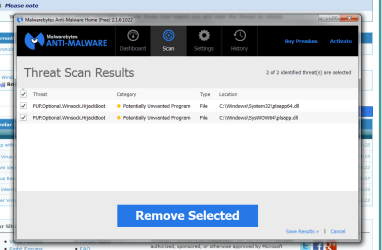
Cottonball, decided to get it over with. Anyway, I completed the scan but MBAM doesn't give me the option to Quarantine. I select them and it asks if I want to REMOVE them. Is that what you want me to do? I just don't want to take any chances so I want to make I am selecting the right option.
 

My Computer My Computer

At a glance

Windows 7 Home Premium 64
Computer type
PC/Desktop
OS
Windows 7 Home Premium 64
Antivirus
Avast Internet Security
Browser
Chrome
Image...
 

Attachments

  • malimage.png
    malimage.png
    34.4 KB · Views: 0

My Computer My Computer

At a glance

Windows 7 Home Premium 64
Computer type
PC/Desktop
OS
Windows 7 Home Premium 64
Antivirus
Avast Internet Security
Browser
Chrome
Report before actions have been applied.
 

Attachments

My Computer My Computer

At a glance

Windows 7 Home Premium 64
Computer type
PC/Desktop
OS
Windows 7 Home Premium 64
Antivirus
Avast Internet Security
Browser
Chrome
Yep, those two entries are the 'treasures'.

With checkmarks on the entries, click on: Remove Selected

The computer should reboot twice, and, at the second reboot MBAM should take action to repair the damage.

If it does not, and the Internet connection is down again, then use Zoek.

If the Internet connection works fine, use Zoek, but only use the following:

Code:
createsrpoint;
ipconfig /flushdns;b
emptyfolderscheck;delete
emptyclsid;
emptyalltemp;
autoclean;

There would be no need for netsh winsock reset catalog;b if the connection is OK.
 

My Computer My Computer

At a glance

Windows 7 Home Premium
Computer type
PC/Desktop
Computer Manufacturer/Model Number
An ol' eMachines
OS
Windows 7 Home Premium
Internet Speed
Fine for me...I'm retired!
Okay, so the deletion of the files did not kill the connection. I did have to manually restart after MBAM ran as it did not prompt me to do so. I ran the internet success script you gave me through Zoek, attached is the report. Internet is currently functioning. :)
 

Attachments

My Computer My Computer

At a glance

Windows 7 Home Premium 64
Computer type
PC/Desktop
OS
Windows 7 Home Premium 64
Antivirus
Avast Internet Security
Browser
Chrome
See if you can do the following:
http://www.sevenforums.com/tutorials/336-system-protection-restore-points-delete.html

If you can, delete the Restore Point for: 27/05/2015

We want to get rid of this:
C:\System Volume Information\SystemRestore\FRStaging\Windows\System32\plsapp64.dll ------- 439296 bytes [21:33 27/05/2015]

If not, please use Option 2.
Delete all, except the most recent Restore Point.

Let us know how it goes.

See ya sometime during the day. We have to stop meeting at this hour (2:11AM)!!!
 

My Computer My Computer

At a glance

Windows 7 Home Premium
Computer type
PC/Desktop
Computer Manufacturer/Model Number
An ol' eMachines
OS
Windows 7 Home Premium
Internet Speed
Fine for me...I'm retired!
Morning, Cottonball. :) May have been a little too early to try to think. Basically, I may sorta kinda have deleted all restore points but I just created a new one so I hope that doesn't set us back. I ran MBAM overnight and no threats or anything were discovered. And yeah, I feel more bad about your lack of sleep, I typically don't get much anyway so I'm used to it. LOL
 

My Computer My Computer

At a glance

Windows 7 Home Premium 64
Computer type
PC/Desktop
OS
Windows 7 Home Premium 64
Antivirus
Avast Internet Security
Browser
Chrome
ChronicX,

Glad you have good news this morning!! :)

Please use SystemLook, and search for these again:

:filefind
*plsapp*
:regfind
PureLeads

Let's see if they are gone.

My going to bed late PM is balanced off by getting up late in the AM!!
 

My Computer My Computer

At a glance

Windows 7 Home Premium
Computer type
PC/Desktop
Computer Manufacturer/Model Number
An ol' eMachines
OS
Windows 7 Home Premium
Internet Speed
Fine for me...I'm retired!
Please check you PMs on the upper left:

Welcome, ChronicX
You last visited: X Hours Ago at X
Private Messages: Unread 1, Total X

X = number(s)

Thanks!
 

My Computer My Computer

At a glance

Windows 7 Home Premium
Computer type
PC/Desktop
Computer Manufacturer/Model Number
An ol' eMachines
OS
Windows 7 Home Premium
Internet Speed
Fine for me...I'm retired!
Here is the latest SysLook report.
 

Attachments

My Computer My Computer

At a glance

Windows 7 Home Premium 64
Computer type
PC/Desktop
OS
Windows 7 Home Premium 64
Antivirus
Avast Internet Security
Browser
Chrome
Let's give this a whirl...

Please open Notepad and paste the following text to it:

Code:
[HKEY_LOCAL_MACHINE\SOFTWARE\Dyn\Installed]
"PureLeads"=-
[-HKEY_LOCAL_MACHINE\SOFTWARE\PureLeads]

In Notepad, click File > Save as...
Save the file to the Desktop
File name: PLfix2.reg
Make sure the Save as Type field says: All Files
Next, please go to the Desktop and double-click on PLfix2.reg
Click Yes to merge it in the Registry.

Now, please go back to Control Panel > Folder Options
Select: Show hidden files, folders, and drives
Uncheck: Hide protected operating system files

Please search for and remove the following folder:
C:\Program Files (x86)\PureLead

The following files:
C:\Users\user\AppData\Roaming\Microsoft\Windows\Recent\plsapp64.lnk

...and let's see if we can remove this one:
C:\System Volume Information\SystemRestore\FRStaging\Windows\System32\plsapp64.dll

But, you need to open a Command Prompt as Administrator

At the Command Prompt:
Type: CD \

At the C:\ prompt, copy/paste with mouse:
takeown /f "C:\System Volume Information\SystemRestore\FRStaging\Windows\System32\plsapp64.dll"

Now, run the cacls command to give yourself full control rights to the file:
cacls "C:\System Volume Information\SystemRestore\FRStaging\Windows\System32\plsapp64.dll" /G user:F

The last part of the command needs the user name. I think in your case it is user??

When done, use SystemLook once gain, and provide the results.

 

My Computer My Computer

At a glance

Windows 7 Home Premium
Computer type
PC/Desktop
Computer Manufacturer/Model Number
An ol' eMachines
OS
Windows 7 Home Premium
Internet Speed
Fine for me...I'm retired!
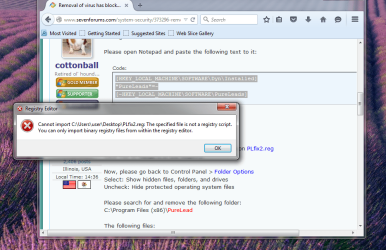
When I tried to merge, this is what popped up.
 

Attachments

  • PLfixnotify.png
    PLfixnotify.png
    118.2 KB · Views: 0

My Computer My Computer

At a glance

Windows 7 Home Premium 64
Computer type
PC/Desktop
OS
Windows 7 Home Premium 64
Antivirus
Avast Internet Security
Browser
Chrome
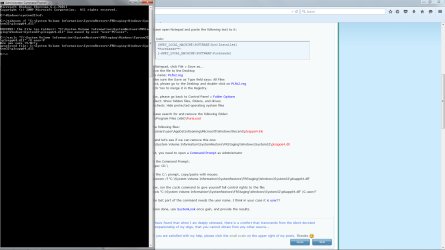
The only one of those files I could find was the last one. The other ones were not able to be located by Windows or manually.
 

Attachments

  • cmdfinish.png
    cmdfinish.png
    58.6 KB · Views: 3

My Computer My Computer

At a glance

Windows 7 Home Premium 64
Computer type
PC/Desktop
OS
Windows 7 Home Premium 64
Antivirus
Avast Internet Security
Browser
Chrome
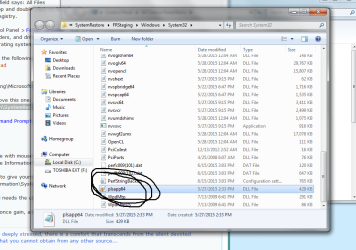
Image of file directory and latest syslook results.
 

Attachments

  • dirpic.png
    dirpic.png
    178.5 KB · Views: 4

My Computer My Computer

At a glance

Windows 7 Home Premium 64
Computer type
PC/Desktop
OS
Windows 7 Home Premium 64
Antivirus
Avast Internet Security
Browser
Chrome
Oooops!! :o

Code:
REGEDIT4
 
[HKEY_LOCAL_MACHINE\SOFTWARE\Dyn\Installed]
"PureLeads"=-
[-HKEY_LOCAL_MACHINE\SOFTWARE\PureLeads]

Brains are dense today! Sorry for the goof!!


The only one of those files I could find was the last one.
Which file did you find and remove?

Please use SystemLook once again, after doing the Registry merge above.

Thanks!
 

My Computer My Computer

At a glance

Windows 7 Home Premium
Computer type
PC/Desktop
Computer Manufacturer/Model Number
An ol' eMachines
OS
Windows 7 Home Premium
Internet Speed
Fine for me...I'm retired!
@ ChronicX, we see you have run Combofix..... can you find and post the log from
C:\Qoobox combofix.txt? please. Just copy and paste it in your next reply.
 

My Computer My Computer

At a glance

Windows 7 Ultimate 32bit SP1Intel(R) Core(TM)2 Quad CPU @ 2.40GHz, 2400 MHz4 GBATI Radeon HD 2600 Pro
Computer type
PC/Desktop
Computer Manufacturer/Model Number
Bruce ... somewhere in his 40's
OS
Windows 7 Ultimate 32bit SP1
CPU
Intel(R) Core(TM)2 Quad CPU @ 2.40GHz, 2400 MHz
Motherboard
INTEL/D975XBX2
Memory
4 GB
Graphics Card(s)
ATI Radeon HD 2600 Pro
Monitor(s) Displays
Samsung SyncMaster 914v
Screen Resolution
1280 x 1024
Hard Drives
2/500GB each ... ST3500630AS ATA Device.
One is not connected
PSU
Rocketfish 700 W
Case
G.Skill Gigabyte Chassis
Keyboard
Standard PS/2 Keyboard
Mouse
Microsoft PS/2 Mouse
Internet Speed
DSL
Antivirus
Avira Internet Security
Browser
IE 11
Other Info
ATI HDMI Audio
Hey, Cotton, sorry for the silence, real life always gets in the way. I will run the tests now. The image is of the path of the file I thought I'd deleted but as you can see it is still there. I manually deleted it but it's a sticky one apparently. The other files just were flat not located. Hope you are having a great day!
 

Attachments

  • dirimage.png
    dirimage.png
    59.5 KB · Views: 0

My Computer My Computer

At a glance

Windows 7 Home Premium 64
Computer type
PC/Desktop
OS
Windows 7 Home Premium 64
Antivirus
Avast Internet Security
Browser
Chrome
Latest Combofix report.
 

Attachments

My Computer My Computer

At a glance

Windows 7 Home Premium 64
Computer type
PC/Desktop
OS
Windows 7 Home Premium 64
Antivirus
Avast Internet Security
Browser
Chrome
Hello, CX!

Heading for a Doctor's appt. and a few other things in a few minutes, so, will get back here later.

Please post some new results for SystemLook when you are done.

Please, do copy and paste them right on this thread, vs. attaching the results. Will be using my tablet while waiting, and it is easier to just look at the results on the tablet.

Thanks!
 

My Computer My Computer

At a glance

Windows 7 Home Premium
Computer type
PC/Desktop
Computer Manufacturer/Model Number
An ol' eMachines
OS
Windows 7 Home Premium
Internet Speed
Fine for me...I'm retired!
Back
Top