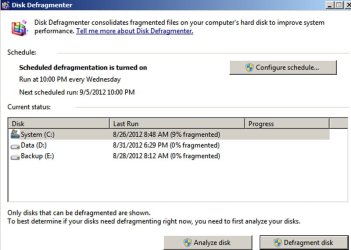
Remove C and System reserved from Defrag

UnknownReverent

New member
Member
VIP
Local time
7:20 AM
Messages
349
Location
United States
I just recently got an SSD and I was wondering if I could remove the C drive and System Reserved from defrag, but leave my other hard drive in there so I don't accidentally defrag my SSD.
 

My Computer

Computer type
PC/Desktop
Computer Manufacturer/Model Number
Custom Built
OS
MS Windows 7 Professional 64-bit SP1
CPU
Intel(R) Core(TM) i5-2400 CPU @ 3.10GHz
Motherboard
Asus P8Z77-V LK
Memory
G.SKILL Ares 8GB (2x4GB)
Graphics Card(s)
EVGA nVidia GeForce GTX 760 Superclocked
Sound Card
Realtek High Definition Audio
Monitor(s) Displays
ASUS VN247 24" 1ms
Screen Resolution
1920x1080
Hard Drives
Mushkin Chronos 120GB SSD (OS), 1TB Seagate HDD (Data)
PSU
XFX Pro Series 850w P1-850B-BEFX
Case
Corsair Obsidian 750D
Cooling
Corsair H100i (cpu) and case fans
Keyboard
Corsair Vengeance K70
Mouse
Corsair Vengeance M60
Internet Speed
1.14 MB/s (9.6 mbps)
Browser
Google Chrome
SSDs are typically recognized as SSDs by Windows and are NOT part of a standard defragmentation.

But you can certainly confirm your defrag settings to be sure that regular hard drives are defragged and SSDs are not.

Right click the drive, choose properties, then tools, then defragment now. Then "configure schedule". In my case, the SSD is not even listed as a choice under "select disks".
 

My Computer

Computer type
PC/Desktop
Computer Manufacturer/Model Number
Ignatz Special; 4 speed manual gearbox; factory air conditioning; one of one
OS
Windows 7 Home Premium SP1, 64-bit
CPU
Intel Skylake i5-6600K, not overclocked
Motherboard
AsRock Z170M Extreme 4, micro ATX
Memory
8 GB HyperX DDR4-2666 (2 x 4 GB)
Graphics Card(s)
none; graphics are integrated on CPU
Sound Card
onboard: Realtek ALC1150; external: USB Behringer UF0-202
Monitor(s) Displays
Dell S2340M 23 inch IPS
Screen Resolution
1600 x 900
Hard Drives
System: Crucial MX100 series SSD, 128 GB;
Data: Samsung Spinpoint 103SJ, 1 TB;
Backup: WD Caviar Green WD30EZRX-00D8PB0, 3 TB
PSU
Rosewill SilentNight 500 watt fanless, semi-modular
Case
Antec Solo II
Cooling
Noctua NH-U12S; Noctua F12 intake, Noctua S12A exhaust
Keyboard
Microsoft 200 6JH-00001 USB
Mouse
Dell or Microsoft optical wired; USB
Antivirus
Microsoft Security Essentials and Malwarebytes Premium
Browser
Pale Moon
Other Info
All fans PWM; speeds at idle: CPU circa 500 rpm; intake circa 600 rpm; exhaust circa 600 rpm; CPU temps 27 idle and 47 C load in a warm room (27 C/81 F) when running Intel Extreme Tuning Utility stress test.
SSDs are typically recognized as SSDs by Windows and are NOT part of a standard defragmentation.

But you can certainly confirm your defrag settings to be sure that regular hard drives are defragged and SSDs are not.

Right click the drive, choose properties, then tools, then defragment now. Then "configure schedule". In my case, the SSD is not even listed as a choice under "select disks".

I go to the defrag and it still shows the c drive and system reserved, which is my SSD. So it still shows it in the defrag. I'll probably use the defrag for my tb drive that I have, but I don't want to accidentally defrag my SSD.
 

My Computer

Computer type
PC/Desktop
Computer Manufacturer/Model Number
Custom Built
OS
MS Windows 7 Professional 64-bit SP1
CPU
Intel(R) Core(TM) i5-2400 CPU @ 3.10GHz
Motherboard
Asus P8Z77-V LK
Memory
G.SKILL Ares 8GB (2x4GB)
Graphics Card(s)
EVGA nVidia GeForce GTX 760 Superclocked
Sound Card
Realtek High Definition Audio
Monitor(s) Displays
ASUS VN247 24" 1ms
Screen Resolution
1920x1080
Hard Drives
Mushkin Chronos 120GB SSD (OS), 1TB Seagate HDD (Data)
PSU
XFX Pro Series 850w P1-850B-BEFX
Case
Corsair Obsidian 750D
Cooling
Corsair H100i (cpu) and case fans
Keyboard
Corsair Vengeance K70
Mouse
Corsair Vengeance M60
Internet Speed
1.14 MB/s (9.6 mbps)
Browser
Google Chrome
I go to the defrag and it still shows the c drive and system reserved, which is my SSD.

Post a screen shot of the screen in which the C drive is shown.

Just because it is shown in the screen below doesn't mean it will be defragged.

C is an SSD on my system. It is not defragged and is not part of the defrag schedule.
 

Attachments

  • Untitled-1.jpg
    Untitled-1.jpg
    68.3 KB · Views: 16

My Computer

Computer type
PC/Desktop
Computer Manufacturer/Model Number
Ignatz Special; 4 speed manual gearbox; factory air conditioning; one of one
OS
Windows 7 Home Premium SP1, 64-bit
CPU
Intel Skylake i5-6600K, not overclocked
Motherboard
AsRock Z170M Extreme 4, micro ATX
Memory
8 GB HyperX DDR4-2666 (2 x 4 GB)
Graphics Card(s)
none; graphics are integrated on CPU
Sound Card
onboard: Realtek ALC1150; external: USB Behringer UF0-202
Monitor(s) Displays
Dell S2340M 23 inch IPS
Screen Resolution
1600 x 900
Hard Drives
System: Crucial MX100 series SSD, 128 GB;
Data: Samsung Spinpoint 103SJ, 1 TB;
Backup: WD Caviar Green WD30EZRX-00D8PB0, 3 TB
PSU
Rosewill SilentNight 500 watt fanless, semi-modular
Case
Antec Solo II
Cooling
Noctua NH-U12S; Noctua F12 intake, Noctua S12A exhaust
Keyboard
Microsoft 200 6JH-00001 USB
Mouse
Dell or Microsoft optical wired; USB
Antivirus
Microsoft Security Essentials and Malwarebytes Premium
Browser
Pale Moon
Other Info
All fans PWM; speeds at idle: CPU circa 500 rpm; intake circa 600 rpm; exhaust circa 600 rpm; CPU temps 27 idle and 47 C load in a warm room (27 C/81 F) when running Intel Extreme Tuning Utility stress test.
It shows it exactly like that with the system reserved as well. They're both the SSD. I don't want to accidentally click it and hit defrag. I'm a bit of a perfectionist too, so it will annoy me if it shows how much it's fragmented. It will make me want to defrag it. Lol. I'm a bit OCD about it I guess.
 

My Computer

Computer type
PC/Desktop
Computer Manufacturer/Model Number
Custom Built
OS
MS Windows 7 Professional 64-bit SP1
CPU
Intel(R) Core(TM) i5-2400 CPU @ 3.10GHz
Motherboard
Asus P8Z77-V LK
Memory
G.SKILL Ares 8GB (2x4GB)
Graphics Card(s)
EVGA nVidia GeForce GTX 760 Superclocked
Sound Card
Realtek High Definition Audio
Monitor(s) Displays
ASUS VN247 24" 1ms
Screen Resolution
1920x1080
Hard Drives
Mushkin Chronos 120GB SSD (OS), 1TB Seagate HDD (Data)
PSU
XFX Pro Series 850w P1-850B-BEFX
Case
Corsair Obsidian 750D
Cooling
Corsair H100i (cpu) and case fans
Keyboard
Corsair Vengeance K70
Mouse
Corsair Vengeance M60
Internet Speed
1.14 MB/s (9.6 mbps)
Browser
Google Chrome
it will annoy me if it shows how much it's fragmented. It will make me want to defrag it.

If it annoys you, why would you voluntarily open defrag to take a look?

That's a rhetorical question.

Do you have a similar impulse to delete partitions when you examine them in Disk Management?
 

My Computer

Computer type
PC/Desktop
Computer Manufacturer/Model Number
Ignatz Special; 4 speed manual gearbox; factory air conditioning; one of one
OS
Windows 7 Home Premium SP1, 64-bit
CPU
Intel Skylake i5-6600K, not overclocked
Motherboard
AsRock Z170M Extreme 4, micro ATX
Memory
8 GB HyperX DDR4-2666 (2 x 4 GB)
Graphics Card(s)
none; graphics are integrated on CPU
Sound Card
onboard: Realtek ALC1150; external: USB Behringer UF0-202
Monitor(s) Displays
Dell S2340M 23 inch IPS
Screen Resolution
1600 x 900
Hard Drives
System: Crucial MX100 series SSD, 128 GB;
Data: Samsung Spinpoint 103SJ, 1 TB;
Backup: WD Caviar Green WD30EZRX-00D8PB0, 3 TB
PSU
Rosewill SilentNight 500 watt fanless, semi-modular
Case
Antec Solo II
Cooling
Noctua NH-U12S; Noctua F12 intake, Noctua S12A exhaust
Keyboard
Microsoft 200 6JH-00001 USB
Mouse
Dell or Microsoft optical wired; USB
Antivirus
Microsoft Security Essentials and Malwarebytes Premium
Browser
Pale Moon
Other Info
All fans PWM; speeds at idle: CPU circa 500 rpm; intake circa 600 rpm; exhaust circa 600 rpm; CPU temps 27 idle and 47 C load in a warm room (27 C/81 F) when running Intel Extreme Tuning Utility stress test.
it will annoy me if it shows how much it's fragmented. It will make me want to defrag it.

If it annoys you, why would you voluntarily open defrag to take a look?

That's a rhetorical question.

Do you have a similar impulse to delete partitions when you examine them in Disk Management?

Lol, no. I don't open disk management unless I'm making partitions. I open defrag to check how much a disk is fragmented to defrag it. This is my first SSD and I'm not used to seeing something fragmented that I shouldn't defrag. I am a bit curious why you don't have a system reserved though.
 

My Computer

Computer type
PC/Desktop
Computer Manufacturer/Model Number
Custom Built
OS
MS Windows 7 Professional 64-bit SP1
CPU
Intel(R) Core(TM) i5-2400 CPU @ 3.10GHz
Motherboard
Asus P8Z77-V LK
Memory
G.SKILL Ares 8GB (2x4GB)
Graphics Card(s)
EVGA nVidia GeForce GTX 760 Superclocked
Sound Card
Realtek High Definition Audio
Monitor(s) Displays
ASUS VN247 24" 1ms
Screen Resolution
1920x1080
Hard Drives
Mushkin Chronos 120GB SSD (OS), 1TB Seagate HDD (Data)
PSU
XFX Pro Series 850w P1-850B-BEFX
Case
Corsair Obsidian 750D
Cooling
Corsair H100i (cpu) and case fans
Keyboard
Corsair Vengeance K70
Mouse
Corsair Vengeance M60
Internet Speed
1.14 MB/s (9.6 mbps)
Browser
Google Chrome

My Computer

Computer type
PC/Desktop
Computer Manufacturer/Model Number
Ignatz Special; 4 speed manual gearbox; factory air conditioning; one of one
OS
Windows 7 Home Premium SP1, 64-bit
CPU
Intel Skylake i5-6600K, not overclocked
Motherboard
AsRock Z170M Extreme 4, micro ATX
Memory
8 GB HyperX DDR4-2666 (2 x 4 GB)
Graphics Card(s)
none; graphics are integrated on CPU
Sound Card
onboard: Realtek ALC1150; external: USB Behringer UF0-202
Monitor(s) Displays
Dell S2340M 23 inch IPS
Screen Resolution
1600 x 900
Hard Drives
System: Crucial MX100 series SSD, 128 GB;
Data: Samsung Spinpoint 103SJ, 1 TB;
Backup: WD Caviar Green WD30EZRX-00D8PB0, 3 TB
PSU
Rosewill SilentNight 500 watt fanless, semi-modular
Case
Antec Solo II
Cooling
Noctua NH-U12S; Noctua F12 intake, Noctua S12A exhaust
Keyboard
Microsoft 200 6JH-00001 USB
Mouse
Dell or Microsoft optical wired; USB
Antivirus
Microsoft Security Essentials and Malwarebytes Premium
Browser
Pale Moon
Other Info
All fans PWM; speeds at idle: CPU circa 500 rpm; intake circa 600 rpm; exhaust circa 600 rpm; CPU temps 27 idle and 47 C load in a warm room (27 C/81 F) when running Intel Extreme Tuning Utility stress test.

My Computer

Computer type
PC/Desktop
Computer Manufacturer/Model Number
Custom Built
OS
MS Windows 7 Professional 64-bit SP1
CPU
Intel(R) Core(TM) i5-2400 CPU @ 3.10GHz
Motherboard
Asus P8Z77-V LK
Memory
G.SKILL Ares 8GB (2x4GB)
Graphics Card(s)
EVGA nVidia GeForce GTX 760 Superclocked
Sound Card
Realtek High Definition Audio
Monitor(s) Displays
ASUS VN247 24" 1ms
Screen Resolution
1920x1080
Hard Drives
Mushkin Chronos 120GB SSD (OS), 1TB Seagate HDD (Data)
PSU
XFX Pro Series 850w P1-850B-BEFX
Case
Corsair Obsidian 750D
Cooling
Corsair H100i (cpu) and case fans
Keyboard
Corsair Vengeance K70
Mouse
Corsair Vengeance M60
Internet Speed
1.14 MB/s (9.6 mbps)
Browser
Google Chrome
System Reserved contains files--but those files can be placed on C if you prefer. If they are on C, you don't need System Reserved.
 

My Computer

Computer type
PC/Desktop
Computer Manufacturer/Model Number
Ignatz Special; 4 speed manual gearbox; factory air conditioning; one of one
OS
Windows 7 Home Premium SP1, 64-bit
CPU
Intel Skylake i5-6600K, not overclocked
Motherboard
AsRock Z170M Extreme 4, micro ATX
Memory
8 GB HyperX DDR4-2666 (2 x 4 GB)
Graphics Card(s)
none; graphics are integrated on CPU
Sound Card
onboard: Realtek ALC1150; external: USB Behringer UF0-202
Monitor(s) Displays
Dell S2340M 23 inch IPS
Screen Resolution
1600 x 900
Hard Drives
System: Crucial MX100 series SSD, 128 GB;
Data: Samsung Spinpoint 103SJ, 1 TB;
Backup: WD Caviar Green WD30EZRX-00D8PB0, 3 TB
PSU
Rosewill SilentNight 500 watt fanless, semi-modular
Case
Antec Solo II
Cooling
Noctua NH-U12S; Noctua F12 intake, Noctua S12A exhaust
Keyboard
Microsoft 200 6JH-00001 USB
Mouse
Dell or Microsoft optical wired; USB
Antivirus
Microsoft Security Essentials and Malwarebytes Premium
Browser
Pale Moon
Other Info
All fans PWM; speeds at idle: CPU circa 500 rpm; intake circa 600 rpm; exhaust circa 600 rpm; CPU temps 27 idle and 47 C load in a warm room (27 C/81 F) when running Intel Extreme Tuning Utility stress test.
Back to what I was saying though, there's no way to get it off of that screen is there?
 

My Computer

Computer type
PC/Desktop
Computer Manufacturer/Model Number
Custom Built
OS
MS Windows 7 Professional 64-bit SP1
CPU
Intel(R) Core(TM) i5-2400 CPU @ 3.10GHz
Motherboard
Asus P8Z77-V LK
Memory
G.SKILL Ares 8GB (2x4GB)
Graphics Card(s)
EVGA nVidia GeForce GTX 760 Superclocked
Sound Card
Realtek High Definition Audio
Monitor(s) Displays
ASUS VN247 24" 1ms
Screen Resolution
1920x1080
Hard Drives
Mushkin Chronos 120GB SSD (OS), 1TB Seagate HDD (Data)
PSU
XFX Pro Series 850w P1-850B-BEFX
Case
Corsair Obsidian 750D
Cooling
Corsair H100i (cpu) and case fans
Keyboard
Corsair Vengeance K70
Mouse
Corsair Vengeance M60
Internet Speed
1.14 MB/s (9.6 mbps)
Browser
Google Chrome
Not that I know of.
 

My Computer

Computer type
PC/Desktop
Computer Manufacturer/Model Number
Ignatz Special; 4 speed manual gearbox; factory air conditioning; one of one
OS
Windows 7 Home Premium SP1, 64-bit
CPU
Intel Skylake i5-6600K, not overclocked
Motherboard
AsRock Z170M Extreme 4, micro ATX
Memory
8 GB HyperX DDR4-2666 (2 x 4 GB)
Graphics Card(s)
none; graphics are integrated on CPU
Sound Card
onboard: Realtek ALC1150; external: USB Behringer UF0-202
Monitor(s) Displays
Dell S2340M 23 inch IPS
Screen Resolution
1600 x 900
Hard Drives
System: Crucial MX100 series SSD, 128 GB;
Data: Samsung Spinpoint 103SJ, 1 TB;
Backup: WD Caviar Green WD30EZRX-00D8PB0, 3 TB
PSU
Rosewill SilentNight 500 watt fanless, semi-modular
Case
Antec Solo II
Cooling
Noctua NH-U12S; Noctua F12 intake, Noctua S12A exhaust
Keyboard
Microsoft 200 6JH-00001 USB
Mouse
Dell or Microsoft optical wired; USB
Antivirus
Microsoft Security Essentials and Malwarebytes Premium
Browser
Pale Moon
Other Info
All fans PWM; speeds at idle: CPU circa 500 rpm; intake circa 600 rpm; exhaust circa 600 rpm; CPU temps 27 idle and 47 C load in a warm room (27 C/81 F) when running Intel Extreme Tuning Utility stress test.
The main reason I ask is because I open defrag to check what's fragmented. I don't use a set schedule. Then seeing something fragmented, I want to defrag it. Not used to having an SSD considering it's my first. I'll have to try to get used to it and hope I don't defrag.
 

My Computer

Computer type
PC/Desktop
Computer Manufacturer/Model Number
Custom Built
OS
MS Windows 7 Professional 64-bit SP1
CPU
Intel(R) Core(TM) i5-2400 CPU @ 3.10GHz
Motherboard
Asus P8Z77-V LK
Memory
G.SKILL Ares 8GB (2x4GB)
Graphics Card(s)
EVGA nVidia GeForce GTX 760 Superclocked
Sound Card
Realtek High Definition Audio
Monitor(s) Displays
ASUS VN247 24" 1ms
Screen Resolution
1920x1080
Hard Drives
Mushkin Chronos 120GB SSD (OS), 1TB Seagate HDD (Data)
PSU
XFX Pro Series 850w P1-850B-BEFX
Case
Corsair Obsidian 750D
Cooling
Corsair H100i (cpu) and case fans
Keyboard
Corsair Vengeance K70
Mouse
Corsair Vengeance M60
Internet Speed
1.14 MB/s (9.6 mbps)
Browser
Google Chrome
If you have an SSD and no other drive, I guess you will have to try to restrain your inclination to open defrag since the fragmentation level doesn't matter.

If you do have another drive, you'll have to deal with the SSD sitting there, glaring at you, begging to be defragged.
 

My Computer

Computer type
PC/Desktop
Computer Manufacturer/Model Number
Ignatz Special; 4 speed manual gearbox; factory air conditioning; one of one
OS
Windows 7 Home Premium SP1, 64-bit
CPU
Intel Skylake i5-6600K, not overclocked
Motherboard
AsRock Z170M Extreme 4, micro ATX
Memory
8 GB HyperX DDR4-2666 (2 x 4 GB)
Graphics Card(s)
none; graphics are integrated on CPU
Sound Card
onboard: Realtek ALC1150; external: USB Behringer UF0-202
Monitor(s) Displays
Dell S2340M 23 inch IPS
Screen Resolution
1600 x 900
Hard Drives
System: Crucial MX100 series SSD, 128 GB;
Data: Samsung Spinpoint 103SJ, 1 TB;
Backup: WD Caviar Green WD30EZRX-00D8PB0, 3 TB
PSU
Rosewill SilentNight 500 watt fanless, semi-modular
Case
Antec Solo II
Cooling
Noctua NH-U12S; Noctua F12 intake, Noctua S12A exhaust
Keyboard
Microsoft 200 6JH-00001 USB
Mouse
Dell or Microsoft optical wired; USB
Antivirus
Microsoft Security Essentials and Malwarebytes Premium
Browser
Pale Moon
Other Info
All fans PWM; speeds at idle: CPU circa 500 rpm; intake circa 600 rpm; exhaust circa 600 rpm; CPU temps 27 idle and 47 C load in a warm room (27 C/81 F) when running Intel Extreme Tuning Utility stress test.
If you have an SSD and no other drive, I guess you will have to try to restrain your inclination to open defrag since the fragmentation level doesn't matter.

If you do have another drive, you'll have to deal with the SSD sitting there, glaring at you, begging to be defragged.

Lol, I have my SSD and a tb hard drive. So I'll have to deal with it glaring at me. If I don't hit analyze by accident, then I should be fine.
 

My Computer

Computer type
PC/Desktop
Computer Manufacturer/Model Number
Custom Built
OS
MS Windows 7 Professional 64-bit SP1
CPU
Intel(R) Core(TM) i5-2400 CPU @ 3.10GHz
Motherboard
Asus P8Z77-V LK
Memory
G.SKILL Ares 8GB (2x4GB)
Graphics Card(s)
EVGA nVidia GeForce GTX 760 Superclocked
Sound Card
Realtek High Definition Audio
Monitor(s) Displays
ASUS VN247 24" 1ms
Screen Resolution
1920x1080
Hard Drives
Mushkin Chronos 120GB SSD (OS), 1TB Seagate HDD (Data)
PSU
XFX Pro Series 850w P1-850B-BEFX
Case
Corsair Obsidian 750D
Cooling
Corsair H100i (cpu) and case fans
Keyboard
Corsair Vengeance K70
Mouse
Corsair Vengeance M60
Internet Speed
1.14 MB/s (9.6 mbps)
Browser
Google Chrome
Analyzing is harmless as far as I know.

And defragging isn't going to ruin it as far as I know.
 

My Computer

Computer type
PC/Desktop
Computer Manufacturer/Model Number
Ignatz Special; 4 speed manual gearbox; factory air conditioning; one of one
OS
Windows 7 Home Premium SP1, 64-bit
CPU
Intel Skylake i5-6600K, not overclocked
Motherboard
AsRock Z170M Extreme 4, micro ATX
Memory
8 GB HyperX DDR4-2666 (2 x 4 GB)
Graphics Card(s)
none; graphics are integrated on CPU
Sound Card
onboard: Realtek ALC1150; external: USB Behringer UF0-202
Monitor(s) Displays
Dell S2340M 23 inch IPS
Screen Resolution
1600 x 900
Hard Drives
System: Crucial MX100 series SSD, 128 GB;
Data: Samsung Spinpoint 103SJ, 1 TB;
Backup: WD Caviar Green WD30EZRX-00D8PB0, 3 TB
PSU
Rosewill SilentNight 500 watt fanless, semi-modular
Case
Antec Solo II
Cooling
Noctua NH-U12S; Noctua F12 intake, Noctua S12A exhaust
Keyboard
Microsoft 200 6JH-00001 USB
Mouse
Dell or Microsoft optical wired; USB
Antivirus
Microsoft Security Essentials and Malwarebytes Premium
Browser
Pale Moon
Other Info
All fans PWM; speeds at idle: CPU circa 500 rpm; intake circa 600 rpm; exhaust circa 600 rpm; CPU temps 27 idle and 47 C load in a warm room (27 C/81 F) when running Intel Extreme Tuning Utility stress test.
Analyzing is harmless as far as I know.

And defragging isn't going to ruin it as far as I know.

I've seen in multiple places that defragging can reduce the life of the SSD.
 

My Computer

Computer type
PC/Desktop
Computer Manufacturer/Model Number
Custom Built
OS
MS Windows 7 Professional 64-bit SP1
CPU
Intel(R) Core(TM) i5-2400 CPU @ 3.10GHz
Motherboard
Asus P8Z77-V LK
Memory
G.SKILL Ares 8GB (2x4GB)
Graphics Card(s)
EVGA nVidia GeForce GTX 760 Superclocked
Sound Card
Realtek High Definition Audio
Monitor(s) Displays
ASUS VN247 24" 1ms
Screen Resolution
1920x1080
Hard Drives
Mushkin Chronos 120GB SSD (OS), 1TB Seagate HDD (Data)
PSU
XFX Pro Series 850w P1-850B-BEFX
Case
Corsair Obsidian 750D
Cooling
Corsair H100i (cpu) and case fans
Keyboard
Corsair Vengeance K70
Mouse
Corsair Vengeance M60
Internet Speed
1.14 MB/s (9.6 mbps)
Browser
Google Chrome
Analyzing is harmless as far as I know.

And defragging isn't going to ruin it as far as I know.

I've seen in multiple places that defragging can reduce the life of the SSD.

That's right---if you do it repeatedly.

So can writing to it.

Not only can, but will. The question is how much.

I have not seen anything that says how much a single defrag hurts. So if you can't control yourself and do defrag it, I suspect the SSD will still work.
 

My Computer

Computer type
PC/Desktop
Computer Manufacturer/Model Number
Ignatz Special; 4 speed manual gearbox; factory air conditioning; one of one
OS
Windows 7 Home Premium SP1, 64-bit
CPU
Intel Skylake i5-6600K, not overclocked
Motherboard
AsRock Z170M Extreme 4, micro ATX
Memory
8 GB HyperX DDR4-2666 (2 x 4 GB)
Graphics Card(s)
none; graphics are integrated on CPU
Sound Card
onboard: Realtek ALC1150; external: USB Behringer UF0-202
Monitor(s) Displays
Dell S2340M 23 inch IPS
Screen Resolution
1600 x 900
Hard Drives
System: Crucial MX100 series SSD, 128 GB;
Data: Samsung Spinpoint 103SJ, 1 TB;
Backup: WD Caviar Green WD30EZRX-00D8PB0, 3 TB
PSU
Rosewill SilentNight 500 watt fanless, semi-modular
Case
Antec Solo II
Cooling
Noctua NH-U12S; Noctua F12 intake, Noctua S12A exhaust
Keyboard
Microsoft 200 6JH-00001 USB
Mouse
Dell or Microsoft optical wired; USB
Antivirus
Microsoft Security Essentials and Malwarebytes Premium
Browser
Pale Moon
Other Info
All fans PWM; speeds at idle: CPU circa 500 rpm; intake circa 600 rpm; exhaust circa 600 rpm; CPU temps 27 idle and 47 C load in a warm room (27 C/81 F) when running Intel Extreme Tuning Utility stress test.
Much of the "damage" of defragging an SSD is mostly a myth than a reality. It of course causes it to wear off a little, as well as defragging a regular hard disk, and as well as a regular use of an SSD. If you don't tempt yourself too much there should be no problem. Many of the benefits of defragging are meaningless by the nature of SSDs, but I would consider it anyway because it helps with a possible data restoration in case of accidental deletions.
 

My Computer

Computer type
Laptop
Computer Manufacturer/Model Number
Toshiba Sattelite A665-S6092
OS
Windows 7 Ultimate x64
CPU
Intel Core i7-740QM
Memory
8 GB DDR3
Graphics Card(s)
NVIDIA GeForce 330GT
Screen Resolution
1366x768
Hard Drives
Samsung 840 SSD 500GB
1TB USB3 external HD
Cooling
Coolermaster Notepal U3 notebook cooling pad
Internet Speed
3mbps ASDL
Antivirus
ClamWin 0.98.7
Browser
Opera 12.17 x86 (main), Firefox 38 (sec), IE11 (last resort)
Back
Top