
rocketbeta
New member
- Local time
- 5:35 AM
- Messages
- 1
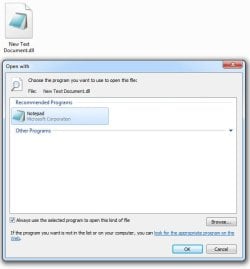
I wanted to look at and edit a .dll file using Notepad, but I accidentally forgot to uncheck "Always use the selected program to open this kind of file." So now Notepad is associated with .dll files.
I've tried completely removing the registry values under
but for some reason .dll files still have Notepad as the default program! Any ideas?
It's not a big deal, just incredibly irritating.. Why are file extensions so difficult to manage in Win7??
I've tried completely removing the registry values under
- Computer\HKEY_CLASSES_ROOT\.dll
- Computer\HKEY_CURRENT_USER\Software\MS\Win\CurrVer\Explorer\FileExts\.dll
but for some reason .dll files still have Notepad as the default program! Any ideas?
It's not a big deal, just incredibly irritating.. Why are file extensions so difficult to manage in Win7??
Attachments
My Computer
- Computer type
- PC/Desktop
- Computer Manufacturer/Model Number
- Custom
- OS
- Windows 7 Pro x64
- CPU
- Intel
- Motherboard
- Intel
- Memory
- 16gb
- Graphics Card(s)
- GTX 670
- Browser
- Chrome


