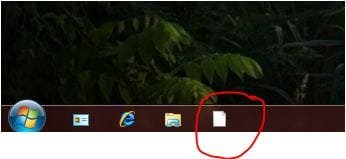
Remove pinned icon from location path

HugePan

New member
Local time
11:36 PM
Messages
17
Hi

We want to remove windows media player icon, which is pinned to the taskbar in windows 7.
We looked for a solution with GPOs, but didn't find anything.
So I found the path, which the pinned shortcuts of quicklaunch are stored.
--> C:\Users\username\AppData\Roaming\Microsoft\Internet Explorer\Quick Launch\User Pinned\TaskBar

So I removed the windows media player icon from there and restarted my computer. Next start, the shortcut was still there, but without the icon.

I want to remove the whole shortcut (including the icon..)
Is this possible?

What have I to do?

Cheers,

HugePan
 

My Computer

OS
Windows 7
hello hugepan and welcome to seven forums.

if you want to remove the program that pinned. just right click on it and unpin.
 

My Computer

Computer Manufacturer/Model Number
built up
OS
windows 7
CPU
Phenom II AMD Dragon 3.5Ghz
Memory
DDR3 4GB
Graphics Card(s)
ATI Radeon 512Mb
Monitor(s) Displays
HP L1506
Screen Resolution
1152 x 864
Hard Drives
WDC 1 TB SATA-II Green Power
Keyboard
HP wireless keyboard
Mouse
HP Optic
Internet Speed
1GB
Hi
yes of course, but we want to do this step to all other machines in our domain.
So to interact manually on the machines would not be a possible solution.
I'm looking for a solution, to do it by policies or as described over the location path.

Do you know this issue, i described you...?

What solution can you recommend for me?

Cheers,

HugePan
 

My Computer

OS
Windows 7
Hi
yes of course, but we want to do this step to all other machines in our domain.
So to interact manually on the machines would not be a possible solution.
I'm looking for a solution, to do it by policies or as described over the location path.

Do you know this issue, i described you...?

What solution can you recommend for me?

Cheers,

HugePan


if you're join domain and not workgroup, the step login to your machines server as administrator and you can delete from there. i think that will influence to the client
 

My Computer

Computer Manufacturer/Model Number
built up
OS
windows 7
CPU
Phenom II AMD Dragon 3.5Ghz
Memory
DDR3 4GB
Graphics Card(s)
ATI Radeon 512Mb
Monitor(s) Displays
HP L1506
Screen Resolution
1152 x 864
Hard Drives
WDC 1 TB SATA-II Green Power
Keyboard
HP wireless keyboard
Mouse
HP Optic
Internet Speed
1GB
which step, login to your machines server as administrator...
i don't know what you mean.. sorry..

can you tell me how to do it..?

HugePan
 

My Computer

OS
Windows 7
ok the logic is like this, example i have server installed in my PC and then i make domain server of that PC ( ex. desktop.ap) so when client is already join the domain desktop.ap. it's mean you can delete the pin from your PC at server, not in client. (not manually). but you delete from server PC and login as administrator at server PC, unpin or delete from there. it's will influence to the client who join that domain.

sorry if i'm wrong advice, but post back if you have more issue. thank's.
 

My Computer

Computer Manufacturer/Model Number
built up
OS
windows 7
CPU
Phenom II AMD Dragon 3.5Ghz
Memory
DDR3 4GB
Graphics Card(s)
ATI Radeon 512Mb
Monitor(s) Displays
HP L1506
Screen Resolution
1152 x 864
Hard Drives
WDC 1 TB SATA-II Green Power
Keyboard
HP wireless keyboard
Mouse
HP Optic
Internet Speed
1GB
can you explain in detail please ..
:geek:
screenshot please ...
 

My Computer

OS
win7
  • Like
Reactions: ryo
can you explain in detail please ..
:geek:
screenshot please ...

hello guile and welcome.
sorry i can't attach screenshot here.

but the logic i though is like that.
 

My Computer

Computer Manufacturer/Model Number
built up
OS
windows 7
CPU
Phenom II AMD Dragon 3.5Ghz
Memory
DDR3 4GB
Graphics Card(s)
ATI Radeon 512Mb
Monitor(s) Displays
HP L1506
Screen Resolution
1152 x 864
Hard Drives
WDC 1 TB SATA-II Green Power
Keyboard
HP wireless keyboard
Mouse
HP Optic
Internet Speed
1GB
Hi..

I tried the following steps: Our profiles in the company are roaming profiles. So the appdata\roaming is on every logoff stored in the definied location. Every time, we logon, the roaming profile will load again from this location.
- I logged me off and deleted the Icons in the quicklaunch from another computer. (from another computer accessing to appdata\roaming\microsoft\internet explorer\..... until taskbar where the shortcuts are stored.)
- I logged me on and saw that the shortcuts were still there, but without an icon. I couldn't remove it correctly.
- This is the same behaviour as if I removed it locally and logoff/logon again.

So I still haven't found a solution to remove the unwanted icons/shortcuts from the quicklaunch. (removing it manually with the mouse isn't a problem... but in a company isn't this possible)

Have any one of you a solution, which help me to remove the shortcuts... over GPO, over Registry, or even over the location path in appdata\roaming....

Cheers, and thank you for every help

HugePan
 

My Computer

OS
Windows 7
Hi..

I tried the following steps: Our profiles in the company are roaming profiles. So the appdata\roaming is on every logoff stored in the definied location. Every time, we logon, the roaming profile will load again from this location.
- I logged me off and deleted the Icons in the quicklaunch from another computer. (from another computer accessing to appdata\roaming\microsoft\internet explorer\..... until taskbar where the shortcuts are stored.)
- I logged me on and saw that the shortcuts were still there, but without an icon. I couldn't remove it correctly.
- This is the same behaviour as if I removed it locally and logoff/logon again.

So I still haven't found a solution to remove the unwanted icons/shortcuts from the quicklaunch. (removing it manually with the mouse isn't a problem... but in a company isn't this possible)

Have any one of you a solution, which help me to remove the shortcuts... over GPO, over Registry, or even over the location path in appdata\roaming....

Cheers, and thank you for every help

HugePan


Are you use active directory to manage client profile?? if you'are using active directory, that's case more simple. you're login to the server like i said before. and find the profile of user for manage the quicklaunch that you want to delete.
at the case i'm same with you. i'm work at office and use active directory. so when i want to manage my client, i just login to the server (windows server 2000 R2) and i can manage the profile of user.
 

My Computer

Computer Manufacturer/Model Number
built up
OS
windows 7
CPU
Phenom II AMD Dragon 3.5Ghz
Memory
DDR3 4GB
Graphics Card(s)
ATI Radeon 512Mb
Monitor(s) Displays
HP L1506
Screen Resolution
1152 x 864
Hard Drives
WDC 1 TB SATA-II Green Power
Keyboard
HP wireless keyboard
Mouse
HP Optic
Internet Speed
1GB
HI,

Yes I tried to logon on my server and delete the shortcuts from their roaming profile.
When the user logon again, it's the same issue. Icons disappeared but shortcuts are still there.

\\Server\profile$\name.V2 --> Here are the roaming profiles stored. I navigate to the quicklaunch and deleted the icons. But nothing. Icons disappeared, shortcuts are still here..

Any help?

Cheers
HugePan
 

My Computer

OS
Windows 7
HI,

Yes I tried to logon on my server and delete the shortcuts from their roaming profile.
When the user logon again, it's the same issue. Icons disappeared but shortcuts are still there.

\\Server\profile$\name.V2 --> Here are the roaming profiles stored. I navigate to the quicklaunch and deleted the icons. But nothing. Icons disappeared, shortcuts are still here..

Any help?

Cheers
HugePan


when i'm try at my server and login to the administrator. that run well,i'm trying to remove and modified it. that's infected to my users (join domain).
i don't know really what is the issue you get. but you run as windows server 2000? and your clients is use win7?
 

My Computer

Computer Manufacturer/Model Number
built up
OS
windows 7
CPU
Phenom II AMD Dragon 3.5Ghz
Memory
DDR3 4GB
Graphics Card(s)
ATI Radeon 512Mb
Monitor(s) Displays
HP L1506
Screen Resolution
1152 x 864
Hard Drives
WDC 1 TB SATA-II Green Power
Keyboard
HP wireless keyboard
Mouse
HP Optic
Internet Speed
1GB
We have W2k3 and now we are migrating to w2k8 r2..

Do you delete your shortcuts from \\server\profile$\name.V2 in the definied location of quicklaunch?
Do you know the profile folders.. name.V2?

thank you

HugePan
 

My Computer

OS
Windows 7
We have W2k3 and now we are migrating to w2k8 r2..

Do you delete your shortcuts from \\server\profile$\name.V2 in the definied location of quicklaunch?
Do you know the profile folders.. name.V2?

thank you

HugePan


hi,

You can delete quicklunch shortcut from folder "desktop" on each profile.
hope it's work.
:thumbsup:
 

My Computer

OS
win7
Hi

how do you come on "desktop"? Desktop have nothing in common with quicklaunch.
I see it's very difficult to explain my issue.
I'm going to make some printscreens and attach they here...

HugePan
 

My Computer

OS
Windows 7
Hi

Here are the attachtments.

1.JPG
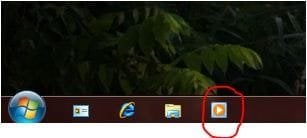
I want to delete this shortcut on the quicklaunch.

2.JPG
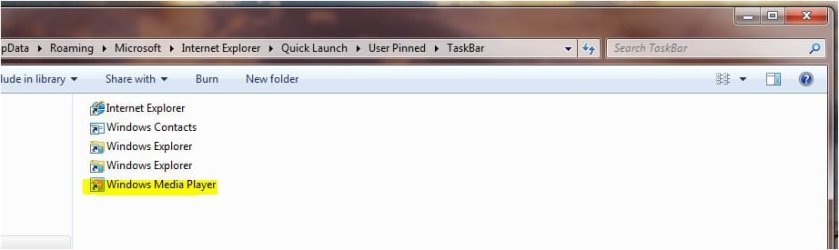
I navigate to the stored path, C:\users\username\appdata\roaming\microsoft\internet explorer\quick launch\user pinned\taskbar
In this path i remove the shortcut i'd like to remove. (in this case Windows Media Player)

3.JPG
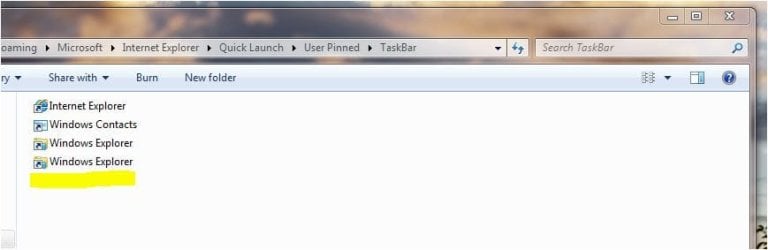
You see, that WMP is removed

4.JPG
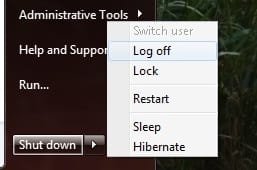
After this, i logoff and logon again.

5.JPG
After the logon the icon disappeard but the shortcut is still here.

...
We want to remove this shortcut for all users in the domain. So i thought to remove this shortcut on the users roaming profile with group policies.
If anyone has another idea, please help me to resolve this trouble. I've been fighting with this issue for 2weeks.
If anyone knows a GPO to resolve this, i'll appreciate all possibilites.

Thanks for your help

HugePan
 

Attachments

  • 1.JPG
    1.JPG
    13.9 KB · Views: 325
  • 2.JPG
    2.JPG
    29.9 KB · Views: 16
  • 3.JPG
    3.JPG
    28.3 KB · Views: 12
  • 4.jpg
    4.jpg
    7.8 KB · Views: 326
  • 5.JPG
    5.JPG
    14.8 KB · Views: 11

My Computer

OS
Windows 7
when the icon delete and at client computer still have the icon but not have the picture..

hm already try to open the icon without picture?? is it still run?
 

My Computer

Computer Manufacturer/Model Number
built up
OS
windows 7
CPU
Phenom II AMD Dragon 3.5Ghz
Memory
DDR3 4GB
Graphics Card(s)
ATI Radeon 512Mb
Monitor(s) Displays
HP L1506
Screen Resolution
1152 x 864
Hard Drives
WDC 1 TB SATA-II Green Power
Keyboard
HP wireless keyboard
Mouse
HP Optic
Internet Speed
1GB
Yes i tried to open it by clicking on the shortcut in my quick launch. But i don't want to open anything. I only want to definately delete it...

Any ideas?
HugePan
 

My Computer

OS
Windows 7
hi hugepan,

where your profile is located ?
and what is your AD server ?

fyi, i'm using 2k3 server and it's located in "C:\Documents and Settings\'username'\Desktop"
'username' : your profile name
 
Last edited:

My Computer

OS
win7
Hi

2k3. We can access through shares to our profiles or home folders.
But nothing i tried to remove the shortcut from another computer and user from appdata\........ and logon with my credentials on a different computer.

Nothing yet. I still have this shurtcut without an icon. I deleted also the file desktop.ini on "pinned icons" in appdata.

I tried everything but nothing works.. ':(
 

My Computer

OS
Windows 7
Back
Top