Remove Program - Not In Programs and Features (Add/Remove Program)

baumgrenze

New member
Member
VIP
Local time
2:34 PM
Messages
300
Location
Charlottesville, VA
I would like to follow advice from a 'trusted source' and remove all instances of a program (IrfanView) so that I can make a clean reinstall using a 'trusted source' to provide the install file.

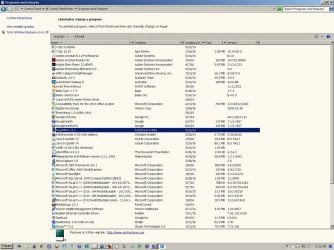
I cannot find the program in Programs and Features (was Add/Remove Program) in Control Panel.

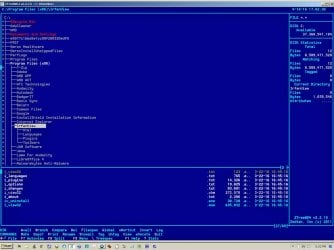
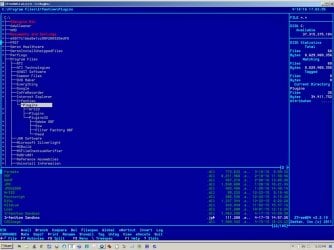
I can clearly see the program in ZTreeWin.

I have attached image files.

I do not understand the implications of this paradox, but I do not want to 'dig a deeper hole.' I don't understand the implications of Control Panel not finding the installation trees.

Can I simply use ZTreeWin to delete the installations or does this leave a 'mess' of files in other paths and/or Registry entries that will complicate reinstalling the program? I seem to remember being told this at least once in the past 30 years, but that may apply to DOS, or Win98.

thanks

baumgrenze
 

Attachments

  • ControlPanelPrograms041916.jpg
    ControlPanelPrograms041916.jpg
    409 KB · Views: 5
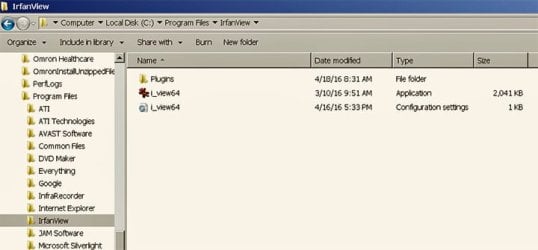
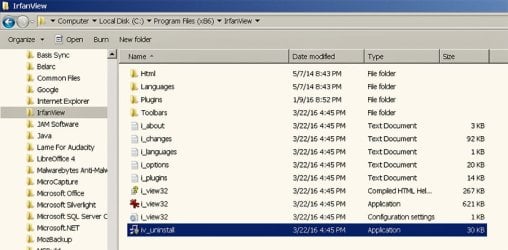
  • IrfanViewProgFiles_x86_ZTree.jpg
    IrfanViewProgFiles_x86_ZTree.jpg
    406.6 KB · Views: 2
  • IrfanViewProgFilesZTree.jpg
    IrfanViewProgFilesZTree.jpg
    447.3 KB · Views: 1

My Computer

Computer type
PC/Desktop
Computer Manufacturer/Model Number
Custom built by GamePC/Solid Electric - Palo Alto - on 03/10/08
OS
Win 7 Pro 64
CPU
Intel Core 2 Quad Q6600 (2.4 GHz) Quad Core
Motherboard
Gigabyte GA-P35-DS3P Intel P35 ATX (rev. 2.1)
Memory
2 x Crucial 4GB Kit (2GBx2) DDR2 CT2KIT25664AA800
Graphics Card(s)
Sapphire Radeon HD 3870 PCIe 512 Mb
Sound Card
RealTek audio on MOBO + EDIROL UA-1EX
Monitor(s) Displays
Samsung S24A450BW 24" LED monitor
Screen Resolution
1600 x 1200 at 75 Hz
Hard Drives
2 Crucial 128 Gb SSD (CT128M550SSD1)
one mounted and running Win7/Pro x64
one disconnected containing only Win10/Pro upgrade - in process
1 1TB WD Caviar Black (WD1003FZEX-00MK2A0) (Data drive)
1 2TB Seagate 2TB (PN/ 9JB1N3-576 - ST2000DM001-1ER
PSU
Seasonic S12-HT 650W 80% Efficiency Power Supply
Case
Lian Li PC-B25B
Cooling
Gigabyte Silent-Pipe
Keyboard
Dell MS Comfort
Mouse
HP x4000 wireless
Internet Speed
Sonic FTTN @ 23 Mbps
Antivirus
Avast
Browser
SeaMonkey
Other Info
BIOS: Award Software International, Inc. F6 06/18/2009

System Specs - Updated on 09//16/19
Check for the uninstaller here:

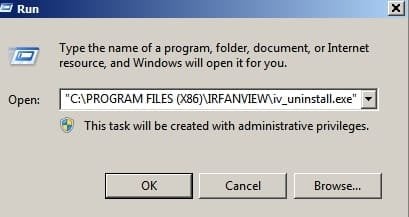
"C:\PROGRAM FILES (X86)\IRFANVIEW\iv_uninstall.exe"

If that fails try the free version of REVO assuming that it's the 32bit version of Irfanview on your 64bit machine.

Download Revo Uninstaller Freeware - Free and Full Download - Uninstall software, remove programs, solve uninstall problems

Free version is down the page. It's only suitable for 32bit program removal and not 64bit program removal.

Another option: Reinstall Irfanview straight over the top of the old version and see if it shows up in Control Panel - Programs & Features.
 

My Computer

Computer type
Laptop
Computer Manufacturer/Model Number
ASUS
OS
Microsoft Windows 7 Home Premium 64-bit 7601 Multiprocessor Free Service Pack 1
CPU
AMD C-60 APU with Radeon(tm) HD Graphics
Motherboard
ASUSTeK COMPUTER INC. X501U
Memory
4.00 GB
Graphics Card(s)
AMD Radeon HD 6290 Graphics
Sound Card
(1) AMD High Definition Audio Device (2) Realtek High Defi
Screen Resolution
1366 x 768 x 32 bits (4294967296 colors) @ 60 Hz
Hard Drives
Hitachi HTS545050A7E380 SATA Disk Device
Antivirus
Comodo CIS & FW, SecureAplus App Whitelisting, Threatfire
Browser
Cyberfox 64bit, Opera 64bit, Airfox
Other Info
Spy-The-Spy, HitmanPro.Alert, Norton Connect Safe, MJRegWatcher, BitDefender TrafficLight, Voodoo Shield, Zemana AntiMalware
Thank you, Callender (a familiar name and avatar!)

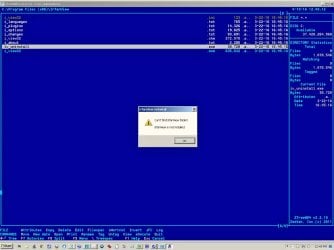
The search box in Start did not find an uninstall file. I did find one in Program Files (x86) but not in Program Files. When I ran it from ZTreeWin a dialog opened asking if I wanted to let iv_uninstall-exe run. When I gave permission, here is what happened.

This 'Can't find IrfanView folder! "IrfanView is not installed." makes no sense to me at all. I can see it in ZTreeWin (as can you.)

Will I cause more trouble if I display both IrfanView paths in ZTreeWin and progressively delete first files and then folders until I see no entries at all?

I did run malwarebytes and based on:

http://www.sevenforums.com/system-security/326269-programs-missing-control-panel-programs-list.html

I also ran AdwCleaner 5.1.1.2 and Junkware Removal Tool (JRT) by Malwarebytes Version: 8.0.4 (03.14.2016)

A few PUPs were found, e.g, HKCU\Software\CoinisRS in the Registry. I also deliberately ran AvastFree and found nothing.

thanks again,

baumgrenze
 

Attachments

  • IrfanViewProgFiles_x86_ZTree_Uninstall.jpg
    IrfanViewProgFiles_x86_ZTree_Uninstall.jpg
    323.1 KB · Views: 1

My Computer

Computer type
PC/Desktop
Computer Manufacturer/Model Number
Custom built by GamePC/Solid Electric - Palo Alto - on 03/10/08
OS
Win 7 Pro 64
CPU
Intel Core 2 Quad Q6600 (2.4 GHz) Quad Core
Motherboard
Gigabyte GA-P35-DS3P Intel P35 ATX (rev. 2.1)
Memory
2 x Crucial 4GB Kit (2GBx2) DDR2 CT2KIT25664AA800
Graphics Card(s)
Sapphire Radeon HD 3870 PCIe 512 Mb
Sound Card
RealTek audio on MOBO + EDIROL UA-1EX
Monitor(s) Displays
Samsung S24A450BW 24" LED monitor
Screen Resolution
1600 x 1200 at 75 Hz
Hard Drives
2 Crucial 128 Gb SSD (CT128M550SSD1)
one mounted and running Win7/Pro x64
one disconnected containing only Win10/Pro upgrade - in process
1 1TB WD Caviar Black (WD1003FZEX-00MK2A0) (Data drive)
1 2TB Seagate 2TB (PN/ 9JB1N3-576 - ST2000DM001-1ER
PSU
Seasonic S12-HT 650W 80% Efficiency Power Supply
Case
Lian Li PC-B25B
Cooling
Gigabyte Silent-Pipe
Keyboard
Dell MS Comfort
Mouse
HP x4000 wireless
Internet Speed
Sonic FTTN @ 23 Mbps
Antivirus
Avast
Browser
SeaMonkey
Other Info
BIOS: Award Software International, Inc. F6 06/18/2009

System Specs - Updated on 09//16/19
Personally I'd just try running the Irfanview installer downloaded from the website and see if it throws up any errors.

Also you could try copying

"C:\PROGRAM FILES (X86)\IRFANVIEW\iv_uninstall.exe"

into the Start> Run dialog box

Run.jpg

I wouldn't try deleting folders/ files except as a last resort and even then I'd run a full disk check before rebooting.

http://www.sevenforums.com/tutorials/433-disk-check.html

Option 2 - Step 1

then type

chkdsk /r /f

Press enter.

include spaces. It takes a while so it's better to do it when you've finished using your computer.

No drive letter in the command means that it checks all partitions.
 

My Computer

Computer type
Laptop
Computer Manufacturer/Model Number
ASUS
OS
Microsoft Windows 7 Home Premium 64-bit 7601 Multiprocessor Free Service Pack 1
CPU
AMD C-60 APU with Radeon(tm) HD Graphics
Motherboard
ASUSTeK COMPUTER INC. X501U
Memory
4.00 GB
Graphics Card(s)
AMD Radeon HD 6290 Graphics
Sound Card
(1) AMD High Definition Audio Device (2) Realtek High Defi
Screen Resolution
1366 x 768 x 32 bits (4294967296 colors) @ 60 Hz
Hard Drives
Hitachi HTS545050A7E380 SATA Disk Device
Antivirus
Comodo CIS & FW, SecureAplus App Whitelisting, Threatfire
Browser
Cyberfox 64bit, Opera 64bit, Airfox
Other Info
Spy-The-Spy, HitmanPro.Alert, Norton Connect Safe, MJRegWatcher, BitDefender TrafficLight, Voodoo Shield, Zemana AntiMalware
Thank you, again.

I've asked Bhikkhu Pesala, a London based guru on the IrfanView forums about where to get an uninstaller, whether each version actually has one, or if the way to get one is to redownload a good program installation file for each version, install them on top of the existing version, and then retry Control Panel. At present IrfanView does not show up in Control Panel but it does show up in Windows Explorer. If I type into Start 'iv_uninstall.exe' and try to run it, it asks my permission and then tells me:
"Can't find IrfanView folder! IrfanView is not installed."


I will attach selections of screen dumps of the Windows Explorer pages.


thanks


baumgrenze
 

Attachments

  • WinExplorerIViewProgramsPath.jpg
    WinExplorerIViewProgramsPath.jpg
    112.8 KB · Views: 4
  • WinExplorerIView_x86Path.jpg
    WinExplorerIView_x86Path.jpg
    222.4 KB · Views: 1

My Computer

Computer type
PC/Desktop
Computer Manufacturer/Model Number
Custom built by GamePC/Solid Electric - Palo Alto - on 03/10/08
OS
Win 7 Pro 64
CPU
Intel Core 2 Quad Q6600 (2.4 GHz) Quad Core
Motherboard
Gigabyte GA-P35-DS3P Intel P35 ATX (rev. 2.1)
Memory
2 x Crucial 4GB Kit (2GBx2) DDR2 CT2KIT25664AA800
Graphics Card(s)
Sapphire Radeon HD 3870 PCIe 512 Mb
Sound Card
RealTek audio on MOBO + EDIROL UA-1EX
Monitor(s) Displays
Samsung S24A450BW 24" LED monitor
Screen Resolution
1600 x 1200 at 75 Hz
Hard Drives
2 Crucial 128 Gb SSD (CT128M550SSD1)
one mounted and running Win7/Pro x64
one disconnected containing only Win10/Pro upgrade - in process
1 1TB WD Caviar Black (WD1003FZEX-00MK2A0) (Data drive)
1 2TB Seagate 2TB (PN/ 9JB1N3-576 - ST2000DM001-1ER
PSU
Seasonic S12-HT 650W 80% Efficiency Power Supply
Case
Lian Li PC-B25B
Cooling
Gigabyte Silent-Pipe
Keyboard
Dell MS Comfort
Mouse
HP x4000 wireless
Internet Speed
Sonic FTTN @ 23 Mbps
Antivirus
Avast
Browser
SeaMonkey
Other Info
BIOS: Award Software International, Inc. F6 06/18/2009

System Specs - Updated on 09//16/19
An Afterthought

Hello Callender,

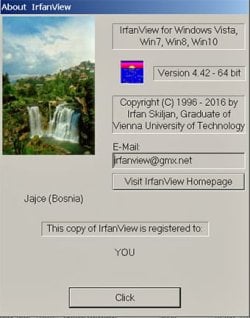
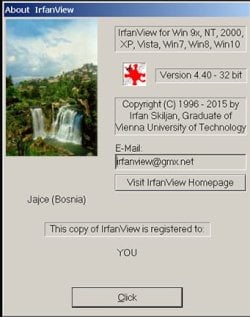
Here's an added afterthought. I find that I can run both versions, despite the Windows Start complaint that the programs are not installed. Start cannot find or run the program executable files. If I run them from Windows Explorer they open just fine. That is where I obtained the Help About images.

thanks

baumgrenze
 

Attachments

  • IrfanViewHelpAbout64Bit.jpg
    IrfanViewHelpAbout64Bit.jpg
    107.4 KB · Views: 29
  • IrfanViewHelpAbout32Bit.jpg
    IrfanViewHelpAbout32Bit.jpg
    104.3 KB · Views: 29
Last edited:

My Computer

Computer type
PC/Desktop
Computer Manufacturer/Model Number
Custom built by GamePC/Solid Electric - Palo Alto - on 03/10/08
OS
Win 7 Pro 64
CPU
Intel Core 2 Quad Q6600 (2.4 GHz) Quad Core
Motherboard
Gigabyte GA-P35-DS3P Intel P35 ATX (rev. 2.1)
Memory
2 x Crucial 4GB Kit (2GBx2) DDR2 CT2KIT25664AA800
Graphics Card(s)
Sapphire Radeon HD 3870 PCIe 512 Mb
Sound Card
RealTek audio on MOBO + EDIROL UA-1EX
Monitor(s) Displays
Samsung S24A450BW 24" LED monitor
Screen Resolution
1600 x 1200 at 75 Hz
Hard Drives
2 Crucial 128 Gb SSD (CT128M550SSD1)
one mounted and running Win7/Pro x64
one disconnected containing only Win10/Pro upgrade - in process
1 1TB WD Caviar Black (WD1003FZEX-00MK2A0) (Data drive)
1 2TB Seagate 2TB (PN/ 9JB1N3-576 - ST2000DM001-1ER
PSU
Seasonic S12-HT 650W 80% Efficiency Power Supply
Case
Lian Li PC-B25B
Cooling
Gigabyte Silent-Pipe
Keyboard
Dell MS Comfort
Mouse
HP x4000 wireless
Internet Speed
Sonic FTTN @ 23 Mbps
Antivirus
Avast
Browser
SeaMonkey
Other Info
BIOS: Award Software International, Inc. F6 06/18/2009

System Specs - Updated on 09//16/19
Thanks for the info. I'm not sure why you can't run it from the Start> Run dialog box.

I reckon installing again might fix it but perhaps you'd better await a response from your enquiry.
 

My Computer

Computer type
Laptop
Computer Manufacturer/Model Number
ASUS
OS
Microsoft Windows 7 Home Premium 64-bit 7601 Multiprocessor Free Service Pack 1
CPU
AMD C-60 APU with Radeon(tm) HD Graphics
Motherboard
ASUSTeK COMPUTER INC. X501U
Memory
4.00 GB
Graphics Card(s)
AMD Radeon HD 6290 Graphics
Sound Card
(1) AMD High Definition Audio Device (2) Realtek High Defi
Screen Resolution
1366 x 768 x 32 bits (4294967296 colors) @ 60 Hz
Hard Drives
Hitachi HTS545050A7E380 SATA Disk Device
Antivirus
Comodo CIS & FW, SecureAplus App Whitelisting, Threatfire
Browser
Cyberfox 64bit, Opera 64bit, Airfox
Other Info
Spy-The-Spy, HitmanPro.Alert, Norton Connect Safe, MJRegWatcher, BitDefender TrafficLight, Voodoo Shield, Zemana AntiMalware
Hello again, Callender,

On the IrfanView forum I seem to be having a 'Catch22' experience. I describe my experience. Someone replies, I tried what you did and I have a different (expected) experience. I am not moved forward.

Perhaps the description below will allow a Windows expert to say what might have gone wrong and what needs to be done.

---------
This is the current status of my Win7/Pro x64 machine.
There is an entry for IrfanView in Windows Explorer>Program Files (x86).

I can launch and run IrfanView 32bit if I double click on the file, 'i_view32.exe', in the complete list of installed files.

If I enter 'i_view32.exe' in the search box at the bottom of the Start menu the system reports 'No items match your search.'

There is no entry for IrfanView in Control Panel>Programs and Features. I cannot remove IrfanView using this tool.

I would like to remove this instance of IrfanView 4.42 x32 from my system so that I can reinstall it in a clean fashion. I know enough about 21st century Windows systems to know that just deleting the files I find in Windows Explorer will not accomplish this task. I've seen suggestions that it may make the problem worse and harder to solve.
--------------

My experience suggests to me that some fundamental entry in Win7 has been lost. It prevents Control Panel>Programs and Features from finding the uninstall file when I double click on it or enter it in the Search box at the bottom of Start. It prevents running the uninstall program if I double-click the file in Windows Explorer. At the same time, a double click of the executable for IrfanView on Windows Explorer launches the program, but trying to launch it from Start does not work.

Are there other things I could do to further troubleshoot this 'Catch22?'

Here is the contents of the i_view32.ini file.

Could anything be wrong here? I gathered and copied the file using ZTreeWin.

C:\Program Files (x86)\IrfanView\i_view32

[Others]
INI_Folder=%APPDATA%\IrfanView
[Language]
DLL=ENGLISH
Lang=English
[Toolbar]
Skin=Grosberg_24.png
Size=24

I see this reference:

INI_Folder=%APPDATA%\IrfanView

How do I check to make sure that this file exists and is where it belongs?

thanks

baumgrenze


My Computer

Computer type
PC/Desktop
Computer Manufacturer/Model Number
Custom built by GamePC/Solid Electric - Palo Alto - on 03/10/08
OS
Win 7 Pro 64
CPU
Intel Core 2 Quad Q6600 (2.4 GHz) Quad Core
Motherboard
Gigabyte GA-P35-DS3P Intel P35 ATX (rev. 2.1)
Memory
2 x Crucial 4GB Kit (2GBx2) DDR2 CT2KIT25664AA800
Graphics Card(s)
Sapphire Radeon HD 3870 PCIe 512 Mb
Sound Card
RealTek audio on MOBO + EDIROL UA-1EX
Monitor(s) Displays
Samsung S24A450BW 24" LED monitor
Screen Resolution
1600 x 1200 at 75 Hz
Hard Drives
2 Crucial 128 Gb SSD (CT128M550SSD1)
one mounted and running Win7/Pro x64
one disconnected containing only Win10/Pro upgrade - in process
1 1TB WD Caviar Black (WD1003FZEX-00MK2A0) (Data drive)
1 2TB Seagate 2TB (PN/ 9JB1N3-576 - ST2000DM001-1ER
PSU
Seasonic S12-HT 650W 80% Efficiency Power Supply
Case
Lian Li PC-B25B
Cooling
Gigabyte Silent-Pipe
Keyboard
Dell MS Comfort
Mouse
HP x4000 wireless
Internet Speed
Sonic FTTN @ 23 Mbps
Antivirus
Avast
Browser
SeaMonkey
Other Info
BIOS: Award Software International, Inc. F6 06/18/2009

System Specs - Updated on 09//16/19
RE: the i_view32.ini file.

I don't see any problem there. It just contains a few settings. However mine is different but I'm not using the same version. Recent files and saves are obscured with asterisks by me.

Code:
[Language]
DLL=ENGLISH
Lang=English
[Toolbar]
Skin=Grosberg_24.png
Size=24
Flag=1048559
[WinPosition]
xKoord=0
yKoord=0
Width=662
Height=123
Maximized=0
[Open]
OpenDir=C:\Portable Apps\SlimBrowser\SlimBrowser\html\newtab\images\
ViewMode=28747
OpenIndex=2
[Resize]
ResampleFilter=5
ResizeAspectRatio=1
UseResample=1
Sharpen=1
PercUsed=1
ResizeAutoDPI=1
DPI=72
Unit=0
FastResampleDown=1
ResampleGamma=1
[Thumbnails]
MRUD1=D:\Desktop Aug 2015\***\
MRUD2=C:\Users\Chris\Desktop\*****\
MRUD3=C:\Users\Chris\Desktop\Toolbox\
MRUD4=C:\Users\Chris\Desktop\***\
MRUD5=C:\Users\Chris\Desktop\***
MRUD6=C:\Users\Chris\Desktop\***\
MRUD7=C:\Users\Chris\Desktop\***\
MRUD8=K:\RECOVERED\
MRUD9=C:\Users\Chris\Documents\
MRUD10=N:\***\
MRUD11=N:\***\
MRUD12=N:\***\
MRUD13=C:\Users\Chris\Pictures\
MRUD14=C:\Users\Chris\Pictures\****\
MRUD15=C:\Users\Chris\Pictures\Images\
MRUD16=C:\Users\Chris\Pictures\LifeFrame\
MRUD17=C:\Users\Chris\Pictures\New Folder\
MRUD18=C:\Users\Chris\Pictures\Test\
MRUD19=C:\Users\Chris\Desktop\
MRUD20=C:\Users\Chris\Desktop\****\
MRUD21=C:\Users\Chris\Desktop\*****
MRUD22=C:\Users\Chris\Desktop\New folder\
MRUD23=C:\Users\Chris\Desktop\
MRUD24=C:\Users\Chris\Desktop\
MRUD25=C:\Users\Chris\Desktop\
MRUD26=C:\Users\Chris\Desktop\
MRUD27=C:\Users\Chris\Desktop\*****\
MRUD28=C:\Users\Chris\Desktop\*****\
MRUD29=C:\Users\Chris\Desktop\*****\
MRUD30=C:\Users\Chris\Desktop\*****\
Enlarge=0
Tooltip=1
Text=$D$F $X|$W x $H pixels|$B bpp|$S|$T|$E36867
Scroll=0
UseResample=0
PaintBorders=0
ThumbSize=1
ThumbW=50,50
BackColor=12632256
BackgroundColor=12632256
ExifThumb=1
MRUDs=30
TrueColWarning=1
FullSort=1
ShowShell=1
ESCExit=0
[JPEG]
Save Quality=100
Save Progressive=1
Save Grayscale=0
NoSampling=0
KeepExif=1
KeepXmp=1
KeepCom=1
KeepIptc=1
KeepQuality=0
ExifOrient=1
SetSize=0
FileSize=65.00
[MultiGIF]
Transparency=0
SaveInterlaced=1
UsePalette=2
SaveTransparent=1
[MRUD]
SaveDir2=
SaveDir3=
SaveDir4=
SaveDir5=
SaveDir6=
SaveDir7=
SaveDir8=
SaveDir9=
SaveDir10=
SaveDir11=
SaveDir12=
SaveDir13=
SaveDir14=
SaveDir15=
SaveDir16=
SaveDir17=
SaveDir18=
SaveDir19=
SaveDir20=
SaveDir1=C\
Dir2=C:\Users\Chris\Desktop\****\
Dir3=
Dir4=C:\Users\Chris\Desktop\
Dir5=
Dir6=
Dir7=D:\icons\****
Dir8=
Dir9=D:\My Completed Downloads\
Dir10=
Dir11=
Dir12=C:\Users\Chris\*****
Dir13=
Dir14=
Dir15=
Dir16=
Dir17=
Dir18=
Dir19=
Dir20=
Dir1=C:\Users\Chris\****
[Save]
ViewMode=28747
SaveExtension=gif
SaveDir=C:\Users\Chris\****
[Panorama]
PanoramaDir=C:\Users\Chris\Desktop\****
Direction=2
InsertName=0
Spacing=20
SpaceColor=16777215
[Others]
Test=1
PropPage=10
StartOption=0
StartFolder=
OneInstance=0
ESCThumbs=1
ESCExit=0
SaveChanges=0
Unicode=1
SaveICOTransp=0
IcoWndColor=1
[AddText]
AddText=USN Journal|    Cleaner
Orientation=1
TranspText=0
SemiTranspText=0
FontColor=16777215
TxtBgkr=0
FitColorW=1
OutlineFill=0
Outline=0
Emboss=0
Shadow=0
FontParam=-13|0|0|0|400|0|0|0|0|3|2|4|34|
Font=Arial
FontZoom=0
[Edit]
ColorDialogCustom=0,0,0,0,0,0,0,0,0,0,0,0,0,0,0,0;
CustSelX=15
CustSelY=0
CustSelW=261.00
CustSelH=391.00
CustUnit=1
CustRatio=10
CustRatioEdit=1.0000
[Paint]
ACUP61
arrowSettings=14000000140000000001000029
bgBrush=00000000ffffff0000000000fd
bgPen=000001000a00000000000000000000000b
currentTool=1001
extendedHelp=1
fgBrush=000000005555550000000000ff
fgPen=000001000a00000000000000000000000b
fillFlag=0
ITFontEffects=1
ITFontName=Arial
ITFontSize=12
ITParaAlign=1
ITTextRenderingMode=4
MUItem0_DefaultUnit=1
MUItem1_DefaultUnit=2
MUItem2_DefaultUnit=3
MUItem3_BaseUnit=1
MUItem3_Coefficient=0.0393701
MUItem3_Name=millimeter
MUItem3_Symbol=mm
TBMagnLimit=16
TBMagnOffset=0
TBMagnState=NotMagnetized
TBXPos=1307
TBYPos=66
threshold=30
[RecentFiles]
File0=C:\Portable Apps\SlimBrower\*****
File1=C:\Users\Chris\Desktop\****
File2=C:\Users\Chris\Desktop\****
File3=C:\Users\Chris\Desktop\****
File4=C:\Users\Chris\Desktop\****
File5=C:\Users\Chris\Desktop\****
File6=C:\Users\Chris\Desktop\****
File7=C:\Users\Chris\Documents\****
File8=C:\Users\Chris\Desktop\***
File9=C:\Users\Chris\Desktop\***
File10=C:\Users\Chris\Desktop\******
File11=C:\Users\Chris\Desktop\*****
File12=C:\Users\Chris\Desktop\******
File13=C:\Users\Chris\Desktop\Volume.gif
File14=C:\Users\Chris\Desktop\****
[Effects]
RotateDegrees=13.00
RotateColor=0
RotateOldCanvas=0
RotateOldImage=0
TilesMethod=0
TilesX=2
TilesY=3
TilesW=2000.00
TilesH=1500.00
TilesUnits=0
TilesDPI=72
TilesOrient=1
CanvMethod=0
CanvL=8
CanvR=8
CanvT=8
CanvB=8
CanvInside=1
CanvW=1920
CanvH=1080
CanvCorner=4
CanvColor=4210816
JPGTrans=2
JPGTransExifDate=1
JPGTransDate=0
JPGTransOpt=1
JPGTransPerfect=0
JPGTransExifThumb=0
JPGTransDPI=0
JPGTransDPIValX=0
JPGTransDPIValY=0
JPGTransJFIF=1
JPGTransMarker=0
JPGTransMarkerC=1
JPGTransMarkerE=1
JPGTransMarkerI=1
JPGTransMarkerA=1
ColorDialogCustom=0,0,0,0,0,0,0,0,0,0,0,0,0,0,0,0;
ReplaceColorOld=14737407
ReplaceColorNew=5197823
ReplaceColorTol=0
[Viewing]
FullScreen=0
ShowMultipageDlg=1
[RAW]
RWidth=100
RHeight=100
ROffset=0
RBpp=24
RBpp24=0
RBpp16=0
RRGBOrder=0
RPlanar=0
RVertFlip=0
RGray=0
Packed10=0
Packed12=0
Bayer=0
BayerMode=0
[Batch]
OutputPath=C:\Users\Chris\Desktop\TEST\
SaveExtension=jpg
OpenDir=C:\Users\Chris\Desktop*****
UseAdvanced=1
ViewMode=28747
Work=0
RenamePattern0=image###
OpenIndex=1
AdvCrop=0
AdvCropX=0
AdvCropY=0
AdvCropW=0
AdvCropH=0
AdvCropC=0
AdvResize=1
AdvResizeOpt=0
AdvResizeW=0.00
AdvResizeH=0.00
AdvResizeL=0.00
AdvResizeS=0.00
AdvResizeMP=0.00
AdvResample=1
AdvResizePerc=1
AdvResizePercW=95.00
AdvResizePercH=95.00
AdvDPI=0
AdvResizeUnit=0
AdvResizeRatio=1
AdvNoEnlarge=0
AdvNoShrink=0
AdvResizeOnDpi=0
AdvCanvas=0
AdvAddText=0
AdvWatermark=0
AdvReplaceColor=0
AdvUseBPP=0
AdvBPP=0
AdvUseFSDither=1
AdvDecrQuality=0
AdvAutoRGB=0
AdvHFlip=0
AdvVFlip=0
AdvRLeft=0
AdvRRight=0
AdvGray=0
AdvInvert=0
AdvSharpen=0
AdvGamma=0
AdvContrast=0
AdvBrightness=0
AdvSaturation=0
AdvColR=0
AdvColG=0
AdvColB=0
AdvSharpenVal=5
AdvGammaVal=0.00
AdvContrastVal=0
AdvBrightnessVal=0
AdvSaturationVal=0
AdvColRVal=0
AdvColGVal=0
AdvColBVal=0
AdvDelOrg=1
AdvOverwrite=1
AdvSubdirs=0
AdvSaveOldDate=0
AdvAllPages=1
UseAdvOptionsOrder=0
AdvFineR=0
AdvFineRVal=0.00
AdvBlur=0
AdvBlurVal=1
AdvMedian=0
AdvMedianVal=3
AdvRbg=0
AdvBgr=0
AdvBrg=0
AdvGrb=0
AdvGbr=0
AdvAutoCrop=0
Preview=0
[BatchText]
AddText=$D:$F
Orientation=0
TranspText=0
SemiTranspText=0
FontColor=255
TxtBgkr=16777215
FitColorW=1
OutlineFill=0
Outline=0
Emboss=0
Shadow=0
FontParam=-16|0|0|0|700|0|0|0|0|1|2|0|49|
Font=Courier
TextCoord=0;0;1000;50;
Corner=2
[PNM]
SaveAscii=0
[PNG]
SavePNGTransp=0
SavePNGAlpha=0
PngWndColor=1
PngOut=0
CompressionLevel=9
[Slideshow]
OpenDir=C:\Users\Chris\Music\*****
ViewMode=28747
StartIndex=0
AutoDelay=5.000
RandomDelay=5.000
SuppressErrors=1
SaveIndex=0
Loop=0
ShowFilename=1
LoopAudio=1
HideCursor=0
Advancement=1
PlayInWindow=0
WindowX=0
WindowY=0
WindowW=800
WindowH=600
Center=1
StopAndClose=0
Text=$D$F $X
OpenIndex=36
EXESCRFolder=C:\Users\Chris\Desktop\
EXESCRFile=MySlideshow
SaveAsSCR=0
[BatchScaning]
SaveImage=1
CloseTwain=1
SaveDir=C:\Users\Chris\Desktop\****\
BatchScanExtension=jpg
SaveName=ScanImage
StartingIndex=1
Increment=1
Digits=2
Multipage=0
SkipExisting=1
SaveIndex=1
[FilterFiles]
Folder=C:\Users\Chris\Desktop\****\
SortOrder=1
AutoSort=1
Files=*.*
Subfolders=1
UseDate=0
Date1=
Text=flowers
Iptc=1
Exif=1
Comment=1
SelOnly=0
[ContactSheet]
FontColor=65280
FontParam=-13|0|0|0|400|0|0|0|0|1|2|4|49|
Font=Courier
BackColor=16777215
Width=1024.00
Height=768.00
Units=0
DPI=72
Orient=1
Columns=5
Rows=5
HMargin=30
VMargin=30
HSpacing=30
VSpacing=30
Enlarge=0
Output=2
SaveFolder=C:\Users\Chris\Desktop\
SaveExt=jpg
FileNames=1
FileText=$F
HeadText=
FootText=$M
[IPTC]
JPGComKeepOrgDate=1
JPGComClearSpaces=0
JPGComAppend=0
ComUnicodeSet=1
ComUnicodeGet=1
BatchMode=1
KeepOrgDate=1
UnicodeSet=1
UnicodeGet=1
ReplaceEmpty=1
SkipEmpty=0
Append=0
SaveTab=0
[EXIF]
xPos=488
yPos=85

EDIT: You find the file by copying and pasting the following into Explorer address bar or Start> Run Dialog box:

%Userprofile%\Appdata\Roaming\IrfanView

or

%APPDATA%\IrfanView

Open the file with your text editor.
 
Last edited:

My Computer

Computer type
Laptop
Computer Manufacturer/Model Number
ASUS
OS
Microsoft Windows 7 Home Premium 64-bit 7601 Multiprocessor Free Service Pack 1
CPU
AMD C-60 APU with Radeon(tm) HD Graphics
Motherboard
ASUSTeK COMPUTER INC. X501U
Memory
4.00 GB
Graphics Card(s)
AMD Radeon HD 6290 Graphics
Sound Card
(1) AMD High Definition Audio Device (2) Realtek High Defi
Screen Resolution
1366 x 768 x 32 bits (4294967296 colors) @ 60 Hz
Hard Drives
Hitachi HTS545050A7E380 SATA Disk Device
Antivirus
Comodo CIS & FW, SecureAplus App Whitelisting, Threatfire
Browser
Cyberfox 64bit, Opera 64bit, Airfox
Other Info
Spy-The-Spy, HitmanPro.Alert, Norton Connect Safe, MJRegWatcher, BitDefender TrafficLight, Voodoo Shield, Zemana AntiMalware
It might not unistall, if you have not unregistered it.

Roy
 

My Computer

Computer type
PC/Desktop
Computer Manufacturer/Model Number
medionl/Aspire 6930G/acer x55a
OS
W7 home premium 32bit/W7HP 64bit/w10 tp insider ring
CPU
E5300 dual core
Motherboard
medion MS7366
Memory
3gb
Graphics Card(s)
Nvidia Geforce 7100 Nforce 630i
Monitor(s) Displays
avixc
Internet Speed
n (isp resticted to 72)
Antivirus
mse/pands
Browser
palemoon
Other Info
Belkin Fd7050 n USB using Railink RT2870 drivers, more upto date
Last edited:

My Computer

Computer type
Laptop
Computer Manufacturer/Model Number
ASUS
OS
Microsoft Windows 7 Home Premium 64-bit 7601 Multiprocessor Free Service Pack 1
CPU
AMD C-60 APU with Radeon(tm) HD Graphics
Motherboard
ASUSTeK COMPUTER INC. X501U
Memory
4.00 GB
Graphics Card(s)
AMD Radeon HD 6290 Graphics
Sound Card
(1) AMD High Definition Audio Device (2) Realtek High Defi
Screen Resolution
1366 x 768 x 32 bits (4294967296 colors) @ 60 Hz
Hard Drives
Hitachi HTS545050A7E380 SATA Disk Device
Antivirus
Comodo CIS & FW, SecureAplus App Whitelisting, Threatfire
Browser
Cyberfox 64bit, Opera 64bit, Airfox
Other Info
Spy-The-Spy, HitmanPro.Alert, Norton Connect Safe, MJRegWatcher, BitDefender TrafficLight, Voodoo Shield, Zemana AntiMalware
Suggest:

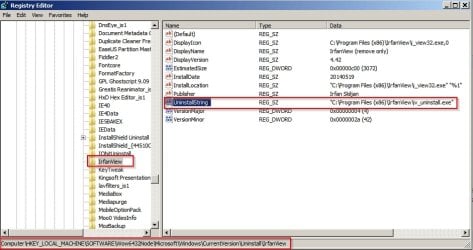
Check registry for uninstall entry here:

HKEY_LOCAL_MACHINE\SOFTWARE\Wow6432Node\Microsoft\Windows\CurrentVersion\Uninstall\IrfanView

The uninstall string value in the right pane should be:

"C:\Program Files (x86)\IrfanView\iv_uninstall.exe"

Can you confirm?

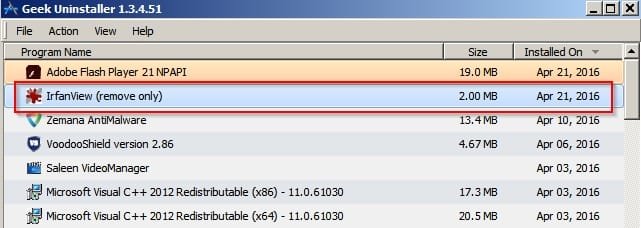
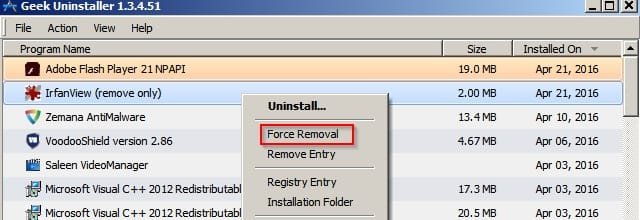
Also for your consideration. You might need to resort to a third party program uninstaller. If you don't like Revo you can try GeekUninstaller. It's portable so runs without installation. Maybe it will detect Irfanview. It it does show Irfanview it is possible to select the "Forced Removal" option.

Geek Uninstaller 1.jpg

Geek Uninstaller 2.jpg
 

My Computer

Computer type
Laptop
Computer Manufacturer/Model Number
ASUS
OS
Microsoft Windows 7 Home Premium 64-bit 7601 Multiprocessor Free Service Pack 1
CPU
AMD C-60 APU with Radeon(tm) HD Graphics
Motherboard
ASUSTeK COMPUTER INC. X501U
Memory
4.00 GB
Graphics Card(s)
AMD Radeon HD 6290 Graphics
Sound Card
(1) AMD High Definition Audio Device (2) Realtek High Defi
Screen Resolution
1366 x 768 x 32 bits (4294967296 colors) @ 60 Hz
Hard Drives
Hitachi HTS545050A7E380 SATA Disk Device
Antivirus
Comodo CIS & FW, SecureAplus App Whitelisting, Threatfire
Browser
Cyberfox 64bit, Opera 64bit, Airfox
Other Info
Spy-The-Spy, HitmanPro.Alert, Norton Connect Safe, MJRegWatcher, BitDefender TrafficLight, Voodoo Shield, Zemana AntiMalware
Thank you, Roy, for the suggestion.

The concept of 'unregistering' a application is foreign to me.

How do I do this?

thanks

baumgrenze
 

My Computer

Computer type
PC/Desktop
Computer Manufacturer/Model Number
Custom built by GamePC/Solid Electric - Palo Alto - on 03/10/08
OS
Win 7 Pro 64
CPU
Intel Core 2 Quad Q6600 (2.4 GHz) Quad Core
Motherboard
Gigabyte GA-P35-DS3P Intel P35 ATX (rev. 2.1)
Memory
2 x Crucial 4GB Kit (2GBx2) DDR2 CT2KIT25664AA800
Graphics Card(s)
Sapphire Radeon HD 3870 PCIe 512 Mb
Sound Card
RealTek audio on MOBO + EDIROL UA-1EX
Monitor(s) Displays
Samsung S24A450BW 24" LED monitor
Screen Resolution
1600 x 1200 at 75 Hz
Hard Drives
2 Crucial 128 Gb SSD (CT128M550SSD1)
one mounted and running Win7/Pro x64
one disconnected containing only Win10/Pro upgrade - in process
1 1TB WD Caviar Black (WD1003FZEX-00MK2A0) (Data drive)
1 2TB Seagate 2TB (PN/ 9JB1N3-576 - ST2000DM001-1ER
PSU
Seasonic S12-HT 650W 80% Efficiency Power Supply
Case
Lian Li PC-B25B
Cooling
Gigabyte Silent-Pipe
Keyboard
Dell MS Comfort
Mouse
HP x4000 wireless
Internet Speed
Sonic FTTN @ 23 Mbps
Antivirus
Avast
Browser
SeaMonkey
Other Info
BIOS: Award Software International, Inc. F6 06/18/2009

System Specs - Updated on 09//16/19
RE: the i_view32.ini file.

I don't see any problem there. It just contains a few settings. However mine is different but I'm not using the same version. Recent files and saves are obscured with asterisks by me.

Code:
[Language]
DLL=ENGLISH
Lang=English
[Toolbar]
Skin=Grosberg_24.png
Size=24
Flag=1048559
[WinPosition]
xKoord=0
yKoord=0
Width=662
Height=123
Maximized=0
[Open]
OpenDir=C:\Portable Apps\SlimBrowser\SlimBrowser\html\newtab\images\
ViewMode=28747
OpenIndex=2
[Resize]
ResampleFilter=5
ResizeAspectRatio=1
UseResample=1
Sharpen=1
PercUsed=1
ResizeAutoDPI=1
DPI=72
Unit=0
FastResampleDown=1
ResampleGamma=1
[Thumbnails]
MRUD1=D:\Desktop Aug 2015\***\
MRUD2=C:\Users\Chris\Desktop\*****\
MRUD3=C:\Users\Chris\Desktop\Toolbox\
MRUD4=C:\Users\Chris\Desktop\***\
MRUD5=C:\Users\Chris\Desktop\***
MRUD6=C:\Users\Chris\Desktop\***\
MRUD7=C:\Users\Chris\Desktop\***\
MRUD8=K:\RECOVERED\
MRUD9=C:\Users\Chris\Documents\
MRUD10=N:\***\
MRUD11=N:\***\
MRUD12=N:\***\
MRUD13=C:\Users\Chris\Pictures\
MRUD14=C:\Users\Chris\Pictures\****\
MRUD15=C:\Users\Chris\Pictures\Images\
MRUD16=C:\Users\Chris\Pictures\LifeFrame\
MRUD17=C:\Users\Chris\Pictures\New Folder\
MRUD18=C:\Users\Chris\Pictures\Test\
MRUD19=C:\Users\Chris\Desktop\
MRUD20=C:\Users\Chris\Desktop\****\
MRUD21=C:\Users\Chris\Desktop\*****
MRUD22=C:\Users\Chris\Desktop\New folder\
MRUD23=C:\Users\Chris\Desktop\
MRUD24=C:\Users\Chris\Desktop\
MRUD25=C:\Users\Chris\Desktop\
MRUD26=C:\Users\Chris\Desktop\
MRUD27=C:\Users\Chris\Desktop\*****\
MRUD28=C:\Users\Chris\Desktop\*****\
MRUD29=C:\Users\Chris\Desktop\*****\
MRUD30=C:\Users\Chris\Desktop\*****\
Enlarge=0
Tooltip=1
Text=$D$F $X|$W x $H pixels|$B bpp|$S|$T|$E36867
Scroll=0

etc,
EDIT: You find the file by copying and pasting the following into Explorer address bar or Start> Run Dialog box:

%Userprofile%\Appdata\Roaming\IrfanView

or

%APPDATA%\IrfanView

Open the file with your text editor.

Thanks for the 'firehose' I copied mine into a Word document to compare with yours. Mine runs 7+ pages and yours 8+ so they are different, but perhaps that it to be expected. I tried to follow your example and **** where you did.

Here's what I found:

full text:

[Language]
DLL=ENGLISH
Lang=English
[Toolbar]
Skin=Grosberg_24.png
Size=24
[WinPosition]
xKoord=-7
yKoord=-7
Width=650
Height=768
Maximized=1
Effects=224,186,619,391,0;
FileRename=456,379,368,171,0;
EnhColors=390,240,499,449,0;
EXIF=741,236,516,692,0;
[Open]
OpenDir=D:\MyImageFiles\MyImageDocuments\Computer\IrfanViewProb0416\
ViewMode=28747
OpenIndex=2
[Effects]
Sharpen=99
Filter=9
JPGTrans=3
JPGTransExifDate=1
JPGTransDate=0
JPGTransOpt=1
JPGTransPerfect=0
JPGTransExifThumb=0
JPGTransDPI=0
JPGTransDPIValX=0
JPGTransDPIValY=0
JPGTransJFIF=0
JPGTransMarker=0
JPGTransMarkerC=1
JPGTransMarkerE=1
JPGTransMarkerI=1
JPGTransMarkerA=1
AutoCropTol=0
ColorDialogCustom=0,0,0,0,0,0,0,0,0,0,0,0,0,0,0,0;
ReplaceColorOld=9694363
ReplaceColorNew=255
ReplaceColorTol=0
RotateDegrees=-1.00
RotateColor=0
RotateOldCanvas=0
RotateOldImage=0
JPGTransProgress=0
[RecentFiles]
File0=D:\MyImageFiles\MyImageDocuments\Computer\IrfanViewProb0416\WinExplorerIView_x86Path.jpg
File1=D:\MyImageFiles\MyPictures****
File2=D:\MyImageFiles\MyPictures****
File3=D:\MyImageFiles\MyPictures****
File4=D:\MyImageFiles\MyPictures****
File5=D:\MyImageFiles\MyPictures****
File6=D:\MyImageFiles\MyPictures****
File7=D:\MyImageFiles\MyPictures****.JPG
File8=D:\MyImageFiles\MyPictures****.JPG
File9=D:\MyImageFiles\MyPictures\****.JPG
File10=D:\MyImageFiles\MyPictures****.JPG
File11=D:\MyImageFiles\MyPictures****.JPG
File12=D:\MyImageFiles\MyPictures****.jpg
File13=D:\AudioFiles\AfonskyChoir****.mp3
File14=D:\MyImageFiles\MyPictures****.jpg
[MRUD]
Dir2=D:\MyImageFiles\MyPictures\***
Dir3=D:\AudioFiles\AfonskyChoir\****
Dir4=D:\AudioFiles\****\
Dir5=D:\MyImageFiles\MyPictures\****
Dir6=D:\MyImageFiles\MyPictures\****
Dir7=D:\MyImageFiles\MyPictures\****
Dir8=D:\MyImageFiles\MyPictures\****
Dir9=D:\MyImageFiles\MyPictures\****
Dir10=D:\Pictures\MyImageFiles\****
Dir11=D:\MyImageFiles\MyPictures\****
Dir12=D:\MyImageFiles\MyImageDocuments\****
Dir13=D:\MyImageFiles\MyPictures\****
Dir14=D:\Pictures\MyImageFiles\MyPictures****
Dir15=D:\MyImageFiles\MyPictures\****
Dir16=D:\MyImageFiles\MyPictures\****
Dir17=D:\MyImageFiles\MyImageDocuments\****
Dir18=D:\MyImageFiles\MyPictures\****
Dir19=D:\MyImageFiles\MyImageDocuments\****
Dir20=D:\MyImageFiles\MyImageDocuments\****
Dir1=D:\MyImageFiles\MyImageDocuments\****\
SaveDir2=D:\MyImageFiles\MyPictures****
SaveDir3=D:\MyImageFiles\MyPictures\****
SaveDir4=D:\MyImageFiles\MyPictures\****
SaveDir5=D:\MyImageFiles\MyImageDocuments****
SaveDir6=D:\MyImageFiles\MyImageDocuments****
SaveDir7=
SaveDir8=D:\MyImageFiles\MyPictures\****
SaveDir9=D:\MyImageFiles\MyImage****
SaveDir10=D:\MyImageFiles\MyImageDocuments\****
SaveDir11=D:\My Documents\MineNotes\****
SaveDir12=
SaveDir13=D:\MyImageFiles\MyImageDocuments\****
SaveDir14=
SaveDir15=D:\MyImageFiles\MyImageDocuments\****
SaveDir16=D:\MyImageFiles\MyImageDocuments\****
SaveDir17=
SaveDir18=D:\My Documents\Computer\****
SaveDir19=
SaveDir20=
SaveDir1=D:\MyImageFiles\MyImageDocuments****\
[Resize]
ResampleFilter=5
FastResampleDown=0
ResampleGamma=1
ResizeAspectRatio=1
UseResample=1
Sharpen=1
PercUsed=0
ResizeAutoDPI=0
DPI=297
Unit=2
[Print]
AutoRotate=0
Option=4
Left=0.00
Top=0.00
Inches=1
ScaleX=0.96
ScaleY=0.98
Centered=0
Copies=1
Head=0
HeadTxt=
Collate=1
Foot=0
FootTxt=
FontParam=-13|0|0|0|400|0|0|0|0|1|2|4|49|
Font=Courier
Printer=Canon iP4700 series
Orient=2
Size=120
Src=7
Color=2
Duplex=1
SizeTxt=4"x6" 10x15cm
AlwaysDefPrinter=0
Borderless=1
[JPEG]
Save Quality=100
Save Progressive=0
Save Grayscale=0
NoSampling=0
KeepExif=1
KeepXmp=1
KeepCom=1
KeepIptc=1
KeepQuality=0
ExifOrient=1
SetSize=0
FileSize=65.00
[MultiGIF]
Transparency=0
SaveInterlaced=1
UsePalette=2
SaveTransparent=0
[Save]
ViewMode=28751
SaveExtension=jpg
SaveDir=D:\MyImageFiles\MyImageDocuments\House\
SaveOldDate=1
[Thumbnails]
MRUD1=D:\MyImageFiles\MyPictures\****
MRUD2=D:\MyImageFiles\MyPictures\****
MRUD3=D:\AudioFiles\****
MRUD4=D:\MyImageFiles\MyPictures\****\
MRUD5=D:\MyImageFiles\MyPictures\****
MRUD6=D:\Pictures\MyImageFiles\MyPictures****
MRUD7=D:\Pictures\MyImageFiles\MyPictures\****
MRUD8=D:\Pictures\MyImageFiles\MyPictures\_****
MRUD9=D:\Pictures\MyImageFiles\MyPictures\_****\
MRUD10=D:\Pictures\MyImageFiles\MyPictures\__****
MRUD11=D:\Pictures\MyImageFiles\MyPictures\_****\
MRUD12=D:\Pictures\MyImageFiles\MyPictures\__****\
MRUD13=D:\Pictures\MyImageFiles\MyPictures\__****\
MRUD14=D:\Pictures\MyImageFiles\MyPictures\__****
MRUD15=D:\Pictures\MyImageFiles\MyPictures\_****
MRUD16=D:\Pictures\MyImageFiles\MyPictures\_****
MRUD17=D:\Pictures\MyImageFiles\MyPictures\__****\
MRUD18=D:\Pictures\MyImageFiles\MyPictures\_****
MRUD19=D:\Pictures\MyImageFiles\MyPictures\__****
MRUD20=D:\Pictures\MyImageFiles\MyPictures\__****
MRUD21=D:\Pictures\MyImageFiles\MyPictures\_****
MRUD22=D:\Pictures\MyImageFiles\MyPictures\__****
MRUD23=D:\Pictures\MyImageFiles\MyPictures\_****\
MRUD24=D:\Pictures\MyImageFiles\MyPictures\__****\
MRUD25=D:\Pictures\MyImageFiles\MyPictures\__****
MRUD26=D:\MyImageFiles\MyPictures\__****
MRUD27=D:\MyImageFiles\
MRUD28=D:\MyImageFiles\MyPictures\__****
MRUD29=D:\MyImageFiles\MyPictures\__****
MRUD30=H:\DCIM\****\
Enlarge=0
Tooltip=1
Text=$D$F $X|$W x $H pixels|$B bpp|$S|$T|$E36867
Scroll=0
UseResample=1
PaintBorders=0
ThumbSize=5
ThumbW=150,150
BackColor=12632256
BackgroundColor=12632256
ExifThumb=1
MRUDs=30
TrueColWarning=1
FullSort=1
ShowShell=1
ESCExit=0
[Others]
Test=1
StartOption=0
StartFolder=
OneInstance=0
ESCThumbs=1
ESCExit=0
SaveChanges=0
LoopCurDir=0
BeepOnLoop=1
JumpOnPageKey=0
UseUndo=1
PasteSel=0
SpecialPasteFit=1
PaletteNearest=1
UseMRUDs=1
UseMRUFs=1
SaveSlideDir=1
SaveBatchDir=0
ExternalViewer=C:\Program Files (x86)\Adobe\Photoshop Elements 6.0\Photoshop Elements 6.0.exe
ExternalViewer2=
ExternalViewer3=C:\Program Files (x86)\IrfanView\i_view32.exe
ShortExtViewer=0
ExtViewerFullLine=1
PropPage=10
FileSortOrder=1
UseFSDither=1
DecrQuality=0
Grayscale=0
[Viewing]
FullScreen=0
ViewAll=1
ShowHiddenFiles=1
MultipageScroll=1
GridSize=75
SelColor=-1
FitWindowOption=2
[Edit]
CutColor=0
EnhColorsSave=0
CustSelX=0
CustSelY=0
CustSelW=90.00
CustSelH=180.00
CustUnit=0
CustRatio=9
CustRatioEdit=1.0000
ColorDialogCustom=0,0,0,0,0,0,0,0,0,0,0,0,0,0,0,0;
[TXT]
TXTFileFont=0
TXTFileFontColor=0
TXTFileBackColor=16777215
[EXIF]
xPos=741
yPos=235
[Copy-Move]
CopyDir1=D:\MyImageFiles\****
CopyDir2=C:\TEMP
CopyDir3=C:\TEMP
CopyDir4=C:\TEMP
CopyDir5=C:\TEMP
CopyDir6=C:\TEMP
CopyDir7=C:\TEMP
CopyDir8=C:\TEMP
CopyDir9=C:\TEMP
CopyDir10=C:\TEMP
CopyDir11=C:\TEMP
CopyDir12=C:\TEMP
CopyDir13=C:\TEMP
CopyDir14=C:\TEMP
CopyReplace=1
DefaultCopy=1
[ContactSheet]
FontColor=65280
FontParam=-13|0|0|0|400|0|0|0|0|1|2|4|49|
Font=Courier
BackColor=16777215
Width=1024.00
Height=768.00
Units=0
DPI=72
Orient=1
Columns=3
Rows=3
HMargin=5
VMargin=10
HSpacing=5
VSpacing=20
Enlarge=0
Output=0
SaveFolder=C:\Users\JOHNBA~1\AppData\Local\Temp\
SaveExt=jpg
FileNames=1
FileText=$F
HeadText=
FootText=$M
[Slideshow]
StartIndex=0
AutoDelay=5.000
RandomDelay=5.000
SuppressErrors=1
SaveIndex=0
Loop=0
ShowFilename=1
LoopAudio=1
HideCursor=0
Advancement=1
PlayInWindow=0
WindowX=0
WindowY=0
WindowW=800
WindowH=600
Center=1
StopAndClose=0
Text=$D$F $X
[IPTC]
KeepOrgDate=1
UnicodeSet=1
UnicodeGet=1
ReplaceEmpty=0
SkipEmpty=0
Append=0
SaveTab=0
[Paint]
ACUP61
arrowSettings=14000000140000000001000029
bgBrush=00000000ffffff0000000000fd
bgPen=0000010001000000000000000000000002
currentTool=1002
extendedHelp=1
fgBrush=00000000ff00000000000000ff
fgPen=0000010001000000000000000000000002
fillFlag=0
MUItem0_DefaultUnit=1
MUItem1_DefaultUnit=2
MUItem2_DefaultUnit=3
MUItem3_BaseUnit=1
MUItem3_Coefficient=0.0393701
MUItem3_Name=millimeter
MUItem3_Symbol=mm
TBMagnLimit=16
TBMagnOffset=0
TBMagnState=NotMagnetized
TBXPos=1221
TBYPos=65
threshold=30
[Capture]
Window=4
Rect=0,0,640,480;
IncludeCursor=1
VScroll=0
UseTimer=0
UseMax=0
MaxShots=99
CaptureTimer=600.0
HotKey=634
Result=1
CaptureExtension=jpg
SavePath=C:\Users\JOHNBA~1\AppData\Local\Temp\
SaveName=capture_###_$U(%d%m%Y_%H%M%S)
[MoviePlayer]
OpenIndex=0
UseMPlayer=1
VideoSize=100
VideoLoop=0
OpenDir=C:\

I then pasted yours and mine side-by-side in 2 columns in Excel and adjusted the first column width to make it readable. The two appear to be identical in structure. What does this teach us?

thanks

baumgrenze

 

My Computer

Computer type
PC/Desktop
Computer Manufacturer/Model Number
Custom built by GamePC/Solid Electric - Palo Alto - on 03/10/08
OS
Win 7 Pro 64
CPU
Intel Core 2 Quad Q6600 (2.4 GHz) Quad Core
Motherboard
Gigabyte GA-P35-DS3P Intel P35 ATX (rev. 2.1)
Memory
2 x Crucial 4GB Kit (2GBx2) DDR2 CT2KIT25664AA800
Graphics Card(s)
Sapphire Radeon HD 3870 PCIe 512 Mb
Sound Card
RealTek audio on MOBO + EDIROL UA-1EX
Monitor(s) Displays
Samsung S24A450BW 24" LED monitor
Screen Resolution
1600 x 1200 at 75 Hz
Hard Drives
2 Crucial 128 Gb SSD (CT128M550SSD1)
one mounted and running Win7/Pro x64
one disconnected containing only Win10/Pro upgrade - in process
1 1TB WD Caviar Black (WD1003FZEX-00MK2A0) (Data drive)
1 2TB Seagate 2TB (PN/ 9JB1N3-576 - ST2000DM001-1ER
PSU
Seasonic S12-HT 650W 80% Efficiency Power Supply
Case
Lian Li PC-B25B
Cooling
Gigabyte Silent-Pipe
Keyboard
Dell MS Comfort
Mouse
HP x4000 wireless
Internet Speed
Sonic FTTN @ 23 Mbps
Antivirus
Avast
Browser
SeaMonkey
Other Info
BIOS: Award Software International, Inc. F6 06/18/2009

System Specs - Updated on 09//16/19
I Don't Find an Entry?

Thank you once again, Callender,

I ran 'regedit' from 'Start' and followed the path you suggest below. I do not find IrfanView as a program listed in this display. It starts with what appear to be "Patch Files." The first entry starts "[00030409-7BE1-etc" and under the "I" entries all I find are:

IE40
IE4Data
IE5BAKEX
IEData

I scrolled up carefully and did screen dumps of what I saw. Then I backed out carefully, closing each branch with a '-' to be as careful as I could not to make a greater mess of things.

What do you suggest next?

thanks

baumgrenze

Suggest:

Check registry for uninstall entry here:

HKEY_LOCAL_MACHINE\SOFTWARE\Wow6432Node\Microsoft\Windows\CurrentVersion\Uninstall\IrfanView

The uninstall string value in the right pane should be:

"C:\Program Files (x86)\IrfanView\iv_uninstall.exe"

Can you confirm?

Also for your consideration. You might need to resort to a third party program uninstaller. If you don't like Revo you can try GeekUninstaller. It's portable so runs without installation. Maybe it will detect Irfanview. It it does show Irfanview it is possible to select the "Forced Removal" option.
 

My Computer

Computer type
PC/Desktop
Computer Manufacturer/Model Number
Custom built by GamePC/Solid Electric - Palo Alto - on 03/10/08
OS
Win 7 Pro 64
CPU
Intel Core 2 Quad Q6600 (2.4 GHz) Quad Core
Motherboard
Gigabyte GA-P35-DS3P Intel P35 ATX (rev. 2.1)
Memory
2 x Crucial 4GB Kit (2GBx2) DDR2 CT2KIT25664AA800
Graphics Card(s)
Sapphire Radeon HD 3870 PCIe 512 Mb
Sound Card
RealTek audio on MOBO + EDIROL UA-1EX
Monitor(s) Displays
Samsung S24A450BW 24" LED monitor
Screen Resolution
1600 x 1200 at 75 Hz
Hard Drives
2 Crucial 128 Gb SSD (CT128M550SSD1)
one mounted and running Win7/Pro x64
one disconnected containing only Win10/Pro upgrade - in process
1 1TB WD Caviar Black (WD1003FZEX-00MK2A0) (Data drive)
1 2TB Seagate 2TB (PN/ 9JB1N3-576 - ST2000DM001-1ER
PSU
Seasonic S12-HT 650W 80% Efficiency Power Supply
Case
Lian Li PC-B25B
Cooling
Gigabyte Silent-Pipe
Keyboard
Dell MS Comfort
Mouse
HP x4000 wireless
Internet Speed
Sonic FTTN @ 23 Mbps
Antivirus
Avast
Browser
SeaMonkey
Other Info
BIOS: Award Software International, Inc. F6 06/18/2009

System Specs - Updated on 09//16/19
Well you should have the following:

Irfanview.jpg

As that key appears to be missing I wonder if you ran any types of registry cleaner or system optimization tools recently?

It would appear that registry entries may not exist even though files are present.

What I would do personally is make a system image backup then attempt to reinstall Irfanvew.

The next option would involve attempting to delete Irfanview files. I can give you a list of file locations. T suspect that you might get an error like "Windows cannot find this file/ folder" or similar. There are ways to force delete directories.

Did you get round to running the full disk check?

chkdsk /f /r
 

My Computer

Computer type
Laptop
Computer Manufacturer/Model Number
ASUS
OS
Microsoft Windows 7 Home Premium 64-bit 7601 Multiprocessor Free Service Pack 1
CPU
AMD C-60 APU with Radeon(tm) HD Graphics
Motherboard
ASUSTeK COMPUTER INC. X501U
Memory
4.00 GB
Graphics Card(s)
AMD Radeon HD 6290 Graphics
Sound Card
(1) AMD High Definition Audio Device (2) Realtek High Defi
Screen Resolution
1366 x 768 x 32 bits (4294967296 colors) @ 60 Hz
Hard Drives
Hitachi HTS545050A7E380 SATA Disk Device
Antivirus
Comodo CIS & FW, SecureAplus App Whitelisting, Threatfire
Browser
Cyberfox 64bit, Opera 64bit, Airfox
Other Info
Spy-The-Spy, HitmanPro.Alert, Norton Connect Safe, MJRegWatcher, BitDefender TrafficLight, Voodoo Shield, Zemana AntiMalware
If you like I can test a forced removal of Irfanview on my machine using Geek Uninstaller.

EDIT: Re your Irfanview .ini file. I don't see any problem there. It just contains settings and prefernces. It's nothing to do with install/ uninstall.
 

My Computer

Computer type
Laptop
Computer Manufacturer/Model Number
ASUS
OS
Microsoft Windows 7 Home Premium 64-bit 7601 Multiprocessor Free Service Pack 1
CPU
AMD C-60 APU with Radeon(tm) HD Graphics
Motherboard
ASUSTeK COMPUTER INC. X501U
Memory
4.00 GB
Graphics Card(s)
AMD Radeon HD 6290 Graphics
Sound Card
(1) AMD High Definition Audio Device (2) Realtek High Defi
Screen Resolution
1366 x 768 x 32 bits (4294967296 colors) @ 60 Hz
Hard Drives
Hitachi HTS545050A7E380 SATA Disk Device
Antivirus
Comodo CIS & FW, SecureAplus App Whitelisting, Threatfire
Browser
Cyberfox 64bit, Opera 64bit, Airfox
Other Info
Spy-The-Spy, HitmanPro.Alert, Norton Connect Safe, MJRegWatcher, BitDefender TrafficLight, Voodoo Shield, Zemana AntiMalware
Callender,

Thanks for these last 2 replies. I may not get much done tomorrow. We host a dinner group and other duties may call.

If I ran a registry cleaner and/or system optimizer it was not my intention to do so. I don't think that was the problem.

I can't recall if I said it in this thread, but the problem started when I downloaded the x64 version of IrfanView from the CNET server on 4/16/16. I do not believe that it is on my system at all any more. At least i see no traces of it. Perhaps I should just run another (on-top) installation of the 32bit version so that I can make it my default application for images and audio files. It seems to work. It is only troubling that uninstalling it does not really remove it.

How can Windows find and run the application executable file but not find the removal executable when both are next to each other in the same folder. That puzzles me.

No, I've not done the full disk check. My last one was an involuntary one, long enough ago so that it is time out of mind (which is apparently getting to be a shorter period with each passing year.) I recall it was messy and disconcerting with lots of 'lost bits and pieces' in the process.

I'm one of those 'awful procrastinators' who has never mastered the art of 'image backups.' The same 'condition' is the primary reason for not installing Win10.

Now is bedtime, so I've procrastinated until at least tomorrow.

thanks

John
 

My Computer

Computer type
PC/Desktop
Computer Manufacturer/Model Number
Custom built by GamePC/Solid Electric - Palo Alto - on 03/10/08
OS
Win 7 Pro 64
CPU
Intel Core 2 Quad Q6600 (2.4 GHz) Quad Core
Motherboard
Gigabyte GA-P35-DS3P Intel P35 ATX (rev. 2.1)
Memory
2 x Crucial 4GB Kit (2GBx2) DDR2 CT2KIT25664AA800
Graphics Card(s)
Sapphire Radeon HD 3870 PCIe 512 Mb
Sound Card
RealTek audio on MOBO + EDIROL UA-1EX
Monitor(s) Displays
Samsung S24A450BW 24" LED monitor
Screen Resolution
1600 x 1200 at 75 Hz
Hard Drives
2 Crucial 128 Gb SSD (CT128M550SSD1)
one mounted and running Win7/Pro x64
one disconnected containing only Win10/Pro upgrade - in process
1 1TB WD Caviar Black (WD1003FZEX-00MK2A0) (Data drive)
1 2TB Seagate 2TB (PN/ 9JB1N3-576 - ST2000DM001-1ER
PSU
Seasonic S12-HT 650W 80% Efficiency Power Supply
Case
Lian Li PC-B25B
Cooling
Gigabyte Silent-Pipe
Keyboard
Dell MS Comfort
Mouse
HP x4000 wireless
Internet Speed
Sonic FTTN @ 23 Mbps
Antivirus
Avast
Browser
SeaMonkey
Other Info
BIOS: Award Software International, Inc. F6 06/18/2009

System Specs - Updated on 09//16/19
RE: Disk Check. I run it one per week usually especially after installing or removing various softwares.

RE: Irfanview 64bit. I have installed the 64bit version in the past but only after first removing the 32bit version. Possibly this could be where the problem lies.

Suggest running the installer for the 64bit version then rebooting. Then attempt removal but I have to say that Control Panel > Add Remove Programs doesn't always do a good job. It's better to use something else. Also for some programs you get better results if you hunt down running processes, services and drivers that were installed by the program and stop them before attempting removal. I don't think Irfanview falls under the category of programs that leave stuff running in the background but it does install shell extensions that integrate with Explorer.

Anyway if the 64bit version install and subsequent uninstall works - do the same again with the 32bit version.

You might be interested in reading this thread:

http://www.sevenforums.com/software/385536-new-irfanview-now-available-64-bit-version-2.html

If you don't want to read it all it basically shows how another member had problems with Irfanview after switching versions.

I was forced to reimage my PC due to the carnage KB3102810 caused when I uninstalled it (I lost my "Hidden Updates" list and "Programs and Features" was totally screwed up too).
As a result, I had to reinstall a stack of program updates including IrfanView v4.40 64 bit.There must have been remnants of the old 32 bit version of IrfanView left on my machine the last time I tried to install the 64 bit version.
 

My Computer

Computer type
Laptop
Computer Manufacturer/Model Number
ASUS
OS
Microsoft Windows 7 Home Premium 64-bit 7601 Multiprocessor Free Service Pack 1
CPU
AMD C-60 APU with Radeon(tm) HD Graphics
Motherboard
ASUSTeK COMPUTER INC. X501U
Memory
4.00 GB
Graphics Card(s)
AMD Radeon HD 6290 Graphics
Sound Card
(1) AMD High Definition Audio Device (2) Realtek High Defi
Screen Resolution
1366 x 768 x 32 bits (4294967296 colors) @ 60 Hz
Hard Drives
Hitachi HTS545050A7E380 SATA Disk Device
Antivirus
Comodo CIS & FW, SecureAplus App Whitelisting, Threatfire
Browser
Cyberfox 64bit, Opera 64bit, Airfox
Other Info
Spy-The-Spy, HitmanPro.Alert, Norton Connect Safe, MJRegWatcher, BitDefender TrafficLight, Voodoo Shield, Zemana AntiMalware
Back
Top