
You are using an out of date browser. It may not display this or other websites correctly.
You should upgrade or use an alternative browser.
You should upgrade or use an alternative browser.
Remove shadow Icon Boxes
- Thread starter Rose1
- Start date
Maybe this thread will help,
http://www.sevenforums.com/customization/53318-remove-focus-rectangle-icons.html
http://www.sevenforums.com/customization/53318-remove-focus-rectangle-icons.html
My Computer
At a glance
Win 10 Pro x64Intel I5-2500K @3.3GHz16GB G.Skill Ripjaws X (4x4GB)EVGA GeForce 750 Ti SC 2GB
- Computer type
- PC/Desktop
- Computer Manufacturer/Model Number
- Self Built
- OS
- Win 10 Pro x64
- CPU
- Intel I5-2500K @3.3GHz
- Motherboard
- Asrock P67 Extreme4
- Memory
- 16GB G.Skill Ripjaws X (4x4GB)
- Graphics Card(s)
- EVGA GeForce 750 Ti SC 2GB
- Sound Card
- ASUS Xonar DG 5.1 Channels 24-bit 96KHz PCI Interface Sound
- Monitor(s) Displays
- auria eq2367
- Screen Resolution
- 1920 x 1080
- Hard Drives
- 250GB Samsung 850 EVO SSD
1TB WD Blue
1TB Hitachi
- PSU
- SeaSonic X 650W 80 Plus Gold
- Case
- Corsair Obsidian 750D
- Cooling
- Corsair H60, Three 140mm case fans
- Keyboard
- Logitech Wireless Keyboard K520
- Mouse
- Logitech Wireless Mouse M310
- Internet Speed
- Wave Broadband ~ 100 dn 5 up
- Antivirus
- Windows Defender, Malwarebytes Premium
- Browser
- Edge, IE11, Chrome
- Other Info
- Laptop specs: HP g7-1365dx /
CPU: AMD A6-3420M APU with Radeon(tm) HD Graphics /
RAM: Crucial 8Gb (2x4Gb) /
SSD: Crucial M4-CT128M4SSD2 ATA Device/ FW 000F /
GFX: AMD Radeon HD 6520G /
OS: Windows 10 Pro x64

- Local time
- 10:36 PM
- Messages
- 416
That's the one I'm talking about. On your previous forum post it states. To take a risk. Why the risk?Maybe this thread will help,
http://www.sevenforums.com/customization/53318-remove-focus-rectangle-icons.html
My Computer
At a glance
windows Ultimate
- Computer type
- Laptop
- Computer Manufacturer/Model Number
- compaq
- OS
- windows Ultimate
- Local time
- 10:36 PM
- Messages
- 416
Unfortunately I can't install it. I have Avast and that link you provided as a install it. Its spyware blocked.
My Computer
At a glance
windows Ultimate
- Computer type
- Laptop
- Computer Manufacturer/Model Number
- compaq
- OS
- windows Ultimate
That's the one I'm talking about. On your previous forum post it states. To take a risk. Why the risk?Maybe this thread will help,
http://www.sevenforums.com/customization/53318-remove-focus-rectangle-icons.html
Sorry, I didn't see that you mentioned that. I don't remember a previous post either.

My Computer
At a glance
Win 10 Pro x64Intel I5-2500K @3.3GHz16GB G.Skill Ripjaws X (4x4GB)EVGA GeForce 750 Ti SC 2GB
- Computer type
- PC/Desktop
- Computer Manufacturer/Model Number
- Self Built
- OS
- Win 10 Pro x64
- CPU
- Intel I5-2500K @3.3GHz
- Motherboard
- Asrock P67 Extreme4
- Memory
- 16GB G.Skill Ripjaws X (4x4GB)
- Graphics Card(s)
- EVGA GeForce 750 Ti SC 2GB
- Sound Card
- ASUS Xonar DG 5.1 Channels 24-bit 96KHz PCI Interface Sound
- Monitor(s) Displays
- auria eq2367
- Screen Resolution
- 1920 x 1080
- Hard Drives
- 250GB Samsung 850 EVO SSD
1TB WD Blue
1TB Hitachi
- PSU
- SeaSonic X 650W 80 Plus Gold
- Case
- Corsair Obsidian 750D
- Cooling
- Corsair H60, Three 140mm case fans
- Keyboard
- Logitech Wireless Keyboard K520
- Mouse
- Logitech Wireless Mouse M310
- Internet Speed
- Wave Broadband ~ 100 dn 5 up
- Antivirus
- Windows Defender, Malwarebytes Premium
- Browser
- Edge, IE11, Chrome
- Other Info
- Laptop specs: HP g7-1365dx /
CPU: AMD A6-3420M APU with Radeon(tm) HD Graphics /
RAM: Crucial 8Gb (2x4Gb) /
SSD: Crucial M4-CT128M4SSD2 ATA Device/ FW 000F /
GFX: AMD Radeon HD 6520G /
OS: Windows 10 Pro x64

Here is the default aeroThat's the theme I'm using. I still have the boxes.
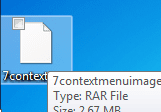
here's the theme I just made as you can see the blue box is gone.
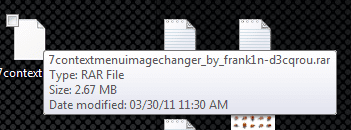
Does it only show up when you hover over the icon?
Jerry
My Computer
At a glance
Win 7 Pro x64 / Win 10 ProIntel(R) Core(TM) i7-3630QM CPU @ 2.40GHz12 GB(1) Intel(R) HD Graphics 4000 (2) NVIDIA GeFo...
- Computer type
- Laptop
- Computer Manufacturer/Model Number
- Sager NP9170
- OS
- Win 7 Pro x64 / Win 10 Pro
- CPU
- Intel(R) Core(TM) i7-3630QM CPU @ 2.40GHz
- Motherboard
- CLEVO P170EM
- Memory
- 12 GB
- Graphics Card(s)
- (1) Intel(R) HD Graphics 4000 (2) NVIDIA GeForce GTX 675M
- Sound Card
- (1) Realtek High Definition Audio (2) Intel(R) Display Aud
- Monitor(s) Displays
- 17.3
- Screen Resolution
- 1920x1080
- Hard Drives
- (1) Samsung 860 EVO 500GB(OS) (1) Samsung 860 EVO 500GB(Data)
- Keyboard
- Backlite
- Antivirus
- MSE, Malwarebytes Pro
- Browser
- Firefox
- Other Info
- DESKTOP: Custom-built.
OS: Win 10 Pro x64.
CASE: Rosewill R5.
CPU: Intel I5 4670K CPU @ 3.40GHz.
CPU COOLER: Cool Master Hyper 212 EVO.
MOTHERBOARD: Asus Z87-A.
MEMORY: Kingston HyperX 2x4 GB.
GPU: Nvidia Geforce 650 TI.
PSU: Corsair TX750.
DRIVES: (1) Samsung 840 120 GB SSD (2) Western Digital blue 500 GB 7200 RPM.

My Computer
At a glance
Win 7 Pro x64 / Win 10 ProIntel(R) Core(TM) i7-3630QM CPU @ 2.40GHz12 GB(1) Intel(R) HD Graphics 4000 (2) NVIDIA GeFo...
- Computer type
- Laptop
- Computer Manufacturer/Model Number
- Sager NP9170
- OS
- Win 7 Pro x64 / Win 10 Pro
- CPU
- Intel(R) Core(TM) i7-3630QM CPU @ 2.40GHz
- Motherboard
- CLEVO P170EM
- Memory
- 12 GB
- Graphics Card(s)
- (1) Intel(R) HD Graphics 4000 (2) NVIDIA GeForce GTX 675M
- Sound Card
- (1) Realtek High Definition Audio (2) Intel(R) Display Aud
- Monitor(s) Displays
- 17.3
- Screen Resolution
- 1920x1080
- Hard Drives
- (1) Samsung 860 EVO 500GB(OS) (1) Samsung 860 EVO 500GB(Data)
- Keyboard
- Backlite
- Antivirus
- MSE, Malwarebytes Pro
- Browser
- Firefox
- Other Info
- DESKTOP: Custom-built.
OS: Win 10 Pro x64.
CASE: Rosewill R5.
CPU: Intel I5 4670K CPU @ 3.40GHz.
CPU COOLER: Cool Master Hyper 212 EVO.
MOTHERBOARD: Asus Z87-A.
MEMORY: Kingston HyperX 2x4 GB.
GPU: Nvidia Geforce 650 TI.
PSU: Corsair TX750.
DRIVES: (1) Samsung 840 120 GB SSD (2) Western Digital blue 500 GB 7200 RPM.
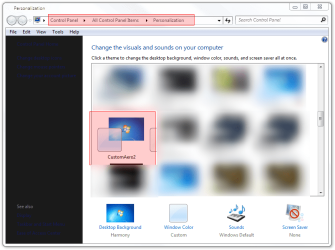
When you go to Personalize do you have CustomAero2 & are you using it? I have tried it on both 32-bit and 64-bit and those boxes are gone.I install it and it didn't remove those boxes.
look at screenshot
Jerry
Attachments
My Computer
At a glance
Win 7 Pro x64 / Win 10 ProIntel(R) Core(TM) i7-3630QM CPU @ 2.40GHz12 GB(1) Intel(R) HD Graphics 4000 (2) NVIDIA GeFo...
- Computer type
- Laptop
- Computer Manufacturer/Model Number
- Sager NP9170
- OS
- Win 7 Pro x64 / Win 10 Pro
- CPU
- Intel(R) Core(TM) i7-3630QM CPU @ 2.40GHz
- Motherboard
- CLEVO P170EM
- Memory
- 12 GB
- Graphics Card(s)
- (1) Intel(R) HD Graphics 4000 (2) NVIDIA GeForce GTX 675M
- Sound Card
- (1) Realtek High Definition Audio (2) Intel(R) Display Aud
- Monitor(s) Displays
- 17.3
- Screen Resolution
- 1920x1080
- Hard Drives
- (1) Samsung 860 EVO 500GB(OS) (1) Samsung 860 EVO 500GB(Data)
- Keyboard
- Backlite
- Antivirus
- MSE, Malwarebytes Pro
- Browser
- Firefox
- Other Info
- DESKTOP: Custom-built.
OS: Win 10 Pro x64.
CASE: Rosewill R5.
CPU: Intel I5 4670K CPU @ 3.40GHz.
CPU COOLER: Cool Master Hyper 212 EVO.
MOTHERBOARD: Asus Z87-A.
MEMORY: Kingston HyperX 2x4 GB.
GPU: Nvidia Geforce 650 TI.
PSU: Corsair TX750.
DRIVES: (1) Samsung 840 120 GB SSD (2) Western Digital blue 500 GB 7200 RPM.
OK try this remove the CustomAero2 from C:\Windows\Resources\Themes\ & put this new one in & tell me what color shows up red, yellow, green then I should know.exactly that's what I'm using and the desktop icon boxes are there.
Jerry
Attachments
My Computer
At a glance
Win 7 Pro x64 / Win 10 ProIntel(R) Core(TM) i7-3630QM CPU @ 2.40GHz12 GB(1) Intel(R) HD Graphics 4000 (2) NVIDIA GeFo...
- Computer type
- Laptop
- Computer Manufacturer/Model Number
- Sager NP9170
- OS
- Win 7 Pro x64 / Win 10 Pro
- CPU
- Intel(R) Core(TM) i7-3630QM CPU @ 2.40GHz
- Motherboard
- CLEVO P170EM
- Memory
- 12 GB
- Graphics Card(s)
- (1) Intel(R) HD Graphics 4000 (2) NVIDIA GeForce GTX 675M
- Sound Card
- (1) Realtek High Definition Audio (2) Intel(R) Display Aud
- Monitor(s) Displays
- 17.3
- Screen Resolution
- 1920x1080
- Hard Drives
- (1) Samsung 860 EVO 500GB(OS) (1) Samsung 860 EVO 500GB(Data)
- Keyboard
- Backlite
- Antivirus
- MSE, Malwarebytes Pro
- Browser
- Firefox
- Other Info
- DESKTOP: Custom-built.
OS: Win 10 Pro x64.
CASE: Rosewill R5.
CPU: Intel I5 4670K CPU @ 3.40GHz.
CPU COOLER: Cool Master Hyper 212 EVO.
MOTHERBOARD: Asus Z87-A.
MEMORY: Kingston HyperX 2x4 GB.
GPU: Nvidia Geforce 650 TI.
PSU: Corsair TX750.
DRIVES: (1) Samsung 840 120 GB SSD (2) Western Digital blue 500 GB 7200 RPM.
- Local time
- 10:36 PM
- Messages
- 416
The boxes are gone, but taskbar is white. I like the taskbar color before though. Also, it meesed up my menu bar icons.
My Computer
At a glance
windows Ultimate
- Computer type
- Laptop
- Computer Manufacturer/Model Number
- compaq
- OS
- windows Ultimate
Did you try the one back 2 post it should have be a color in the boxs?The boxes are gone, but taskbar is white. I like the taskbar color before though.
Take a screenshot of the start button & the taskbar so I can see it.
Jerry
My Computer
At a glance
Win 7 Pro x64 / Win 10 ProIntel(R) Core(TM) i7-3630QM CPU @ 2.40GHz12 GB(1) Intel(R) HD Graphics 4000 (2) NVIDIA GeFo...
- Computer type
- Laptop
- Computer Manufacturer/Model Number
- Sager NP9170
- OS
- Win 7 Pro x64 / Win 10 Pro
- CPU
- Intel(R) Core(TM) i7-3630QM CPU @ 2.40GHz
- Motherboard
- CLEVO P170EM
- Memory
- 12 GB
- Graphics Card(s)
- (1) Intel(R) HD Graphics 4000 (2) NVIDIA GeForce GTX 675M
- Sound Card
- (1) Realtek High Definition Audio (2) Intel(R) Display Aud
- Monitor(s) Displays
- 17.3
- Screen Resolution
- 1920x1080
- Hard Drives
- (1) Samsung 860 EVO 500GB(OS) (1) Samsung 860 EVO 500GB(Data)
- Keyboard
- Backlite
- Antivirus
- MSE, Malwarebytes Pro
- Browser
- Firefox
- Other Info
- DESKTOP: Custom-built.
OS: Win 10 Pro x64.
CASE: Rosewill R5.
CPU: Intel I5 4670K CPU @ 3.40GHz.
CPU COOLER: Cool Master Hyper 212 EVO.
MOTHERBOARD: Asus Z87-A.
MEMORY: Kingston HyperX 2x4 GB.
GPU: Nvidia Geforce 650 TI.
PSU: Corsair TX750.
DRIVES: (1) Samsung 840 120 GB SSD (2) Western Digital blue 500 GB 7200 RPM.
- Local time
- 10:36 PM
- Messages
- 416
Its all white, and the firefox 4 menu bar icon shakes. The other customaero you told me to delete had colors just like default aero, but it didn't remove the boxes. The last theme you provided removed the boxes its just like the aero you provided before and its white.
My Computer
At a glance
windows Ultimate
- Computer type
- Laptop
- Computer Manufacturer/Model Number
- compaq
- OS
- windows Ultimate
I would like to see your start button to see if aero is on.Its all white, and the firefox 4 menu bar icon shakes. The other customaero you told me to delete had colors just like default aero, but it didn't remove the boxes. The last theme you provided removed the boxes its just like the aero you provided before and its white.
I do no know how the 2nd one removed the boxs I had them a solid color.
Jerry
My Computer
At a glance
Win 7 Pro x64 / Win 10 ProIntel(R) Core(TM) i7-3630QM CPU @ 2.40GHz12 GB(1) Intel(R) HD Graphics 4000 (2) NVIDIA GeFo...
- Computer type
- Laptop
- Computer Manufacturer/Model Number
- Sager NP9170
- OS
- Win 7 Pro x64 / Win 10 Pro
- CPU
- Intel(R) Core(TM) i7-3630QM CPU @ 2.40GHz
- Motherboard
- CLEVO P170EM
- Memory
- 12 GB
- Graphics Card(s)
- (1) Intel(R) HD Graphics 4000 (2) NVIDIA GeForce GTX 675M
- Sound Card
- (1) Realtek High Definition Audio (2) Intel(R) Display Aud
- Monitor(s) Displays
- 17.3
- Screen Resolution
- 1920x1080
- Hard Drives
- (1) Samsung 860 EVO 500GB(OS) (1) Samsung 860 EVO 500GB(Data)
- Keyboard
- Backlite
- Antivirus
- MSE, Malwarebytes Pro
- Browser
- Firefox
- Other Info
- DESKTOP: Custom-built.
OS: Win 10 Pro x64.
CASE: Rosewill R5.
CPU: Intel I5 4670K CPU @ 3.40GHz.
CPU COOLER: Cool Master Hyper 212 EVO.
MOTHERBOARD: Asus Z87-A.
MEMORY: Kingston HyperX 2x4 GB.
GPU: Nvidia Geforce 650 TI.
PSU: Corsair TX750.
DRIVES: (1) Samsung 840 120 GB SSD (2) Western Digital blue 500 GB 7200 RPM.
- Local time
- 10:36 PM
- Messages
- 416
Yes I try the 2 back posts. The colors are the same as default, but you told me to delete that theme. Now I'm back using the default theme. The last theme was like the windows classic with white taskbar and firefox 4 menu bar tabs were shaking.
My Computer
At a glance
windows Ultimate
- Computer type
- Laptop
- Computer Manufacturer/Model Number
- compaq
- OS
- windows Ultimate
My Computer
At a glance
Win 7 Pro x64 / Win 10 ProIntel(R) Core(TM) i7-3630QM CPU @ 2.40GHz12 GB(1) Intel(R) HD Graphics 4000 (2) NVIDIA GeFo...
- Computer type
- Laptop
- Computer Manufacturer/Model Number
- Sager NP9170
- OS
- Win 7 Pro x64 / Win 10 Pro
- CPU
- Intel(R) Core(TM) i7-3630QM CPU @ 2.40GHz
- Motherboard
- CLEVO P170EM
- Memory
- 12 GB
- Graphics Card(s)
- (1) Intel(R) HD Graphics 4000 (2) NVIDIA GeForce GTX 675M
- Sound Card
- (1) Realtek High Definition Audio (2) Intel(R) Display Aud
- Monitor(s) Displays
- 17.3
- Screen Resolution
- 1920x1080
- Hard Drives
- (1) Samsung 860 EVO 500GB(OS) (1) Samsung 860 EVO 500GB(Data)
- Keyboard
- Backlite
- Antivirus
- MSE, Malwarebytes Pro
- Browser
- Firefox
- Other Info
- DESKTOP: Custom-built.
OS: Win 10 Pro x64.
CASE: Rosewill R5.
CPU: Intel I5 4670K CPU @ 3.40GHz.
CPU COOLER: Cool Master Hyper 212 EVO.
MOTHERBOARD: Asus Z87-A.
MEMORY: Kingston HyperX 2x4 GB.
GPU: Nvidia Geforce 650 TI.
PSU: Corsair TX750.
DRIVES: (1) Samsung 840 120 GB SSD (2) Western Digital blue 500 GB 7200 RPM.
Its the same as the one before this. Windows classic.
Did you use the
Universal Theme Patcher? http://www.sevenforums.com/tutorials/28377-theme-how-apply-custom-themes.html?filter
or
UxStyle Core Beta? http://www.sevenforums.com/tutorials/34579-enabling-custom-themes-windows-7-a.html
Jerry
My Computer
At a glance
Win 7 Pro x64 / Win 10 ProIntel(R) Core(TM) i7-3630QM CPU @ 2.40GHz12 GB(1) Intel(R) HD Graphics 4000 (2) NVIDIA GeFo...
- Computer type
- Laptop
- Computer Manufacturer/Model Number
- Sager NP9170
- OS
- Win 7 Pro x64 / Win 10 Pro
- CPU
- Intel(R) Core(TM) i7-3630QM CPU @ 2.40GHz
- Motherboard
- CLEVO P170EM
- Memory
- 12 GB
- Graphics Card(s)
- (1) Intel(R) HD Graphics 4000 (2) NVIDIA GeForce GTX 675M
- Sound Card
- (1) Realtek High Definition Audio (2) Intel(R) Display Aud
- Monitor(s) Displays
- 17.3
- Screen Resolution
- 1920x1080
- Hard Drives
- (1) Samsung 860 EVO 500GB(OS) (1) Samsung 860 EVO 500GB(Data)
- Keyboard
- Backlite
- Antivirus
- MSE, Malwarebytes Pro
- Browser
- Firefox
- Other Info
- DESKTOP: Custom-built.
OS: Win 10 Pro x64.
CASE: Rosewill R5.
CPU: Intel I5 4670K CPU @ 3.40GHz.
CPU COOLER: Cool Master Hyper 212 EVO.
MOTHERBOARD: Asus Z87-A.
MEMORY: Kingston HyperX 2x4 GB.
GPU: Nvidia Geforce 650 TI.
PSU: Corsair TX750.
DRIVES: (1) Samsung 840 120 GB SSD (2) Western Digital blue 500 GB 7200 RPM.
Similar threads

- Replies
- 0
- Views
- 6K


- Replies
- 4
- Views
- 1K