remove universal theme patcher and install windowblinds problem

brainstormed

New member
Local time
5:21 PM
Messages
12
i use VS theme and want to switch to windowblinds (public).
i restored files that UTP offered and installed WB, but all i get is sort of windows 98 blinds (gray and no aero) and something with explorer goes wrong so when i open window i just see frames (of the window) and no content.
when i uninstall WB and patch files with UTP again everything goes back to normal, but it's not what i want.
can someone help me with this one?
 

My Computer

OS
Windows 7

My Computer

Computer type
PC/Desktop
Computer Manufacturer/Model Number
LENOVO K450 @3.0GHZ
OS
64-bit Windows 8.1 Pro
CPU
Core(TM) i5 CPU 4330 Haswell @ 3.20GHz
Motherboard
LENOVO
Memory
12.00 GB
Graphics Card(s)
Intel(R) HD Graphics
Sound Card
Intel HD integtrated
Monitor(s) Displays
HP 25' ISP Monitor
Screen Resolution
1900/1020
Hard Drives
(1) ST1000DM003-1CH162 (2) Generic STORAGE DEVICE USB Device (3) Generic STORAGE DEVICE USB Device
Internet Speed
100mb down/10mb up
repair didn't work, tried it earlier
what's the thing with sfc /scannow?
 

My Computer

OS
Windows 7
That command will scan the system files ( such as uxtheme.dll ) and if a problem is found it will attempt to repair them... It is not a gaurenteed fix, but one worth attempted .... I dont suppose that you made an image of your system before you ran UTP???
 

My Computer

Computer type
PC/Desktop
Computer Manufacturer/Model Number
LENOVO K450 @3.0GHZ
OS
64-bit Windows 8.1 Pro
CPU
Core(TM) i5 CPU 4330 Haswell @ 3.20GHz
Motherboard
LENOVO
Memory
12.00 GB
Graphics Card(s)
Intel(R) HD Graphics
Sound Card
Intel HD integtrated
Monitor(s) Displays
HP 25' ISP Monitor
Screen Resolution
1900/1020
Hard Drives
(1) ST1000DM003-1CH162 (2) Generic STORAGE DEVICE USB Device (3) Generic STORAGE DEVICE USB Device
Internet Speed
100mb down/10mb up
i use VS theme and want to switch to windowblinds (public).
i restored files that UTP offered and installed WB, but all i get is sort of windows 98 blinds (gray and no aero) and something with explorer goes wrong so when i open window i just see frames (of the window) and no content.
when i uninstall WB and patch files with UTP again everything goes back to normal, but it's not what i want.
can someone help me with this one?
When it was vista (I used it far a very few days ) I tried Windowblinds. It was enhanced, not public. But from my experience, I seen that if after installing windowblinds properly with the required reboots it fails to load a custom theme, a theme download from wincustomize.com and applying it may solve the issue :D

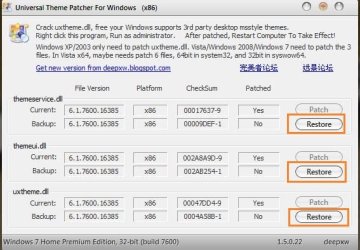
But if you just want to the remove patches made by universal theme patcher, run the patcher again, and press the three restore buttons there, for namely themeservice.dll, themeui.dll and uxtheme.dll ; all the patches will be removed :D
 

Attachments

  • Capture.JPG
    Capture.JPG
    50.8 KB · Views: 182

My Computer

Computer type
PC/Desktop
Computer Manufacturer/Model Number
Self Assembled
OS
Microsoft Windows 10 Pro Insider Preview 64-bit
CPU
Intel(R) Core(TM) i3-4130 CPU @ 3.40GHz
Motherboard
Gigabyte Technology Co., Ltd. B85M-D3H
Memory
Corsair Vengence 4GB x2 (8.00GB Dual-Channel DDR3 @ 798MHz)
Graphics Card(s)
2047MB GeForce GTS 450 (ZOTAC International)
Sound Card
Onboard (Realtek High Definition Audio)
Monitor(s) Displays
LG Flatron E2040T
Screen Resolution
1600x900
Hard Drives
Western Digital 1 TB
Seagate 500 GB
PSU
Corsair VS550
Case
Cooler Master K380
Cooling
Cooler Master Seidon 120V Plus
Keyboard
Logitech MK260r
Mouse
Logitech MK260r
Internet Speed
PMPL Broadband
Antivirus
Windows Defender + MBAM
Browser
Firefox
Other Info
Dell Studio 15" Laptop
restore patch not working

i read the whole thread and did everything i can
i have no restore points in system restore, and i restored the patch but Uxstyle still not working and im stuck with win99 theme -.-'
two themes i installed earlier worked, no need for any additional program, or patch, and i installed the third that requires one and now not even the two first ones are working.
i know the thread is old but i seriously need help with this.
Thanks in advance
 

My Computer

OS
windows 7 home premium 32bit

My Computer

Computer Manufacturer/Model Number
Hewlett packard/p6512uk
OS
Microsoft Windows 7 Home Premium 64-bit 7600
CPU
IIx4 amd athelon 635 processor
Motherboard
FOXCONN 2AA9
Memory
2x2gb
Graphics Card(s)
ati radeon HD 5450
Sound Card
(1) Realtek High Definition Audio (2) AMD High Definition
Monitor(s) Displays
samsung lcd tv 32"
Screen Resolution
1360x 768
Hard Drives
(1) WDC WD10 01FAES-60Z2A0 SATA Disk Device (2) Maxtor OneTouch USB Device (3) ST310003 33AS USB Device (4) WD My Book 1111 USB Device
PSU
?
Cooling
air!
Keyboard
wireless hp
Mouse
wireless Hp,optical
Internet Speed
1.10mb/s
Antivirus
MSE
Browser
Firefox
Back
Top