Solved Remove Win XP from dual boot with Win7. Win7 not at front of HDD.

Kaktussoft - I have my backups stored on my F: drive since I don't have another external source at the moment. I'm assuming that will be okay and I won't have to worry about the USB things.

I think I'll only delete the XP partition initially and then try to restore the Win7 backup. After I've determined the restored partition is working, go back and delete the Win7 partition. Is it okay to do it that way? I'd hate like the devil to have the restore go foobar on me and be stuck. My only other question is this....If I keep the original Win7 install intact and restore my backup, will I need to change that partition from active to inactive first? Or, will, as you you've said, the restored partition take over and render the original Win7 inactive?
Mark old win7 not active first and then restore. Post disk amnagement screenshot after booting into new win7
 

My Computer My Computer

At a glance

Microsoft Windows 7 Home Premium 64-bits 7601...Intel(R) Core(TM) i3 CPU M 370 @ 2.40GHz4,00 GBATI Mobility Radeon HD 5400 Series
Computer type
Laptop
Computer Manufacturer/Model Number
ACER ASPIRE 5742G
OS
Microsoft Windows 7 Home Premium 64-bits 7601 Multiprocessor Free Service Pack 1
CPU
Intel(R) Core(TM) i3 CPU M 370 @ 2.40GHz
Motherboard
Acer Aspire 5742G
Memory
4,00 GB
Graphics Card(s)
ATI Mobility Radeon HD 5400 Series
Sound Card
(1) AMD High Definition Audio Device (2) Realtek High Defi
Screen Resolution
1366 x 768 x 32 bits (4294967296 colors) @ 60 Hz
Hard Drives
WDC WD5000BEVT-22ZAT0
Kaktussoft - Thank you sire for that quick response. I'm getting ready to delete the XP partition and begin the restore in a few minutes. As you've requested, I'll post a shot of the Disk Management screen when completed.
 

My Computer My Computer

At a glance

Windows 7 Ultimate x64AMD Phenom II 555BE4 GB CorsairATI Radeon HD 4830 512 MB
Computer Manufacturer/Model Number
self built
OS
Windows 7 Ultimate x64
CPU
AMD Phenom II 555BE
Motherboard
Biostar TA890GXB HD
Memory
4 GB Corsair
Graphics Card(s)
ATI Radeon HD 4830 512 MB
Sound Card
Diamond Xtreme Sound 7.1
Monitor(s) Displays
Acer 22" LED
Hard Drives
Western Digital 1 TB Black
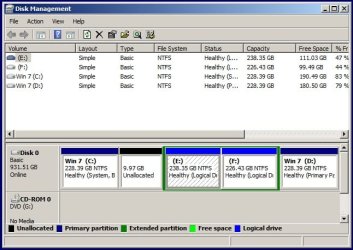
Kaktussoft - Here is a Disk Management screenshot taken after the initial boot with the newly restored partition.

DM_3.jpg

Looks like not quite 10gb unallocated, so I'll see about extending C: to make use of it. Is it necessary to delete the old Win7 partition, or can I just format it and continue to use it as drive D:? It seems to me that either option will work, but if formatting will work I'll do that and be done with the whole process.

It seems like everything is working just as it did before, so I'm guessing I didn't screw anything up. I'll use the pc the way it is for a day or so just to make sure, then make the other changes.

A big thanks to everyone who took time to help me with this project. Feels pretty darn good to know I can do such things and get the result I want. Thanks again very much.
 

My Computer My Computer

At a glance

Windows 7 Ultimate x64AMD Phenom II 555BE4 GB CorsairATI Radeon HD 4830 512 MB
Computer Manufacturer/Model Number
self built
OS
Windows 7 Ultimate x64
CPU
AMD Phenom II 555BE
Motherboard
Biostar TA890GXB HD
Memory
4 GB Corsair
Graphics Card(s)
ATI Radeon HD 4830 512 MB
Sound Card
Diamond Xtreme Sound 7.1
Monitor(s) Displays
Acer 22" LED
Hard Drives
Western Digital 1 TB Black
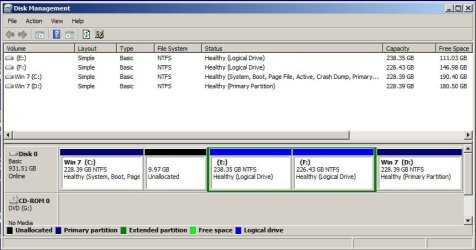
You've hidden whether the new C partition is indeed marked Active, and we're unable to see fully what the other partitions are marked. Please maximize the windows before snipping.

As long as Win7 is marked Active, you can extend C into the adjacent unallocated space using Disk Mgmt Extend Partition. Then you can copy your files from the old Win7 into the new one by opening each User folder, from Organize tab Select All, then drag the group to the corresponding User folder on the lefthand Explorer bar, making sure not to release them until it confirms in hypertext where they are being copied and stops unfolding the bar.

When ready you can delete XP, then redistribute the space into any of the other partitions using the cool new Partition Wizard extend feature which will grab empty space from any other partition or unallocated space from the target partition.
 
Oh brother, sorry about cutting off the details. I think this screenshot should give you the info you need.

DM_4.jpg

I've rebooted about 4 times so far and each time I boot straight into Win7. It appears that everything is working properly. My only unanswered question is can I just format drive D: and use it as storage instead of deleting it and recreating it? I suppose also make it a logical drive and not primary?
 

My Computer My Computer

At a glance

Windows 7 Ultimate x64AMD Phenom II 555BE4 GB CorsairATI Radeon HD 4830 512 MB
Computer Manufacturer/Model Number
self built
OS
Windows 7 Ultimate x64
CPU
AMD Phenom II 555BE
Motherboard
Biostar TA890GXB HD
Memory
4 GB Corsair
Graphics Card(s)
ATI Radeon HD 4830 512 MB
Sound Card
Diamond Xtreme Sound 7.1
Monitor(s) Displays
Acer 22" LED
Hard Drives
Western Digital 1 TB Black
Yep, just format it.
 

My Computer My Computer

At a glance

Windows 10 Pro x64Intel Core i7 6700KGSkill TridentZ RGB 16GB 3600 16-16-16-36EVGA GTX 980 Ti SC x2
Computer type
PC/Desktop
Computer Manufacturer/Model Number
Skylake Special #666
OS
Windows 10 Pro x64
CPU
Intel Core i7 6700K
Motherboard
Asus Sabertooth Z170 Mark 1
Memory
GSkill TridentZ RGB 16GB 3600 16-16-16-36
Graphics Card(s)
EVGA GTX 980 Ti SC x2
Sound Card
Realtek High Definition
Monitor(s) Displays
AOC G2460PG
Screen Resolution
1920 x 1080 144Hz
Hard Drives
Samsung 860 Pro 256GB, Seagate Barracuda 4TB x2
PSU
EVGA 1000 P2, EVGA White Custom Braided Cables
Case
Corsair Vengeance C70 Gunmetal Black
Cooling
Corsair H100i v2, Corsair ML120 x2, Thermal Grizzly Kryonaut
Keyboard
Logitech G910 Orion Spectrum
Mouse
Logitech G700s
Internet Speed
Verizon Fios Quantum Gateway 75/75
Antivirus
Windows Defender, Malwarebytes Free 3.8.3
Browser
Chrome
Other Info
Corsair SP120 x4, LG Blu-ray Drive, Durabrand HT-395 100 Watt Dolby Digital Amp, Corsair H2100 Wireless 7.1 Headset
AddRAM - I just finished recovering the unallocated space by extending drive C:. Also formatted drive D: and made it a logical drive. After several restarts everything seems fine. I'll spend some time tomorrow running programs to ensure everything is working as it should be. I wanted to note that everything I did pertaining to partitions I did with Partition Wizard. It's a nice tool to have.

Unless something blows up in the next few days I think this has been solved. I'll mark the thread as such.

Thanks to everyone who helped.
 

My Computer My Computer

At a glance

Windows 7 Ultimate x64AMD Phenom II 555BE4 GB CorsairATI Radeon HD 4830 512 MB
Computer Manufacturer/Model Number
self built
OS
Windows 7 Ultimate x64
CPU
AMD Phenom II 555BE
Motherboard
Biostar TA890GXB HD
Memory
4 GB Corsair
Graphics Card(s)
ATI Radeon HD 4830 512 MB
Sound Card
Diamond Xtreme Sound 7.1
Monitor(s) Displays
Acer 22" LED
Hard Drives
Western Digital 1 TB Black
AddRAM - I just finished recovering the unallocated space by extending drive C:. Also formatted drive D: and made it a logical drive. After several restarts everything seems fine. I'll spend some time tomorrow running programs to ensure everything is working as it should be. I wanted to note that everything I did pertaining to partitions I did with Partition Wizard. It's a nice tool to have.

Unless something blows up in the next few days I think this has been solved. I'll mark the thread as such.

Thanks to everyone who helped.
No further testing is needed. Bootmgr is fine, and win7 boots from new partition. All other partitions have same drive letter as before.

Only check this:
http://www.sevenforums.com/tutorials/330-system-protection-turn-off.html any ghost drives there? Configure system protection OFF on them and they will disappear afterwards. Configure system protection ON on C if it's not already.

Start disk fragmenter and configure the schedule. Are all disks you want selected?
 

My Computer My Computer

At a glance

Microsoft Windows 7 Home Premium 64-bits 7601...Intel(R) Core(TM) i3 CPU M 370 @ 2.40GHz4,00 GBATI Mobility Radeon HD 5400 Series
Computer type
Laptop
Computer Manufacturer/Model Number
ACER ASPIRE 5742G
OS
Microsoft Windows 7 Home Premium 64-bits 7601 Multiprocessor Free Service Pack 1
CPU
Intel(R) Core(TM) i3 CPU M 370 @ 2.40GHz
Motherboard
Acer Aspire 5742G
Memory
4,00 GB
Graphics Card(s)
ATI Mobility Radeon HD 5400 Series
Sound Card
(1) AMD High Definition Audio Device (2) Realtek High Defi
Screen Resolution
1366 x 768 x 32 bits (4294967296 colors) @ 60 Hz
Hard Drives
WDC WD5000BEVT-22ZAT0
Kaktussoft - Thanks for the final bits of advice. Confirmed System Protection on for drive C: and made a fresh restore point. No ghost drives, only the four partitions I started out with. My disk defragmenter has been set to run auto once a week since I first installed Win7 way back when.

Looks like everything is good to go, so unless there's something else I need to do I'll leave things as they are. Thanks for all your help with this project.
 

My Computer My Computer

At a glance

Windows 7 Ultimate x64AMD Phenom II 555BE4 GB CorsairATI Radeon HD 4830 512 MB
Computer Manufacturer/Model Number
self built
OS
Windows 7 Ultimate x64
CPU
AMD Phenom II 555BE
Motherboard
Biostar TA890GXB HD
Memory
4 GB Corsair
Graphics Card(s)
ATI Radeon HD 4830 512 MB
Sound Card
Diamond Xtreme Sound 7.1
Monitor(s) Displays
Acer 22" LED
Hard Drives
Western Digital 1 TB Black
Back
Top