
Solved Removed "failed updates" in Win 7 update history

trinaz

New member
Member
VIP
Local time
6:33 PM
Messages
477
Location
Phoenix
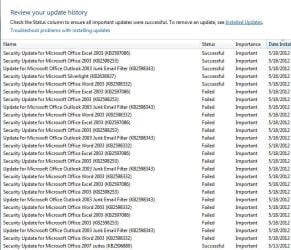
Is there a way to edit the log for Windows update history to remove the failed updates as in the attached jpg ?

I have solved the issue of them failing...but would like to delete these and other "failed" entries

Thanks....TRinAz
 

Attachments

  • failed.jpg
    failed.jpg
    108.1 KB · Views: 123

My Computer My Computer

Computer type
PC/Desktop
Computer Manufacturer/Model Number
Self built
OS
Windows 7 Pro 64bit SP1
CPU
AMD FX-6100 Six-Core Processor
Motherboard
M5A78L-M LX PLUS
Memory
2ea Corsair-1333MHz-PC3-10666-240-pin-CMX4GX3M1A1333C9
Graphics Card(s)
NVIDIA GeForce GT 630 - 1023MB (EVGA)
Sound Card
OnBoard Via High Def Audio
Monitor(s) Displays
Samsung 204B main - ASUS VS228 secondary
Screen Resolution
1920x1080 main - 1920x1080 secondary
Hard Drives
Samsung SSD 840 128GB Win7 Pro 64bit - Western Digital WDC 465GB - Seagate 640GB Sata B/U - Maxtor 500GB Sata B/U - Maxtor 200GB Sata
PSU
Antec 650 watt
Cooling
Multiple case fans
Keyboard
MS USB dual Wireless Keyboard - IntelliType Pro
Mouse
MS USB dual Wireless Mouse - IntelliPoint
Internet Speed
Cox Cable
Antivirus
Bitdefender IS 2014
Browser
FireFox Primary - IE 11
Other Info
Hauppaguge Win TV HVR-1250 (Model 22xxx, Hybrid ATSC/QAM)
Samsung HD103SI USB 1TB Desktop Drive - Backup & Disk Image storage

My Computer My Computer

Computer type
Laptop
Computer Manufacturer/Model Number
HP pavilion DV6
OS
win7 home premium-64bit-SP1-IE10
CPU
T6600 2.2Ghz
Motherboard
HP Model 3628
Memory
4 Gb
Graphics Card(s)
ATI Mobility Radeon HD 4530
Sound Card
IDT High Definition
Screen Resolution
1366x768 @ 60Hz
Hard Drives
500Gb Western Digital
Antivirus
MSE
Other Info
Malwarebytes Antimalware + Spybot-Search&Destroy
There is no need whatever to remove the entries - that's all they are (entries in a database)., they are not separate downloads and take almost no space on the drive.
 

My Computer My Computer

Computer type
Laptop
Computer Manufacturer/Model Number
Asus K52F or Lenovo B51-80
OS
Win 7 x64 Home Premium (and x86 VirtualBox VM)/Win10
CPU
i3 370M/i7 6500U
Motherboard
Asus/Lenovo
Memory
8GB - finally :)/8GB
Graphics Card(s)
it's an i3, dude!/dual Intel&nVidia
Sound Card
onboard
Monitor(s) Displays
15.6" built-in
Screen Resolution
1366x768/1920x1080
Hard Drives
750GB Seagate internal
Sundry external drives attached to other computers on the local network
1TB SSD on the Lenovo
PSU
n/a
Internet Speed
as much as I can get - usually on a dongle/phone, so <1MB/s
Antivirus
MSE/Defender
Browser
IE11/12/Edge/Chrome/FF(if I must)
Back
Top