Removing Raid O designation and installing a New SSD

ray47

New member
Local time
2:22 PM
Messages
2
Location
San Tan Valley, Az
I currently have a Dell Studio 7100 AMD 1090T with two 750 gb Baracudas in a Raid 0 configuration. My MOB is sata 2 only. I wish to undo the Raid and make them individual drives. I am adding a sata 3 card along with a new Samsung 830 256 gb ssd drive configured as the start up drive and working drive with the two other drives as storage drives.

Have never undone Raid 0 drives before. Any suggestions on how to proceed.

Thanks for all of your help!
 

My Computer My Computer

At a glance

Windows 7 Home EditionAMD 1090T16 GBRadeon 5870
Computer Manufacturer/Model Number
Dell XPS 7100
OS
Windows 7 Home Edition
CPU
AMD 1090T
Motherboard
AMD
Memory
16 GB
Graphics Card(s)
Radeon 5870
Sound Card
System 7.1
Monitor(s) Displays
Viewsonic 27" 2 ms Response Time 1080p
Hard Drives
2 ea. Seagate 750 gb in a Raid 0 configuration
PSU
460 watt
Case
Dell Studio
Cooling
2 system fans
First back up all data on your raid configuration. When you break the raid you will lose all data. Break the raid from the same set up screen where you set it up. There should be an option to delete the array. Change the Sata configuration from Raid to AHCI. Then you will have 2 seperate drives. I would wipe them. Connect the Samsung to your machine, disconnect all other hard drives and reinstall Windows. After the installation is complete, re connect the 2 Seagate drives, and they will be independant drives. restore your data you backed up.
 

My Computers My Computers

  • At a glance

    Windows 11 ProRyzen 9 5900X32GB G Skill DDR4-3600EVGA RTX 3080 FTW 3 Ultra
    Computer type
    PC/Desktop
    Computer Manufacturer/Model Number
    ALWAYS UNDER CONSTRUCTION
    OS
    Windows 11 Pro
    CPU
    Ryzen 9 5900X
    Motherboard
    Asus X570 Crosshair Viii Hero
    Memory
    32GB G Skill DDR4-3600
    Graphics Card(s)
    EVGA RTX 3080 FTW 3 Ultra
    Sound Card
    On Board/Sennheiser PC37X Headset
    Monitor(s) Displays
    3 X Asus 27"
    Screen Resolution
    2560x1440
    Hard Drives
    2 X 1 TB NVME drives
    PSU
    EVGA 850
    Case
    Phanteks Eclipse P400A
    Cooling
    EVGA 280 AIO
    Keyboard
    Logitech G510s/ Logitech G13
    Mouse
    Logitech G502
    Internet Speed
    24/1
    Antivirus
    ESET/MBAM Pro/SAS Pro
    Browser
    Chrome/ Firefox/ Edge
  • At a glance

    Windows 11 ProIntel Ultra 9 288V32 GB LPDDR5X 8533
    Computer type
    Laptop
    System Manufacturer/Model Number
    Dell 16 Plus
    OS
    Windows 11 Pro
    CPU
    Intel Ultra 9 288V
    Memory
    32 GB LPDDR5X 8533
    Monitor(s) Displays
    16" Mini-LED HDR600 Touch 90 Hz
    Screen Resolution
    2560X1600
    Hard Drives
    1 TB NVME
Thank you for your response. One other question, how does the Sata 3 card fit in? The new SSD will be plugged into the Sata 3 card and the other two will plug into the motherboard. Do you think that there will be any problem with labeling drives or other issues?

Again thanks for your help !!!!
 

My Computer My Computer

At a glance

Windows 7 Home EditionAMD 1090T16 GBRadeon 5870
Computer Manufacturer/Model Number
Dell XPS 7100
OS
Windows 7 Home Edition
CPU
AMD 1090T
Motherboard
AMD
Memory
16 GB
Graphics Card(s)
Radeon 5870
Sound Card
System 7.1
Monitor(s) Displays
Viewsonic 27" 2 ms Response Time 1080p
Hard Drives
2 ea. Seagate 750 gb in a Raid 0 configuration
PSU
460 watt
Case
Dell Studio
Cooling
2 system fans
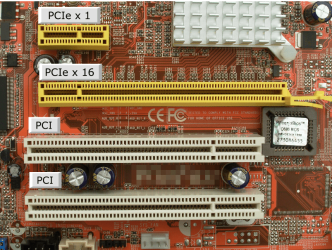
It depends on what type card it is. Most, I think, are pcie X 1 cards which means they fit into an X 1 pcie slot, but usually they can be installed in any pcie port. Turn off and unplug the computer, hold the start button down for 30 seconds. Just find the right pcie slot and remove the screw for the expansion slot in the back of the computer. Plug the card in and the backplate should line up with the expansion slot you just removed, the same as a graphics card. Screw the backplate down with the same screw that was in the expansion slot you removed. I wouldn't connect any hard drives to it. Plug the computer back in and restart. You should get a 'new hardware found' notice. Install the correct driver for your card. Shut down and connect the hard drive, restart and go to disk management to see if it is recognized. If you need help identifying the slot types, look at the card pins on the bottom and line them up with one that will fit. Maybe this will help.

PCIe Slots.PNG
 

My Computers My Computers

  • At a glance

    Windows 11 ProRyzen 9 5900X32GB G Skill DDR4-3600EVGA RTX 3080 FTW 3 Ultra
    Computer type
    PC/Desktop
    Computer Manufacturer/Model Number
    ALWAYS UNDER CONSTRUCTION
    OS
    Windows 11 Pro
    CPU
    Ryzen 9 5900X
    Motherboard
    Asus X570 Crosshair Viii Hero
    Memory
    32GB G Skill DDR4-3600
    Graphics Card(s)
    EVGA RTX 3080 FTW 3 Ultra
    Sound Card
    On Board/Sennheiser PC37X Headset
    Monitor(s) Displays
    3 X Asus 27"
    Screen Resolution
    2560x1440
    Hard Drives
    2 X 1 TB NVME drives
    PSU
    EVGA 850
    Case
    Phanteks Eclipse P400A
    Cooling
    EVGA 280 AIO
    Keyboard
    Logitech G510s/ Logitech G13
    Mouse
    Logitech G502
    Internet Speed
    24/1
    Antivirus
    ESET/MBAM Pro/SAS Pro
    Browser
    Chrome/ Firefox/ Edge
  • At a glance

    Windows 11 ProIntel Ultra 9 288V32 GB LPDDR5X 8533
    Computer type
    Laptop
    System Manufacturer/Model Number
    Dell 16 Plus
    OS
    Windows 11 Pro
    CPU
    Intel Ultra 9 288V
    Memory
    32 GB LPDDR5X 8533
    Monitor(s) Displays
    16" Mini-LED HDR600 Touch 90 Hz
    Screen Resolution
    2560X1600
    Hard Drives
    1 TB NVME
Back
Top