Removing Vista drive from dual boot with W7

Jonmor68

New member
Local time
2:22 AM
Messages
52
Location
Adelaide Australia
I have Vista on one drive and Windows 7 on a separate hdd dual booting.
I want to remove the Vista drive and only retain Windows 7, so that I only need to have one drive to boot from and to backup the Windows 7 OS drive.
I have no further use for Vista, I haven’t used it for months. Space no problem, just a nuisance to have to include it in the image backup and make larger files.
Vista is drive C: Windows 7 is F:
I have 32 bit Windows 7 Home Premium Upgrade disks and Repair disk.
4 hdd’s installed and 2 DVD Writers.
Any help on an easy solution would be much appreciated.
 

My Computer My Computer

At a glance

Vista Home Premium & Windows 7
OS
Vista Home Premium & Windows 7
Hello Jonmor68.


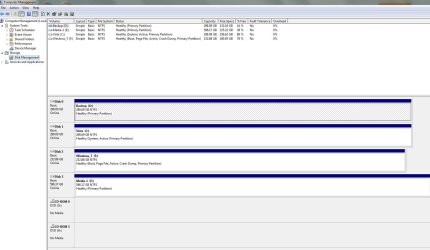
Will you please post a snip/screen-shot of the entire disk management drive map so we can see what you have going on as there may be a fairly simple way to resolve the situation.


In the Windows start menu right click computer and click manage, in the left pane of the "Computer Management" window that opens click disk management and post a snip of that.
 

My Computer My Computer

At a glance

W 7 64-bit UltimateIntel Q9550 Yorkfield8GB Dominator 8500C5DATI : XFX 5870
Computer Manufacturer/Model Number
* BFK Customs *
OS
W 7 64-bit Ultimate
CPU
Intel Q9550 Yorkfield
Motherboard
ASUS P5Q Pro
Memory
8GB Dominator 8500C5D
Graphics Card(s)
ATI : XFX 5870
Sound Card
Realtek HD Audio 7-1
Monitor(s) Displays
1x 47" LCD HDMI & 3x 26" LCD HDMI
Screen Resolution
1920x1080P & 1920x1200
Hard Drives
1x 80GB Intel X25-M G2 SSD : 1x 500GB & 1x 640GB WD Caviar Black(s)
PSU
Corsair 620HX
Case
Cooler Master RC-690
Cooling
Tuniq Tower 120, 2x 140mm and 3x 120mm case fans
Keyboard
Microsoft 500
Mouse
Razer Diamondback 3G
Internet Speed
14 Mb/s
Other Info
1x Koutech 3Gb/s SATA HDD Hot Swap Rack
I can't see how that will make any difference, I believe I have posted the relavent info, ie; Vista on one drive Windows 7 added on second drive.
Obviously removing the Vista drive will stop Windows 7 from booting.
I can't insert image it's asking for url.
 

My Computer My Computer

At a glance

Vista Home Premium & Windows 7
OS
Vista Home Premium & Windows 7

My Computer My Computer

At a glance

W 7 64-bit UltimateIntel Q9550 Yorkfield8GB Dominator 8500C5DATI : XFX 5870
Computer Manufacturer/Model Number
* BFK Customs *
OS
W 7 64-bit Ultimate
CPU
Intel Q9550 Yorkfield
Motherboard
ASUS P5Q Pro
Memory
8GB Dominator 8500C5D
Graphics Card(s)
ATI : XFX 5870
Sound Card
Realtek HD Audio 7-1
Monitor(s) Displays
1x 47" LCD HDMI & 3x 26" LCD HDMI
Screen Resolution
1920x1080P & 1920x1200
Hard Drives
1x 80GB Intel X25-M G2 SSD : 1x 500GB & 1x 640GB WD Caviar Black(s)
PSU
Corsair 620HX
Case
Cooler Master RC-690
Cooling
Tuniq Tower 120, 2x 140mm and 3x 120mm case fans
Keyboard
Microsoft 500
Mouse
Razer Diamondback 3G
Internet Speed
14 Mb/s
Other Info
1x Koutech 3Gb/s SATA HDD Hot Swap Rack
I didn't know how to insert image untill your post.
 

Attachments

  • Disk manage.JPG
    Disk manage.JPG
    138.9 KB · Views: 42

My Computer My Computer

At a glance

Vista Home Premium & Windows 7
OS
Vista Home Premium & Windows 7
OK, disconnect the Hard Disk Drive (HDD) that Vista is on then as Windows 7 is already marked as "Active" you should be able to do the 3 separate startup repairs with the system restarts between each repair to rebuild the boot files to the Windows 7 partition.

After W_7 is booting on it's own connect the Vista HDD back up and you can do as you wish with it though you may be able to boot the 2 independently using the BIOS boot priority menu.


Have a look at the tutorial at the link below for more info on the subject.

Startup Repair - Run 3 Separate Times
 

My Computer My Computer

At a glance

W 7 64-bit UltimateIntel Q9550 Yorkfield8GB Dominator 8500C5DATI : XFX 5870
Computer Manufacturer/Model Number
* BFK Customs *
OS
W 7 64-bit Ultimate
CPU
Intel Q9550 Yorkfield
Motherboard
ASUS P5Q Pro
Memory
8GB Dominator 8500C5D
Graphics Card(s)
ATI : XFX 5870
Sound Card
Realtek HD Audio 7-1
Monitor(s) Displays
1x 47" LCD HDMI & 3x 26" LCD HDMI
Screen Resolution
1920x1080P & 1920x1200
Hard Drives
1x 80GB Intel X25-M G2 SSD : 1x 500GB & 1x 640GB WD Caviar Black(s)
PSU
Corsair 620HX
Case
Cooler Master RC-690
Cooling
Tuniq Tower 120, 2x 140mm and 3x 120mm case fans
Keyboard
Microsoft 500
Mouse
Razer Diamondback 3G
Internet Speed
14 Mb/s
Other Info
1x Koutech 3Gb/s SATA HDD Hot Swap Rack
OK thanks for that I already have a repair disk made so keep fingers crossed.
 

My Computer My Computer

At a glance

Vista Home Premium & Windows 7
OS
Vista Home Premium & Windows 7
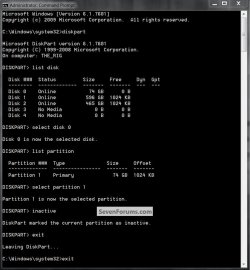
You may need to mark the Vista partition as "Inactive" to finish the process, have a look at the snip below if need be to see the process.


click to enlarge
Inactive2.jpg
 

My Computer My Computer

At a glance

W 7 64-bit UltimateIntel Q9550 Yorkfield8GB Dominator 8500C5DATI : XFX 5870
Computer Manufacturer/Model Number
* BFK Customs *
OS
W 7 64-bit Ultimate
CPU
Intel Q9550 Yorkfield
Motherboard
ASUS P5Q Pro
Memory
8GB Dominator 8500C5D
Graphics Card(s)
ATI : XFX 5870
Sound Card
Realtek HD Audio 7-1
Monitor(s) Displays
1x 47" LCD HDMI & 3x 26" LCD HDMI
Screen Resolution
1920x1080P & 1920x1200
Hard Drives
1x 80GB Intel X25-M G2 SSD : 1x 500GB & 1x 640GB WD Caviar Black(s)
PSU
Corsair 620HX
Case
Cooler Master RC-690
Cooling
Tuniq Tower 120, 2x 140mm and 3x 120mm case fans
Keyboard
Microsoft 500
Mouse
Razer Diamondback 3G
Internet Speed
14 Mb/s
Other Info
1x Koutech 3Gb/s SATA HDD Hot Swap Rack
Don't forget to set Win7 HD as first HD to boot in BIOS setup (after CD/DVD drive) before running the Repair.
 
Back
Top