Solved Renaming Files/File Extensions

Coaxsist

New member
Local time
8:42 PM
Messages
15
Location
Richmond, VA
Setup: Win 7 Home Premium SP 1 x64 on Dell Studio 1558.

In most directories, if I rename "file.jpg" to... "file.JPG" and hit return to commit the change, "file.jpg" is the result.

When I go to rename "file.jpg" again and the text is highlighted, awaiting my input, "file.jpg" turns into... "file.JPG", as I had originally renamed it.

If I rename "file.jpg" to... "file1.JPG", the change commits. I can then rename "file1.JPG" to... "file.JPG" without any problem.

Does anyone have any idea why this might be happening? And what's the difference between upper and lowercase extensions anyways?
 

My Computer

Computer Manufacturer/Model Number
Dell Studio 1558
OS
Windows 7 Home Premium 64-bit
CPU
Intel(R) Core(TM) i3 CPU
Memory
4 GB
Graphics Card(s)
Intel(R) HD Graphics (Core i3)
Monitor(s) Displays
Generic PnP Monitor
Screen Resolution
1366x768 (32-bit)
Hard Drives
450 GB, 7200 RPM
Keyboard
English, no Number Pad (Backlit)
Mouse
Dell Touchpad
Internet Speed
7.07 mb/s down, 4.37 up
In Windows, an extension is the same regardless of uppercase or lowercase. However, if you move this file to a Linux file system, JPG is not the same as jpg. *nix operating system files are case sensitive.
 

My Computer

Computer Manufacturer/Model Number
Dell XPS 15 L502x
OS
Windows 7 Ultimate x64 SP1
CPU
Core i7-2670QM
Memory
8GB DDR3 PC3-10600
Graphics Card(s)
Intel HD Graphics 3000 + GeForce GT 540M
Screen Resolution
1920x1080
Hard Drives
1TB 5400RPM Seagate
Hello Coaxsist,

Yep, due to Windows 7 seeing uppercase and lowercase file extensions the same, you'll need to rename it to something else say .jph, then rename it again to .jpg. :(

Personally, I wouldn't worry about it since it doesn't matter to Windows unless you just wanted it back to lowercase though.
 

My Computer

Computer type
PC/Desktop
Computer Manufacturer/Model Number
Self built custom
OS
64-bit Windows 11 Pro for Workstations
CPU
Intel i7-8700K OC'd to 5 GHz
Motherboard
ASUS ROG Maximus XI Formula Z390
Memory
64 GB (4x16GB) G.SKILL TridentZ RGB DDR4 3600 MHz
Graphics Card(s)
ASUS ROG-STRIX-GTX1080TI-O11G-GAMING
Sound Card
Integrated
Monitor(s) Displays
2 x Samsung Odyssey G7 27"
Screen Resolution
2560x1440
Hard Drives
1TB Samsung 990 PRO M.2,
4TB Samsung 990 PRO PRO M.2,
TerraMaster F8 SSD Plus NAS
PSU
Seasonic Prime Titanium 850W
Case
Thermaltake Core P3
Cooling
Corsair Hydro H115i
Keyboard
Logitech wireless K800
Mouse
Logitech MX Master 4
Internet Speed
2 Gb/s Download and 100 Mb/s Upload
Antivirus
Malwarebyte Anti-Malware Premium
Browser
Google Chrome
Other Info
Logitech Z625 speaker system,
Logitech BRIO 4K Pro webcam,
HP Color LaserJet Pro MFP M477fdn,
APC SMART-UPS RT 1000 XL - SURT1000XLI,
Galaxy S23 Plus phone
In Windows, an extension is the same regardless of uppercase or lowercase. However, if you move this file to a Linux file system, JPG is not the same as jpg. *nix operating system files are case sensitive.

Okay kegobeer, can you answer me this then?

I have an html tag
Code:
<img src="img/file.jpg" />
and 1 image file, "file.JPG".
The code above does not display the image; it's not found/doesn't exist. If the code is changed to accommodate the uppercase extension though, the image is then displayed.

Now that I think about it, some of my hosting accounts are based on *nix servers... so your earlier explanation could be it.

However, even if extensions are not case sensitive in Windows, why does my original question even happen?
 

My Computer

Computer Manufacturer/Model Number
Dell Studio 1558
OS
Windows 7 Home Premium 64-bit
CPU
Intel(R) Core(TM) i3 CPU
Memory
4 GB
Graphics Card(s)
Intel(R) HD Graphics (Core i3)
Monitor(s) Displays
Generic PnP Monitor
Screen Resolution
1366x768 (32-bit)
Hard Drives
450 GB, 7200 RPM
Keyboard
English, no Number Pad (Backlit)
Mouse
Dell Touchpad
Internet Speed
7.07 mb/s down, 4.37 up
Personally, I wouldn't worry about it since it doesn't matter to Windows unless you just wanted it back to lowercase though.

That's the thing. I get files with uppercase extensions often from clients (web design/development) and this issue gets in the way often. Do you know anymore about it, or have you just accepted it and moved on? I'd like to know if there's a fix of some sort; like forcing all extensions in Windows to be lowercase.
 

My Computer

Computer Manufacturer/Model Number
Dell Studio 1558
OS
Windows 7 Home Premium 64-bit
CPU
Intel(R) Core(TM) i3 CPU
Memory
4 GB
Graphics Card(s)
Intel(R) HD Graphics (Core i3)
Monitor(s) Displays
Generic PnP Monitor
Screen Resolution
1366x768 (32-bit)
Hard Drives
450 GB, 7200 RPM
Keyboard
English, no Number Pad (Backlit)
Mouse
Dell Touchpad
Internet Speed
7.07 mb/s down, 4.37 up
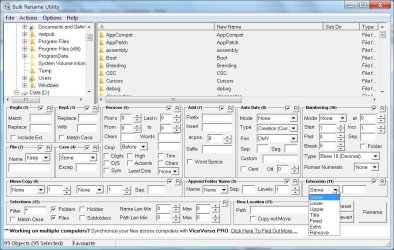
Bulk Rename Utility is one of the free file rename utility programs I like and it can easily convert the upper and mixed case extensions to lower, upper, Title cases etc. for multiple files and folders.
 

Attachments

  • Bulk Rename Utility.jpg
    Bulk Rename Utility.jpg
    123.2 KB · Views: 45

My Computer

Computer Manufacturer/Model Number
Toshiba Satellite P775-S7232
OS
MS Windows 7 Ultimate 64-bit SP1
CPU
i5-2410M 2.3GHz (2.9GHz Turbo-Boost) Sandy Bridge 32nm
Motherboard
Toshiba PHRAA ver. PSBY1U-00F003
Memory
4GB+4GB Samsung DDR3 PC3-10700 (1333 MHz)
Graphics Card(s)
Video Intel(R) HD Graphics Family, 1696MB available memory
Sound Card
Realtek High Definition Audio version=6.0.1.6323
Monitor(s) Displays
17.3 " Trubrite TFT LCD, LED Backlit
Screen Resolution
1600x900 32 bit, Native support for 720P content
Hard Drives
TOSHIBA MK6476GSXN
580.614 [GB] partitioned C: 80GB and D: 500GB with hidden recovery partitons.

Spare bay for 2nd HDD but no SATA connector :-(
PSU
Toshiba AC/DC Adapter
Case
Notebook
Cooling
Built-in Fan
Keyboard
Premium Raised Tile keyboard
Mouse
Logitech M215 wireless mouse
Internet Speed
Not fast enough
Other Info
Built-in Harman Kardon speakers with Dolby Advanced Audio, Waves MaxxAudio® 3. HDMI, 1xUSB3+3xUSB2 ports, WebCam, Battery life 4hrs 11mins, 4GB Readyboost SDHC card, WD My Book Essential Ext HDDs 2 TB, 2x1TB, My Passport SE 1TB and WDTV 1st Gen for Multimedia playing on a Sony Wega 32" LCD.
Recent addition to my toys are Asus Transformer Pad TF300T with 32GB onboard sd card + 32GB microsd card.
However, even if extensions are not case sensitive in Windows, why does my original question even happen?

The easiest way to explain it is the following...

As stated, Windows doesn't care what case the extension is in, so JPG == jpg == JpG, etc. So, if you are starting with a file called temp.jpg and change it to temp.JPG, according to Windows, there is no change in the properties of the file. For all intents and purposes, temp.jpg is the same name as temp.JPG, so there is nothing for Windows to change regarding the file. However, if you rename temp.jpg to temp1.jpg, that is a definitely different file name since the name and case of the file name matters, according to Windows, so it will update the record accordingly. Does that make sense?
 

My Computer

OS
XP / Win7 x64 Pro
CPU
Intel Quad-Core Q9450 @ 3.2GHz
Motherboard
Asus P5-E
Memory
2x2GB GSkill DDR2
Graphics Card(s)
NVIDIA GeForce 8600 GTS (EVGA)
Monitor(s) Displays
Dell 2408WFP
Screen Resolution
1920x1200

My Computer

Computer Manufacturer/Model Number
Dell Studio 1558
OS
Windows 7 Home Premium 64-bit
CPU
Intel(R) Core(TM) i3 CPU
Memory
4 GB
Graphics Card(s)
Intel(R) HD Graphics (Core i3)
Monitor(s) Displays
Generic PnP Monitor
Screen Resolution
1366x768 (32-bit)
Hard Drives
450 GB, 7200 RPM
Keyboard
English, no Number Pad (Backlit)
Mouse
Dell Touchpad
Internet Speed
7.07 mb/s down, 4.37 up
So to recap for everyone else:

  • Windows doesn't care if your extension is upper or lowercase. .jpg == .JPG
    • Therefore, if "file.jpg" were renamed "file.JPG" according to Windows, there is no change in the properties of the file. For all intents and purposes, temp.jpg is the same name as temp.JPG, so there is nothing for Windows to change regarding the file.
      • This means if "file.jpg" were a black square and "file.JPG" was a white square, and you overwrote "file.jpg" with "file.JPG" the black square would still be the only image, not white. To Windows, it's the same file.
    • However, if you rename "file.jpg" to "file1.jpg", that is a definitely different file name since the name and case of the file name matters, according to Windows, so it will update the record accordingly.

So...

  • Any operating system ending in "nix" knows that "file.jpg" and "file.JPG" are different files.
    • This means that if you have an image tag with a src of "file.jpg" and you uploaded "file.JPG" and the server you've uploaded to is running anything "nix" (or Linux) your image will not display.
    • The code that doesn't work on your server running anything "nix" or Linux will work however on Windows because Windows doesn't know/doesn't care about the difference between lowercase and uppercase extensions.
 

My Computer

Computer Manufacturer/Model Number
Dell Studio 1558
OS
Windows 7 Home Premium 64-bit
CPU
Intel(R) Core(TM) i3 CPU
Memory
4 GB
Graphics Card(s)
Intel(R) HD Graphics (Core i3)
Monitor(s) Displays
Generic PnP Monitor
Screen Resolution
1366x768 (32-bit)
Hard Drives
450 GB, 7200 RPM
Keyboard
English, no Number Pad (Backlit)
Mouse
Dell Touchpad
Internet Speed
7.07 mb/s down, 4.37 up
Back
Top