Reordering a track in WMP slow?

rezelute

New member
Member
Local time
10:40 PM
Messages
78
When i want to add a new track to WMP i have to open the playlist in the 'Play' tab (to be able to edit the playlist) then drag a song from a music folder into this playlist. The only problem is that when there are alot of songs in the playlist and the track gets added to the very bottom of list then it takes ages for me to drag it back to the very top of the playlist. Is there any easier way to drag the track to the top of the list? Or am i maybe adding tracks wrongly in WMP?

Thanks :)
 

My Computer My Computer

At a glance

Windows 7 64-bitCore 2 Duo OC 4GHZ4MB DDR2GTX 460
OS
Windows 7 64-bit
CPU
Core 2 Duo OC 4GHZ
Motherboard
Asus P5Q SE Plus
Memory
4MB DDR2
Graphics Card(s)
GTX 460
Sound Card
Xonar D1
Monitor(s) Displays
LG 42 inch
Screen Resolution
1980x1020
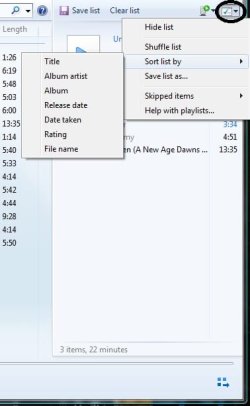
Well, you can always use the little "check" icon in the Play tab to rearrange music added to the playlist according to certain tags.

WMPsort.jpg

Other than that, I'm afraid it's dragging through the entire playlist :/
 

My Computer My Computer

At a glance

Windows 7 Home Premium x64Intel Core i5 2500K8GB DDR3nVidia GeForce GTX650 Ti BOOST
Computer type
Laptop
Computer Manufacturer/Model Number
Custom
OS
Windows 7 Home Premium x64
CPU
Intel Core i5 2500K
Motherboard
MSI MS-7750
Memory
8GB DDR3
Graphics Card(s)
nVidia GeForce GTX650 Ti BOOST
Sound Card
Realtek
Monitor(s) Displays
21' Philips
Screen Resolution
Full HD
Hard Drives
1TB
PSU
500W
Thanks Gornot however from that drop down you cant organise by "date modified" unless you/anyone else knows hows to add that tag to the list?
 

My Computer My Computer

At a glance

Windows 7 64-bitCore 2 Duo OC 4GHZ4MB DDR2GTX 460
OS
Windows 7 64-bit
CPU
Core 2 Duo OC 4GHZ
Motherboard
Asus P5Q SE Plus
Memory
4MB DDR2
Graphics Card(s)
GTX 460
Sound Card
Xonar D1
Monitor(s) Displays
LG 42 inch
Screen Resolution
1980x1020
I don't think so, but if you use the WMP libraries you can sort music by "Date last played", would that help?
 

My Computer My Computer

At a glance

Windows 7 Home Premium x64Intel Core i5 2500K8GB DDR3nVidia GeForce GTX650 Ti BOOST
Computer type
Laptop
Computer Manufacturer/Model Number
Custom
OS
Windows 7 Home Premium x64
CPU
Intel Core i5 2500K
Motherboard
MSI MS-7750
Memory
8GB DDR3
Graphics Card(s)
nVidia GeForce GTX650 Ti BOOST
Sound Card
Realtek
Monitor(s) Displays
21' Philips
Screen Resolution
Full HD
Hard Drives
1TB
PSU
500W
In the library i can sort by "Date modified" so there is an option for it however its just annoying when this happens: (it just makes your library list even longer)
-5 OCT 2010-------------------------------------------- (//there should be an option ideally to disable this line)
track 1
track 2
-4 OCT 2010--------------------------------------------(//there should be an option ideally to disable this line)
track 1
track 2

I take it there is no other way anyways, thanks for the help thought Garnot :)
 

My Computer My Computer

At a glance

Windows 7 64-bitCore 2 Duo OC 4GHZ4MB DDR2GTX 460
OS
Windows 7 64-bit
CPU
Core 2 Duo OC 4GHZ
Motherboard
Asus P5Q SE Plus
Memory
4MB DDR2
Graphics Card(s)
GTX 460
Sound Card
Xonar D1
Monitor(s) Displays
LG 42 inch
Screen Resolution
1980x1020
No problem.

WMP12 isn't really all that bad, it's the little things that annoy users (including me) :/
 

My Computer My Computer

At a glance

Windows 7 Home Premium x64Intel Core i5 2500K8GB DDR3nVidia GeForce GTX650 Ti BOOST
Computer type
Laptop
Computer Manufacturer/Model Number
Custom
OS
Windows 7 Home Premium x64
CPU
Intel Core i5 2500K
Motherboard
MSI MS-7750
Memory
8GB DDR3
Graphics Card(s)
nVidia GeForce GTX650 Ti BOOST
Sound Card
Realtek
Monitor(s) Displays
21' Philips
Screen Resolution
Full HD
Hard Drives
1TB
PSU
500W
sorry if this appears daft ,but all i do to add a track to wmp is drag it to an area in wmp background as you drag it says "add to library"
also wont the library add it to wmp from your root folders automatically if you configure it to
 

My Computer My Computer

At a glance

Microsoft Windows 7 Home Premium 64-bit 7600IIx4 amd athelon 635 processor2x2gbati radeon HD 5450
Computer Manufacturer/Model Number
Hewlett packard/p6512uk
OS
Microsoft Windows 7 Home Premium 64-bit 7600
CPU
IIx4 amd athelon 635 processor
Motherboard
FOXCONN 2AA9
Memory
2x2gb
Graphics Card(s)
ati radeon HD 5450
Sound Card
(1) Realtek High Definition Audio (2) AMD High Definition
Monitor(s) Displays
samsung lcd tv 32"
Screen Resolution
1360x 768
Hard Drives
(1) WDC WD10 01FAES-60Z2A0 SATA Disk Device (2) Maxtor OneTouch USB Device (3) ST310003 33AS USB Device (4) WD My Book 1111 USB Device
PSU
?
Cooling
air!
Keyboard
wireless hp
Mouse
wireless Hp,optical
Internet Speed
1.10mb/s
Antivirus
MSE
Browser
Firefox
Back
Top