
Solved Repair install got stuck

MaynardJ

New member
Local time
10:52 PM
Messages
19
Location
Maastricht, Netherlands
Hi,

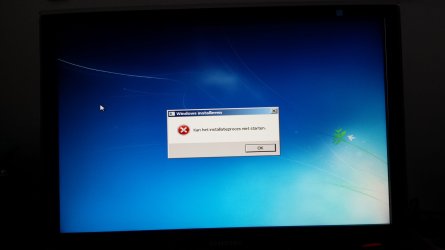
I'm trying to do a repair install (upgrade) of Windows 7 SP1, but it just got stuck. The setup rebooted the PC, but upon starting Windows I'm getting an error message saying it can't start the installation process. When I click OK or just close the window, the PC reboots and I'm getting the same thing again. The same thing happens when I turn off the PC and start again.

In other words: Windows won't properly start up anymore. How do I fix this?
 

Attachments
  • 1445786301799.jpg
    1445786301799.jpg
    1.3 MB · Views: 2

My Computer

Computer type
PC/Desktop
Computer Manufacturer/Model Number
Custom built
OS
Windows 7 Home Premium 64 bit
CPU
Intel Core i7 920 / 2.66 GHz
Motherboard
Asus Sabertooth X58
Memory
6144 MB RAM
Graphics Card(s)
Asus Radeon HD 5970 2048 MB
Hard Drives
Intel SSDSA2M080G2GC ATA Device
Samsung HD103SJ ATA Device
Antivirus
Kaspersky Internet Security
Browser
Chrome usually, sometimes Internet Explorer
IF you have the windows 7 disc; i would try starting up the pc with the disc in; boot off the disc; and try and do a repair off the disc.
 

My Computer

Computer type
PC/Desktop
Computer Manufacturer/Model Number
custom built
OS
Windows 7 ultimate 64-bit
CPU
Intel I7 2600K 3.4ghz
Motherboard
Asus Evo P8P67
Memory
Corsair 16gb ddr3 1600mhz
Graphics Card(s)
Nvidia Geforce gt 430
Sound Card
Sound Blaster Titanium x-fi pci express
Monitor(s) Displays
Dell E198WFP
Hard Drives
1 western digital 2TB drive.
PSU
Antec 1200 watt
Case
Inwin Dragon Rider
Cooling
6 case supplied cooling fans
Keyboard
logitech mk700
Mouse
logitech m705
Internet Speed
25-50mbps download; 10mbps upload(i think)
Antivirus
avg free 2014
Browser
mozilla firefox
Other Info
Also have a pretty bad speaker setup which is a klipsch promedia 5.1 surround speaker setup with huge subwoofer and lg blu ray player/writer. Also a hp officejet pro 8600 plus wireless all in one and a logitech s7500 webcam.
I started the repair install from a bootable disk I created myself, the original installation disk doesn't have SP1. After that it got stuck. A custom install instead of upgrading (replacing Windows instead of repairing it) might be a better option by now.

So, boot from the disc and reinstall from there? I'll try that and get back to you.
 

My Computer

Computer type
PC/Desktop
Computer Manufacturer/Model Number
Custom built
OS
Windows 7 Home Premium 64 bit
CPU
Intel Core i7 920 / 2.66 GHz
Motherboard
Asus Sabertooth X58
Memory
6144 MB RAM
Graphics Card(s)
Asus Radeon HD 5970 2048 MB
Hard Drives
Intel SSDSA2M080G2GC ATA Device
Samsung HD103SJ ATA Device
Antivirus
Kaspersky Internet Security
Browser
Chrome usually, sometimes Internet Explorer
That seems to work. It's properly reinstalling now and replacing everything on the C drive. Thankfully all my documents are on another hard drive.
 

My Computer

Computer type
PC/Desktop
Computer Manufacturer/Model Number
Custom built
OS
Windows 7 Home Premium 64 bit
CPU
Intel Core i7 920 / 2.66 GHz
Motherboard
Asus Sabertooth X58
Memory
6144 MB RAM
Graphics Card(s)
Asus Radeon HD 5970 2048 MB
Hard Drives
Intel SSDSA2M080G2GC ATA Device
Samsung HD103SJ ATA Device
Antivirus
Kaspersky Internet Security
Browser
Chrome usually, sometimes Internet Explorer
My C drive is a pretty small 75 GB SSD. I'm expecting it to get pretty full if a Windows keeps the old version stored in a Windows.old folder. Would it hurt to delete that folder?

Edit: Yes, it's getting crowded in there. The Windows.old is taking up like 35 gb and I'm down to about 15 gb of free space.
 
Last edited:

My Computer

Computer type
PC/Desktop
Computer Manufacturer/Model Number
Custom built
OS
Windows 7 Home Premium 64 bit
CPU
Intel Core i7 920 / 2.66 GHz
Motherboard
Asus Sabertooth X58
Memory
6144 MB RAM
Graphics Card(s)
Asus Radeon HD 5970 2048 MB
Hard Drives
Intel SSDSA2M080G2GC ATA Device
Samsung HD103SJ ATA Device
Antivirus
Kaspersky Internet Security
Browser
Chrome usually, sometimes Internet Explorer
I did a Disk Cleanup and that did the trick. Half my C drive is empty now.
 

My Computer

Computer type
PC/Desktop
Computer Manufacturer/Model Number
Custom built
OS
Windows 7 Home Premium 64 bit
CPU
Intel Core i7 920 / 2.66 GHz
Motherboard
Asus Sabertooth X58
Memory
6144 MB RAM
Graphics Card(s)
Asus Radeon HD 5970 2048 MB
Hard Drives
Intel SSDSA2M080G2GC ATA Device
Samsung HD103SJ ATA Device
Antivirus
Kaspersky Internet Security
Browser
Chrome usually, sometimes Internet Explorer
Back
Top