Repair Install

How to Do a Repair Install to Fix Windows 7


   Information
This will show you how to do a repair install (aka: in-place upgrade install) to fix your currently installed Windows 7 and preserve your user accounts, data, programs, and system drivers.
   Note
Do a Repair installation if:
  • A System Restore did not help fix your Windows 7.
  • There is no other easier option left that can fix your Windows 7.
  • You DO NOT want to do a Clean reinstall of Windows 7.
  • You DO want to preserve your user accounts, data, programs, and system drivers.
   Tip
ITEMS THAT WILL BE RESET TO DEFAULT OR AFFECTED:
  • Sounds
  • Services
  • Visual Effects Settings
  • Device Drivers - Be sure to have these handy to reinstall. They do not always remain after the repair (upgrade) install.
  • You may lose the ability to sign on to MSN Messenger, to solve this problem have a look at this thread Unable to sign in to WLM.
  • You may lose your custom themes due to not having permisions set on the old themes. Go to the hidden themes folder at C:/Users/(User-Name)/AppData/Local/Microsoft/Windows/Themes, then Take Ownership of the themes folder and you will now have all your themes back.
  • It has been reported that you may also lose your Media Center gadget after doing the repair install.
  • Windows Updates will need to be checked and reinstalled again.
   Warning

  • You can only do a repair install with the same edition Windows 7 installation disc for the same edition of Windows 7 that you have installed.
  • You cannot use a OEM Windows 7 "Factory" Restore/Recovery type of installation disc that came with or created from a store bought computer to do a repair install with. These can only be used do a clean install instead.
  • You can do a repair install on a factory OEM installation with the latest official Windows 7 with SP1 ISO file here: Microsoft: Windows 7 Direct Download Links, and use Windows 7 USB-DVD Download Tool to create a bootable DVD or USB flash drive with the ISO to do the repair install from within Windows 7.
  • You can use a retail OEM Windows 7 installation disc to do a repair install with.
  • You can use a retail (full or upgrade) Windows 7 installation disc to do a repair install with.
  • You cannot do a repair install with a System Repair Disc. A System Repair Disc is not a installation disc, and will only boot to the System Recovery Options screen.
  • If you have a 32-bit (x86) Windows 7 currently installed, then you must use a 32-bit Windows 7 installation disc to be able to do a repair install with.
  • If you have a 64-bit (x64) Windows 7 currently installed, then you must use a 64-bit Windows 7 installation disc to be able to do a repair install with.
  • You can use a retail Windows 7 SP1 installation disc (ex: Technet (available), MSDN (available), or retail (when available)) to do a repair install with on a currently installed Windows 7 SP1.
  • You can use a Windows 7 SP1 installation disc (ex: Technet (available), MSDN (available), or retail (when available)) to do a repair install with on a currently installed slipstream Windows 7 SP1.
  • You cannot use a slipstream Windows 7 installation disc to do a repair install with on a currently installed Windows 7 SP1.
  • You cannot use a slipstream Windows 7 installation disc to do a repair install with on a currently installed slipstream Windows 7 SP1.
  • You can only do a repair install from within Windows 7.
  • You cannot do a repair install at boot or in Safe Mode.
  • You must be logged into Windows 7 in a administrator account to be able to do a repair install.
  • You must have at least 8.87 GB + what is currently being used of free space (more if you have a larger installation) on the hard drive/partition Windows 7 is installed on to do a repair install.
  • If you changed the default location of a user account's profile folder, then you will need to change it back to the default C:\Users location first.
  • If you moved the default location of a user folder, then you will need to change it back to the default C:\Users\(user-name) location first.


Here's How:
NOTE: Be sure to back up anything that you do not want to lose first to be extra safe.1. Start Windows 7, and log on to an administrator account.

2. Disable any 3rd party firewall, antivirus, or other security program to avoid it from possibly preventing the repair in-place upgrade installation of Windows 7.

3. Do either step 4, step 5, or step 6 below depending if your retail Windows 7 installation ISO/DVD/USB has SP1 or not, and if your currently installed Windows 7 has SP1 installed or not.

4. Repair Installed Windows 7 SP1 using Windows 7 with SP1 ISO

   Note
If you do not have a Windows 7 with SP1 ISO, then you can download an official ISO with your retail product key from Microsoft at the link below.

:ar: Microsoft Software Recovery

You can also download the latest official Windows 7 SP1 Media Refresh (SP1 U) ISO file at the link below, but this link is not always available for download.

:ar: Microsoft: Windows 7 Direct Download Links

A) If you have not already, you will need to install a program like 7-Zip that supports extracting a ISO to a folder.

B) Using the program (ex: 7-Zip) from step 1, extract the Windows 7 SP1 ISO file to a folder on a partition or HDD other than the current Windows 7 partition. (see screenshot below)
NOTE: For example with 7-Zip, right click on ISO, click on 7-Zip, Extract files, browse button, select where you want to extract to, and click on OK twice.7-Zip.jpg
C) While in Windows 7 SP1, open the folder that you extracted the ISO into, and run the setup.exe file.

D) Go to step 7 below.
5. Repair Installed Windows 7 SP1 using Windows 7 with SP1 DVD/USB

   Note
If you do not have a Windows 7 with SP1 ISO, then you can download an official ISO with your retail product key from Microsoft at the link below.

:ar: http://www.microsoft.com/en-us/software-recovery

You can also download the latest official Windows 7 SP1 Media Refresh (SP1 U) ISO file at the link below, but this link is not always available for download.

:ar: Microsoft: Windows 7 Direct Download Links

Afterwards, you can use Windows 7 USB-DVD Download Tool to create a bootable DVD or USB flash drive with the ISO to do the repair install from within Windows 7 using this step.

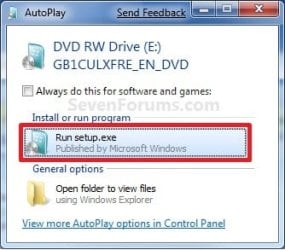
A) While in Windows 7 SP1, insert your retail Windows 7 SP1 installation DVD into the DVD drive, or connect your Windows 7 with SP1 installation USB thumb drive, and click on the Run setup.exe option in AutoPlay. (see screenshot below)
NOTE: If the AutoPlay window does not open, then open the drive folder in Computer and run the setup.exe file.AutoPlay.jpg
B) Go to Go to step 7 below.
6. Repair Installed Windows 7 without SP1 using Windows 7 without SP1 DVD/USB

   Note
If you do not have a Windows 7 without SP1 installation DVD/USB, then you can download the latest official Windows 7 Professional or Home Premium without SP1 ISO file here: Microsoft: Windows 7 Direct Download Links, and use Windows 7 USB-DVD Download Tool to create a bootable DVD or USB flash drive with the ISO to do the repair install from within Windows 7 using this step.

It is preferred to have SP1 installed on your PC and to use step 4 or step 5 above to do a repair install with instead though.

A) While in Windows 7 SP1 installed, insert your retail Windows 7 installation DVD into the DVD drive, or connect your Windows 7 installation USB thumb drive, and click on the Run setup.exe option in AutoPlay. (see screenshot below)
NOTE: If the AutoPlay window does not open, then open the drive folder in Computer and run the setup.exe file.AutoPlay.jpg
B) Go to Go to step 7 below.
7. If prompted by UAC, then click on Yes.

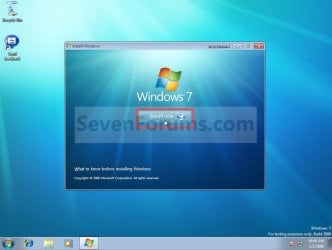
8. Click on the Install Now button to start the installation. (see screenshot below)Step1.jpg
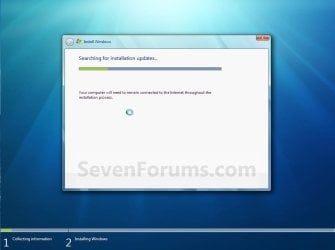
9. If prompted, uncheck the I want to help make Windows installation better box (unless you would like to :) ), and click on the Go online to get the latest updates for installation option. (see screenshot below)Step2.jpg
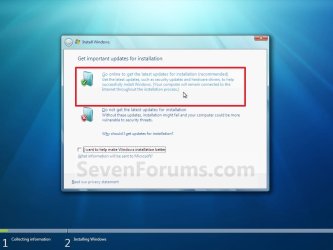
A) Windows 7 will now check online for and install any available installation updates. (see screenshots below)Step2A.jpg

Step2B.jpg

10. Check the I accept the license terms box, and click on Next. (see screenshot below)Step3.jpg
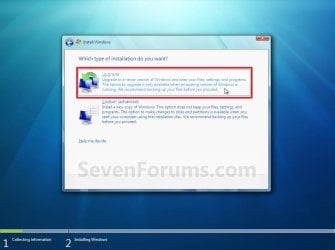
11. Click on the Upgrade option. (see screenshot below)Step4.jpg
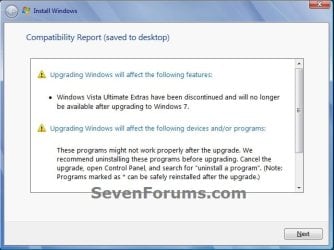
12. Windows will now check for any compatibility issues. If any are found like in the example below, click on the red X to cancel the repair install and close this "Install Windows" window, take care of any found issues (ex: uninstall any incompatible program), then restart the repair install process over again.Compatibility-Report.jpg
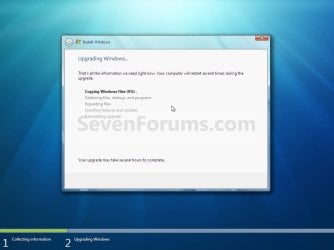
13. The installation of Windows 7 will now begin. (see screenshot below)
NOTE: During the installation process, your screen may flash and computer will restart a few times.Step5.jpg
14. After the final restart, you will see this screen for a moment. (see screenshot below)Step6.jpg
15. Type in your Windows 7 product key number. (see screenshot below step 16)

16. Uncheck the Automatically activate Windows when I'm online box unchecked, then click on the Next button. (see screenshot below)
NOTE: You can activate Windows 7 later after you make sure it is running properly. (see step 23 below)
If you chose to automatically activate Windows online when you set up your computer, automatic activation begins trying to activate your copy of Windows three days after you log on for the first time.Step7.jpg
17. Click on Use recommended settings. (see screenshot below)

:note: You will always be able to change your Windows Update settings at anytime in Windows 7.

Step8.jpg
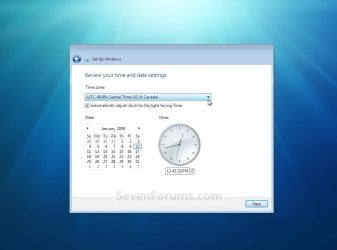
18. Select your time zone and set your time and date settings, then click on the Next button. (see screenshot below)Step9.jpg
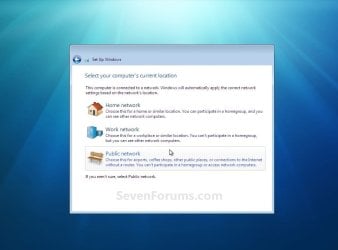
19. Click on the option for your computer's location to select the correct network location type settings to be applied for that location. (see screenshot below)
NOTE: It is best to select Public location for the best security.Step10.jpg
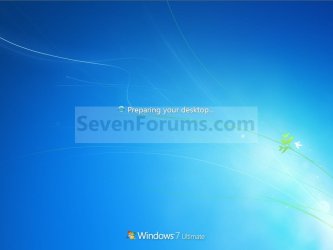
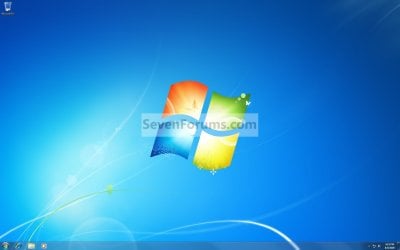
20. Windows 7 will now prepare your desktop to startup. (see screenshots below)Step11A.jpg

Desktop.jpg

21. If you used a DVD or USB to do the repair install with, then you can remove the DVD or USB when the repair install has successfully completed and you are logged in to Windows 7.

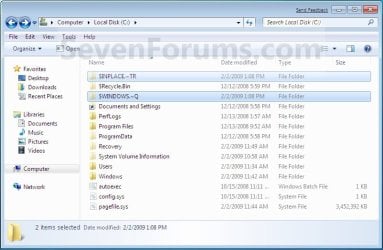
22. Check to see if you are missing any user files. If you are, then you can copy them from the C:\Windows.old or the hidden protected operating system C:\$INPLACE.~TR and C:\WINDOWS.~Q backup folders. (see screenshot below)Old_Install.jpg
23. If everything checks out in step 21, then you can run Disk Cleanup (step 5 at this link). You will need to click on the Clean up system files button first, and then could check the Files discarded by Windows upgrade, Previous Windows installations, and Windows upgrade log files boxes. (see screenshot below)
NOTE: This will delete the C:\Windows.old, C:\$INPLACE.~TR and C:\WINDOWS.~Q folders from step 21 above.Disk_Cleanup.jpg
24. Refresh your Windows Experience Index (WEI) score.

25. When finished, activate Windows 7, and make sure that your 3rd party security programs (if applicable) are enabled again.
That's it,
Shawn


Last edited:
I suppose you may have had something corrupted that could have caused that to get reset or changed when repaired.
 

My Computer

Computer type
PC/Desktop
Computer Manufacturer/Model Number
Self built custom
OS
64-bit Windows 11 Pro for Workstations
CPU
Intel i7-8700K OC'd to 5 GHz
Motherboard
ASUS ROG Maximus XI Formula Z390
Memory
64 GB (4x16GB) G.SKILL TridentZ RGB DDR4 3600 MHz
Graphics Card(s)
ASUS ROG-STRIX-GTX1080TI-O11G-GAMING
Sound Card
Integrated
Monitor(s) Displays
2 x Samsung Odyssey G7 27"
Screen Resolution
2560x1440
Hard Drives
1TB Samsung 990 PRO M.2,
4TB Samsung 990 PRO PRO M.2,
TerraMaster F8 SSD Plus NAS
PSU
Seasonic Prime Titanium 850W
Case
Thermaltake Core P3
Cooling
Corsair Hydro H115i
Keyboard
Logitech wireless K800
Mouse
Logitech MX Master 4
Internet Speed
2 Gb/s Download and 100 Mb/s Upload
Antivirus
Malwarebyte Anti-Malware Premium
Browser
Google Chrome
Other Info
Logitech Z625 speaker system,
Logitech BRIO 4K Pro webcam,
HP Color LaserJet Pro MFP M477fdn,
APC SMART-UPS RT 1000 XL - SURT1000XLI,
Galaxy S23 Plus phone
System Repair with factory installed OS

I have an Asus N53Jf laptop with Windows 7 Home Premium (64bit) 6.1.7601 Service Pack 1 Build 7601 that came installed. Asus has a Recovery Partition plus I created Recovery Disc's when I received the computer. Per the info below I can't use those to do a system repair. (
You cannot do a repair install with a System Repair Disc. A System Repair Disc is not a installation disc, and will only boot to the System Recovery Options screen.)

I just want to be sure that the following is the correct method for me to follow per the tutorial to undertake a system repair on this computer.

You can do a repair install on a factory OEM installation with the latest official Windows 7 with SP1 ISO file here: Microsoft: Windows 7 Direct Download Links, and use Windows 7 USB-DVD Download Tool to create a bootable DVD or USB flash drive with the ISO to do the repair install from within Windows 7.

Thanks much... Hope this is the correct forum / way to post my query..

P.S. I'm considering doing this as I have a few issues that this seems to be the only solution for short of a total reinstall. i.e. I've lost use of the System Restore functions and the ability to manage user accounts.
I've run sfc scannow as and admin. and come up clean...
 

My Computer

Computer type
PC/Desktop
Computer Manufacturer/Model Number
Asus N53Jf
OS
Windows 7 x 64 Home Premium
CPU
2.67 gigahertz Intel Core i5 M 460
Motherboard
ASUSTeK Computer Inc. N53Jf 1.0
Memory
7982 Megabytes Usable Installed Memory Crucial
Graphics Card(s)
Intel(R) HD Graphics [Display adapter] NVIDIA GeForce GT 4
Hard Drives
500 GB whatever Asus uses
Antivirus
Norton Internet Security
Browser
Primary is Firefox
Hello Macwilly, and welcome to Seven Forums.

Yes, that would be correct. Be sure to download the same 64-bit Windows 7 Home Premium ISO that you currently have installed. I would also recommend to back up anything that you do not want to lose to be extra safe. :)
 

My Computer

Computer type
PC/Desktop
Computer Manufacturer/Model Number
Self built custom
OS
64-bit Windows 11 Pro for Workstations
CPU
Intel i7-8700K OC'd to 5 GHz
Motherboard
ASUS ROG Maximus XI Formula Z390
Memory
64 GB (4x16GB) G.SKILL TridentZ RGB DDR4 3600 MHz
Graphics Card(s)
ASUS ROG-STRIX-GTX1080TI-O11G-GAMING
Sound Card
Integrated
Monitor(s) Displays
2 x Samsung Odyssey G7 27"
Screen Resolution
2560x1440
Hard Drives
1TB Samsung 990 PRO M.2,
4TB Samsung 990 PRO PRO M.2,
TerraMaster F8 SSD Plus NAS
PSU
Seasonic Prime Titanium 850W
Case
Thermaltake Core P3
Cooling
Corsair Hydro H115i
Keyboard
Logitech wireless K800
Mouse
Logitech MX Master 4
Internet Speed
2 Gb/s Download and 100 Mb/s Upload
Antivirus
Malwarebyte Anti-Malware Premium
Browser
Google Chrome
Other Info
Logitech Z625 speaker system,
Logitech BRIO 4K Pro webcam,
HP Color LaserJet Pro MFP M477fdn,
APC SMART-UPS RT 1000 XL - SURT1000XLI,
Galaxy S23 Plus phone
Thanks Brink
Which of these two files should I use?
Windows 7 Home Premium x64 SP1 U (media refresh) X17-58997.iso
Windows 7 Home Premium x86 SP1 U (media refresh) X17-58996.iso
 

My Computer

Computer type
PC/Desktop
Computer Manufacturer/Model Number
Asus N53Jf
OS
Windows 7 x 64 Home Premium
CPU
2.67 gigahertz Intel Core i5 M 460
Motherboard
ASUSTeK Computer Inc. N53Jf 1.0
Memory
7982 Megabytes Usable Installed Memory Crucial
Graphics Card(s)
Intel(R) HD Graphics [Display adapter] NVIDIA GeForce GT 4
Hard Drives
500 GB whatever Asus uses
Antivirus
Norton Internet Security
Browser
Primary is Firefox
This one. :)

Windows 7 Home Premium x64 SP1 U (media refresh) X17-58997.iso
 

My Computer

Computer type
PC/Desktop
Computer Manufacturer/Model Number
Self built custom
OS
64-bit Windows 11 Pro for Workstations
CPU
Intel i7-8700K OC'd to 5 GHz
Motherboard
ASUS ROG Maximus XI Formula Z390
Memory
64 GB (4x16GB) G.SKILL TridentZ RGB DDR4 3600 MHz
Graphics Card(s)
ASUS ROG-STRIX-GTX1080TI-O11G-GAMING
Sound Card
Integrated
Monitor(s) Displays
2 x Samsung Odyssey G7 27"
Screen Resolution
2560x1440
Hard Drives
1TB Samsung 990 PRO M.2,
4TB Samsung 990 PRO PRO M.2,
TerraMaster F8 SSD Plus NAS
PSU
Seasonic Prime Titanium 850W
Case
Thermaltake Core P3
Cooling
Corsair Hydro H115i
Keyboard
Logitech wireless K800
Mouse
Logitech MX Master 4
Internet Speed
2 Gb/s Download and 100 Mb/s Upload
Antivirus
Malwarebyte Anti-Malware Premium
Browser
Google Chrome
Other Info
Logitech Z625 speaker system,
Logitech BRIO 4K Pro webcam,
HP Color LaserJet Pro MFP M477fdn,
APC SMART-UPS RT 1000 XL - SURT1000XLI,
Galaxy S23 Plus phone
I do have one question. My user profile is on another partition from the C drive and it is pretty big, which takes longer to copy files from one partition to the next. Is it possible to create another profile in the C drive with the same name? If not, how would I go about making this not take as long with copying files?
 

My Computer

Computer type
PC/Desktop
Computer Manufacturer/Model Number
Custom Build
OS
Microsoft Windows 7 64-bit Service Pack 1
CPU
Intel Core i7-4790K Devil's Canyon Quad-Core 4.0 GHz
Motherboard
GIGABYTE GA-Z97X-SLI LGA 1150
Memory
16.00 GB
Graphics Card(s)
NVIDIA GeForce GTX 950
Monitor(s) Displays
AOC 2050W
Screen Resolution
1920 x 1080
Hard Drives
ST1000DL002-9TT153 ATA Device
Seagate 2TB FireCuda Gaming SSHD (Solid State Hybrid Drive) - 7200 RPM SATA 6Gb/s 64MB Cache 3.5-Inch Hard Drive
Samsung 850 EVO - 250GB - 2.5-Inch SATA III Internal SSD
PSU
CORSAIR CX-M Series CX750M 750W ATX12V & EPS12V Semi-modular
Case
Lian Li PC-7H
Browser
Firefox
Hello TONPumper,

You'll need to move the user profile back to C: before doing the repair install. Otherwise, you'll could lose the profile during the repair install. :(
 

My Computer

Computer type
PC/Desktop
Computer Manufacturer/Model Number
Self built custom
OS
64-bit Windows 11 Pro for Workstations
CPU
Intel i7-8700K OC'd to 5 GHz
Motherboard
ASUS ROG Maximus XI Formula Z390
Memory
64 GB (4x16GB) G.SKILL TridentZ RGB DDR4 3600 MHz
Graphics Card(s)
ASUS ROG-STRIX-GTX1080TI-O11G-GAMING
Sound Card
Integrated
Monitor(s) Displays
2 x Samsung Odyssey G7 27"
Screen Resolution
2560x1440
Hard Drives
1TB Samsung 990 PRO M.2,
4TB Samsung 990 PRO PRO M.2,
TerraMaster F8 SSD Plus NAS
PSU
Seasonic Prime Titanium 850W
Case
Thermaltake Core P3
Cooling
Corsair Hydro H115i
Keyboard
Logitech wireless K800
Mouse
Logitech MX Master 4
Internet Speed
2 Gb/s Download and 100 Mb/s Upload
Antivirus
Malwarebyte Anti-Malware Premium
Browser
Google Chrome
Other Info
Logitech Z625 speaker system,
Logitech BRIO 4K Pro webcam,
HP Color LaserJet Pro MFP M477fdn,
APC SMART-UPS RT 1000 XL - SURT1000XLI,
Galaxy S23 Plus phone
Will repair install reset security settings?
 

My Computer

Computer type
PC/Desktop
Computer Manufacturer/Model Number
Custom Build
OS
Microsoft Windows 7 64-bit Service Pack 1
CPU
Intel Core i7-4790K Devil's Canyon Quad-Core 4.0 GHz
Motherboard
GIGABYTE GA-Z97X-SLI LGA 1150
Memory
16.00 GB
Graphics Card(s)
NVIDIA GeForce GTX 950
Monitor(s) Displays
AOC 2050W
Screen Resolution
1920 x 1080
Hard Drives
ST1000DL002-9TT153 ATA Device
Seagate 2TB FireCuda Gaming SSHD (Solid State Hybrid Drive) - 7200 RPM SATA 6Gb/s 64MB Cache 3.5-Inch Hard Drive
Samsung 850 EVO - 250GB - 2.5-Inch SATA III Internal SSD
PSU
CORSAIR CX-M Series CX750M 750W ATX12V & EPS12V Semi-modular
Case
Lian Li PC-7H
Browser
Firefox
Hello TONPumper,

For system files it will. Anything in your "C:\Users" folder will not be affected though.
 

My Computer

Computer type
PC/Desktop
Computer Manufacturer/Model Number
Self built custom
OS
64-bit Windows 11 Pro for Workstations
CPU
Intel i7-8700K OC'd to 5 GHz
Motherboard
ASUS ROG Maximus XI Formula Z390
Memory
64 GB (4x16GB) G.SKILL TridentZ RGB DDR4 3600 MHz
Graphics Card(s)
ASUS ROG-STRIX-GTX1080TI-O11G-GAMING
Sound Card
Integrated
Monitor(s) Displays
2 x Samsung Odyssey G7 27"
Screen Resolution
2560x1440
Hard Drives
1TB Samsung 990 PRO M.2,
4TB Samsung 990 PRO PRO M.2,
TerraMaster F8 SSD Plus NAS
PSU
Seasonic Prime Titanium 850W
Case
Thermaltake Core P3
Cooling
Corsair Hydro H115i
Keyboard
Logitech wireless K800
Mouse
Logitech MX Master 4
Internet Speed
2 Gb/s Download and 100 Mb/s Upload
Antivirus
Malwarebyte Anti-Malware Premium
Browser
Google Chrome
Other Info
Logitech Z625 speaker system,
Logitech BRIO 4K Pro webcam,
HP Color LaserJet Pro MFP M477fdn,
APC SMART-UPS RT 1000 XL - SURT1000XLI,
Galaxy S23 Plus phone
Well, I did it. I followed member Brink's post on the repair install and also an article about the same issue from PC World :How to Repair a Corrupt Windows 7 Installation | PCWorld (11-4-11) .

I did a straight download from Heidoc.com of the version I needed, to my local drive, then burned that to disk with Windows Disc Image Burner.

The PC World article recommends using Windows Disk Cleanup before and after the repair-install which I did, along with uninstalling 3rd party antivirus programs beforehand then re-installing afterwards. It also said the process would take about 40 minutes, depending on your system, with several re-boots involved. In my case it took about 24 hours to complete, however I used my trusty (circa 2004) Plextor external USB disk drive to run the burned disk since the local D: drive in my Gateway PC can be quirky and I didn't want it acting up in the middle of it.

Close to the final stages, setup stated that it detected that Net Framework 4.5 needed to be repaired and it then repaired it. Could this have been the assumed corrupted files problem to begin with?

Mt PC is working great now and sfc /verifyonly completes to 100% with " ... no integrity violations found."

A couple tips not mentioned in the instructions:

1- Turn your password entry to Windows logon (before entering the desktop) off. Otherwise you have to be present every time it reboots to enter your password so it can continue with the repair-install. If that off, you just need to have your OS's serial number ready one time when it asks for it towards the end.

2- If you have a wired keyboard, it's a good idea to plug one into your PC before starting the process. My wireless one wouldn't work after a couple re-boots and my wired one saved the day. This probably is a good idea regarding a wired mouse too.

Thanks for your help!
 

My Computer

Computer type
PC/Desktop
Computer Manufacturer/Model Number
Gateway DX4831
OS
Windows 7 Ultimate x64
CPU
i5
Memory
8GB
Hard Drives
Western Digital 1TB
... oh, one more "tip". There apparently is no indication of when the repair-install is complete. There's no "Congratulations" or "Complete" message. I was left thinking "Now what ???" after about an hour waiting for something new to happen - it doesn't. Is there a way to know without interrupting the automatic repair-install process?
 

My Computer

Computer type
PC/Desktop
Computer Manufacturer/Model Number
Gateway DX4831
OS
Windows 7 Ultimate x64
CPU
i5
Memory
8GB
Hard Drives
Western Digital 1TB
Hello Bret,

You should be back at your desktop like the second screenshot under step 20 when the repair install is finished. :)
 

My Computer

Computer type
PC/Desktop
Computer Manufacturer/Model Number
Self built custom
OS
64-bit Windows 11 Pro for Workstations
CPU
Intel i7-8700K OC'd to 5 GHz
Motherboard
ASUS ROG Maximus XI Formula Z390
Memory
64 GB (4x16GB) G.SKILL TridentZ RGB DDR4 3600 MHz
Graphics Card(s)
ASUS ROG-STRIX-GTX1080TI-O11G-GAMING
Sound Card
Integrated
Monitor(s) Displays
2 x Samsung Odyssey G7 27"
Screen Resolution
2560x1440
Hard Drives
1TB Samsung 990 PRO M.2,
4TB Samsung 990 PRO PRO M.2,
TerraMaster F8 SSD Plus NAS
PSU
Seasonic Prime Titanium 850W
Case
Thermaltake Core P3
Cooling
Corsair Hydro H115i
Keyboard
Logitech wireless K800
Mouse
Logitech MX Master 4
Internet Speed
2 Gb/s Download and 100 Mb/s Upload
Antivirus
Malwarebyte Anti-Malware Premium
Browser
Google Chrome
Other Info
Logitech Z625 speaker system,
Logitech BRIO 4K Pro webcam,
HP Color LaserJet Pro MFP M477fdn,
APC SMART-UPS RT 1000 XL - SURT1000XLI,
Galaxy S23 Plus phone
Unable to use setup program to do repair install

I downloaded the appropriate .iso image and burned it to a CD okay. However I have a slight problem. My Windows Installer program doesn't work. So I can't run the setup program using the Windows 7 USB/DVD Download Tool. Is there a workaround, or am I stuck having to do a clean install of Windows 7 (UGH)?

I tried for days to fix the Installer and finally gave up. Which is why I want to do the repair install. Ironic, isn't it? I want to do the repair install to solve the Installer problem, but I need the Installer to work to perform the repair install.
 

My Computer

Computer type
Laptop
Computer Manufacturer/Model Number
HP
OS
Windows 7 64 bit
CPU
Intel Core i3 CPU M330 @2.13 GHz
Memory
8 GB
Graphics Card(s)
Intel Graphics Media Accelerator HD
Sound Card
Intel
Monitor(s) Displays
Generic PnP monitor
Screen Resolution
1366 x 768
Hard Drives
ST9500420AS Internal 500 GB
Seagate External 110 GB
Seagate FreeAgent GoFlex External 1 TB
Keyboard
Microsoft
Mouse
Microsoft
Internet Speed
87 Mbps download speed, 12.16 Mbps upload speed
Antivirus
Microsoft Security Essentials
Browser
MS IE, Google Chrome, Mozilla Firefox, Apple Safari
Hello accordeoniste, and welcome to Seven Forums. :)

What happens when you run the setup.exe file?
 

My Computer

Computer type
PC/Desktop
Computer Manufacturer/Model Number
Self built custom
OS
64-bit Windows 11 Pro for Workstations
CPU
Intel i7-8700K OC'd to 5 GHz
Motherboard
ASUS ROG Maximus XI Formula Z390
Memory
64 GB (4x16GB) G.SKILL TridentZ RGB DDR4 3600 MHz
Graphics Card(s)
ASUS ROG-STRIX-GTX1080TI-O11G-GAMING
Sound Card
Integrated
Monitor(s) Displays
2 x Samsung Odyssey G7 27"
Screen Resolution
2560x1440
Hard Drives
1TB Samsung 990 PRO M.2,
4TB Samsung 990 PRO PRO M.2,
TerraMaster F8 SSD Plus NAS
PSU
Seasonic Prime Titanium 850W
Case
Thermaltake Core P3
Cooling
Corsair Hydro H115i
Keyboard
Logitech wireless K800
Mouse
Logitech MX Master 4
Internet Speed
2 Gb/s Download and 100 Mb/s Upload
Antivirus
Malwarebyte Anti-Malware Premium
Browser
Google Chrome
Other Info
Logitech Z625 speaker system,
Logitech BRIO 4K Pro webcam,
HP Color LaserJet Pro MFP M477fdn,
APC SMART-UPS RT 1000 XL - SURT1000XLI,
Galaxy S23 Plus phone
Hi Brink,

Thanks for the welcome.

What happens is that I immediately see a dialog box with this error message:

Windows Installer

The Windows Installer Service could not be accessed. This can occur if the Windows Installer is not correctly installed. Contact your support personnel for assistance.

The log file reports:

Windows Installer proxy information not correctly registered

Failed to connect to server. Error: 0x80004005


Probably you've seen this before.

I was able to extract the setup.cmd file in the archive using Winzip. Unfortunately, the above error message appears when I run the program.
 

My Computer

Computer type
Laptop
Computer Manufacturer/Model Number
HP
OS
Windows 7 64 bit
CPU
Intel Core i3 CPU M330 @2.13 GHz
Memory
8 GB
Graphics Card(s)
Intel Graphics Media Accelerator HD
Sound Card
Intel
Monitor(s) Displays
Generic PnP monitor
Screen Resolution
1366 x 768
Hard Drives
ST9500420AS Internal 500 GB
Seagate External 110 GB
Seagate FreeAgent GoFlex External 1 TB
Keyboard
Microsoft
Mouse
Microsoft
Internet Speed
87 Mbps download speed, 12.16 Mbps upload speed
Antivirus
Microsoft Security Essentials
Browser
MS IE, Google Chrome, Mozilla Firefox, Apple Safari
I downloaded the appropriate .iso image and burned it to a CD okay. However I have a slight problem. My Windows Installer program doesn't work. So I can't run the setup program using the Windows 7 USB/DVD Download Tool. Is there a workaround, or am I stuck having to do a clean install of Windows 7 (UGH)?

I tried for days to fix the Installer and finally gave up. Which is why I want to do the repair install. Ironic, isn't it? I want to do the repair install to solve the Installer problem, but I need the Installer to work to perform the repair install.
Try Windows Repair (All In One)
"restore important windows services" and "Repair MSI (windows installer)" should be checked. Reboot after repairing windows installer.

Post results.
 

My Computer

Computer type
Laptop
Computer Manufacturer/Model Number
ACER ASPIRE 5742G
OS
Microsoft Windows 7 Home Premium 64-bits 7601 Multiprocessor Free Service Pack 1
CPU
Intel(R) Core(TM) i3 CPU M 370 @ 2.40GHz
Motherboard
Acer Aspire 5742G
Memory
4,00 GB
Graphics Card(s)
ATI Mobility Radeon HD 5400 Series
Sound Card
(1) AMD High Definition Audio Device (2) Realtek High Defi
Screen Resolution
1366 x 768 x 32 bits (4294967296 colors) @ 60 Hz
Hard Drives
WDC WD5000BEVT-22ZAT0
Hi Brink,

Thanks for the welcome.

What happens is that I immediately see a dialog box with this error message:

Windows Installer

The Windows Installer Service could not be accessed. This can occur if the Windows Installer is not correctly installed. Contact your support personnel for assistance.

The log file reports:

Windows Installer proxy information not correctly registered

Failed to connect to server. Error: 0x80004005


Probably you've seen this before.

I was able to extract the setup.cmd file in the archive using Winzip. Unfortunately, the above error message appears when I run the program.
Double click the attached file .. so import in registry. Afterwards:

  1. Restart Windows in safe mode, and then register the Msiexec.exe file by typing msiexec /regserver at an elevated command prompt. http://www.sevenforums.com/tutorials/783-elevated-command-prompt.html
  2. Shut down Windows, and then restart it in standard mode.
 

Attachments

My Computer

Computer type
Laptop
Computer Manufacturer/Model Number
ACER ASPIRE 5742G
OS
Microsoft Windows 7 Home Premium 64-bits 7601 Multiprocessor Free Service Pack 1
CPU
Intel(R) Core(TM) i3 CPU M 370 @ 2.40GHz
Motherboard
Acer Aspire 5742G
Memory
4,00 GB
Graphics Card(s)
ATI Mobility Radeon HD 5400 Series
Sound Card
(1) AMD High Definition Audio Device (2) Realtek High Defi
Screen Resolution
1366 x 768 x 32 bits (4294967296 colors) @ 60 Hz
Hard Drives
WDC WD5000BEVT-22ZAT0
Try Windows Repair (All In One)
"restore important windows services" and "Repair MSI (windows installer)" should be checked. Reboot after repairing windows installer.

Post results.


Kaktussoft, I don't know how the Windows Repair program did it, but it fixed my Installer problem! I knew there had to be a way, I just didn't know what it was. The holistic approach taken by the program, starting with disconnecting the notebook from the power source and running a battery of system tests, appears to be just what it needed. I ran the tests that you indicated and many others. When all the testing was done I rebooted the system. Thank you so much for your recommendation! Now I may not have to do the repair install after all.

I said "may not" because Windows Explorer shuts down and restarts whenever I go into Control Panel / Programs and Features. It did this before I ran the repair program and still does it. I upgraded my video driver, so that shouldn't be the cause of the problem. You wouldn't happen to have an idea of how I can fix it, would you?
 

My Computer

Computer type
Laptop
Computer Manufacturer/Model Number
HP
OS
Windows 7 64 bit
CPU
Intel Core i3 CPU M330 @2.13 GHz
Memory
8 GB
Graphics Card(s)
Intel Graphics Media Accelerator HD
Sound Card
Intel
Monitor(s) Displays
Generic PnP monitor
Screen Resolution
1366 x 768
Hard Drives
ST9500420AS Internal 500 GB
Seagate External 110 GB
Seagate FreeAgent GoFlex External 1 TB
Keyboard
Microsoft
Mouse
Microsoft
Internet Speed
87 Mbps download speed, 12.16 Mbps upload speed
Antivirus
Microsoft Security Essentials
Browser
MS IE, Google Chrome, Mozilla Firefox, Apple Safari
Try Windows Repair (All In One)
"restore important windows services" and "Repair MSI (windows installer)" should be checked. Reboot after repairing windows installer.

Post results.


Kaktussoft, I don't know how the Windows Repair program did it, but it fixed my Installer problem! I knew there had to be a way, I just didn't know what it was. The holistic approach taken by the program, starting with disconnecting the notebook from the power source and running a battery of system tests, appears to be just what it needed. I ran the tests that you indicated and many others. When all the testing was done I rebooted the system. Thank you so much for your recommendation! Now I may not have to do the repair install after all.

I said "may not" because Windows Explorer shuts down and restarts whenever I go into Control Panel / Programs and Features. It did this before I ran the repair program and still does it. I upgraded my video driver, so that shouldn't be the cause of the problem. You wouldn't happen to have an idea of how I can fix it, would you?
Maybe #1576 did fix it [also part of the program I gave you] (?) Why did you so many test/fixes with the program I gave you?

"Windows Explorer shuts down and restarts whenever I go into Control Panel " ->really only with Control Panel? Please post exact error message. and check event viewer for relevant error messages.

----------------
The problem may be related to a corrupt .cpl loading in the control panel.

Please try the following steps to locate that item:

1. Navigate to %windir%\System32


2. On the top right search for *.cpl


3. In the Results, sort by Type, and review all of the Control Panel Item Types. Double click on each of those items to open and verify which one is causing the Explorer crash.

4. If the CPL file that you locate is related to a 3rd party application, we may need to uninstall it . If it is a Windows CPL, please let me know for further steps.
-------
Try http://www.sevenforums.com/tutorial...ation-conflicts-performing-clean-startup.html and "safe mode" ( http://www.sevenforums.com/tutorials/666-advanced-boot-options.html ). Same porblem?
 

My Computer

Computer type
Laptop
Computer Manufacturer/Model Number
ACER ASPIRE 5742G
OS
Microsoft Windows 7 Home Premium 64-bits 7601 Multiprocessor Free Service Pack 1
CPU
Intel(R) Core(TM) i3 CPU M 370 @ 2.40GHz
Motherboard
Acer Aspire 5742G
Memory
4,00 GB
Graphics Card(s)
ATI Mobility Radeon HD 5400 Series
Sound Card
(1) AMD High Definition Audio Device (2) Realtek High Defi
Screen Resolution
1366 x 768 x 32 bits (4294967296 colors) @ 60 Hz
Hard Drives
WDC WD5000BEVT-22ZAT0
Maybe #1576 did fix it [also part of the program I gave you] (?) Why did you so many test/fixes with the program I gave you?

"Windows Explorer shuts down and restarts whenever I go into Control Panel " ->really only with Control Panel? Please post exact error message. and check event viewer for relevant error messages.

----------------
The problem may be related to a corrupt .cpl loading in the control panel.

Please try the following steps to locate that item:

1. Navigate to %windir%\System32


2. On the top right search for *.cpl


3. In the Results, sort by Type, and review all of the Control Panel Item Types. Double click on each of those items to open and verify which one is causing the Explorer crash.

4. If the CPL file that you locate is related to a 3rd party application, we may need to uninstall it . If it is a Windows CPL, please let me know for further steps.
-------
Try http://www.sevenforums.com/tutorial...ation-conflicts-performing-clean-startup.html and "safe mode" ( http://www.sevenforums.com/tutorials/666-advanced-boot-options.html ). Same porblem?


I decided it wouldn't hurt to run most of the tests, that maybe it would do some good, and that perhaps one of the repair tools not directly related to the Installer problem would help to solve it. The system is running better now.

The suggestion you made in message #1576, to re-register the msiexec.exe file, is one I tried several times before. It hadn't made any difference then, but perhaps it helped this time. I wish I knew which of the repair tools solved the problem, and how it was solved.

After I ran the repair program you sent yesterday, I had the trouble with Windows Explorer crashing. Then I tried installing some Windows updates. After installing only one update successfully, I went back into Control Panel. Windows Explorer didn't crash this time. Since then I returned to Control Panel several times without incident. I ran appwiz.cpl and opened the cpl files you referred to, again without seeing Windows Explorer crash. None of the cpl files appear to be corrupt. All of this happened in Standard mode.

I still can't install the Windows 7 SP1 update successfully. I tried at least five times. If you have an idea how that can be fixed, I'd be grateful to hear your suggestion.
 

My Computer

Computer type
Laptop
Computer Manufacturer/Model Number
HP
OS
Windows 7 64 bit
CPU
Intel Core i3 CPU M330 @2.13 GHz
Memory
8 GB
Graphics Card(s)
Intel Graphics Media Accelerator HD
Sound Card
Intel
Monitor(s) Displays
Generic PnP monitor
Screen Resolution
1366 x 768
Hard Drives
ST9500420AS Internal 500 GB
Seagate External 110 GB
Seagate FreeAgent GoFlex External 1 TB
Keyboard
Microsoft
Mouse
Microsoft
Internet Speed
87 Mbps download speed, 12.16 Mbps upload speed
Antivirus
Microsoft Security Essentials
Browser
MS IE, Google Chrome, Mozilla Firefox, Apple Safari
Back
Top