"Repair Your Computer" Not Working

gfroy91

New member
Local time
3:40 PM
Messages
11
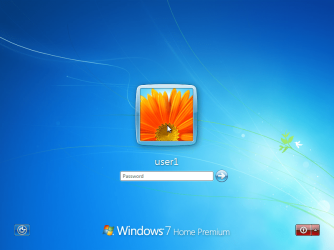
Hey guys I'm having some trouble with my laptop. I have a virus or viruses on my computer and have ran numerous scans and recovery disks to try and get them erased but to no avail. I've decided I'm going to factory reset my computer but in trying to do so I come up with another problem. During startup, I hit F8 and it brings up "advanced boot options". However, when I hit enter to "repair your computer", windows 7 launches instead. I can't enter the "repair your computer" part of advanced boot options. It seems to be that the virus isn't letting me do this but I really have no idea. Does anyone know how I can get this to work it's driving me crazy!
 

My Computer

Computer type
PC/Desktop
Computer Manufacturer/Model Number
Dell Inspiron 1545
OS
64
gfroy91

When you press <ENTER> on Repair your computer inside the Advanced Boot Options menu do you then get any options ?

1010d1227511616-startup-repair-repair.jpg
 

My Computer

Computer Manufacturer/Model Number
Custom Built
OS
Windows 7 Ultimate 32-Bit & Windows 7 Ultimate 64-Bit
CPU
Intel Core i7 CPU 950 @ 3.07GHz
Motherboard
ASUS P6T DELUXE V2
Memory
OCZ 6GB (3 x 2GB) 240-Pin DDR3 SDRAM DDR3 1600 OCZ3X1600R2
Graphics Card(s)
ATI Radeon HD 5700 Series
Sound Card
OnBoard
Hard Drives
WD6400AACS-00M3B0 (640GB SATA )
PSU
CORSAIR 850w
Case
NZXT LEXA
Cooling
Intel Stock Heatsink Fan
Keyboard
Microsoft Wireless Laser Keyboard 7000
Mouse
Microsoft Wireless Laser Mouse 7000
No I don't, it just goes directly to Windows7 home where I have to log in under my account name.
 

My Computer

Computer type
PC/Desktop
Computer Manufacturer/Model Number
Dell Inspiron 1545
OS
64
Can you log into Safe Mode or Safe Mode with networking ?
 

My Computer

Computer Manufacturer/Model Number
Custom Built
OS
Windows 7 Ultimate 32-Bit & Windows 7 Ultimate 64-Bit
CPU
Intel Core i7 CPU 950 @ 3.07GHz
Motherboard
ASUS P6T DELUXE V2
Memory
OCZ 6GB (3 x 2GB) 240-Pin DDR3 SDRAM DDR3 1600 OCZ3X1600R2
Graphics Card(s)
ATI Radeon HD 5700 Series
Sound Card
OnBoard
Hard Drives
WD6400AACS-00M3B0 (640GB SATA )
PSU
CORSAIR 850w
Case
NZXT LEXA
Cooling
Intel Stock Heatsink Fan
Keyboard
Microsoft Wireless Laser Keyboard 7000
Mouse
Microsoft Wireless Laser Mouse 7000
Yup, it lets me do that.
 

My Computer

Computer type
PC/Desktop
Computer Manufacturer/Model Number
Dell Inspiron 1545
OS
64
Please login to your account under Safe Mode with networking

Click here DDS

:ar: Click on Download Now button

:ar: When the download is complete . Drag the DDS program from the Downloads folder to your Desktop

:ar: Right-click the DDS icon on the Desktop choose Run as administrator to run the tool.

:ar: Place a check next to attact.txt and click Start . When done, DDS will open two logs
DDS.txt
Attach.txt

:ar: Save two logs onto your desktop and upload them with your replyCan you run DDS Please inside safe mode
 

My Computer

Computer Manufacturer/Model Number
Custom Built
OS
Windows 7 Ultimate 32-Bit & Windows 7 Ultimate 64-Bit
CPU
Intel Core i7 CPU 950 @ 3.07GHz
Motherboard
ASUS P6T DELUXE V2
Memory
OCZ 6GB (3 x 2GB) 240-Pin DDR3 SDRAM DDR3 1600 OCZ3X1600R2
Graphics Card(s)
ATI Radeon HD 5700 Series
Sound Card
OnBoard
Hard Drives
WD6400AACS-00M3B0 (640GB SATA )
PSU
CORSAIR 850w
Case
NZXT LEXA
Cooling
Intel Stock Heatsink Fan
Keyboard
Microsoft Wireless Laser Keyboard 7000
Mouse
Microsoft Wireless Laser Mouse 7000
Did I do this right? I attached them to this response. Thanks for helping
 

Attachments

My Computer

Computer type
PC/Desktop
Computer Manufacturer/Model Number
Dell Inspiron 1545
OS
64
Gfroy91

Please download and run AdwCleaner

Click here AdwCleaner

:ar: Click on Download Now button

:ar: Save to the Desktop

:ar: Right-click on AdwCleaner.exe and choose Run as administrator

:ar: Click the Delete button

:ar: Upload the AdwCleaner[Sn].txt in your reply.

   Note
The log file is at C:\AdwCleaner[Sn].txt
 

My Computer

Computer Manufacturer/Model Number
Custom Built
OS
Windows 7 Ultimate 32-Bit & Windows 7 Ultimate 64-Bit
CPU
Intel Core i7 CPU 950 @ 3.07GHz
Motherboard
ASUS P6T DELUXE V2
Memory
OCZ 6GB (3 x 2GB) 240-Pin DDR3 SDRAM DDR3 1600 OCZ3X1600R2
Graphics Card(s)
ATI Radeon HD 5700 Series
Sound Card
OnBoard
Hard Drives
WD6400AACS-00M3B0 (640GB SATA )
PSU
CORSAIR 850w
Case
NZXT LEXA
Cooling
Intel Stock Heatsink Fan
Keyboard
Microsoft Wireless Laser Keyboard 7000
Mouse
Microsoft Wireless Laser Mouse 7000
Here ya go.
 

Attachments

My Computer

Computer type
PC/Desktop
Computer Manufacturer/Model Number
Dell Inspiron 1545
OS
64
Lets run RogueKiller


RogueKiller for 32bit or RogueKiller for 64bit

:ar: Click on one of the links above that goes with your Windows 7 bit versions

:ar: Save to the Desktop.

:ar: Close all windows and browsers

:ar: Right click on
332trud.png
and choose Run as Administrator

:ar: Press: SCAN

:ar: provide the RKreport.txt (Mode: Scan) in your reply.
 

My Computer

Computer Manufacturer/Model Number
Custom Built
OS
Windows 7 Ultimate 32-Bit & Windows 7 Ultimate 64-Bit
CPU
Intel Core i7 CPU 950 @ 3.07GHz
Motherboard
ASUS P6T DELUXE V2
Memory
OCZ 6GB (3 x 2GB) 240-Pin DDR3 SDRAM DDR3 1600 OCZ3X1600R2
Graphics Card(s)
ATI Radeon HD 5700 Series
Sound Card
OnBoard
Hard Drives
WD6400AACS-00M3B0 (640GB SATA )
PSU
CORSAIR 850w
Case
NZXT LEXA
Cooling
Intel Stock Heatsink Fan
Keyboard
Microsoft Wireless Laser Keyboard 7000
Mouse
Microsoft Wireless Laser Mouse 7000
I ran the scan once, deleted the items, then deleted items again. That must be the reason for the three different reports it gave me.
 

Attachments

My Computer

Computer type
PC/Desktop
Computer Manufacturer/Model Number
Dell Inspiron 1545
OS
64
gfroy91

Lets see if this will help

Copy and paste the code below into Notepad. To open Notepad, click on the :orb: button in the Search programs and files box, type notepad and then press <ENTER> button .

Code:
@Echo off
pushd\windows\system32\drivers\etc
attrib -h -s -r hosts
echo 127.0.0.1 localhost>HOSTS
attrib +r +h +s hosts
popd
ipconfig /release
ipconfig /renew
ipconfig /flushdns
netsh winsock reset all
netsh int ip reset all
cls
echo Script finished.
pause
del %0

In Notepad, click File and then Save. Type reset.bat for the file name . Change Save as Type to All Files, and then save the file to your desktop. After the file is saved, double-click on the file to open it. Once it's finished running, restart your computer. Check to see if your Internet connection is restored.
 

My Computer

Computer Manufacturer/Model Number
Custom Built
OS
Windows 7 Ultimate 32-Bit & Windows 7 Ultimate 64-Bit
CPU
Intel Core i7 CPU 950 @ 3.07GHz
Motherboard
ASUS P6T DELUXE V2
Memory
OCZ 6GB (3 x 2GB) 240-Pin DDR3 SDRAM DDR3 1600 OCZ3X1600R2
Graphics Card(s)
ATI Radeon HD 5700 Series
Sound Card
OnBoard
Hard Drives
WD6400AACS-00M3B0 (640GB SATA )
PSU
CORSAIR 850w
Case
NZXT LEXA
Cooling
Intel Stock Heatsink Fan
Keyboard
Microsoft Wireless Laser Keyboard 7000
Mouse
Microsoft Wireless Laser Mouse 7000
gfroy91

If you would like to Delete the post #13 click on the Edit button on post #13 and then click on Delete button . That will delete the post .
 

My Computer

Computer Manufacturer/Model Number
Custom Built
OS
Windows 7 Ultimate 32-Bit & Windows 7 Ultimate 64-Bit
CPU
Intel Core i7 CPU 950 @ 3.07GHz
Motherboard
ASUS P6T DELUXE V2
Memory
OCZ 6GB (3 x 2GB) 240-Pin DDR3 SDRAM DDR3 1600 OCZ3X1600R2
Graphics Card(s)
ATI Radeon HD 5700 Series
Sound Card
OnBoard
Hard Drives
WD6400AACS-00M3B0 (640GB SATA )
PSU
CORSAIR 850w
Case
NZXT LEXA
Cooling
Intel Stock Heatsink Fan
Keyboard
Microsoft Wireless Laser Keyboard 7000
Mouse
Microsoft Wireless Laser Mouse 7000
VistaKing, I feel really dumb but I can't find the delete option.....However, I want to let you know that I have restarted my computer and I do have intneternet connection. I am still in safe mode with networking just for your information. Anything else I need to/should do?
 

My Computer

Computer type
PC/Desktop
Computer Manufacturer/Model Number
Dell Inspiron 1545
OS
64
Try to login to normal mode
 

My Computer

Computer Manufacturer/Model Number
Custom Built
OS
Windows 7 Ultimate 32-Bit & Windows 7 Ultimate 64-Bit
CPU
Intel Core i7 CPU 950 @ 3.07GHz
Motherboard
ASUS P6T DELUXE V2
Memory
OCZ 6GB (3 x 2GB) 240-Pin DDR3 SDRAM DDR3 1600 OCZ3X1600R2
Graphics Card(s)
ATI Radeon HD 5700 Series
Sound Card
OnBoard
Hard Drives
WD6400AACS-00M3B0 (640GB SATA )
PSU
CORSAIR 850w
Case
NZXT LEXA
Cooling
Intel Stock Heatsink Fan
Keyboard
Microsoft Wireless Laser Keyboard 7000
Mouse
Microsoft Wireless Laser Mouse 7000
Normal mode seems to be working pretty good. However, I did try to enter "repair your computer" once again and it is still taking me to windows log in. What gives?
 

My Computer

Computer type
PC/Desktop
Computer Manufacturer/Model Number
Dell Inspiron 1545
OS
64
Can you take an image of the screen you're referring to ?

When you click <Enter> on Repair Your Computer on the Advanced Boot Options screen you should see this screen next

windows-7-startup-repair-5.jpg
then
windows-7-startup-repair-6.jpg
then
windows-7-startup-repair-7.jpg
 

My Computer

Computer Manufacturer/Model Number
Custom Built
OS
Windows 7 Ultimate 32-Bit & Windows 7 Ultimate 64-Bit
CPU
Intel Core i7 CPU 950 @ 3.07GHz
Motherboard
ASUS P6T DELUXE V2
Memory
OCZ 6GB (3 x 2GB) 240-Pin DDR3 SDRAM DDR3 1600 OCZ3X1600R2
Graphics Card(s)
ATI Radeon HD 5700 Series
Sound Card
OnBoard
Hard Drives
WD6400AACS-00M3B0 (640GB SATA )
PSU
CORSAIR 850w
Case
NZXT LEXA
Cooling
Intel Stock Heatsink Fan
Keyboard
Microsoft Wireless Laser Keyboard 7000
Mouse
Microsoft Wireless Laser Mouse 7000
Here's where my computer takes me when I hit enter on "repair your computer".
 

Attachments

  • Windows.png
    Windows.png
    146.1 KB · Views: 1

My Computer

Computer type
PC/Desktop
Computer Manufacturer/Model Number
Dell Inspiron 1545
OS
64
Hi gfroy91

I asked Brink to shine some :tip: on this situation .
 

My Computer

Computer Manufacturer/Model Number
Custom Built
OS
Windows 7 Ultimate 32-Bit & Windows 7 Ultimate 64-Bit
CPU
Intel Core i7 CPU 950 @ 3.07GHz
Motherboard
ASUS P6T DELUXE V2
Memory
OCZ 6GB (3 x 2GB) 240-Pin DDR3 SDRAM DDR3 1600 OCZ3X1600R2
Graphics Card(s)
ATI Radeon HD 5700 Series
Sound Card
OnBoard
Hard Drives
WD6400AACS-00M3B0 (640GB SATA )
PSU
CORSAIR 850w
Case
NZXT LEXA
Cooling
Intel Stock Heatsink Fan
Keyboard
Microsoft Wireless Laser Keyboard 7000
Mouse
Microsoft Wireless Laser Mouse 7000
Okay I'll wait to see what he/she has to say. Thanks again for your help
 

My Computer

Computer type
PC/Desktop
Computer Manufacturer/Model Number
Dell Inspiron 1545
OS
64
Back
Top